
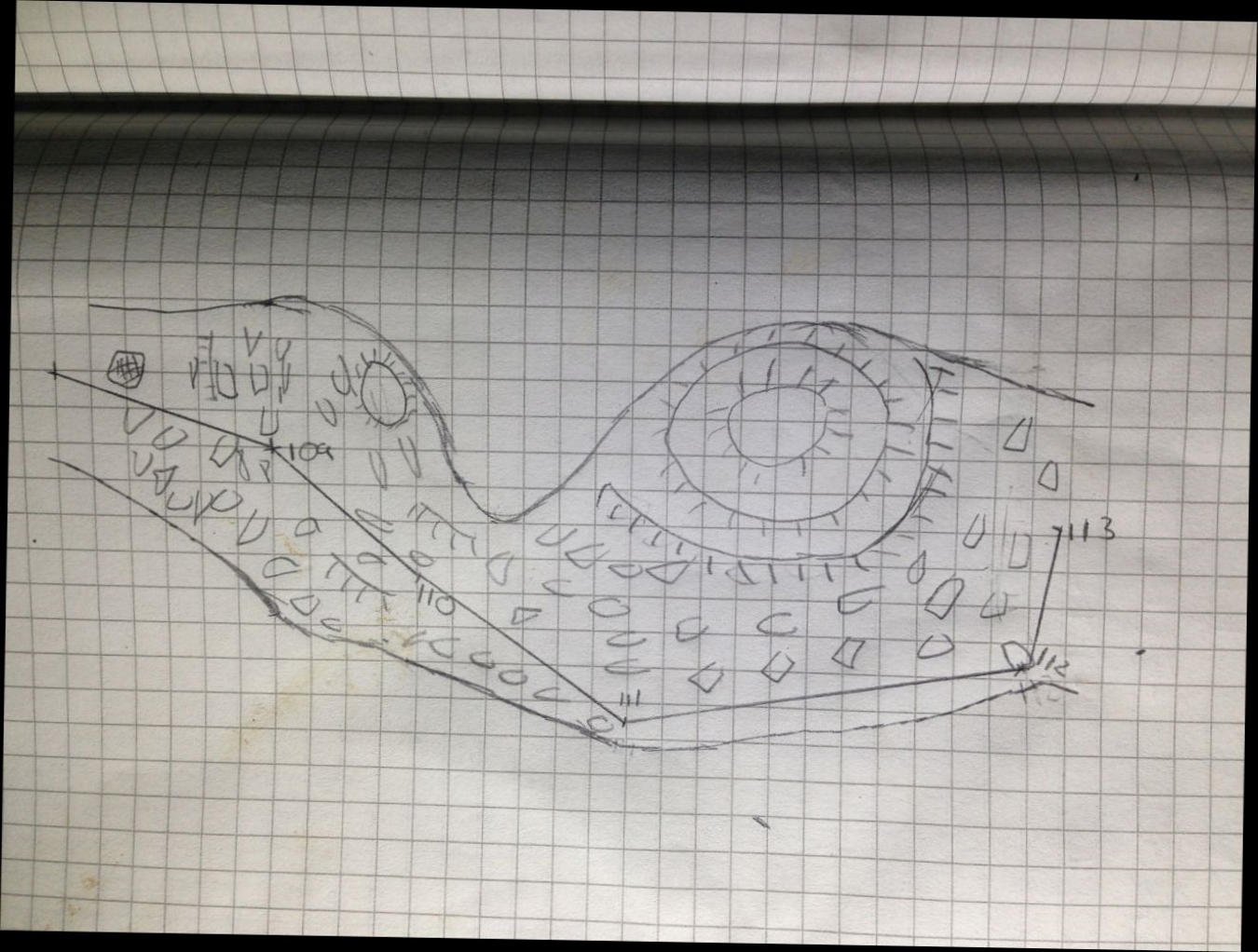
Hi As I read some of the last mails I came to the question how to morph a sketch. I searched the wiki and the Therion book but could not find how to do it. All I found was on page 89 ff in the book which shows some pictures before and after morphing. But no explanation how to do it in detail. If I got it right it is possible like that: Someone have an image, a sketch of a cave area (which is not orientated correctly at all). And you have some survey data from that passage (which should be correct). The sketch is scanned to a png or jpg file. Now you can morph this image file into a xvi file where the image is morphed to the correct orientation matching the messured survey data. The final result is a new xvi file (with correctly morphed) image inside so you can use this new xvi file (including survey data as a line and the correctly morphed sketch itself) as a background image to draw the final scrap. Or did I get this wrong? Can anyone describe in detail how to do this please!? Apparently I'm too stupid to make it... I put a sketch and the survey data from a small passage to this email as a possible example to show how this process does work. Many thanks in advance. regards, Torsten

What is the advantage of digitizing a morphed sketch over just let therion morph the raw digitized sketch? I usually just digitize the raw paper sketch and get good results.
Am 27.06.2021 um 12:43 schrieb Torsten Schnitter via Therion <therion@speleo.sk>:
Hi
As I read some of the last mails I came to the question how to morph a sketch. I searched the wiki and the Therion book but could not find how to do it. All I found was on page 89 ff in the book which shows some pictures before and after morphing. But no explanation how to do it in detail.
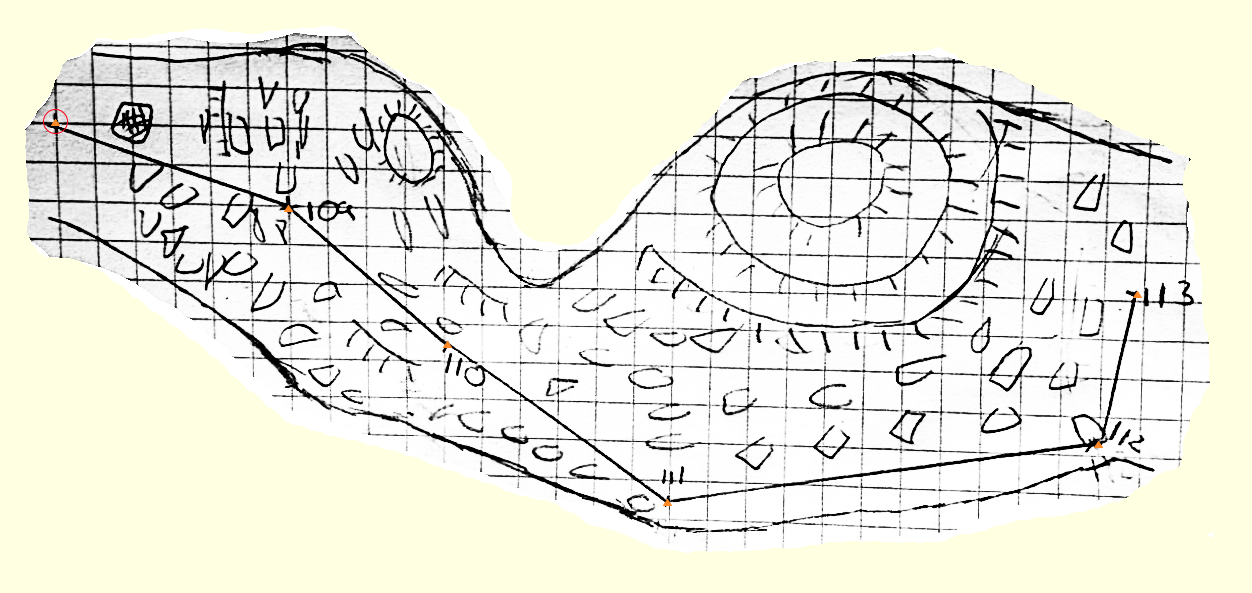
If I got it right it is possible like that: Someone have an image, a sketch of a cave area (which is not orientated correctly at all). And you have some survey data from that passage (which should be correct). The sketch is scanned to a png or jpg file. Now you can morph this image file into a xvi file where the image is morphed to the correct orientation matching the messured survey data. The final result is a new xvi file (with correctly morphed) image inside so you can use this new xvi file (including survey data as a line and the correctly morphed sketch itself) as a background image to draw the final scrap. Or did I get this wrong?
Can anyone describe in detail how to do this please!? Apparently I'm too stupid to make it... I put a sketch and the survey data from a small passage to this email as a possible example to show how this process does work. Many thanks in advance.
regards, Torsten <IMG_8377.jpg> <line_x.th> _______________________________________________ Therion mailing list Therion@speleo.sk https://mailman.speleo.sk/listinfo/therion

Hi Torsten,
As I read some of the last mails I came to the question how to morph a sketch.
You don't.
All I found was on page 89 ff in the book which shows some pictures before and after morphing.
Clarification; that appears to be page 94 of this: https://therion.speleo.sk/downloads/thbook.pdf
If I got it right it is possible like that:
Those pages of the book do not (at east to my knowledge) show how you do things with Therion. You do not warp the drawings. You start with the original drawings in a .th2 file. Create a "scrap" and set the approximate scale and approximate scale directions (x/y = east distance/north distance) - normally it doesn't matter if you get this wrong, as long as you have more than one station per scrap, but occasionally it makes very odd shapes if you get it badly wrong. Inside that scrap, you put "station" points on the stations shown in your drawings. You then draw the walls using "wall" lines (and other features using other lines). Then when you process the survey with Therion, it takes the line vectors, and warps those as needed to force them to align with the real directions of the survey legs. I *think* those pages of the book are just trying to help you visualise how Therion will internally warp the *vector* drawing to match the legs. It does not actually warp the xvi/image drawings. The book is trying to show you how the morphing approach would need to correct the imperfections of a sketch to make it align with reality. But maybe I am also wrong, and Therion might have some very cool functionality I have never seen. No doubt one of the highly experienced users will confirm either way. Cheers Tarquin

27. 6. 2021 v 18:31, Tarquin Wilton-Jones via Therion <therion@speleo.sk>:
But maybe I am also wrong, and Therion might have some very cool functionality I have never seen. No doubt one of the highly experienced users will confirm either way.
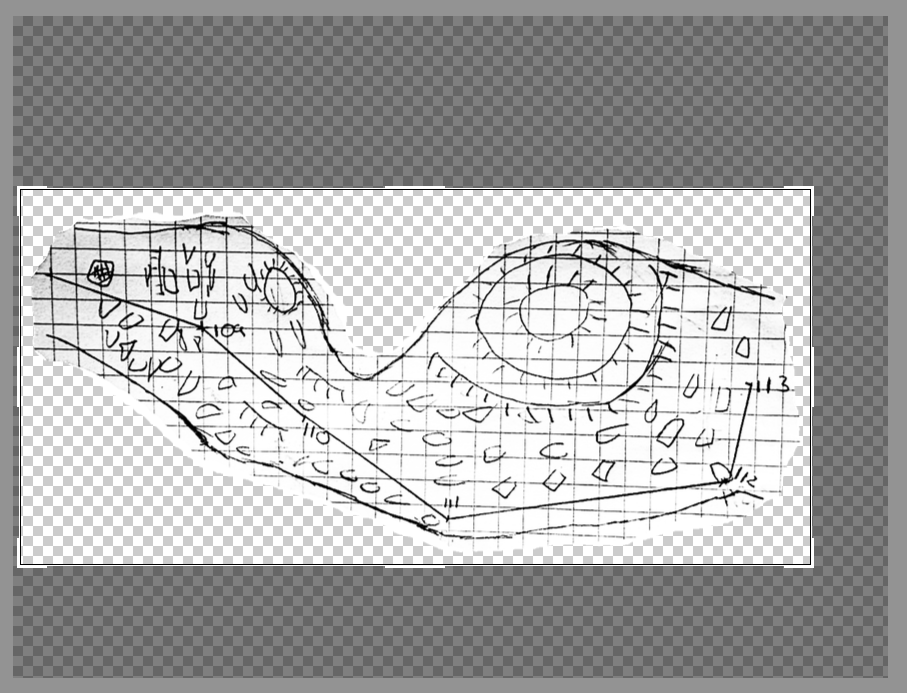
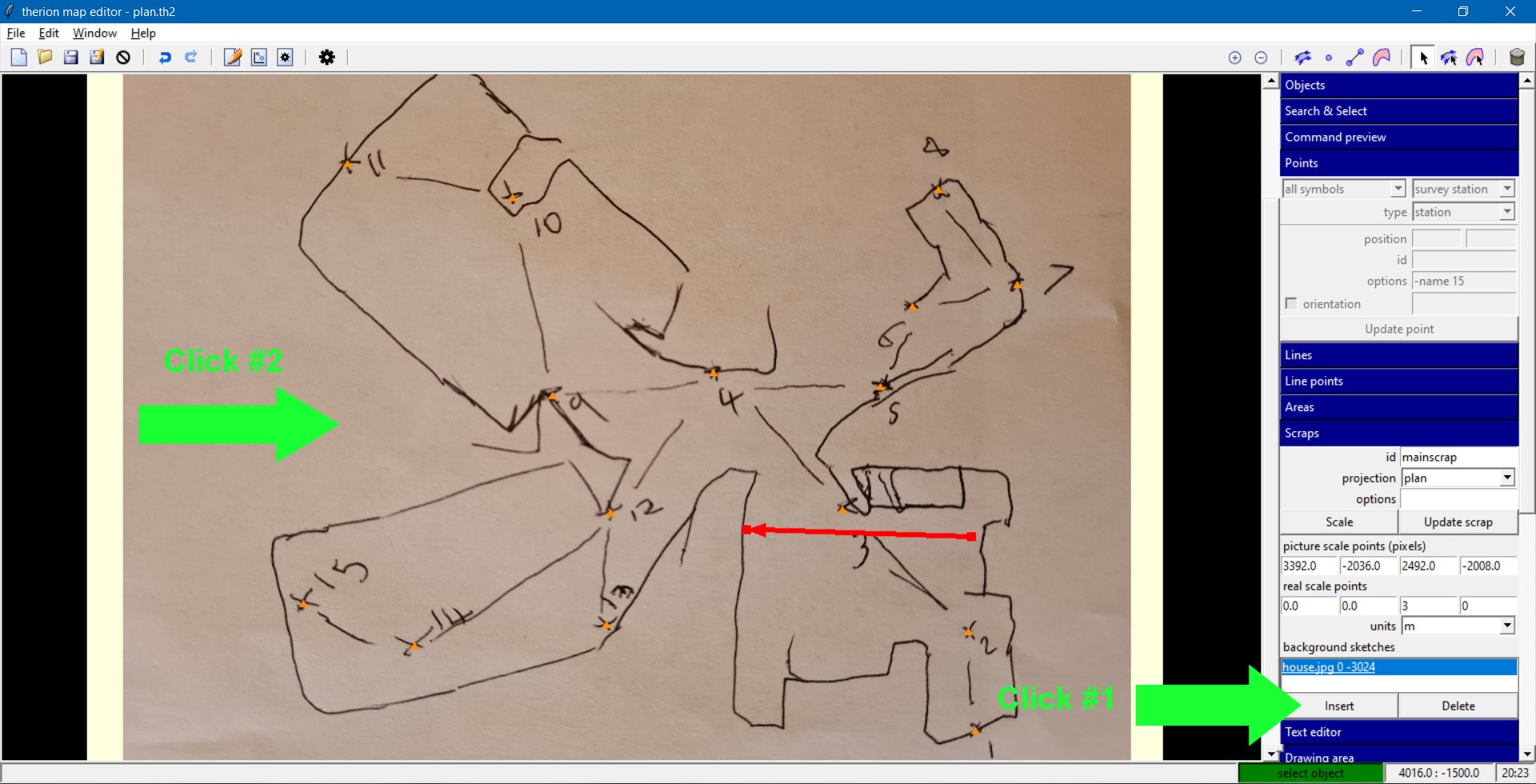
I standard situations you are right. But there could be situations time from time, where sketches are not in scale and very bad quality too. In such case morning of background sketches may help much. I attached an archive of Thorsten’s example with morfed sketch. Main trick there is to insert in scrap mode (click on scrap icon with arrow in upper right corner) the “background sketches” with simple click on an unwarped sketch in map editor window. 1. insert an image to Background image field 2. create scrap 3. add minimally 2 stations to your scrap 4. optional you may add “extra” points with option -value nn Such “extra” point therion will use to modify difference between nearest station and position of “extra” point in sketch while warping. 5. insert Background image to background sketches field. 5. export xvi image with option in layout "sketches on" To enhance contrast of your example sketch, to crop it, to erase white space around sketch and export .png file with transparency I used online photo editor Pixlr E. https://pixlr.com <https://pixlr.com/> You may erase overall image with 50% eraser to create 50% transparent background image too. The layer with edited image must be unlocked in such case. In Therion map editor: Martin
Hi Martin, Many thanks for that! I got to learn something very cool :)
5. insert Background image to background sketches field.
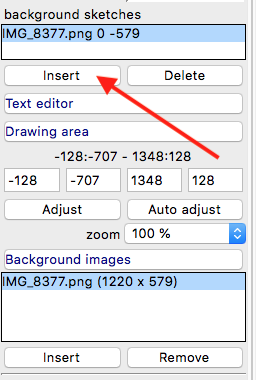
That step was somewhat awkward to find. For anyone else who was trying to follow: a. Under "Objects" on the right panel, select your scrap (or use the "Select next scrap" button until it is selected). b. Under "Scraps" on the right panel, in the "background sketches" section, click "Insert". c. Click on the sketch image in the main area (anywhere on a blank part of it). See the attached image.
5. export xvi image with option in layout "sketches on"
layout local sketches on endlayout source "yourcave.th" export map -layout local -proj plan -o "newsketch.xvi" I will note, however, that it produced a horrible effect when applied to an area with a junction, and loads of walls close to each other. It couldn't decide what bits of my drawings to keep, and simply deleted a load of them, and kept others. It works best in fairly simple cases. Incidentally, the survey was of my house again (what else?!), with the angles a bit messed up in the drawing - it did not look like a house after morphing the sketch. Admittedly, I was making it deliberately significantly wrong, in much the same way as you might get from a paper survey of a cave. To me, it was fairly realistic as a representation of the case where you might want to use the feature, so I wonder about its effectiveness in actual use. Maybe it could be a way that Bill could solve the problem with the multi-piece chamber survey, since it could automatically piece together all the sketches and warp them into a single drawing. Cheers, Tarquin
27. 6. 2021 v 21:41, Tarquin Wilton-Jones via Therion <therion@speleo.sk>:
I will note, however, that it produced a horrible effect when applied to an area with a junction, and loads of walls close to each other. It couldn't decide what bits of my drawings to keep, and simply deleted a load of them, and kept others. It works best in fairly simple cases.
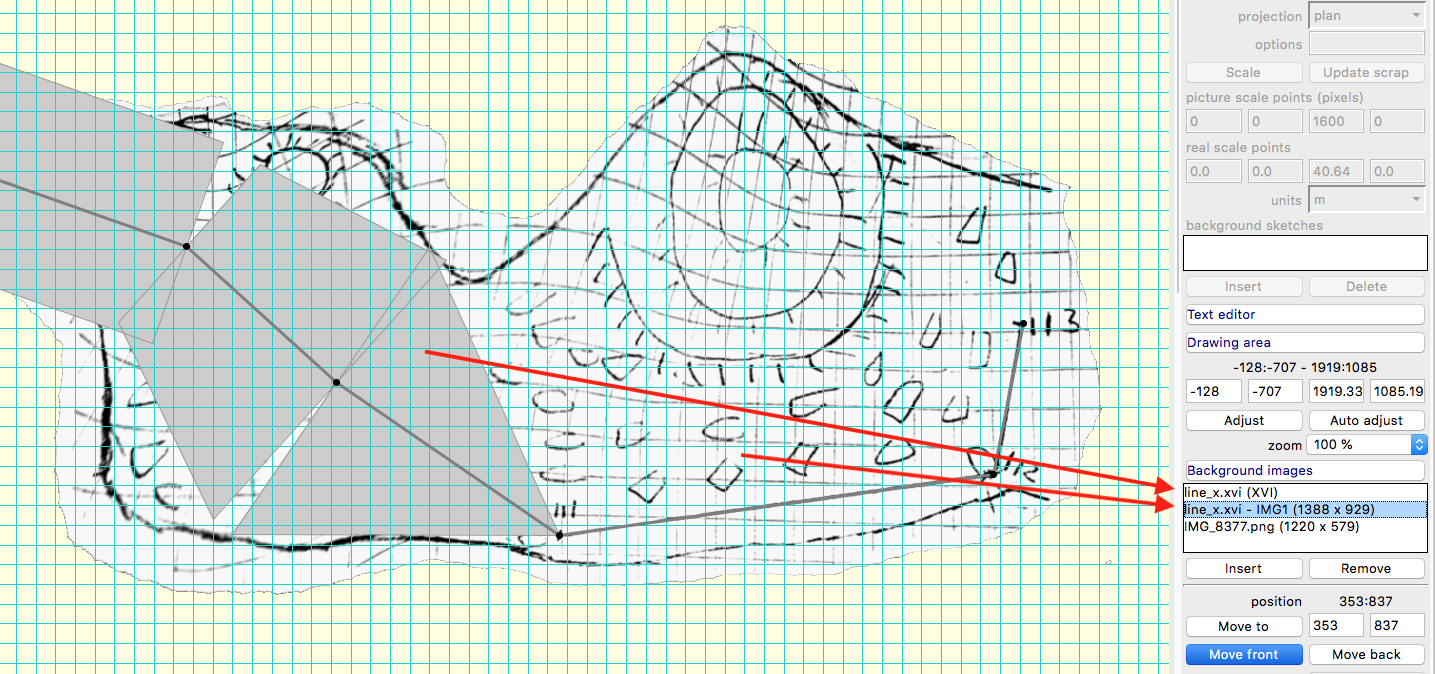
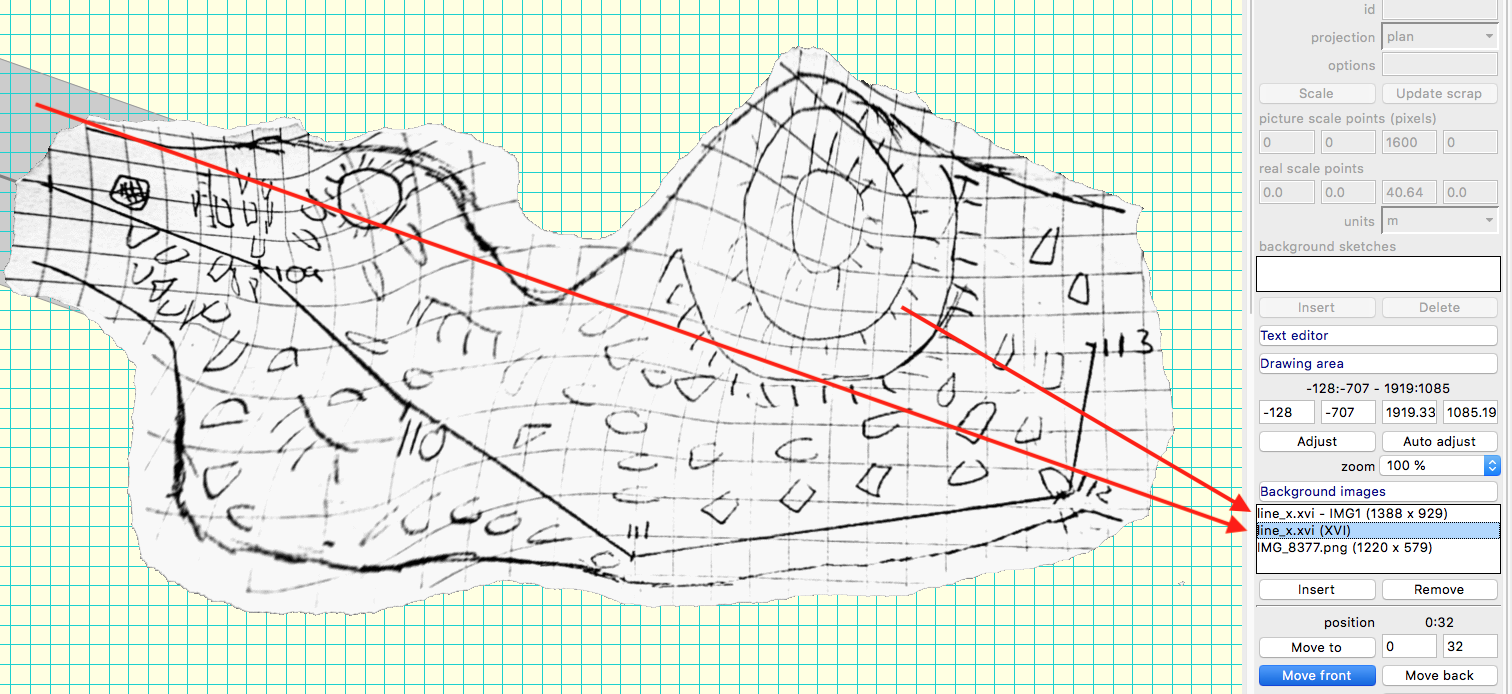
You are right. It could be very useful in simple passages. But in your case I’ll divide sketch to three pieces first and try to use “extra” points when LRUD are available. Note: You may change order of morphed sketches and xvi with splay shots, centreline and xvi mesh, switch visibility on/off, move them to exact coordinates in “Background sketches” part of Map editor. Martin
You are right. It could be very useful in simple passages. But in your case I’ll divide sketch to three pieces first and try to use “extra” points when LRUD are available.
Ah yes, doing it as separate scraps is a lot less messy. Though in the end you then probably have to keep using multiple scraps, even if the idea was to warp it into a nice shape so you can draw it up as a single scrap. I tested out the "sketch-warp" option (that goes directly in the .thconfig file, not inside the layout). "plaquette" gave a very good resulting shape for my demo case (and was really fast!), but made the lines jagged and hard to see. "linear" preserved the sketch best but caused more distortion. "point" took forever, but the result was absolutely excellent. It is interesting to me that the default "line" gave the worst result of all options. The Therion book does not mention "linear" or "point", and could do with an update. I found more details on this very old tutorial: http://marcocorvi.altervista.org/caving/tbe/m_04/m_045.htm Torsten, that article is a treasure trove for you!
Note: You may change order of morphed sketches and xvi with splay shots, centreline and xvi mesh, switch visibility on/off, move them to exact coordinates in “Background sketches” part of Map editor.
Are these documented anywhere? Specifically how to use the options. I can see the "point extra" options in the linked article above, but not how to use the coordinates or visibility. Feeling like I must have missed something, since the Therion book doesn't mention "background sketches" at all, and only describes setting <x> and <y> coordinates for the scrap's -sketch option. I am guessing that x/y lets you offset the sketch to a more useful location relative to your stations (though I have no idea why you would need to).
Thanks a lot for these examples and explanation. Now I got it to work. :-) (you never stop learning about Therion...) This last article from Marco is realy worth a read. Great stuff! cheers, Torsten
Tarquin Wilton-Jones via Therion <therion@speleo.sk> hat am 28.06.2021 10:17 geschrieben:
You are right. It could be very useful in simple passages. But in your case I’ll divide sketch to three pieces first and try to use “extra” points when LRUD are available.
Ah yes, doing it as separate scraps is a lot less messy. Though in the end you then probably have to keep using multiple scraps, even if the idea was to warp it into a nice shape so you can draw it up as a single scrap.
I tested out the "sketch-warp" option (that goes directly in the .thconfig file, not inside the layout). "plaquette" gave a very good resulting shape for my demo case (and was really fast!), but made the lines jagged and hard to see. "linear" preserved the sketch best but caused more distortion. "point" took forever, but the result was absolutely excellent. It is interesting to me that the default "line" gave the worst result of all options.
The Therion book does not mention "linear" or "point", and could do with an update. I found more details on this very old tutorial: http://marcocorvi.altervista.org/caving/tbe/m_04/m_045.htm
Torsten, that article is a treasure trove for you!
Note: You may change order of morphed sketches and xvi with splay shots, centreline and xvi mesh, switch visibility on/off, move them to exact coordinates in “Background sketches” part of Map editor.
Are these documented anywhere? Specifically how to use the options.
I can see the "point extra" options in the linked article above, but not how to use the coordinates or visibility.
Feeling like I must have missed something, since the Therion book doesn't mention "background sketches" at all, and only describes setting <x> and <y> coordinates for the scrap's -sketch option. I am guessing that x/y lets you offset the sketch to a more useful location relative to your stations (though I have no idea why you would need to). _______________________________________________ Therion mailing list Therion@speleo.sk https://mailman.speleo.sk/listinfo/therion
28. 6. 2021 v 10:17, Tarquin Wilton-Jones via Therion <therion@speleo.sk>:
Ah yes, doing it as separate scraps is a lot less messy. Though in the end you then probably have to keep using multiple scraps, even if the idea was to warp it into a nice shape so you can draw it up as a single scrap.
Anyway you may use all morphed sketches in one final scrap (Torsten). Take care if you add another xvi file it will go above of recent one. So the way is to switch visibility of mesh (xvi itself) to off and move morphed sketch (xvi - IMGn) to correct position: select that sketch in "Background images" field, check coordinates of cursor (lover right corner of map editor window) where you want to place it, write those coordinates to fields next of “Move to” and press Enter. Manually move sketch to exact position. There is the bug in Therion that th2 file will remember only 3 such positions. For fourth and next you should repeat that last step after you open th2 file again. To move to your sketch is the shortest way to click on point or line in “Object section” - on the top of sections menu.
I tested out the "sketch-warp" option (that goes directly in the .thconfig file, not inside the layout). "plaquette" gave a very good resulting shape for my demo case (and was really fast!), but made the lines jagged and hard to see. "linear" preserved the sketch best but caused more distortion. "point" took forever, but the result was absolutely excellent. It is interesting to me that the default "line" gave the worst result of all options.
The Therion book does not mention "linear" or "point", and could do with an update. I found more details on this very old tutorial: http://marcocorvi.altervista.org/caving/tbe/m_04/m_045.htm <http://marcocorvi.altervista.org/caving/tbe/m_04/m_045.htm> Thank you for your research!
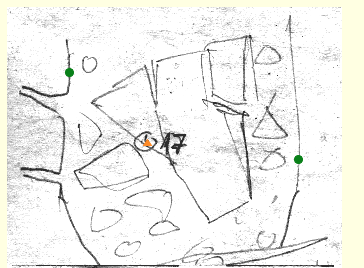
Extra points define distance from nearest station. You may use the L and R distance (or U D for elevation) or the calculated distance from splay shots. For spreadsheets it is: delta_l: =F22*COS(E22*PI()/180) delta_h: =F22*SIN(E22*PI()/180) Martin

On 28/06/2021 09:58, Martin Sluka via Therion wrote:
28. 6. 2021 v 10:17, Tarquin Wilton-Jones via Therion <therion@speleo.sk <mailto:therion@speleo.sk>>:
Ah yes, doing it as separate scraps is a lot less messy. Though in the end you then probably have to keep using multiple scraps, even if the idea was to warp it into a nice shape so you can draw it up as a single scrap.
Anyway you may use all morphed sketches in one final scrap (Torsten). Take care if you add another xvi file it will go above of recent one. So the way is to switch visibility of mesh (xvi itself) to off and move morphed sketch (xvi - IMGn) to correct position: select that sketch in "Background images" field, check coordinates of cursor (lover right corner of map editor window) where you want to place it, write those coordinates to fields next of “Move to” and press Enter. Manually move sketch to exact position. There is the bug in Therion that th2 file will remember only 3 such positions. For fourth and next you should repeat that last step after you open th2 file again.
To move to your sketch is the shortest way to click on point or line in “Object section” - on the top of sections menu.
So that would be a solution to Bill's problem, of combining separate surveys of a single room into one scrap. (Think someone mentioned this in that thread too...) Just need to set the -name property correctly for each survey station (like 1@subsurvey1) if you end up using the resulting .th2 from a parent survey that has access to all of the subsurvey data. And if they are paper drawings, perhaps morph (warp) them first using the instructions from earlier mails in this thread. This has been a hugely useful learning exercise :)

And you may prepare two versions of morphed scraps - one with 50% transparency and move them to correct position and then replace it wit no transparent using coordinates. You may use screenshots, ...... The increase quality of morphed sketches enhance contrast of sketches. Martin Odesláno z iPhonu 28. 6. 2021 v 12:30, Tarquin Wilton-Jones via Therion <therion@speleo.sk>:
On 28/06/2021 09:58, Martin Sluka via Therion wrote: 28. 6. 2021 v 10:17, Tarquin Wilton-Jones via Therion <therion@speleo.sk <mailto:therion@speleo.sk>>:
Ah yes, doing it as separate scraps is a lot less messy. Though in the end you then probably have to keep using multiple scraps, even if the idea was to warp it into a nice shape so you can draw it up as a single scrap.
Anyway you may use all morphed sketches in one final scrap (Torsten). Take care if you add another xvi file it will go above of recent one. So the way is to switch visibility of mesh (xvi itself) to off and move morphed sketch (xvi - IMGn) to correct position: select that sketch in "Background images" field, check coordinates of cursor (lover right corner of map editor window) where you want to place it, write those coordinates to fields next of “Move to” and press Enter. Manually move sketch to exact position. There is the bug in Therion that th2 file will remember only 3 such positions. For fourth and next you should repeat that last step after you open th2 file again.
To move to your sketch is the shortest way to click on point or line in “Object section” - on the top of sections menu.
So that would be a solution to Bill's problem, of combining separate surveys of a single room into one scrap. (Think someone mentioned this in that thread too...)
Just need to set the -name property correctly for each survey station (like 1@subsurvey1) if you end up using the resulting .th2 from a parent survey that has access to all of the subsurvey data.
And if they are paper drawings, perhaps morph (warp) them first using the instructions from earlier mails in this thread.
This has been a hugely useful learning exercise :) _______________________________________________ Therion mailing list Therion@speleo.sk https://mailman.speleo.sk/listinfo/therion
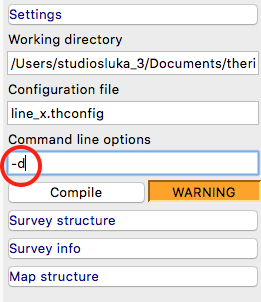
An final solution: You may use Command line option when compiling. It will create the folder thTMPDIR in working directory. and save there all temporary files created during compilation. There you may find your morphed background image too. Rename it, move to directory with sketches and use in normal way as any background image. You may unsharp it, make more contrast, make transparent and so on. Thanks Stacho to pointed me to this option. Life with Therion is more easy now. :) Martin
28. 6. 2021 v 12:30, Tarquin Wilton-Jones via Therion <therion@speleo.sk>:
On 28/06/2021 09:58, Martin Sluka via Therion wrote:
28. 6. 2021 v 10:17, Tarquin Wilton-Jones via Therion <therion@speleo.sk <mailto:therion@speleo.sk> <mailto:therion@speleo.sk <mailto:therion@speleo.sk>>>:
Ah yes, doing it as separate scraps is a lot less messy. Though in the end you then probably have to keep using multiple scraps, even if the idea was to warp it into a nice shape so you can draw it up as a single scrap.
Anyway you may use all morphed sketches in one final scrap (Torsten). Take care if you add another xvi file it will go above of recent one. So the way is to switch visibility of mesh (xvi itself) to off and move morphed sketch (xvi - IMGn) to correct position: select that sketch in "Background images" field, check coordinates of cursor (lover right corner of map editor window) where you want to place it, write those coordinates to fields next of “Move to” and press Enter. Manually move sketch to exact position. There is the bug in Therion that th2 file will remember only 3 such positions. For fourth and next you should repeat that last step after you open th2 file again.
To move to your sketch is the shortest way to click on point or line in “Object section” - on the top of sections menu.
So that would be a solution to Bill's problem, of combining separate surveys of a single room into one scrap. (Think someone mentioned this in that thread too...)
Just need to set the -name property correctly for each survey station (like 1@subsurvey1) if you end up using the resulting .th2 from a parent survey that has access to all of the subsurvey data.
And if they are paper drawings, perhaps morph (warp) them first using the instructions from earlier mails in this thread.
This has been a hugely useful learning exercise :) _______________________________________________ Therion mailing list Therion@speleo.sk <mailto:Therion@speleo.sk> https://mailman.speleo.sk/listinfo/therion <https://mailman.speleo.sk/listinfo/therion>
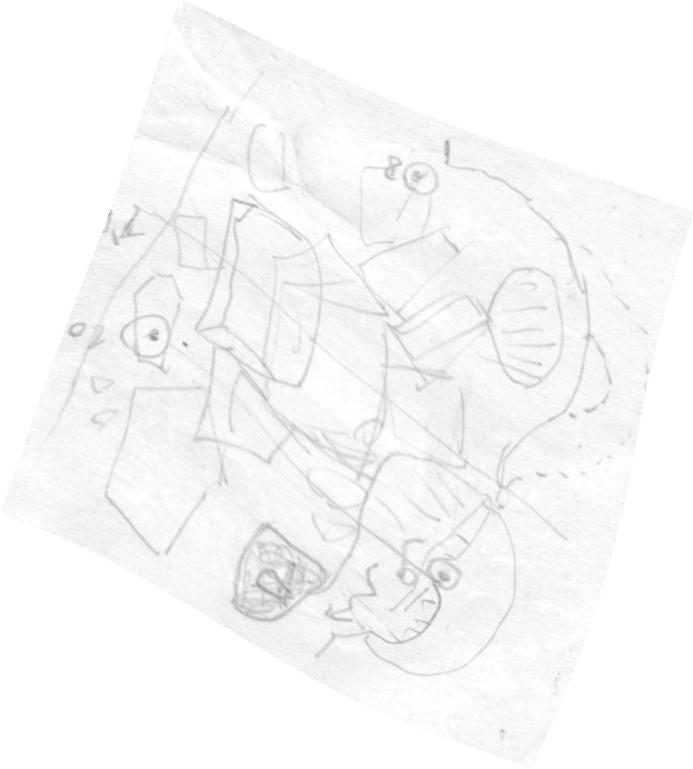
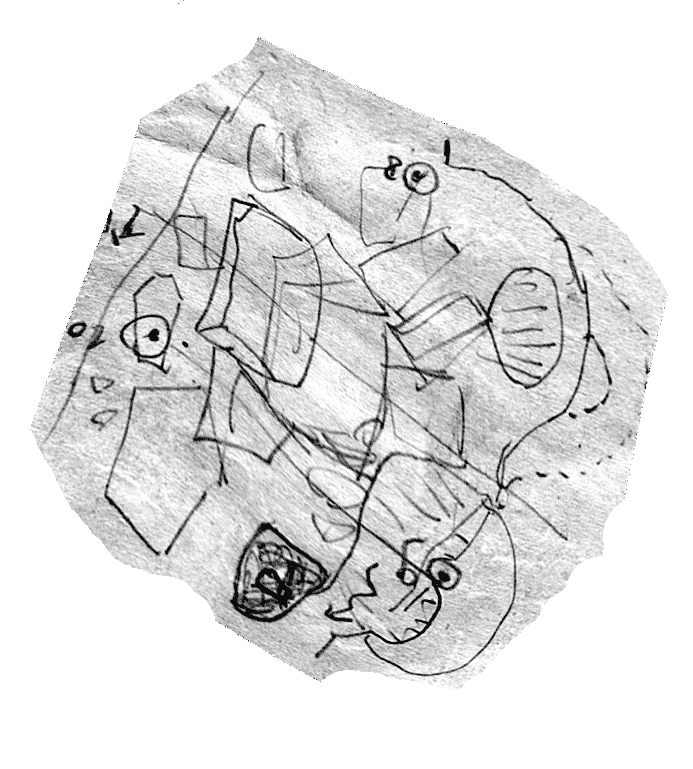
For example, image from morphing - sketch-warp point and the same image with enhanced contrast and unsharping. Martin
And final note (I hope): There are two kinds of images in thTMPDIR folder: .png (or other extension) and .gif. The first one is the source background image, the .gif one is the morphed image. Martin
30. 6. 2021 v 22:06, Martin Sluka <martinsluka@mac.com>:
For example, image from morphing - sketch-warp point and the same image with enhanced contrast and unsharping.
Martin
<418-419-4110_point.png><418-419-4110_point_us.png>
participants (5)
-
 Benedikt Hallinger
 -
 Martin Sluka
 -
 Martin Sluka
 -
 Tarquin Wilton-Jones
 -
 Torsten Schnitter