Switch off measured cave passages

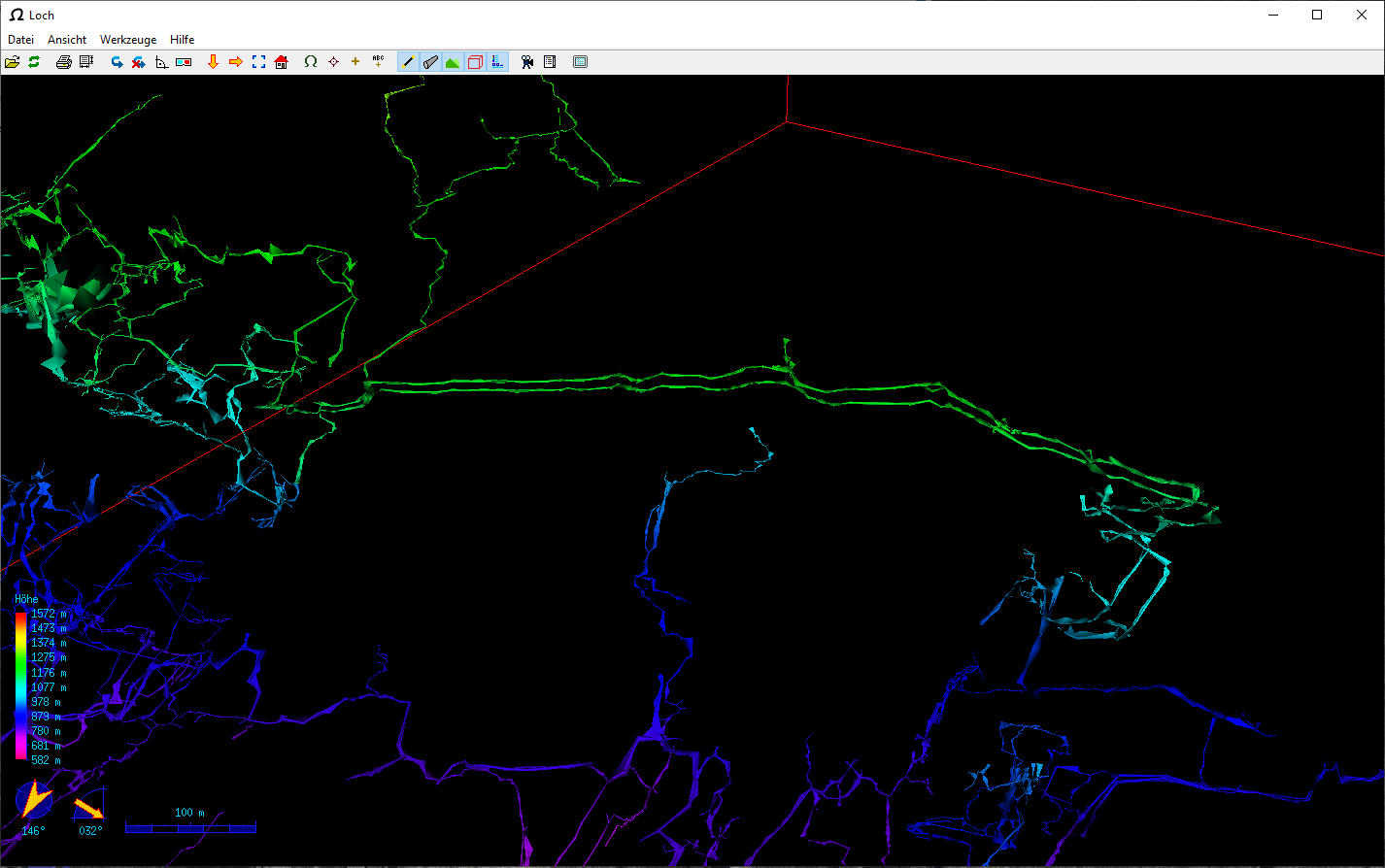
Dear Therion Community Our caving club is working on processing our old survey data. We are trying to display our data with the help of Therion and the Loch programme. Among the caves, the Hölloch is represented with over 200 km of passages. The survey data has been added over 70 years. This results in a problem that already surveyed passages were re-surveyed years later. In addition, a surveying network was drawn through the entire cave and recorded with theodolites to increase accuracy. In order to represent all the passages, there are therefore overlaps; some passages are drawn twice in the Loch programme. However, all these surveys are needed to calculate the cave. My question is, is there a flag that makes it possible to switch off or hide measuring sections in the LRUD data without these being excluded in the calculation? Or what other solutions are there? Thank you for your answers. Kind regards Thomas

Hi Thomas, it looks like an amazing project! Unfortunately, there is no flag for individual survey shots to be ignored yet. Currently, you may flag only the whole centerline object with -walls off option. E.g. centerline *-walls off* data normal from to compass clino tape up down left right 1 2 ... <survey data follows> endcenterline should ignore LRUD data in this centerline object when the model is generated. In the case, you need some extra data flag that will switch 3D model generation for particular survey shots, please let us know. It should not take a lot of time to implement. Best regards, S. On Mon, 17 May 2021 at 15:17, thomasschilter@bluewin.ch < thomasschilter@bluewin.ch> wrote:
Dear Therion Community
Our caving club is working on processing our old survey data. We are trying to display our data with the help of Therion and the Loch programme.
Among the caves, the Hölloch is represented with over 200 km of passages. The survey data has been added over 70 years. This results in a problem that already surveyed passages were re-surveyed years later. In addition, a surveying network was drawn through the entire cave and recorded with theodolites to increase accuracy.
In order to represent all the passages, there are therefore overlaps; some passages are drawn twice in the Loch programme. However, all these surveys are needed to calculate the cave.
My question is, is there a flag that makes it possible to switch off or hide measuring sections in the LRUD data without these being excluded in the calculation? Or what other solutions are there?
Thank you for your answers.
Kind regards
Thomas
_______________________________________________ Therion mailing list Therion@speleo.sk https://mailman.speleo.sk/listinfo/therion

Hi guys, I’m trying to generate an atlas but I don’t understand why the different maps do not appear on the same page when they overlay. I have a maplist with maps corresponding to parts of the networks, and they often overlay, so coloring by maps is very helpful. I does work when I plot a regular map, but when I try to generate the altas, the parts with maps overlying in the same area separated, one page per map. I can put all the maps in one and generate the atlas but in this cas I lose the benefice of having the color per maps. Is there a way to have the same atlas drawing as for the regular map with coloring option " color map-fg map” Thanks, Phil
Hi Philippe, one page per map is a feature. When maps overlap, you normally use preview above/below to show over/underlying maps not to hide all details of a map of interest. In any case - if you want to display all maps one above the other, just use: export atlas -map-level 0 which means, that therion stops splitting maps to submaps at level 0 - the topmost selected map. HTH, S. On Fri, 21 May 2021 at 22:41, Philippe Vernant <phil.vernant@gmail.com> wrote:
Hi guys,
I’m trying to generate an atlas but I don’t understand why the different maps do not appear on the same page when they overlay. I have a maplist with maps corresponding to parts of the networks, and they often overlay, so coloring by maps is very helpful. I does work when I plot a regular map, but when I try to generate the altas, the parts with maps overlying in the same area separated, one page per map. I can put all the maps in one and generate the atlas but in this cas I lose the benefice of having the color per maps. Is there a way to have the same atlas drawing as for the regular map with coloring option " color map-fg map”
Thanks, Phil _______________________________________________ Therion mailing list Therion@speleo.sk https://mailman.speleo.sk/listinfo/therion
Hi Stacho, Thanks for your answer. I didn’t had select commands in my thconfig file. Using your suggestion I had the following error : therion: error -- garrel.thconfig -- unknown option -- "-map-level" I added some select commands and now I have the following lines in my thconfig : select siphons_blocs@garrel select 1ere_entree_a_gours_Pascal@garrel select 2eme_entree_a_baignoire@garrel # Map export map -projection plan -o ./topos/garrel_plan_couleur.pdf -layout water-blue -layout carte_couleur # Atlas export atlas -map-level 0 -projection plan -o ./topos/garrel_atlas.pdf -layout water-blue -layout atlass And I still have the "therion: error -- garrel.thconfig -- unknown option -- "-map-level” “ error message. I’m running therion 5.5.0, but in the thbook the option "map-level” is described so I guess this is not related to the Therion release I’m using. I cannot figure out what I’m missing. Any suggestion ? Best, Phil
On 25 May 2021, at 21:05, Stacho Mudrak <lists@group-s.sk> wrote:
Hi Philippe,
one page per map is a feature. When maps overlap, you normally use preview above/below to show over/underlying maps not to hide all details of a map of interest.
In any case - if you want to display all maps one above the other, just use:
export atlas -map-level 0
which means, that therion stops splitting maps to submaps at level 0 - the topmost selected map.
HTH, S.
On Fri, 21 May 2021 at 22:41, Philippe Vernant <phil.vernant@gmail.com <mailto:phil.vernant@gmail.com>> wrote: Hi guys,
I’m trying to generate an atlas but I don’t understand why the different maps do not appear on the same page when they overlay. I have a maplist with maps corresponding to parts of the networks, and they often overlay, so coloring by maps is very helpful. I does work when I plot a regular map, but when I try to generate the altas, the parts with maps overlying in the same area separated, one page per map. I can put all the maps in one and generate the atlas but in this cas I lose the benefice of having the color per maps. Is there a way to have the same atlas drawing as for the regular map with coloring option " color map-fg map”
Thanks, Phil _______________________________________________ Therion mailing list Therion@speleo.sk <mailto:Therion@speleo.sk> https://mailman.speleo.sk/listinfo/therion <https://mailman.speleo.sk/listinfo/therion> _______________________________________________ Therion mailing list Therion@speleo.sk https://mailman.speleo.sk/listinfo/therion
I am really sorry, I made a mistake :/ -map-level 0 is an argument for select command, not export altas. See attached example. select top-level-map -map-level 0 and then export atlas should work. I am sorry once again, I knew the option but I did not notice, I have added it to select not an export command when I have tried. But you will probably have to define the top-level map containing all selected maps in your case. S. On Wed, 26 May 2021 at 10:57, Philippe Vernant <phil.vernant@gmail.com> wrote:
Hi Stacho,
Thanks for your answer. I didn’t had select commands in my thconfig file. Using your suggestion I had the following error :
therion: error -- garrel.thconfig -- unknown option -- "-map-level"
I added some select commands and now I have the following lines in my thconfig :
select siphons_blocs@garrel select 1ere_entree_a_gours_Pascal@garrel select 2eme_entree_a_baignoire@garrel
# Map export map -projection plan -o ./topos/garrel_plan_couleur.pdf -layout water-blue -layout carte_couleur
# Atlas export atlas -map-level 0 -projection plan -o ./topos/garrel_atlas.pdf -layout water-blue -layout atlass
And I still have the "therion: error -- garrel.thconfig -- unknown option -- "-map-level” “ error message.
I’m running therion 5.5.0, but in the thbook the option "map-level” is described so I guess this is not related to the Therion release I’m using.
I cannot figure out what I’m missing. Any suggestion ?
Best, Phil
On 25 May 2021, at 21:05, Stacho Mudrak <lists@group-s.sk> wrote:
Hi Philippe,
one page per map is a feature. When maps overlap, you normally use preview above/below to show over/underlying maps not to hide all details of a map of interest.
In any case - if you want to display all maps one above the other, just use:
export atlas -map-level 0
which means, that therion stops splitting maps to submaps at level 0 - the topmost selected map.
HTH, S.
On Fri, 21 May 2021 at 22:41, Philippe Vernant <phil.vernant@gmail.com> wrote:
Hi guys,
I’m trying to generate an atlas but I don’t understand why the different maps do not appear on the same page when they overlay. I have a maplist with maps corresponding to parts of the networks, and they often overlay, so coloring by maps is very helpful. I does work when I plot a regular map, but when I try to generate the altas, the parts with maps overlying in the same area separated, one page per map. I can put all the maps in one and generate the atlas but in this cas I lose the benefice of having the color per maps. Is there a way to have the same atlas drawing as for the regular map with coloring option " color map-fg map”
Thanks, Phil _______________________________________________ Therion mailing list Therion@speleo.sk https://mailman.speleo.sk/listinfo/therion
_______________________________________________ Therion mailing list Therion@speleo.sk https://mailman.speleo.sk/listinfo/therion
_______________________________________________ Therion mailing list Therion@speleo.sk https://mailman.speleo.sk/listinfo/therion
Thanks Stacho for the example. If I understand correctly it means that for an atlas I cannot keep the option "color map-fg map” and get the maps on the same page with color coding for each map. It is either all the maps but the same color with transparency levels, or one by one maps but with different colors. Am I right ? Cheers, Phil
On 26 May 2021, at 18:59, Stacho Mudrak <lists@group-s.sk> wrote:
I am really sorry, I made a mistake :/
-map-level 0 is an argument for select command, not export altas. See attached example.
select top-level-map -map-level 0
and then
export atlas
should work. I am sorry once again, I knew the option but I did not notice, I have added it to select not an export command when I have tried. But you will probably have to define the top-level map containing all selected maps in your case.
S.
On Wed, 26 May 2021 at 10:57, Philippe Vernant <phil.vernant@gmail.com <mailto:phil.vernant@gmail.com>> wrote: Hi Stacho,
Thanks for your answer. I didn’t had select commands in my thconfig file. Using your suggestion I had the following error :
therion: error -- garrel.thconfig -- unknown option -- "-map-level"
I added some select commands and now I have the following lines in my thconfig :
select siphons_blocs@garrel select 1ere_entree_a_gours_Pascal@garrel select 2eme_entree_a_baignoire@garrel
# Map export map -projection plan -o ./topos/garrel_plan_couleur.pdf -layout water-blue -layout carte_couleur
# Atlas export atlas -map-level 0 -projection plan -o ./topos/garrel_atlas.pdf -layout water-blue -layout atlass
And I still have the "therion: error -- garrel.thconfig -- unknown option -- "-map-level” “ error message.
I’m running therion 5.5.0, but in the thbook the option "map-level” is described so I guess this is not related to the Therion release I’m using.
I cannot figure out what I’m missing. Any suggestion ?
Best, Phil
On 25 May 2021, at 21:05, Stacho Mudrak <lists@group-s.sk <mailto:lists@group-s.sk>> wrote:
Hi Philippe,
one page per map is a feature. When maps overlap, you normally use preview above/below to show over/underlying maps not to hide all details of a map of interest.
In any case - if you want to display all maps one above the other, just use:
export atlas -map-level 0
which means, that therion stops splitting maps to submaps at level 0 - the topmost selected map.
HTH, S.
On Fri, 21 May 2021 at 22:41, Philippe Vernant <phil.vernant@gmail.com <mailto:phil.vernant@gmail.com>> wrote: Hi guys,
I’m trying to generate an atlas but I don’t understand why the different maps do not appear on the same page when they overlay. I have a maplist with maps corresponding to parts of the networks, and they often overlay, so coloring by maps is very helpful. I does work when I plot a regular map, but when I try to generate the altas, the parts with maps overlying in the same area separated, one page per map. I can put all the maps in one and generate the atlas but in this cas I lose the benefice of having the color per maps. Is there a way to have the same atlas drawing as for the regular map with coloring option " color map-fg map”
Thanks, Phil _______________________________________________ Therion mailing list Therion@speleo.sk <mailto:Therion@speleo.sk> https://mailman.speleo.sk/listinfo/therion <https://mailman.speleo.sk/listinfo/therion> _______________________________________________ Therion mailing list Therion@speleo.sk <mailto:Therion@speleo.sk> https://mailman.speleo.sk/listinfo/therion <https://mailman.speleo.sk/listinfo/therion>
_______________________________________________ Therion mailing list Therion@speleo.sk <mailto:Therion@speleo.sk> https://mailman.speleo.sk/listinfo/therion <https://mailman.speleo.sk/listinfo/therion> <map-offset.zip>_______________________________________________ Therion mailing list Therion@speleo.sk https://mailman.speleo.sk/listinfo/therion

On 26/05/2021 21:05, Philippe Vernant wrote:
Thanks Stacho for the example. If I understand correctly it means that for an atlas I cannot keep the option "color map-fg map” and get the maps on the same page with color coding for each map. It is either all the maps but the same color with transparency levels, or one by one maps but with different colors. Am I right ?
You can always use a lookup to set colours for the submaps. The good part about that is that they don't randomly change every time you add a new submap in the middle, which they will do with a basic colour-by-map. https://therion.speleo.sk/wiki/examples#colour_palette_scales_-_lookups
Thanks, I’ll dive in the thbook to discover that option. Sounds like a great option to me ! Phil
On 26 May 2021, at 22:09, Tarquin Wilton-Jones via Therion <therion@speleo.sk> wrote:
On 26/05/2021 21:05, Philippe Vernant wrote:
Thanks Stacho for the example. If I understand correctly it means that for an atlas I cannot keep the option "color map-fg map” and get the maps on the same page with color coding for each map. It is either all the maps but the same color with transparency levels, or one by one maps but with different colors. Am I right ?
You can always use a lookup to set colours for the submaps. The good part about that is that they don't randomly change every time you add a new submap in the middle, which they will do with a basic colour-by-map.
https://therion.speleo.sk/wiki/examples#colour_palette_scales_-_lookups _______________________________________________ Therion mailing list Therion@speleo.sk https://mailman.speleo.sk/listinfo/therion
Awesome option ! Thanks again for pointing this out ! Phil
On 26 May 2021, at 22:12, Philippe Vernant <phil.vernant@gmail.com> wrote:
Thanks, I’ll dive in the thbook to discover that option. Sounds like a great option to me !
Phil
On 26 May 2021, at 22:09, Tarquin Wilton-Jones via Therion <therion@speleo.sk> wrote:
On 26/05/2021 21:05, Philippe Vernant wrote:
Thanks Stacho for the example. If I understand correctly it means that for an atlas I cannot keep the option "color map-fg map” and get the maps on the same page with color coding for each map. It is either all the maps but the same color with transparency levels, or one by one maps but with different colors. Am I right ?
You can always use a lookup to set colours for the submaps. The good part about that is that they don't randomly change every time you add a new submap in the middle, which they will do with a basic colour-by-map.
https://therion.speleo.sk/wiki/examples#colour_palette_scales_-_lookups _______________________________________________ Therion mailing list Therion@speleo.sk https://mailman.speleo.sk/listinfo/therion
participants (4)
-
 Philippe Vernant
 -
 Stacho Mudrak
 -
 Tarquin Wilton-Jones
 -
 thomasschilter@bluewin.ch