
A curious thing I just discovered. One of my scraps was not showing the walls properly in the lox model. The cause was one wall line being set to invisible using the syntax: line wall:invisible If I changed this to: line wall -visibility off Now the lox model looks fine. I would have expected both these ways of hiding a wall line in the PDF would be processed the same way (both look the same in the PDF). But clearly something different is happening in the lox model. Footleg

I'll have a stab at this but not really sure if this is the correct answer. wall:invisible (or wall subtype invisible) is not the same as the -visibility option. I think -visibility just controls whether the symbol can be seen in the 2d outputs. However I think of wall:invisible as equivalent to "wall does not exist" as that is the effect (generally) that it has in all outputs and scrap joining algorithm (passage interiors). It is mainly useful for indicating that an area is actually inside of a passage when making complex multi-scrap joins at junctions, so that the pdf's and lox models are rendered properly. But maybe it is a bug and they should behave the same? I have always used wall:invisible and usually get the result I desire for pdf, lox and most of the time for kml, but for complex arrangements it takes a bit of fiddling. I wonder how the join statement treats walls with -visibility off? Check that you do not have any -outline in/out or wall -reverse on/off type anomalies in your scrap. Bruce -----Original Message----- From: Footleg A curious thing I just discovered. One of my scraps was not showing the walls properly in the lox model. The cause was one wall line being set to invisible using the syntax: line wall:invisible If I changed this to: line wall -visibility off Now the lox model looks fine. I would have expected both these ways of hiding a wall line in the PDF would be processed the same way (both look the same in the PDF). But clearly something different is happening in the lox model. Footleg
There are other wall:invisible lines in my scrap. It is only when I switch one of them to wall:invisible from visibility off that my lox model walls are all rendered OK. The others are still wall:invisible but these also have identical lines of type ceiling step running along the same path. Maybe that makes a difference? I've attached a mini project with the two versions of my ths file. One gives a good lox model, and one does not. Footleg On 9 May 2012 20:52, Bruce <bruce@tomo.co.nz> wrote:
I'll have a stab at this but not really sure if this is the correct answer.
wall:invisible (or wall subtype invisible) is not the same as the -visibility option.
I think -visibility just controls whether the symbol can be seen in the 2d outputs.
However I think of wall:invisible as equivalent to "wall does not exist" as that is the effect (generally) that it has in all outputs and scrap joining algorithm (passage interiors). It is mainly useful for indicating that an area is actually inside of a passage when making complex multi-scrap joins at junctions, so that the pdf's and lox models are rendered properly.
But maybe it is a bug and they should behave the same? I have always used wall:invisible and usually get the result I desire for pdf, lox and most of the time for kml, but for complex arrangements it takes a bit of fiddling. I wonder how the join statement treats walls with -visibility off?
Check that you do not have any -outline in/out or wall -reverse on/off type anomalies in your scrap.
Bruce
-----Original Message----- From: Footleg
A curious thing I just discovered. One of my scraps was not showing the walls properly in the lox model. The cause was one wall line being set to invisible using the syntax:
line wall:invisible
If I changed this to:
line wall -visibility off
Now the lox model looks fine.
I would have expected both these ways of hiding a wall line in the PDF would be processed the same way (both look the same in the PDF). But clearly something different is happening in the lox model.
Footleg
_______________________________________________ Therion mailing list Therion@speleo.sk http://mailman.speleo.sk/mailman/listinfo/therion
Hmm Something is happening to the lox model wall a little remote from the wall you are changing. Intriguing. I added -layout-colour map-fg [97 86 38] to the export of the pdf, to check what therion interpreted as inside and outside. All seems OK. I cannot see any problem with -reverse or -outline settings, but I did not check exhaustively. I cannot imagine that superposed ceiling step lines would make any difference (They are not rendered in loch so I presume they are ignored). Only style thing that you do different to I is that you seem to start a new line each time you change the subtype, where as I tend to use long lines and change the subtype from invisible to bedrock or clay or whatever at internal points. This makes it less likely that you 'lose' underlying lines. Should make no difference to the characteristic we are discussing. As far as I can see the file with all wall:invisible should be good, but it is not. I have perhaps similar issues with many of my scraps rendering in loch, and I have just put it down to bugs that will be fixed in due course. I'm done. Someone else? Bruce -----Original Message----- From: therion-bounces@speleo.sk [mailto:therion-bounces@speleo.sk] On Behalf Of Footleg Sent: Thursday, 10 May 2012 8:12 a.m. To: List for Therion users Subject: Re: [Therion] Wall visibility affecting lox model There are other wall:invisible lines in my scrap. It is only when I switch one of them to wall:invisible from visibility off that my lox model walls are all rendered OK. The others are still wall:invisible but these also have identical lines of type ceiling step running along the same path. Maybe that makes a difference? I've attached a mini project with the two versions of my ths file. One gives a good lox model, and one does not. Footleg
Footleg (and others) Just some musings about how 'wall subtype invisible' and 'wall -visibility off' are intended to be used. It seems Footleg is wanting a wall linetype that does not exist, and so quite sensibly making his wall invisible in some way (so therion knows where the passage interior is), and then overlying his wall with the line type he wants (ceiling step, chimney, whatever). Clever. Aside from the loch issues my experiences with pdf and kml outputs suggest that unless you do this right there will be problems in some cases. This is how I think therion might be intended to behave, these are my guesses, so please comment if I am wrong. wall:invisible (or 'wall subtype invisible' is exactly equivalent) means 'wall does not exist'. Ie Use this syntax to show that this is the boundary of the interior of the passage for this scrap but it is NOT a wall. Eg A passage branches off here and there is an open end (wall:invisible required if the open end is wider than the passage/scrap width) or there is a junction at the end of the scrap where three or more passages join, and you need to help therion understand that the 'blank polygon' inside the junction is in fact inside the passage, and you don't want to (or cannot) use the solution here http://therion.speleo.sk/wiki/doku.php?id=tbe:wiki3 <http://therion.speleo.sk/wiki/doku.php?id=tbe:wiki3&s%5b%5d=join#joining_sc raps> &s[]=join#joining_scraps to fill in the blank. Therions scrap 'join' statement (default usage) ignores walls with subtype invisible (as if they don't exist) and so this is where Footlegs workaround for unsupported wall linetypes could come unstuck. Some really odd joins could manifest, requiring the user to adopt the more tedious explicitly defined line by line joins. Therefore if you have a case where there really is a wall, but you want a work-around to get a different linetype, then wall - visibility off is probably what you should be using. Is this an OK explanation? Bruce
Hi Bruce, That explanation makes a lot of sense. It also highlights that really I want an option to treat any line type as a wall, rather than having to use one of the limited set of wal sub types. Is there any reason why I shouldn't be allowed to have a wall that renders like a ceiling step line in my PDF? This is generally how I have always drawn avens where some of the wall of the aven is also effectively the passage wall. Footleg On 11 May 2012 22:16, Bruce <bruce@tomo.co.nz> wrote:
Footleg (and others)
Just some musings about how 'wall subtype invisible' and 'wall -visibility off' are intended to be used. It seems Footleg is wanting a wall linetype that does not exist, and so quite sensibly making his wall invisible in some way (so therion knows where the passage interior is), and then overlying his wall with the line type he wants (ceiling step, chimney, whatever). Clever.
Aside from the loch issues my experiences with pdf and kml outputs suggest that unless you do this right there will be problems in some cases.
This is how I think therion might be intended to behave, these are my guesses, so please comment if I am wrong.
wall:invisible (or ‘wall subtype invisible’ is exactly equivalent)
means 'wall does not exist'. Ie Use this syntax to show that this is the boundary of the interior of the passage for this scrap but it is NOT a wall. Eg A passage branches off here and there is an open end (wall:invisible required if the open end is wider than the passage/scrap width) or there is a junction at the end of the scrap where three or more passages join, and you need to help therion understand that the ‘blank polygon’ inside the junction is in fact inside the passage, and you don’t want to (or cannot) use the solution here http://therion.speleo.sk/wiki/doku.php?id=tbe:wiki3&s[]=join#joining_scraps to fill in the blank.
Therions scrap ‘join’ statement (default usage) ignores walls with subtype invisible (as if they don’t exist) and so this is where Footlegs workaround for unsupported wall linetypes could come unstuck. Some really odd joins could manifest, requiring the user to adopt the more tedious explicitly defined line by line joins.
Therefore if you have a case where there really is a wall, but you want a work-around to get a different linetype, then wall – visibility off is probably what you should be using.
Is this an OK explanation?
Bruce
_______________________________________________ Therion mailing list Therion@speleo.sk http://mailman.speleo.sk/mailman/listinfo/therion
It also highlights that really I want an option to treat any line type as a wall, rather than having to use one of the limited set of wall sub types.
I have also wondered this - I guess it's a matter for the authors to comment on.
Is there any reason why I shouldn't be allowed to have a wall that renders like a ceiling step line in my PDF? This is generally how I have always drawn avens where some of the wall of the aven is also effectively the passage wall.
Me too, except that I use the chimney symbology. I have been planning to write metapost to change the chimney symbol to the one we use in NZ (solid wall line with dots on outside of the passage) and then make a request to the authors for a wall subtype chimney. Perhaps a feature we could request is; line wall subtype context-<otherline> where <otherline> is any other currently defined line type? And back on the topic of -visibility.
Therefore if you have a case where there really is a wall, but you want a work-around to get a different linetype, then wall - visibility off is probably what you should be using.
Should admit I have not tested this to see if it behaves with joins the way I think it would. Bruce

On 12.5.2012, at 0:59, Bruce wrote:
line wall subtype context-<otherline>
where <otherline> is any other currently defined line type?
As I wrote, wall has it own very important role. If you need line as wall but with ticks as pit you may use the trick I wrote before. The problem with pit and wall could just the problem of mathematical topology. Because pit in 3D is pit, not only line. So therion must correctly add there something as virtual vertical passage. m.
On 12.5.2012, at 0:59, Bruce wrote:
line wall subtype context-<otherline> where <otherline> is any other currently defined line type?
As I wrote, wall has it own very important role. If you need line as wall but with ticks as pit you may use the trick I wrote before.
Agree with both sentences Martin (a good trick), but it is tedious to do whether tracing the line in map editor or with a text editor, unless you are a therion pro. Even then if you have all the Matienzo caves to draw, I doubt you'd like the idea of drawing lines twice! Not the therion way to do things more than once. If it is not too much problem to code line wall so that it could take on the symbology of any other line (and keep the important special properties of walls), then I think it would be popular with people just starting out with Therion (and maybe some of the more experienced). Maybe the syntax I suggested above is not so great. How about; line wall -substitute <otherline> where <otherline> is any other currently defined line type? This keeps it separate from -subtype. Anyway, for me this would be a low priority unless it was easy to implement. Just exploring ideas. Bruce
Other idea: use as map editor the Inkscape with plugin from Thomas Holder. M. Odesláno z iPhonu 12. 5. 2012 v 10:18, Bruce <bruce@tomo.co.nz>:
On 12.5.2012, at 0:59, Bruce wrote:
line wall subtype context-<otherline> where <otherline> is any other currently defined line type?
As I wrote, wall has it own very important role. If you need line as wall but with ticks as pit you may use the trick I wrote before.
Agree with both sentences Martin (a good trick), but it is tedious to do whether tracing the line in map editor or with a text editor, unless you are a therion pro. Even then if you have all the Matienzo caves to draw, I doubt you'd like the idea of drawing lines twice! Not the therion way to do things more than once.
If it is not too much problem to code line wall so that it could take on the symbology of any other line (and keep the important special properties of walls), then I think it would be popular with people just starting out with Therion (and maybe some of the more experienced).
Maybe the syntax I suggested above is not so great. How about;
line wall -substitute <otherline> where <otherline> is any other currently defined line type?
This keeps it separate from -subtype.
Anyway, for me this would be a low priority unless it was easy to implement. Just exploring ideas.
Bruce
_______________________________________________ Therion mailing list Therion@speleo.sk http://mailman.speleo.sk/mailman/listinfo/therion
Other idea: use as map editor the Inkscape with plugin from Thomas Holder.
That does seem like it's very interesting. Sadly my brain is full. I downloaded Inkscape and stared at it blankly for a bit. I'm going to need someone to show me how to drive Inkscape or wait until I have the time and energy to learn something new. Bruce
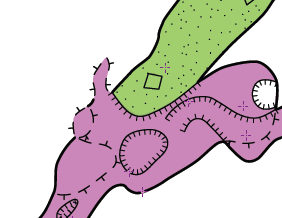
I am already doing almost exactly what Martin suggested. Duplicating the line in a text editor and turning the copy of it into an invisible wall line. I am doing this in the scrap I gave in my example being the bottom of the pitch, so the pit edge line is not in that scrap. The passage continues in another scrap at the higher level. So I am using the same trick there to draw the floor step line along the exact path of an invisible wall line. I make sure the floor step line ticks appear by adding the flag -clip off to that line. You might wonder why I do not just join the scraps and not bother with the invisible wall lines in both scraps? Well if I do that then the colour fill by altitude does not follow the line of the pit edge. Instead it is drawn as a straight line between the wall ends. See the attached bitmap for how it renders using the invisible walls with colour by altitude. Footleg On 12 May 2012 06:56, Martin Sluka <martinsluka@mac.com> wrote:
On 12.5.2012, at 0:59, Bruce wrote:
line wall subtype context-<otherline>
where <otherline> is any other currently defined line type?
As I wrote, wall has it own very important role. If you need line as wall but with ticks as pit you may use the trick I wrote before.
The problem with pit and wall could just the problem of mathematical topology. Because pit in 3D is pit, not only line. So therion must correctly add there something as virtual vertical passage.
m.
_______________________________________________ Therion mailing list Therion@speleo.sk http://mailman.speleo.sk/mailman/listinfo/therion

I am sorry for late answer. Just a few comments. As Bruce has written, -visibility off means, that symbol is there but for some reasons, it should not be drawn. Line wall:invisible is to be used to mark scrap outline, where there is no wall - or, more frequently - where therion scrap outline closure algorithm has a problem to close the outline. You may use any line symbol as "wall" (in fact as a scrap outline) - also a pit, or overhang or anything else, all you need to do is to add "-outline out" option to it. Your problem is caused probably by a bug in therion outline reconstruction algorithm. If you use two times wall:invisible - they are not connected automatically, but therion "prefers" to connect wall invisible to some wall, that is visible. I could not image the situation, where two invisible walls will be forming scrap outline one after the other ;) This is the reason, why when you specify "visibility off", everything is OK. HTH, S.
You may use any line symbol as "wall" (in fact as a scrap outline) . all you need to do is to add "-outline out" option to it.
At first I thought this is a revolutionary idea! Then I searched the Therion Book and discovered that it has long been described in the chapters 'How to draw maps' and 'Scrap' on pg 21. Thanks for pointing it out, I must try it out. Bruce
On 12.5.2012, at 22:51, Bruce wrote:
You may use any line symbol as "wall" (in fact as a scrap outline) … all you need to do is to add "-outline out" option to it.
At first I thought this is a revolutionary idea!
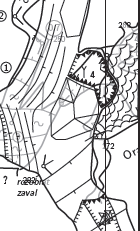
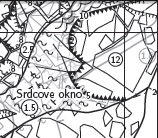
It is only way how to correctly draw sitution if passages in two levels are connected in one cave room - it means there is a passage going from bottom of room and another one just under the ceiling. And they are one above another. Check the attached pictures. The overhangs there have typicaly -outline out -clip off. m.
On 11.5.2012, at 23:40, Footleg wrote:
This is generally how I have always drawn avens where some of the wall of the aven is also effectively the passage wall.
Just add to the pit line an ID, save, open the th2 file in plain text editor, copy the definition of pit with ID and change the type of line to wall with -outline none or in as you need. Not drawn, but "therioned". Wall lines has generally very special role - they clip (outline) all the objects. So one may not take care if the part of block or pit or step or ... line is outside of cave passage. The wall line will clip it off automatically. I think it is very useful feature. m.
I've attached a mini project with the two versions of my ths file. One gives a good lox model, and one does not.
I'm not able to imagine what it means - check attachment. If there is a chimney, by my meaning, the border of chimney should by the wall, because it is wall, and only part which is inside the contours of the passage should the chimney line. Another problem is transparent pit, because there is no passage below, so it is a hole to nowhere. m.
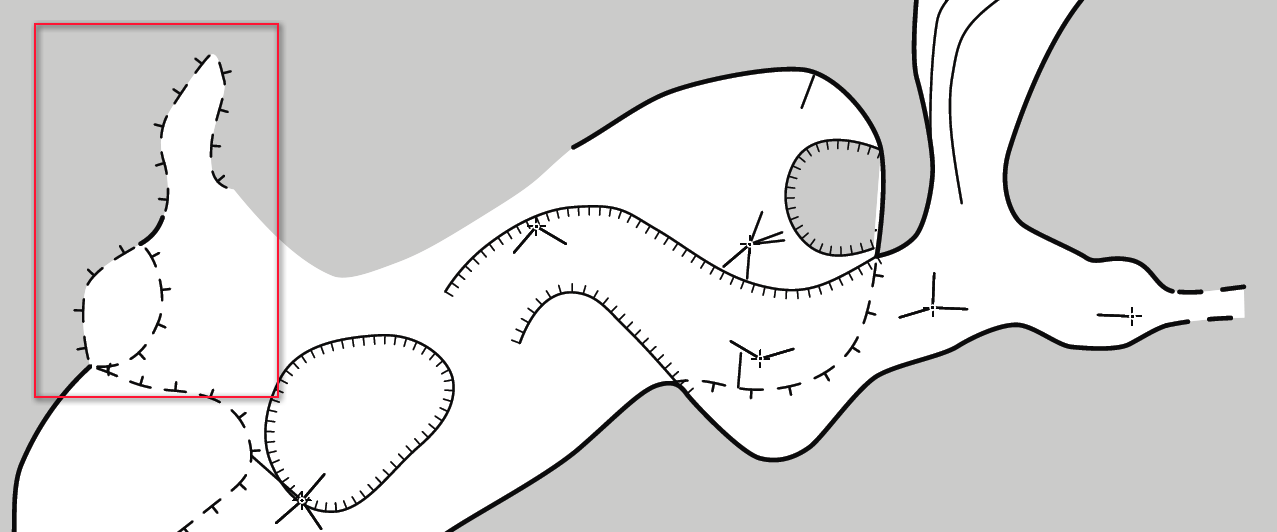
So you spotted that I missed off a line showing part of my chimney. I've added that now. I've also removed all my duplicated invisible wall lines and just set the option '-outline out' for the chimney lines which are also walls in my sketch. This works great and both my PDF and lox model look like I wanted them to. Martin raised a couple of questions about my drawing of chimney and pits. I follow the point about the wall of the chimney which is also the passage wall not needing to be drawn as a chimney line (technically there is no undercut on the ceiling so I realise that I should not use a chimney or ceil step line there. But I always thought it made it clearer that there was an aven above the general passage roof at these places if I encircle the entire aven with ceil step lines. In effect I am using the ceiling step line to indicate that the ceiling inside that line is higher than the general ceiling height of the passage. What do other people do? I've attached another screen grab from my PDF. This also shows the pit as it is intended with the scrap included which covered the floor of the pit. Then you can see that the pit is no longer transparent on the PDF. Footleg On 13 May 2012 21:59, Martin Sluka <martinsluka@mac.com> wrote:
I've attached a mini project with the two versions of my ths file. One gives a good lox model, and one does not.
I'm not able to imagine what it means - check attachment. If there is a chimney, by my meaning, the border of chimney should by the wall, because it is wall, and only part which is inside the contours of the passage should the chimney line.
Another problem is transparent pit, because there is no passage below, so it is a hole to nowhere.
m.
_______________________________________________ Therion mailing list Therion@speleo.sk http://mailman.speleo.sk/mailman/listinfo/therion
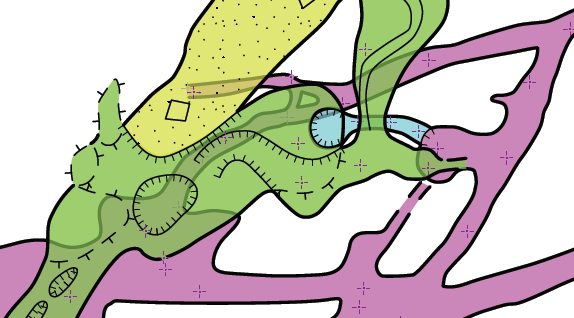
I've also removed all my duplicated invisible wall lines and just set the option '-outline out' for the chimney lines which are also walls in my sketch. This works great and both my PDF and lox model look like I wanted them to.
How do the kml map outputs look Footleg? Are they rendered properly?
But I always thought it made it clearer that there was an aven above the general passage roof at these places if I encircle the entire aven with ceil step lines. In effect I am using the ceiling step line to indicate that the ceiling inside that line is higher than the general ceiling height of the passage. What do other people do?
I usually would draw it as Footleg has, but using and aven or chimney linetype as is usually done on NZ maps. I don't think it really matters - just a style preference.
I've attached another screen grab from my PDF. This also shows the pit as it is intended with the scrap included which covered the floor of the pit. Then you can see that the pit is no longer transparent on the PDF.
This is looking good now, (but at the risk of being picky) if the blue passage were to be offset 50m to the right (or not appear at all in THIS output map) then the pit would be 'white' and apparently not inside the cave (a pillar). And what of the green pit? I guess if it were as deep as the blue pit, then if the draughtsperson were fussy it's bottom could be yet another scrap, but I admit I would not bother. Anyway, with the blue passage offset, the two pits look fundamentally different when the passage below is offset as Martin pointed out. If the pit line in the scrap above the blue passage has either outline in or out set, then I am surprised that the loch model does not have a recess or some odd looking characteristics here. Anyway, if using outline options alone can produce near ideal pdf, kml map and loch model outputs in one go, then I guess its near enough to problem solved (just the 'pit-bottoms-blank-when-sometimes-offset' problem remains). Bruce
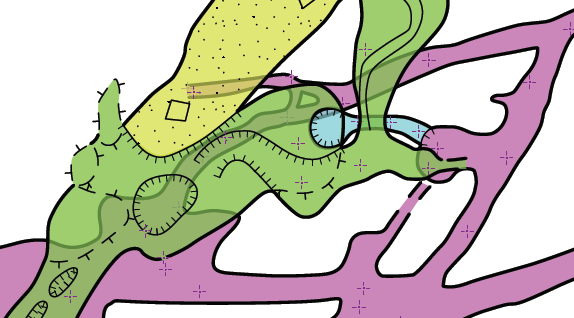
KML looks fine, as does the lox model. I understand that the pit would look like a transparent hole if rendered in a map without the lower scrap. Wasn't there are way you suggested which might allow toggling the options on a line in different maps Bruce? So you could have the pit filled in one map but transparent in another? Footleg On 14 May 2012 21:27, Bruce <bruce@tomo.co.nz> wrote:
I've also removed all my duplicated invisible wall lines and just set the option '-outline out' for the chimney lines which are also walls in my sketch. This works great and both my PDF and lox model look like I wanted them to.
How do the kml map outputs look Footleg? Are they rendered properly?
But I always thought it made it clearer that there was an aven above the general passage roof at these places if I encircle the entire aven with ceil step lines. In effect I am using the ceiling step line to indicate that the ceiling inside that line is higher than the general ceiling height of the passage. What do other people do?
I usually would draw it as Footleg has, but using and aven or chimney linetype as is usually done on NZ maps. I don't think it really matters - just a style preference.
I've attached another screen grab from my PDF. This also shows the pit as it is intended with the scrap included which covered the floor of the pit. Then you can see that the pit is no longer transparent on the PDF.
This is looking good now, (but at the risk of being picky) if the blue passage were to be offset 50m to the right (or not appear at all in THIS output map) then the pit would be 'white' and apparently not inside the cave (a pillar). And what of the green pit? I guess if it were as deep as the blue pit, then if the draughtsperson were fussy it's bottom could be yet another scrap, but I admit I would not bother. Anyway, with the blue passage offset, the two pits look fundamentally different when the passage below is offset as Martin pointed out.
If the pit line in the scrap above the blue passage has either outline in or out set, then I am surprised that the loch model does not have a recess or some odd looking characteristics here.
Anyway, if using outline options alone can produce near ideal pdf, kml map and loch model outputs in one go, then I guess its near enough to problem solved (just the 'pit-bottoms-blank-when-sometimes-offset' problem remains).
Bruce
_______________________________________________ Therion mailing list Therion@speleo.sk http://mailman.speleo.sk/mailman/listinfo/therion
KML looks fine, as does the lox model.
I understand that the pit would look like a transparent hole if rendered in a map without the lower scrap. Wasn't there are way you suggested which might allow toggling the options on a line in different maps Bruce? So you could have the pit filled in one map but transparent in another?
Yes, the revise statement would allow the user to quite easily change the outline parameter for any 'non-standard' outputs without having to manually edit it each time. If the pit is defined in scrap1 as Martin suggested ('-outline in -clip off' or whatever is required) and it has -id scrap1pit1, then perhaps in the map definition with the lower scraps offset, the revise statement could be included... map LowerScrapOffset -proj plan revise scrap1pit1 -outline none # restore shading to top scrap scrap1@s1 MapofScrap2 preview 100 000 metres below # MapofScrap2 contains scrap2@s2 endmap Must admit I've not used revise in this context, and not sure if revise would need to be inside the map definition or out. Still, one way or another it should work and be relatively painless unless you have 400 pit lines to revise. To digress a little... If your resolution was not as seamless as it appears to be I was going to cancel my support of the -2d [in out] and -3d [in out] idea and suggest a new entity; area void Area void would have no effect in 3d models and would erase the passage fill in 2d drawings (and as a nice to have bonus- except where no scrap is rendered beneath it in the particular output). It seems there is no need though. Bruce
participants (4)
-
 Bruce
Bruce -
 Footleg
 -
 Martin Sluka
 -
 Stacho Mudrak