Georeferenced PNG export problem

Hi, I want to export a map to georeferenced PGN. I am using the Xtherion "Help\Calibrate bitmap" function to register a PDF map to PGN, like explain in the next message. https://www.mail-archive.com/therion@speleo.sk/msg02593.html ThePNG is created appropriately, but I have problems with the ".MAP" file. When I execute the command, it creates a good PGN file, but creates an empty ".map" file. When a close Xtherion, the ".map" file is filled with the information. But that information is wrong, the coordinates are 0,0 (look attached file). Wheres is my mistake? An other question, can I convert the background to transparent directly from Therion. I want import the georeferenced PNG in Google Earth or GIS, and want only have the cave survey rendered and see the other layers around the cave. Regards, Evaristo.

Another question, can I convert the background to transparent directly from Therion. I want import the georeferenced PNG in Google Earth or GIS, and want only have the cave survey rendered and see the other layers around the cave.
Try ‘colour map-bg transparent’ in your layout. Around pg 54 of the Therion Book. If it is working it should give you a pdf of the cave with a transparent background. I have not tested this recently. When it was first brought in, around version 5.3.5, it had to be placed directly in the export statement in your thconfig, something like; export map -layout-colour map-bg transparent Bruce
Thanks Bruce, the transparent statement is working perfectly. Now I have only to resolve the ".map" problem. Regards, Evaristo. El 26/03/2018 a las 5:43, Bruce Mutton via Therion escribió:
Try ‘colour map-bg transparent’ in your layout. Around pg 54 of the Therion Book.
If it is working it should give you a pdf of the cave with a transparent background. I have not tested this recently. When it was first brought in, around version 5.3.5, it had to be placed directly in the export statement in your thconfig, something like;
export map -layout-colour map-bg transparent
Bruce

For possible work-around you can export map with grid lines, and use grid lines intersection points as GCP (ground control points) with known coordinates to manually georeference your raster PNG.
Thanks Nikita. First, I thought about doing it as you say. But I want an image that only has the survey and the rest is transparent, so putting the grid complicates my work. Then I discovered that the "calibrate bitmap" option does all the work. But it's not working. We don't need the gridbecause the exported Therion PDF have a comment with nine coordinates (thCalibrate) . A Xtherion tcl command (mapcal.tcl) do the calculation from the pdf coordinates to the bitmap coordinates. I am now doing inverse engineering with this file to understand the equations, to do the calculation manually. Regards, Evaristo. El 26/03/2018 a las 11:32, Nikita Kozlov via Therion escribió:
For possible work-around you can export map with grid lines, and use grid lines intersection points as GCP (ground control points) with known coordinates to manually georeference your raster PNG.
_______________________________________________ Therion mailing list Therion@speleo.sk https://mailman.speleo.sk/listinfo/therion
You can export 2 PNGs one with grid to put GCPs on, and second PNG without grid, but exactly same size (in pixels). And use GCPs put on first grid-equipped PNG to georeference second "grid-free" PNG. Grid is used only to get pixel coordinates. Dealing with pdf and 'reverse engineering' for me seems a bit complicated stuff, since in addition to 6 georeference parameters, you need to deal with scale and so on, so I'd rather used quick and dirty solution with grid and rasters.
The reverse engineering is not with the PDF. Martin do a good job here putting in all the therion output pdf a comment with the reference. You only have to open the file and search "thCalibrate". You found the next text: / ///thCalibrate0 (X=-22.16017pt, Y=260.12132pt, L=-0.3641990570, F=42.2992656650) // ///thCalibrate1 (X=1921.38345pt, Y=199.8752pt, L=-0.3608862211, F=42.2991894208) // ///thCalibrate2 (X=3864.92708pt, Y=139.62904pt, L=-0.3575733981, F=42.2991130810) // ///thCalibrate3 (X=-0.2183pt, Y=967.96619pt, L=-0.3641616744, F=42.3001613659) // ///thCalibrate4 (X=3886.86893pt, Y=847.47388pt, L=-0.3575359218, F=42.3000087771) // ///thCalibrate5 (X=21.72351pt, Y=1675.81102pt, L=-0.3641242900, F=42.3010570667) // ///thCalibrate6 (X=1965.26714pt, Y=1615.56487pt, L=-0.3608113605, F=42.3009808177) // ///thCalibrate7 (X=3908.81078pt, Y=1555.31871pt, L=-0.3574984437, F=42.3009044731) // ///thCalibrate8 (X=1943.32529pt, Y=907.72003pt, L=-0.3608487917, F=42.3000851193) // ///thCalibrate (HS=3913.97253pt, VS=1573.34683pt, HD=546.7244489428)/ All the information is here: pdf coordinates (X,Y), real coordinates (L,F) and the pdf width (HS) and height (VS). You only need know the width and height from the generate PGN, and you have all the data to do the calculation. The reverse engineering is to understand the ".map" format and found in the tcl file (mapcalc.tc) the equations to do the conversion. Regards, Evaristo. El 26/03/2018 a las 12:57, Nikita Kozlov via Therion escribió:
You can export 2 PNGs one with grid to put GCPs on, and second PNG without grid, but exactly same size (in pixels). And use GCPs put on first grid-equipped PNG to georeference second "grid-free" PNG.
Grid is used only to get pixel coordinates.
Dealing with pdf and 'reverse engineering' for me seems a bit complicated stuff, since in addition to 6 georeference parameters, you need to deal with scale and so on, so I'd rather used quick and dirty solution with grid and rasters.
_______________________________________________ Therion mailing list Therion@speleo.sk https://mailman.speleo.sk/listinfo/therion
I have found a bug in the Xtherion command "\help\Calibrate bitmap". The command does not work when the longitude is between Greenwich and 1 degree west (example -0.2333). I do not think it should work for the latitudes between the equator and 1 degree south. I think the problem comes from the "ll2ozi" function of the Xtherion "mapcalc.tc" file. It takes the integer value of the longitude and latitude (int [$ lat]). When the longitude is between 0 and 1 of west corresponds a negative value of 0, which the integer function considers a error. The problem is that I just have two karstic zones that are located in those longitude. As long as that error is not corrected I have developed in following trick. /Process twice the pdf file with the command //"\help\Calibrate bitmap". / /With the first execution I create the png file. //Later it changed the name to the pdf, and I open it in an editor, //and search "thCalibrate". //I eliminate the minus signs of the coordinates (L, F). / /Execute again //"\help\Calibrate bitmap" with this new file, generating the file ".map". //I open and edit the .map file changing the E by W in the coordinates. / ///Finally I rename the ".map" file to match the first created png file./ It works but it is a bit cumbersome. Regards, Evaristo. El 26/03/2018 a las 13:25, Evaristo Quiroga via Therion escribió:
The reverse engineering is not with the PDF. Martin do a good job here putting in all the therion output pdf a comment with the reference. You only have to open the file and search "thCalibrate". You found the next text: / ///thCalibrate0 (X=-22.16017pt, Y=260.12132pt, L=-0.3641990570, F=42.2992656650) // ///thCalibrate1 (X=1921.38345pt, Y=199.8752pt, L=-0.3608862211, F=42.2991894208) // ///thCalibrate2 (X=3864.92708pt, Y=139.62904pt, L=-0.3575733981, F=42.2991130810) // ///thCalibrate3 (X=-0.2183pt, Y=967.96619pt, L=-0.3641616744, F=42.3001613659) // ///thCalibrate4 (X=3886.86893pt, Y=847.47388pt, L=-0.3575359218, F=42.3000087771) // ///thCalibrate5 (X=21.72351pt, Y=1675.81102pt, L=-0.3641242900, F=42.3010570667) // ///thCalibrate6 (X=1965.26714pt, Y=1615.56487pt, L=-0.3608113605, F=42.3009808177) // ///thCalibrate7 (X=3908.81078pt, Y=1555.31871pt, L=-0.3574984437, F=42.3009044731) // ///thCalibrate8 (X=1943.32529pt, Y=907.72003pt, L=-0.3608487917, F=42.3000851193) // ///thCalibrate (HS=3913.97253pt, VS=1573.34683pt, HD=546.7244489428)/
All the information is here: pdf coordinates (X,Y), real coordinates (L,F) and the pdf width (HS) and height (VS).
You only need know the width and height from the generate PGN, and you have all the data to do the calculation.
The reverse engineering is to understand the ".map" format and found in the tcl file (mapcalc.tc) the equations to do the conversion.
Regards,
Evaristo.
El 26/03/2018 a las 12:57, Nikita Kozlov via Therion escribió:
You can export 2 PNGs one with grid to put GCPs on, and second PNG without grid, but exactly same size (in pixels). And use GCPs put on first grid-equipped PNG to georeference second "grid-free" PNG.
Grid is used only to get pixel coordinates.
Dealing with pdf and 'reverse engineering' for me seems a bit complicated stuff, since in addition to 6 georeference parameters, you need to deal with scale and so on, so I'd rather used quick and dirty solution with grid and rasters.
_______________________________________________ Therion mailing list Therion@speleo.sk https://mailman.speleo.sk/listinfo/therion
_______________________________________________ Therion mailing list Therion@speleo.sk https://mailman.speleo.sk/listinfo/therion
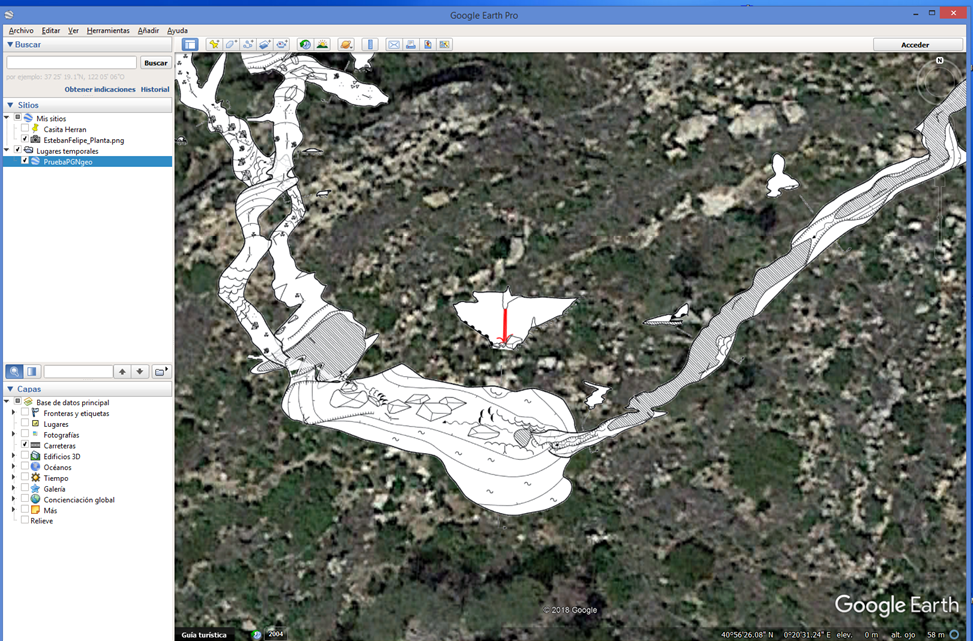
It's OK. I have found my mistake: in the previous PDF the map was rotated. That's why I was giving negative image coordinates, which interrupted the execution of the "Calibrate bitmap" command. Now exporting a PDF not rotated, using the "Calibrate bitmap" and convert to KMZ with Global Mapper, I have this beautiful map in Google Earth and GIS. Evaristo.
participants (3)
-
 Bruce Mutton
 -
 Evaristo Quiroga
 -
 Nikita Kozlov