12. 11. 2014 v 7:28, Bruce <bruce@tomo.co.nz>:
Hi Bill I think I see your problem. I will potter around with the example you sent to demonstrate what I think you want, but maybe not tonight.
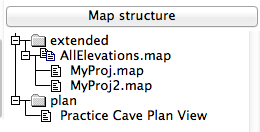
For now, you can avoid the 'object not found' error by double clicking on the survey or map item on the right-hand side of XTherion. For example it places...
select AllElevations.map@PracticeCave
...at the cursor position in the th-config file.
And, if you select multiple maps of one projection, they will all be used in the export for that projection.
Hi Bill The problem is, you select map, but the full name of map is as wrote Bruce. If you double click on AllElevation.map it will add select AllElevations.map@PracticeCave, where @PracticeCave is name of survey where the map is defined: survey PracticeCave -title "Practice Cave" It is not too clear from first point of view. Maybe a bug in xTherion menu. So you should have in your thconfig: xxxxxxxxxxxxxxxxxxxxxxxxxxxxxxxxxxxxxxxxxxxxxx # Entrance passage elevations select AllElevations.map@PracticeCave export map -proj extended -layout profilemap -layout-debug station-names -o PracticeElevation1.pdf select pdp@PracticeCave export map -proj plan -layout mainmap -layout-debug station-names -o PracticeCave.pdf xxxxxxxxxxxxxxxxxxxxxxxxxxxxxxxxxxxxxxxxxxxxxx If you want to export a map for each scrap separately you should use: xxxxxxxxxxxxxxxxxxxxxxxxxxxxxxxxxxxxxxxxxxxxxx select MyProj.map@PracticeCave export map -proj extended -layout profilemap -layout-debug station-names -o PracticeElevation1.pdf select MyProj2.map@PracticeCave export map -proj extended -layout profilemap -layout-debug station-names -o PracticeElevation2.pdf xxxxxxxxxxxxxxxxxxxxxxxxxxxxxxxxxxxxxxxxxxxxxx And add the second elevation map to: xxxxxxxxxxxxxxxxxxxxxxxxxxxxxxxxxxxxxxxxxxxxxx # Add the elevations map map-image 2 0 nw PracticeElevation1.pdf xxxxxxxxxxxxxxxxxxxxxxxxxxxxxxxxxxxxxxxxxxxxxx Another note: The final map must be generated AFTER you generate particular maps. m.