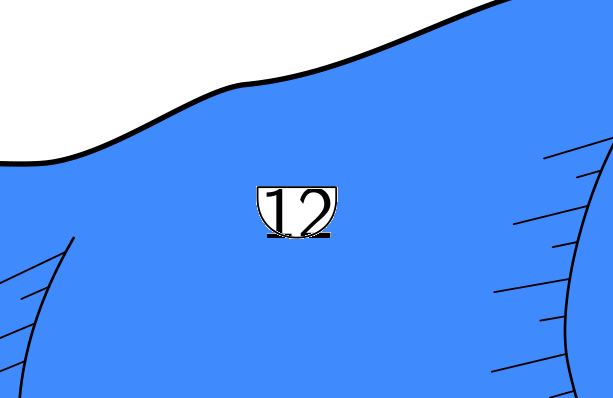
Hi I played around with base-scale option and this "suprise" is working pretty good. For most of my cave symbols. But I figured out that it's the same problem with passage-heigt symbols. So may be there is a bug in this symbol!? When I use scale 1 250 base-scale 1 1000 I get the same "error" than before. The Frame is not all around the number (see attached picture). There is no scale option anymore for this passage-height point. So it's up to default scale. Am I the only one with this behavior or can someone else confirm it? Is there any workaround for this? regards, Torsten
Martin Sluka via Therion <therion@speleo.sk> hat am 13. Dezember 2016 um 09:25 geschrieben:
Therion is a big black box full of such small surprises! ;)
m.
> > 13. 12. 2016 v 8:02, Torsten Schnitter via Therion <therion@speleo.sk mailto:therion@speleo.sk >:
Hi Martin
There is no stupid question but only stupid answers. ;-)
Thanks for that advice. I never used base-scale so far. But this is doing want I wanted to achieve and I don't need fonts_setup for that...
regards, Torsten
> > > Martin Sluka via Therion <therion@speleo.sk mailto:therion@speleo.sk > hat am 12. Dezember 2016 um 18:56 geschrieben:
Maybe stupid question, but have you checked scale and base-scale in layout?
m.s.
> > > > 12. 12. 2016 v 17:38, Torsten Schnitter via Therion <therion@speleo.sk mailto:therion@speleo.sk >:
Hi all
I have a question concerning customizing text labels. Drawing a map with scale 1:250 is ok. Just some points a very small on the map. Therefore I would like to resize these points and make them bigger.
For example: "point x y passage-height -value [- 10 m]" generates the wanted symbol, a number with a frame around. But it's to small (attached picture passage-height-1.jpg). I add the option "-scale xl". Now it's a little bit bigger but still to small (attached picture passage-height-2.jpg).
Finally I use within the layout command: code metapost fonts_setup(6,8,10,14,36); endcode
Now the number is looking good in size but the frame around is not correct anymore (attached picture passage-height-3.jpg).
Is there a solution for this problem? Or is there any other option to resize single points or lines (like "point passage-heigt" or "line label" ...)? I'm looking forward for any help.
Thanks, Torsten
<Passage-Height-1.JPG><Passage-Height-2.JPG><Passage-Height-3.JPG>_______________________________________________ Therion mailing list Therion@speleo.sk mailto:Therion@speleo.sk https://mailman.speleo.sk/listinfo/therion
> > >
> >
> > > _______________________________________________
Therion mailing list Therion@speleo.sk mailto:Therion@speleo.sk https://mailman.speleo.sk/listinfo/therion
> > _______________________________________________
Therion mailing list Therion@speleo.sk mailto:Therion@speleo.sk https://mailman.speleo.sk/listinfo/therion
>
_______________________________________________ Therion mailing list Therion@speleo.sk https://mailman.speleo.sk/listinfo/therion