Question/Problem with customizing text labels

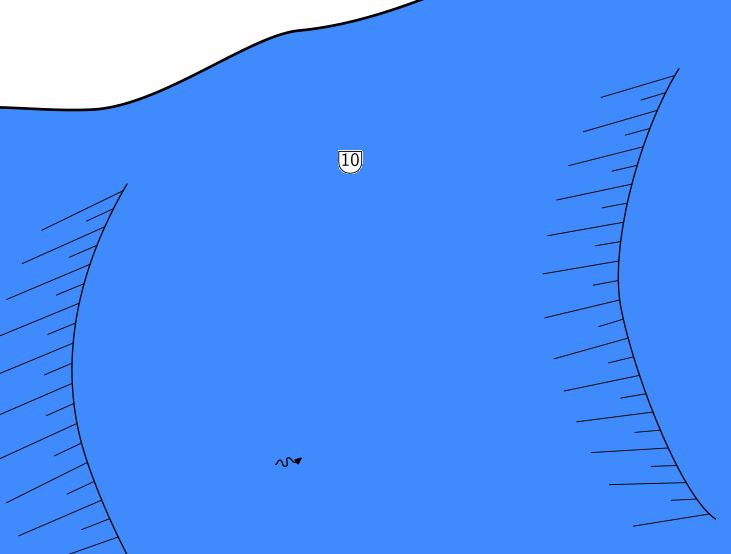
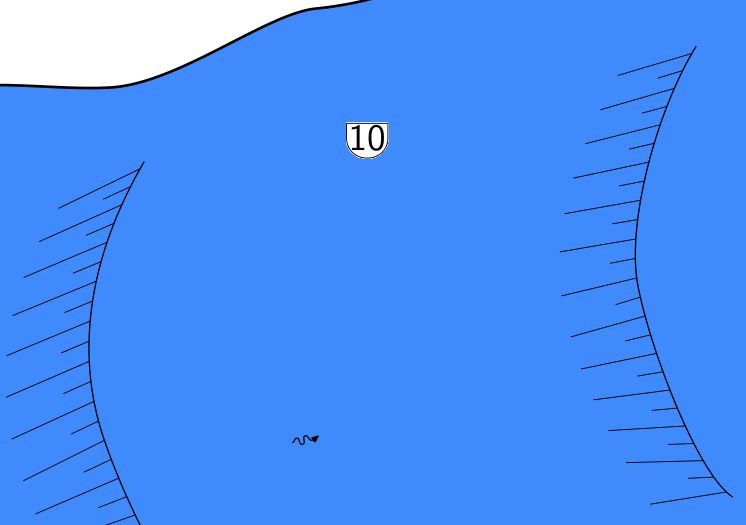
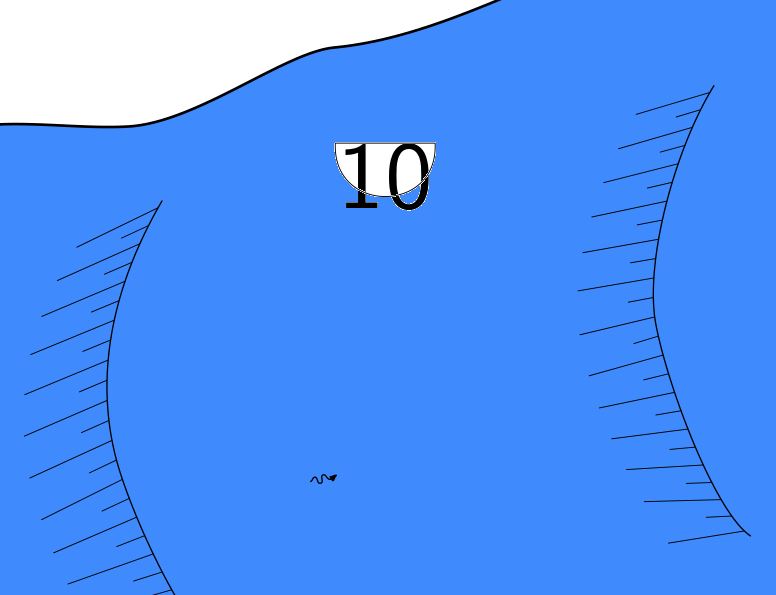
Hi all I have a question concerning customizing text labels. Drawing a map with scale 1:250 is ok. Just some points a very small on the map. Therefore I would like to resize these points and make them bigger. For example: "point x y passage-height -value [- 10 m]" generates the wanted symbol, a number with a frame around. But it's to small (attached picture passage-height-1.jpg). I add the option "-scale xl". Now it's a little bit bigger but still to small (attached picture passage-height-2.jpg). Finally I use within the layout command: code metapost fonts_setup(6,8,10,14,36); endcode Now the number is looking good in size but the frame around is not correct anymore (attached picture passage-height-3.jpg). Is there a solution for this problem? Or is there any other option to resize single points or lines (like "point passage-heigt" or "line label" ...)? I'm looking forward for any help. Thanks, Torsten

Maybe stupid question, but have you checked scale and base-scale in layout? m.s.
12. 12. 2016 v 17:38, Torsten Schnitter via Therion <therion@speleo.sk>:
Hi all
I have a question concerning customizing text labels. Drawing a map with scale 1:250 is ok. Just some points a very small on the map. Therefore I would like to resize these points and make them bigger.
For example: "point x y passage-height -value [- 10 m]" generates the wanted symbol, a number with a frame around. But it's to small (attached picture passage-height-1.jpg). I add the option "-scale xl". Now it's a little bit bigger but still to small (attached picture passage-height-2.jpg).
Finally I use within the layout command: code metapost fonts_setup(6,8,10,14,36); endcode
Now the number is looking good in size but the frame around is not correct anymore (attached picture passage-height-3.jpg).
Is there a solution for this problem? Or is there any other option to resize single points or lines (like "point passage-heigt" or "line label" ...)? I'm looking forward for any help.
Thanks, Torsten
<Passage-Height-1.JPG><Passage-Height-2.JPG><Passage-Height-3.JPG>_______________________________________________ Therion mailing list Therion@speleo.sk https://mailman.speleo.sk/listinfo/therion
Hi Martin There is no stupid question but only stupid answers. ;-) Thanks for that advice. I never used base-scale so far. But this is doing want I wanted to achieve and I don't need fonts_setup for that... regards, Torsten
Martin Sluka via Therion <therion@speleo.sk> hat am 12. Dezember 2016 um 18:56 geschrieben:
Maybe stupid question, but have you checked scale and base-scale in layout?
m.s.
> > 12. 12. 2016 v 17:38, Torsten Schnitter via Therion <therion@speleo.sk mailto:therion@speleo.sk >:
Hi all
I have a question concerning customizing text labels. Drawing a map with scale 1:250 is ok. Just some points a very small on the map. Therefore I would like to resize these points and make them bigger.
For example: "point x y passage-height -value [- 10 m]" generates the wanted symbol, a number with a frame around. But it's to small (attached picture passage-height-1.jpg). I add the option "-scale xl". Now it's a little bit bigger but still to small (attached picture passage-height-2.jpg).
Finally I use within the layout command: code metapost fonts_setup(6,8,10,14,36); endcode
Now the number is looking good in size but the frame around is not correct anymore (attached picture passage-height-3.jpg).
Is there a solution for this problem? Or is there any other option to resize single points or lines (like "point passage-heigt" or "line label" ...)? I'm looking forward for any help.
Thanks, Torsten
<Passage-Height-1.JPG><Passage-Height-2.JPG><Passage-Height-3.JPG>_______________________________________________ Therion mailing list Therion@speleo.sk mailto:Therion@speleo.sk https://mailman.speleo.sk/listinfo/therion
>
_______________________________________________ Therion mailing list Therion@speleo.sk https://mailman.speleo.sk/listinfo/therion
Therion is a big black box full of such small surprises! ;) m.
13. 12. 2016 v 8:02, Torsten Schnitter via Therion <therion@speleo.sk <mailto:therion@speleo.sk>>:
Hi Martin
There is no stupid question but only stupid answers. ;-)
Thanks for that advice. I never used base-scale so far. But this is doing want I wanted to achieve and I don't need fonts_setup for that...
regards, Torsten
Martin Sluka via Therion <therion@speleo.sk <mailto:therion@speleo.sk>> hat am 12. Dezember 2016 um 18:56 geschrieben:
Maybe stupid question, but have you checked scale and base-scale in layout?
m.s.
12. 12. 2016 v 17:38, Torsten Schnitter via Therion <therion@speleo.sk <mailto:therion@speleo.sk>>:
Hi all
I have a question concerning customizing text labels. Drawing a map with scale 1:250 is ok. Just some points a very small on the map. Therefore I would like to resize these points and make them bigger.
For example: "point x y passage-height -value [- 10 m]" generates the wanted symbol, a number with a frame around. But it's to small (attached picture passage-height-1.jpg). I add the option "-scale xl". Now it's a little bit bigger but still to small (attached picture passage-height-2.jpg).
Finally I use within the layout command: code metapost fonts_setup(6,8,10,14,36); endcode
Now the number is looking good in size but the frame around is not correct anymore (attached picture passage-height-3.jpg).
Is there a solution for this problem? Or is there any other option to resize single points or lines (like "point passage-heigt" or "line label" ...)? I'm looking forward for any help.
Thanks, Torsten
<Passage-Height-1.JPG><Passage-Height-2.JPG><Passage-Height-3.JPG>_______________________________________________ Therion mailing list Therion@speleo.sk <mailto:Therion@speleo.sk> https://mailman.speleo.sk/listinfo/therion <https://mailman.speleo.sk/listinfo/therion>
_______________________________________________ Therion mailing list Therion@speleo.sk <mailto:Therion@speleo.sk> https://mailman.speleo.sk/listinfo/therion <https://mailman.speleo.sk/listinfo/therion>
Therion mailing list Therion@speleo.sk <mailto:Therion@speleo.sk> https://mailman.speleo.sk/listinfo/therion <https://mailman.speleo.sk/listinfo/therion>
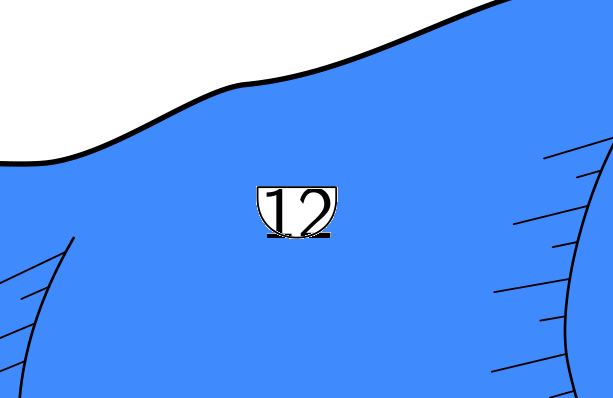
Hi I played around with base-scale option and this "suprise" is working pretty good. For most of my cave symbols. But I figured out that it's the same problem with passage-heigt symbols. So may be there is a bug in this symbol!? When I use scale 1 250 base-scale 1 1000 I get the same "error" than before. The Frame is not all around the number (see attached picture). There is no scale option anymore for this passage-height point. So it's up to default scale. Am I the only one with this behavior or can someone else confirm it? Is there any workaround for this? regards, Torsten
Martin Sluka via Therion <therion@speleo.sk> hat am 13. Dezember 2016 um 09:25 geschrieben:
Therion is a big black box full of such small surprises! ;)
m.
> > 13. 12. 2016 v 8:02, Torsten Schnitter via Therion <therion@speleo.sk mailto:therion@speleo.sk >:
Hi Martin
There is no stupid question but only stupid answers. ;-)
Thanks for that advice. I never used base-scale so far. But this is doing want I wanted to achieve and I don't need fonts_setup for that...
regards, Torsten
> > > Martin Sluka via Therion <therion@speleo.sk mailto:therion@speleo.sk > hat am 12. Dezember 2016 um 18:56 geschrieben:
Maybe stupid question, but have you checked scale and base-scale in layout?
m.s.
> > > > 12. 12. 2016 v 17:38, Torsten Schnitter via Therion <therion@speleo.sk mailto:therion@speleo.sk >:
Hi all
I have a question concerning customizing text labels. Drawing a map with scale 1:250 is ok. Just some points a very small on the map. Therefore I would like to resize these points and make them bigger.
For example: "point x y passage-height -value [- 10 m]" generates the wanted symbol, a number with a frame around. But it's to small (attached picture passage-height-1.jpg). I add the option "-scale xl". Now it's a little bit bigger but still to small (attached picture passage-height-2.jpg).
Finally I use within the layout command: code metapost fonts_setup(6,8,10,14,36); endcode
Now the number is looking good in size but the frame around is not correct anymore (attached picture passage-height-3.jpg).
Is there a solution for this problem? Or is there any other option to resize single points or lines (like "point passage-heigt" or "line label" ...)? I'm looking forward for any help.
Thanks, Torsten
<Passage-Height-1.JPG><Passage-Height-2.JPG><Passage-Height-3.JPG>_______________________________________________ Therion mailing list Therion@speleo.sk mailto:Therion@speleo.sk https://mailman.speleo.sk/listinfo/therion
> > >
> >
> > > _______________________________________________
Therion mailing list Therion@speleo.sk mailto:Therion@speleo.sk https://mailman.speleo.sk/listinfo/therion
> > _______________________________________________
Therion mailing list Therion@speleo.sk mailto:Therion@speleo.sk https://mailman.speleo.sk/listinfo/therion
>
_______________________________________________ Therion mailing list Therion@speleo.sk https://mailman.speleo.sk/listinfo/therion

Torsten I can't confirm or test the issue, but if the -xl size is too small, you can check out the beta version here https://github.com/vldgeorgiev/therion/wiki A few weeks ago I added three more large symbol sizes. E.g. 2XL, 3XL and 4XL. They might work in your case. If I have time next week I will see about the frame size and why it is drawn smaller. Vladimir On Tue, Dec 13, 2016 at 2:13 PM, Torsten Schnitter via Therion < therion@speleo.sk> wrote:
Hi
I played around with base-scale option and this "suprise" is working pretty good. For most of my cave symbols. But I figured out that it's the same problem with passage-heigt symbols. So may be there is a bug in this symbol!?
When I use scale 1 250 base-scale 1 1000 I get the same "error" than before. The Frame is not all around the number (see attached picture). There is no scale option anymore for this passage-height point. So it's up to default scale.
Am I the only one with this behavior or can someone else confirm it? Is there any workaround for this?
regards, Torsten
Martin Sluka via Therion <therion@speleo.sk> hat am 13. Dezember 2016 um 09:25 geschrieben:
Therion is a big black box full of such small surprises! ;)
m.
13. 12. 2016 v 8:02, Torsten Schnitter via Therion <therion@speleo.sk>:
Hi Martin
There is no stupid question but only stupid answers. ;-)
Thanks for that advice. I never used base-scale so far. But this is doing want I wanted to achieve and I don't need fonts_setup for that...
regards, Torsten
Martin Sluka via Therion <therion@speleo.sk> hat am 12. Dezember 2016 um 18:56 geschrieben:
Maybe stupid question, but have you checked scale and base-scale in layout?
m.s.
12. 12. 2016 v 17:38, Torsten Schnitter via Therion <therion@speleo.sk>:
Hi all
I have a question concerning customizing text labels. Drawing a map with scale 1:250 is ok. Just some points a very small on the map. Therefore I would like to resize these points and make them bigger.
For example: "point x y passage-height -value [- 10 m]" generates the wanted symbol, a number with a frame around. But it's to small (attached picture passage-height-1.jpg). I add the option "-scale xl". Now it's a little bit bigger but still to small (attached picture passage-height-2.jpg).
Finally I use within the layout command: code metapost fonts_setup(6,8,10,14,36); endcode
Now the number is looking good in size but the frame around is not correct anymore (attached picture passage-height-3.jpg).
Is there a solution for this problem? Or is there any other option to resize single points or lines (like "point passage-heigt" or "line label" ...)? I'm looking forward for any help.
Thanks, Torsten <Passage-Height-1.JPG><Passage-Height-2.JPG><Passage-Height-3.JPG> _______________________________________________ Therion mailing list Therion@speleo.sk https://mailman.speleo.sk/listinfo/therion
_______________________________________________ Therion mailing list Therion@speleo.sk https://mailman.speleo.sk/listinfo/therion
_______________________________________________ Therion mailing list Therion@speleo.sk https://mailman.speleo.sk/listinfo/therion
_______________________________________________ Therion mailing list Therion@speleo.sk https://mailman.speleo.sk/listinfo/therion
_______________________________________________ Therion mailing list Therion@speleo.sk https://mailman.speleo.sk/listinfo/therion
I don't know way, but this symbol is not in any .mp files in mpost directory so it is managed somewhere inside of Therion itself. I'll ask Martin Budaj what is the reason and what to do. M.s. On Dec 13, 2016, at 04:13 PM, Владимир Георгиев via Therion <therion@speleo.sk> wrote: Torsten I can't confirm or test the issue, but if the -xl size is too small, you can check out the beta version here https://github.com/vldgeorgiev/therion/wiki A few weeks ago I added three more large symbol sizes. E.g. 2XL, 3XL and 4XL. They might work in your case. If I have time next week I will see about the frame size and why it is drawn smaller. Vladimir On Tue, Dec 13, 2016 at 2:13 PM, Torsten Schnitter via Therion <therion@speleo.sk> wrote: Hi I played around with base-scale option and this "suprise" is working pretty good. For most of my cave symbols. But I figured out that it's the same problem with passage-heigt symbols. So may be there is a bug in this symbol!? When I use scale 1 250 base-scale 1 1000 I get the same "error" than before. The Frame is not all around the number (see attached picture). There is no scale option anymore for this passage-height point. So it's up to default scale. Am I the only one with this behavior or can someone else confirm it? Is there any workaround for this? regards, Torsten Martin Sluka via Therion <therion@speleo.sk> hat am 13. Dezember 2016 um 09:25 geschrieben: Therion is a big black box full of such small surprises! ;) m. 13. 12. 2016 v 8:02, Torsten Schnitter via Therion <therion@speleo.sk>: Hi Martin There is no stupid question but only stupid answers. ;-) Thanks for that advice. I never used base-scale so far. But this is doing want I wanted to achieve and I don't need fonts_setup for that... regards, Torsten Martin Sluka via Therion <therion@speleo.sk> hat am 12. Dezember 2016 um 18:56 geschrieben: Maybe stupid question, but have you checked scale and base-scale in layout? m.s. 12. 12. 2016 v 17:38, Torsten Schnitter via Therion <therion@speleo.sk>: Hi all I have a question concerning customizing text labels. Drawing a map with scale 1:250 is ok. Just some points a very small on the map. Therefore I would like to resize these points and make them bigger. For example: "point x y passage-height -value [- 10 m]" generates the wanted symbol, a number with a frame around. But it's to small (attached picture passage-height-1.jpg). I add the option "-scale xl". Now it's a little bit bigger but still to small (attached picture passage-height-2.jpg). Finally I use within the layout command: code metapost fonts_setup(6,8,10,14,36); endcode Now the number is looking good in size but the frame around is not correct anymore (attached picture passage-height-3.jpg). Is there a solution for this problem? Or is there any other option to resize single points or lines (like "point passage-heigt" or "line label" ...)? I'm looking forward for any help. Thanks, Torsten <Passage-Height-1.JPG><Passage-Height-2.JPG><Passage-Height-3.JPG>_______________________________________________ Therion mailing list Therion@speleo.sk https://mailman.speleo.sk/listinfo/therion _______________________________________________ Therion mailing list Therion@speleo.sk https://mailman.speleo.sk/listinfo/therion _______________________________________________ Therion mailing list Therion@speleo.sk https://mailman.speleo.sk/listinfo/therion _______________________________________________ Therion mailing list Therion@speleo.sk https://mailman.speleo.sk/listinfo/therion _______________________________________________ Therion mailing list Therion@speleo.sk https://mailman.speleo.sk/listinfo/therion _______________________________________________ Therion mailing list Therion@speleo.sk https://mailman.speleo.sk/listinfo/therion

Hi, I see that more text size options didn’t make it into the 5.4.1 release. Would be great to see it in a future release. Thanks, Henry From: Therion [mailto:therion-bounces@speleo.sk] On Behalf Of ???????? ???????? via Therion Sent: 13 December 2016 15:13 To: List for Therion users <therion@speleo.sk> Cc: Владимир Георгиев <vld.georgiev@gmail.com> Subject: Re: [Therion] Question/Problem with customizing text labels Torsten I can't confirm or test the issue, but if the -xl size is too small, you can check out the beta version here https://github.com/vldgeorgiev/therion/wiki A few weeks ago I added three more large symbol sizes. E.g. 2XL, 3XL and 4XL. They might work in your case. If I have time next week I will see about the frame size and why it is drawn smaller. Vladimir Dell Corporation Limited is registered in England and Wales. Company Registration Number: 2081369 Registered address: Dell House, The Boulevard, Cain Road, Bracknell, Berkshire, RG12 1LF, UK. Company details for other Dell UK entities can be found on www.dell.co.uk.
Henry After a talk with Stacho, he thought that it would be better not to increase the list of sizes. They are restrictive, in a sense that you have a limited set and can not use anything larger or smaller or in-between sizes. There was a "scale" option that already existed, but was not enabled, so he enabled it. For point and line items you can use this option: "-scale <number>", where <number> is the scale factor. The normal size corresponds to 1.0, but you can use any value >0. Vladimir On Mon, May 15, 2017 at 3:48 PM, <Henry.Bennett@dell.com> wrote:
Hi, I see that more text size options didn’t make it into the 5.4.1 release.
Would be great to see it in a future release.
Thanks, Henry
*From:* Therion [mailto:therion-bounces@speleo.sk] *On Behalf Of *???????? ???????? via Therion *Sent:* 13 December 2016 15:13 *To:* List for Therion users <therion@speleo.sk> *Cc:* Владимир Георгиев <vld.georgiev@gmail.com> *Subject:* Re: [Therion] Question/Problem with customizing text labels
Torsten
I can't confirm or test the issue, but if the -xl size is too small, you can check out the beta version here https://github.com/ vldgeorgiev/therion/wiki
A few weeks ago I added three more large symbol sizes. E.g. 2XL, 3XL and 4XL. They might work in your case.
If I have time next week I will see about the frame size and why it is drawn smaller.
Vladimir
Dell Corporation Limited is registered in England and Wales. Company Registration Number: 2081369 Registered address: Dell House, The Boulevard, Cain Road, Bracknell, Berkshire, RG12 1LF, UK. Company details for other Dell UK entities can be found on www.dell.co.uk .
Hi Vladimir, “-scale” sounds interesting. One of the things I like about s,m,l,xl, etc was the ability in metapost to set xs to zero (0). Consider a system where you have a full size survey of a single cave. I can draw that cave with full detail using xs set to a x font size. When that cave intercepts the cave master I can simply draw the system by suppressing some of the detail by using code metapost #change the size of the default fonts #fonts_setup(<tinysize>,<smallsize>,<normalsize>,<largesize>,<hugesize>); fonts_setup(0,18,40,64,80); endcode I will take a look at –scale and see how that works in such a case. Regards, Henry Bennett Solutions Consultant Dell EMC | Public Sector henry.bennett@dell.com<mailto:henry.bennett@dell.com> +44 7717 157 193 http://uk.linkedin.com/in/bennetthenry/ Planned absence: 19-23 June From: Therion [mailto:therion-bounces@speleo.sk] On Behalf Of ???????? ???????? via Therion Sent: 15 May 2017 16:34 To: Bennett, Henry <Henry_Bennett@Dell.com> Cc: Владимир Георгиев <vld.georgiev@gmail.com>; TherionList <therion@speleo.sk> Subject: Re: [Therion] Question/Problem with customizing text labels Henry After a talk with Stacho, he thought that it would be better not to increase the list of sizes. They are restrictive, in a sense that you have a limited set and can not use anything larger or smaller or in-between sizes. There was a "scale" option that already existed, but was not enabled, so he enabled it. For point and line items you can use this option: "-scale <number>", where <number> is the scale factor. The normal size corresponds to 1.0, but you can use any value >0. Vladimir On Mon, May 15, 2017 at 3:48 PM, <Henry.Bennett@dell.com<mailto:Henry.Bennett@dell.com>> wrote: Hi, I see that more text size options didn’t make it into the 5.4.1 release. Would be great to see it in a future release. Thanks, Henry From: Therion [mailto:therion-bounces@speleo.sk<mailto:therion-bounces@speleo.sk>] On Behalf Of ???????? ???????? via Therion Sent: 13 December 2016 15:13 To: List for Therion users <therion@speleo.sk<mailto:therion@speleo.sk>> Cc: Владимир Георгиев <vld.georgiev@gmail.com<mailto:vld.georgiev@gmail.com>> Subject: Re: [Therion] Question/Problem with customizing text labels Torsten I can't confirm or test the issue, but if the -xl size is too small, you can check out the beta version here https://github.com/vldgeorgiev/therion/wiki A few weeks ago I added three more large symbol sizes. E.g. 2XL, 3XL and 4XL. They might work in your case. If I have time next week I will see about the frame size and why it is drawn smaller. Vladimir Dell Corporation Limited is registered in England and Wales. Company Registration Number: 2081369 Registered address: Dell House, The Boulevard, Cain Road, Bracknell, Berkshire, RG12 1LF, UK. Company details for other Dell UK entities can be found on www.dell.co.uk<http://www.dell.co.uk>. Dell Corporation Limited is registered in England and Wales. Company Registration Number: 2081369 Registered address: Dell House, The Boulevard, Cain Road, Bracknell, Berkshire, RG12 1LF, UK. Company details for other Dell UK entities can be found on www.dell.co.uk.
There is also a "min-symbol-scale" option in layout, which hides smaller symbols. It might work similar to what you are doing in the font_setup metapost. You can hide the smallest items, not the largest ones, but hiding the larger ones is not that useful anyway. On Mon, May 15, 2017 at 7:13 PM, Henry.Bennett--- via Therion < therion@speleo.sk> wrote:
Hi Vladimir,
“-scale” sounds interesting. One of the things I like about s,m,l,xl, etc was the ability in metapost to set xs to zero (0).
Consider a system where you have a full size survey of a single cave. I can draw that cave with full detail using xs set to a x font size. When that cave intercepts the cave master I can simply draw the system by suppressing some of the detail by using
code metapost
#change the size of the default fonts
#fonts_setup(<tinysize>,<smallsize>,<normalsize>,< largesize>,<hugesize>);
fonts_setup(0,18,40,64,80);
endcode
I will take a look at –scale and see how that works in such a case.
Regards,
*Henry Bennett*
Solutions Consultant
*Dell* *EMC* | Public Sector
henry.bennett@dell.com +44 7717 157 193 <+44%207717%20157193>
http://uk.linkedin.com/in/bennetthenry/
Planned absence: *19-23 June*
*From:* Therion [mailto:therion-bounces@speleo.sk] *On Behalf Of *???????? ???????? via Therion *Sent:* 15 May 2017 16:34 *To:* Bennett, Henry <Henry_Bennett@Dell.com> *Cc:* Владимир Георгиев <vld.georgiev@gmail.com>; TherionList < therion@speleo.sk> *Subject:* Re: [Therion] Question/Problem with customizing text labels
Henry
After a talk with Stacho, he thought that it would be better not to increase the list of sizes. They are restrictive, in a sense that you have a limited set and can not use anything larger or smaller or in-between sizes.
There was a "scale" option that already existed, but was not enabled, so he enabled it.
For point and line items you can use this option:
"-scale <number>", where <number> is the scale factor. The normal size corresponds to 1.0, but you can use any value >0.
Vladimir
On Mon, May 15, 2017 at 3:48 PM, <Henry.Bennett@dell.com> wrote:
Hi, I see that more text size options didn’t make it into the 5.4.1 release.
Would be great to see it in a future release.
Thanks, Henry
*From:* Therion [mailto:therion-bounces@speleo.sk] *On Behalf Of *???????? ???????? via Therion *Sent:* 13 December 2016 15:13 *To:* List for Therion users <therion@speleo.sk> *Cc:* Владимир Георгиев <vld.georgiev@gmail.com> *Subject:* Re: [Therion] Question/Problem with customizing text labels
Torsten
I can't confirm or test the issue, but if the -xl size is too small, you can check out the beta version here https://github.com/ vldgeorgiev/therion/wiki
A few weeks ago I added three more large symbol sizes. E.g. 2XL, 3XL and 4XL. They might work in your case.
If I have time next week I will see about the frame size and why it is drawn smaller.
Vladimir
Dell Corporation Limited is registered in England and Wales. Company Registration Number: 2081369 Registered address: Dell House, The Boulevard, Cain Road, Bracknell, Berkshire, RG12 1LF, UK. Company details for other Dell UK entities can be found on www.dell.co.uk .
Dell Corporation Limited is registered in England and Wales. Company Registration Number: 2081369 Registered address: Dell House, The Boulevard, Cain Road, Bracknell, Berkshire, RG12 1LF, UK. Company details for other Dell UK entities can be found on www.dell.co.uk .
_______________________________________________ Therion mailing list Therion@speleo.sk https://mailman.speleo.sk/listinfo/therion

An alternative to setting smaller text size codes to 0 (to hide xs labels) is to put the labels in a different scrap to the drawing. I have done this with some success where I wanted more detailed text in large scale maps. I still draw it all in the editor on one th2 file, but just move the labels into a separate scrap. Then I can decide when I define my maps which ones to include the labels in. This works well where some maps use offsets too, as I can include labels in the white space per map depending on where the white space on the survey appears based on different use of offsets on each map. Footleg On Mon, May 15, 2017 at 6:04 PM Владимир Георгиев via Therion < therion@speleo.sk> wrote:
There is also a "min-symbol-scale" option in layout, which hides smaller symbols. It might work similar to what you are doing in the font_setup metapost. You can hide the smallest items, not the largest ones, but hiding the larger ones is not that useful anyway.
On Mon, May 15, 2017 at 7:13 PM, Henry.Bennett--- via Therion < therion@speleo.sk> wrote:
Hi Vladimir,
“-scale” sounds interesting. One of the things I like about s,m,l,xl, etc was the ability in metapost to set xs to zero (0).
Consider a system where you have a full size survey of a single cave. I can draw that cave with full detail using xs set to a x font size. When that cave intercepts the cave master I can simply draw the system by suppressing some of the detail by using
code metapost
#change the size of the default fonts
#fonts_setup(<tinysize>,<smallsize>,<normalsize>,<largesize>,<hugesize>);
fonts_setup(0,18,40,64,80);
endcode
I will take a look at –scale and see how that works in such a case.
Regards,
*Henry Bennett*
Solutions Consultant
*Dell* *EMC* | Public Sector
henry.bennett@dell.com +44 7717 157 193 <+44%207717%20157193>
http://uk.linkedin.com/in/bennetthenry/
Planned absence: *19-23 June*
*From:* Therion [mailto:therion-bounces@speleo.sk] *On Behalf Of *???????? ???????? via Therion *Sent:* 15 May 2017 16:34 *To:* Bennett, Henry <Henry_Bennett@Dell.com> *Cc:* Владимир Георгиев <vld.georgiev@gmail.com>; TherionList < therion@speleo.sk> *Subject:* Re: [Therion] Question/Problem with customizing text labels
Henry
After a talk with Stacho, he thought that it would be better not to increase the list of sizes. They are restrictive, in a sense that you have a limited set and can not use anything larger or smaller or in-between sizes.
There was a "scale" option that already existed, but was not enabled, so he enabled it.
For point and line items you can use this option:
"-scale <number>", where <number> is the scale factor. The normal size corresponds to 1.0, but you can use any value >0.
Vladimir
On Mon, May 15, 2017 at 3:48 PM, <Henry.Bennett@dell.com> wrote:
Hi, I see that more text size options didn’t make it into the 5.4.1 release.
Would be great to see it in a future release.
Thanks, Henry
*From:* Therion [mailto:therion-bounces@speleo.sk] *On Behalf Of *???????? ???????? via Therion *Sent:* 13 December 2016 15:13 *To:* List for Therion users <therion@speleo.sk> *Cc:* Владимир Георгиев <vld.georgiev@gmail.com> *Subject:* Re: [Therion] Question/Problem with customizing text labels
Torsten
I can't confirm or test the issue, but if the -xl size is too small, you can check out the beta version here https://github.com/vldgeorgiev/therion/wiki
A few weeks ago I added three more large symbol sizes. E.g. 2XL, 3XL and 4XL. They might work in your case.
If I have time next week I will see about the frame size and why it is drawn smaller.
Vladimir
Dell Corporation Limited is registered in England and Wales. Company Registration Number: 2081369 Registered address: Dell House, The Boulevard, Cain Road, Bracknell, Berkshire, RG12 1LF, UK. Company details for other Dell UK entities can be found on www.dell.co.uk.
Dell Corporation Limited is registered in England and Wales. Company Registration Number: 2081369 Registered address: Dell House, The Boulevard, Cain Road, Bracknell, Berkshire, RG12 1LF, UK. Company details for other Dell UK entities can be found on www.dell.co.uk.
_______________________________________________ Therion mailing list Therion@speleo.sk https://mailman.speleo.sk/listinfo/therion
_______________________________________________ Therion mailing list Therion@speleo.sk https://mailman.speleo.sk/listinfo/therion

Hello, i wonder why i can produce altitude lines in projected elevation, but not in extended elevation. How can i enable the depth lines in xelev output? (grid-command and friends did nothing) With best regards, Beni
participants (6)
-
 Benedikt Hallinger
 -
 Footleg
 -
 Henry.Bennett@dell.com
 -
 Martin Sluka
 -
 Torsten Schnitter
 -
 Владимир Георгиев