Therion 5.3.16 - Error opening th and th2 files

Hello everyone - I installed therion 5.3.16 a week ago but never did anything more than verify it would start. Now I need to do some work on a map. In xtherion - Whenever I try to open either a th or th2 file (text editor or map editor windows), it throws an error. I took a screen shot and attached to this message. The error comes up as soon as I click on the File-Open icon. It never presents a file chooser dialog. The cave will compile correctly. The thconfig file opens without error. This all worked in 5.3.15. The system is 64-bit Fedora 21. Any ideas? Thanks - Bill Gee
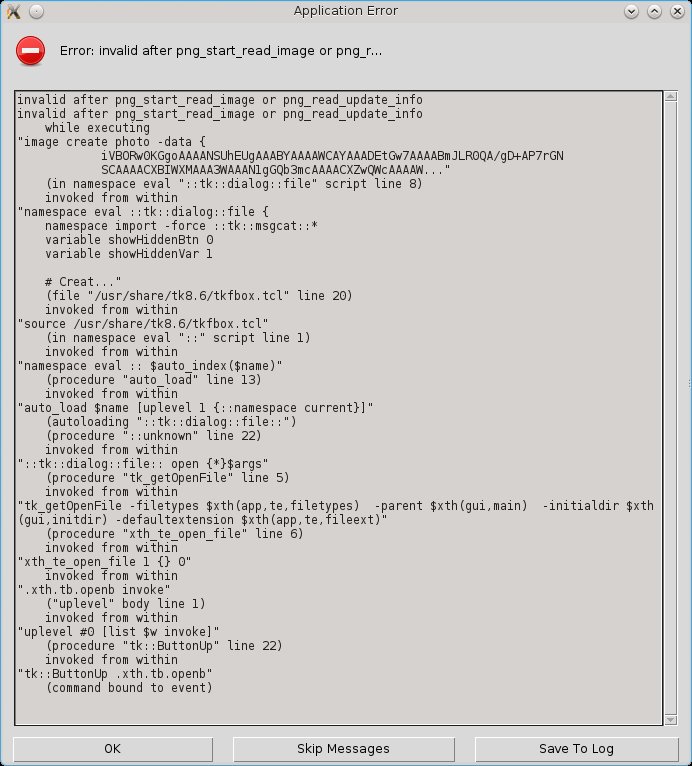

Looks strange, especially, when it works in compiler. As far as I know, nothing was touched in xtherion in newest version. Are you able to open new file via File->Open or Ctrl+O? S. On 8 January 2015 at 17:34, Bill Gee <bgee@campercaver.net> wrote:
Hello everyone -
I installed therion 5.3.16 a week ago but never did anything more than verify it would start. Now I need to do some work on a map. In xtherion - Whenever I try to open either a th or th2 file (text editor or map editor windows), it throws an error. I took a screen shot and attached to this message.
The error comes up as soon as I click on the File-Open icon. It never presents a file chooser dialog.
The cave will compile correctly. The thconfig file opens without error. This all worked in 5.3.15.
The system is 64-bit Fedora 21.
Any ideas?
Thanks - Bill Gee
_______________________________________________ Therion mailing list Therion@speleo.sk http://mailman.speleo.sk/mailman/listinfo/therion
Hi Stacho - Both File-Open and Ctrl-O give the same error. I tried it on several different caves, too, and nothing changed. I also tried creating a new file. Same error. I even tried it on a brand new cave by opening xtherion and then immediately going to the text edit window and trying to create a new file. I tried it on both 32-bit and 64-bit Fedora 21. No change, same behavior on both. When I did that last, there were some interesting messages in the bash window. ============= [bgee@main2 ~]$ bgerror failed to handle background error. Original error: invalid after png_start_read_image or png_read_update_info Error in bgerror: can't invoke "grab" command: application has been destroyed bgerror failed to handle background error. Original error: can't read "data(upd,afterid)": no such variable Error in bgerror: can't invoke "tk" command: application has been destroyed [1]+ Done xtherion [bgee@main2 ~]$ which tk /usr/bin/which: no tk in (/usr/lib64/qt-3.3/bin:/usr/lib64/ccache:/usr/local/bin:/usr/local/sbin:/usr/bin:/usr/sbin:/bin:/sbin:/home/bgee/bin) [bgee@main2 ~]$ tk bash: tk: command not found [bgee@main2 ~]$ ============= I confirmed that tk is installed, yet there is no command called tk. When I get a chance, I will revert a computer back to 5.3.15 and see what happens. Thanks - Bill Gee On Thursday, January 08, 2015 21:22:46 Stacho Mudrak wrote:
Looks strange, especially, when it works in compiler. As far as I know, nothing was touched in xtherion in newest version.
Are you able to open new file via File->Open or Ctrl+O?
S.
On 8 January 2015 at 17:34, Bill Gee <bgee@campercaver.net> wrote:
Hello everyone -
I installed therion 5.3.16 a week ago but never did anything more than verify it would start. Now I need to do some work on a map. In xtherion - Whenever I try to open either a th or th2 file (text editor or map editor windows), it throws an error. I took a screen shot and attached to this message.
The error comes up as soon as I click on the File-Open icon. It never presents a file chooser dialog.
The cave will compile correctly. The thconfig file opens without error. This all worked in 5.3.15.
The system is 64-bit Fedora 21.
Any ideas?
Thanks - Bill Gee
_______________________________________________ Therion mailing list Therion@speleo.sk http://mailman.speleo.sk/mailman/listinfo/therion
Hi Bill, it looks to me, that commands that are shown are dynamic library routines, not the system commands. When I will have time, I can install Fedora on some machine to see, what is going on. It is really strange. It looks to me, that tk_getOpenFile fails from some reason, but it looks like a tcltk installation problem, not the therion one. At least, it fails in /usr/share/tk8.6/tkfbox.tcl, which is I believe a part of TclTk installation. Are you able to run in X console: wish % tk_getOpenFile It should open File Open dialog. But if you are able to open thcofig file, it is probably a wrong lead... S. On 8 January 2015 at 21:43, Bill Gee <bgee@campercaver.net> wrote:
Hi Stacho -
Both File-Open and Ctrl-O give the same error. I tried it on several different caves, too, and nothing changed. I also tried creating a new file. Same error.
I even tried it on a brand new cave by opening xtherion and then immediately going to the text edit window and trying to create a new file.
I tried it on both 32-bit and 64-bit Fedora 21. No change, same behavior on both.
When I did that last, there were some interesting messages in the bash window.
============= [bgee@main2 ~]$ bgerror failed to handle background error. Original error: invalid after png_start_read_image or png_read_update_info Error in bgerror: can't invoke "grab" command: application has been destroyed bgerror failed to handle background error. Original error: can't read "data(upd,afterid)": no such variable Error in bgerror: can't invoke "tk" command: application has been destroyed
[1]+ Done xtherion [bgee@main2 ~]$ which tk /usr/bin/which: no tk in
(/usr/lib64/qt-3.3/bin:/usr/lib64/ccache:/usr/local/bin:/usr/local/sbin:/usr/bin:/usr/sbin:/bin:/sbin:/home/bgee/bin) [bgee@main2 ~]$ tk bash: tk: command not found [bgee@main2 ~]$ =============
I confirmed that tk is installed, yet there is no command called tk.
When I get a chance, I will revert a computer back to 5.3.15 and see what happens.
Thanks - Bill Gee
On Thursday, January 08, 2015 21:22:46 Stacho Mudrak wrote:
Looks strange, especially, when it works in compiler. As far as I know, nothing was touched in xtherion in newest version.
Are you able to open new file via File->Open or Ctrl+O?
S.
On 8 January 2015 at 17:34, Bill Gee <bgee@campercaver.net> wrote:
Hello everyone -
I installed therion 5.3.16 a week ago but never did anything more than verify it would start. Now I need to do some work on a map. In xtherion - Whenever I try to open either a th or th2 file (text editor or map editor windows), it throws an error. I took a screen shot and attached to this message.
The error comes up as soon as I click on the File-Open icon. It never presents a file chooser dialog.
The cave will compile correctly. The thconfig file opens without error. This all worked in 5.3.15.
The system is 64-bit Fedora 21.
Any ideas?
Thanks - Bill Gee
_______________________________________________ Therion mailing list Therion@speleo.sk http://mailman.speleo.sk/mailman/listinfo/therion
_______________________________________________ Therion mailing list Therion@speleo.sk http://mailman.speleo.sk/mailman/listinfo/therion
Hi Stacho - If I name the thconfig file on the xtherion command line, then it will open. If I run xtherion with no command line options, then use File-Open to get a thconfig file, it will fail. Running tk_getOpenFile inside wish works. It opens a file browser dialog box. I reverted one of my test systems to therion 5.3.15. The problem still exists. There is no "make uninstall" target, so I just deleted the three binary files (loch, therion, xtherion) from /usr/local/bin and then compiled and installed 5.3.15. I have version 8.6.3 of both Tcl and Tk. So far all of my testing has been on Fedora 21 systems. I have a Centos 7 test system which has never had Therion installed. Tomorrow I will give it a try. Thanks - Bill Gee On Thursday, January 08, 2015 23:04:07 Stacho Mudrak wrote:
Hi Bill,
it looks to me, that commands that are shown are dynamic library routines, not the system commands.
When I will have time, I can install Fedora on some machine to see, what is going on. It is really strange.
It looks to me, that tk_getOpenFile fails from some reason, but it looks like a tcltk installation problem, not the therion one. At least, it fails in /usr/share/tk8.6/tkfbox.tcl, which is I believe a part of TclTk installation.
Are you able to run in X console:
wish % tk_getOpenFile
It should open File Open dialog. But if you are able to open thcofig file, it is probably a wrong lead...
S.
On 8 January 2015 at 21:43, Bill Gee <bgee@campercaver.net> wrote:
Hi Stacho -
Both File-Open and Ctrl-O give the same error. I tried it on several different caves, too, and nothing changed. I also tried creating a new file. Same error.
I even tried it on a brand new cave by opening xtherion and then immediately going to the text edit window and trying to create a new file.
I tried it on both 32-bit and 64-bit Fedora 21. No change, same behavior on both.
When I did that last, there were some interesting messages in the bash window.
============= [bgee@main2 ~]$ bgerror failed to handle background error.
Original error: invalid after png_start_read_image or
png_read_update_info
Error in bgerror: can't invoke "grab" command: application has been
destroyed bgerror failed to handle background error.
Original error: can't read "data(upd,afterid)": no such variable Error in bgerror: can't invoke "tk" command: application has been
destroyed
[1]+ Done xtherion [bgee@main2 ~]$ which tk /usr/bin/which: no tk in
(/usr/lib64/qt-3.3/bin:/usr/lib64/ccache:/usr/local/bin:/usr/local/sbin:/u sr/bin:/usr/sbin:/bin:/sbin:/home/bgee/bin) [bgee@main2 ~]$ tk bash: tk: command not found [bgee@main2 ~]$ =============
I confirmed that tk is installed, yet there is no command called tk.
When I get a chance, I will revert a computer back to 5.3.15 and see what happens.
Thanks - Bill Gee
On Thursday, January 08, 2015 21:22:46 Stacho Mudrak wrote:
Looks strange, especially, when it works in compiler. As far as I know, nothing was touched in xtherion in newest version.
Are you able to open new file via File->Open or Ctrl+O?
S.
On 8 January 2015 at 17:34, Bill Gee <bgee@campercaver.net> wrote:
Hello everyone -
I installed therion 5.3.16 a week ago but never did anything more than verify it would start. Now I need to do some work on a map. In xtherion - Whenever I try to open either a th or th2 file (text editor or map editor
windows),
it throws an error. I took a screen shot and attached to this message.
The error comes up as soon as I click on the File-Open icon. It never presents a file chooser dialog.
The cave will compile correctly. The thconfig file opens without
error.
This all worked in 5.3.15.
The system is 64-bit Fedora 21.
Any ideas?
Thanks - Bill Gee
_______________________________________________ Therion mailing list Therion@speleo.sk http://mailman.speleo.sk/mailman/listinfo/therion
_______________________________________________ Therion mailing list Therion@speleo.sk http://mailman.speleo.sk/mailman/listinfo/therion

+++ Bill Gee [2015-01-08 14:43 -0600]:
Hi Stacho -
Both File-Open and Ctrl-O give the same error. I tried it on several different caves, too, and nothing changed. I also tried creating a new file. Same error.
I even tried it on a brand new cave by opening xtherion and then immediately going to the text edit window and trying to create a new file.
I tried it on both 32-bit and 64-bit Fedora 21. No change, same behavior on both.
When I did that last, there were some interesting messages in the bash window.
============= [bgee@main2 ~]$ bgerror failed to handle background error. Original error: invalid after png_start_read_image or png_read_update_info Error in bgerror: can't invoke "grab" command: application has been destroyed bgerror failed to handle background error. Original error: can't read "data(upd,afterid)": no such variable Error in bgerror: can't invoke "tk" command: application has been destroyed
One possibility. The tk graphics extras are packaged separately in Debian, but need to be installed. Fedora maybe the same. The package is libtk-img on debian. Is that a clue? Wookey -- Principal hats: Linaro, Debian, Wookware, ARM http://wookware.org/
On Friday, January 09, 2015 04:37:10 Wookey wrote:
+++ Bill Gee [2015-01-08 14:43 -0600]:
Hi Stacho -
Both File-Open and Ctrl-O give the same error. I tried it on several different caves, too, and nothing changed. I also tried creating a new file. Same error.
I even tried it on a brand new cave by opening xtherion and then immediately going to the text edit window and trying to create a new file.
I tried it on both 32-bit and 64-bit Fedora 21. No change, same behavior on both.
When I did that last, there were some interesting messages in the bash window.
============= [bgee@main2 ~]$ bgerror failed to handle background error.
Original error: invalid after png_start_read_image or png_read_update_info Error in bgerror: can't invoke "grab" command: application has been
destroyed bgerror failed to handle background error.
Original error: can't read "data(upd,afterid)": no such variable Error in bgerror: can't invoke "tk" command: application has been
destroyed
One possibility. The tk graphics extras are packaged separately in Debian, but need to be installed. Fedora maybe the same.
The package is libtk-img on debian.
Is that a clue?
Wookey
Hi Wookey - In Fedora the package is called "tkimg". Here is how it appears on my computer: ================ [bgee@main2 ~]$ rpm -qa | grep "^tk" tkimg-1.4-19.fc21.x86_64 tk-8.6.3-1.fc21.x86_64 tkinter-2.7.8-7.fc21.x86_64 tk-devel-8.6.3-1.fc21.x86_64 [bgee@main2 ~]$ rpm -qi tkimg Name : tkimg Version : 1.4 Release : 19.fc21 Architecture: x86_64 Install Date: Fri 19 Dec 2014 10:37:46 AM CST Group : Development/Libraries Size : 515935 License : BSD Signature : RSA/SHA256, Tue 04 Nov 2014 01:09:42 AM CST, Key ID 89ad4e8795a43f54 Source RPM : tkimg-1.4-19.fc21.src.rpm Build Date : Mon 03 Nov 2014 02:53:07 PM CST Build Host : buildhw-07.phx2.fedoraproject.org Relocations : (not relocatable) Packager : Fedora Project Vendor : Fedora Project URL : http://sourceforge.net/projects/tkimg Summary : Image support library for Tk Description : This package contains a collection of image format handlers for the Tk photo image type, and a new image type, pixmaps. The provided format handlers include bmp, gif, ico, jpeg, pcx, png, ppm, ps, sgi, sun, tga, tiff, xbm, and xpm. ================= I have had the tkimg package on my Therion computers for several years. Thanks - Bill Gee
Update - Trying this on a different Linux distro is going to be more difficult than I thought. I use derivatives of Red Hat on all my systems. That includes CentOS 6 and 7 as well as Fedora. I thought I would try installing Therion on one of my CentOS test systems. No such luck, at least not easily. There are no packages for either tkimg or metapost for CentOS. I am going to have to hunt around to find a tarball for them. Bill Gee On Friday, January 09, 2015 04:37:10 Wookey wrote:
+++ Bill Gee [2015-01-08 14:43 -0600]:
Hi Stacho -
Both File-Open and Ctrl-O give the same error. I tried it on several different caves, too, and nothing changed. I also tried creating a new file. Same error.
I even tried it on a brand new cave by opening xtherion and then immediately going to the text edit window and trying to create a new file.
I tried it on both 32-bit and 64-bit Fedora 21. No change, same behavior on both.
When I did that last, there were some interesting messages in the bash window.
============= [bgee@main2 ~]$ bgerror failed to handle background error.
Original error: invalid after png_start_read_image or png_read_update_info Error in bgerror: can't invoke "grab" command: application has been
destroyed bgerror failed to handle background error.
Original error: can't read "data(upd,afterid)": no such variable Error in bgerror: can't invoke "tk" command: application has been
destroyed
One possibility. The tk graphics extras are packaged separately in Debian, but need to be installed. Fedora maybe the same.
The package is libtk-img on debian.
Is that a clue?
Wookey
Update: This is definitely a problem with Tcl/TK and maybe tkimg. I found a computer with Fedora 21 and Therion 5.3.13 still installed. This computer shows the same problem. Therion obviously has not changed, but the system is patched up to current. That means it is not a problem in Therion. Something must have happened to the other subsystems. Bill Gee On Friday, January 09, 2015 04:37:10 Wookey wrote:
+++ Bill Gee [2015-01-08 14:43 -0600]:
Hi Stacho -
Both File-Open and Ctrl-O give the same error. I tried it on several different caves, too, and nothing changed. I also tried creating a new file. Same error.
I even tried it on a brand new cave by opening xtherion and then immediately going to the text edit window and trying to create a new file.
I tried it on both 32-bit and 64-bit Fedora 21. No change, same behavior on both.
When I did that last, there were some interesting messages in the bash window.
============= [bgee@main2 ~]$ bgerror failed to handle background error.
Original error: invalid after png_start_read_image or png_read_update_info Error in bgerror: can't invoke "grab" command: application has been
destroyed bgerror failed to handle background error.
Original error: can't read "data(upd,afterid)": no such variable Error in bgerror: can't invoke "tk" command: application has been
destroyed
One possibility. The tk graphics extras are packaged separately in Debian, but need to be installed. Fedora maybe the same.
The package is libtk-img on debian.
Is that a clue?
Wookey
Another update - It seems this is a problem in tkimg. I found another application which is reported to have exactly the same problem. http://sourceforge.net/p/scid/mailman/message/33180453/ Has anyone else upgraded to Tcl 8.6.3 and tkimg 1.4? Bill Gee On Friday, January 09, 2015 04:37:10 Wookey wrote:
+++ Bill Gee [2015-01-08 14:43 -0600]:
Hi Stacho -
Both File-Open and Ctrl-O give the same error. I tried it on several different caves, too, and nothing changed. I also tried creating a new file. Same error.
I even tried it on a brand new cave by opening xtherion and then immediately going to the text edit window and trying to create a new file.
I tried it on both 32-bit and 64-bit Fedora 21. No change, same behavior on both.
When I did that last, there were some interesting messages in the bash window.
============= [bgee@main2 ~]$ bgerror failed to handle background error.
Original error: invalid after png_start_read_image or png_read_update_info Error in bgerror: can't invoke "grab" command: application has been
destroyed bgerror failed to handle background error.
Original error: can't read "data(upd,afterid)": no such variable Error in bgerror: can't invoke "tk" command: application has been
destroyed
One possibility. The tk graphics extras are packaged separately in Debian, but need to be installed. Fedora maybe the same.
The package is libtk-img on debian.
Is that a clue?
Wookey
+++ Bill Gee [2015-01-12 11:04 -0600]:
Another update - It seems this is a problem in tkimg. I found another application which is reported to have exactly the same problem.
http://sourceforge.net/p/scid/mailman/message/33180453/
Has anyone else upgraded to Tcl 8.6.3 and tkimg 1.4?
I'm using libtk-img 1.4.2 and tcl 8.6.2 So it might be an 8.6.2->8.6.3 issue? Can you downgrade to 8.6.2 and see if it goes away? 8.6.3 is not yet packaged for Debian so I can't easily try it out here. Wookey -- Principal hats: Linaro, Debian, Wookware, ARM http://wookware.org/
One more update: I downgraded the tkimg installation on a test machine to the previous version. It fixed the problem. Definitely something in the latest tkimg package. In Fedora-speak, the version that does not work is tkimg-1.4-19. The version which DOES work is tkimg-1.4-18. Fortunately there are no dependencies on tkimg. It can be uninstalled and reinstalled without affecting anything in the rpm dependency tree. As an interesting side effect - I found that xtherion works quite well when tkimg is not installed at all, with the exception that background images in the map editor do not load. There is no error message - they just don't load. Bill Gee On Friday, January 09, 2015 04:37:10 Wookey wrote:
+++ Bill Gee [2015-01-08 14:43 -0600]:
Hi Stacho -
Both File-Open and Ctrl-O give the same error. I tried it on several different caves, too, and nothing changed. I also tried creating a new file. Same error.
I even tried it on a brand new cave by opening xtherion and then immediately going to the text edit window and trying to create a new file.
I tried it on both 32-bit and 64-bit Fedora 21. No change, same behavior on both.
When I did that last, there were some interesting messages in the bash window.
============= [bgee@main2 ~]$ bgerror failed to handle background error.
Original error: invalid after png_start_read_image or png_read_update_info Error in bgerror: can't invoke "grab" command: application has been
destroyed bgerror failed to handle background error.
Original error: can't read "data(upd,afterid)": no such variable Error in bgerror: can't invoke "tk" command: application has been
destroyed
One possibility. The tk graphics extras are packaged separately in Debian, but need to be installed. Fedora maybe the same.
The package is libtk-img on debian.
Is that a clue?
Wookey
+++ Bill Gee [2015-01-12 11:21 -0600]:
One more update:
I downgraded the tkimg installation on a test machine to the previous version. It fixed the problem. Definitely something in the latest tkimg package.
In Fedora-speak, the version that does not work is tkimg-1.4-19. The version which DOES work is tkimg-1.4-18.
OK. Not sure how that corresponds to my 1.4.2+dfsg-2 versioning (newer/older). But I presume it's just a packaging change between -19 and -19 that has broken things.
Fortunately there are no dependencies on tkimg. It can be uninstalled and reinstalled without affecting anything in the rpm dependency tree.
As an interesting side effect - I found that xtherion works quite well when tkimg is not installed at all, with the exception that background images in the map editor do not load. There is no error message - they just don't load.
Correct. Which is why that package is only 'recommended' (i.e install by default, but don't require) in the Debian packaging. And if you make your background images as .pbm (portable bitmap) then they work fine without this package (which adds support for 'newfangled' formats like .png and .jpeg :-) Wookey -- Principal hats: Linaro, Debian, Wookware, ARM http://wookware.org/
participants (3)
-
 Bill Gee
 -
 Stacho Mudrak
 -
 Wookey