'can't read "xth(me, cmds, ....": no such element in array' errors

Hi, I trying to work in a topo I make recently. One of the sketches got way bigger than it should and is presenting errors like: can't read "xth(me,cmds,5,18,x)": no such element in array I already reduced the file to something really small and I still get these errors most of the times I try to open it. Any ideas on what could be the cause? I send attached both a small version of the sketch that presents the error and the complete log of the error. Regards, Rodrigo

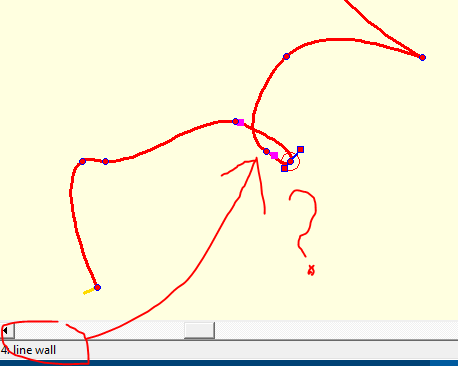
Rodrigo Do you still get the error if you remove the loop in the wall? And if you correct the orientation of the line wall in the top right corner (it’s yellow tick mark points out, not in)? Bruce From: Therion [mailto:therion-bounces@speleo.sk] On Behalf Of Rodrigo Severo via Therion Sent: Friday, 23 February 2018 5:27 AM To: List for Therion users <therion@speleo.sk> Cc: Rodrigo Severo <rodrigo@fabricadeideias.com> Subject: [Therion] 'can't read "xth(me, cmds, ....": no such element in array' errors Hi, I trying to work in a topo I make recently. One of the sketches got way bigger than it should and is presenting errors like: can't read "xth(me,cmds,5,18,x)": no such element in array I already reduced the file to something really small and I still get these errors most of the times I try to open it. Any ideas on what could be the cause? I send attached both a small version of the sketch that presents the error and the complete log of the error. Regards, Rodrigo
2018-02-22 15:09 GMT-03:00 Bruce Mutton via Therion <therion@speleo.sk>:
Rodrigo
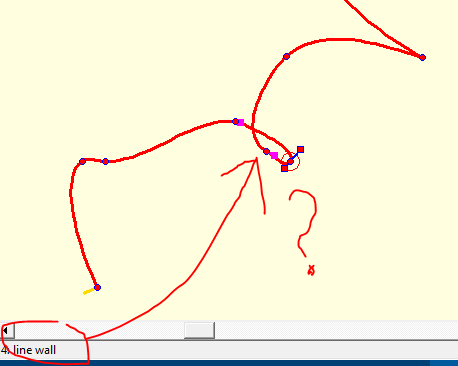
Do you still get the error if you remove the loop in the wall?
And if you correct the orientation of the line wall in the top right corner (it’s yellow tick mark points out, not in)?
Nice questions. I don't seem to be able to remove the loop in Therion. Can you? I will try to do it in Topodroid. Thanks, Rodrigo

Hi, Rodrigo, if I do a look on your file with an simple editor (Windows), then it looks very other as all my own th2-files. In you file is written all in 3 lines. And I think that is the problem in generally. Your file is not really readable for Therion. I`am using Therion 5.4.1 on Windows 7 prof. This file looks like it is coming from Topodroid without compiling it to therion-format, if I`am right. Regards Markus My th2-Files looks like this (a part of a file: encoding utf-8 ##XTHERION## xth_me_area_adjust -138.0 -138.0 1545.322834645669 1838.0 ##XTHERION## xth_me_area_zoom_to 40 ##XTHERION## xth_me_image_insert {234.64566929133855 1 1.0} {174.8031496062992 1.0} Farrenwiesschacht-alles_p.xvi 0 {} ##XTHERION## xth_me_image_insert {349.60629921259834 1 1.0} {1701.2913385826766 1.0} Farrenwiesschacht-alles_e.xvi 0 {} scrap scrap1 -projection plan -scale [-128.0 -128.0 1545.322834645669 -128.0 0.0 0.0 42.50239999999999 0.0 m] line gradient 137.0 82.0 203.0 89.0 323.0 243.0 323.0 243.0 smooth off endline line gradient 108.0 125.0 179.0 121.0 308.0 244.0 308.0 244.0 smooth off endline line gradient 91.0 166.0 161.0 155.0 308.0 259.0 308.0 259.0 smooth off endline line gradient 85.0 213.0 147.0 216.0 275.0 251.0 275.0 251.0 smooth off endline . . . . . endscrap Von: Therion [mailto:therion-bounces@speleo.sk] Im Auftrag von Rodrigo Severo via Therion Gesendet: Donnerstag, 22. Februar 2018 17:27 An: List for Therion users Cc: Rodrigo Severo Betreff: [Therion] 'can't read "xth(me, cmds, ....": no such element in array' errors Hi, I trying to work in a topo I make recently. One of the sketches got way bigger than it should and is presenting errors like: can't read "xth(me,cmds,5,18,x)": no such element in array I already reduced the file to something really small and I still get these errors most of the times I try to open it. Any ideas on what could be the cause? I send attached both a small version of the sketch that presents the error and the complete log of the error. Regards, Rodrigo
2018-02-22 15:44 GMT-03:00 Markus Boldt via Therion <therion@speleo.sk>:
Hi,
Rodrigo,
if I do a look on your file with an simple editor (Windows), then it looks very other as all my own th2-files. In you file is written all in 3 lines.
And I think that is the problem in generally. Your file is not really readable for Therion. I`am using Therion 5.4.1 on Windows 7 prof.
This file looks like it is coming from Topodroid without compiling it to therion-format, if I`am right.
I think the problem you are seeing are caused just different line endings settings. My file looks exactly like that here. But I use Linux. All other files from this same topo are being read correctly by Therion, AFAICT. Don't Therion accepts Unix line-endings? Regards, Rodrigo

As Bruse answered you, there is a loop on one of your walls. Second problem is that your scrap doesn’t obtain any stations and it is not scaled manually. So Therion calculated in some very great numbers. If you manually scale your scrap and correct that loop everything should be OK. Martin S.
22. 2. 2018 v 19:55, Rodrigo Severo via Therion <therion@speleo.sk>:
2018-02-22 15:44 GMT-03:00 Markus Boldt via Therion <therion@speleo.sk <mailto:therion@speleo.sk>>: Hi,
Rodrigo,
if I do a look on your file with an simple editor (Windows), then it looks very other as all my own th2-files. In you file is written all in 3 lines.
And I think that is the problem in generally. Your file is not really readable for Therion. I`am using Therion 5.4.1 on Windows 7 prof.
This file looks like it is coming from Topodroid without compiling it to therion-format, if I`am right.
I think the problem you are seeing are caused just different line endings settings.
My file looks exactly like that here. But I use Linux.
All other files from this same topo are being read correctly by Therion, AFAICT.
Don't Therion accepts Unix line-endings?
Regards,
Rodrigo
_______________________________________________ Therion mailing list Therion@speleo.sk https://mailman.speleo.sk/listinfo/therion

Hi guys, Sorry to bother you with my dumbness, but I can't figure it out how to use the command grade based on the manual. Let say that I have a survey with poor measurements, how to I apply grade3 to this survey ? Thanks, Phil
Phil I don't do this much, but here is what I do for a low grade survey. I put this near the start of the low grade survey file. centreline grade BCRA3 # low accuracy # grade BCRA5 # high accuracy ... Endcentreline I am not sure if the same centreline can have multiple grades if you put grade statements in line with your data. The Therion Book description on page 19 would suggest not, as quoted below. “sd <quantity list> <value> <units> ▷ sets the standard deviation for the given measurements. The Quantity list can contain the following keywords: length, tape, bearing, compass, gradient, clino, counter, depth, x, y, z, position, easting, dx, northing, dy, altitude, dz. • grade <grade list> ▷ sets standard deviations according to the survey grade specification (see grade command). All previously specified standard deviations or grades are lost. If you want to change an SD, use the sd option after this command. If multiple grades are specified, only the last one applies. You can specify grades only for position or only for surveys. If you want to combine them, you must use them in one grade line. ” There are UISv1 grade options these days, but I will let someone else who knows them verify that they work… Bruce -----Original Message----- From: Therion [mailto:therion-bounces@speleo.sk] On Behalf Of Philippe Vernant via Therion Sent: Friday, 23 February 2018 10:11 AM To: List for Therion users <therion@speleo.sk> Cc: Philippe Vernant <phil.vernant@gmail.com> Subject: [Therion] grade commande Hi guys, Sorry to bother you with my dumbness, but I can't figure it out how to use the command grade based on the manual. Let say that I have a survey with poor measurements, how to I apply grade3 to this survey ? Thanks, Phil _______________________________________________ Therion mailing list <mailto:Therion@speleo.sk> Therion@speleo.sk <https://mailman.speleo.sk/listinfo/therion> https://mailman.speleo.sk/listinfo/therion

The uis grades work! Am 2018-02-23 8:40, schrieb Bruce Mutton via Therion:
Phil
I don't do this much, but here is what I do for a low grade survey.
I put this near the start of the low grade survey file.
centreline
grade BCRA3 # low accuracy
# grade BCRA5 # high accuracy
...
Endcentreline
I am not sure if the same centreline can have multiple grades if you put grade statements in line with your data.
The Therion Book description on page 19 would suggest not, as quoted below.
“sd <quantity list> <value> <units> ▷ sets the standard deviation for the given measurements. The Quantity list can contain the following keywords: length, tape, bearing, compass, gradient, clino, counter, depth, x, y, z, position, easting, dx, northing, dy, altitude, dz. • grade <grade list> ▷ sets standard deviations according to the survey grade specification (see grade command). All previously specified standard deviations or grades are lost. If you want to change an SD, use the sd option after this command. If multiple grades are specified, only the last one applies. You can specify grades only for position or only for surveys. If you want to combine them, you must use them in one grade line.
”
There are UISv1 grade options these days, but I will let someone else who knows them verify that they work…
Bruce
-----Original Message----- From: Therion [mailto:therion-bounces@speleo.sk] On Behalf Of Philippe Vernant via Therion Sent: Friday, 23 February 2018 10:11 AM To: List for Therion users <therion@speleo.sk> Cc: Philippe Vernant <phil.vernant@gmail.com> Subject: [Therion] grade commande
Hi guys,
Sorry to bother you with my dumbness, but I can't figure it out how to use the command grade based on the manual. Let say that I have a survey with poor measurements, how to I apply grade3 to this survey ?
Thanks,
Phil
_______________________________________________
Therion mailing list
Therion@speleo.sk [1]
https://mailman.speleo.sk/listinfo/therion [2]
Links: ------ [1] mailto:Therion@speleo.sk [2] https://mailman.speleo.sk/listinfo/therion
Anyway you may divide centerline to several centerlines and use diferent grades for each one. Odesláno z iPhonu 23. 2. 2018 v 7:40, Bruce Mutton via Therion <therion@speleo.sk>:
Phil I don't do this much, but here is what I do for a low grade survey. I put this near the start of the low grade survey file.
centreline grade BCRA3 # low accuracy # grade BCRA5 # high accuracy
... Endcentreline
I am not sure if the same centreline can have multiple grades if you put grade statements in line with your data. The Therion Book description on page 19 would suggest not, as quoted below.
“sd <quantity list> <value> <units> ▷ sets the standard deviation for the given measurements. The Quantity list can contain the following keywords: length, tape, bearing, compass, gradient, clino, counter, depth, x, y, z, position, easting, dx, northing, dy, altitude, dz. • grade <grade list> ▷ sets standard deviations according to the survey grade specification (see grade command). All previously specified standard deviations or grades are lost. If you want to change an SD, use the sd option after this command. If multiple grades are specified, only the last one applies. You can specify grades only for position or only for surveys. If you want to combine them, you must use them in one grade line. ”
There are UISv1 grade options these days, but I will let someone else who knows them verify that they work…
Bruce
-----Original Message----- From: Therion [mailto:therion-bounces@speleo.sk] On Behalf Of Philippe Vernant via Therion Sent: Friday, 23 February 2018 10:11 AM To: List for Therion users <therion@speleo.sk> Cc: Philippe Vernant <phil.vernant@gmail.com> Subject: [Therion] grade commande
Hi guys,
Sorry to bother you with my dumbness, but I can't figure it out how to use the command grade based on the manual. Let say that I have a survey with poor measurements, how to I apply grade3 to this survey ?
Thanks, Phil _______________________________________________ Therion mailing list Therion@speleo.sk https://mailman.speleo.sk/listinfo/therion _______________________________________________ Therion mailing list Therion@speleo.sk https://mailman.speleo.sk/listinfo/therion
Thanks you guys, now it is working! Best, Phil
On 23 Feb 2018, at 7:40 AM, Bruce Mutton via Therion <therion@speleo.sk> wrote:
Phil I don't do this much, but here is what I do for a low grade survey. I put this near the start of the low grade survey file.
centreline grade BCRA3 # low accuracy # grade BCRA5 # high accuracy
... Endcentreline
I am not sure if the same centreline can have multiple grades if you put grade statements in line with your data. The Therion Book description on page 19 would suggest not, as quoted below.
“sd <quantity list> <value> <units> ▷ sets the standard deviation for the given measurements. The Quantity list can contain the following keywords: length, tape, bearing, compass, gradient, clino, counter, depth, x, y, z, position, easting, dx, northing, dy, altitude, dz. • grade <grade list> ▷ sets standard deviations according to the survey grade specification (see grade command). All previously specified standard deviations or grades are lost. If you want to change an SD, use the sd option after this command. If multiple grades are specified, only the last one applies. You can specify grades only for position or only for surveys. If you want to combine them, you must use them in one grade line. ”
There are UISv1 grade options these days, but I will let someone else who knows them verify that they work…
Bruce
-----Original Message----- From: Therion [mailto:therion-bounces@speleo.sk] On Behalf Of Philippe Vernant via Therion Sent: Friday, 23 February 2018 10:11 AM To: List for Therion users <therion@speleo.sk> Cc: Philippe Vernant <phil.vernant@gmail.com> Subject: [Therion] grade commande
Hi guys,
Sorry to bother you with my dumbness, but I can't figure it out how to use the command grade based on the manual. Let say that I have a survey with poor measurements, how to I apply grade3 to this survey ?
Thanks, Phil _______________________________________________ Therion mailing list Therion@speleo.sk <mailto:Therion@speleo.sk> https://mailman.speleo.sk/listinfo/therion <https://mailman.speleo.sk/listinfo/therion>_______________________________________________ Therion mailing list Therion@speleo.sk <mailto:Therion@speleo.sk> https://mailman.speleo.sk/listinfo/therion <https://mailman.speleo.sk/listinfo/therion>

And, since a few weeks: http://www.speleotoscana.it/3d/ :-) Marco 2018-02-24 9:45 GMT+01:00 Martin Sluka via Therion <therion@speleo.sk>:
https://aardgoose.github.io/CaveView.js/
http://www.speleopg.it/modelli-3d/
Martin S.
_______________________________________________ Therion mailing list Therion@speleo.sk https://mailman.speleo.sk/listinfo/therion
2018-02-24 9:48 GMT+01:00 Marco Menchise <marco.menchise@gmail.com>:
And, since a few weeks:
http://www.speleotoscana.it/3d/
:-)
That is a page from the Federazione Speleologica Toscana website. We collected 3D models of many caves in Apuan Alpes, Italy and we overlayed them with three different maps: a trekking map, a geological map and the official Italian map. Users may choose about different maps and models using CaveView menu.
There are also credits at the page bottom :-) Thanks, Marco
participants (7)
-
 Benedikt Hallinger
 -
 Bruce Mutton
 -
 Marco Menchise
 -
 Markus Boldt
 -
 Martin Sluka
 -
 Philippe Vernant
 -
 Rodrigo Severo