3d to QGIS - different alignment

Hi all Not strictly a Therion question, but the answer is likely to be in the data entry or the interpretation of data in Therion. I'm slowly incorporating QGIS into my workflow, and trying to automate it. As such I'm using a modified version of the survex 3d importer https://github.com/AndrewAkinson/qgis3-survex-import_amend So that items can be easily switched on and off I'm going down the line of importing the 3d files by cave rather than the generated one for the whole catchment For now I'm doing it with the data in http://www.cave-registry.org.uk/svn/CheddarCatchment/ Currently I'm working on the Longwood Valley area as Longwood Valley Sink has been recently discovered. The directories I'm using RRift/ (3d needs to be generated from survex) LongwoodValleySink/ Longwood/ (Fake data with calibrate compass -90!) Toothache/ (single leg) In each of these directories the .th file generates a survex 3d file Also in the the root there is a LongwoodValley.thcfg which has the above caves (plus maybe Charterhouse, GB, TynningsGS and Reads depending on how I left it) In the diagram attached (hopefully this list does attachments!) The Dark purple dots are the import of the 3d file that has Rhino, Longwood, LongwoodValley Sink and Toothache together. The light pink, yellow dots are the individual imports (and entrances from the MCRA database.) Also included is an overlay of a scree shot from aven, which agrees with the group import. The question is why is Longwood different when imported as a 3d on its own compared with as a group? They are both using the same data! Andrew
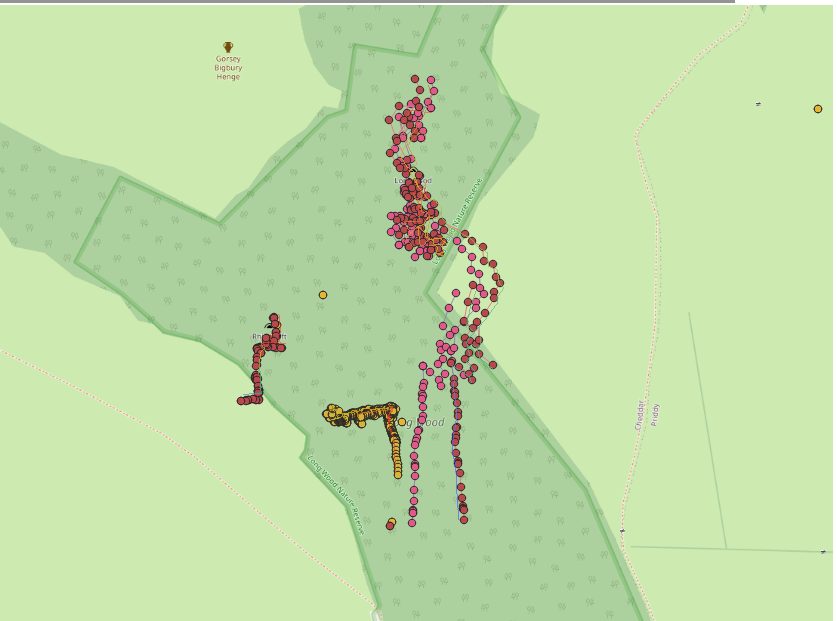
Found the problem. As it, is fake data, it does not have a date. It appears Therion use the earliest date for the data is has for undated surveys. This is nearly 9° difference between 1965 to today, which is quiet a swing. (I don't know what if Therion uses today as the declination if it processes data none of which has a date. I guess it just doesn't apply declination, which currently for the UK is nearly the same thing) Solved by setting declination to zero, as the fake data is aligned with true north. Not sure processing surveys that do not have a date with the oldest date is the best option. This changes the answer depending on what caves it is processed with. Not sure what the right answer is, but I fell applying no declination is probably best. Then it either is broken or acceptable where ever it is processed. This leads to the problem that I have lots of old data that I do not know the date of, I need to think of the best way to handle this. thanks Andrew On 20/02/2025 11:57, Andrew Atkinson wrote:
Hi all
Not strictly a Therion question, but the answer is likely to be in the data entry or the interpretation of data in Therion.
I'm slowly incorporating QGIS into my workflow, and trying to automate it.
As such I'm using a modified version of the survex 3d importer
https://github.com/AndrewAkinson/qgis3-survex-import_amend
So that items can be easily switched on and off I'm going down the line of importing the 3d files by cave rather than the generated one for the whole catchment
For now I'm doing it with the data in http://www.cave-registry.org.uk/svn/CheddarCatchment/
Currently I'm working on the Longwood Valley area as Longwood Valley Sink has been recently discovered.
The directories I'm using
RRift/ (3d needs to be generated from survex) LongwoodValleySink/ Longwood/ (Fake data with calibrate compass -90!) Toothache/ (single leg)
In each of these directories the .th file generates a survex 3d file
Also in the the root there is a LongwoodValley.thcfg which has the above caves (plus maybe Charterhouse, GB, TynningsGS and Reads depending on how I left it)
In the diagram attached (hopefully this list does attachments!)
The Dark purple dots are the import of the 3d file that has Rhino, Longwood, LongwoodValley Sink and Toothache together. The light pink, yellow dots are the individual imports (and entrances from the MCRA database.) Also included is an overlay of a scree shot from aven, which agrees with the group import.
The question is why is Longwood different when imported as a 3d on its own compared with as a group? They are both using the same data!
Andrew
_______________________________________________ Therion mailing list Therion@speleo.sk https://mailman.speleo.sk/listinfo/therion

Hi Andrew - What a coincidence this is! I have been struggling with QGIS for a couple of weeks. It has a VERY steep learning curve. I am beginning to think that our future as cave cartographers will include some kind of GIS work. Some sort of tutorial would be very useful for complete GIS newbies like me I got your Survex plugin loaded. That was easy. It will open and view a .3d file which is produced by Therion. QGIS shows centerline and survey stations, but no walls. Nothing from LRUD. I suspect that Therion does not create the same kind of file as Survex. Viewing the file in Aven also does not show any kind of walls or passage polygons. I have struggled to get some sort of DEM file. That is another learning curve! I have a GeoTIFF file which covers several square miles around the current cave project. The web site I got it from (USGS) would not zoom in any further. I was able to add another layer which is the .shp file from Therion's ESRI output. Also a .kml file. Neither the .shp nor the .kml file is visible This cave runs directly under the owner's house. We would very much like to see some sort of 3D view which shows how the cave and surface are related. I suspect there is only 20 feet or so between the house and the cave. Not much! The owner has some ideas for renovation which would reduce that, possibly to something that is not safe. =============== Bill Gee On 2/20/25 05:57, Andrew Atkinson wrote:
Hi all
Not strictly a Therion question, but the answer is likely to be in the data entry or the interpretation of data in Therion.
I'm slowly incorporating QGIS into my workflow, and trying to automate it.
As such I'm using a modified version of the survex 3d importer
https://github.com/AndrewAkinson/qgis3-survex-import_amend
So that items can be easily switched on and off I'm going down the line of importing the 3d files by cave rather than the generated one for the whole catchment
For now I'm doing it with the data in http://www.cave-registry.org.uk/svn/CheddarCatchment/
Currently I'm working on the Longwood Valley area as Longwood Valley Sink has been recently discovered.
The directories I'm using
RRift/ (3d needs to be generated from survex) LongwoodValleySink/ Longwood/ (Fake data with calibrate compass -90!) Toothache/ (single leg)
In each of these directories the .th file generates a survex 3d file
Also in the the root there is a LongwoodValley.thcfg which has the above caves (plus maybe Charterhouse, GB, TynningsGS and Reads depending on how I left it)
In the diagram attached (hopefully this list does attachments!)
The Dark purple dots are the import of the 3d file that has Rhino, Longwood, LongwoodValley Sink and Toothache together. The light pink, yellow dots are the individual imports (and entrances from the MCRA database.) Also included is an overlay of a scree shot from aven, which agrees with the group import.
The question is why is Longwood different when imported as a 3d on its own compared with as a group? They are both using the same data!
Andrew
_______________________________________________ Therion mailing list Therion@speleo.sk https://mailman.speleo.sk/listinfo/therion
On 20/02/2025 14:32, Bill Gee wrote:
Hi Andrew -
What a coincidence this is! I have been struggling with QGIS for a couple of weeks. It has a VERY steep learning curve. I am beginning to think that our future as cave cartographers will include some kind of GIS work. Some sort of tutorial would be very useful for complete GIS newbies like me
I agree it is a very steep learning curve, I'm still very much on it, just not sure how high it is, but I'm getting to the stage I can do some useful stuff. I think some sort of GIS will be the front end for cavesurveying. Then we can concentrate on the cave data and the rest of the world will deal with viewing the rest of the world for us
I got your Survex plugin loaded. That was easy. It will open and view a .3d file which is produced by Therion. QGIS shows centerline and survey stations, but no walls. Nothing from LRUD. I suspect that Therion does not create the same kind of file as Survex. Viewing the file in Aven also does not show any kind of walls or passage polygons.
It is by no means mine, it is Patrick warren's I've done some modification so that it opens up the 3d file in aven. It is also ready to open the original data file. Currently there is a ticket so this information gets included into the 3d file to make full automation possible. Currently it assumes a one survey to one file each in their own directory, which works for me and many that I've delivered courses too, but there are many valid arrangements out there, hence needing the information in the 3d file.
I have struggled to get some sort of DEM file. That is another learning curve! I have a GeoTIFF file which covers several square miles around the current cave project. The web site I got it from (USGS) would not zoom in any further. I was able to add another layer which is the .shp file from Therion's ESRI output. Also a .kml file. Neither the .shp nor the .kml file is visible
DEM is confusing, and often treated differently. The native 3d view handles WMS/WMTS served files but the QGIS2threejs needs downloaded tiles and cannot do 3D across tile boundaries. Joining tiles is a dark art I don't think I've mastered.
This cave runs directly under the owner's house. We would very much like to see some sort of 3D view which shows how the cave and surface are related. I suspect there is only 20 feet or so between the house and the cave. Not much! The owner has some ideas for renovation which would reduce that, possibly to something that is not safe.
QGIS2threejs is very good. Main advantage is that it can be put on a web page. The native 3D view has other benefits. This sort of thing is easy to produce once you've got over the initial learning curve. Happy to help, either on the list or privately, depending how much spam this list might want. http://goodlife.org.uk/__Survey/LVS/ This link is likely to disappear over time. What I really like is the ease of sending, I have multiple sources of data, I could do google/bing views, but need to sort the copyright acknowledgement. So currently you only get OSM with and without the dots on the surface and the 1795/1815 or there abouts map. (I need to fix the acknowledgements on them.) But it has most of the tools you need, including measurement and transparency. Beat aven (sorry Olly) enjoy Andrew
participants (2)
-
 Andrew Atkinson
 -
 Bill Gee