
In a message, Andrew wrote:
I hope this can be done with symbol-show, but cannot fine what to put after can anyone help
Andrew
and Bruce replied:
Andrew
Not sure what your question is. If you include the survey centreline in a map definition, then splay shots and regular shots are plotted by default.
Bruce
Bruce, no, in every plot I've generated or seen only the regular shots get included in the pdf, never the splays, so if Andrew is right and they can be included then this will surely need an additional command. Graham

Hi, I have the same issue has Andrew's one: cannot display right and left indications in my pdf (map/ projection plan) despite they are in the centerline data (with option "walls auto" or "wall on"). I have tried to play with some options in export command: -enable walls/all/centerline -wall-source centerline/all but both gives a compilation error (unknown option). Regards, Benoît
In a message, Andrew wrote:
I hope this can be done with symbol-show, but cannot fine what to put after can anyone help
Andrew
and Bruce replied:
Andrew
Not sure what your question is. If you include the survey centreline in a map definition, then splay shots and regular shots are plotted by default.
Bruce
Bruce, no, in every plot I've generated or seen only the regular shots get included in the pdf, never the splays, so if Andrew is right and they can be included then this will surely need an additional command.
Graham
_______________________________________________ Therion mailing list Therion@speleo.sk http://mailman.speleo.sk/mailman/listinfo/therion

I have the same issue has Andrew's one: cannot display right and left indications in my pdf (map/ projection plan)
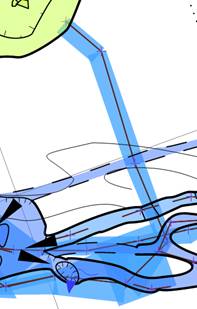
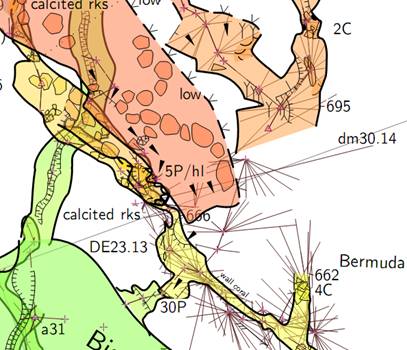
despite they are in the centerline data (with option "walls auto" or "wall on"). Left right up down (LRUD)are not the same as splay shots. LRUD display as shaded quadrilaterals overlaid on the centreline, provided you also have; a) Background colour different to foreground colour, and b) in an established project, provided you also have the centreline in question in the map definition. This is how you change the map foreground colour in a layout. colour map-fg altitude # Shading in cave passage, <colour>, <altitude>, <scrap>, <map> The image below shows an example of LRUD (blue) and survey centrelines part of an established map. There are no splays in this one. And this next snapshot from the same pdf file shows passages in various stages of drawing completion. All of the passages have splay shots, but only the passages that have the centreline included in the map definition have their splays included in the output. This is a large project, so I may have forgotten something, but I am pretty sure that is all there is to it. They are the principles I have followed on other smaller projects and they work out OK. I should point out that I have never used the shot flag 'splay'. All of my data with splay shots comes from PocketTopo, and so I make use of the default behaviour. "All shots having one of the stations named either '.' or '-' are splay shots by default" (from the Therion Book) Explicitly using the shot flag splay may invoke different behaviour - I have never tried. Bruce
participants (3)
-
 "Benoît Lebeau"
 -
 Bruce
Bruce -
 Graham Mullan