Horrific Warping between maps where I want my lines to join

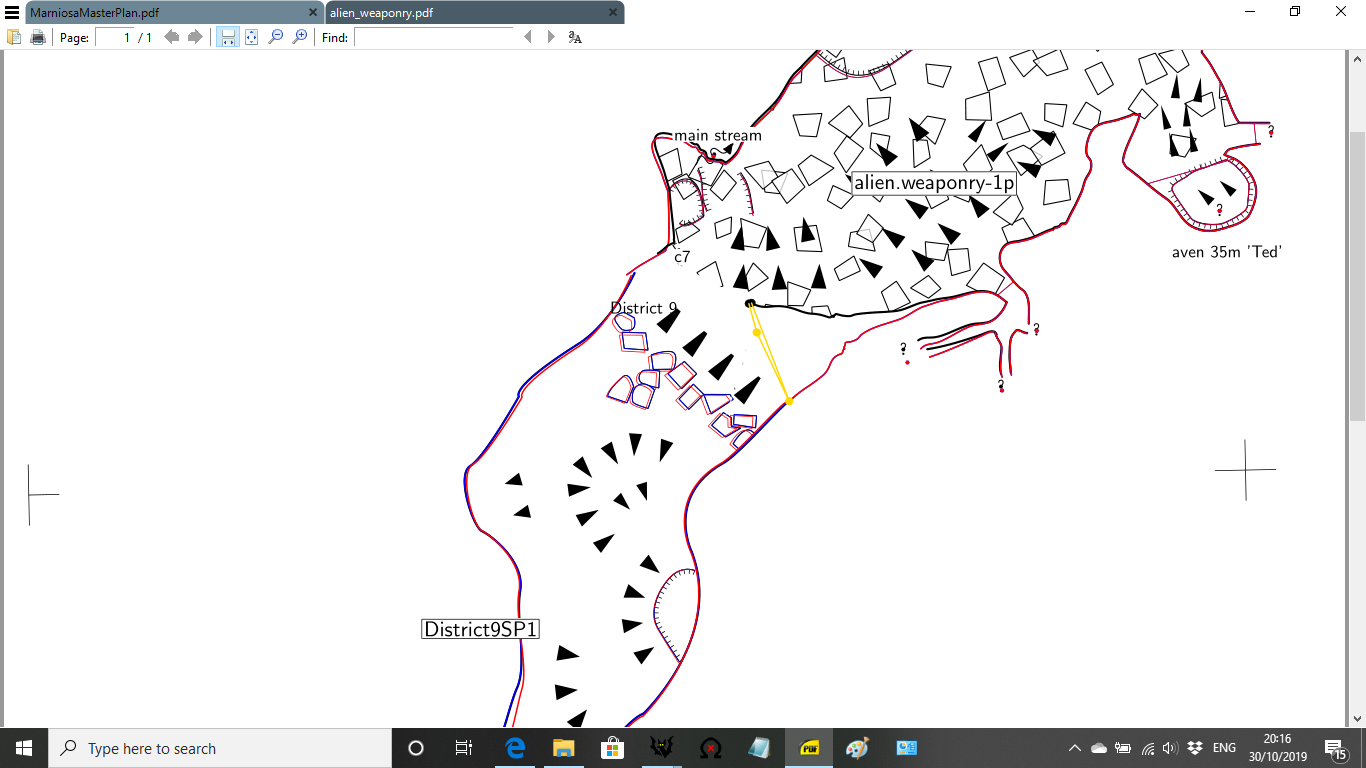
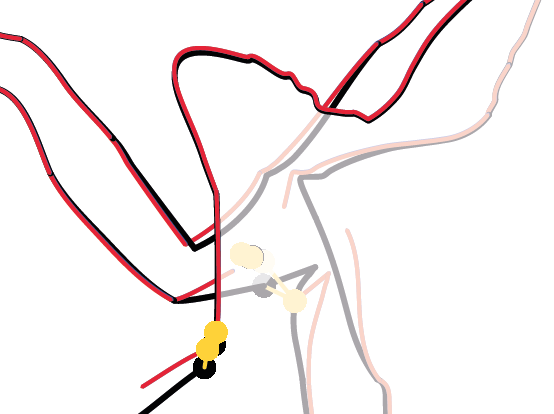
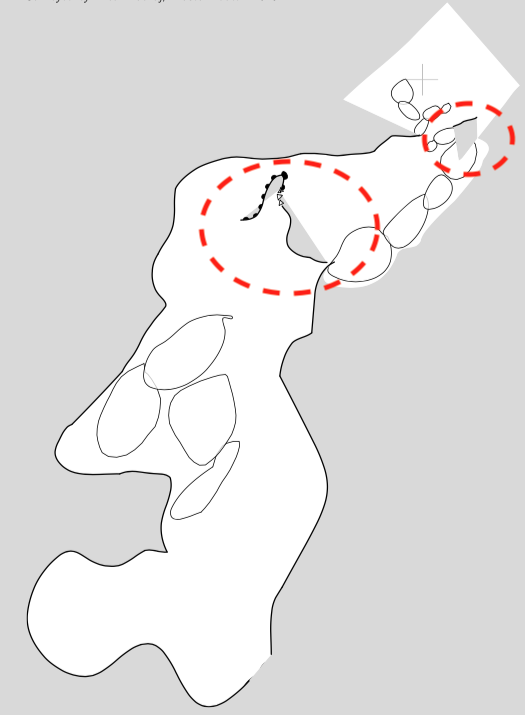
Hi Therion Mailing List, My maps are just not joining where I want them to, the walls are repellant to each other! All I want to do is join the black line where i'm putting the red line, but the yellow warping lines are thrusting it away again. If anyone has any thoughts it would be great to know them because there's something fundamentally wrong with what I'm doing! [cid:206d78da-11f6-41f7-b5bf-6b26829ce45f] Regards, Alastair Gott. AlastairGott@hotmail.com, M: 07931779380.

Hi Alastair,
My maps are just not joining where I want them to, the walls are repellant to each other!
You can force a specific point on a line to join to another specific point on another line, instead of letting Therion do it automatically. Give each line an ID. find out whether you want the points at the start "0" or end "END" of the lines to be used in the join. Then use something like this: join line1@survey1:0 line2@survey2:END However, I would be checking whether your scrap has perhaps got some survey stations with the wrong -name set in them. Causes really extreme warping when XTherion has accidentally made a bad guess about the station name within a scrap. Also note that Therion naturally only joins "wall" lines. If you have any other wall lines in the area - be they "-visibility off", or "-outline none", Therion might be trying to make them part of the automatic joins, forcing a weird warp and a mis-join. (And double check that none of your fill lines or slopes are accidentally made of a wall instead.) In such cases, using a specific point join described above is the solution. But I will be interested to see what the actual problem is, so feel free to send me your survey data and I will try debugging it, if you would like. I'm guessing it is not small enough to send share with the whole list. Cheers, Tarquin
Hi Xavier, Tarquin and Therion Mailing list, I've had a look through tarquins suggestions and tried a few, but am still struggling. (it will teach me to try and join walls in a chamber 20m wide, should have done 20mins more surveying the first time round, and joined somewhere more sensible!) I've got the project on http://cave-registry.org.uk/svn/Andara/Tresviso/Marniosa/therion/ I think it's openly available for people to pull off if you have SVN. The config file (thconfig.MMaster<http://cave-registry.org.uk/svn/Andara/Tresviso/Marniosa/therion/thconfig.MMaster>) has preselected the two problem surveys: source MarniosaMaster.th select District9.MarniosaMaster select alien_weaponry.MarniosaMaster or if you want a smaller selection of files, you could just pull District9 and Alienweaponry and create a .th with the following in it. #### survey problemcave input alien_weaponry/alien_weaponry.th input district9/District9.th join District9SP1@District9 alien_weaponry-1p@alien_weaponry map ProblemPlan -projection plan m1p@alien_weaponry District9Plan@District9 endmap centreline equate 12@alien_weaponry 12@District9 endcentreline endsurvey #### Regards, Alastair Gott. AlastairGott@hotmail.com, M: 07931779380. ________________________________ From: Therion <therion-bounces@speleo.sk> on behalf of alastair gott <alastairgott@hotmail.com> Sent: 30 October 2019 20:26 To: Therion Mailing List <therion@speleo.sk> Subject: [Therion] Horrific Warping between maps where I want my lines to join Hi Therion Mailing List, My maps are just not joining where I want them to, the walls are repellant to each other! All I want to do is join the black line where i'm putting the red line, but the yellow warping lines are thrusting it away again. If anyone has any thoughts it would be great to know them because there's something fundamentally wrong with what I'm doing! [cid:206d78da-11f6-41f7-b5bf-6b26829ce45f] Regards, Alastair Gott. AlastairGott@hotmail.com, M: 07931779380.
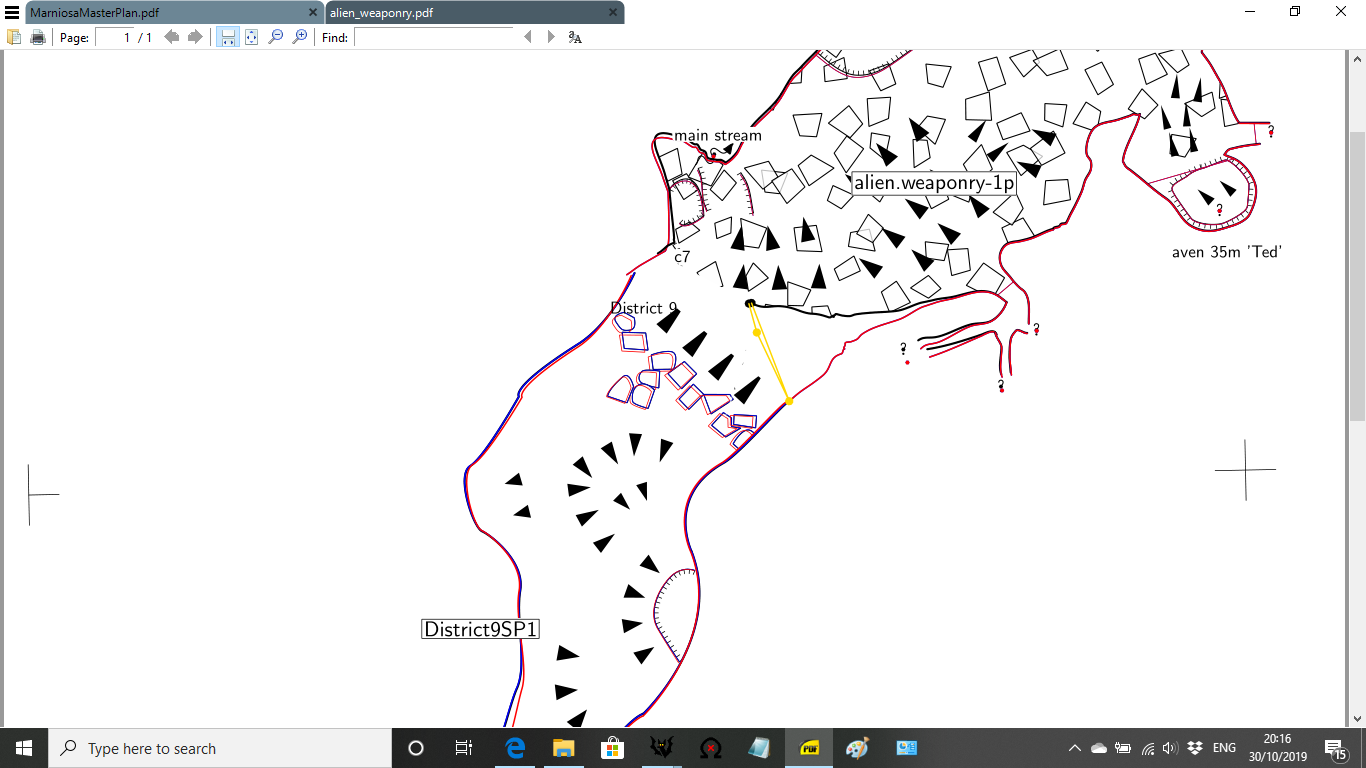

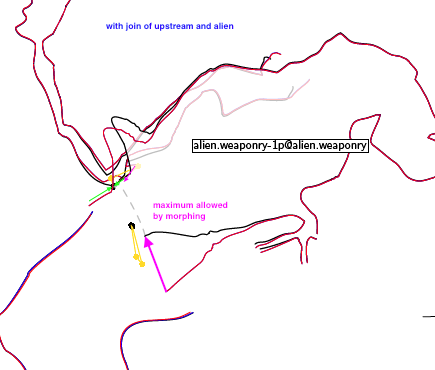
Hi Alastair, I played a little with your data, but I will not be able to continue searching, so here are my comments : * In Distric9Plan.th2, there is an empty line, you may remove it * If I compile with only the 2 problematic surveys (.th, I removed the others), you have distortion, but you can join them and it looks quite OK (see the attachment) * The walls ends between the 2 scraps that you try to join are far from each other (1 passage is 10 m large, the other 20 m large), so even if you can join them, you will have strong distortion, like in the attachment. * If I compile with the whole system, whatever I am doing (removing stations in the scraps, changing the lines, cleaning/simplifying the scraps), I always get the same problem that you have : there is no correct warping, and the walls from the alien scrap is always distorded al lot. I am not sure because I still do not understand what happens between your scraps , but it seems to me that your problem does not come from the 2 scraps alien and/or district9, but more probably: * because an other scrap? * or in the way your are joining the survey data? Cheers, Xavier De: "alastairgott" <alastairgott@hotmail.com> À: "List for Therion users" <therion@speleo.sk> Envoyé: Mercredi 30 Octobre 2019 18:37:05 Objet: Re: [Therion] Horrific Warping between maps where I want my lines to join Hi Xavier, Tarquin and Therion Mailing list, I've had a look through tarquins suggestions and tried a few, but am still struggling. (it will teach me to try and join walls in a chamber 20m wide, should have done 20mins more surveying the first time round, and joined somewhere more sensible!) I've got the project on [ http://cave-registry.org.uk/svn/Andara/Tresviso/Marniosa/therion/ | http://cave-registry.org.uk/svn/Andara/Tresviso/Marniosa/therion/ ] I think it's openly available for people to pull off if you have SVN. The config file ( [ http://cave-registry.org.uk/svn/Andara/Tresviso/Marniosa/therion/thconfig.MM... | thconfig.MMaster ] ) has preselected the two problem surveys: source MarniosaMaster.th select District9.MarniosaMaster select alien_weaponry.MarniosaMaster or if you want a smaller selection of files, you could just pull District9 and Alienweaponry and create a .th with the following in it. #### survey problemcave input alien_weaponry/alien_weaponry.th input district9/District9.th join District9SP1@District9 alien_weaponry-1p@alien_weaponry map ProblemPlan -projection plan m1p@alien_weaponry District9Plan@District9 endmap centreline equate 12@alien_weaponry 12@District9 endcentreline endsurvey #### Regards, Alastair Gott. AlastairGott@hotmail.com, M: 07931779380. From: Therion <therion-bounces@speleo.sk> on behalf of alastair gott <alastairgott@hotmail.com> Sent: 30 October 2019 20:26 To: Therion Mailing List <therion@speleo.sk> Subject: [Therion] Horrific Warping between maps where I want my lines to join Hi Therion Mailing List, My maps are just not joining where I want them to, the walls are repellant to each other! All I want to do is join the black line where i'm putting the red line, but the yellow warping lines are thrusting it away again. If anyone has any thoughts it would be great to know them because there's something fundamentally wrong with what I'm doing! Regards, Alastair Gott. AlastairGott@hotmail.com, M: 07931779380. _______________________________________________ Therion mailing list Therion@speleo.sk https://mailman.speleo.sk/listinfo/therion
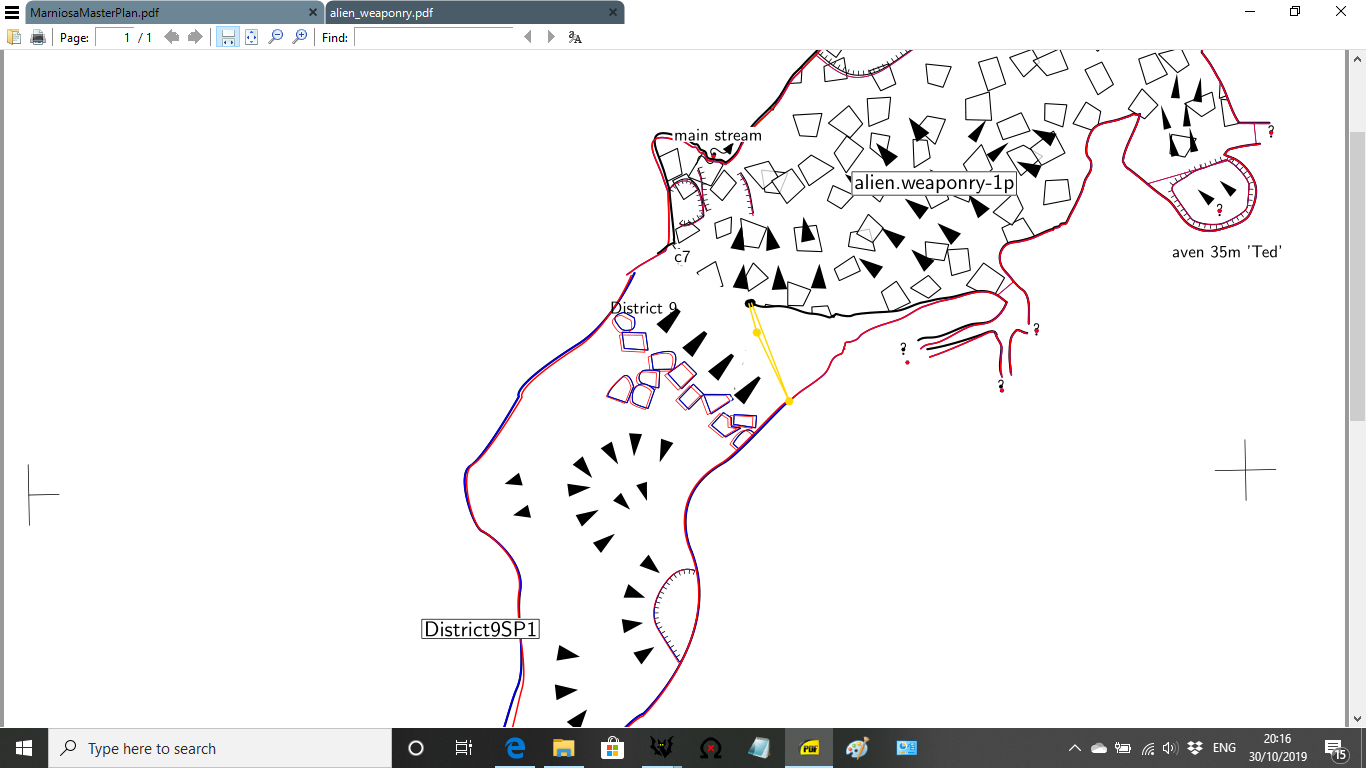

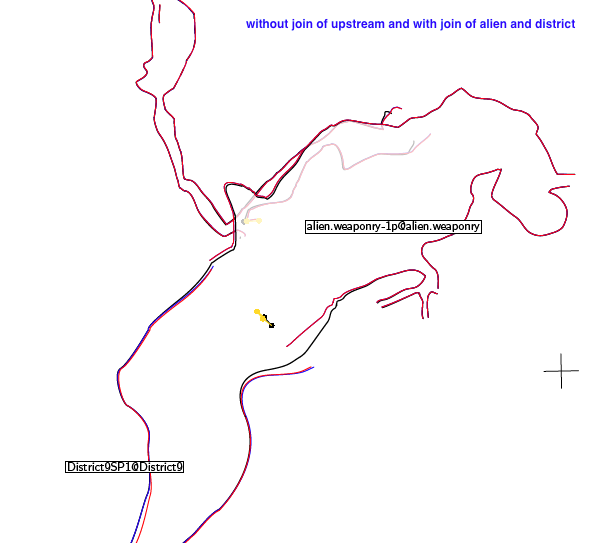
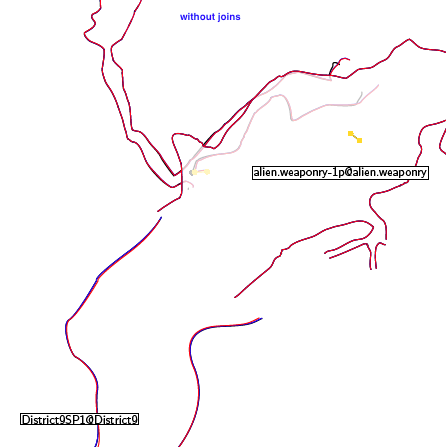
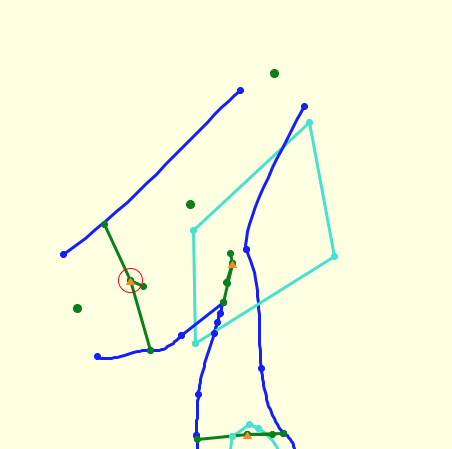
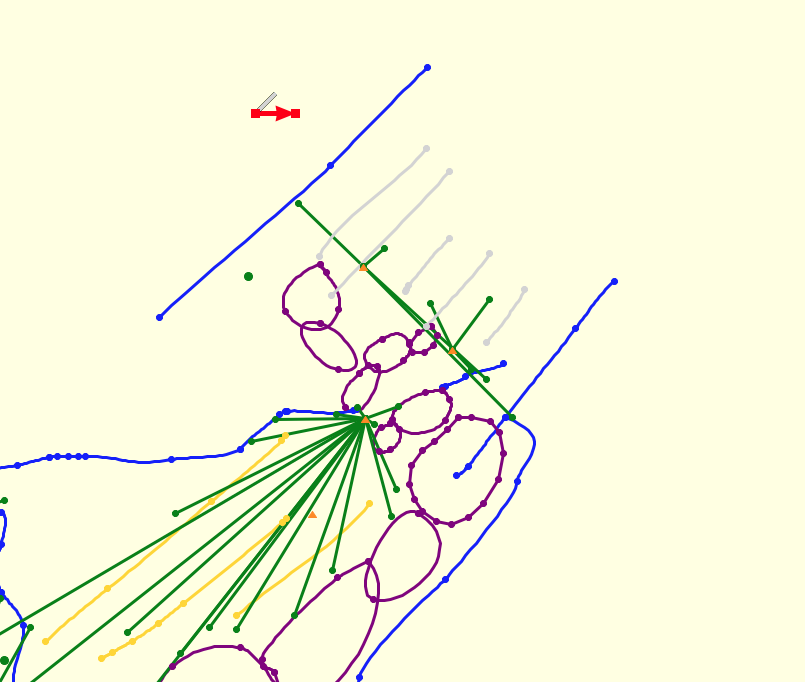
Hi Alastair, there is wrong survey data in District9: data dimensions station left right up down 12 1.80 5.10 9.80 1.80 1 10.10 5.10 3.90 0.30 2 23.80 0.00 3.40 1.40 Left and Right of station 1 are 10.10 and 5.10 [m?] so the width of the passage on station 1 is 15.20 m But in the alien_weaponry the width of passage according of splay shots is on the same place only less than half as on BOBs sketch (district9) and about 1/3 after morphing. There is another problem with overlapping sketches - see attachment. Martin
31. 10. 2019 v 0:37, alastair gott <alastairgott@hotmail.com>:
Hi Xavier, Tarquin and Therion Mailing list,
I've had a look through tarquins suggestions and tried a few, but am still struggling. (it will teach me to try and join walls in a chamber 20m wide, should have done 20mins more surveying the first time round, and joined somewhere more sensible!)
I've got the project on http://cave-registry.org.uk/svn/Andara/Tresviso/Marniosa/therion/ <http://cave-registry.org.uk/svn/Andara/Tresviso/Marniosa/therion/>
I think it's openly available for people to pull off if you have SVN.
The config file (thconfig.MMaster <http://cave-registry.org.uk/svn/Andara/Tresviso/Marniosa/therion/thconfig.MMaster>) has preselected the two problem surveys: source MarniosaMaster.th <http://marniosamaster.th/> select District9.MarniosaMaster select alien_weaponry.MarniosaMaster
or if you want a smaller selection of files, you could just pull District9 and Alienweaponry and create a .th with the following in it. #### survey problemcave
input alien_weaponry/alien_weaponry.th input district9/District9.th <http://district9.th/>
join District9SP1@District9 alien_weaponry-1p@alien_weaponry
map ProblemPlan -projection plan m1p@alien_weaponry District9Plan@District9 endmap
centreline equate 12@alien_weaponry 12@District9 endcentreline
endsurvey ####
Regards, Alastair Gott.
AlastairGott@hotmail.com <mailto:AlastairGott@hotmail.com>, M: 07931779380. From: Therion <therion-bounces@speleo.sk> on behalf of alastair gott <alastairgott@hotmail.com> Sent: 30 October 2019 20:26 To: Therion Mailing List <therion@speleo.sk> Subject: [Therion] Horrific Warping between maps where I want my lines to join
Hi Therion Mailing List,
My maps are just not joining where I want them to, the walls are repellant to each other!
All I want to do is join the black line where i'm putting the red line, but the yellow warping lines are thrusting it away again.
If anyone has any thoughts it would be great to know them because there's something fundamentally wrong with what I'm doing!
<image.png>
Regards, Alastair Gott.
AlastairGott@hotmail.com, M: 07931779380. _______________________________________________ Therion mailing list Therion@speleo.sk https://mailman.speleo.sk/listinfo/therion
There could be simple explanation, way those two sketches are so different: On sketch of Bob Clay there is something as a hump from blocks south of station 1. On your sketch it looks as you not mentioned it as a hump but as a wall. Try to correct your sketch according this presumption and correct the overlapping ends. There is still a problem with morphing of scrap alien_weaponry somewhere. Martin
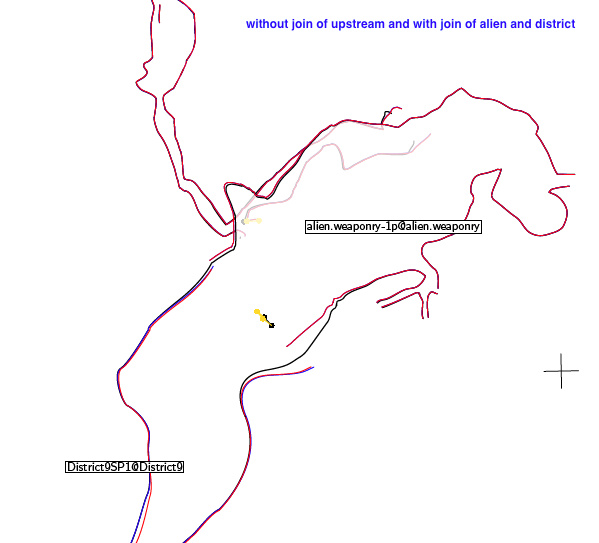
Solved! There is a join which has no any sense because there are no any related ends of walls in scrap alien_weaponry_1p connected to scrap marniosa_upstream_4-upstream4p If you comment next join and correct the overlapping it should work. #join alien_weaponry-1p@alien_weaponry marniosa_upstream_4-upstream4p@marniosa_upstream_4 Anyway you may join scrap marniosa_upstream_4-upstream4p to pit in scrap alien_weaponry_1p manually as Bruce wrote. Joining of scraps is not fully automated process, there are situations where it will not work. Martin
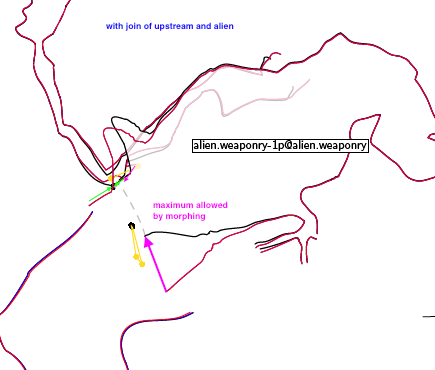
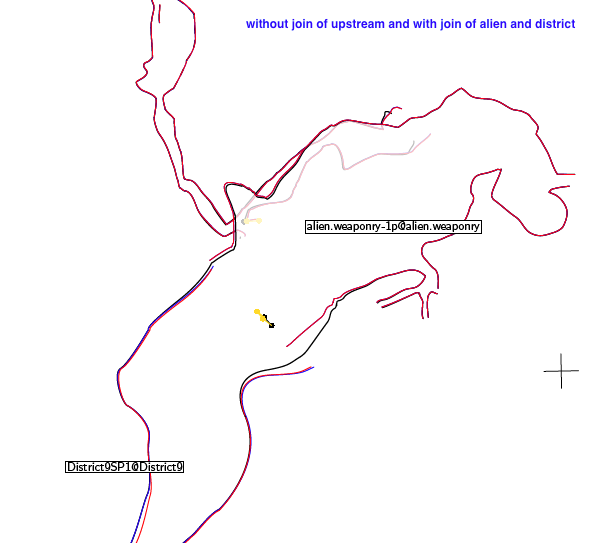

Good Thread. Alastair you can demo this at our Therion weekend in a couple of weeks. Nick ________________________________ From: Therion <therion-bounces@speleo.sk> on behalf of Martin Sluka via Therion <therion@speleo.sk> Sent: Thursday, October 31, 2019 11:30 AM To: List for Therion users Cc: Martin Sluka Subject: Re: [Therion] Horrific Warping between maps where I want my lines to join Solved! There is a join which has no any sense because there are no any related ends of walls in scrap alien_weaponry_1p connected to scrap marniosa_upstream_4-upstream4p If you comment next join and correct the overlapping it should work. #join alien_weaponry-1p@alien_weaponry marniosa_upstream_4-upstream4p@marniosa_upstream_4 Anyway you may join scrap marniosa_upstream_4-upstream4p to pit in scrap alien_weaponry_1p manually as Bruce wrote. Joining of scraps is not fully automated process, there are situations where it will not work. Martin [cid:CF27F806-FD82-4B7E-ADCD-99F4DBC612C3] [cid:B5C023AB-6DB1-4777-BFC2-9D925DD323B8] [cid:7FB0BFD3-05C0-4984-B5C9-3A8862569705]
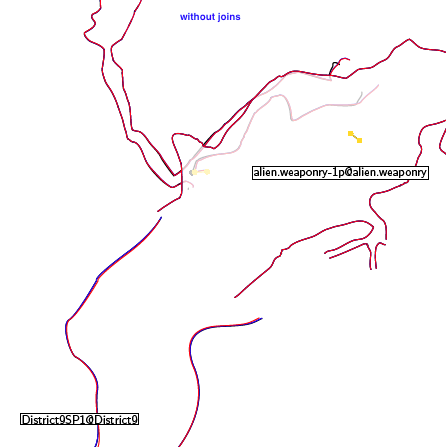
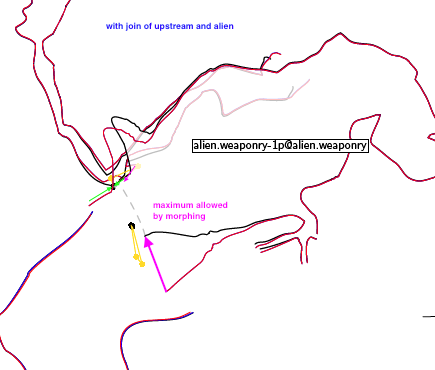
Hi Martin, You are amazing, thank you, I've seen quite a few things in therion, but that one just threw me off entirely. (all sorts of ways to fix it were in my head on the way to work this morning, Trigonometry to join further down District9 and drawing around the lox model were two initial thoughts). Time to plow on with the rest of the joins and fix that empty wall that Xavier found 😄 my fault on drawing up from the trad team. No topodroid to blame on that one. we'll be more careful when we sketch next time, on my lessons a year or so ago, Mr Nick Bairstow said don't join in the middle of a chamber. I'm inclined to agree. Sorry everyone... @PW no streamways next time 😉 Regards, Alastair Gott. AlastairGott@hotmail.com, M: 07931779380. ________________________________ From: Therion <therion-bounces@speleo.sk> on behalf of Martin Sluka via Therion <therion@speleo.sk> Sent: 31 October 2019 11:30 To: List for Therion users <therion@speleo.sk> Cc: Martin Sluka <martinsluka@mac.com> Subject: Re: [Therion] Horrific Warping between maps where I want my lines to join Solved! There is a join which has no any sense because there are no any related ends of walls in scrap alien_weaponry_1p connected to scrap marniosa_upstream_4-upstream4p If you comment next join and correct the overlapping it should work. #join alien_weaponry-1p@alien_weaponry marniosa_upstream_4-upstream4p@marniosa_upstream_4 Anyway you may join scrap marniosa_upstream_4-upstream4p to pit in scrap alien_weaponry_1p manually as Bruce wrote. Joining of scraps is not fully automated process, there are situations where it will not work. Martin [cid:CF27F806-FD82-4B7E-ADCD-99F4DBC612C3] [cid:B5C023AB-6DB1-4777-BFC2-9D925DD323B8] [cid:7FB0BFD3-05C0-4984-B5C9-3A8862569705]

… don't join in the middle of a chamber...
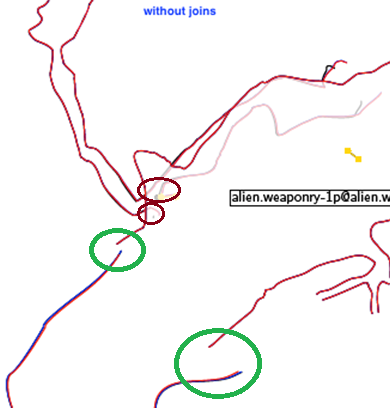
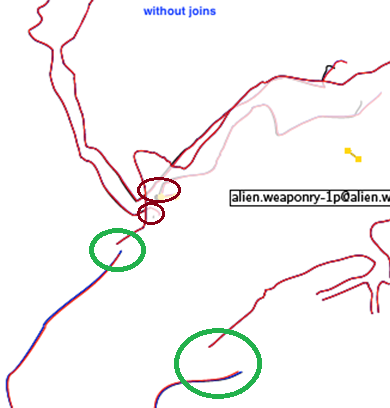
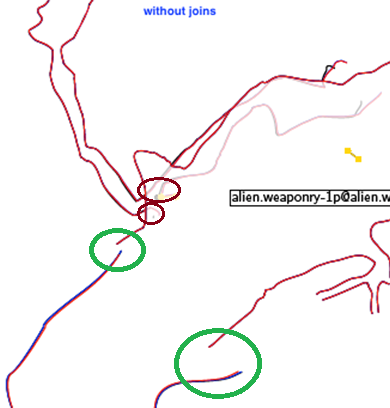
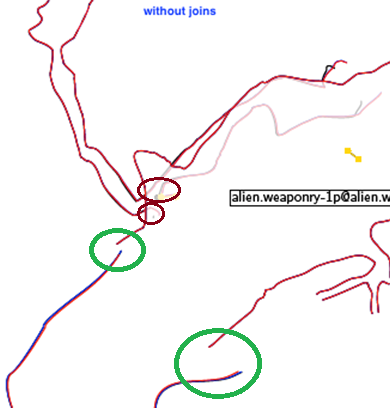
Yes, an interesting thread. As Martin rightly says, joining should not be considered fully automatic, but with care it usually can be, with some provisos. https://therion.speleo.sk/wiki/tips?s[]=join#joining_scraps_together <https://therion.speleo.sk/wiki/tips?s%5b%5d=join#joining_scraps_together> Joining in the middle of chambers or passages IS perfectly OK, indeed it is necessary every time there is a passage intersection. You just need to ensure that each affected passage has a gap in the wall to accept the join! The only restriction I have found is that there should not be two wide openings opposite each other in the same scrap. In this scenario the scrap is ‘broken in half’ and while you will get a nice pdf output, the kml plan will not plot properly (unless this feature has been fixed recently). In Alistair’s example, the pair of green circles indicate a passage opening that can be joined. The pair of brown circles show a passage opening on one side and no corresponding opening on the other. Hence Therion found the nearest opening it could in the scraps it was instructed to join, and in this particular case was trying to join the three nearest openings together. I predict that an acceptable result would be obtained if a gap were to be opened near the brown circles. Bruce
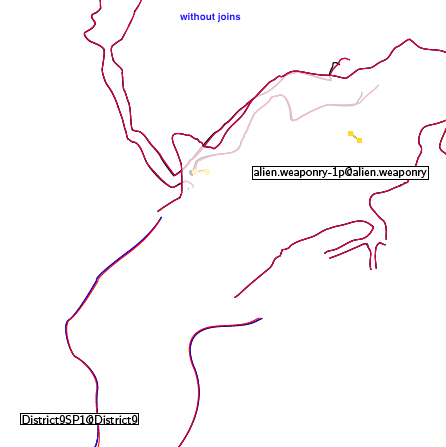
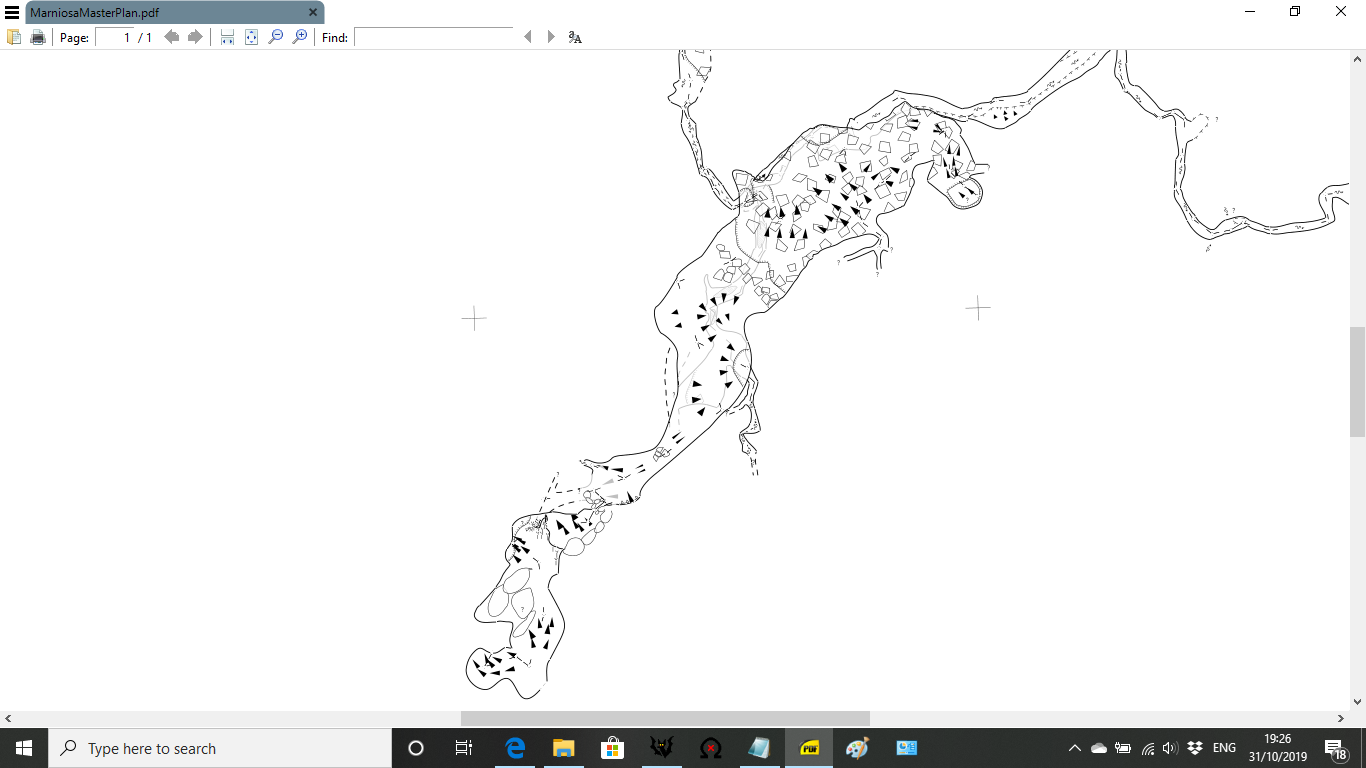
For a conclusion, the end result is below. 🙂 [cid:2a4bc006-c07f-405f-b249-58129ee05837] Regards, Alastair Gott. AlastairGott@hotmail.com, M: 07931779380. ________________________________ From: Therion <therion-bounces@speleo.sk> on behalf of Bruce Mutton <bruce@tomo.co.nz> Sent: 31 October 2019 19:07 To: 'List for Therion users' <therion@speleo.sk> Subject: [Therion] Horrific Warping between maps where I want my lines to join
… don't join in the middle of a chamber...
Yes, an interesting thread. As Martin rightly says, joining should not be considered fully automatic, but with care it usually can be, with some provisos. https://therion.speleo.sk/wiki/tips?s[]=join#joining_scraps_together<https://therion.speleo.sk/wiki/tips?s%5b%5d=join#joining_scraps_together> Joining in the middle of chambers or passages IS perfectly OK, indeed it is necessary every time there is a passage intersection. You just need to ensure that each affected passage has a gap in the wall to accept the join! The only restriction I have found is that there should not be two wide openings opposite each other in the same scrap. In this scenario the scrap is ‘broken in half’ and while you will get a nice pdf output, the kml plan will not plot properly (unless this feature has been fixed recently). In Alistair’s example, the pair of green circles indicate a passage opening that can be joined. The pair of brown circles show a passage opening on one side and no corresponding opening on the other. Hence Therion found the nearest opening it could in the scraps it was instructed to join, and in this particular case was trying to join the three nearest openings together. I predict that an acceptable result would be obtained if a gap were to be opened near the brown circles. Bruce [cid:image001.png@01D59088.D74A4B20]
There are several problematic places: * join of scrap the_42_streamway-42streamp with scrap marniosa_upstream_4-upstream4p First one begins in shape T, with two gaps, including part of passage upstream_4 and it is joined with streamway-42 with only one gap. I removed presumed walls and the T part * the scrap District_9_contd-1p has very strange beginning with some invisible walls with gaps and overlapping. I’m not sure therion will be able to interpret. Martin
31. 10. 2019 v 20:28, alastair gott <alastairgott@hotmail.com>:
For a conclusion, the end result is below. 🙂
<image.png>
Regards, Alastair Gott.
AlastairGott@hotmail.com <mailto:AlastairGott@hotmail.com>, M: 07931779380. From: Therion <therion-bounces@speleo.sk <mailto:therion-bounces@speleo.sk>> on behalf of Bruce Mutton <bruce@tomo.co.nz <mailto:bruce@tomo.co.nz>> Sent: 31 October 2019 19:07 To: 'List for Therion users' <therion@speleo.sk <mailto:therion@speleo.sk>> Subject: [Therion] Horrific Warping between maps where I want my lines to join
… don't join in the middle of a chamber...
Yes, an interesting thread. As Martin rightly says, joining should not be considered fully automatic, but with care it usually can be, with some provisos. https://therion.speleo.sk/wiki/tips?s[]=join#joining_scraps_together <https://therion.speleo.sk/wiki/tips?s%5b%5d=join#joining_scraps_together>
Joining in the middle of chambers or passages IS perfectly OK, indeed it is necessary every time there is a passage intersection. You just need to ensure that each affected passage has a gap in the wall to accept the join! The only restriction I have found is that there should not be two wide openings opposite each other in the same scrap. In this scenario the scrap is ‘broken in half’ and while you will get a nice pdf output, the kml plan will not plot properly (unless this feature has been fixed recently).
In Alistair’s example, the pair of green circles indicate a passage opening that can be joined. The pair of brown circles show a passage opening on one side and no corresponding opening on the other. Hence Therion found the nearest opening it could in the scraps it was instructed to join, and in this particular case was trying to join the three nearest openings together. I predict that an acceptable result would be obtained if a gap were to be opened near the brown circles.
Bruce
<image001.png> _______________________________________________ Therion mailing list Therion@speleo.sk <mailto:Therion@speleo.sk> https://mailman.speleo.sk/listinfo/therion <https://mailman.speleo.sk/listinfo/therion>
… don't join in the middle of a chamber...
I think I said avoid joining in the middle of a chamber as quite often chambers are where you might actually want to use an area fill and I think it is generally accepted that these make joins more difficult. A chamber is usually just a big passage with two walls after all. If there are side passages going off a chamber then its just the same principle, get the end close with a small gap, avoid overlaps and it usually works. I agree with Bruce that joins can with care be usually be considered automatic if fact I can’t remember the last time I used two named line points for a normal passage join. Having two screens helps enormously when getting wall ends close together in different .th2 files. As with a lot of things Therion I used to struggle with joins but once I sorted my methodology a problem in this area now is an uncommon event.
The only restriction I have found is that there should not be two wide >openings opposite each other in the same scrap. In this scenario the >scrap is ‘broken in half’ and while you will get a nice pdf output, the kml >plan will not plot properly (unless this feature has been fixed recently).
I used to suffer a lot with broken kml outputs, as Bruce says gaps in walls can cause this. I never leave just a gap in a wall, if it is a side passage I put a station shot up it (different number sequence) and then get back to the main passage. In Therion I then draw some walls to the station and always put a wall line across the end, usually -option invisible. The side passage will not then upset the kml output. I find that with the kml output some open passages will work and some will not, not sure why but if you stick a line wall across the end then they all work. Nick From: Therion [mailto:therion-bounces@speleo.sk] On Behalf Of Bruce Mutton Sent: 31 October 2019 19:07 To: 'List for Therion users' <therion@speleo.sk> Subject: [Therion] Horrific Warping between maps where I want my lines to join
… don't join in the middle of a chamber...
Yes, an interesting thread. As Martin rightly says, joining should not be considered fully automatic, but with care it usually can be, with some provisos. https://therion.speleo.sk/wiki/tips?s[]=join#joining_scraps_together<https://therion.speleo.sk/wiki/tips?s%5b%5d=join#joining_scraps_together> Joining in the middle of chambers or passages IS perfectly OK, indeed it is necessary every time there is a passage intersection. You just need to ensure that each affected passage has a gap in the wall to accept the join! The only restriction I have found is that there should not be two wide openings opposite each other in the same scrap. In this scenario the scrap is ‘broken in half’ and while you will get a nice pdf output, the kml plan will not plot properly (unless this feature has been fixed recently). In Alistair’s example, the pair of green circles indicate a passage opening that can be joined. The pair of brown circles show a passage opening on one side and no corresponding opening on the other. Hence Therion found the nearest opening it could in the scraps it was instructed to join, and in this particular case was trying to join the three nearest openings together. I predict that an acceptable result would be obtained if a gap were to be opened near the brown circles. Bruce [cid:image001.png@01D5909C.476D48E0]
Well said Nick. Good advice. Bruce From: Therion <therion-bounces@speleo.sk> On Behalf Of Nick Bairstow Sent: Friday, 1 November 2019 23:45 To: List for Therion users <therion@speleo.sk> Subject: Re: [Therion] Horrific Warping between maps where I want my lines to join
… don't join in the middle of a chamber...
I think I said avoid joining in the middle of a chamber as quite often chambers are where you might actually want to use an area fill and I think it is generally accepted that these make joins more difficult. A chamber is usually just a big passage with two walls after all. If there are side passages going off a chamber then its just the same principle, get the end close with a small gap, avoid overlaps and it usually works. I agree with Bruce that joins can with care be usually be considered automatic if fact I can’t remember the last time I used two named line points for a normal passage join. Having two screens helps enormously when getting wall ends close together in different .th2 files. As with a lot of things Therion I used to struggle with joins but once I sorted my methodology a problem in this area now is an uncommon event.
The only restriction I have found is that there should not be two wide >openings opposite each other in the same scrap. In this scenario the >scrap is ‘broken in half’ and while you will get a nice pdf output, the kml >plan will not plot properly (unless this feature has been fixed recently).
I used to suffer a lot with broken kml outputs, as Bruce says gaps in walls can cause this. I never leave just a gap in a wall, if it is a side passage I put a station shot up it (different number sequence) and then get back to the main passage. In Therion I then draw some walls to the station and always put a wall line across the end, usually -option invisible. The side passage will not then upset the kml output. I find that with the kml output some open passages will work and some will not, not sure why but if you stick a line wall across the end then they all work. Nick From: Therion [mailto:therion-bounces@speleo.sk] On Behalf Of Bruce Mutton Sent: 31 October 2019 19:07 To: 'List for Therion users' <therion@speleo.sk <mailto:therion@speleo.sk> > Subject: [Therion] Horrific Warping between maps where I want my lines to join
… don't join in the middle of a chamber...
Yes, an interesting thread. As Martin rightly says, joining should not be considered fully automatic, but with care it usually can be, with some provisos. https://therion.speleo.sk/wiki/tips?s[]=join#joining_scraps_together <https://therion.speleo.sk/wiki/tips?s%5b%5d=join#joining_scraps_together> Joining in the middle of chambers or passages IS perfectly OK, indeed it is necessary every time there is a passage intersection. You just need to ensure that each affected passage has a gap in the wall to accept the join! The only restriction I have found is that there should not be two wide openings opposite each other in the same scrap. In this scenario the scrap is ‘broken in half’ and while you will get a nice pdf output, the kml plan will not plot properly (unless this feature has been fixed recently). In Alistair’s example, the pair of green circles indicate a passage opening that can be joined. The pair of brown circles show a passage opening on one side and no corresponding opening on the other. Hence Therion found the nearest opening it could in the scraps it was instructed to join, and in this particular case was trying to join the three nearest openings together. I predict that an acceptable result would be obtained if a gap were to be opened near the brown circles. Bruce
An advice to beginners: 1. Always check each scrap independently for “holes”. Such hole indicate incorrect position of walls according to base principle of drawing a map: The map is the projection of a passage to horizontal plane and the walls are borders of such projections. So there MUST NOT be walls inside (excluding walls with parameter “-outline none” for some reasons) the borders of such passage. Holes will produce mess in warping, joining and 3D models. They are incorrect in any way, because there is not unspecified rock (background) inside a passage. Export map of a crap with these lines in layout to see the holes.: layout check_holes symbol-hide group all symbol-show line wall debug station-names #for better orientation only colour map-bg 85 end layout export map …. layout check_holes 2. When there is a complicated situation to draw passage in one scrap divide the scrap to smaller ones just to simplify the process. 3. Always check two (or more) scraps to be joined for overlaps and continuity of walls of adjoining scraps before any joining. 4. A pit, a chimney or a hole among blocks is a gap to join scraps together too. But you should use manual joining point of line to point of line in such case. Martin
participants (6)
-
 alastair gott
 -
 Bruce Mutton
 -
 Martin Sluka
 -
 Nick Bairstow
 -
 Tarquin Wilton-Jones
 -
 Xavier Robert