Showing a lower scrap down a pit in an overlying scrap

I've been experimenting to try to draw some more complex features in Therion. One of these is where a passage contains a pit with a second scrap going off at the bottom of the pit. There is an example of this in the Therion By Examples pages on the wiki. http://therion.speleo.sk/wiki/doku.php?id=tbe:wiki3 In that example the lower scrap in included in a separate map, and that map is then included in the upper map using the preview command: map map5 -proj plan scrap1@s1 break scrap2@s2 preview above map22 endmap What is the purpose of using two maps here? I appear to be able to do this with a single map containing the two scraps. My second question is whether it is possible to show the pit as a hole so that the colour of the lower scrap shows in the bottom of the pit when I colour by altitude. Currently my pit is coloured the colour of the upper scrap and the colour at the bottom of the pit shows through the transparent upper scrap. But as there is no floor in the upper scrap at this point, I want to have no colour shading in the upper scrap so it is clear that the bottom of the pit is at the level of the lower passage. See the attached bitmap showing an example of what I mean (not drawn with Therion). The green lower passage is clearly shown at the bottom of the pit where the pit floor is coloured green. Can I do this in Therion? Footleg

To make pit transparent just add to line pit option -outline in. Odesláno z iPhonu 8. 5. 2012 v 15:28, Footleg <drfootleg@gmail.com>:
I've been experimenting to try to draw some more complex features in Therion. One of these is where a passage contains a pit with a second scrap going off at the bottom of the pit. There is an example of this in the Therion By Examples pages on the wiki. http://therion.speleo.sk/wiki/doku.php?id=tbe:wiki3
In that example the lower scrap in included in a separate map, and that map is then included in the upper map using the preview command:
map map5 -proj plan scrap1@s1 break scrap2@s2 preview above map22 endmap
What is the purpose of using two maps here? I appear to be able to do this with a single map containing the two scraps.
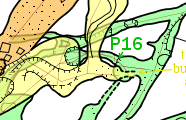
My second question is whether it is possible to show the pit as a hole so that the colour of the lower scrap shows in the bottom of the pit when I colour by altitude. Currently my pit is coloured the colour of the upper scrap and the colour at the bottom of the pit shows through the transparent upper scrap. But as there is no floor in the upper scrap at this point, I want to have no colour shading in the upper scrap so it is clear that the bottom of the pit is at the level of the lower passage. See the attached bitmap showing an example of what I mean (not drawn with Therion). The green lower passage is clearly shown at the bottom of the pit where the pit floor is coloured green. Can I do this in Therion?
Footleg <PitColouredByAltitude.png> _______________________________________________ Therion mailing list Therion@speleo.sk http://mailman.speleo.sk/mailman/listinfo/therion
And -clip off , because the -outline in option will erase the ticks from pit line. sorry Martin On 8.5.2012, at 17:07, Martin Sluka wrote:
To make pit transparent just add to line pit option -outline in.
Odesláno z iPhonu
8. 5. 2012 v 15:28, Footleg <drfootleg@gmail.com>:
I've been experimenting to try to draw some more complex features in Therion. One of these is where a passage contains a pit with a second scrap going off at the bottom of the pit. There is an example of this in the Therion By Examples pages on the wiki. http://therion.speleo.sk/wiki/doku.php?id=tbe:wiki3
In that example the lower scrap in included in a separate map, and that map is then included in the upper map using the preview command:
map map5 -proj plan scrap1@s1 break scrap2@s2 preview above map22 endmap
What is the purpose of using two maps here? I appear to be able to do this with a single map containing the two scraps.
My second question is whether it is possible to show the pit as a hole so that the colour of the lower scrap shows in the bottom of the pit when I colour by altitude. Currently my pit is coloured the colour of the upper scrap and the colour at the bottom of the pit shows through the transparent upper scrap. But as there is no floor in the upper scrap at this point, I want to have no colour shading in the upper scrap so it is clear that the bottom of the pit is at the level of the lower passage. See the attached bitmap showing an example of what I mean (not drawn with Therion). The green lower passage is clearly shown at the bottom of the pit where the pit floor is coloured green. Can I do this in Therion?
Footleg <PitColouredByAltitude.png> _______________________________________________ Therion mailing list Therion@speleo.sk http://mailman.speleo.sk/mailman/listinfo/therion
Therion mailing list Therion@speleo.sk http://mailman.speleo.sk/mailman/listinfo/therion

To make pit transparent just add to line pit option '-outline in -clip off'.
This works well if you only ever present this scrap in maps with no internal colour or both coloured upper and lower levels in their true positions. If like I have been doing, the scraps are sometimes presented one above the other, and others they are presented offset (two different outputs for two different purposes), then the upper offset passage has a 'hole' where the pit should be. It is perhaps not so much a therion problem, more the user has to decide whether to compromise on colours, variety of presentations, or edit all of the pits each time the presentation is changed. And the last bit of that sentence gave me an idea. The revise statement would allow the user to quite easily change the outline parameter for any 'non-standard' outputs without having to manually edit it each time. If the pit is defined in scrap1 as Martin suggested at the top of this post, and it has -id scrap1pit1, then perhaps in the map definition with the lower scraps offset, the revise statement could be included... map LowerScrapOffset -proj plan revise scrap1pit1 -outline out # restore shading to top scrap scrap1@s1 MapofScrap2 preview 100 000 metres below # MapofScrap2 contains scrap2@s2 endmap Simple? I'll find some of my irksome pits sometime and test it. Bruce
Footleg
One of these is where a passage contains a pit with a second scrap going off at the bottom of the pit...
In that example the lower scrap in included in a separate map, and that map is then included in the upper map using the preview command:
map map5 -proj plan scrap1@s1 break scrap2@s2 preview above map22 endmap
What is the purpose of using two maps here? I appear to be able to do this with a single map containing the two scraps.
Hi Footleg In this example scrap1@s1 break scrap2@s2 should produce scrap1 overlying scrap2 (and is in one map, map5). So yes, one map, two scraps, one overlying the other. preview above map22 places the outline of map22 in map5. I don't think preview allows specification of scraps, so a second map is required. (If I were writing that map definition I would put the preview above first, because in map definitions generally, therion places the object at the top of the list on the top 'layer' in the map. However in the case of previews it seems that therion overrides that convention). Bruce
So is the advantage of using two maps only so that you can present a subset of the survey (from the separate map) offset or at a different scale or similar in the same output PDF? I've not yet got as far as working out how to combine multiple maps into one output document. Footleg On 9 May 2012 01:24, Bruce <bruce@tomo.co.nz> wrote:
Footleg
One of these is where a passage contains a pit with a second scrap going off at the bottom of the pit...
In that example the lower scrap in included in a separate map, and that map is then included in the upper map using the preview command:
map map5 -proj plan scrap1@s1 break scrap2@s2 preview above map22 endmap
What is the purpose of using two maps here? I appear to be able to do this with a single map containing the two scraps.
Hi Footleg
In this example
scrap1@s1 break scrap2@s2
should produce scrap1 overlying scrap2 (and is in one map, map5). So yes, one map, two scraps, one overlying the other.
preview above map22
places the outline of map22 in map5. I don't think preview allows specification of scraps, so a second map is required. (If I were writing that map definition I would put the preview above first, because in map definitions generally, therion places the object at the top of the list on the top 'layer' in the map. However in the case of previews it seems that therion overrides that convention).
Bruce
_______________________________________________ Therion mailing list Therion@speleo.sk http://mailman.speleo.sk/mailman/listinfo/therion
So is the advantage of using two maps only so that you can present a subset of the survey (from the separate map) offset... In this case yes.
...or at a different scale or similar in the same output PDF? Cannot do different scales in the same output pdf as far as I know.
I've not yet got as far as working out how to combine multiple maps into one output document.
It's as easy as; select map1 select map2 select map3 in the thconfig file. The resulting pdf will then have a layer for each of the maps and for the surface image if you have one. These layers can be toggled visible or not by the user of the pdf viewer. Aside from that, I use maps hierarchically the same way as we tend to do with survey centrelines as a basic means of managing a project. Each section of cave has its own map. These maps are in turn collected into maps, then these are in turn collected into a map of the whole cave. Then perhaps a map with several nearby caves and surface features. You can choose to export the map at the top of the 'tree' in which case you do not get a layered pdf, or you can export a selection of maps below the top of the tree to get a layered pdf. I've tried to explain my understanding of it, somewhat unfinished, here http://therion.speleo.sk/wiki/doku.php?id=bds#concepts Bruce
Thanks Bruce. That is most helpful. Your wiki pages on layout templates have already been immensely useful to me and I am fast becoming rather more adept at hacking metapost than I ever intended! Now I need to draw up enough scraps to be able to play with these hierarchical PDF outputs. Footleg On 9 May 2012 10:46, Bruce <bruce@tomo.co.nz> wrote:
So is the advantage of using two maps only so that you can present a subset of the survey (from the separate map) offset... In this case yes.
...or at a different scale or similar in the same output PDF? Cannot do different scales in the same output pdf as far as I know.
I've not yet got as far as working out how to combine multiple maps into one output document.
It's as easy as; select map1 select map2 select map3 in the thconfig file. The resulting pdf will then have a layer for each of the maps and for the surface image if you have one. These layers can be toggled visible or not by the user of the pdf viewer.
Aside from that, I use maps hierarchically the same way as we tend to do with survey centrelines as a basic means of managing a project. Each section of cave has its own map. These maps are in turn collected into maps, then these are in turn collected into a map of the whole cave. Then perhaps a map with several nearby caves and surface features. You can choose to export the map at the top of the 'tree' in which case you do not get a layered pdf, or you can export a selection of maps below the top of the tree to get a layered pdf.
I've tried to explain my understanding of it, somewhat unfinished, here http://therion.speleo.sk/wiki/doku.php?id=bds#concepts
Bruce
_______________________________________________ Therion mailing list Therion@speleo.sk http://mailman.speleo.sk/mailman/listinfo/therion
participants (3)
-
 Bruce
Bruce -
 Footleg
 -
 Martin Sluka