Export Multiple Caves to Single KML Model

There is one feature I have found that does not work. . One of my four maps has a section where two passages run pretty much the same way, one directly above the other. In the single-cave map I handled this by setting the upper passage off to the side. That does not come through to the group map. The two passages are drawn on top of each other.
Bill I presume you are now referring to exported map pdf outputs? I was looking for something that fitted that description in an old copy of your Big Cavern Ranch project that I got from one of your posts last year, but didn't find anything. In general, if you select and export a map that has offsets defined, they will be honoured. I you do not specifically select a map with the offsets defined, then the scraps will be plotted in their true position - no offset. I do this intentionally for overview maps of multiple caves, as offsets at small scales (1:2,000, 1:10,000) provide a misleading impression of the cave. It seems like you have done this as well, perhaps unwittingly. Your source BigCavernRanch.th contains a survey named 'all' but there is no corresponding map defined as far as I can see. Therefore despite each of those caves referenced having maps defined, they are not used - every scrap defined is used instead. So no offsets.
From the Therion Book.
'select' Description: selects objects (surveys and maps) for export. By default, all survey objects are selected. If there is no map selected, all scraps belonging to selected surveys are selected by default for map export. You can easily control what is plotted by defining a 'map all' in your BigCavernRanch.th file (or elsewhere) and then selecting it in your 'all' thconfig. Bruce

Hi Bruce - Yes, I am now referring to PDF outputs. It has not bothered me enough to chase down the solution. I am pretty sure there is some combination of map and select statements that will do the trick. The last time I thought much about this, the problem I came up with was how to tell the BigCavernRanch.th file the names of the various maps in the other .th files. I don't know how the scope of the name spaces works in this kind of configuration. The issue will probably become more annoying in a few weeks. We are planning a major survey expedition to these caves for Nov 10-11, and I will have a lot of new data to work with. The passage that I want to offset is particularly difficult, less than 12 inches high for most of its known length, so there are very few people who are willing to do survey in there. At least it is in dry clay! No water to deal with. The old maps you have may not include this passage. It takes off from the top of Texas Dome, which is in the far north part of Allie Spring Cave. We call the passage "Top of Texas". It runs pretty much directly above other passages. Even with transparency it makes for a rather confused presentation unless it is offset to the side. -- Bill Gee On Wednesday, October 30, 2019 2:55:37 AM CDT Bruce Mutton wrote:
There is one feature I have found that does not work. . One of my four maps has a section where two passages run pretty much the same way, one directly above the other. In the single-cave map I handled this by setting the upper passage off to the side. That does not come through to the group map. The two passages are drawn on top of each other.
Bill
I presume you are now referring to exported map pdf outputs?
I was looking for something that fitted that description in an old copy of your Big Cavern Ranch project that I got from one of your posts last year, but didn't find anything.
In general, if you select and export a map that has offsets defined, they will be honoured.
I you do not specifically select a map with the offsets defined, then the scraps will be plotted in their true position - no offset. I do this intentionally for overview maps of multiple caves, as offsets at small scales (1:2,000, 1:10,000) provide a misleading impression of the cave.
It seems like you have done this as well, perhaps unwittingly.
Your source BigCavernRanch.th contains a survey named 'all' but there is no corresponding map defined as far as I can see. Therefore despite each of those caves referenced having maps defined, they are not used - every scrap defined is used instead. So no offsets.
From the Therion Book.
'select' Description: selects objects (surveys and maps) for export. By default, all survey objects are selected. If there is no map selected, all scraps belonging to selected surveys are selected by default for map export.
You can easily control what is plotted by defining a 'map all' in your BigCavernRanch.th file (or elsewhere) and then selecting it in your 'all' thconfig.
Bruce
Bill As Martin suggested, you just need to define a top-level map, and select that for output. Here is a snip of a top level map that is part of a set of maps I have used to highlight chronology in atlas outputs. map 2009-2011PlanMap \ -title "MiddleEarth 2009-2011 Plan" \ -projection plan preview above 2017-PlanMap preview above 2014-2015-PlanMap preview above 2013-PlanMap preview above 2012-PlanMap #Deck Extension DB-DeckExtensionPlan@MiddleEarth DD-SandyWayPlan@MiddleEarth DE-BermudaTriPlan@MiddleEarth DF-DeckEndPlan@MiddleEarth DO-UpperBermudaPlan@MiddleEarth IZ-wotsumpPlan@MiddleEarth preview below 1995-2008PlanMap preview below 1983-1994PlanMap preview below 1979-1982PlanMap preview below 1974-1978PlanMap endmap Your relationship of scraps and maps to surveys is different to what I use, so the namespace relationship will be different. The first time, you may need to figure it out yourself, but once you have done that you can compile your project, then in the compiler window, double click on the component map to select it with its correct path. Bruce From: Therion <therion-bounces@speleo.sk> On Behalf Of Bill Gee Sent: Thursday, 31 October 2019 03:37 To: therion@speleo.sk Subject: [Therion] Multiple caves on one map with an offset Hi Bruce - Yes, I am now referring to PDF outputs. It has not bothered me enough to chase down the solution. I am pretty sure there is some combination of map and select statements that will do the trick. The last time I thought much about this, the problem I came up with was how to tell the BigCavernRanch.th file the names of the various maps in the other .th files. I don't know how the scope of the name spaces works in this kind of configuration. The issue will probably become more annoying in a few weeks. We are planning a major survey expedition to these caves for Nov 10-11, and I will have a lot of new data to work with. The passage that I want to offset is particularly difficult, less than 12 inches high for most of its known length, so there are very few people who are willing to do survey in there. At least it is in dry clay! No water to deal with. The old maps you have may not include this passage. It takes off from the top of Texas Dome, which is in the far north part of Allie Spring Cave. We call the passage "Top of Texas". It runs pretty much directly above other passages. Even with transparency it makes for a rather confused presentation unless it is offset to the side. -- Bill Gee On Wednesday, October 30, 2019 2:55:37 AM CDT Bruce Mutton wrote:
There is one feature I have found that does not work. . One of my four
maps has a section where two passages run pretty much the same way, one
directly above the other. In the single-cave map I handled this by setting
the upper passage off to the side. That does not come through to the group
map. The two passages are drawn on top of each other.
Bill
I presume you are now referring to exported map pdf outputs?
I was looking for something that fitted that description in an old copy of
your Big Cavern Ranch project that I got from one of your posts last year,
but didn't find anything.
In general, if you select and export a map that has offsets defined, they
will be honoured.
I you do not specifically select a map with the offsets defined, then the
scraps will be plotted in their true position - no offset. I do this
intentionally for overview maps of multiple caves, as offsets at small
scales (1:2,000, 1:10,000) provide a misleading impression of the cave.
It seems like you have done this as well, perhaps unwittingly.
Your source BigCavernRanch.th contains a survey named 'all' but there is no
corresponding map defined as far as I can see. Therefore despite each of
those caves referenced having maps defined, they are not used - every scrap
defined is used instead. So no offsets.
From the Therion Book.
'select'
Description: selects objects (surveys and maps) for export. By default, all
survey objects
are selected. If there is no map selected, all scraps belonging to selected
surveys are
selected by default for map export.
You can easily control what is plotted by defining a 'map all' in your
BigCavernRanch.th file (or elsewhere) and then selecting it in your 'all'
thconfig.
Bruce
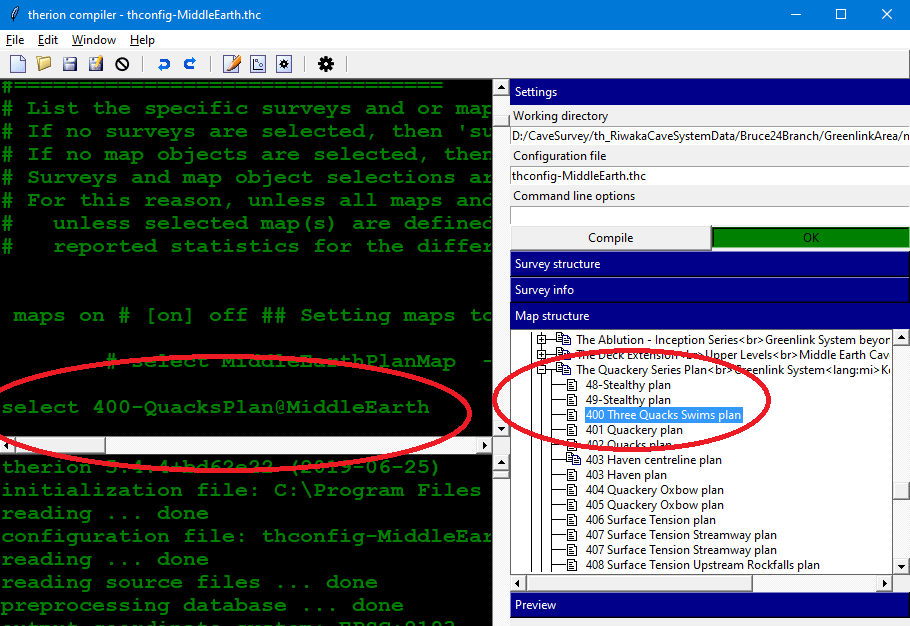
Hi Bruce and everyone else - It is time to revisit this topic. We had our big survey weekend a few days ago, and now I am trying to get the group map to display the offsets. There is something bloody obvious that I am missing. Attached are three sample files. The thconfig file is from the group map BigCavernRanch. I also included the .th file from BigCavernRanch, and the .th file from one of the individual caves. This set of files compiles without error but the offsets are NOT displayed. I tried creating a map statement in the BigCavernRanch .th file which mentioned the four main maps, then doing a "select" on that map in the thconfig. That produced errors saying that objects did not exist. If I open the BigCavernRanch files in xtherion and then look at the boxes for survey structure and map structure, they are completely empty. The individual cave maps all compile correctly and display offsets the way they should. The survey and map structure boxes in xtherion are not empty. -- Bill Gee On Wednesday, October 30, 2019 1:17:46 PM CST Bruce Mutton wrote:
Bill
As Martin suggested, you just need to define a top-level map, and select that for output.
Here is a snip of a top level map that is part of a set of maps I have used to highlight chronology in atlas outputs.
map 2009-2011PlanMap \
-title "MiddleEarth 2009-2011 Plan" \
-projection plan
preview above 2017-PlanMap
preview above 2014-2015-PlanMap
preview above 2013-PlanMap
preview above 2012-PlanMap
#Deck Extension
DB-DeckExtensionPlan@MiddleEarth
DD-SandyWayPlan@MiddleEarth
DE-BermudaTriPlan@MiddleEarth
DF-DeckEndPlan@MiddleEarth
DO-UpperBermudaPlan@MiddleEarth
IZ-wotsumpPlan@MiddleEarth
preview below 1995-2008PlanMap
preview below 1983-1994PlanMap
preview below 1979-1982PlanMap
preview below 1974-1978PlanMap
endmap
Your relationship of scraps and maps to surveys is different to what I use, so the namespace relationship will be different.
The first time, you may need to figure it out yourself, but once you have done that you can compile your project, then in the compiler window, double click on the component map to select it with its correct path.
Bruce
From: Therion <therion-bounces@speleo.sk> On Behalf Of Bill Gee Sent: Thursday, 31 October 2019 03:37 To: therion@speleo.sk Subject: [Therion] Multiple caves on one map with an offset
Hi Bruce -
Yes, I am now referring to PDF outputs. It has not bothered me enough to chase down the solution. I am pretty sure there is some combination of map and select statements that will do the trick. The last time I thought much about this, the problem I came up with was how to tell the BigCavernRanch.th file the names of the various maps in the other .th files. I don't know how the scope of the name spaces works in this kind of configuration.
The issue will probably become more annoying in a few weeks. We are planning a major survey expedition to these caves for Nov 10-11, and I will have a lot of new data to work with. The passage that I want to offset is particularly difficult, less than 12 inches high for most of its known length, so there are very few people who are willing to do survey in there. At least it is in dry clay! No water to deal with.
The old maps you have may not include this passage. It takes off from the top of Texas Dome, which is in the far north part of Allie Spring Cave. We call the passage "Top of Texas". It runs pretty much directly above other passages. Even with transparency it makes for a rather confused presentation unless it is offset to the side.
There is one feature I have found that does not work. . One of my four
maps has a section where two passages run pretty much the same way, one
directly above the other. In the single-cave map I handled this by setting
the upper passage off to the side. That does not come through to the group
map. The two passages are drawn on top of each other.
Bill
I presume you are now referring to exported map pdf outputs?
I was looking for something that fitted that description in an old copy of
your Big Cavern Ranch project that I got from one of your posts last year,
but didn't find anything.
In general, if you select and export a map that has offsets defined, they
will be honoured.
I you do not specifically select a map with the offsets defined, then the
scraps will be plotted in their true position - no offset. I do this
intentionally for overview maps of multiple caves, as offsets at small
scales (1:2,000, 1:10,000) provide a misleading impression of the cave.
It seems like you have done this as well, perhaps unwittingly.
Your source BigCavernRanch.th contains a survey named 'all' but there is no
corresponding map defined as far as I can see. Therefore despite each of
those caves referenced having maps defined, they are not used - every scrap
defined is used instead. So no offsets.
From the Therion Book.
'select'
Description: selects objects (surveys and maps) for export. By default, all
survey objects
are selected. If there is no map selected, all scraps belonging to selected
surveys are
selected by default for map export.
You can easily control what is plotted by defining a 'map all' in your
BigCavernRanch.th file (or elsewhere) and then selecting it in your 'all'
thconfig.
Bruce

If I open the BigCavernRanch files in xtherion and then look at the boxes for survey structure and map structure, they are completely empty.
You may see that structure only after successful compilation.
14. 11. 2019 v 3:46, Bill Gee <bgee@campercaver.net>:
I tried creating a map statement in the BigCavernRanch .th file which mentioned the four main maps, then doing a "select" on that map in the thconfig. That produced errors saying that objects did not exist.
What will happen if you try select only AllieMainPlan in your thconfig? Map „AllieMainPlan" is a part of the "all“ name-space so it should work. Just a note: in such complicated projects I prefer to use extensions for names of surveys, scraps, maps, for example map AllieMainPlan.map scrap Entrance1.scrap survey all.survey Names of objects are a bit longer, but later it is clear, what the name of object means. Martin
14. 11. 2019 v 8:45, Martin Sluka via Therion <therion@speleo.sk>:
survey all.survey
Sorry, it will work only in very simple case, dot is a part of „path“ on right side of object after „@„ So NOT use dot in names of surveys. I any case you may use underline or something else - all_survey Martin
This morning I tried several things: 1) I modified the BigCavernRanch.th file to look like this: map MapGroup -projection plan AllieMainPlan endmap and then recompiled. No error was produced. The resulting map contains all four caves. Offsets are not offset. As far as I can tell, that entire map/endmap block is totally ignored. 2) I modified thconfig for BigCavernRanch. I added select AllieMainPlan as the fourth line in the file. Therion complained that the object AllieMainPlan could not be found. It proceeded to compile a map with all four caves. I tried the same modification except using the name of a map defined in BigCavernRanch.th. Same result - an error about a missing object and a final map that includes all four caves. 3) I modified BigCavernRanch.th with this line survey TestSurvey -title "Big Cavern Ranch" Therion compiled without error. The resulting map has all four caves and no offsets. 4) I modified BigCavernRanch.th. I moved the "map MapGroup/endmap" block so it is not within the survey/endsurvey block. Therion issues an error "Object does not exist - AllieMainPlan" and immediately quits. That seems odd to me. The AllieSpringCave.th file has a map/endmap block that is outside the survey/endsurvey block, and it does NOT complain about any of those objects missing. 5) I modified BigCavernRanch.th so that it does not contain a map/endmap block. Therion did not produce an error. The compiled map includes all four caves and no offsets. I am shooting blindly in the dark here. What is the hierarchy of namespaces? Do surveys contain maps, or do maps contain surveys? Can maps contain maps? Can surveys contain surveys? Can a map contain a survey which in turn contains a map? If surveys can contain maps, and maps can contain surveys, then how do you know what the top of the namespace is? Using Allie Spring Cave as an example, it looks to me like the top of the name space is a map called AllieMainPlan. This map contains seven subsidiary maps and is defined outside of a survey/endsurvey block. But all of those subsidiary maps are defined inside a survey/endsurvey block. So does AllieMainPlan contain the survey at the second level, and the survey contains the subsidiary maps at the third level? If true, then why does it not show up that way in xtherion? Martin - In a different email you mentioned that MainPassages is not part of AllieSpringCave. I don't understand that. AllieSpringCave is the name of a survey/endsurvey block, and inside that block are seven map/endmap blocks. One of those map blocks is MainPassages. It seems to me that the survey/endsurvey block contains the map/endmap blocks and therefore the names they define should be part of the survey namespace. -- Bill Gee On Thursday, November 14, 2019 1:45:38 AM CST Martin Sluka via Therion wrote:
If I open the BigCavernRanch files in xtherion and then look at the boxes for survey structure and map structure, they are completely empty.
You may see that structure only after successful compilation.
14. 11. 2019 v 3:46, Bill Gee <bgee@campercaver.net>:
I tried creating a map statement in the BigCavernRanch .th file which mentioned the four main maps, then doing a "select" on that map in the thconfig. That produced errors saying that objects did not exist.
What will happen if you try select only AllieMainPlan in your thconfig? Map „AllieMainPlan" is a part of the "all“ name-space so it should work.
Just a note: in such complicated projects I prefer to use extensions for names of surveys, scraps, maps, for example
map AllieMainPlan.map scrap Entrance1.scrap survey all.survey
Names of objects are a bit longer, but later it is clear, what the name of object means.
Martin
14. 11. 2019 v 14:38, Bill Gee <bgee@campercaver.net>:
I am shooting blindly in the dark here. What is the hierarchy of namespaces? Do surveys contain maps, or do maps contain surveys? Can maps contain maps? Can surveys contain surveys? Can a map contain a survey which in turn contains a map?
Any survey-endsurvey structure is a name space. Maps structure is independent from structure of surveys but it allways belong to a name space of enclosing survey-endsurvey. So in your file AllieSpringCave.th <http://alliespringcave.th/> there is name space AllieSpringCave, but map AllieMainPlan is outside it. After you input the file AllieSpringCave.th <http://alliespringcave.th/> into your file BigCavernRanch.th <http://bigcavernranch.th/> inside name space all, it become part of "name space all".
If surveys can contain maps, and maps can contain surveys, then how do you know what the top of the namespace is?
Name space is each structure survey-endsurvey.
Using Allie Spring Cave as an example, it looks to me like the top of the name space is a map called AllieMainPlan.
This map AllieMainPlan is outside the name space "survey AllieSpringCave-endsurvey". It is reason you should call all subsidiary maps from name space AllieSpringCave by @AllieSpringCave.
This map contains seven subsidiary maps and is defined outside of a survey/endsurvey block. But all of those subsidiary maps are defined inside a survey/endsurvey block. So does AllieMainPlan contain the survey at the second level, and the survey contains the subsidiary maps at the third level? If true, then why does it not show up that way in xtherion?
Any command input is only copy/paste piece of plaint text. So if you input ../AllieSpringCaveSurvey/AllieSpringCave.th <http://alliespringcave.th/> into name space "survey all-endsurvey“, map AllieMainPlan become object in this name space and name space "survey AllieSpringCave-endsurvey“ become enclosed name space.
Martin - In a different email you mentioned that MainPassages is not part of AllieSpringCave. I don't understand that. AllieSpringCave is the name of a survey/endsurvey block, and inside that block are seven map/endmap blocks. One of those map blocks is MainPassages. It seems to me that the survey/endsurvey block contains the map/endmap blocks and therefore the names they define should be part of the survey namespace.
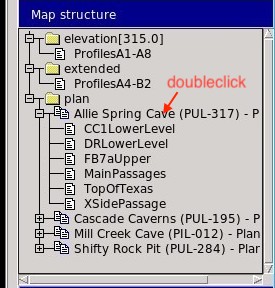
I was probably totaly wrong. Map AllieMainPlan is not part of name space "survey AllieSpringCave-endsurvey" What will Therion produce from your original files if you in thconfig select only „select AllieMainPlan@all“? Or may you try to add that select command by doubleclick on map AllieMainPlan in structure of maps in right side panel? May you publish screenshot of that rightside panel with structure of maps, please? Martin
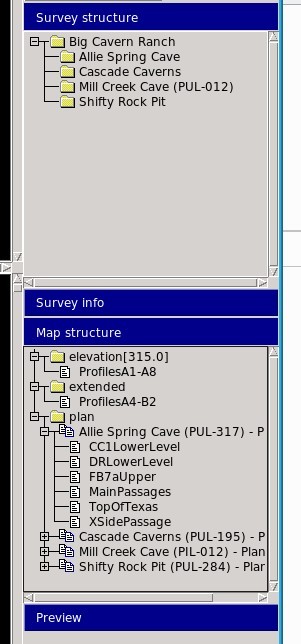
Hi Martin - I tried a few more things based on your suggestions. The first thing I had to learn was how to get the Survey Structure and Map Structure boxes to populate. The secret is to run the therion compiler from inside xtherion. I have been running it straight from the command line. Since Big Cavern Ranch has no drawings, I did not see any reason to bother with xtherion. The attached file "selection_002.jpg" shows the survey and map structure boxes. These both look reasonably sane to me. I have attached the thconfig and .th file that were used to generate this. I ran this also with a map defined in the .th file. The result was another item in Map Structure under "plan which was the name of the map I defined. In that map were all of the pieces that are also present the other levels under "plan". The thconfig file has a line "select AllieMainPlan". I changed that to "select AllieMainPlan@all" and recompiled. No difference. The resulting map has all four caves and no offsets. The map structure as reported by xtherion did not change. -- Bill Gee On Thursday, November 14, 2019 8:33:22 AM CST Martin Sluka via Therion wrote:
14. 11. 2019 v 14:38, Bill Gee <bgee@campercaver.net>:
I am shooting blindly in the dark here. What is the hierarchy of namespaces? Do surveys contain maps, or do maps contain surveys? Can maps contain maps? Can surveys contain surveys? Can a map contain a survey which in turn contains a map?
Any survey-endsurvey structure is a name space.
Maps structure is independent from structure of surveys but it allways belong to a name space of enclosing survey-endsurvey.
So in your file AllieSpringCave.th <http://alliespringcave.th/> there is name space AllieSpringCave, but map AllieMainPlan is outside it. After you input the file AllieSpringCave.th <http://alliespringcave.th/> into your file BigCavernRanch.th <http://bigcavernranch.th/> inside name space all, it become part of "name space all".
If surveys can contain maps, and maps can contain surveys, then how do you know what the top of the namespace is?
Name space is each structure survey-endsurvey.
Using Allie Spring Cave as an example, it looks to me like the top of the name space is a map called AllieMainPlan.
This map AllieMainPlan is outside the name space "survey AllieSpringCave-endsurvey". It is reason you should call all subsidiary maps from name space AllieSpringCave by @AllieSpringCave.
This map contains seven subsidiary maps and is defined outside of a survey/endsurvey block. But all of those subsidiary maps are defined inside a survey/endsurvey block. So does AllieMainPlan contain the survey at the second level, and the survey contains the subsidiary maps at the third level? If true, then why does it not show up that way in xtherion?
Any command input is only copy/paste piece of plaint text. So if you input ../AllieSpringCaveSurvey/AllieSpringCave.th <http://alliespringcave.th/> into name space "survey all-endsurvey“, map AllieMainPlan become object in this name space and name space "survey AllieSpringCave-endsurvey“ become enclosed name space.
Martin - In a different email you mentioned that MainPassages is not part of AllieSpringCave. I don't understand that. AllieSpringCave is the name of a survey/endsurvey block, and inside that block are seven map/endmap blocks. One of those map blocks is MainPassages. It seems to me that the survey/endsurvey block contains the map/endmap blocks and therefore the names they define should be part of the survey namespace.
I was probably totaly wrong. Map AllieMainPlan is not part of name space "survey AllieSpringCave-endsurvey"
What will Therion produce from your original files if you in thconfig select only „select AllieMainPlan@all“?
Or may you try to add that select command by doubleclick on map AllieMainPlan in structure of maps in right side panel?
May you publish screenshot of that rightside panel with structure of maps, please?
Martin
Hi Bill I have mashed up something with the old parts of your dataset, plus whatever new bits you posted recently, then commented out bits until it would compile. Then I added some random offsets, and created an overview BCRPlanMap (with just two of the caves) as attached. Took me a little while, as I’m not used to the structure you use, but it seems to work just fine. Extract of AllieSprings with offsets plotting OK First few lines of Allie thconfig encoding utf-8 source AllieSpringCave.th # input ../TherionMasterFiles/CustomSymbolsCode.txt select AllieMainPlan # This layout is for the main 2D map, all on one page layout basics units imperial scale-bar 50 feet First few lines of AllieSpringCave.th encoding utf-8 map AllieMainPlan -title "Allie Spring Cave (PUL-317) - Plan View" -projection plan # Main passages MainPassages@AllieSpringCave # Upper section near Blue Hole FB7aUpper@AllieSpringCave [50 50 ft] below XSidePassage@AllieSpringCave [50 50 ft] below # Basement area of C survey. Connects to Shifty Rock Pit CC1LowerLevel@AllieSpringCave [50 50 ft] below # Bailout Passage goes under the main passage DRLowerLevel@AllieSpringCave [50 50 ft] below # Upper lead from Texas Dome # TopOfTexas@AllieSpringCave [300 100 ft] above endmap survey AllieSpringCave -title "Allie Spring Cave" # Contains the cave entrance and first part of water crawl #Scraps Entrance1 and Entrance2 input AllieSpringCaveEntrance1.th2 #Scrap Entrance3 input AllieSpringCaveEntrance2.th2 Extract of Big Cavern Ranch with offsets plotting OK First few lines of BigCavernRanch thconfig below (and BigCavernRanch attached) encoding utf-8 source BigCavernRanch.th # input ../TherionMasterFiles/CustomSymbolsCode.txt # select AllieMainPlan@BCRSurvey #select individual maps like this select BCRPlanMap #select overall map like this # This layout is for the main 2D map, all on one page layout basics language en_US units imperial I notice there are some strange offsets in your file. Maybe they were just random experiments, but I suspect zero offsets are not a great idea. ie like this XSidePassage@AllieSpringCave [0 0] below Anyway, they seem to work just fine, we get both the shading and the passage rendering. Bruce From: Therion <therion-bounces@speleo.sk> On Behalf Of Bill Gee Sent: Friday, 15 November 2019 09:11 To: List for Therion users <therion@speleo.sk> Subject: Re: [Therion] Multiple caves on one map with an offset Hi Martin - I tried a few more things based on your suggestions. The first thing I had to learn was how to get the Survey Structure and Map Structure boxes to populate. The secret is to run the therion compiler from inside xtherion. I have been running it straight from the command line. Since Big Cavern Ranch has no drawings, I did not see any reason to bother with xtherion. The attached file "selection_002.jpg" shows the survey and map structure boxes. These both look reasonably sane to me. I have attached the thconfig and .th file that were used to generate this. I ran this also with a map defined in the .th file. The result was another item in Map Structure under "plan which was the name of the map I defined. In that map were all of the pieces that are also present the other levels under "plan". The thconfig file has a line "select AllieMainPlan". I changed that to "select AllieMainPlan@all" and recompiled. No difference. The resulting map has all four caves and no offsets. The map structure as reported by xtherion did not change. -- Bill Gee On Thursday, November 14, 2019 8:33:22 AM CST Martin Sluka via Therion wrote:
14. 11. 2019 v 14:38, Bill Gee <bgee@campercaver.net <mailto:bgee@campercaver.net> >:
I am shooting blindly in the dark here. What is the hierarchy of namespaces? Do surveys contain maps, or do maps contain surveys? Can maps contain maps? Can surveys contain surveys? Can a map contain a survey which in turn contains a map?
Any survey-endsurvey structure is a name space.
Maps structure is independent from structure of surveys but it allways belong to a name space of enclosing survey-endsurvey.
So in your file AllieSpringCave.th <http://alliespringcave.th/> there is name space AllieSpringCave, but map AllieMainPlan is outside it. After you input the file AllieSpringCave.th <http://alliespringcave.th/> into your file BigCavernRanch.th <http://bigcavernranch.th/> inside name space all, it become part of "name space all".
If surveys can contain maps, and maps can contain surveys, then how do you know what the top of the namespace is?
Name space is each structure survey-endsurvey.
Using Allie Spring Cave as an example, it looks to me like the top of the name space is a map called AllieMainPlan.
This map AllieMainPlan is outside the name space "survey AllieSpringCave-endsurvey". It is reason you should call all subsidiary maps from name space AllieSpringCave by @AllieSpringCave.
This map contains seven subsidiary maps and is defined outside of a survey/endsurvey block. But all of those subsidiary maps are defined inside a survey/endsurvey block. So does AllieMainPlan contain the survey at the second level, and the survey contains the subsidiary maps at the third level? If true, then why does it not show up that way in xtherion?
Any command input is only copy/paste piece of plaint text. So if you input ../AllieSpringCaveSurvey/AllieSpringCave.th <http://alliespringcave.th/> into name space "survey all-endsurvey“, map AllieMainPlan become object in this name space and name space "survey AllieSpringCave-endsurvey“ become enclosed name space.
Martin - In a different email you mentioned that MainPassages is not part of AllieSpringCave. I don't understand that. AllieSpringCave is the name of a survey/endsurvey block, and inside that block are seven map/endmap blocks. One of those map blocks is MainPassages. It seems to me that the survey/endsurvey block contains the map/endmap blocks and therefore the names they define should be part of the survey namespace.
I was probably totaly wrong. Map AllieMainPlan is not part of name space "survey AllieSpringCave-endsurvey"
What will Therion produce from your original files if you in thconfig select only „select AllieMainPlan@all“?
Or may you try to add that select command by doubleclick on map AllieMainPlan in structure of maps in right side panel?
May you publish screenshot of that rightside panel with structure of maps, please?
Martin
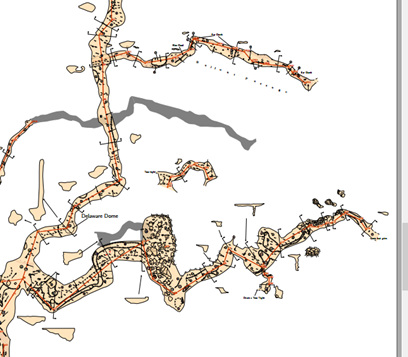
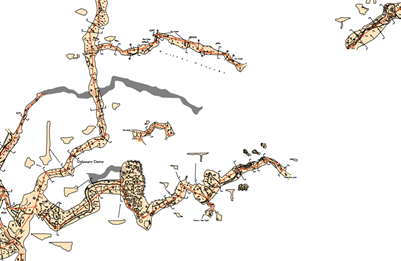
Hi Bruce and Martin - WooHoo! I got it to work. The composite map with all four caves compiles and shows offsets the way I want. Thanks you VERY MUCH for your assistance! I had to rename some of the subsidiary maps to avoid name conflicts, but that was no big deal. The major part was Bruce's suggestions from below regarding the layout of the BigCavernsRanch thconfig and .th files. I wound up with BigCavernRanch.th looking like this: ============= encoding utf-8 map BCRPlanMap AllieMainPlan@BCRSurvey MillCreekMainCaveMap@BCRSurvey SRPMainPlan@BCRSurvey CascadeMainPlan@BCRSurvey endmap survey BCRSurvey -title "Big Cavern Ranch" # Name the input caves input ../AllieSpringCaveSurvey/AllieSpringCave.th input ../MillCreekCaveSurvey/MillCreekCave.th input ../ShiftyRockPit/ShiftyRockPit.th input ../CascadeCaverns/CascadeCaverns.th equate AA41a@ShiftyRockPit DR23@AllieSpringCave equate AA51@ShiftyRockPit CC7@AllieSpringCave endsurvey ========== And the first few lines of thconfig: =========== encoding utf-8 source BigCavernRanch.th input ../TherionMasterFiles/CustomSymbolsCode.txt select BCRPlanMap # This layout is for the main 2D map, all on one page layout basics language en_US units imperial =========== Regarding the strange offsets of [0 0 ft] - That is intentional. If I did not do the offset with "above" or "below", then the transparency effects did not work. It was not clear which passage was above or below. They were all mashed together as if they were one layer. A true offset was not, in my judgement, necessary. The passages that I DO want to offset are done because they overlay significant stretches of other passage. Even with transparency effects the result is a jumbled up mess that is near impossible to visualize. The most significant of these is the Top of Texas passage in the far north part of Allie Spring Cave. There are nearly 300 feet (about 90 meters) of passage which is never more than 16 inches high and is often less than 12 inches. That is some nasty, difficult survey. At least it is dry with a soft clay floor! And one last question, just because I am curious: Does the naming convention of "name@place" extend to more than one layer? Is something like "name@cave@space" possible? Could I write something like "AllieMainPlan@AllieSpringCave@BCRPlanMap"? -- Bill Gee On Friday, November 15, 2019 1:42:14 AM CST Bruce Mutton wrote:
Hi Bill
I have mashed up something with the old parts of your dataset, plus whatever new bits you posted recently, then commented out bits until it would compile.
Then I added some random offsets, and created an overview BCRPlanMap (with just two of the caves) as attached.
Took me a little while, as I’m not used to the structure you use, but it seems to work just fine.
Extract of AllieSprings with offsets plotting OK
First few lines of Allie thconfig
encoding utf-8
source AllieSpringCave.th
# input ../TherionMasterFiles/CustomSymbolsCode.txt
select AllieMainPlan
# This layout is for the main 2D map, all on one page
layout basics
units imperial
scale-bar 50 feet
First few lines of AllieSpringCave.th
encoding utf-8
map AllieMainPlan -title "Allie Spring Cave (PUL-317) - Plan View" -projection plan
# Main passages
MainPassages@AllieSpringCave
# Upper section near Blue Hole
FB7aUpper@AllieSpringCave [50 50 ft] below
XSidePassage@AllieSpringCave [50 50 ft] below
# Basement area of C survey. Connects to Shifty Rock Pit
CC1LowerLevel@AllieSpringCave [50 50 ft] below
# Bailout Passage goes under the main passage
DRLowerLevel@AllieSpringCave [50 50 ft] below
# Upper lead from Texas Dome
# TopOfTexas@AllieSpringCave [300 100 ft] above
endmap
survey AllieSpringCave -title "Allie Spring Cave"
# Contains the cave entrance and first part of water crawl
#Scraps Entrance1 and Entrance2
input AllieSpringCaveEntrance1.th2
#Scrap Entrance3
input AllieSpringCaveEntrance2.th2
Extract of Big Cavern Ranch with offsets plotting OK
First few lines of BigCavernRanch thconfig below (and BigCavernRanch attached)
encoding utf-8
source BigCavernRanch.th
# input ../TherionMasterFiles/CustomSymbolsCode.txt
# select AllieMainPlan@BCRSurvey #select individual maps like this
select BCRPlanMap #select overall map like this
# This layout is for the main 2D map, all on one page
layout basics
language en_US
units imperial
I notice there are some strange offsets in your file. Maybe they were just random experiments, but I suspect zero offsets are not a great idea.
ie like this
XSidePassage@AllieSpringCave [0 0] below
Anyway, they seem to work just fine, we get both the shading and the passage rendering.
Bruce
From: Therion <therion-bounces@speleo.sk> On Behalf Of Bill Gee Sent: Friday, 15 November 2019 09:11 To: List for Therion users <therion@speleo.sk> Subject: Re: [Therion] Multiple caves on one map with an offset
Hi Martin -
I tried a few more things based on your suggestions. The first thing I had to learn was how to get the Survey Structure and Map Structure boxes to populate. The secret is to run the therion compiler from inside xtherion. I have been running it straight from the command line. Since Big Cavern Ranch has no drawings, I did not see any reason to bother with xtherion.
The attached file "selection_002.jpg" shows the survey and map structure boxes. These both look reasonably sane to me. I have attached the thconfig and .th file that were used to generate this.
I ran this also with a map defined in the .th file. The result was another item in Map Structure under "plan which was the name of the map I defined. In that map were all of the pieces that are also present the other levels under "plan".
The thconfig file has a line "select AllieMainPlan". I changed that to "select AllieMainPlan@all" and recompiled. No difference. The resulting map has all four caves and no offsets. The map structure as reported by xtherion did not change.
14. 11. 2019 v 14:38, Bill Gee <bgee@campercaver.net <mailto:bgee@campercaver.net> >:
I am shooting blindly in the dark here. What is the hierarchy of namespaces? Do surveys contain maps, or do maps contain surveys? Can maps contain maps? Can surveys contain surveys? Can a map contain a survey which in turn contains a map?
Any survey-endsurvey structure is a name space.
Maps structure is independent from structure of surveys but it allways belong to a name space of enclosing survey-endsurvey.
So in your file AllieSpringCave.th <http://alliespringcave.th/> there is name space AllieSpringCave, but map AllieMainPlan is outside it. After you input the file AllieSpringCave.th <http://alliespringcave.th/> into your file BigCavernRanch.th <http://bigcavernranch.th/> inside name space all, it become part of "name space all".
If surveys can contain maps, and maps can contain surveys, then how do you know what the top of the namespace is?
Name space is each structure survey-endsurvey.
Using Allie Spring Cave as an example, it looks to me like the top of the name space is a map called AllieMainPlan.
This map AllieMainPlan is outside the name space "survey AllieSpringCave-endsurvey". It is reason you should call all subsidiary maps from name space AllieSpringCave by @AllieSpringCave.
This map contains seven subsidiary maps and is defined outside of a survey/endsurvey block. But all of those subsidiary maps are defined inside a survey/endsurvey block. So does AllieMainPlan contain the survey at the second level, and the survey contains the subsidiary maps at the third level? If true, then why does it not show up that way in xtherion?
Any command input is only copy/paste piece of plaint text. So if you input ../AllieSpringCaveSurvey/AllieSpringCave.th <http://alliespringcave.th/> into name space "survey all-endsurvey“, map AllieMainPlan become object in this name space and name space "survey AllieSpringCave-endsurvey“ become enclosed name space.
Martin - In a different email you mentioned that MainPassages is not part of AllieSpringCave. I don't understand that. AllieSpringCave is the name of a survey/endsurvey block, and inside that block are seven map/endmap blocks. One of those map blocks is MainPassages. It seems to me that the survey/endsurvey block contains the map/endmap blocks and therefore the names they define should be part of the survey namespace.
I was probably totaly wrong. Map AllieMainPlan is not part of name space "survey AllieSpringCave-endsurvey"
What will Therion produce from your original files if you in thconfig select only „select AllieMainPlan@all“?
Or may you try to add that select command by doubleclick on map AllieMainPlan in structure of maps in right side panel?
May you publish screenshot of that rightside panel with structure of maps, please?
Martin
Good news Bill A well-earned success. I had noticed you were likely to run into name conflicts, so glad you figured that out.
Regarding the strange offsets of [0 0 ft] - That is intentional. If I did not do the offset with "above" or "below", then the transparency effects did not work. It was not clear which passage was above or below. They were all mashed together as if they were one layer.
It seems like you may have missed part of the recipe. When defining maps composed of scraps, you need to place the scraps more or less in order of their altitude, with the highest passage at the top of the list. This in itself makes no difference to how they will render, but in the situation where one overlies another, insert a break statement. See page 31 of the current Therion Book under ‘map’. You do not need a break if your map is composed of other maps, because it turns out that Therion inserts an implied break in this situation. But you still need to sort your map definitions with the overlying maps at the top of the list for this to render as you would want it to. An as I think you are aware; you need to turn transparency on and set an appropriate opacity value. transparency on # see thru passages #transparent = 0 <= opacity <= 100 = opaque opacity 50 # degree of transparency #00 = transparent, 100 = block out #40 = subtle, 60 - 70 = apparent: overwritten text still visible #80 = good passage definition but overwritten text barely visible Still, I had not thought of the approach you have taken. Maybe darkening up the underlying scraps locally is an interesting style approach to explore (in conjunction with the above).
Does the naming convention of "name@place" extend to more than one layer? Is something like "name@cave@space" possible? Could I write something like AllieMainPlan@AllieSpringCave@BCRPlanMap"?
Of course, as many levels as you like to set up in your project structure, except the syntax is name@place.cave.mastercaves Only one @, then use dots. One comment I would make, the BigCavernRanch project folder structure is very flat (which is generally a good thing), but now that the Therion data structure is nested (BigCavernRanch includes 4 caves), it might be a good idea to make the folder structure mirror the data structure. This will make the data structure easier to visualise, and in future make it easier to merge with adjacent cave project data (or split out individual cave projects). ie folder structure should mirror the data structure; -BigCavernRanch |-AllieSpring |-CascadeCaverns |-MillCreek |-ShiftyRock And not the current situation in which it is not possible to infer the data structure; -AllieSpring -BigCavernRanch -CascadeCaverns -MillCreek -ShiftyRock Bruce
15. 11. 2019 v 14:33, Bill Gee <bgee@campercaver.net>:
Regarding the strange offsets of [0 0 ft] - That is intentional. If I did not do the offset with "above" or "below", then the transparency effects did not work. It was not clear which passage was above or below. They were all mashed together as if they were one layer. A true offset was not, in my judgement, necessary.
There is a way you may use to organize layers of maps with above and below: map layer_3.map -projection plan -title "Radavc - layer 3“ ... radavc_2012_w_plan_s2d preview above layer_1.map preview above layer_2.map preview below layer_4.map preview below layer_5.map preview below layer_6.map endmap map layer_4.map -projection plan -title "Radavc - layer 4“ …. It means that you define what is relative position of a map definition to another maps which create an overall map.
And one last question, just because I am curious: Does the naming convention of "name@place" extend to more than one layer? Is something like "name@cave@space" possible? Could I write something like "AllieMainPlan@AllieSpringCave@BCRPlanMap"?
There is another syntax, but it works only for surveys/name spaces: AllieMainPlan@AllieSpringCave.BCRPlanMap.x.y etc. object@name_space.higher_name_space.higher_name_space Martin
Situation: Two or more surveying groups surveyed the same part of cave, as the result in .th and .th2 files are overlays. In data file (.th) you may eliminate it by: flags duplicate … … flags not duplicate. In maps you may solve it to choose only one unique scrap for definition of map. But the problem is generation of 3D (Loch) model. Therion will generate model according all scraps in surveys in source file and it may result in very strange results. Only solution, I found, is to manually comment by „#“ unwanted particular scraps in .th2 files. Martin
Martin We have the scrap option 'walls <on | off | auto> which should toggle the use of the scrap for 3d generation. This should solve the problem you describe. By the way, I realise I have only used 'walls' as a centreline option, which manages the use of LRUD and or scraps for 3d generation. So I have learned something. Thanks. There remains a problem of both scraps being output if you do not select a map prior to exporting. Or if you activate 'maps off'. In these scenarios (they are both valid for certain purposes, even if you have many map variants defined), there should be a tidy way to suppress the use of scraps in any output. Seems to me that a scrap needs the option -visibility <[on] | off> to manage this situation? Bruce -----Original Message----- From: Therion <therion-bounces@speleo.sk> On Behalf Of Martin Sluka via Therion Sent: Friday, 22 November 2019 04:59 To: List for Therion users <therion@speleo.sk> Cc: Martin Sluka <martinsluka@mac.com> Subject: [Therion] multiple scraps and 3D model Situation: Two or more surveying groups surveyed the same part of cave, as the result in .th and .th2 files are overlays. In data file (.th) you may eliminate it by: flags duplicate … … flags not duplicate. In maps you may solve it to choose only one unique scrap for definition of map. But the problem is generation of 3D (Loch) model. Therion will generate model according all scraps in surveys in source file and it may result in very strange results. Only solution, I found, is to manually comment by „#“ unwanted particular scraps in .th2 files. Martin _______________________________________________ Therion mailing list Therion@speleo.sk https://mailman.speleo.sk/listinfo/therion
21. 11. 2019 v 19:53, Bruce Mutton <bruce@tomo.co.nz>: We have the scrap option 'walls <on | off | auto> which should toggle the use of the scrap for 3d generation.
It doesn’t work for this situation. Martin
Is this a bug, or something peculiar to your project? I should test the walls scrap option on this little project I suppose. I did not realise that 'walls on/off' could apply to scraps when I wrote it. https://therion.speleo.sk/wiki/examples?s[]=walls#loch_models_paperless_survey_plan_scraps_and_lrud Bruce
Hi Bill,
14. 11. 2019 v 21:10, Bill Gee <bgee@campercaver.net>:
The thconfig file has a line "select AllieMainPlan". I changed that to "select AllieMainPlan@all" and recompiled. No difference. The resulting map has all four caves and no offsets. The map structure as reported by xtherion did not change.
I checked your files BigCavernRanch.th <http://bigcavernranch.th/> and thconfig.txt The command select AllieMainPlan@TestSurvey should work. In the latest version of BigCavernRanch.th <http://bigcavernranch.th/> you renamed survey all to survey TestSurvey. As result map AllieMainPlan is part of survey/name space TestSurvey and not survey/name space all. Probably the best way to select a particular map is doubleclick on it’s name in map structure when cursor in proper place in thcongig file.. Martin
Just something to check Bill. If you set maps to off in your thconfig, you will not get any offsets, previews or other map features. Does not look like you have done this however, but something to be aware of. maps if maps OFF is chosen, defined map structures are NOT parsed to the outputs (therefore offsets are disabled). Only scraps from the selected maps are output. Survey centrelines and stations are not output. https://therion.speleo.sk/wiki/bds Bruce
. produced errors saying that objects did not exist. If I open the BigCavernRanch files in xtherion and then look at the boxes for survey structure and map structure, they are completely empty. Hi Bill I added your files to the bits of your project that I have, but there is too much of the data behind your new survey missing for the new files to compile, and I am out of time tonight. Not to worry, there is enough information there to solve the puzzle I think. The boxes in XTherion are empty because the project did not compile. It is unfortunate that Therion cannot give you that easy method of obtaining the correctly enumerated name until you have already cracked the code and correctly deduced one or more of them! Your problem is most likely that you have not chanced upon the correct namespace to add to the maps in your select statement. I'll have a look tomorrow if I get a chance. Bruce
As always, bathroom effect ;) There is a typical problem in data - badly used name spaces. You defined in file BigCavernRanch.th: survey all -title "Big Cavern Ranch" # Name the input caves input ../AllieSpringCaveSurvey/AllieSpringCave.th input ../MillCreekCaveSurvey/MillCreekCave.th input ../ShiftyRockPit/ShiftyRockPit.th input ../CascadeCaverns/CascadeCaverns.th map MapGroup -projection plan # Allie Spring Cave MainPassages@AllieSpringCave … but the map MainPassages is not part of name space AllieSpringCave! It is defined outside of survey AllieSpringCave, so after you input AllieSpringCave.th file into survey all it will become part of the name space all. Correct definition of map all should be: map MapGroup -projection plan # Allie Spring Cave MainPassages ... because map MapGroup is defined inside survey (name space) all so map and submap are in the same name space. I assume it is the case of other submaps too. Martin
14. 11. 2019 v 3:46, Bill Gee <bgee@campercaver.net>:
Hi Bruce and everyone else -
It is time to revisit this topic. We had our big survey weekend a few days ago, and now I am trying to get the group map to display the offsets. There is something bloody obvious that I am missing.
Attached are three sample files. The thconfig file is from the group map BigCavernRanch. I also included the .th file from BigCavernRanch, and the .th file from one of the individual caves.
This set of files compiles without error but the offsets are NOT displayed.
I tried creating a map statement in the BigCavernRanch .th file which mentioned the four main maps, then doing a "select" on that map in the thconfig. That produced errors saying that objects did not exist.
If I open the BigCavernRanch files in xtherion and then look at the boxes for survey structure and map structure, they are completely empty.
The individual cave maps all compile correctly and display offsets the way they should. The survey and map structure boxes in xtherion are not empty.
-- Bill Gee
On Wednesday, October 30, 2019 1:17:46 PM CST Bruce Mutton wrote:
Bill
As Martin suggested, you just need to define a top-level map, and select that for output.
Here is a snip of a top level map that is part of a set of maps I have used to highlight chronology in atlas outputs.
map 2009-2011PlanMap \
-title "MiddleEarth 2009-2011 Plan" \
-projection plan
preview above 2017-PlanMap
preview above 2014-2015-PlanMap
preview above 2013-PlanMap
preview above 2012-PlanMap
#Deck Extension
DB-DeckExtensionPlan@MiddleEarth
DD-SandyWayPlan@MiddleEarth
DE-BermudaTriPlan@MiddleEarth
DF-DeckEndPlan@MiddleEarth
DO-UpperBermudaPlan@MiddleEarth
IZ-wotsumpPlan@MiddleEarth
preview below 1995-2008PlanMap
preview below 1983-1994PlanMap
preview below 1979-1982PlanMap
preview below 1974-1978PlanMap
endmap
Your relationship of scraps and maps to surveys is different to what I use, so the namespace relationship will be different.
The first time, you may need to figure it out yourself, but once you have done that you can compile your project, then in the compiler window, double click on the component map to select it with its correct path.
Bruce
From: Therion <therion-bounces@speleo.sk <mailto:therion-bounces@speleo.sk>> On Behalf Of Bill Gee Sent: Thursday, 31 October 2019 03:37 To: therion@speleo.sk <mailto:therion@speleo.sk> Subject: [Therion] Multiple caves on one map with an offset
Hi Bruce -
Yes, I am now referring to PDF outputs. It has not bothered me enough to chase down the solution. I am pretty sure there is some combination of map and select statements that will do the trick. The last time I thought much about this, the problem I came up with was how to tell the BigCavernRanch.th <http://bigcavernranch.th/> file the names of the various maps in the other .th files. I don't know how the scope of the name spaces works in this kind of configuration.
The issue will probably become more annoying in a few weeks. We are planning a major survey expedition to these caves for Nov 10-11, and I will have a lot of new data to work with. The passage that I want to offset is particularly difficult, less than 12 inches high for most of its known length, so there are very few people who are willing to do survey in there. At least it is in dry clay! No water to deal with.
The old maps you have may not include this passage. It takes off from the top of Texas Dome, which is in the far north part of Allie Spring Cave. We call the passage "Top of Texas". It runs pretty much directly above other passages. Even with transparency it makes for a rather confused presentation unless it is offset to the side.
There is one feature I have found that does not work. . One of my four
maps has a section where two passages run pretty much the same way, one
directly above the other. In the single-cave map I handled this by setting
the upper passage off to the side. That does not come through to the group
map. The two passages are drawn on top of each other.
Bill
I presume you are now referring to exported map pdf outputs?
I was looking for something that fitted that description in an old copy of
your Big Cavern Ranch project that I got from one of your posts last year,
but didn't find anything.
In general, if you select and export a map that has offsets defined, they
will be honoured.
I you do not specifically select a map with the offsets defined, then the
scraps will be plotted in their true position - no offset. I do this
intentionally for overview maps of multiple caves, as offsets at small
scales (1:2,000, 1:10,000) provide a misleading impression of the cave.
It seems like you have done this as well, perhaps unwittingly.
Your source BigCavernRanch.th <http://bigcavernranch.th/> contains a survey named 'all' but there is no
corresponding map defined as far as I can see. Therefore despite each of
those caves referenced having maps defined, they are not used - every scrap
defined is used instead. So no offsets.
From the Therion Book.
'select'
Description: selects objects (surveys and maps) for export. By default, all
survey objects
are selected. If there is no map selected, all scraps belonging to selected
surveys are
selected by default for map export.
You can easily control what is plotted by defining a 'map all' in your
BigCavernRanch.th <http://bigcavernranch.th/> file (or elsewhere) and then selecting it in your 'all'
thconfig.
Bruce
<thconfig.txt><BigCavernRanch.th><AllieSpringCave.th>_______________________________________________ Therion mailing list Therion@speleo.sk <mailto:Therion@speleo.sk> https://mailman.speleo.sk/listinfo/therion <https://mailman.speleo.sk/listinfo/therion>
participants (3)
-
 Bill Gee
 -
 Bruce Mutton
 -
 Martin Sluka