
On page 31 of the thbook there is the very innocent line Use the revise command if you want to add maps from higher levels to the preview. This probably helps with one of my problems BUT Further reading of revise on pp33 revise’ Description: This command is used to set or change properties of an already existing object. Syntax: The syntax of this command for object created with “single line” command is revise id [-option1 value1 -option2 value2 ...] For objects created with “multi line” commands is syntax following revise id [-option1 value1 -option2 value2 ...] ... optionX valueX data ... endrevise Context: all Arguments: The id stands for object identifier (the id of an object you want to revise must always be specified). Sorry that is not getting me anywhere, could someone please give an example, preferably relating to the level of maps thanks Andrew PS I cannot get preview/offsets to work for projected elevations, should they, the thbooks seems to say any map!!

Andrew
I cannot get preview/offsets to work for projected elevations, should they, the thbooks seems to say any map!!
See this earlier discussion thread http://article.gmane.org/gmane.comp.gis.therion/4203/match=level+preview+off set Elevation offsets should work fine, as the link above suggests and elevation previews have been problematic - I think I have had them working, but cannot remember for sure, sorry, too many tasks stacked up to want to go looking for examples at present. As for using revise to add maps of higher level. Since 2008 I have been searching for enlightenment! This search might be helpful in starting out on your quest... http://search.gmane.org/?query=revise+level+preview&author=&group=gmane.comp .gis.therion&sort=date&DEFAULTOP=and&xP=Zrevis%09Zpreview&xFILTERS=Gcomp.gis .therion---A May the force be with you Bruce
I cannot get preview/offsets to work for projected elevations, should
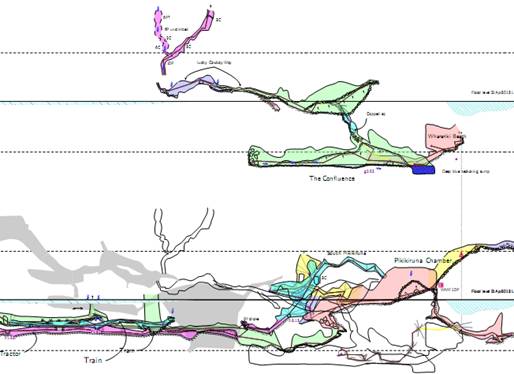
they, the thbooks seems to say any map!! So yes, I checked a projected elevation. Both offset and preview work OK, just like plan projections. The difficulty I recalled may have been associated with 'map-level'. In the diagram below, the shaded passage is 'preview below', and the outline is 'offset 100m above'. The definition is like this. map AblutionInceptionElev020Map \ -title "Greenlink System Elevation looking 020 deg" \ -projection [elevation 020 deg] #in front JM-DigiPlusElev020@MiddleEarth [000 100 m] above IK-LuckyCowboyElev020@MiddleEarth [000 100 m] above break JG-TrainElev020@MiddleEarth . break preview below IJ-CarpeDiemElev020@MiddleEarth . endmap and in the th-config the map is invoked directly with select AblutionInceptionElev020Map Hope that helps Bruce
On 12/07/15 06:44, Bruce wrote:
The definition is like this…
map AblutionInceptionElev020Map \
-title "Greenlink System Elevation looking 020 deg" \
-projection [elevation 020 deg]
#in front
JM-DigiPlusElev020@MiddleEarth [000 100 m] above
IK-LuckyCowboyElev020@MiddleEarth [000 100 m] above
break
JG-TrainElev020@MiddleEarth
…
break
preview below IJ-CarpeDiemElev020@MiddleEarth
…
endmap
and in the th-config the map is invoked directly with
select AblutionInceptionElev020Map
Hope that helps
Yes I have got it to work with projections, with similar problems to solve to plan now, I had missed out the -proj [] on the map which seemed to break the previews, and using your example to check what I had done, along with knowing it worked, got me through, now to the other problems thanks Andrew
participants (2)
-
 Andrew Atkinson
 -
 Bruce
Bruce