Scaling problems with backgrounds in th2 files - XTherion

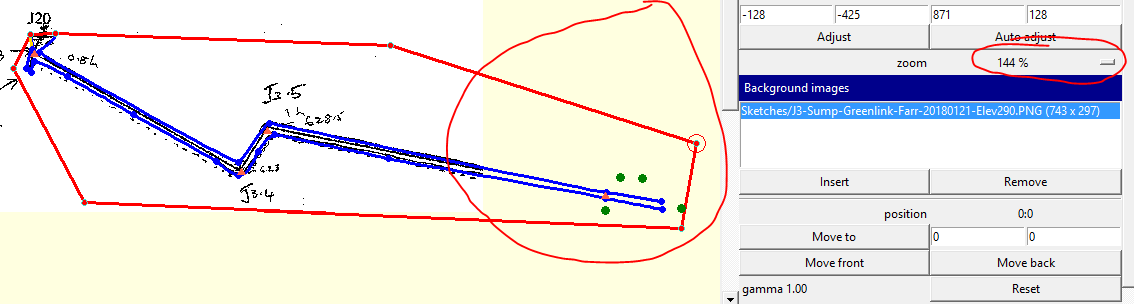
Today I made a new .th2 drawing file and used a .png file as a background image. Not something I do very much these days, as I typically use .xvi files created PocketTopo files. The xvi images work just fine in XTherion. But as described in the post in this link, https://www.mail-archive.com/therion@speleo.sk/msg06890.html, there are problems when using the mouse wheel to zoom if background images are .jpg or .png. Until now I have adopted a work around of only using the menu + and - zoom buttons where th2 files are linked to these. However for one projected elevation drawing, even the + and - controls are problematic. I think I accidentally used the mouse wheel before inserting the image. As a result the image is only aligned with the sketch at one particular zoom level. 144% in this case. There is also a problem with the image clipping. In the above example, if I zoom out one level, the drawing reduces, but the image does not change by the same amount. If I use the zoom wheel, the situation compounds and gets worse. So I have a situation where I can only align this drawing at one zoom level, and I have to be careful not to use the mouse wheel. Not really a problem in this case, as it is a trivial survey and scrap, but it is a significant issue for anyone who might still be regularly using scanned sketches for drawing. Is this something that someone knows how to address? I'm using Therion 5.4.1+f0c98ce (2018-03-03) Bruce
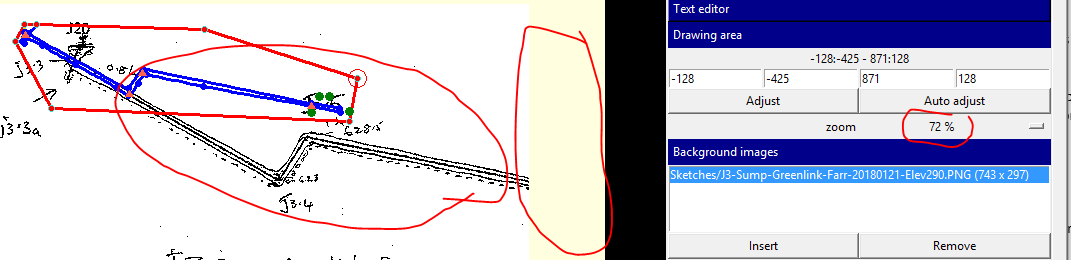

The same problem. I used undo button to return to the correct state. Martin S.
19. 3. 2018 v 9:44, Bruce Mutton via Therion <therion@speleo.sk>:
Today I made a new .th2 drawing file and used a .png file as a background image. Not something I do very much these days, as I typically use .xvi files created PocketTopo files. The xvi images work just fine in XTherion.
But as described in the post in this link, https://www.mail-archive.com/therion@speleo.sk/msg06890.html <https://www.mail-archive.com/therion@speleo.sk/msg06890.html>, there are problems when using the mouse wheel to zoom if background images are .jpg or .png. Until now I have adopted a work around of only using the menu + and – zoom buttons where th2 files are linked to these.
However for one projected elevation drawing, even the + and – controls are problematic. I think I accidentally used the mouse wheel before inserting the image. As a result the image is only aligned with the sketch at one particular zoom level. 144% in this case. There is also a problem with the image clipping. <image001.png>
In the above example, if I zoom out one level, the drawing reduces, but the image does not change by the same amount. <image002.png>
If I use the zoom wheel, the situation compounds and gets worse. So I have a situation where I can only align this drawing at one zoom level, and I have to be careful not to use the mouse wheel. Not really a problem in this case, as it is a trivial survey and scrap, but it is a significant issue for anyone who might still be regularly using scanned sketches for drawing.
Is this something that someone knows how to address?
I’m using Therion 5.4.1+f0c98ce (2018-03-03)
Bruce
_______________________________________________ Therion mailing list Therion@speleo.sk <mailto:Therion@speleo.sk> https://mailman.speleo.sk/listinfo/therion <https://mailman.speleo.sk/listinfo/therion>
participants (2)
-
 Bruce Mutton
 -
 Martin Sluka