
i think that extend should take values in the interval [-1,1], ie also fractional values, plus some special value such as "ignore" to open loops, and "undefined" to let the program choose, because it's a nuisance to enter a decimal number for every shot (legs + splays). therion uses the left/right normal/reverse etc. solution, and users should be allowed to set extend also for splays, if they need to. for now, let's use left/right/vert, and ignore only to open loops btw, are vertical extend considered in the computation of the cave length by therion ? marco

There is a new feature of model export from Therion which use splay shots to generate .lox file in the latest developers version. To generate model to ignore splay shots use: export model -wall-source maps Martin S.

Hello, I'm working on a large survey with a mix of old (LRUD) datas and new (splays+scraps) datas. Is there a way to ignore splay in when therion generate lox model, but enable centreline data AND maps data ? something like : export model -wall-source [maps centreline] thanks a lot ! *Benoit MARTINEZ - *mz.benoit@gmail.com <https://www.facebook.com/mz.benoit> <http://fr.linkedin.com/in/benoitmartinez> Le ven. 8 juin 2018 à 13:42, Martin Sluka via Therion <therion@speleo.sk> a écrit :
There is a new feature of model export from Therion which use splay shots to generate .lox file in the latest developers version.
To generate model to ignore splay shots use:
export model -wall-source maps
Martin S. _______________________________________________ Therion mailing list Therion@speleo.sk https://mailman.speleo.sk/listinfo/therion

Marco, Evaristo Looking also at Evaristo’s TopoDroid screenshots, which highlight the issue nicely, it seems to me that both TopoDroid (which I have not used) and PocketTopo (which I use) handle splays similarly, and automatically (maybe not TopoDroid?) and that automatically is the right way to do it, based on some combination of splay, leg and leg extend direction (difficult and arbitrary as a precise solution might be). A precise solution is a difficult concept where extend switches say from left to right – although the software coders will be the experts on this. At least PocketTopo mostly gives sensible splays. Therion also messes up PocketTopo’s extended splay legs, and I just ignore it, because hopefully I still have the sketch to trace. In theory a nice solution would be for Therion to somehow preserve what the source software gives it. But in practice not so easy, especially as I always end up changing the extend specifications when it comes time to produce a finished drawing. Marco, are you suggesting below that extend -1 would be left, extend 0 would be vertical, and extend 1 would be right? Conceptually seems OK. Personally I would not be bothered with that level of refinement, but I concede there are times when it would be nice to foreshorten a passage just a little in order to close a loop, or make something look or fit better. Fairly often the extend direction I choose in the cave gets modified by the time I get to drawing the map! More I think about it, the more I like it.
btw, are vertical extend considered in the computation of the cave length by therion?
I don’t know for sure, but it would seem illogical for anything about the drawing or presentation projection (extend is a hybrid of both) to have any effect on the centreline length or depth reported by Therion. Length and depth are a survey centreline property. Length should be the sum of all survey legs that are not duplicate and not splay. It also includes nosurvey legs. Depth is the vertical range between highest station and lowest station, and I think it goes further to include possibly the highest and lowest splay points and or up and down measurement. Conceptually an elevation drawing could affect the reported depth, but as far as I can tell, elevation drawings are not yet considered when producing 3d models, so it would seem unlikely that Therion would bring them into the depth calculation. Or did I misunderstand your question? Another idea. Debug could have an extend option ‘debug extend’. It might include adding arrow heads and L, R or V to the centreline of each survey leg (not so meaningful for splays). And maybe there is some way to graphically show why some ignore statements shift large chunks of centreline far to the left or right – maybe by showing hidden legs in very light colour? In conjunction with ‘debug station-names’ this would help when trying to untangle large multi-looped survey networks. Bruce From: Therion <therion-bounces@speleo.sk> On Behalf Of Marco Corvi via Therion Sent: Friday, 8 June 2018 10:51 PM To: therion@speleo.sk Cc: Marco Corvi <marco.corvi@gmail.com> Subject: [Therion] extend i think that extend should take values in the interval [-1,1], ie also fractional values, plus some special value such as "ignore" to open loops, and "undefined" to let the program choose, because it's a nuisance to enter a decimal number for every shot (legs + splays). therion uses the left/right normal/reverse etc. solution, and users should be allowed to set extend also for splays, if they need to. for now, let's use left/right/vert, and ignore only to open loops btw, are vertical extend considered in the computation of the cave length by therion ? marco
After thinking in a more structured way, and after Evaristo’s clear explanation and request, I have gone back to my original line of thinking; that extend (left right vertical ignore) for splays has no direct meaning. Perhaps it is more correct to say; it is not generally meaningful to apply extend control statements to splays. Extend controls applied to legs will, however, affect where the splays are projected. And in most cases the splay projection can be calculated explicitly without need of further user input. I will try to explain my proposal with a word picture. I would draw a diagram, but my skills don’t extend that far. Plan Projection Consider looking down on the cave, and projecting onto a horizontal plane, the shape and position of the stations, legs and splays. This is a fixed shape, once loops are closed. It would not be appropriate for user control to move the projected position of splays. I don’t think there would be any dispute here. Elevation projection This is the same as for a plan projection, except that the whole cave is viewed from the side, projected onto a vertical plane, looking say north-east, or any other compass direction. Again, user control of projected splay positions would not be appropriate. Extended Elevation (projection) Here I am including both the concepts that Evaristo introduced, of Extended Profile and Idealised Profile. To some degree they are the same thing, once artistic input has been applied. 1. We could think of one survey leg that has been extended left or right as been projected in a vertical plane, that passes through the leg. The stations at each end of the leg are of course in that plane as well. 2. Now the splays at each station are projected onto that plane, in the same way as described for plan projections and elevation projections above. This means that for this leg, and the splays attached to its stations, there is only one possible projected position and shape for its splays, in its vertical plane. Splays that are not perfectly aligned with the plane will be foreshortened. 3. Now the legs vertical plane is rotated or flattened out onto the ‘page’, left or right as we specify, and we have one leg for our extended elevation. No further user control is desirable at this point. 4. If there is another leg at the end of the leg we are considering, we have to think about which splays are associated with which of the legs. 5. If there are only two legs from each station, this is easy, if the splay projected position is not between the stations, then the splay is projected in the other legs vertical plane. If there are multiple legs intersecting, say at a passage junction, then it is more complicated, but a rational computation could be devised. There may also be some justification for a user control that allows the user to assign which survey leg each splay is associated with. ie user assigns extend left or right to legs, user optionally assigns legs to splays. This is not the same as extending splays left or right, as if we did that, the splay lengths would be too long (not projected into the legs vertical plane). 6. Therion now follows this process for all legs that make up the cave and we have an extended elevation. And as described above, splays are not directly manipulated by extend left, right or ignore. 7. But there are some difficulties. Vertical legs that are extended left or right will be a problem. And any leg that is ‘extend vertical’ will be a problem. In both cases there is no unique vertical plane in which to project the splays. In each case, if there is only one vertical leg at a time ie there is a non-vertical leg at each end, then the non-vertical legs planes can be used to project the splays at each end. No problem. 8. Where there are multiple (near) vertical legs, either because you are surveying down a shaft, or because the user has extended multiple legs vertically, there is still a problem. I can think of two expedient solutions: -Allow splays to be extended left and right – This will have the effect of making these passages seem larger, as the splay lengths will not be ‘projected’, or -Have Therion refer back to a bearing associated with the vertical leg (entered in the centreline data) to decide the orientation of the vertical plane for splay projections, and then continue exactly as described above. Although additional control would be required… extend vertical -splay-left extend vertical -spay-right …in order for Therion to know which way around to project the splays. I prefer the second option I think. Does that make sense? Aside from my explanation above, I have a selfish reason for preferring to minimise the ability to explicitly control splay extensions. It is because I suspect that splay control can only be specified if the extend control statements are in-line with the survey centreline data. It is hard to imagine how one could efficiently identify particular splays if the control is not in-line, as in my preference <https://therion.speleo.sk/wiki/extend#an_extended_elevation_paradigm> to accommodate the option of multiple extended elevations for one set of data. Bruce

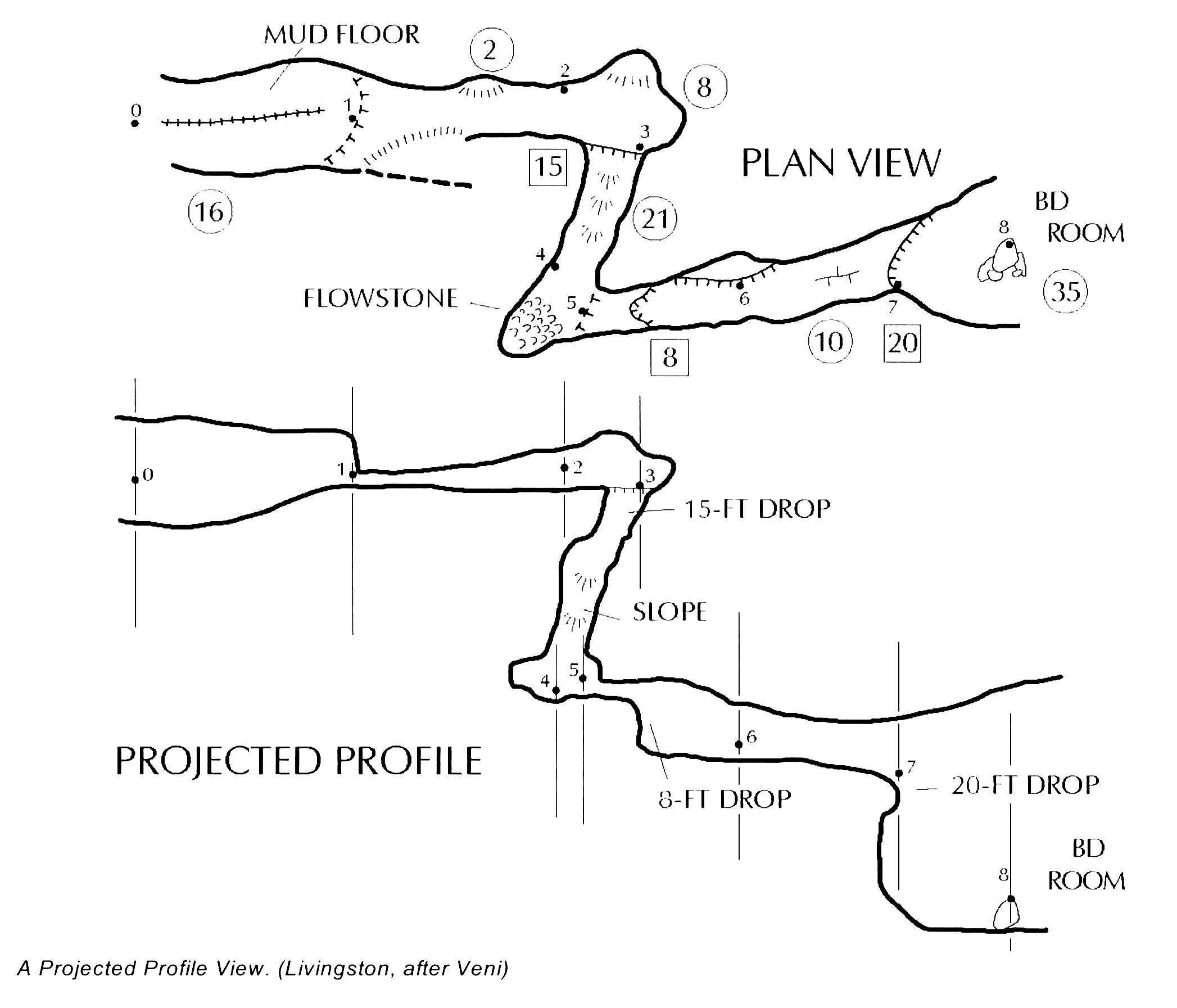
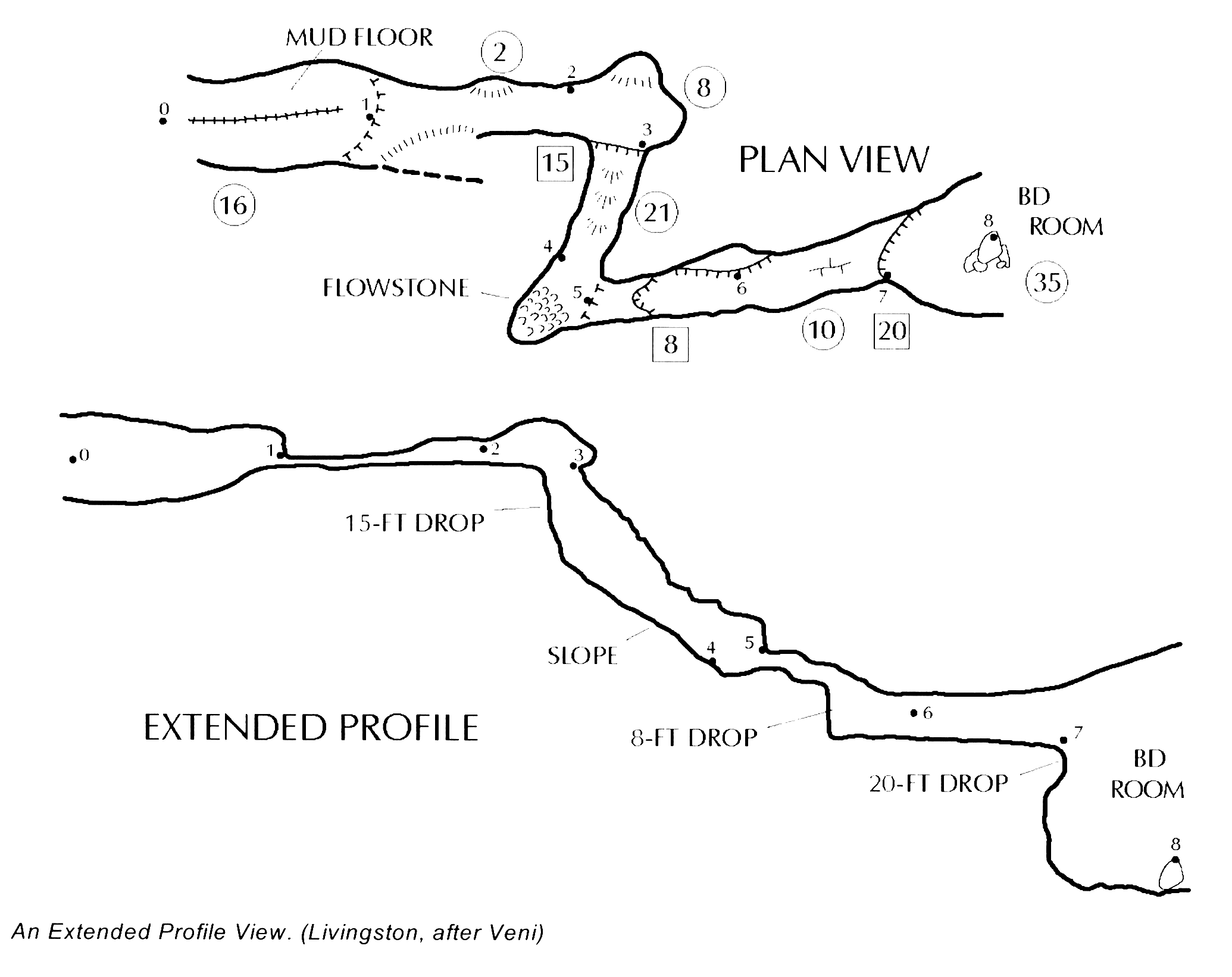
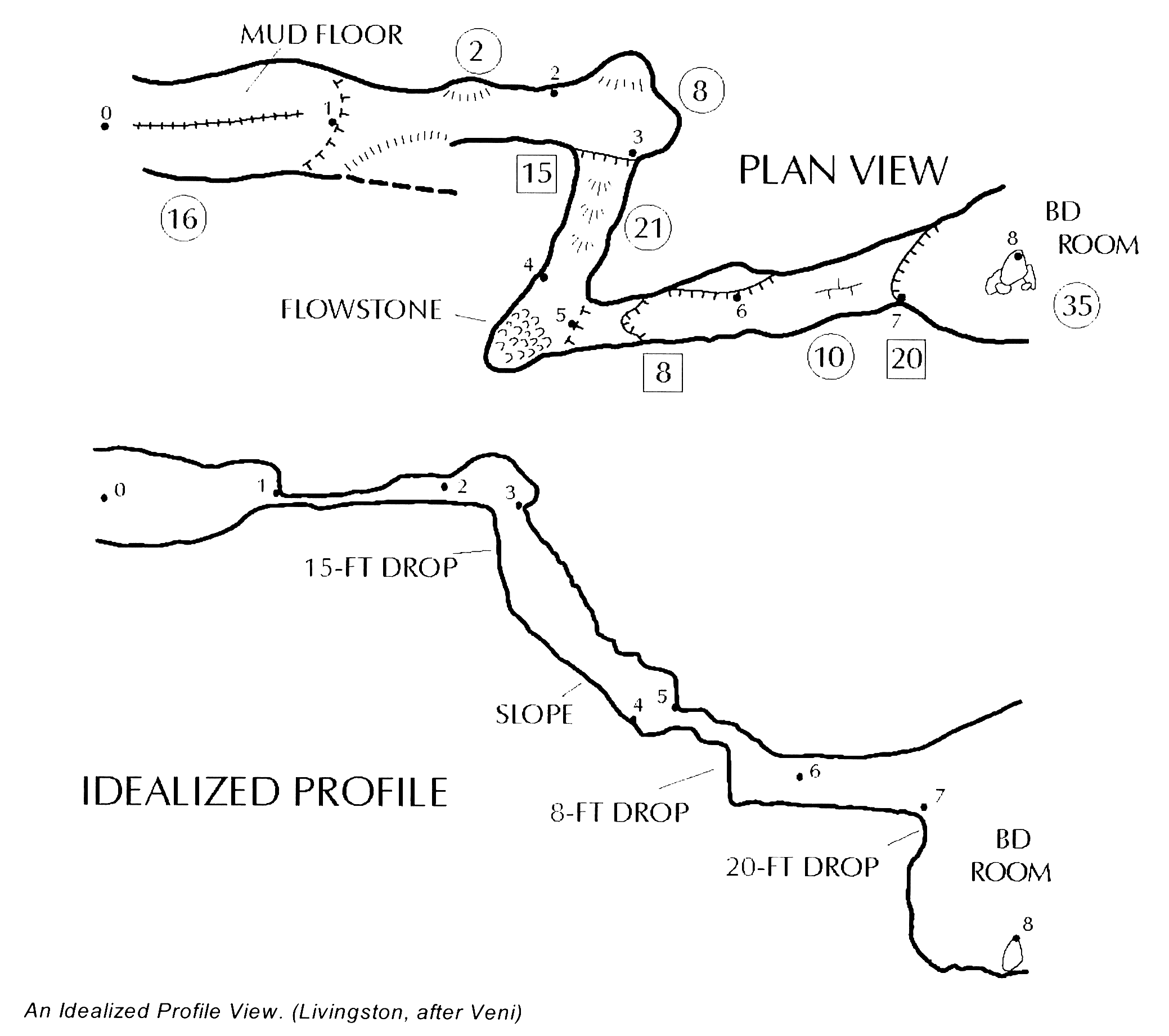
Hi, Since we are with the extend letter of santa claus, I'm going to make my own request: *idealized profile. * First remember a bit the profile types: * *Projected profile: *which displays the cave passages at a right angle to the plan view, or as if the front wall of the cave have been "removed". The projected profile gives the best idea of how the different cave levels relate, but the view is sometimes confusing in winding passages. * *Extended profile*: displays the cave as if it were pulled into a straight line. This profile provides a view of the caves as it will be experienced by cavers. * *Idealized profile*: is a compromise between the other two profiles, it maintains the approximate bounds of projected profile or extended profile, but expands or reduce the length of the passage to better show the subjective view. This type of profile is a somewhat subjective view that depends on the cartographer's ability to "stretch" the cave and its passages, while maintaining a somewhat "pseudo-projected" point-of-view to the profile. Currently with Therion I am already making my own idealized profile. Starting from a extended profile, I turn the gallery to the left or right (extend left or right) depending on the plan, and using the vertical extension (extend vertical) to finish adjusting the relative position of the two galleries of the loop. To have more control over to "stretch" the cave passages, I need the Therion authors to incorporate an option to the extend command: *scale*. This factor would allow to stretch or reduce the horizontal length of the leg shots. By default it would be equal to 1. if I want to reduce the distance it would be less than 1. if I want to stretch the distance would be greater than 1. The definition of the command would be: extend <spec> [<station> [<station>]] [scale] Example: extend left A.2 A.3 0.5 # To reduce the length With this new option it would be very easy to make idealized profiles. This option is best applied to the long horizontal sections, leaving the vertical sections without modification. I hope to have explained myself well in my Spanglish, and I hope that my wishes are taken into account. Best regards and exciting explorations. Evaristo.
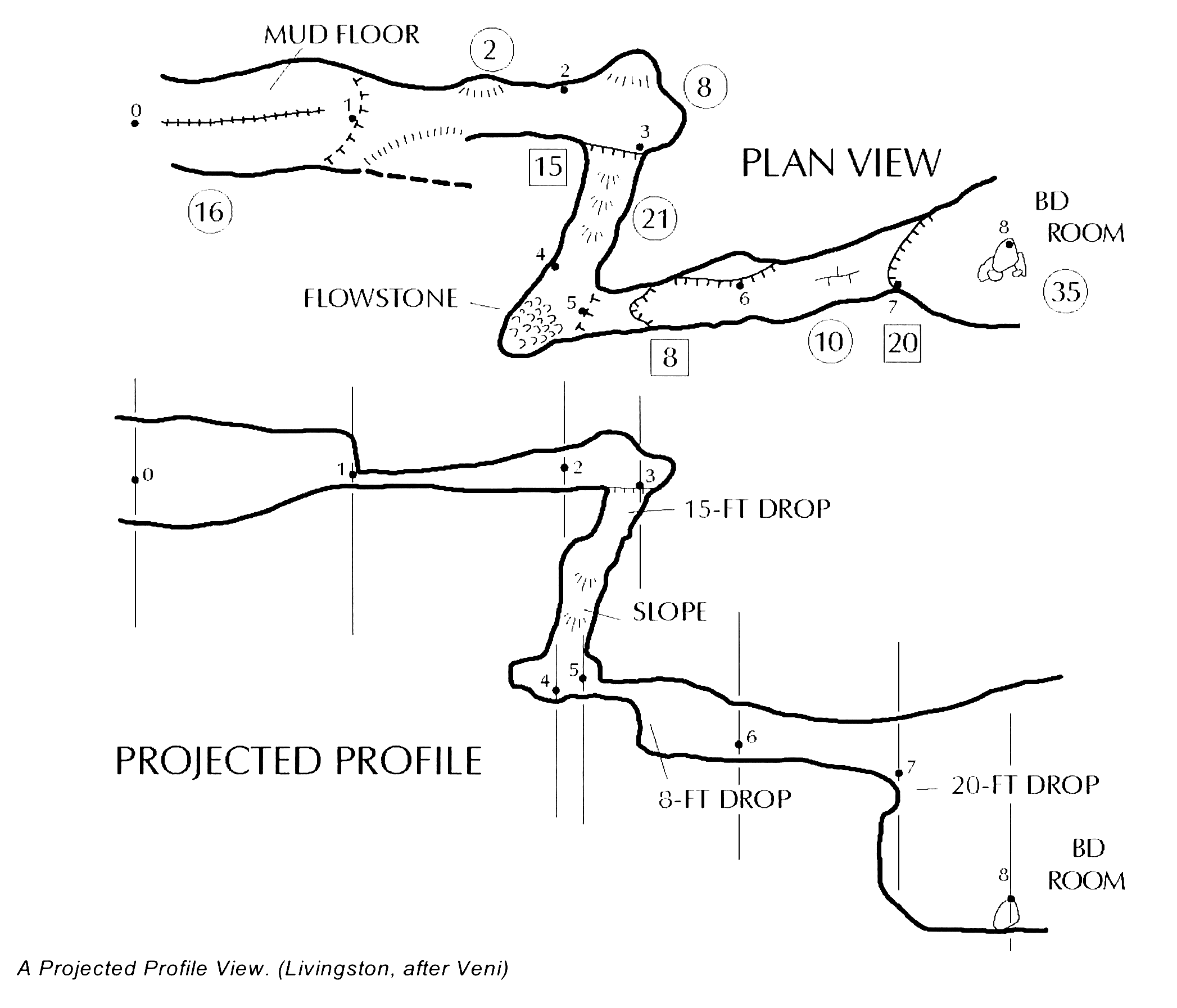
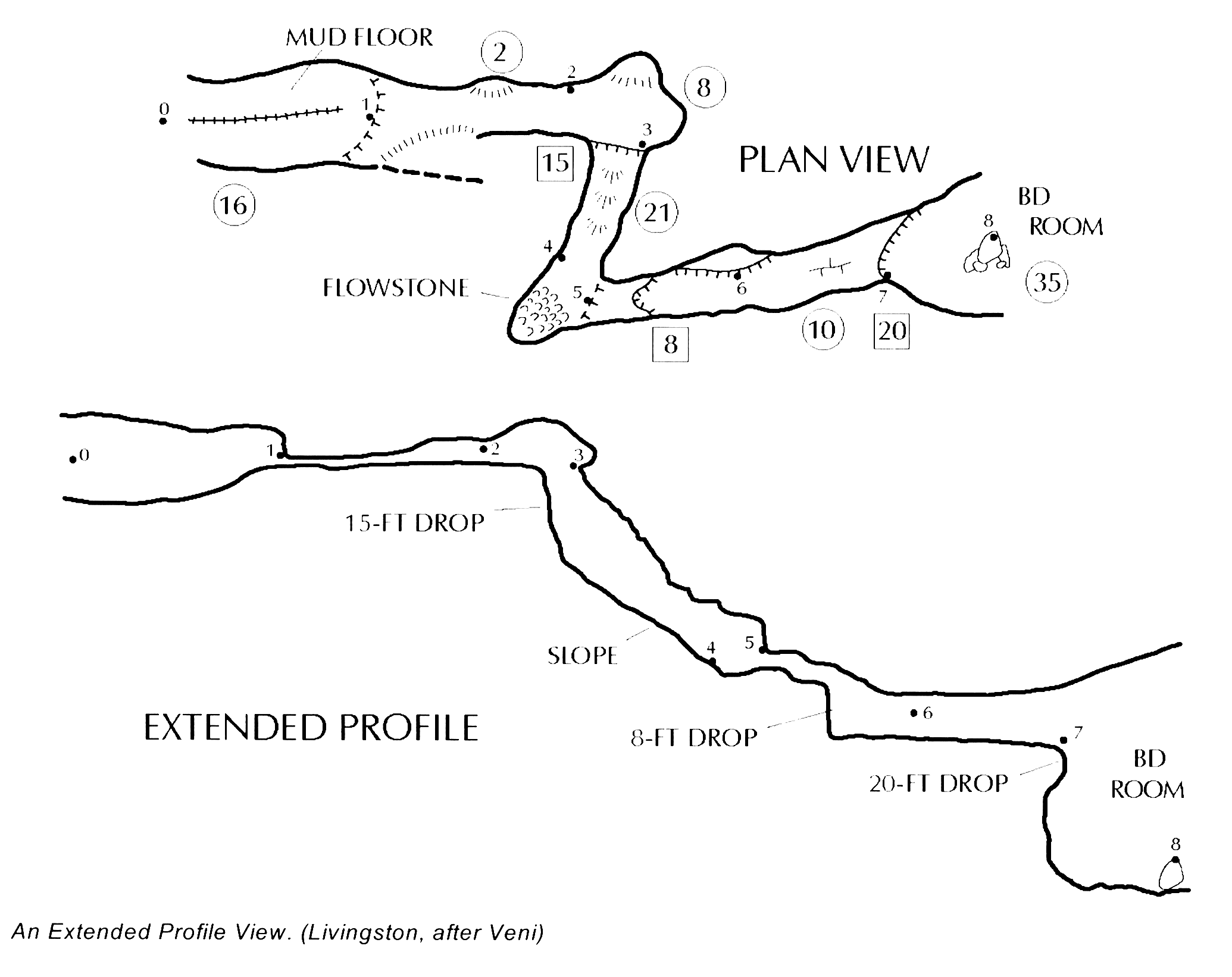
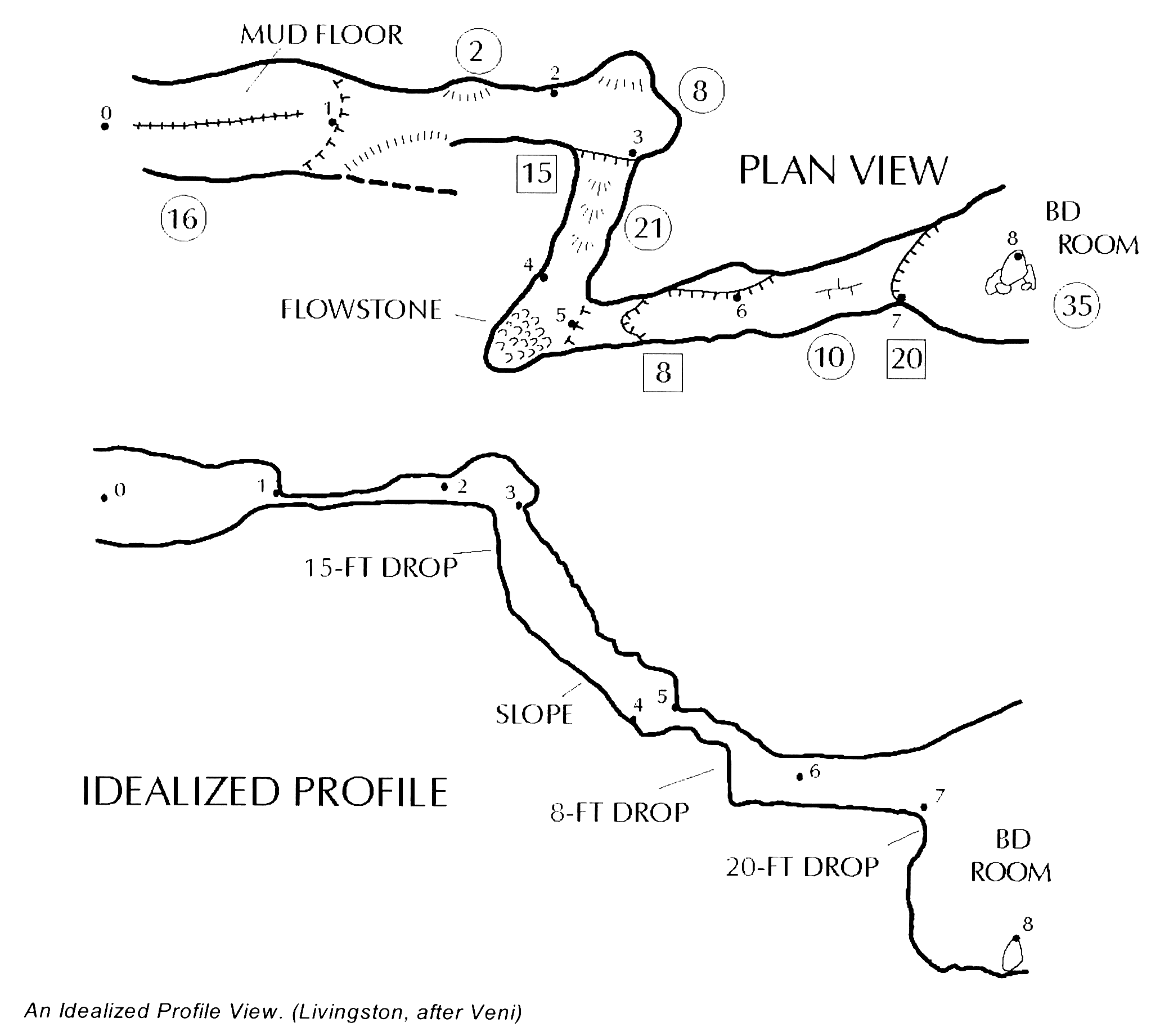
Evaristo Nicely explained. As though English was your first language! I think that is the same general concept that Marco suggested – “I think that extend should take values in the interval [-1,1]”. An idealised profile is what I guess we are all aiming for, but at present we are limited by the Therion controls left, right vertical. Looks like you have done a very good job with the example you posted. From: Therion <therion-bounces@speleo.sk> On Behalf Of Evaristo Quiroga via Therion Sent: Saturday, 9 June 2018 10:00 PM To: Marco Corvi via Therion <therion@speleo.sk> Cc: Evaristo Quiroga <eqr@ecgracia.com> Subject: Re: [Therion] extend Hi, Since we are with the extend letter of santa claus, I'm going to make my own request: idealized profile. First remember a bit the profile types: * Projected profile: which displays the cave passages at a right angle to the plan view, or as if the front wall of the cave have been "removed". The projected profile gives the best idea of how the different cave levels relate, but the view is sometimes confusing in winding passages. * Extended profile: displays the cave as if it were pulled into a straight line. This profile provides a view of the caves as it will be experienced by cavers. * Idealized profile: is a compromise between the other two profiles, it maintains the approximate bounds of projected profile or extended profile, but expands or reduce the length of the passage to better show the subjective view. This type of profile is a somewhat subjective view that depends on the cartographer's ability to "stretch" the cave and its passages, while maintaining a somewhat "pseudo-projected" point-of-view to the profile. Currently with Therion I am already making my own idealized profile. Starting from a extended profile, I turn the gallery to the left or right (extend left or right) depending on the plan, and using the vertical extension (extend vertical) to finish adjusting the relative position of the two galleries of the loop. To have more control over to "stretch" the cave passages, I need the Therion authors to incorporate an option to the extend command: scale. This factor would allow to stretch or reduce the horizontal length of the leg shots. By default it would be equal to 1. if I want to reduce the distance it would be less than 1. if I want to stretch the distance would be greater than 1. The definition of the command would be: extend <spec> [<station> [<station>]] [scale] Example: extend left A.2 A.3 0.5 # To reduce the length With this new option it would be very easy to make idealized profiles. This option is best applied to the long horizontal sections, leaving the vertical sections without modification. I hope to have explained myself well in my Spanglish, and I hope that my wishes are taken into account. Best regards and exciting explorations. Evaristo.
participants (5)
-
 Benoit Martinez
 -
 Bruce Mutton
 -
 Evaristo Quiroga
 -
 Marco Corvi
 -
 Martin Sluka