Lox Model showing walls from wrong side

I've branched this from Converting Inkscape Drawings of very large caves intoTherion: I have experienced the stretch using 2 points, and where I have tried this is always solved by adding more points and scraps were needed, but the inside out part I do get more often. I have tried splitting into more scraps, and splitting the lines. The former works totally or reduces the incorrect bit, however a side affect is that the model is not as neat as it should be as the lox model has a 'step' on the scrap join. As demonstrated by the 2 attached set of files. But currently all this is a bit random, and the moving to a new scrap is very tedious, it would be good to have some understanding of the problems, so they could be avoided? Andrew On 24/02/11 18:47, Bruce wrote:
Simple scrap, but why does my lox model appear to only show the walls when seen from the wrong side?
I have checked that the wall lines all have the yellow tick pointing inside the passage. But half my passage appears in the Loch viewer to only show the wall from the inside face, not from outside the model.
Very simple data file contents are as follows. The survey stations are being imported from a survex 3D file. But I am only using 2 survey points to scale the scrap, so you should be able to create any two points to substitute the survey data.
I have done this with scanned paper files a number of times.
Always if I use two points the lox files come out as you describe, or with vertical extensions from the actual cave position to the surface.
A solution that has worked once, but not tested yet on the others is two break the drawing into more than one scrap, and have at least two points per scrap. This way the therion drawings and lox come out the same as with a conventional survey.
It seems that two points, one scrap is too minimalist for the current implementation.
Bruce

the th2 file is normal text file. you may edit it in standard text editors you may use it to divide one th2 file into two or more th2 files. Just to copy header lines. Very simple is to create new scrap from part of original scrap in map editor of xtherion, Just create new scrap check the number of line of endscrap command and move to that line number all parts you want they be a part of new scrap. m. On 25 Feb, 2011,at 12:13 PM, Andrew Atkinson <andrew@wotcc.org.uk> wrote: I've branched this from Converting Inkscape Drawings of very large caves intoTherion: I have experienced the stretch using 2 points, and where I have tried this is always solved by adding more points and scraps were needed, but the inside out part I do get more often. I have tried splitting into more scraps, and splitting the lines. The former works totally or reduces the incorrect bit, however a side affect is that the model is not as neat as it should be as the lox model has a 'step' on the scrap join. As demonstrated by the 2 attached set of files. But currently all this is a bit random, and the moving to a new scrap is very tedious, it would be good to have some understanding of the problems, so they could be avoided? Andrew On 24/02/11 18:47, Bruce wrote:
Simple scrap, but why does my lox model appear to only show the walls when seen from the wrong side?
I have checked that the wall lines all have the yellow tick pointing inside the passage. But half my passage appears in the Loch viewer to only show the wall from the inside face, not from outside the model.
Very simple data file contents are as follows. The survey stations are being imported from a survex 3D file. But I am only using 2 survey points to scale the scrap, so you should be able to create any two points to substitute the survey data
I have done this with scanned paper files a number of times.
Always if I use two points the lox files come out as you describe, or with vertical extensions from the actual cave position to the surface
A solution that has worked once, but not tested yet on the others is two break the drawing into more than one scrap, and have at least two points per scrap. This way the therion drawings and lox come out the same as with a conventional survey.
It seems that two points, one scrap is too minimalist for the current implementation.
Bruce
_______________________________________________ Therion mailing list Therion@speleo.sk http://mailman.speleo.sk/mailman/listinfo/therion
The process is simple, but in reality, it is tedious, as the 'elements' are not always together, so you have to do them individually from then map editor, quite often it the next automatically selected element is away from the area you are working on, so you have to scroll back. Sometimes I am lucky and everything is together and I can edit the text. Not difficult, but very tedious, avoiding it would be better. Some of my files now have scraps of only 2 stations and 5m long, meaning lots of joins on the lox model that are not as neat as a single scrap. Andrew On 25/02/11 12:05, martinsluka wrote:
the th2 file is normal text file. you may edit it in standard text editors. you may use it to divide one th2 file into two or more th2 files. Just to copy header lines.
Very simple is to create new scrap from part of original scrap in map editor of xtherion, Just create new scrap check the number of line of endscrap command and move to that line number all parts you want they be a part of new scrap.
m.
On 25 Feb, 2011,at 12:13 PM, Andrew Atkinson <andrew@wotcc.org.uk> wrote:
I've branched this from Converting Inkscape Drawings of very large caves intoTherion:
I have experienced the stretch using 2 points, and where I have tried this is always solved by adding more points and scraps were needed, but the inside out part I do get more often. I have tried splitting into more scraps, and splitting the lines.
The former works totally or reduces the incorrect bit, however a side affect is that the model is not as neat as it should be as the lox model has a 'step' on the scrap join. As demonstrated by the 2 attached set of files.
But currently all this is a bit random, and the moving to a new scrap is very tedious, it would be good to have some understanding of the problems, so they could be avoided?
Andrew
On 24/02/11 18:47, Bruce wrote:
Simple scrap, but why does my lox model appear to only show the walls when seen from the wrong side?
I have checked that the wall lines all have the yellow tick pointing inside the passage. But half my passage appears in the Loch viewer to only show the wall from the inside face, not from outside the model.
Very simple data file contents are as follows. The survey stations are being imported from a survex 3D file. But I am only using 2 survey points to scale the scrap, so you should be able to create any two points to substitute the survey data.
I have done this with scanned paper files a number of times.
Always if I use two points the lox files come out as you describe, or with vertical extensions from the actual cave position to the surface.
A solution that has worked once, but not tested yet on the others is two break the drawing into more than one scrap, and have at least two points per scrap. This way the therion drawings and lox come out the same as with a conventional survey.
It seems that two points, one scrap is too minimalist for the current implementation.
Bruce
_______________________________________________ Therion mailing list Therion@speleo.sk <mailto:Therion@speleo.sk> http://mailman.speleo.sk/mailman/listinfo/therion
_______________________________________________ Therion mailing list Therion@speleo.sk http://mailman.speleo.sk/mailman/listinfo/therion

Following the discussions yesterday I have tried adding more survey points to my scrap but this did not make any difference. I did notice that the log warned me that my scrap outline intersects itself, followed by some numbers. But visually in the editor I cannot see any place where the lines are messed up. So what to the numbers after the warning mean? My wall lines were imported from Inkscape. The warnings: [Warning: scrap outline intersects itself in scrap layer4@Riano] [Warning: scrap outline intersects itself in scrap layer4@Riano] [8] [9] [10] (./mptextmp.mp) [11] ) Footleg
Right, some more investigation has proved that this is not because of the wall lines exactly, but is due to the fact that I have a survey point outside the area enclosed by the walls. See the attached screenshot. By adding the small line shown in red the problem goes away. I think the problem arises if you draw imaginary lines between the two pairs of points forming the ends of the two walls, and there is a survey point outside the area defined by the walls and imaginary enclosing lines then you get the 'scrap outline intersects itself' error and the lox model walls get all messed up. Correction! I just tried deleting the survey point and survey line, and it messes up still unless I have that extra bit of wall line shown in red. So it appears that you have to end your two wall lines roughly on a line perpendicular to the passage. If one is shorter than the other then the lox model messes up. I confirmed this by removing my extra bit of wall line from the scrap, and then splitting the other wall line a couple of nodes up and deleting the end bit off that wall. This renders fine too. Footleg On 25 February 2011 13:32, Footleg <drfootleg@gmail.com> wrote:
Following the discussions yesterday I have tried adding more survey points to my scrap but this did not make any difference. I did notice that the log warned me that my scrap outline intersects itself, followed by some numbers. But visually in the editor I cannot see any place where the lines are messed up. So what to the numbers after the warning mean? My wall lines were imported from Inkscape.
The warnings: [Warning: scrap outline intersects itself in scrap layer4@Riano] [Warning: scrap outline intersects itself in scrap layer4@Riano] [8] [9] [10] (./mptextmp.mp) [11] )
Footleg

Why you have "survey line" in your scraps? You need only points (station type) for orientation/scaling. I think there should be another problem in your data files then what you described. L. On Fri, 25 Feb 2011 14:39:38 +0000, Footleg <drfootleg@gmail.com> wrote:
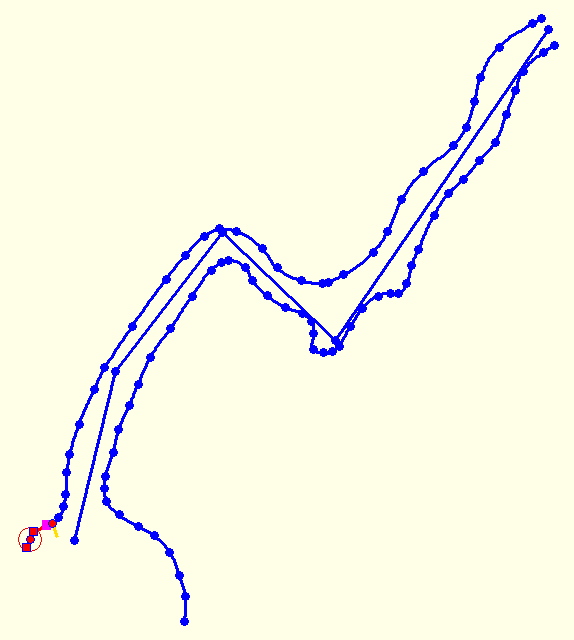
Right, some more investigation has proved that this is not because of the wall lines exactly, but is due to the fact that I have a survey point outside the area enclosed by the walls. See the attached screenshot. By adding the small line shown in red the problem goes away. I think the problem arises if you draw imaginary lines between the two pairs of points forming the ends of the two walls, and there is a survey point outside the area defined by the walls and imaginary enclosing lines then you get the 'scrap outline intersects itself' error and the lox model walls get all messed up.
Correction! I just tried deleting the survey point and survey line, and it messes up still unless I have that extra bit of wall line shown in red. So it appears that you have to end your two wall lines roughly on a line perpendicular to the passage. If one is shorter than the other then the lox model messes up. I confirmed this by removing my extra bit of wall line from the scrap, and then splitting the other wall line a couple of nodes up and deleting the end bit off that wall. This renders fine too.
Footleg
On 25 February 2011 13:32, Footleg wrote: Following the discussions yesterday I have tried adding more survey points to my scrap but this did not make any difference. I did notice that the log warned me that my scrap outline intersects itself, followed by some numbers. But visually in the editor I cannot see any place where the lines are messed up. So what to the numbers after the warning mean? My wall lines were imported from Inkscape.
The warnings: [Warning: scrap outline intersects itself in scrap layer4@Riano] [Warning: scrap outline intersects itself in scrap layer4@Riano] [8] [9] [10] (./mptextmp.mp [2]) [11] )
Footleg
Links: ------ [1] mailto:drfootleg@gmail.com [2] http://mptextmp.mp
The survey line is there because I am testing importing sketches drawn in another application. So if I include the survey lines then I can click on the nodes and it sets my survey points in exactly the right place to scale and position my scraps on the centreline. The survey lines don't appear to affect the problem in the lox model. I can delete them all and it still messes up the walls unless I make the ends about level with each other. Footleg 2011/2/25 Ladislav Blažek <lada@blazcata.cz>
Why you have "survey line" in your scraps? You need only points (station type) for orientation/scaling. I think there should be another problem in your data files then what you described.
L.
On Fri, 25 Feb 2011 14:39:38 +0000, Footleg <drfootleg@gmail.com> wrote:
Right, some more investigation has proved that this is not because of the wall lines exactly, but is due to the fact that I have a survey point outside the area enclosed by the walls. See the attached screenshot. By adding the small line shown in red the problem goes away. I think the problem arises if you draw imaginary lines between the two pairs of points forming the ends of the two walls, and there is a survey point outside the area defined by the walls and imaginary enclosing lines then you get the 'scrap outline intersects itself' error and the lox model walls get all messed up.
Correction! I just tried deleting the survey point and survey line, and it messes up still unless I have that extra bit of wall line shown in red. So it appears that you have to end your two wall lines roughly on a line perpendicular to the passage. If one is shorter than the other then the lox model messes up. I confirmed this by removing my extra bit of wall line from the scrap, and then splitting the other wall line a couple of nodes up and deleting the end bit off that wall. This renders fine too.
Footleg
On 25 February 2011 13:32, Footleg wrote:
Following the discussions yesterday I have tried adding more survey points to my scrap but this did not make any difference. I did notice that the log warned me that my scrap outline intersects itself, followed by some numbers. But visually in the editor I cannot see any place where the lines are messed up. So what to the numbers after the warning mean? My wall lines were imported from Inkscape.
The warnings: [Warning: scrap outline intersects itself in scrap layer4@Riano] [Warning: scrap outline intersects itself in scrap layer4@Riano] [8] [9] [10] (./mptextmp.mp [2]) [11] )
Footleg
Links: ------ [1] mailto:drfootleg@gmail.com [2] http://mptextmp.mp
_______________________________________________ Therion mailing list Therion@speleo.sk http://mailman.speleo.sk/mailman/listinfo/therion
If you can send me your data I can help you with debugging. Otherwise it is hard to say what is wrong. Odesláno z mého bezdrátového zařízení BlackBerry® -----Original Message----- From: Footleg <drfootleg@gmail.com> Sender: therion-bounces@speleo.sk Date: Fri, 25 Feb 2011 17:08:25 To: List for Therion users<therion@speleo.sk> Reply-To: List for Therion users <therion@speleo.sk> Subject: Re: [Therion] Lox Model showing walls from wrong side _______________________________________________ Therion mailing list Therion@speleo.sk http://mailman.speleo.sk/mailman/listinfo/therion
Not from footleg, but here is one I have not solved yet, probably something to do with the high level passage coming in at the end of scrap one, separate survey On 25/02/11 17:49, lada@blazcata.cz wrote:
If you can send me your data I can help you with debugging. Otherwise it is hard to say what is wrong. Odesláno z mého bezdrátového zařízení BlackBerry®
-----Original Message----- From: Footleg<drfootleg@gmail.com> Sender: therion-bounces@speleo.sk Date: Fri, 25 Feb 2011 17:08:25 To: List for Therion users<therion@speleo.sk> Reply-To: List for Therion users<therion@speleo.sk> Subject: Re: [Therion] Lox Model showing walls from wrong side
_______________________________________________ Therion mailing list Therion@speleo.sk http://mailman.speleo.sk/mailman/listinfo/therion
_______________________________________________ Therion mailing list Therion@speleo.sk http://mailman.speleo.sk/mailman/listinfo/therion
I have attached a very simple project showing the problem. There are screen shots in the zip file too. Using the cave1.th2 file you get the bad model. Note that it looks like the lox model has created a wall between a line node in one wall and a line node in an unconnected line node on the opposite wall. The wall in the Loch screen shot appears to be passing through the cave centreline. By adding a bit of extra line to the end of one of the walls, as shown in the ExtraLine.png, the lox model comes out correct. This is in the cave2.th2 file. So use either cave1.th2 to reproduce the problem, or cave2.th2 to see how it is fixed by adding a bit extra on the end of one wall. All done using the current latest 5.3.6 update of Therion. Footleg
On 25/02/11 17:49, lada@blazcata.cz wrote:
If you can send me your data I can help you with debugging. Otherwise it is hard to say what is wrong. Odesláno z mého bezdrátového zařízení BlackBerry(R)
-----Original Message----- From: Footleg<drfootleg@gmail.com> Sender: therion-bounces@speleo.sk Date: Fri, 25 Feb 2011 17:08:25 To: List for Therion users<therion@speleo.sk> Reply-To: List for Therion users<therion@speleo.sk> Subject: Re: [Therion] Lox Model showing walls from wrong side
_______________________________________________ Therion mailing list Therion@speleo.sk http://mailman.speleo.sk/mailman/listinfo/therion
_______________________________________________ Therion mailing list Therion@speleo.sk http://mailman.speleo.sk/mailman/listinfo/therion
_______________________________________________ Therion mailing list Therion@speleo.sk http://mailman.speleo.sk/mailman/listinfo/therion

This is the same problem. Adding line wall:invisible to both ends of this simple scrap (scrapPlan1) ultimately solves the problem. Sorry for late answer. I will try to fix it in the next snapshot. The problem is simple. When scanning outline, therion goes line by line. If there is another line, starting at the same point, where another ends, it continues this way. If there is none, it tries to find nearest end line point. But it does not care, whether it is really end point - or it just wall divided into two lines. I apologize for inconvenience. Best regards, S. 2011/2/26 Footleg <drfootleg@gmail.com>
I have attached a very simple project showing the problem. There are screen shots in the zip file too. Using the cave1.th2 file you get the bad model. Note that it looks like the lox model has created a wall between a line node in one wall and a line node in an unconnected line node on the opposite wall. The wall in the Loch screen shot appears to be passing through the cave centreline.
By adding a bit of extra line to the end of one of the walls, as shown in the ExtraLine.png, the lox model comes out correct. This is in the cave2.th2 file. So use either cave1.th2 to reproduce the problem, or cave2.th2 to see how it is fixed by adding a bit extra on the end of one wall.
All done using the current latest 5.3.6 update of Therion.
Footleg
On 25/02/11 17:49, lada@blazcata.cz wrote:
If you can send me your data I can help you with debugging. Otherwise it is hard to say what is wrong. Odesláno z mého bezdrátového zařízení BlackBerry(R)
-----Original Message----- From: Footleg<drfootleg@gmail.com> Sender: therion-bounces@speleo.sk Date: Fri, 25 Feb 2011 17:08:25 To: List for Therion users<therion@speleo.sk> Reply-To: List for Therion users<therion@speleo.sk> Subject: Re: [Therion] Lox Model showing walls from wrong side
_______________________________________________ Therion mailing list Therion@speleo.sk http://mailman.speleo.sk/mailman/listinfo/therion
_______________________________________________ Therion mailing list Therion@speleo.sk http://mailman.speleo.sk/mailman/listinfo/therion
_______________________________________________ Therion mailing list Therion@speleo.sk http://mailman.speleo.sk/mailman/listinfo/therion
_______________________________________________ Therion mailing list Therion@speleo.sk http://mailman.speleo.sk/mailman/listinfo/therion
Excellent, that does make sense, will be a great help in trouble shooting. Andrew On 26/02/11 11:18, Stacho Mudrak wrote:
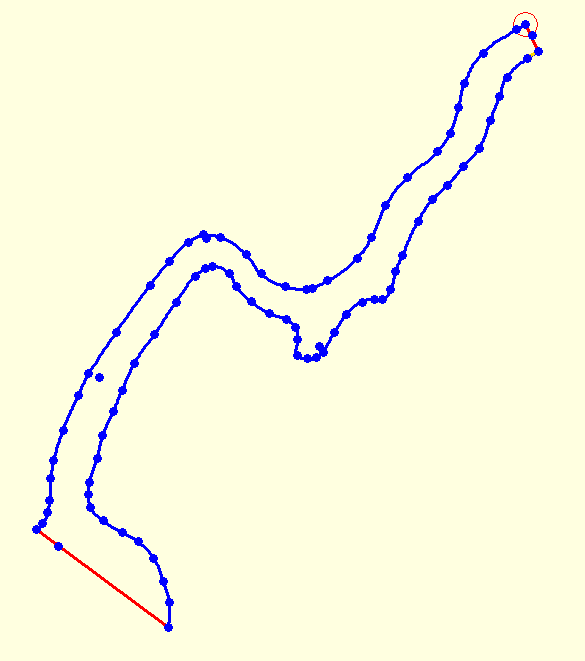
This is the same problem. Adding line wall:invisible to both ends of this simple scrap (scrapPlan1) ultimately solves the problem. Sorry for late answer. I will try to fix it in the next snapshot.
The problem is simple. When scanning outline, therion goes line by line. If there is another line, starting at the same point, where another ends, it continues this way. If there is none, it tries to find nearest end line point. But it does not care, whether it is really end point - or it just wall divided into two lines. I apologize for inconvenience.
Best regards, S.
2011/2/26 Footleg <drfootleg@gmail.com <mailto:drfootleg@gmail.com>>
I have attached a very simple project showing the problem. There are screen shots in the zip file too. Using the cave1.th2 file you get the bad model. Note that it looks like the lox model has created a wall between a line node in one wall and a line node in an unconnected line node on the opposite wall. The wall in the Loch screen shot appears to be passing through the cave centreline.
By adding a bit of extra line to the end of one of the walls, as shown in the ExtraLine.png, the lox model comes out correct. This is in the cave2.th2 file. So use either cave1.th2 to reproduce the problem, or cave2.th2 to see how it is fixed by adding a bit extra on the end of one wall.
All done using the current latest 5.3.6 update of Therion.
Footleg
On 25/02/11 17:49, lada@blazcata.cz <mailto:lada@blazcata.cz> wrote:
If you can send me your data I can help you with debugging. Otherwise it is hard to say what is wrong. Odesláno z mého bezdrátového zařízení BlackBerry®
-----Original Message----- From: Footleg<drfootleg@gmail.com <mailto:drfootleg@gmail.com>> Sender: therion-bounces@speleo.sk <mailto:therion-bounces@speleo.sk> Date: Fri, 25 Feb 2011 17:08:25 To: List for Therion users<therion@speleo.sk <mailto:therion@speleo.sk>> Reply-To: List for Therion users<therion@speleo.sk <mailto:therion@speleo.sk>> Subject: Re: [Therion] Lox Model showing walls from wrong side
_______________________________________________ Therion mailing list Therion@speleo.sk <mailto:Therion@speleo.sk> http://mailman.speleo.sk/mailman/listinfo/therion
_______________________________________________ Therion mailing list Therion@speleo.sk <mailto:Therion@speleo.sk> http://mailman.speleo.sk/mailman/listinfo/therion
_______________________________________________ Therion mailing list Therion@speleo.sk <mailto:Therion@speleo.sk> http://mailman.speleo.sk/mailman/listinfo/therion
_______________________________________________ Therion mailing list Therion@speleo.sk <mailto:Therion@speleo.sk> http://mailman.speleo.sk/mailman/listinfo/therion
_______________________________________________ Therion mailing list Therion@speleo.sk http://mailman.speleo.sk/mailman/listinfo/therion
Well, this is issue of outline scanning algorithm. Adding invisible wall: line wall:invisible 5036.0 1371.0 4832.0 1298.0 endline Solves the problem. Therion very often has problems correctly connecting outline, if there are short wall lines and relatively long gaps between them. Adding invisible line there always solves the problem. HTH, S. On 26 February 2011 09:43, Andrew Atkinson <andrew@wotcc.org.uk> wrote:
Not from footleg, but here is one I have not solved yet, probably something to do with the high level passage coming in at the end of scrap one, separate survey
On 25/02/11 17:49, lada@blazcata.cz wrote:
If you can send me your data I can help you with debugging. Otherwise it is hard to say what is wrong. Odesláno z mého bezdrátového zařízení BlackBerry(R)
-----Original Message----- From: Footleg<drfootleg@gmail.com> Sender: therion-bounces@speleo.sk Date: Fri, 25 Feb 2011 17:08:25 To: List for Therion users<therion@speleo.sk> Reply-To: List for Therion users<therion@speleo.sk> Subject: Re: [Therion] Lox Model showing walls from wrong side
_______________________________________________ Therion mailing list Therion@speleo.sk http://mailman.speleo.sk/mailman/listinfo/therion
_______________________________________________ Therion mailing list Therion@speleo.sk http://mailman.speleo.sk/mailman/listinfo/therion
_______________________________________________ Therion mailing list Therion@speleo.sk http://mailman.speleo.sk/mailman/listinfo/therion
Okay an improvement, but still not perfect, (5.3.5) but I can now try to solve with knowledge Andrew On 26/02/11 11:07, Stacho Mudrak wrote:
Well, this is issue of outline scanning algorithm. Adding invisible wall:
line wall:invisible 5036.0 1371.0 4832.0 1298.0 endline
Solves the problem. Therion very often has problems correctly connecting outline, if there are short wall lines and relatively long gaps between them. Adding invisible line there always solves the problem.
HTH, S.
participants (6)
-
 Andrew Atkinson
 -
 Footleg
 -
 lada@blazcata.cz
 -
Ladislav Blažek
-
 martinsluka
 -
 Stacho Mudrak