
Hi, there is a new release 6.1.0 of Therion. Check https://github.com/therion/therion/releases/tag/v6.1.0 for more details. Best regards, Therion team

On 27/05/2022 18:00, Therion via Therion wrote:
Hi, there is a new release 6.1.0 of Therion. Check https://github.com/therion/therion/releases/tag/v6.1.0 for more details.
Just got around to updating, using the standard "Windows installer" on the Therion download page. In this release, I have been getting this error on Windows 10 when trying to run Loch: --------------------------- Fatal Error --------------------------- Mismatch between the program and library build versions detected. The library used 3.0 (wchar_t,compiler with C++ ABI 1016,wx containers,compatible with 2.8), and your program used 3.0 (wchar_t,compiler with C++ ABI 1017,wx containers,compatible with 2.8). --------------------------- OK --------------------------- This doesn't sound like something wrong on my machine, but I would have expected someone else to mention it already if it was wrong with the Therion release. Did I miss something?

Same here with the standard installer on the release page, on Windows 11 I use the MXE installer and there is no more problem : https://github.com/therion/therion/actions/runs/2397690531 Benoit Le lun. 20 juin 2022 à 17:02, Tarquin Wilton-Jones via Therion < therion@speleo.sk> a écrit :
On 27/05/2022 18:00, Therion via Therion wrote:
Hi, there is a new release 6.1.0 of Therion. Check https://github.com/therion/therion/releases/tag/v6.1.0 for more details.
Just got around to updating, using the standard "Windows installer" on the Therion download page. In this release, I have been getting this error on Windows 10 when trying to run Loch:
--------------------------- Fatal Error --------------------------- Mismatch between the program and library build versions detected. The library used 3.0 (wchar_t,compiler with C++ ABI 1016,wx containers,compatible with 2.8), and your program used 3.0 (wchar_t,compiler with C++ ABI 1017,wx containers,compatible with 2.8). --------------------------- OK ---------------------------
This doesn't sound like something wrong on my machine, but I would have expected someone else to mention it already if it was wrong with the Therion release. Did I miss something? _______________________________________________ Therion mailing list Therion@speleo.sk https://mailman.speleo.sk/listinfo/therion
On 20/06/2022 16:48, Benoit Martinez wrote:
Same here with the standard installer on the release page, on Windows 11
Nearly a month after the release and nobody mentioned it yet o_O I don't know what this says about all of us :D Something about who is on vacation, the number of Windows Therion users, the number of Lox users, or how often we all update? Well, I am guilty of the last one, anyway.
I use the MXE installer and there is no more problem : https://github.com/therion/therion/actions/runs/2397690531
Interesting. At least that allows me to run it, thanks! Filed as https://github.com/therion/therion/issues/426

Just got around to updating, using the standard "Windows installer" on the Therion download page. In this release, I have been getting this error on Windows 10 when trying to run Loch: This doesn't sound like something wrong on my machine, but I would have expected someone else to mention it already if it was wrong with the Therion release. Did I miss something?
Same, although I only got it twice, and then not again. Mind you I frequently reinstall the therion-setup-msys2 via the GitHub Actions workflow artifacts. I had not associated the error specifically with the download page route and had it pegged as a mystery to watch for... Bruce

Hi, this should be fixed in the latest snapshot - upgrading wxWidgets from 3.0 to 3.1 seems to solve the problem. Could you please try and confirm whether this fix works for you? Thanks, S. On Mon, 20 Jun 2022 at 21:14, Bruce Mutton <bruce@tomo.co.nz> wrote:
Just got around to updating, using the standard "Windows installer" on the Therion download page. In this release, I have been getting this error on Windows 10 when trying to run Loch: This doesn't sound like something wrong on my machine, but I would have expected someone else to mention it already if it was wrong with the Therion release. Did I miss something?
Same, although I only got it twice, and then not again. Mind you I frequently reinstall the therion-setup-msys2 via the GitHub Actions workflow artifacts. I had not associated the error specifically with the download page route and had it pegged as a mystery to watch for... Bruce
_______________________________________________ Therion mailing list Therion@speleo.sk https://mailman.speleo.sk/listinfo/therion
On 20/06/2022 21:01, Stacho Mudrak wrote:
Hi, this should be fixed in the latest snapshot - upgrading wxWidgets from 3.0 to 3.1 seems to solve the problem.
Could you please try and confirm whether this fix works for you?
Verified fixed. Windows 10, Loch 6.1.0+682fcb3 msys2 #376. Nice turnaround speed :) The UI buttons and general graphics look really fuzzy though. I think that is all releases since 6 or 6.1, because Therion now respects the Windows scaling "Change the size of apps and text on the main display". Can I disable that in Loch by any chance? Because Loch does not do it nicely at all. I could not see anything in the changelog. Cheers Tarquin
Thanks for feedback, Tarquin! Could you please post some screenshots to illustrate your problem with the size of controls? On Mar 7, we made some changes for HiDPI displays, but they should affect only rendered controls, not UI buttons. S. On Mon, 20 Jun 2022 at 22:38, Tarquin Wilton-Jones via Therion < therion@speleo.sk> wrote:
On 20/06/2022 21:01, Stacho Mudrak wrote:
Hi, this should be fixed in the latest snapshot - upgrading wxWidgets from 3.0 to 3.1 seems to solve the problem.
Could you please try and confirm whether this fix works for you?
Verified fixed. Windows 10, Loch 6.1.0+682fcb3 msys2 #376. Nice turnaround speed :)
The UI buttons and general graphics look really fuzzy though. I think that is all releases since 6 or 6.1, because Therion now respects the Windows scaling "Change the size of apps and text on the main display". Can I disable that in Loch by any chance? Because Loch does not do it nicely at all.
I could not see anything in the changelog.
Cheers
Tarquin
_______________________________________________ Therion mailing list Therion@speleo.sk https://mailman.speleo.sk/listinfo/therion
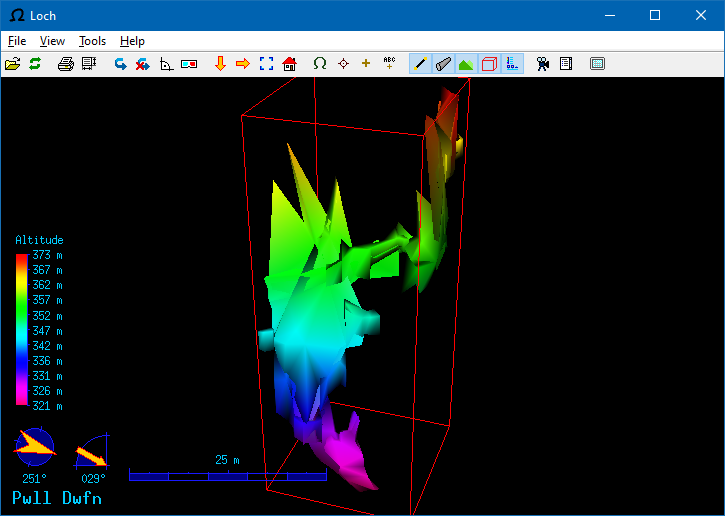
Could you please post some screenshots to illustrate your problem with the size of controls? On Mar 7, we made some changes for HiDPI displays, but they should affect only rendered controls, not UI buttons.
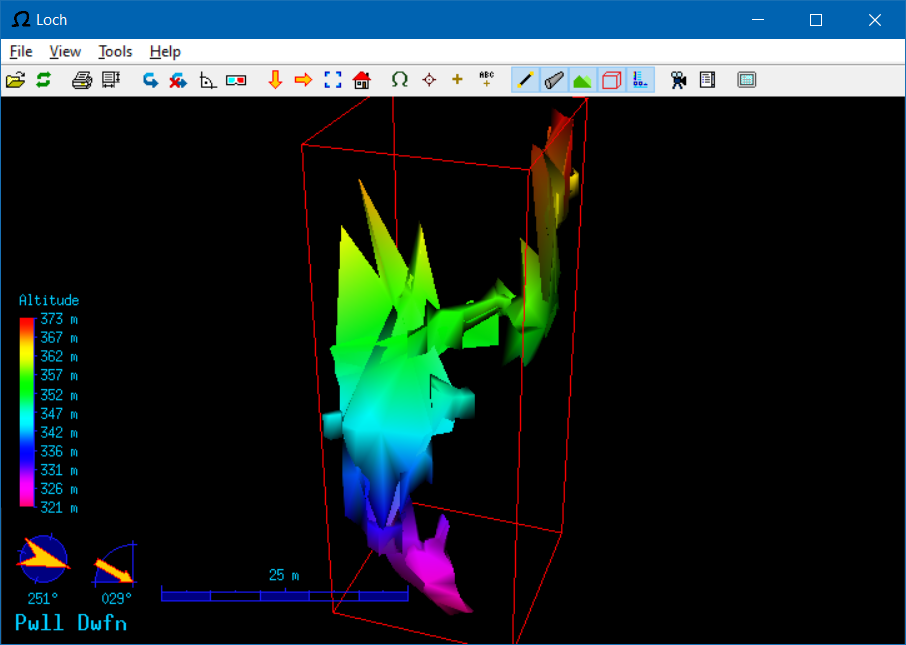
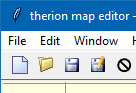
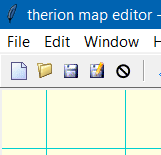
Attached screenshots, taken at 100% and 125% scaling in the Windows 10 settings. The 100% one looks great. The menu has crisp fonts with sub-pixel antialiasing. The UI buttons have clean lines (zoom in on the printer icon to see it). The altitude text is very crisp and clear. The bounding box and edge of the cave are crisp and clear The 125% one looks blurry. Everything mentioned above has been scaled to 125% in the same way as if I had taken a screenshot, put it in my image editor, scaled it to 125% with interpolation, then softened it slightly to make the lines blur into the background a little more (I tested this!). Everything in the cave part looks darker. The effect is really uncomfortable. It makes me feel like I need better glasses, but the whole point of scaling is to avoid needing them. None of my other applications do that. There really was no need to scale the cave at all, since it is a vector graphic. XTherion, on the other hand looks great both ways! (Because it does not attempt to scale the UI buttons.) Windows Explorer seems to have button images that are naturally 125%, and get scaled down at 100% (yes, that was weird). The effect is really subtle, and looks great either way. It uses a different font size, so the text scaling is immaculate.
On Mon, 20 Jun 2022 at 22:38, Tarquin Wilton-Jones via Therion <therion@speleo.sk <mailto:therion@speleo.sk>> wrote:
The UI buttons and general graphics look really fuzzy though. I think that is all releases since 6 or 6.1, because Therion now respects the Windows scaling "Change the size of apps and text on the main display". Can I disable that in Loch by any chance? Because Loch does not do it nicely at all.


Thanks Tarquin, now I understand the problem. It is apparently feasible as aven has no such problems, but I am not able to find the correct magic words in its source code that do the magic. It will definitely take some time to solve this problem. In any case, you can disable scaling for loch application manually by rightclicking on loch.exe and selecting: Properties -> Compatibility -> Change high DPI settings And then selecting High DPI scaling override, scaling performed by application. If someone knows where to set this behavior during installation or program execution, I would be very thankful. S. On Tue, 21 Jun 2022 at 09:22, Tarquin Wilton-Jones via Therion < therion@speleo.sk> wrote:
Could you please post some screenshots to illustrate your problem with the size of controls? On Mar 7, we made some changes for HiDPI displays, but they should affect only rendered controls, not UI buttons.
Attached screenshots, taken at 100% and 125% scaling in the Windows 10 settings.
The 100% one looks great. The menu has crisp fonts with sub-pixel antialiasing. The UI buttons have clean lines (zoom in on the printer icon to see it). The altitude text is very crisp and clear. The bounding box and edge of the cave are crisp and clear
The 125% one looks blurry. Everything mentioned above has been scaled to 125% in the same way as if I had taken a screenshot, put it in my image editor, scaled it to 125% with interpolation, then softened it slightly to make the lines blur into the background a little more (I tested this!). Everything in the cave part looks darker.
The effect is really uncomfortable. It makes me feel like I need better glasses, but the whole point of scaling is to avoid needing them. None of my other applications do that. There really was no need to scale the cave at all, since it is a vector graphic.
XTherion, on the other hand looks great both ways! (Because it does not attempt to scale the UI buttons.)
Windows Explorer seems to have button images that are naturally 125%, and get scaled down at 100% (yes, that was weird). The effect is really subtle, and looks great either way. It uses a different font size, so the text scaling is immaculate.
On Mon, 20 Jun 2022 at 22:38, Tarquin Wilton-Jones via Therion <therion@speleo.sk <mailto:therion@speleo.sk>> wrote:
The UI buttons and general graphics look really fuzzy though. I think that is all releases since 6 or 6.1, because Therion now respects the Windows scaling "Change the size of apps and text on the main display". Can I disable that in Loch by any chance? Because Loch does not do it nicely at all.
Therion mailing list Therion@speleo.sk https://mailman.speleo.sk/listinfo/therion
participants (5)
-
 Benoit Martinez
 -
 Bruce Mutton
 -
 Stacho Mudrak
 -
 Tarquin Wilton-Jones
 -
 Therion