Hi Bruce, transparent colours in therion are transparent only between scraps, but are completely opaque within the scrap. The method used is a "transparency knockout group": all objects in the group are drawn as if they were opaque and only the topmost color is drawn transparently over the lower scrap (Adobe PDF Reference describes this method in detail). I don't remember why we don't support local transparency too, but most probably because there might be disturbing interference between e.g. transparent water and transparent scrap background. Martin On Sat, Nov 10, 2012 at 9:55 AM, Bruce <bruce@tomo.co.nz> wrote:
Taking inspiration from Martins recent post on transparent colours I thought I might make my custom point water and area water transparent, or at least behave better with ‘transparency on’ than the standard non-transparent colours. Alas the code compiles without fuss, but the result is identical to the result when using standard (opaque) colour definitions.****
In my layout I have, in the order called…****
** **
Define the area and point water ****
** **
def p_water (expr pos,theta,sc,al)=****
U:=(.425u,.3u);****
T:=identity aligned al rotated theta scaled sc shifted pos;****
pickup PenD;****
p:=fullcircle xscaled (1.2u) yscaled (0.8u) randomized (0.1u) rotated uniformdeviate (-45);****
%if known colour_water_bg: thfill p withcolor colour_water_bg; else: thfill p withcolor white; fi; ****
if known tr_colour_water_bg: thfill p withtransparentcolor tr_colour_water_bg; else: thfill p withtransparentcolor tr_white; fi; ****
thfill p withpattern pattern_water; %%% withcolor black; %but with failed attempt at black hatch****
thdraw p; %outline****
enddef; ****
** **
def a_water (expr Path) =****
T:=identity;****
% thclean Path;****
pickup PenD;****
% if known colour_water_bg: thfill Path withcolor colour_water_bg; else: thfill Path withcolor white; fi; ****
if known tr_colour_water_bg: thfill Path withtransparentcolor tr_colour_water_bg; else: thfill Path withtransparentcolor tr_white; fi; ****
thfill Path withpattern pattern_water; ****
%%thdraw Path; %outline, not needed as area drawn is defined by line border anyway****
enddef;****
** **
Optionally define the colours (the tr_white not needed as it is defined in the default distribution)****
** **
!color colour_water_bg; %! forces interpretation as metapost****
colour_water_bg := (0.86,1,1); %light blue*** *
def_transparent_rgb(tr_colour_water_bg, 0.86, 1, 1);****
and then****
** **
transparency on ****
opacity 50 ****
** **
Everything in these examples is in a single scrap.****
** **
I have checked that my code is being used by changing the colours, for example from tr_white to tr_black etc and these changes are reflected properly, it’s just that they are not transparent.****
** **
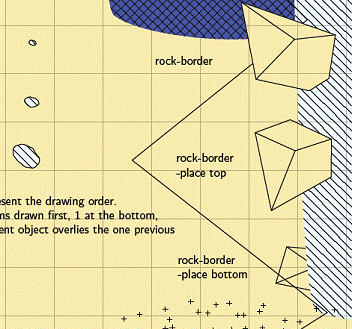
In Adobe Reader it looks like this (below) (the water on the right is definitely not transparent – the rock place bottom is obscured)****
Adobe also seems to make the colours and line weights different to the others – incorrectly I suspect.****
If I run this example with transparency off (but still using my custom transparent colours), the result is identical EXCEPT all the colours are much more intense.****
****
** **
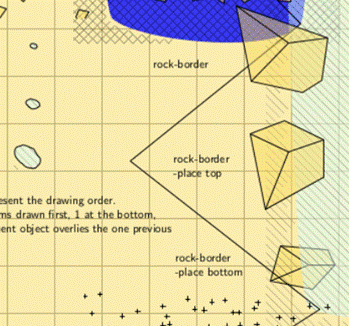
In Foxit Reader it looks like this (below) with transparency on (Foxit always makes everything transparent when transparency is on, so it is not really a test) So again, no difference whether using transparent colour definitions or non-transparent.****
When transparency is off, it looks exactly the same as in Adobe.****
****
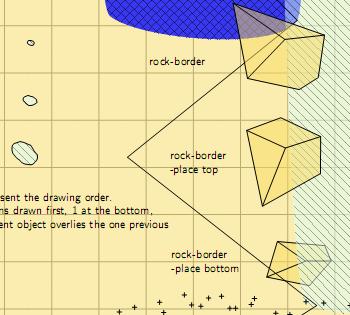
In Evince it looks like this (after about 1 minute to load the modest file-Evince also behaves just like Foxit, but has a problem with hatches extending out into the bounding box as well)****
****
** **
So as you can see the viewing software may be masking (a little) what Therion is really trying to do, however it seems to be somewhat like either almost everything is opaque, or almost everything is transparent, and the promise that transparent colours seem to offer some more control cannot be realised?****
** **
What I would like is something closer to what Adobe is rendering (with the finer line work of Foxit) , but with the ‘rock-border place bottom’ showing through the water when the water is defined with a transparent colour.****
** **
I guess when transparency is on, water and sump should always be transparent to underlying objects, but closed rock-borders and the rocks in ‘area blocks’ should never be. After all that maybe I need to be looking at the rock-border and area blocks definitions?****
** **
Any ideas why transparent colours make no difference at all?****
Any ideas how to make the rocks in area blocks and closed rock-borders opaque to any objects (in the same scrap) beneath them without messing up the transparency of other objects?****
** **
Bruce****
** **
_______________________________________________ Therion mailing list Therion@speleo.sk http://mailman.speleo.sk/mailman/listinfo/therion