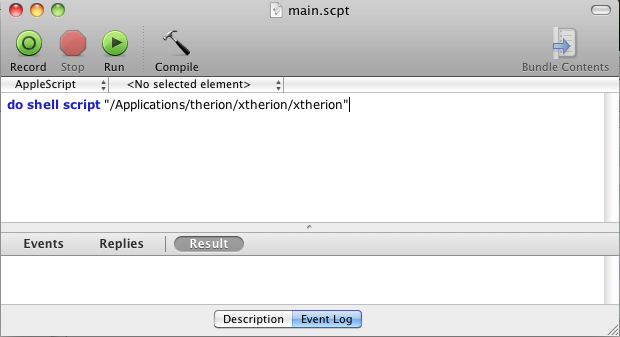
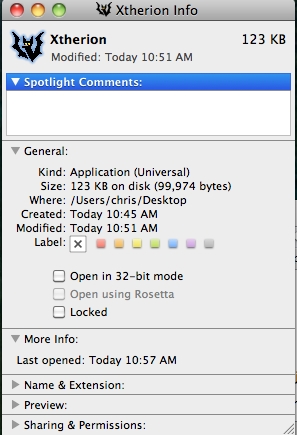
BTW I created an AppleScript to launch xtherion and added the therion icon. You can do the following steps below or write me an email and I will send you the script. 1.) Open the AppleScriptEditor from the Applications/Utilities folder and add the following line. (Adjust to your own path if needed) 2.) Test it by clicking on "Run" 3.) Compile it 4.) Save it to wherever you want to have it. File -> Save As. (Choose Application as Fileformat) - To change the icon you can browse your therion folder /Applications/therion and open therion.ico with the Preview Application. - Select all with CMD+A - Copy with CMD+C - right-click your AppleScript and chose Get Info - Select the icon (should see a blue shadow when selected) - press CMD+V to paste the icon. PS: Maybe you can add this to the Therion bundle or add it to the wiki. I can send you the launcher. Only file that has to be edited is Xtherion->Show Package Contents->Contents->Resources->Scripts->main.scpt which is the script. On 15. September. 2010, at 9:15 AM, Martin Sluka wrote:
THANK YOU MANY TIMES!!!!
m.
On 15.9.2010, at 8:43, Christian Sandrini wrote:
Hi
I finally got everything working under Mac OSX Snow Leopard including Loch. The main Problem was to compile Loch as wxWidgets has to be compiled as 32-bit. (unless you find the 64-bit version of some libs needed by wxWidgets)
Follow the documentation on therion's wiki page http://therion.speleo.sk/wiki/doku.php?id=masox
Make the following changes:
- When installing TeX make sure to use the big MacTeX application. Otherwise you will get some compilation errors when trying to compile the maps. http://mirror.ctan.org/systems/mac/mactex/MacTeX.mpkg.zip
- Install CMAKE as described in the documentation. I used the following version: 2.8-2 - Install VTK (I used version 5.4) as described but use different configuration for CMakeCache.txt
CMAKE_INSTALL_PREFIX:PATH=/Applications/VTK_ALL/VTK_Bin CMAKE_OSX_ARCHITECTURES:STRING=i386;x86_64 VTK_USE_COCOA:BOOL=ON VTK_USE_CARBON:BOOL=OFF CMAKE_OSX_DEPLOYMENT_TARGET:STRING=10.4
- Edit the Makefile of Loch in /Applications/therion/loch/Makefile as follows. Basically it is the same configuration as described in the documentation apart that I added the "-m32" option to the compiler. This will compile it as 32-bit Adjust VTK path if needed. (If you compiled VTK 64-bit only instead of universal build it will print some symbol linking errors)
# PLATFORM MACOSX BITTINESS = -m32 CXX = c++ ${BITTINESS} CC = cc ${BITTINESS} VTKPATH = /Applications/VTK_All/VTK_Bin VTKINCLUDEPATH = $(VTKPATH)/include/vtk-5.4 VTKLIBPATH = $(VTKPATH)/lib/vtk-5.4 VTKLIBS = -lvtkHybrid -lvtkImaging -lvtkIO -lvtkGraphics -lvtkFiltering -lvtkCommon -lvtkjpeg -lvtkpng -lvtkzlib -lvtksys -lfreetype -lGLU -lGL POBJECTS = getline.o CXXPFLAGS = -W -Wall -DLXMACOSX $(shell wx-config --cxxflags) -I$(VTKINCLUDEPATH) -Wno-deprecated -I/usr/X11R6/include -I/usr/X11R6/include/freetype2 CCPFLAGS = -W -Wall -DLXMACOSX $(shell wx-config --cflags) -I/usr/X11R6/include LXLIBDIR = PLIBS = -lz -L/usr/X11R6/lib $(shell wx-config --libs gl) -L$(VTKLIBPATH) $(VTKLIBS) POSTMAKE = cp -f ./loch ./loch.app/Contents/MacOS STRIPFLAG = # PLATFORM ENDCONFIG
With a bit of luck everything will run through smoothly.
Hopefully this will help you out!
cheers Chris
_______________________________________________ Therion mailing list Therion@speleo.sk http://mailman.speleo.sk/mailman/listinfo/therion
_______________________________________________ Therion mailing list Therion@speleo.sk http://mailman.speleo.sk/mailman/listinfo/therion