
On the topic of maps within maps. Therion inserts images with transparent backgrounds into maps correctly - at least it has worked for me. Is it possible to get therion to create a map with a transparent background? Something like 'map-bg off' perhaps? This would be useful sometimes when inserting map enlargements within a main map output. Bruce

On Mon, Jun 14, 2010 at 10:50 PM, Bruce <dangle@tomo.co.nz> wrote:
Is it possible to get therion to create a map with a transparent background?
Something like ‘map-bg off’ perhaps?
It will be supported in the next snapshot (if map-bg is white or omitted in layout). Martin
Is it possible to get therion to create a map with a transparent background?
Something like 'map-bg off' perhaps?
It will be supported in the next snapshot (if map-bg is white or omitted in layout).
Thanks Martin I think that sometimes a white opaque background would be desirable. How about; map-bg [100 100 100] #or map-bg [100] #gives an opaque white background, and map-bg off #gives a transparent background? ie similar in concept to map-header-bg off If this is more complicated to code then your suggestion would be a good interim solution. Bruce

:) old postscript definition: CMYK 0000 is transparent 0010 (1% Y) is white. In RGB: 255 255 255 is transparent 255 255 254 could be white. m. On 19 Jun, 2010,at 11:36 PM, Bruce <dangle@tomo.co.nz> wrote:
Is it possible to get therion to create a map with a transparent background?
Something like 'map-bg off' perhaps?
It will be supported in the next snapshot (if map-bg is white or omitted in layout).
Thanks Martin I think that sometimes a white opaque background would be desirable. How about; map-bg [100 100 100] #or map-bg [100] #gives an opaque white background, and map-bg off #gives a transparent background? ie similar in concept to map-header-bg off If this is more complicated to code then your suggestion would be a good interim solution. Bruce _______________________________________________ Therion mailing list Therion@speleo.sk http://mailman.speleo.sk/mailman/listinfo/therion
On Sat, Jun 19, 2010 at 11:36 PM, Bruce <dangle@tomo.co.nz> wrote:
I think that sometimes a white opaque background would be desirable. How about;
map-bg [100 100 100] #or map-bg [100] #gives an opaque white background, and map-bg off #gives a transparent background?
ie similar in concept to map-header-bg off
OK, it can be done this way. Martin

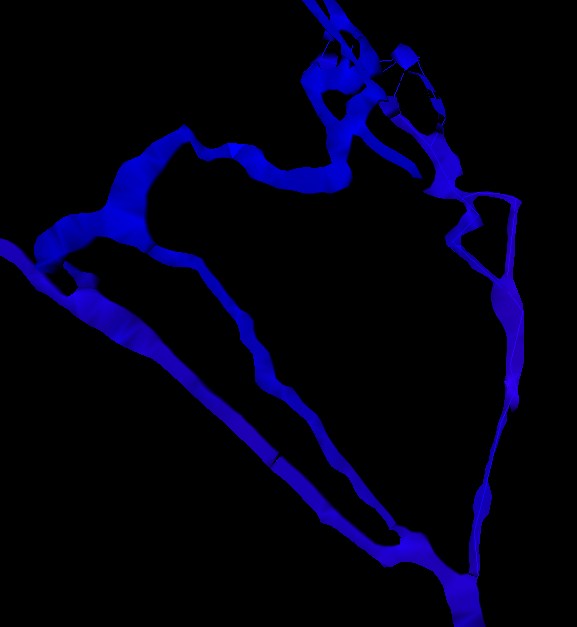
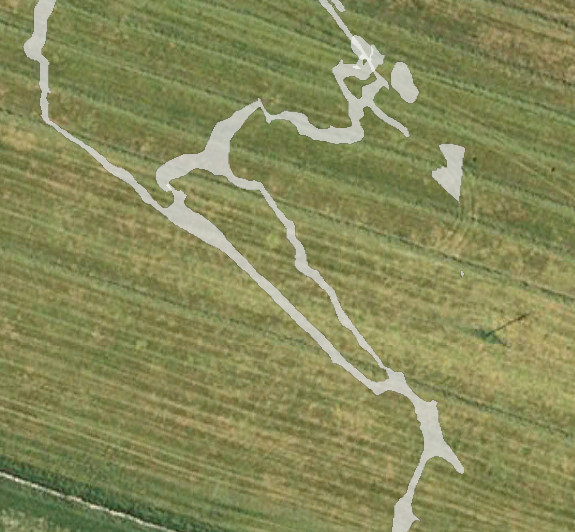
Okay this is a simple question, that after all these years I should have got in my head, but obviously not. I thought it was somewhere in the wiki or thbook, but I cannot find it now. When drawing walls should the yellow 'tick' be on the inside or out? Possibly more important, does it make a difference, all me pdfs are fine, but I have a problem with the kml. Which leads to a question when is a space between passages a pillar? If this 'pillar' is defined over many survey trips and multiple scraps, is the only solution to use -outline in option? Which leads to a further question, what happens if I would like to produce output with one of the passages not included, ie not publish the picture to the whole world before giving a lecture at a conference. The scenario is illustrated by the 2 attached images. The model shows what it should look like, the other is the kml on google earth with the passage on the right missing. Is the only way to get this to work as a kml, to define all the inside walls as outline in? thanks in advance for the help Andrew PS If anyone is interested, all the help received has produced this output (8Mb) http://www.ubss.org.uk/resources/surveys/survex/Charterhouse.lox Lots of the 'smearing' is from made up surveys, constructed from old plans. More project information available on http://www.ubss.org.uk/cave_survey_archive.php
On 22.6.2010, at 21:35, Andrew Atkinson wrote:
When drawing walls should the yellow 'tick' be on the inside or out?
yellow tick is oriented to "air" but it is not very important you draw line type wall. Anyway it is better to draw lines counterclockwise - it will put yellow tick automaticaly in. Any way you may change the air and bedrock side of line in line control window - check reverse button.
Possibly more important, does it make a difference, all me pdfs are fine, but I have a problem with the kml.
I have no experience with kml, but loch files show strange artefats if the logic air/bedrock is not correct.
Which leads to a question when is a space between passages a pillar? If this 'pillar' is defined over many survey trips and multiple scraps, is the only solution to use -outline in option?
Pillar and <outline -in> has sence only in one scrap. If pillar is created by two or more scraps therion should recognize it correctly. You may use <-outline out -clip off> for line/s which ends gallery in concave form, or if pit should be transparent (IT IS transparent on a correct map).
Which leads to a further question, what happens if I would like to produce output with one of the passages not included, ie not publish the picture to the whole world before giving a lecture at a conference.
Just define another map including all scraps (or sub-maps) you want to export and ommiting those you don't. Martin
Which leads to a question when is a space between passages a pillar? If this 'pillar' is defined over many survey trips and multiple scraps, is the only solution to use -outline in option?
Pillar and <outline -in> has sence only in one scrap. If pillar is created by two or more scraps therion should recognize it correctly. You may use <-outline out -clip off> for line/s which ends gallery in concave form, or if pit should be transparent (IT IS transparent on a correct map).
Only in one scrap, that makes sense logically, and has saved me lots of trial and error. But the real benefit has been it has allowed me to focus on the correct scrap to find the error, that I have now done, and have a working kml thank you Andrew
Andrew My experience matches what Martin describes. Since about version 5.2.8+- -outline in/out does not seem to have affected pdf outputs much if at all. However it is still of critical importance for .lox and .kml
http://www.ubss.org.uk/resources/surveys/survex/Charterhouse.lox
Your example would make a nice addition to the therion projects page http://therion.speleo.sk/wiki/doku.php?id=projeurope You might like to add it, or give permission for someone else to
Lots of the 'smearing' is from made up surveys, constructed from old plans.
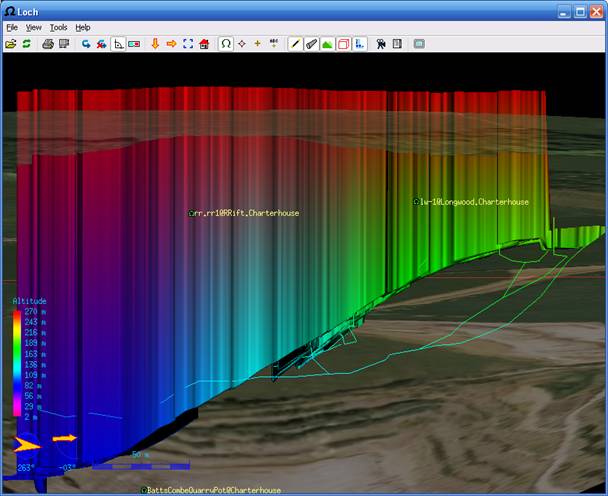
I have had this effect where drawings extend beyond the influence of survey stations (both 'real' and 'made-up' surveys). Any tips as to how to prevent or minimise this? The Longwood cave (in the Charterhouse set above, screenshot below) seems to have a matching survey centreline and model when viewed in plan, but the model is still smeared and the elevations of the smeared 3d model do not match the survey centreline. I assume this is because the drawing is not 'connected' to the centreline by way of point 'survey-station's, and if it were, presumably this view would become the more realistic 3d tube we are accustomed to. Bruce
On 23/06/10 10:48, Bruce wrote:
Your example would make a nice addition to the therion projects page http://therion.speleo.sk/wiki/doku.php?id=projeurope
You might like to add it, or give permission for someone else to
It is on my list of things to do
Lots of the 'smearing' is from made up surveys, constructed from old plans.
I have had this effect where drawings extend beyond the influence of survey stations (both 'real' and 'made-up' surveys). Any tips as to how to prevent or minimise this?
It is good to have further evidence for this, it was my theory also.
The Longwood cave (in the Charterhouse set above, screenshot below) seems to have a matching survey centreline and model when viewed in plan, but the model is still smeared and the elevations of the smeared 3d model do not match the survey centreline. I assume this is because the drawing is not ‘connected’ to the centreline by way of point ‘survey-station’s, and if it were, presumably this view would become the more realistic 3d tube we are accustomed to.
The longwood survey, the centreline does not match the plan. we suspect that, as we do not have the original plan, the version we have has been sheared and twisted by copying so only 2 stations are used in the scraps. I seem to remember that if no height information is given it makes it proportional to the width, and does not use the X-sections, so I am hoping that if we add some height points we will get better output in the lox model thanks Andrew
On 23.6.2010, at 11:48, Bruce wrote:
I have had this effect where drawings extend beyond the influence of survey stations (both 'real' and 'made-up' surveys). Any tips as to how to prevent or minimise this?
Try add some "dummy" shots (ignore). Martin
Hello We have lots of old data that we are trying input to build up our area map. Lots of this data is in degrees and minutes. When dealing with co-ordinates (lat-long) 52:34:23.2 works as degrees:minutes:seconds. I cannot seem to be able to get this format to work for survey data, is there a way to use degrees:minutes, if not could it be added to the things to be implemented, it would save lots of spread sheet work converting it, and make checking back to the original data far easier for future users of the data thanks Andrew
On 30.6.2010, at 8:53, Andrew Atkinson wrote:
Hello
We have lots of old data that we are trying input to build up our area map. Lots of this data is in degrees and minutes. When dealing with co-ordinates (lat-long) 52:34:23.2 works as degrees:minutes:seconds. I cannot seem to be able to get this format to work for survey data, is there a way to use degrees:minutes, if not could it be added to the things to be implemented, it would save lots of spread sheet work converting it, and make checking back to the original data far easier for future users of the data
thanks
Andrew
_______________________________________________ Therion mailing list Therion@speleo.sk http://mailman.speleo.sk/mailman/listinfo/therion
It should be possible according Thbook: lat-long, long-lat ◃ latitude (N positive, S negative) and longitude (E positive, W negative) in given order in degrees (deg[:min[:sec]] allowed), WGS84 datum. By default, not supported on output. 52:34.56461 ? m.
sorry I have not been clear enough, yes it works with lat-long it is when you try it in centreline it does not work centreline data normal from to tape compass clino 1 2 3.24 -6:50 1:50 thanks Andrew On 30/06/10 08:22, Martin Sluka wrote:
On 30.6.2010, at 8:53, Andrew Atkinson wrote:
Hello
We have lots of old data that we are trying input to build up our area map. Lots of this data is in degrees and minutes. When dealing with co-ordinates (lat-long) 52:34:23.2 works as degrees:minutes:seconds. I cannot seem to be able to get this format to work for survey data, is there a way to use degrees:minutes, if not could it be added to the things to be implemented, it would save lots of spread sheet work converting it, and make checking back to the original data far easier for future users of the data
thanks
Andrew
_______________________________________________ Therion mailing list Therion@speleo.sk http://mailman.speleo.sk/mailman/listinfo/therion
It should be possible according Thbook:
lat-long, long-lat ◃ latitude (N positive, S negative) and longitude (E positive, W negative) in given order in degrees (deg[:min[:sec]] allowed), WGS84 datum. By default, not supported on output.
52:34.56461 ?
m. _______________________________________________ Therion mailing list Therion@speleo.sk http://mailman.speleo.sk/mailman/listinfo/therion

This is very strange, so far I have tried it, it works on my computer. Can you send me exact description of an error that it generates when reading such a data? Or a minimaln sample that does not work? Thanks, S. On 30 June 2010 09:27, Andrew Atkinson <andrew@wotcc.org.uk> wrote:
sorry I have not been clear enough, yes it works with lat-long
it is when you try it in centreline it does not work
centreline data normal from to tape compass clino 1 2 3.24 -6:50 1:50
thanks
Andrew
On 30/06/10 08:22, Martin Sluka wrote:
On 30.6.2010, at 8:53, Andrew Atkinson wrote:
Hello
We have lots of old data that we are trying input to build up our area map. Lots of this data is in degrees and minutes. When dealing with co-ordinates (lat-long) 52:34:23.2 works as degrees:minutes:seconds. I cannot seem to be able to get this format to work for survey data, is there a way to use degrees:minutes, if not could it be added to the things to be implemented, it would save lots of spread sheet work converting it, and make checking back to the original data far easier for future users of the data
thanks
Andrew
_______________________________________________ Therion mailing list Therion@speleo.sk http://mailman.speleo.sk/mailman/listinfo/therion
It should be possible according Thbook:
lat-long, long-lat ◃ latitude (N positive, S negative) and longitude (E positive, W negative) in given order in degrees (deg[:min[:sec]] allowed), WGS84 datum. By default, not supported on output.
52:34.56461 ?
m. _______________________________________________ Therion mailing list Therion@speleo.sk http://mailman.speleo.sk/mailman/listinfo/therion
_______________________________________________ Therion mailing list Therion@speleo.sk http://mailman.speleo.sk/mailman/listinfo/therion
Thank you for confirming it should work, that allowed me to find my error else where. However it has lead to another question, it seems to accept minutes larger than 60, (500 adds on 8 1/3 degrees as would be expected) should this not generate a warning at the very least? thanks Andrew On 30/06/10 13:30, Stacho Mudrak wrote:
This is very strange, so far I have tried it, it works on my computer. Can you send me exact description of an error that it generates when reading such a data? Or a minimaln sample that does not work?
Thanks, S.
On 30 June 2010 09:27, Andrew Atkinson<andrew@wotcc.org.uk> wrote:
sorry I have not been clear enough, yes it works with lat-long
it is when you try it in centreline it does not work
centreline data normal from to tape compass clino 1 2 3.24 -6:50 1:50
thanks
Andrew
On 30/06/10 08:22, Martin Sluka wrote:
On 30.6.2010, at 8:53, Andrew Atkinson wrote:
Hello
We have lots of old data that we are trying input to build up our area map. Lots of this data is in degrees and minutes. When dealing with co-ordinates (lat-long) 52:34:23.2 works as degrees:minutes:seconds. I cannot seem to be able to get this format to work for survey data, is there a way to use degrees:minutes, if not could it be added to the things to be implemented, it would save lots of spread sheet work converting it, and make checking back to the original data far easier for future users of the data
thanks
Andrew
_______________________________________________ Therion mailing list Therion@speleo.sk http://mailman.speleo.sk/mailman/listinfo/therion
It should be possible according Thbook:
lat-long, long-lat ◃ latitude (N positive, S negative) and longitude (E positive, W negative) in given order in degrees (deg[:min[:sec]] allowed), WGS84 datum. By default, not supported on output.
52:34.56461 ?
m. _______________________________________________ Therion mailing list Therion@speleo.sk http://mailman.speleo.sk/mailman/listinfo/therion
_______________________________________________ Therion mailing list Therion@speleo.sk http://mailman.speleo.sk/mailman/listinfo/therion
_______________________________________________ Therion mailing list Therion@speleo.sk http://mailman.speleo.sk/mailman/listinfo/therion
Yes, I have noticed this bug when I was trying it. I will fix it. Thanks, S. On 30 June 2010 17:11, Andrew Atkinson <andrew@wotcc.org.uk> wrote:
Thank you for confirming it should work, that allowed me to find my error else where.
However it has lead to another question, it seems to accept minutes larger than 60, (500 adds on 8 1/3 degrees as would be expected) should this not generate a warning at the very least?
thanks
Andrew
On 30/06/10 13:30, Stacho Mudrak wrote:
This is very strange, so far I have tried it, it works on my computer. Can you send me exact description of an error that it generates when reading such a data? Or a minimaln sample that does not work?
Thanks, S.
On 30 June 2010 09:27, Andrew Atkinson<andrew@wotcc.org.uk> wrote:
sorry I have not been clear enough, yes it works with lat-long
it is when you try it in centreline it does not work
centreline data normal from to tape compass clino 1 2 3.24 -6:50 1:50
thanks
Andrew
On 30/06/10 08:22, Martin Sluka wrote:
On 30.6.2010, at 8:53, Andrew Atkinson wrote:
Hello
We have lots of old data that we are trying input to build up our area map. Lots of this data is in degrees and minutes. When dealing with co-ordinates (lat-long) 52:34:23.2 works as degrees:minutes:seconds. I cannot seem to be able to get this format to work for survey data, is there a way to use degrees:minutes, if not could it be added to the things to be implemented, it would save lots of spread sheet work converting it, and make checking back to the original data far easier for future users of the data
thanks
Andrew
_______________________________________________ Therion mailing list Therion@speleo.sk http://mailman.speleo.sk/mailman/listinfo/therion
It should be possible according Thbook:
lat-long, long-lat ◃ latitude (N positive, S negative) and longitude (E positive, W negative) in given order in degrees (deg[:min[:sec]] allowed), WGS84 datum. By default, not supported on output.
52:34.56461 ?
m. _______________________________________________ Therion mailing list Therion@speleo.sk http://mailman.speleo.sk/mailman/listinfo/therion
_______________________________________________ Therion mailing list Therion@speleo.sk http://mailman.speleo.sk/mailman/listinfo/therion
_______________________________________________ Therion mailing list Therion@speleo.sk http://mailman.speleo.sk/mailman/listinfo/therion
_______________________________________________ Therion mailing list Therion@speleo.sk http://mailman.speleo.sk/mailman/listinfo/therion

Further to Andrew's query about this, I entered some data using degrees:minutes and it compiled perfectly well, except that I included a compass correction. The correction would only work in degrees.decimal degrees, not in degrees minutes. Graham -- graham.mullan@coly.org.uk 0117 9502556 or 07887 637064 (or 0844 2327803)
Hello I have been trying to turn off the remarks in the pdf output, having successfully turned off lots of other things. However in the layout using symbol-hide point remark does not seem to work neither does symbol-hide group all symbol-show point label symbol-show line label (as an aside should there not be a group for labels?? Not that it is problem really) However if on the remark as an option you add -context point remark both of the above seem to work. Should point remark not be in its own context by default? Is this a bug or am I missing something? thanks Andrew
So how do I register for the wiki? Instructions say go to the login box and then you can login/register, but I cannot seem to find a register button thanks Andrew On 23/06/10 10:48, Bruce wrote:
Your example would make a nice addition to the therion projects page http://therion.speleo.sk/wiki/doku.php?id=projeurope
You might like to add it, or give permission for someone else to
Implemented in 5.3.4 as color map-bg transparent. Martin On Mon, Jun 21, 2010 at 8:06 PM, Martin Budaj <m.budaj@gmail.com> wrote:
On Sat, Jun 19, 2010 at 11:36 PM, Bruce <dangle@tomo.co.nz> wrote:
I think that sometimes a white opaque background would be desirable. How about;
map-bg [100 100 100] #or map-bg [100] #gives an opaque white background, and map-bg off #gives a transparent background?
ie similar in concept to map-header-bg off
OK, it can be done this way.
Martin
participants (7)
-
 Andrew Atkinson
 -
 Bruce
Bruce -
 Graham Mullan
 -
 Martin Budaj
 -
 Martin Sluka
 -
martinsluka
-
 Stacho Mudrak