How to generate a projected elevation along a specific bearing?

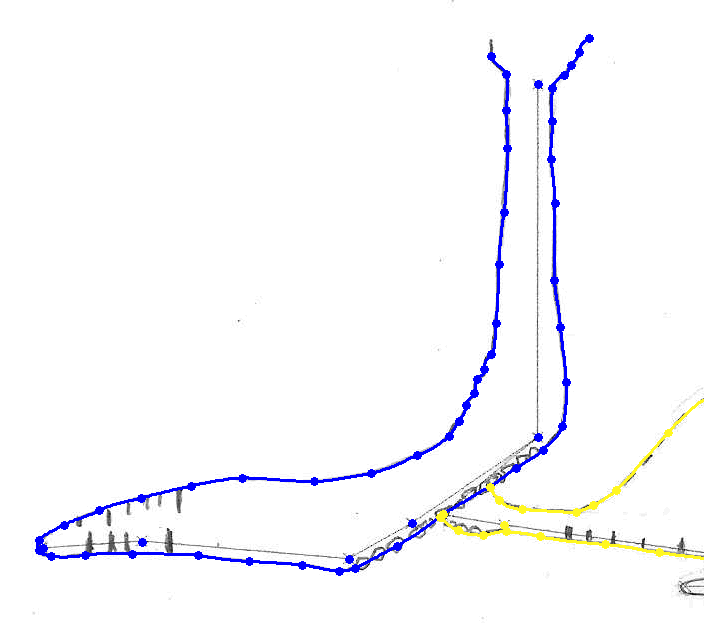
I've tried searching the wiki and Therion book to find an answer to this, but it does not seem to feature anywhere. Not even in any examples I can find. I am trying to draw a simple cave with a 20m vertical entrance shaft, and a couple of chambers down a slope at the bottom. I've drawn an elevation scrap for one of these chambers and the shaft. But when I generate an elevation map using this scrap the shaft looks fine, but the chamber wall is a mess. So I concluded it is not projecting the elevation along the bearing I would like. The Therion book showed me I can put a bearing on the scrap type. So I tried elevation 90. Now my shaft is no longer appearing anywhere near vertical in the elevation PDF and the chamber. Can anyone help me please? Screenshot of scrap, and pdfs with default elevation map and elevation 90 settings attached. Footleg

Well, I am not sure I understand your problem correctly. It is not possible to combine scraps in elevation projection with different projection angles, but I am not sure, whether you are trying to do this. If you could send me some stripped source codes, I can have a look, where the problem is. Thanks, S. On 21 March 2011 14:59, Footleg <drfootleg@gmail.com> wrote:
I've tried searching the wiki and Therion book to find an answer to this, but it does not seem to feature anywhere. Not even in any examples I can find. I am trying to draw a simple cave with a 20m vertical entrance shaft, and a couple of chambers down a slope at the bottom. I've drawn an elevation scrap for one of these chambers and the shaft. But when I generate an elevation map using this scrap the shaft looks fine, but the chamber wall is a mess. So I concluded it is not projecting the elevation along the bearing I would like. The Therion book showed me I can put a bearing on the scrap type. So I tried elevation 90. Now my shaft is no longer appearing anywhere near vertical in the elevation PDF and the chamber. Can anyone help me please?
Screenshot of scrap, and pdfs with default elevation map and elevation 90 settings attached.
Footleg
_______________________________________________ Therion mailing list Therion@speleo.sk http://mailman.speleo.sk/mailman/listinfo/therion

Footleg May need to include your th and th2 files to be more specific. Couple of likely issues. 1. Firstly check that the direction of the projection is the direction in which you are looking. Ie on the elevation the direction will then be 'into the page'. If you don't specify a direction then Therion assumes it is north. I would guess you have some scraps/maps with differing projection directions, and so naturally they are different projections. If you have for example 3 different projection directions, then therion will make three elevations (if you ask to export them). Look in the log file or Xtherion compiler map structure pane for clues. 2. Make sure every scrap and map you want to include in this elevation has the same projection. Many versions ago I found that Therion assumes 0 is not the same as 000 and 20 is not the same as 020. So I always use 3 digit integers these days. 3. Differing coordinate systems. If you for example use a different thconfig for the main map production and test plots of parts of the cave you might be using different coordinate systems or declinations each time. This will really screw up the elevations where passage is almost in the same direction as the projection, because Therion will morph as much as required. In this situation it often turns into a real mess. Bruce _____ From: therion-bounces@speleo.sk [mailto:therion-bounces@speleo.sk] On Behalf Of Footleg Sent: Tuesday, 22 March 2011 2:59 a.m. To: List for Therion users Subject: [Therion] How to generate a projected elevation along a specificbearing? I've tried searching the wiki and Therion book to find an answer to this, but it does not seem to feature anywhere. Not even in any examples I can find. I am trying to draw a simple cave with a 20m vertical entrance shaft, and a couple of chambers down a slope at the bottom. I've drawn an elevation scrap for one of these chambers and the shaft. But when I generate an elevation map using this scrap the shaft looks fine, but the chamber wall is a mess. So I concluded it is not projecting the elevation along the bearing I would like. The Therion book showed me I can put a bearing on the scrap type. So I tried elevation 90. Now my shaft is no longer appearing anywhere near vertical in the elevation PDF and the chamber. Can anyone help me please? Screenshot of scrap, and pdfs with default elevation map and elevation 90 settings attached. Footleg
This is a small learning project, so I've attached all the files apart from the bitmaps. I think there is a bug lurking behind these problems. I am using Therion build 5.3.6 on Windows. I tried adding a projection direction of 090 to both the scraps in my elevations th2 file, even though only one of these scraps was included in the map in the th file at the time. This caused a long list of errors when trying to generate the elevation pdf. So I removed the 090 from after the word 'elevation' in the projection box for both scraps. Including the second scrap in the map block with no projection direction declared now results in what looks like the output for the first scrap duplicated in the elevation pdf with both 0 and 90 projections. Hopefully you can easily reproduce these problems with the attached files. I've left both scraps included in the map for the elevation. But you can comment out the 2nd one and then try to set a projection direction of 090 on both scraps in the th2 file and get the errors. Why does changing the projection direction for the second scrap cause the pdf generation to fail even if that scrap is not used in the pdf? Footleg On 21 March 2011 19:27, Bruce <dangle@tomo.co.nz> wrote:
Footleg
May need to include your th and th2 files to be more specific…
Couple of likely issues.
1. Firstly check that the direction of the projection is the direction in which you are looking. Ie on the elevation the direction will then be ‘into the page’. If you don’t specify a direction then Therion assumes it is north. I would guess you have some scraps/maps with differing projection directions, and so naturally they are different projections. If you have for example 3 different projection directions, then therion will make three elevations (if you ask to export them). Look in the log file or Xtherion compiler map structure pane for clues. 2. Make sure every scrap and map you want to include in this elevation has the same projection. Many versions ago I found that Therion assumes 0 is not the same as 000 and 20 is not the same as 020. So I always use 3 digit integers these days. 3. Differing coordinate systems. If you for example use a different thconfig for the main map production and test plots of parts of the cave you might be using different coordinate systems or declinations each time. This will really screw up the elevations where passage is almost in the same direction as the projection, because Therion will morph as much as required. In this situation it often turns into a real mess.
Bruce
------------------------------
*From:* therion-bounces@speleo.sk [mailto:therion-bounces@speleo.sk] *On Behalf Of *Footleg *Sent:* Tuesday, 22 March 2011 2:59 a.m. *To:* List for Therion users *Subject:* [Therion] How to generate a projected elevation along a specificbearing?
I've tried searching the wiki and Therion book to find an answer to this, but it does not seem to feature anywhere. Not even in any examples I can find. I am trying to draw a simple cave with a 20m vertical entrance shaft, and a couple of chambers down a slope at the bottom. I've drawn an elevation scrap for one of these chambers and the shaft. But when I generate an elevation map using this scrap the shaft looks fine, but the chamber wall is a mess. So I concluded it is not projecting the elevation along the bearing I would like. The Therion book showed me I can put a bearing on the scrap type. So I tried elevation 90. Now my shaft is no longer appearing anywhere near vertical in the elevation PDF and the chamber. Can anyone help me please?
Screenshot of scrap, and pdfs with default elevation map and elevation 90 settings attached.
Footleg
_______________________________________________ Therion mailing list Therion@speleo.sk http://mailman.speleo.sk/mailman/listinfo/therion
OK, a few routine syntactical things to sort out here, no bugs. Firstly to help debug I showed the centerline and added debug all to the layout. Then I could see what was going on. It was apparent that with no projection orientation the elevation scraps were screwed up (upside down). Try it with the original file set Footleg sent, you will see. This is expected behaviour with a scrap drawn in one orientation and then morphed to another. Second I pulled the map object definitions outside of the survey structure in the th file. Not sure if this was a problem, it's just the way I've found works best for me. Third the definitions of the elevation all need to match. Remember that if we are using integer orientations there are 359 possible elevation types, and if anywhere it is undefined it defaults to 'north'. This was the main problem here. In the attached you will see I have added; -projection [elevation 090 deg] To all of the elevation scraps, the elevation map definition in the th file and the export elevation statement in the thconfig. Hope this helps. I guess the Therion Book and the wiki could have a bit more on this. Drawing elevations is one of the very basic functions after all. Cheers Bruce _____ From: therion-bounces@speleo.sk [mailto:therion-bounces@speleo.sk] On Behalf Of Footleg Sent: Tuesday, 22 March 2011 11:39 p.m. To: List for Therion users Subject: Re: [Therion] How to generate a projected elevation along aspecificbearing? This is a small learning project, so I've attached all the files apart from the bitmaps. I think there is a bug lurking behind these problems. I am using Therion build 5.3.6 on Windows. I tried adding a projection direction of 090 to both the scraps in my elevations th2 file, even though only one of these scraps was included in the map in the th file at the time. This caused a long list of errors when trying to generate the elevation pdf. So I removed the 090 from after the word 'elevation' in the projection box for both scraps. Including the second scrap in the map block with no projection direction declared now results in what looks like the output for the first scrap duplicated in the elevation pdf with both 0 and 90 projections. Hopefully you can easily reproduce these problems with the attached files. I've left both scraps included in the map for the elevation. But you can comment out the 2nd one and then try to set a projection direction of 090 on both scraps in the th2 file and get the errors. Why does changing the projection direction for the second scrap cause the pdf generation to fail even if that scrap is not used in the pdf? Footleg On 21 March 2011 19:27, Bruce <dangle@tomo.co.nz> wrote: Footleg May need to include your th and th2 files to be more specific. Couple of likely issues. 1. Firstly check that the direction of the projection is the direction in which you are looking. Ie on the elevation the direction will then be 'into the page'. If you don't specify a direction then Therion assumes it is north. I would guess you have some scraps/maps with differing projection directions, and so naturally they are different projections. If you have for example 3 different projection directions, then therion will make three elevations (if you ask to export them). Look in the log file or Xtherion compiler map structure pane for clues. 2. Make sure every scrap and map you want to include in this elevation has the same projection. Many versions ago I found that Therion assumes 0 is not the same as 000 and 20 is not the same as 020. So I always use 3 digit integers these days. 3. Differing coordinate systems. If you for example use a different thconfig for the main map production and test plots of parts of the cave you might be using different coordinate systems or declinations each time. This will really screw up the elevations where passage is almost in the same direction as the projection, because Therion will morph as much as required. In this situation it often turns into a real mess. Bruce _____ From: therion-bounces@speleo.sk [mailto:therion-bounces@speleo.sk] On Behalf Of Footleg Sent: Tuesday, 22 March 2011 2:59 a.m. To: List for Therion users Subject: [Therion] How to generate a projected elevation along a specificbearing? I've tried searching the wiki and Therion book to find an answer to this, but it does not seem to feature anywhere. Not even in any examples I can find. I am trying to draw a simple cave with a 20m vertical entrance shaft, and a couple of chambers down a slope at the bottom. I've drawn an elevation scrap for one of these chambers and the shaft. But when I generate an elevation map using this scrap the shaft looks fine, but the chamber wall is a mess. So I concluded it is not projecting the elevation along the bearing I would like. The Therion book showed me I can put a bearing on the scrap type. So I tried elevation 90. Now my shaft is no longer appearing anywhere near vertical in the elevation PDF and the chamber. Can anyone help me please? Screenshot of scrap, and pdfs with default elevation map and elevation 90 settings attached. Footleg _______________________________________________ Therion mailing list Therion@speleo.sk http://mailman.speleo.sk/mailman/listinfo/therion
Thanks Bruce, that is most helpful and makes everything clear. One of the things I struggle with as a new user of Therion is the documentation. In this case I found nothing about projected elevations in any examples of on the wiki. The therion book gave me the pointer to put the projection bearing on the scrap type, but I was only able to work out how to set this in the xtherion map editor by editing my th2 file in a text editor and then reopening it in the graphical editor to see what changed in the scrap options pane. I didn't come across the fact that elevation bearings needed to be specified in the map protection declaration in the th file, or in the export map declaration in the thconfig file. I do wonder why if I am declaring everything in the map / endmap block in the th file, and I give that map a name there, then why is it not possible to specify that map by name in the thconfig file export, rather than have to repeat the map type information and have therion try to work out what map from my th file to use to generate that pdf? Just a suggestion. I am happy to write a general introduction/walk through and provide an example project for the wiki if someone can set me up with an account to allow me to edit wiki pages. Footleg On 22 March 2011 19:10, Bruce <dangle@tomo.co.nz> wrote:
OK, a few routine syntactical things to sort out here, no bugs.
Firstly to help debug I showed the centerline and added debug all to the layout. Then I could see what was going on.
It was apparent that with no projection orientation the elevation scraps were screwed up (upside down). Try it with the original file set Footleg sent, you will see. This is expected behaviour with a scrap drawn in one orientation and then morphed to another.
Second I pulled the map object definitions outside of the survey structure in the th file. Not sure if this was a problem, it’s just the way I’ve found works best for me.
Third the definitions of the elevation all need to match. Remember that if we are using integer orientations there are 359 possible elevation types, and if anywhere it is undefined it defaults to ‘north’. This was the main problem here.
In the attached you will see I have added;
-projection [elevation 090 deg]
To all of the *elevation scraps*, the *elevation map* definition in the th file and the *export elevation* statement in the thconfig.
Hope this helps. I guess the Therion Book and the wiki could have a bit more on this. Drawing elevations is one of the very basic functions after all.
Cheers
Bruce
------------------------------
*From:* therion-bounces@speleo.sk [mailto:therion-bounces@speleo.sk] *On Behalf Of *Footleg *Sent:* Tuesday, 22 March 2011 11:39 p.m.
*To:* List for Therion users *Subject:* Re: [Therion] How to generate a projected elevation along aspecificbearing?
This is a small learning project, so I've attached all the files apart from the bitmaps.
I think there is a bug lurking behind these problems. I am using Therion build 5.3.6 on Windows. I tried adding a projection direction of 090 to both the scraps in my elevations th2 file, even though only one of these scraps was included in the map in the th file at the time. This caused a long list of errors when trying to generate the elevation pdf. So I removed the 090 from after the word 'elevation' in the projection box for both scraps. Including the second scrap in the map block with no projection direction declared now results in what looks like the output for the first scrap duplicated in the elevation pdf with both 0 and 90 projections. Hopefully you can easily reproduce these problems with the attached files. I've left both scraps included in the map for the elevation. But you can comment out the 2nd one and then try to set a projection direction of 090 on both scraps in the th2 file and get the errors. Why does changing the projection direction for the second scrap cause the pdf generation to fail even if that scrap is not used in the pdf?
Footleg
On 21 March 2011 19:27, Bruce <dangle@tomo.co.nz> wrote:
Footleg
May need to include your th and th2 files to be more specific…
Couple of likely issues.
1. Firstly check that the direction of the projection is the direction in which you are looking. Ie on the elevation the direction will then be ‘into the page’. If you don’t specify a direction then Therion assumes it is north. I would guess you have some scraps/maps with differing projection directions, and so naturally they are different projections. If you have for example 3 different projection directions, then therion will make three elevations (if you ask to export them). Look in the log file or Xtherion compiler map structure pane for clues. 2. Make sure every scrap and map you want to include in this elevation has the same projection. Many versions ago I found that Therion assumes 0 is not the same as 000 and 20 is not the same as 020. So I always use 3 digit integers these days. 3. Differing coordinate systems. If you for example use a different thconfig for the main map production and test plots of parts of the cave you might be using different coordinate systems or declinations each time. This will really screw up the elevations where passage is almost in the same direction as the projection, because Therion will morph as much as required. In this situation it often turns into a real mess.
Bruce
------------------------------
*From:* therion-bounces@speleo.sk [mailto:therion-bounces@speleo.sk] *On Behalf Of *Footleg *Sent:* Tuesday, 22 March 2011 2:59 a.m. *To:* List for Therion users *Subject:* [Therion] How to generate a projected elevation along a specificbearing?
I've tried searching the wiki and Therion book to find an answer to this, but it does not seem to feature anywhere. Not even in any examples I can find. I am trying to draw a simple cave with a 20m vertical entrance shaft, and a couple of chambers down a slope at the bottom. I've drawn an elevation scrap for one of these chambers and the shaft. But when I generate an elevation map using this scrap the shaft looks fine, but the chamber wall is a mess. So I concluded it is not projecting the elevation along the bearing I would like. The Therion book showed me I can put a bearing on the scrap type. So I tried elevation 90. Now my shaft is no longer appearing anywhere near vertical in the elevation PDF and the chamber. Can anyone help me please?
Screenshot of scrap, and pdfs with default elevation map and elevation 90 settings attached.
Footleg
_______________________________________________ Therion mailing list Therion@speleo.sk http://mailman.speleo.sk/mailman/listinfo/therion
_______________________________________________ Therion mailing list Therion@speleo.sk http://mailman.speleo.sk/mailman/listinfo/therion
One of the things I struggle with as a new user of Therion is the documentation. In this case I found nothing about projected elevations in any examples of on the wiki.
I also learned how to do elevations (and many other things) based on answers from this forum. For better or worse I have figured it is up to the beginners who are struggling (me quite a lot of the time) and the users who have some insight (me sometimes) to write the instructions and make corrections in the wiki. They are likely to better know the needs of those who are trying to learn. I'd rather the therion authors continue to put their time into therion authoring! There are still many features that need fixing and implementing before therion could be called a mature project (even if it is leading the pack in my opinion). Agree the therion book is lacking a bit of clarity on projected elevations.
I am happy to write a general introduction/walk through and provide an example project for the wiki if someone can set me up with an account to allow me to edit wiki pages.
Excellent. See the contacts on http://mailman.speleo.sk/mailman/listinfo/therion for access. http://therion.speleo.sk/wiki/doku.php?id=tbe and http://therion.speleo.sk/wiki/doku.php?id=tfc would be a good place to insert such and example if I can invite you to edit someone elses page :-) (You are welcome to edit my pages if you think it's better there http://therion.speleo.sk/wiki/doku.php?id=do) I have the wiki open and refer directly to it most times when I'm drawing more than just a small amount.
I do wonder why if I am declaring everything in the map / endmap block in the th file, and I give that map a name there, then why is it not possible to specify that map by name in the thconfig file export, rather than have to repeat the map type information and have therion try to work out what map from my th file to use to generate that pdf? Just a suggestion.
Good question. The sort where I learn by researching the answer. I guess the answer is that the 'source', 'select' and 'export' statements are distinct from each other. When it comes to exporting you are really just saying what type of output you want, and what its name will be, and which layout options to use. As far as which maps to export goes, that is chosen with the select statement. A mistake that I often made was to think that 'elevation' was a single projection, when in fact it could be any of 360 or so projections (if we think in degrees). Your example is a simple one where you have specified a source file that only has a few maps and sources (one each possibly) and you have selected no maps (so by default all maps are selected). I have a cave system with three caves and lots of surface features, and so except at the bottom of the hierarchy my thconfig will have a source for the caves, a source for the surface dem and a source for the surface features and minor caves. Then I will have multiple selects that have all of the commonly chosen maps that I may create at this level. These may have all sorts of projections, not necessarily the same for each cave or part cave. Now come the exports. Those that are exporting to map or atlas only need to choose the projection and all the 'map objects' previously selected will be included in the output. One export statement can therefore produce a combination of many maps (with each map having it's own layer in the pdf - nice). So I think the answer to your question might be. for the simple case, yes you have to specify the projection three times, but for the more realistic case of a larger cave, you can select many maps, and filter what you get by using the export statement without having to get too carried away with commenting/uncommenting select statements. This might have confused more than helped. Maybe soon I'll add my thconfig template to http://therion.speleo.sk/wiki/doku.php?id=templates and that might help some. I still have no idea if I am setting out my therion data in a sensible way, but it does seem to work out OK. I'm still on the lookout for other ways to do it. Bruce

On 22.3.2011, at 23:09, Footleg wrote:
I am happy to write a general introduction/walk through and provide an example project for the wiki if someone can set me up with an account to allow me to edit wiki pages.
Contact Lada Blazek, he is administrator of web. Thanks in advance for elevation section on wiki! Martin S.
I could have clarified a bit more. The problem that Footleg described when he tried to amend the example he sent (define the scraps as looking 090 deg) was because the scraps were looking to the east, but therion was trying to export non-existent scraps looking to the north. (By default therion will export just a centerline in this case, if there are no other errors). The differentiation of elevation directions is necessary because often you may draw elevations of the cave from multiple directions (of course!). Bruce
Now that I have played with this a bit more, I see that I get an error unless every scrap, map and map export projection declaration using those scraps has exactly the same projection bearing. I had thought it might be possible to generate a projected elevation map along a different bearing from that which the scraps were drawn on, but possibly not? Is it possible to generate projected elevations using extended elevation scraps? I am just trying to explore the options for producing projected elevation output from my source data so I can better understand how to draw up my initial elevation scale sketches on paper before trying to therionise them. Footleg On 22 March 2011 19:27, Bruce <dangle@tomo.co.nz> wrote:
I could have clarified a bit more.
The problem that Footleg described when he tried to amend the example he sent (define the scraps as looking 090 deg) was because the scraps were looking to the east, but therion was trying to export non-existent scraps looking to the north. (By default therion will export just a centerline in this case, if there are no other errors).
The differentiation of elevation directions is necessary because often you may draw elevations of the cave from multiple directions (of course!).
Bruce
_______________________________________________ Therion mailing list Therion@speleo.sk http://mailman.speleo.sk/mailman/listinfo/therion
Footleg When I first figured out how to draw projected elevations my (somewhat erroneous) assumption was that I could use extended elevation drawings to create projected elevations in almost any direction. What I found was, yes, of course you can, but the further the particular piece of passage deviates from perpendicular to the direction of projection, the more the distortion. So, in all but the straightest of caves you won't like the result. Having said that in one of our current projects I still have a scrap drawing (a few years old) that is identical in the extended elevation and the projected elevation. It is only a little warped in the projection. However I cheated. First I drew the extended elevation, then I copied the file and manually changed the projection in one of them. So even this is not really a case of the same scrap being used in two projections. The process I use when drawing projected elevations is (whether booking on paper or going wireless with pda); 1. draw the plan view, 2. use therion to plot the projected elevation centerline on paper, 3. Looking at the plan, (and my paperless pockettopo extended elevation sketch if I have one) 4. draw the elevation over the centerline on paper, conceptualizing it into scraps as I go, 5. scan the drawings and then import them into therion and trace over them. A bit frustratingly manual compared to the paperless process for plan views, but simple and effective enough. Bruce _____ From: therion-bounces@speleo.sk [mailto:therion-bounces@speleo.sk] On Behalf Of Footleg Sent: Wednesday, 23 March 2011 11:23 a.m. To: List for Therion users Subject: Re: [Therion] How to generate a projected elevation alongaspecificbearing? Now that I have played with this a bit more, I see that I get an error unless every scrap, map and map export projection declaration using those scraps has exactly the same projection bearing. I had thought it might be possible to generate a projected elevation map along a different bearing from that which the scraps were drawn on, but possibly not? Is it possible to generate projected elevations using extended elevation scraps? I am just trying to explore the options for producing projected elevation output from my source data so I can better understand how to draw up my initial elevation scale sketches on paper before trying to therionise them.
Is it possible to generate projected elevations using extended elevation scraps?
I just realized that maybe there is a way to use scraps for multiple projections, at least in a serial manner. Assuming scrap JD-ShoeboxElevEXT-s1 was drawn with -projection extended (and that the passage is fairly straight and runs north to south in the direction drawn in the scrap) then revise JD-ShoeboxElevEXT-s1 -projection [elevation 090 deg] -title "JD was drawn extended but now is projected 090 deg" should allow the exact same scrap to be used in an elev090 map after it has been used in an elevEXT map. A fairly academic situation I admit - hardly of much practical use perhaps. I have never had any luck with 'revise', except where I directly copied the survex users method of adjusting the 'extend' direction of extended elevations, so I don't like my chances of getting the above to work work. Anyone else have any insight into situations where 'revise' will work Bruce
participants (4)
-
 Bruce
Bruce -
 Footleg
 -
 Martin Sluka
 -
 Stacho Mudrak