Need metapost wizard: new text label

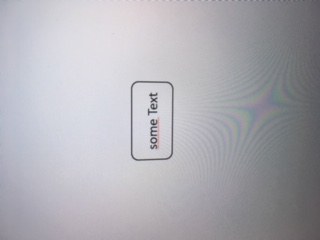
Hi there, i need some new point symbol (text label). Its a simple text on white color within a box with rounded corners, like the attached image. My metapostskills are not good enough to get this to work... For now i would be happy to have such a user point symbol. It would be important that it scales well and react to xtherions direction setting. Optional it would be cool if the default symbol could show the current survey identifier of the nearest station in the scrap and maybe also the nearest next survey. But this information could also be maintained manually for now. Is there someone here for my rescue? :) Thanks in advance, Beni
Hello, meanwhile i tried to play more with this. I'm nearly there, however i still have no clue how to read out the text attribute i attached to the symbol in the th2. "txt := ATTR__text;" throws metapost out the window. The point is defined like this: point 234.0909090909091 626.3636363636364 u:mappe -attr text 1234 Layout i came up with so far (does not support scaling/alignment/rotation, but thats fine so far): --------------------- layout m # Symbol to denote assigned survey. # If option -attr text <string> is given, it will be used; otherwise current survey is shown. code metapost def p_u_mappe(expr pos, theta, sc, al) = T:=identity aligned al rotated theta scaled sc shifted pos; % GET LABEL TEXT: string txt; txt := "123"; %txt := ATTR__text; % does not work. How do i get the value from ' -attr text "345" '? if known(ATTR__text): txt := ATTR_text; % NEVER evaluates to TRUE!?!? else: txt := ATTR__survey; fi; % DRAW LABEL: lab:=thelabel(txt, pos); process_label(pos, 0.001); % BORDER: pickup PenA; % border thickness interim bboxmargin:=6.5bp; % padding border->text q:=((bbox lab) smoothed 4); % smoothness of corners draw q; enddef; initsymbol("p_u_mappe"); endcode endlayout --------------------- Am 2020-02-19 18:34, schrieb Benedikt Hallinger:
Hi there, i need some new point symbol (text label). Its a simple text on white color within a box with rounded corners, like the attached image.
My metapostskills are not good enough to get this to work...
For now i would be happy to have such a user point symbol. It would be important that it scales well and react to xtherions direction setting.
Optional it would be cool if the default symbol could show the current survey identifier of the nearest station in the scrap and maybe also the nearest next survey. But this information could also be maintained manually for now.
Is there someone here for my rescue? :) Thanks in advance, Beni

On 2020-02-26 23:47 +0100, Benedikt Hallinger wrote:
Hello, meanwhile i tried to play more with this. I'm nearly there, however i still have no clue how to read out the text attribute i attached to the symbol in the th2. "txt := ATTR__text;" throws metapost out the window.
One underscore, not two. Here is an example that works: https://therion.speleo.sk/wiki/metapost#customisable_area_blocks_with_differ... I'm no expert, so there may be some other issue, but that's the thing I noticed. Wookey -- Principal hats: Linaro, Debian, Wookware, ARM http://wookware.org/

Hi Benedikt,
txt := "123"; txt := ATTR__text; % does not work. How do i get the value from
You are so nearly right. Two underscores for Therion's built in properties. One underscore for -attr properties. ATTR_text I have an example here: https://therion.speleo.sk/wiki/metapost#rope_lengths Regarding your main question, no I don't know how to create custom label ornamentation (it looks like black magic to me). But you can see what I have learned here: https://therion.speleo.sk/wiki/metapost#adding_custom_styled_labels_at_any_p... And then you need to look through the Metapost debugging output for: vardef p_label@#(expr txt,pos,rot,mode) = That is the code that actually draws labels with ornamentation. It then calls functions like this: process_circledlabel That in turn - after writing a label - uses some kind of bounding box measuring to decide how to ornament it. Check out the function: def write_circ_bbox expr q = Good luck sir. If you work it out, please document it so we can all learn how it all works. :) Cheers, Tarquin
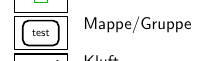
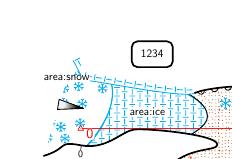
Thank you very much! indeed i was really close. Time to go to bed, hopefully my eyes can find the bed :) It is also already mentioned correctly at the therion book. However, maybe it would be good to add footnote at page 35 so this is made more obvious. The working code below, in case someone tries to google it. Attached also screenshots: - in the legend the current survey name is printed - in the map the "-attr text 1234" is honored. point symbol in th2-file: point u:mappe -attr text "1234" -------------------- # Symbol to denote assigned survey. # If option -attr text <string> is given, it will be used; otherwise current survey is shown. def p_u_mappe(expr pos, theta, sc, al) = T:=identity aligned al rotated theta scaled sc shifted pos; % GET LABEL TEXT: string txt; if known(ATTR_text): txt := ATTR_text; else: txt := ATTR__survey; fi; % DRAW LABEL: lab:=thelabel(txt, pos); process_label(pos, 0.001); % BORDER: pickup PenA; % border thickness interim bboxmargin:=6.5bp; % padding border->text q:=((bbox lab) smoothed 4); % smoothness of corners draw q; enddef; -------------------- Am 2020-02-27 0:37, schrieb Tarquin Wilton-Jones via Therion:
Hi Benedikt,
txt := "123"; txt := ATTR__text; % does not work. How do i get the value from
You are so nearly right. Two underscores for Therion's built in properties. One underscore for -attr properties. ATTR_text
I have an example here: https://therion.speleo.sk/wiki/metapost#rope_lengths
Regarding your main question, no I don't know how to create custom label ornamentation (it looks like black magic to me). But you can see what I have learned here: https://therion.speleo.sk/wiki/metapost#adding_custom_styled_labels_at_any_p...
And then you need to look through the Metapost debugging output for: vardef p_label@#(expr txt,pos,rot,mode) =
That is the code that actually draws labels with ornamentation. It then calls functions like this: process_circledlabel
That in turn - after writing a label - uses some kind of bounding box measuring to decide how to ornament it. Check out the function: def write_circ_bbox expr q =
Good luck sir. If you work it out, please document it so we can all learn how it all works. :)
Cheers,
Tarquin _______________________________________________ Therion mailing list Therion@speleo.sk https://mailman.speleo.sk/listinfo/therion
Nice one :) All simple enough to understand (I might put it on the wiki with some explanatory comments).
thelabel(txt, pos);
I notice in the main Therion Metapost, it uses lab:=thelabel@#(txt, pos); to make sure that it can respect alignment, which your code cannot. Don't suppose you worked out how to pass the correct alignment value to it, did you?
interim bboxmargin:=6.5bp; % padding border->text
Just checking, since I don't know the "interim" keyword very well ... Doesn't it need to be inside a "begingroup/endgroup" pair, in order to know when to stop applying the "interim" value to the internal bboxmargin variable? As far as I can tell, you are modifying the global value of it, so all subsequent uses of that internal variable will end up with your padding. At least until the next "endgroup" happens somewhere above your code in the stack. (You are also trampling on any existing variables called lab, q or txt, but this is normal for Therion's code for some reason. Personally, I have started wrapping all of my symbol code in a group whenever it uses variables, and then I save them in order to make a macro equivalent to a "local" variable. This was needed in one case because I reused some variable name with a different datatype, and caused Metapost to get upset.)
Good morning, and thank you for your comments! Honestly, i have no clue what this all does, i just managed to copy paste until it magically startet to work :) If you want to upload it to the wiki, im honored and please modify to your wills, especially to make it not break anything existing. Would be nice if you could drop me a line if its ready :) (I fear fiddling around with it, as it already took me about five hours to get this and i don’t want to break it again) My intention for the usage was in bigger cave systems to show the adjacent survey names (with preview below/above) so one can more easily navigate in the data and see where to look next. Btw, i found out that „symbol-hide point u:mysymbol“ does not seem to recognize the symbol subtype and thus cannot hide it. Is this normal or am i doing something wrong?
Am 27.02.2020 um 09:02 schrieb Tarquin Wilton-Jones via Therion <therion@speleo.sk>:
Nice one :)
All simple enough to understand (I might put it on the wiki with some explanatory comments).
thelabel(txt, pos);
I notice in the main Therion Metapost, it uses lab:=thelabel@#(txt, pos); to make sure that it can respect alignment, which your code cannot. Don't suppose you worked out how to pass the correct alignment value to it, did you?
interim bboxmargin:=6.5bp; % padding border->text
Just checking, since I don't know the "interim" keyword very well ... Doesn't it need to be inside a "begingroup/endgroup" pair, in order to know when to stop applying the "interim" value to the internal bboxmargin variable?
As far as I can tell, you are modifying the global value of it, so all subsequent uses of that internal variable will end up with your padding. At least until the next "endgroup" happens somewhere above your code in the stack.
(You are also trampling on any existing variables called lab, q or txt, but this is normal for Therion's code for some reason. Personally, I have started wrapping all of my symbol code in a group whenever it uses variables, and then I save them in order to make a macro equivalent to a "local" variable. This was needed in one case because I reused some variable name with a different datatype, and caused Metapost to get upset.) _______________________________________________ Therion mailing list Therion@speleo.sk https://mailman.speleo.sk/listinfo/therion
... maybe it would be a very good idea to write a subchapter into the thbook user symbol chapter? That contains all those pitfalls for metapost-th-symbols novices like me
Am 27.02.2020 um 09:56 schrieb Benedikt Hallinger <beni@hallinger.org>:
Good morning, and thank you for your comments! Honestly, i have no clue what this all does, i just managed to copy paste until it magically startet to work :)
If you want to upload it to the wiki, im honored and please modify to your wills, especially to make it not break anything existing. Would be nice if you could drop me a line if its ready :) (I fear fiddling around with it, as it already took me about five hours to get this and i don’t want to break it again)
My intention for the usage was in bigger cave systems to show the adjacent survey names (with preview below/above) so one can more easily navigate in the data and see where to look next.
Btw, i found out that „symbol-hide point u:mysymbol“ does not seem to recognize the symbol subtype and thus cannot hide it. Is this normal or am i doing something wrong?
Am 27.02.2020 um 09:02 schrieb Tarquin Wilton-Jones via Therion <therion@speleo.sk>:
Nice one :)
All simple enough to understand (I might put it on the wiki with some explanatory comments).
thelabel(txt, pos);
I notice in the main Therion Metapost, it uses lab:=thelabel@#(txt, pos); to make sure that it can respect alignment, which your code cannot. Don't suppose you worked out how to pass the correct alignment value to it, did you?
interim bboxmargin:=6.5bp; % padding border->text
Just checking, since I don't know the "interim" keyword very well ... Doesn't it need to be inside a "begingroup/endgroup" pair, in order to know when to stop applying the "interim" value to the internal bboxmargin variable?
As far as I can tell, you are modifying the global value of it, so all subsequent uses of that internal variable will end up with your padding. At least until the next "endgroup" happens somewhere above your code in the stack.
(You are also trampling on any existing variables called lab, q or txt, but this is normal for Therion's code for some reason. Personally, I have started wrapping all of my symbol code in a group whenever it uses variables, and then I save them in order to make a macro equivalent to a "local" variable. This was needed in one case because I reused some variable name with a different datatype, and caused Metapost to get upset.) _______________________________________________ Therion mailing list Therion@speleo.sk https://mailman.speleo.sk/listinfo/therion
Therion mailing list Therion@speleo.sk https://mailman.speleo.sk/listinfo/therion
If you want to upload it to the wiki, im honored and please modify to your wills
There you go: https://therion.speleo.sk/wiki/metapost#adding_custom_styled_labels_at_any_p... Second version of the code has a custom label style like yours (dashed for fun, and it specifies the padding and smoothing in terms of the PenA thickness). It supports scale, position, rotation, alignment, default styles and custom styles like yours. Hope this is useful.
thelabel(txt, pos);
I notice in the main Therion Metapost, it uses lab:=thelabel@#(txt, pos); to make sure that it can respect alignment, which your code cannot. Don't suppose you worked out how to pass the correct alignment value to it, did you?
I have worked it out, see my thread "Metapost variable macro suffixes". I will add it to my existing function which takes the point alignment parameter and turns it into the right suffix in the "thelabel" call or p_label call, whichever one ends up getting used. Your code also didn't apply rotation to the ornamentation. You need something like this: draw ((bbox lab) smoothed 4) rotatedaround (pos,rotation); Note that this applies the rotation around the point position, so alignment and rotation at the same time is weird. This is the same with regular labels though - Therion bug that Bruce is fond of :) - so at least this is consistent with Therion itself. Your code hardcoded rotation to a very specific 0.001 degrees, which was weird. I assume you had intended to use 0 or a variable (my code uses the rotation parameter of the point symbol).
interim bboxmargin:=6.5bp; % padding border->text
Just checking, since I don't know the "interim" keyword very well ... Doesn't it need to be inside a "begingroup/endgroup" pair, in order to know when to stop applying the "interim" value to the internal bboxmargin variable?
As far as I can tell, you are modifying the global value of it, so all subsequent uses of that internal variable will end up with your padding. At least until the next "endgroup" happens somewhere above your code in the stack.
This was correct. You needed to use begingroup+endgroup or use a vardef instead of a def (with vardef, it automatically applies a begingroup+endgroup). Therion's Metapost uses both of these approaches to avoid the problem.
Hello Tarquin, i tweaked and fiddled around and now have a version that correctly scales, rotates and aligns. Your wiki page hint helped, but i already found it in the past... The example code there does not work here for some reason (compile error). But anyhow, to answer your question regarding the "0.001" rotation parameter in the label calling: if i use "0.0" or "0" or also "0.0001", it puts my label text in the center of the generated map with rotation of the scrap-rotation applied. I don't know why and found by try-and-error that this value works. Here is the updated code:, enhanced with a nicer legend output: ----------------------------------- # Symbol to denote assigned survey. # Option "-attr text <string>" shows given text; otherwise current survey is shown. # Option "-attr bordersmooth <num>" overrides edge smoothness (0 for sharp edges) # Option "-attr bordermargin <num>" overrides margin text/border # Option "-attr basescale <num>" overrides basic text sizing factor (default text size) def p_u_mappe(expr pos, theta, sc, al) = T:=identity aligned al rotated theta scaled sc shifted pos; begingroup; % Basic config bordersmooth:=4; % smoothness of box corners (0=90° edges) bordermargin:=5.0bp; % padding border->text basescale:=1.0; % basic scaling of default-sized text if known(ATTR_bordersmooth): bordersmooth:=scantokens(ATTR_bordersmooth); fi; if known(ATTR_bordermargin): bordermargin:=scantokens(ATTR_bordermargin); fi; if known(ATTR_basescale): basescale:=scantokens(ATTR_basescale); fi; % GET LABEL TEXT: string txt; if known(ATTR_text): txt := ATTR_text; else: txt := ATTR__survey; fi; % DRAW LABEL: lab:=thelabel(txt, (0.0,0.0)); pickup PenA; % border thickness interim bboxmargin:=bordermargin; % padding border->text q:=((bbox lab) smoothed bordersmooth) aligned al scaled (sc * basescale) rotated theta shifted pos; draw q; lab:=lab aligned al; lab:=lab scaled (sc * basescale); lab:=lab rotated theta; lab:=lab shifted pos; process_label(pos, 0.001); % for some weird reason "0.0" does not work here and puts the label to map-center at scrap-rotation. endgroup; enddef; def p_u_mappe_legend = begingroup; save ATTR_text; string ATTR_text; ATTR_text:="028"; p_u_mappe((.5,.5) inscale, 0, 1.0, (0,0)); endgroup; enddef; ----------------------------------- Am 2020-03-01 22:23, schrieb Tarquin Wilton-Jones via Therion:
thelabel(txt, pos);
I notice in the main Therion Metapost, it uses lab:=thelabel@#(txt, pos); to make sure that it can respect alignment, which your code cannot. Don't suppose you worked out how to pass the correct alignment value to it, did you?
I have worked it out, see my thread "Metapost variable macro suffixes". I will add it to my existing function which takes the point alignment parameter and turns it into the right suffix in the "thelabel" call or p_label call, whichever one ends up getting used.
Your code also didn't apply rotation to the ornamentation. You need something like this: draw ((bbox lab) smoothed 4) rotatedaround (pos,rotation);
Note that this applies the rotation around the point position, so alignment and rotation at the same time is weird. This is the same with regular labels though - Therion bug that Bruce is fond of :) - so at least this is consistent with Therion itself.
Your code hardcoded rotation to a very specific 0.001 degrees, which was weird. I assume you had intended to use 0 or a variable (my code uses the rotation parameter of the point symbol).
interim bboxmargin:=6.5bp; % padding border->text
Just checking, since I don't know the "interim" keyword very well ... Doesn't it need to be inside a "begingroup/endgroup" pair, in order to know when to stop applying the "interim" value to the internal bboxmargin variable?
As far as I can tell, you are modifying the global value of it, so all subsequent uses of that internal variable will end up with your padding. At least until the next "endgroup" happens somewhere above your code in the stack.
This was correct. You needed to use begingroup+endgroup or use a vardef instead of a def (with vardef, it automatically applies a begingroup+endgroup). Therion's Metapost uses both of these approaches to avoid the problem. _______________________________________________ Therion mailing list Therion@speleo.sk https://mailman.speleo.sk/listinfo/therion
example code there does not work here for some reason (compile error).
Interesting ... I am using it myself and it works here. I wonder if there is something odd in what the wiki outputs. Or maybe you copy & pasted the "code metapost" inside an existing "code metapost" block. If you have time to check, what's your error message? Or alternatively, do you have a minimal survey where I can see the failure myself?
0.001
I won't pretend to understand what that is all about. Very weird indeed.
Hello again. I freshly copy-pasted your examples and now it works. I must have made something wrong like you described (therion 5.4.4 (2019-05-01)). Tanks! Am 2020-03-04 15:08, schrieb Tarquin Wilton-Jones via Therion:
example code there does not work here for some reason (compile error).
Interesting ... I am using it myself and it works here. I wonder if there is something odd in what the wiki outputs. Or maybe you copy & pasted the "code metapost" inside an existing "code metapost" block. If you have time to check, what's your error message?
Or alternatively, do you have a minimal survey where I can see the failure myself?
0.001
I won't pretend to understand what that is all about. Very weird indeed. _______________________________________________ Therion mailing list Therion@speleo.sk https://mailman.speleo.sk/listinfo/therion
Hello, does anybody know how i can measure the distance from a given station to the surface, when i have a surface model loaded? Thanks, Beni
does anybody know how i can measure the distance from a given station to the surface, when i have a surface model loaded?
I have always done this with Survex's Aven. Export 3D, open in Aven, enable surface legs, click the station, hold mouse over the surface legs. (I do this with either surface survey stations, or surface grid that I prepared with TerrainTool.) Aside: If you use Survex rather than Therion to export this, the ends of the splays become clickable points in Aven, so you can measure from your highest splay. If you use a 3D exported by Therion, then you cannot click on the splays. Therion does not add the control point at the end of each splay (I have filed a bug for that).
Hello, do i need some special options aside from "export model -o model.3d" to enable surface in aven? If i try to enable the surface legs, aven prompts me to open some file... Am 2020-03-26 22:49, schrieb Tarquin Wilton-Jones via Therion:
does anybody know how i can measure the distance from a given station to the surface, when i have a surface model loaded?
I have always done this with Survex's Aven. Export 3D, open in Aven, enable surface legs, click the station, hold mouse over the surface legs. (I do this with either surface survey stations, or surface grid that I prepared with TerrainTool.)
Aside: If you use Survex rather than Therion to export this, the ends of the splays become clickable points in Aven, so you can measure from your highest splay. If you use a 3D exported by Therion, then you cannot click on the splays. Therion does not add the control point at the end of each splay (I have filed a bug for that). _______________________________________________ Therion mailing list Therion@speleo.sk https://mailman.speleo.sk/listinfo/therion
enable surface in aven? If i try to enable the surface legs, aven prompts me to open some file...
I assume you are trying to "file - open terrain" rather than "view - surface survey legs". Terrain is a different thing, which I have never used, and I don't think you can select parts of it for use with measuring. I think though that Survex's terrain is similar to the type of terrain used by Therion though.
Yes i did. Thanks for that hint. However, my aven does not enable me to avtivate it in the view menu, its disabled (greyed out), i assume because i do not have surface data in the file? How do i tell therion to export this? Am 2020-03-26 23:06, schrieb Tarquin Wilton-Jones:
enable surface in aven? If i try to enable the surface legs, aven prompts me to open some file...
I assume you are trying to "file - open terrain" rather than "view - surface survey legs".
Terrain is a different thing, which I have never used, and I don't think you can select parts of it for use with measuring. I think though that Survex's terrain is similar to the type of terrain used by Therion though.
However, my aven does not enable me to avtivate it in the view menu, its disabled (greyed out), i assume because i do not have surface data in the file?
Sounds like it. It works based on legs that have: flags surface 1 2 9.8 123 0 flags not surface Or if you have used TerrainTool to export it as a grid, it will have added that for you. This has been very easy for us in our projects because we either knew exactly which line to follow on the surface beforehand, or we surveyed the cave first then surveyed over the surface afterwards, staying above the passage so we could have a useful measure of the surface above the cave. In more complex caves, I rely on TerrainTool to cover the surface. Looking forward to being able to use the new more accurate NASADEM so that the measurements are actually accurate.
Hi there, i just wrote a small tool to do the conversion from a therion surface mesh into survex format: https://github.com/hbeni/therionsurface2survex It would be nice if some C++ programmers can look over the code as this is my first c++ endeavour. The program basically parses the therion source file and generates *fix commands out of it together with nosurvey-centerline connecting the stations to a mesh. The resulting .swx file then can be put trough survex' cavern program to generate a 3d file of the mesh. That can be easily combined with a 3d file of the cave generated from therion (using the import statements). For ease of use provided a basic example for combining in the readme. A sample to parse a mesh is in the projects example/ folder, however i also tested it positive with the rabbit cave example. With my dataset the calculation seems to take a little longer.... there are 388.800 fixe stations in the surface mesh giving a 31M swx-file in total. I hope this will finish somtime (running already for 25 minutes) but maybe i overloaded cavern with this. Otherwise i probably need to turn down the grid resolution (currently 10m grid size). Am 2020-03-26 23:23, schrieb Tarquin Wilton-Jones:
However, my aven does not enable me to avtivate it in the view menu, its disabled (greyed out), i assume because i do not have surface data in the file?
Sounds like it. It works based on legs that have:
flags surface 1 2 9.8 123 0 flags not surface
Or if you have used TerrainTool to export it as a grid, it will have added that for you.
This has been very easy for us in our projects because we either knew exactly which line to follow on the surface beforehand, or we surveyed the cave first then surveyed over the surface afterwards, staying above the passage so we could have a useful measure of the surface above the cave.
In more complex caves, I rely on TerrainTool to cover the surface. Looking forward to being able to use the new more accurate NASADEM so that the measurements are actually accurate.
cavern had eaten itself, but after pushing ctrl-c in the shell running therion, the 3d file was written successfully and the output was nice. I enhanced the therion wiki a little with a link to the tool. Sorry, i have no clue how to cross compile this for windows. Am 2020-03-27 23:51, schrieb Benedikt Hallinger:
Hi there, i just wrote a small tool to do the conversion from a therion surface mesh into survex format: https://github.com/hbeni/therionsurface2survex
It would be nice if some C++ programmers can look over the code as this is my first c++ endeavour.
The program basically parses the therion source file and generates *fix commands out of it together with nosurvey-centerline connecting the stations to a mesh. The resulting .swx file then can be put trough survex' cavern program to generate a 3d file of the mesh. That can be easily combined with a 3d file of the cave generated from therion (using the import statements). For ease of use provided a basic example for combining in the readme. A sample to parse a mesh is in the projects example/ folder, however i also tested it positive with the rabbit cave example.
With my dataset the calculation seems to take a little longer.... there are 388.800 fixe stations in the surface mesh giving a 31M swx-file in total. I hope this will finish somtime (running already for 25 minutes) but maybe i overloaded cavern with this. Otherwise i probably need to turn down the grid resolution (currently 10m grid size).
Am 2020-03-26 23:23, schrieb Tarquin Wilton-Jones:
However, my aven does not enable me to avtivate it in the view menu, its disabled (greyed out), i assume because i do not have surface data in the file?
Sounds like it. It works based on legs that have:
flags surface 1 2 9.8 123 0 flags not surface
Or if you have used TerrainTool to export it as a grid, it will have added that for you.
This has been very easy for us in our projects because we either knew exactly which line to follow on the surface beforehand, or we surveyed the cave first then surveyed over the surface afterwards, staying above the passage so we could have a useful measure of the surface above the cave.
In more complex caves, I rely on TerrainTool to cover the surface. Looking forward to being able to use the new more accurate NASADEM so that the measurements are actually accurate.

Hi, There is an easy way to extract coordinates from the therion sql export. Then using a shell script and GMT could provide the depth of each point below the surface. I know that there is now a GMT library under Python, if they have implemented the function in the library, everything could be wrapped up in a single python script. Cheers, Phil
On 28 Mar 2020, at 00:28, Benedikt Hallinger <beni@hallinger.org> wrote:
cavern had eaten itself, but after pushing ctrl-c in the shell running therion, the 3d file was written successfully and the output was nice.
I enhanced the therion wiki a little with a link to the tool.
Sorry, i have no clue how to cross compile this for windows.
Am 2020-03-27 23:51, schrieb Benedikt Hallinger:
Hi there, i just wrote a small tool to do the conversion from a therion surface mesh into survex format: https://github.com/hbeni/therionsurface2survex It would be nice if some C++ programmers can look over the code as this is my first c++ endeavour. The program basically parses the therion source file and generates *fix commands out of it together with nosurvey-centerline connecting the stations to a mesh. The resulting .swx file then can be put trough survex' cavern program to generate a 3d file of the mesh. That can be easily combined with a 3d file of the cave generated from therion (using the import statements). For ease of use provided a basic example for combining in the readme. A sample to parse a mesh is in the projects example/ folder, however i also tested it positive with the rabbit cave example. With my dataset the calculation seems to take a little longer.... there are 388.800 fixe stations in the surface mesh giving a 31M swx-file in total. I hope this will finish somtime (running already for 25 minutes) but maybe i overloaded cavern with this. Otherwise i probably need to turn down the grid resolution (currently 10m grid size). Am 2020-03-26 23:23, schrieb Tarquin Wilton-Jones:
However, my aven does not enable me to avtivate it in the view menu, its disabled (greyed out), i assume because i do not have surface data in the file? Sounds like it. It works based on legs that have: flags surface 1 2 9.8 123 0 flags not surface Or if you have used TerrainTool to export it as a grid, it will have added that for you. This has been very easy for us in our projects because we either knew exactly which line to follow on the surface beforehand, or we surveyed the cave first then surveyed over the surface afterwards, staying above the passage so we could have a useful measure of the surface above the cave. In more complex caves, I rely on TerrainTool to cover the surface. Looking forward to being able to use the new more accurate NASADEM so that the measurements are actually accurate.
Therion mailing list Therion@speleo.sk https://mailman.speleo.sk/listinfo/therion
Thanks, but i'm not into python :) Am 2020-03-28 1:18, schrieb Philippe Vernant:
Hi,
There is an easy way to extract coordinates from the therion sql export. Then using a shell script and GMT could provide the depth of each point below the surface. I know that there is now a GMT library under Python, if they have implemented the function in the library, everything could be wrapped up in a single python script.
Cheers, Phil
On 28 Mar 2020, at 00:28, Benedikt Hallinger <beni@hallinger.org> wrote:
cavern had eaten itself, but after pushing ctrl-c in the shell running therion, the 3d file was written successfully and the output was nice.
I enhanced the therion wiki a little with a link to the tool.
Sorry, i have no clue how to cross compile this for windows.
Am 2020-03-27 23:51, schrieb Benedikt Hallinger:
Hi there, i just wrote a small tool to do the conversion from a therion surface mesh into survex format: https://github.com/hbeni/therionsurface2survex It would be nice if some C++ programmers can look over the code as this is my first c++ endeavour. The program basically parses the therion source file and generates *fix commands out of it together with nosurvey-centerline connecting the stations to a mesh. The resulting .swx file then can be put trough survex' cavern program to generate a 3d file of the mesh. That can be easily combined with a 3d file of the cave generated from therion (using the import statements). For ease of use provided a basic example for combining in the readme. A sample to parse a mesh is in the projects example/ folder, however i also tested it positive with the rabbit cave example. With my dataset the calculation seems to take a little longer.... there are 388.800 fixe stations in the surface mesh giving a 31M swx-file in total. I hope this will finish somtime (running already for 25 minutes) but maybe i overloaded cavern with this. Otherwise i probably need to turn down the grid resolution (currently 10m grid size). Am 2020-03-26 23:23, schrieb Tarquin Wilton-Jones:
However, my aven does not enable me to avtivate it in the view menu, its disabled (greyed out), i assume because i do not have surface data in the file? Sounds like it. It works based on legs that have: flags surface 1 2 9.8 123 0 flags not surface Or if you have used TerrainTool to export it as a grid, it will have added that for you. This has been very easy for us in our projects because we either knew exactly which line to follow on the surface beforehand, or we surveyed the cave first then surveyed over the surface afterwards, staying above the passage so we could have a useful measure of the surface above the cave. In more complex caves, I rely on TerrainTool to cover the surface. Looking forward to being able to use the new more accurate NASADEM so that the measurements are actually accurate.
Therion mailing list Therion@speleo.sk https://mailman.speleo.sk/listinfo/therion
_______________________________________________ Therion mailing list Therion@speleo.sk https://mailman.speleo.sk/listinfo/therion
Hi there, i released version 1.0 of therionsurface2survex (https://github.com/hbeni/therionsurface2survex) and now the problem with this is, that the name is not fitting anymore... Version 1.0 can: - read GDAL ASCII grids directly [1] - read therion "surface" blocks - write survex .swx files containing the mesh - write therion source files containing the mesh (flags surface) [2] [1] i niticed that those files do not contain information about the coordinate-system used, so you need to add this manually afterwards. Question to all of you: would you expect an option that the tool adds it itself? [2] would be my preferred way because it allows better control about further usage, also integration is more straightforward. Am 2020-03-28 1:21, schrieb Benedikt Hallinger:
Thanks, but i'm not into python :)
Am 2020-03-28 1:18, schrieb Philippe Vernant:
Hi,
There is an easy way to extract coordinates from the therion sql export. Then using a shell script and GMT could provide the depth of each point below the surface. I know that there is now a GMT library under Python, if they have implemented the function in the library, everything could be wrapped up in a single python script.
Cheers, Phil
On 28 Mar 2020, at 00:28, Benedikt Hallinger <beni@hallinger.org> wrote:
cavern had eaten itself, but after pushing ctrl-c in the shell running therion, the 3d file was written successfully and the output was nice.
I enhanced the therion wiki a little with a link to the tool.
Sorry, i have no clue how to cross compile this for windows.
Am 2020-03-27 23:51, schrieb Benedikt Hallinger:
Hi there, i just wrote a small tool to do the conversion from a therion surface mesh into survex format: https://github.com/hbeni/therionsurface2survex It would be nice if some C++ programmers can look over the code as this is my first c++ endeavour. The program basically parses the therion source file and generates *fix commands out of it together with nosurvey-centerline connecting the stations to a mesh. The resulting .swx file then can be put trough survex' cavern program to generate a 3d file of the mesh. That can be easily combined with a 3d file of the cave generated from therion (using the import statements). For ease of use provided a basic example for combining in the readme. A sample to parse a mesh is in the projects example/ folder, however i also tested it positive with the rabbit cave example. With my dataset the calculation seems to take a little longer.... there are 388.800 fixe stations in the surface mesh giving a 31M swx-file in total. I hope this will finish somtime (running already for 25 minutes) but maybe i overloaded cavern with this. Otherwise i probably need to turn down the grid resolution (currently 10m grid size). Am 2020-03-26 23:23, schrieb Tarquin Wilton-Jones:
However, my aven does not enable me to avtivate it in the view menu, its disabled (greyed out), i assume because i do not have surface data in the file? Sounds like it. It works based on legs that have: flags surface 1 2 9.8 123 0 flags not surface Or if you have used TerrainTool to export it as a grid, it will have added that for you. This has been very easy for us in our projects because we either knew exactly which line to follow on the surface beforehand, or we surveyed the cave first then surveyed over the surface afterwards, staying above the passage so we could have a useful measure of the surface above the cave. In more complex caves, I rely on TerrainTool to cover the surface. Looking forward to being able to use the new more accurate NASADEM so that the measurements are actually accurate.
Therion mailing list Therion@speleo.sk https://mailman.speleo.sk/listinfo/therion
_______________________________________________ Therion mailing list Therion@speleo.sk https://mailman.speleo.sk/listinfo/therion
Hello, i just uploaded an updated version of the 1.0 release, which now contains also a Windows .exe binary in the release tar.gz archive. :)
Am 31.03.2020 um 12:59 schrieb Benedikt Hallinger <beni@hallinger.org>:
Hi there, i released version 1.0 of therionsurface2survex (https://github.com/hbeni/therionsurface2survex) and now the problem with this is, that the name is not fitting anymore...
Version 1.0 can: - read GDAL ASCII grids directly [1] - read therion "surface" blocks - write survex .swx files containing the mesh - write therion source files containing the mesh (flags surface) [2]
[1] i niticed that those files do not contain information about the coordinate-system used, so you need to add this manually afterwards. Question to all of you: would you expect an option that the tool adds it itself? [2] would be my preferred way because it allows better control about further usage, also integration is more straightforward.
Am 2020-03-28 1:21, schrieb Benedikt Hallinger:
Thanks, but i'm not into python :) Am 2020-03-28 1:18, schrieb Philippe Vernant:
Hi, There is an easy way to extract coordinates from the therion sql export. Then using a shell script and GMT could provide the depth of each point below the surface. I know that there is now a GMT library under Python, if they have implemented the function in the library, everything could be wrapped up in a single python script. Cheers, Phil
On 28 Mar 2020, at 00:28, Benedikt Hallinger <beni@hallinger.org> wrote: cavern had eaten itself, but after pushing ctrl-c in the shell running therion, the 3d file was written successfully and the output was nice. I enhanced the therion wiki a little with a link to the tool. Sorry, i have no clue how to cross compile this for windows. Am 2020-03-27 23:51, schrieb Benedikt Hallinger:
Hi there, i just wrote a small tool to do the conversion from a therion surface mesh into survex format: https://github.com/hbeni/therionsurface2survex It would be nice if some C++ programmers can look over the code as this is my first c++ endeavour. The program basically parses the therion source file and generates *fix commands out of it together with nosurvey-centerline connecting the stations to a mesh. The resulting .swx file then can be put trough survex' cavern program to generate a 3d file of the mesh. That can be easily combined with a 3d file of the cave generated from therion (using the import statements). For ease of use provided a basic example for combining in the readme. A sample to parse a mesh is in the projects example/ folder, however i also tested it positive with the rabbit cave example. With my dataset the calculation seems to take a little longer.... there are 388.800 fixe stations in the surface mesh giving a 31M swx-file in total. I hope this will finish somtime (running already for 25 minutes) but maybe i overloaded cavern with this. Otherwise i probably need to turn down the grid resolution (currently 10m grid size). Am 2020-03-26 23:23, schrieb Tarquin Wilton-Jones:
> However, my aven does not enable me to avtivate it in the view menu, its > disabled (greyed out), i assume because i do not have surface data in > the file? Sounds like it. It works based on legs that have: flags surface 1 2 9.8 123 0 flags not surface Or if you have used TerrainTool to export it as a grid, it will have added that for you. This has been very easy for us in our projects because we either knew exactly which line to follow on the surface beforehand, or we surveyed the cave first then surveyed over the surface afterwards, staying above the passage so we could have a useful measure of the surface above the cave. In more complex caves, I rely on TerrainTool to cover the surface. Looking forward to being able to use the new more accurate NASADEM so that the measurements are actually accurate.
Therion mailing list Therion@speleo.sk https://mailman.speleo.sk/listinfo/therion
Therion mailing list Therion@speleo.sk https://mailman.speleo.sk/listinfo/therion
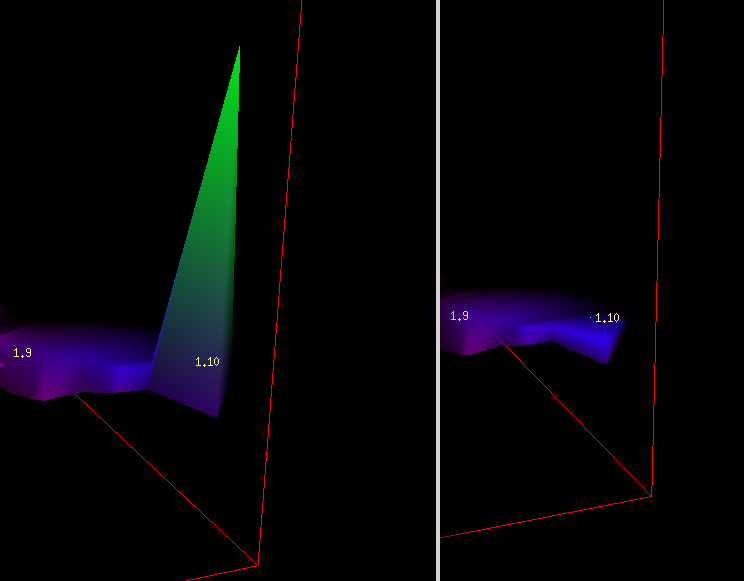
Hello, in a dataset i get a strange behavior regarding the loch model at passage ends: At station 1.10 a weird spike is produced in the loch model, that should not be there. If one comments out some branch that is not located near 1.10, the problem goes away. What causes these spikes? Attached a test set with comented section, thus producing correct ending of the tunnel. Also, an image showing the problem (left: wrong spike, right: correct result with the branch commented) Thanks alot, Beni
Hello, i fiddled more with the data, but to no avail. It seems its something in lochs extrapolation code using misaligned data or something... Is this reproducible at your setup?
Am 31.03.2020 um 18:26 schrieb Benedikt Hallinger <beni@hallinger.org>:
Hello, in a dataset i get a strange behavior regarding the loch model at passage ends:
At station 1.10 a weird spike is produced in the loch model, that should not be there. If one comments out some branch that is not located near 1.10, the problem goes away.
What causes these spikes?
Attached a test set with comented section, thus producing correct ending of the tunnel. Also, an image showing the problem (left: wrong spike, right: correct result with the branch commented)
Thanks alot, Beni <test.tar.gz> <testesult.png>

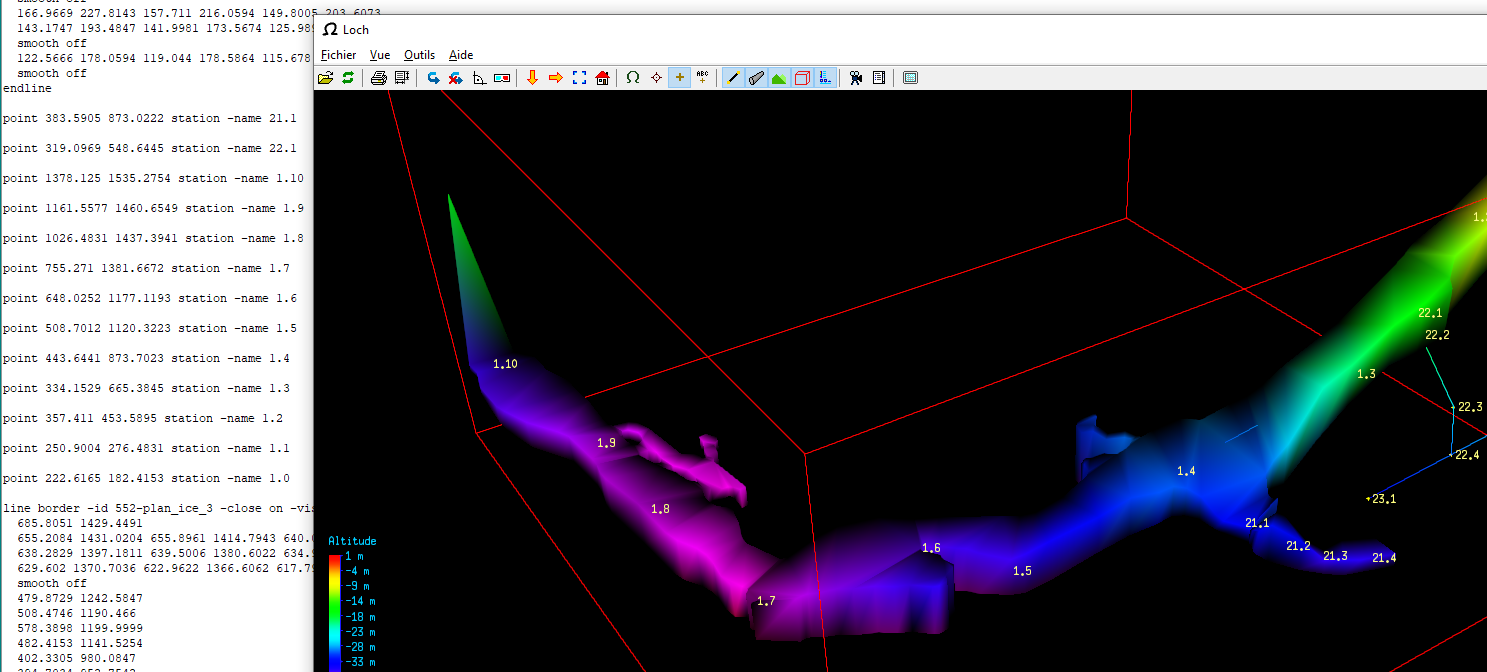
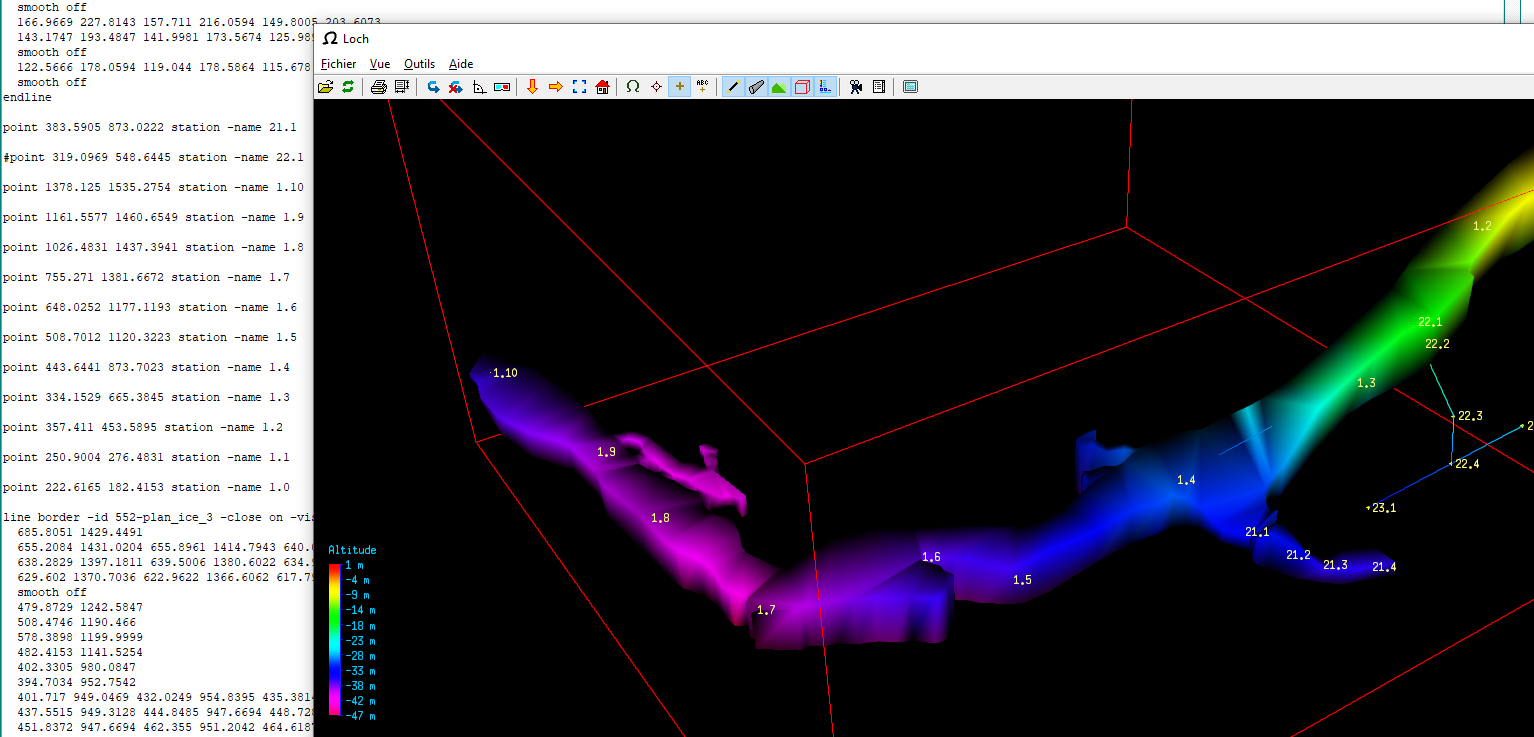
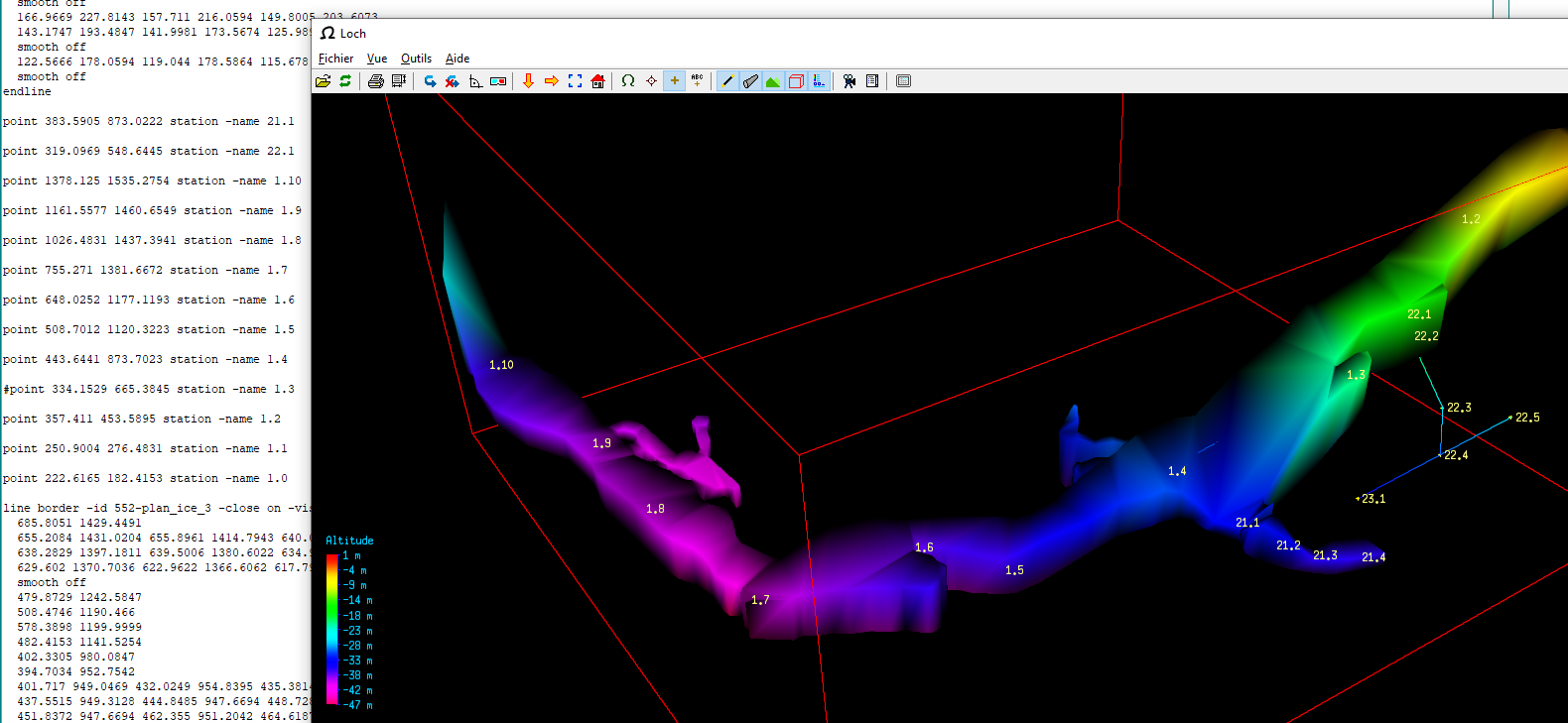
I have sometimes the same problem when the scrap outlines are drawn a bit far from the last station... To help to reproduce the problem, I have made some test : If you remove the point station -name 22.1 in the scrap, the behavior seems ok. Why ? Don't know... If you remove the point station -name 1.3, the behavior is not ok but different original data : [image: image.png] without point station -name 22.1 : [image: image.png] without point station -name 1.3 : [image: image.png] *Benoit MARTINEZ - *mz.benoit@gmail.com Le mar. 14 avr. 2020 à 12:28, Benedikt Hallinger <beni@hallinger.org> a écrit :
Hello, i fiddled more with the data, but to no avail. It seems its something in lochs extrapolation code using misaligned data or something...
Is this reproducible at your setup?
Am 31.03.2020 um 18:26 schrieb Benedikt Hallinger <beni@hallinger.org>:
Hello, in a dataset i get a strange behavior regarding the loch model at passage ends:
At station 1.10 a weird spike is produced in the loch model, that should not be there. If one comments out some branch that is not located near 1.10, the problem goes away.
What causes these spikes?
Attached a test set with comented section, thus producing correct ending of the tunnel. Also, an image showing the problem (left: wrong spike, right: correct result with the branch commented)
Thanks alot, Beni <test.tar.gz> <testesult.png>
Therion mailing list Therion@speleo.sk https://mailman.speleo.sk/listinfo/therion
participants (5)
-
 Benedikt Hallinger
 -
 Benoit Martinez
 -
 Philippe Vernant
 -
 Tarquin Wilton-Jones
 -
 Wookey