
Hi everybody, yesterday I have updated xtherion a little bit. "Edit->Hide inactive scraps" should work now as well as right clicking on point or line invokes context menu. If you have some idea, what else should go to context menu or how items there should be arranged, please let me know. For windows users: I have upgraded bundled TclTk to 8.6 (in fact, only 8.5 features were needed), but I had to compile it my self. I hope, there will be no major issues. Regards, S.

+++ Stacho Mudrak [2014-02-23 09:09 +0100]:
Hi everybody, yesterday I have updated xtherion a little bit. "Edit->Hide inactive scraps" should work now as well as right clicking on point or line invokes context menu.�
OK. new version uploaded to Debian unstable: https://buildd.debian.org/status/package.php?p=therion File bugs or grumble here if you find problems. Wookey -- Principal hats: Linaro, Emdebian, Wookware, Balloonboard, ARM http://wookware.org/

Hi Stacho, Many thanks for the "Hide inactive scraps"which is very useful to identify what is in which scrap. I now use it very often. By the way, I am a windows user and had nothing to recompile. I noticed a small bug with the user defined features: any area of type u:myarea is automatically translated into "area u -subtype myarea" which fails at compilation. This feature does not happen for user defined lines. So far I have to re-edit the th2 file outside therion to correct that. Best Xavier Le 23/02/2014 09:09, Stacho Mudrak a écrit :
Hi everybody,
yesterday I have updated xtherion a little bit. "Edit->Hide inactive scraps" should work now as well as right clicking on point or line invokes context menu.
If you have some idea, what else should go to context menu or how items there should be arranged, please let me know.
For windows users: I have upgraded bundled TclTk to 8.6 (in fact, only 8.5 features were needed), but I had to compile it my self. I hope, there will be no major issues.
Regards, S.
_______________________________________________ Therion mailing list Therion@speleo.sk http://mailman.speleo.sk/mailman/listinfo/therion
--
------------------------- Xavier Pennec Senior Research Scientist / Directeur de recherche Asclepios project-team, INRIA Sophia-Antipolis 2004 Route des Lucioles, BP93 F-06902 Sophia-Antipolis Cedex, France +33 4 92 38 76 64 +33 6 78 35 16 90 http://www-sop.inria.fr/asclepios/ -------------------------------

Stacho Just been having another burst of drawing, and the changes in 5.3.14 XTherion seem like they will be helpful for new users, and maybe educate some old users as to what options are available for various entities! I did not think I would use the context menus much, but in fact, although a bit mouse intensive for my liking, they are often an improvement in workflow. I no longer have to move cursor from drawing to right-hand menu area and back to drawing all the time. However typing the names and options does still provide some mouse relief. I notice a small anomaly in the context menus for lines of type wall. Moonmilk is missing off the bottom of the segment subtype menu. Also the plurals of stalactite and 'mite are missing from the point speleothem menus (I manually typed in the plural in the screenshot) A small suggestion. When the 'type' symbol is changed (from both context menu and right-hand menu area) all the options (as far as I have noticed) are reset to their defaults. This is annoying if you accidentally set the wrong type, set all the options you want, and then correct the type - only to lose all the options. My preference would be to leave options as they are, when the type of an entity is changed (except when changing the 'type' is the first operation after creating a new entity). What do other users think? This could upset some workflows. And one more thing: I notice these days the therion command window that opens during the compilation process stays open and delays access to Xtherion for about 15 sec or more after the compile has completed. I'm not sure if this is a 5.3.14 thing, or an old dying Win XP thing. Have only noticed it since 5.3.14 Also, people who have integrated Therion activation into Notepad++ will need to make a small change to accommodate TclTk to 8.6, as I noted on the wiki a while back. http://therion.speleo.sk/wiki/doku.php/contrib:externaleditors#notepad Thanks Bruce _____ From: therion-bounces@speleo.sk [mailto:therion-bounces@speleo.sk] On Behalf Of Stacho Mudrak Sent: Sunday, 23 February 2014 9:09 p.m. To: List for Therion users Subject: [Therion] 5.3.14 Hi everybody, yesterday I have updated xtherion a little bit. "Edit->Hide inactive scraps" should work now as well as right clicking on point or line invokes context menu. If you have some idea, what else should go to context menu or how items there should be arranged, please let me know. For windows users: I have upgraded bundled TclTk to 8.6 (in fact, only 8.5 features were needed), but I had to compile it my self. I hope, there will be no major issues. Regards, S.

Thanks for bringing that new feature to my attention Bruce. Somehow I completely missed that these context menus had been added. Very useful! Footleg On 31 March 2014 04:42, Bruce <bruce@tomo.co.nz> wrote:
Stacho
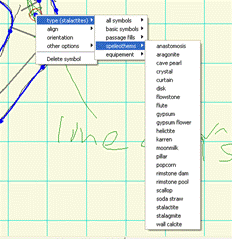
Just been having another burst of drawing, and the changes in 5.3.14 XTherion seem like they will be helpful for new users, and maybe educate some old users as to what options are available for various entities!
I did not think I would use the context menus much, but in fact, although a bit mouse intensive for my liking, they are often an improvement in workflow. I no longer have to move cursor from drawing to right-hand menu area and back to drawing all the time. However typing the names and options does still provide some mouse relief.
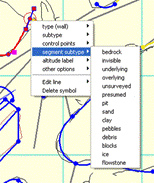
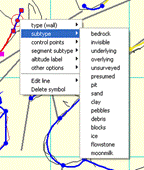
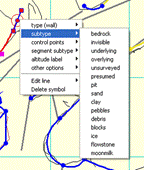
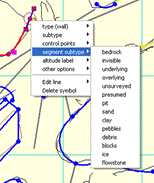
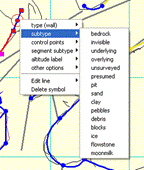
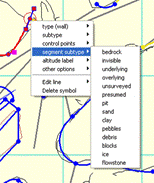
I notice a small anomaly in the context menus for lines of type wall.
Moonmilk is missing off the bottom of the segment subtype menu.
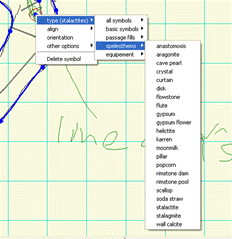
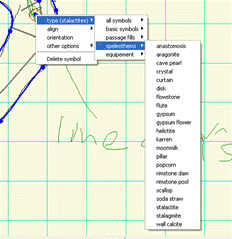
Also the plurals of stalactite and 'mite are missing from the point speleothem menus (I manually typed in the plural in the screenshot)
A small suggestion. When the 'type' symbol is changed (from both context menu and right-hand menu area) all the options (as far as I have noticed) are reset to their defaults. This is annoying if you accidentally set the wrong type, set all the options you want, and then correct the type - only to lose all the options. My preference would be to leave options as they are, when the type of an entity is changed (except when changing the 'type' is the first operation after creating a new entity). What do other users think? This could upset some workflows.
And one more thing: I notice these days the therion command window that opens during the compilation process stays open and delays access to Xtherion for about 15 sec or more after the compile has completed. I'm not sure if this is a 5.3.14 thing, or an old dying Win XP thing. Have only noticed it since 5.3.14
Also, people who have integrated Therion activation into Notepad++ will need to make a small change to accommodate TclTk to 8.6, as I noted on the wiki a while back. http://therion.speleo.sk/wiki/doku.php/contrib:externaleditors#notepad
Thanks
Bruce
------------------------------
*From:* therion-bounces@speleo.sk [mailto:therion-bounces@speleo.sk] *On Behalf Of *Stacho Mudrak *Sent:* Sunday, 23 February 2014 9:09 p.m. *To:* List for Therion users *Subject:* [Therion] 5.3.14
Hi everybody,
yesterday I have updated xtherion a little bit. "Edit->Hide inactive scraps" should work now as well as right clicking on point or line invokes context menu.
If you have some idea, what else should go to context menu or how items there should be arranged, please let me know.
For windows users: I have upgraded bundled TclTk to 8.6 (in fact, only 8.5 features were needed), but I had to compile it my self. I hope, there will be no major issues.
Regards, S.
_______________________________________________ Therion mailing list Therion@speleo.sk http://mailman.speleo.sk/mailman/listinfo/therion

I would point just one thing: line slope - in context menu "border on" is missing. Anyway, for new users of Therion it´s great help, I was dreaming about since beginning.. Palo Quoting Footleg <drfootleg@gmail.com>:
Thanks for bringing that new feature to my attention Bruce. Somehow I completely missed that these context menus had been added. Very useful!
Footleg
On 31 March 2014 04:42, Bruce <bruce@tomo.co.nz> wrote:
Stacho
Just been having another burst of drawing, and the changes in 5.3.14 XTherion seem like they will be helpful for new users, and maybe educate some old users as to what options are available for various entities!
I did not think I would use the context menus much, but in fact, although a bit mouse intensive for my liking, they are often an improvement in workflow. I no longer have to move cursor from drawing to right-hand menu area and back to drawing all the time. However typing the names and options does still provide some mouse relief.
I notice a small anomaly in the context menus for lines of type wall.
Moonmilk is missing off the bottom of the segment subtype menu.
Also the plurals of stalactite and 'mite are missing from the point speleothem menus (I manually typed in the plural in the screenshot)
A small suggestion. When the 'type' symbol is changed (from both context menu and right-hand menu area) all the options (as far as I have noticed) are reset to their defaults. This is annoying if you accidentally set the wrong type, set all the options you want, and then correct the type - only to lose all the options. My preference would be to leave options as they are, when the type of an entity is changed (except when changing the 'type' is the first operation after creating a new entity). What do other users think? This could upset some workflows.
And one more thing: I notice these days the therion command window that opens during the compilation process stays open and delays access to Xtherion for about 15 sec or more after the compile has completed. I'm not sure if this is a 5.3.14 thing, or an old dying Win XP thing. Have only noticed it since 5.3.14
Also, people who have integrated Therion activation into Notepad++ will need to make a small change to accommodate TclTk to 8.6, as I noted on the wiki a while back. http://therion.speleo.sk/wiki/doku.php/contrib:externaleditors#notepad
Thanks
Bruce
------------------------------
*From:* therion-bounces@speleo.sk [mailto:therion-bounces@speleo.sk] *On Behalf Of *Stacho Mudrak *Sent:* Sunday, 23 February 2014 9:09 p.m. *To:* List for Therion users *Subject:* [Therion] 5.3.14
Hi everybody,
yesterday I have updated xtherion a little bit. "Edit->Hide inactive scraps" should work now as well as right clicking on point or line invokes context menu.
If you have some idea, what else should go to context menu or how items there should be arranged, please let me know.
For windows users: I have upgraded bundled TclTk to 8.6 (in fact, only 8.5 features were needed), but I had to compile it my self. I hope, there will be no major issues.
Regards, S.
_______________________________________________ Therion mailing list Therion@speleo.sk http://mailman.speleo.sk/mailman/listinfo/therion
I agree with Bruce on the suggestion NOT to erase the options when changing the type of a symbol: this feature is useful when we draw everything right on the first shot, but when correcting errors in types (or refining the drawing from a first draft), it often create new unnoticed errors by erasing the options. Xavier Le 31/03/2014 11:15, herich@speleodd.sk a écrit :
I would point just one thing: line slope - in context menu "border on" is missing. Anyway, for new users of Therion it´s great help, I was dreaming about since beginning.. Palo
Quoting Footleg <drfootleg@gmail.com>:
Thanks for bringing that new feature to my attention Bruce. Somehow I completely missed that these context menus had been added. Very useful!
Footleg
On 31 March 2014 04:42, Bruce <bruce@tomo.co.nz> wrote:
Stacho
Just been having another burst of drawing, and the changes in 5.3.14 XTherion seem like they will be helpful for new users, and maybe educate some old users as to what options are available for various entities!
I did not think I would use the context menus much, but in fact, although a bit mouse intensive for my liking, they are often an improvement in workflow. I no longer have to move cursor from drawing to right-hand menu area and back to drawing all the time. However typing the names and options does still provide some mouse relief.
I notice a small anomaly in the context menus for lines of type wall.
Moonmilk is missing off the bottom of the segment subtype menu.
Also the plurals of stalactite and 'mite are missing from the point speleothem menus (I manually typed in the plural in the screenshot)
A small suggestion. When the 'type' symbol is changed (from both context menu and right-hand menu area) all the options (as far as I have noticed) are reset to their defaults. This is annoying if you accidentally set the wrong type, set all the options you want, and then correct the type - only to lose all the options. My preference would be to leave options as they are, when the type of an entity is changed (except when changing the 'type' is the first operation after creating a new entity). What do other users think? This could upset some workflows.
And one more thing: I notice these days the therion command window that opens during the compilation process stays open and delays access to Xtherion for about 15 sec or more after the compile has completed. I'm not sure if this is a 5.3.14 thing, or an old dying Win XP thing. Have only noticed it since 5.3.14
Also, people who have integrated Therion activation into Notepad++ will need to make a small change to accommodate TclTk to 8.6, as I noted on the wiki a while back. http://therion.speleo.sk/wiki/doku.php/contrib:externaleditors#notepad
Thanks
Bruce
------------------------------
*From:* therion-bounces@speleo.sk [mailto:therion-bounces@speleo.sk] *On Behalf Of *Stacho Mudrak *Sent:* Sunday, 23 February 2014 9:09 p.m. *To:* List for Therion users *Subject:* [Therion] 5.3.14
Hi everybody,
yesterday I have updated xtherion a little bit. "Edit->Hide inactive scraps" should work now as well as right clicking on point or line invokes context menu.
If you have some idea, what else should go to context menu or how items there should be arranged, please let me know.
For windows users: I have upgraded bundled TclTk to 8.6 (in fact, only 8.5 features were needed), but I had to compile it my self. I hope, there will be no major issues.
Regards, S.
_______________________________________________ Therion mailing list Therion@speleo.sk http://mailman.speleo.sk/mailman/listinfo/therion
_______________________________________________ Therion mailing list Therion@speleo.sk http://mailman.speleo.sk/mailman/listinfo/therion
--
------------------------- Xavier Pennec Senior Research Scientist / Directeur de recherche Asclepios project-team, INRIA Sophia-Antipolis 2004 Route des Lucioles, BP93 F-06902 Sophia-Antipolis Cedex, France +33 4 92 38 76 64 +33 6 78 35 16 90 http://www-sop.inria.fr/asclepios/ -------------------------------
Thank you very much for your comments. Context menus definitely need some improvements. I will try to turn off removing all the options when line/point type is changed. In fact, I have already done this, then I remember, I have put it back, but I do not remember why. So we will see, what will happen :) I am also not sure, whether using translations in symbol types/subtypes is a good idea. I would probably change it to therion language options alphabetically sorted and use balloon tips or status bar for translations. It is a real pain for example to find, where point type height is... I would also remove submenu "other options" and instead put all other options to the main context menu - even it will became longer. Any comments on these suggestions? S. On 31 March 2014 11:15, <herich@speleodd.sk> wrote:
I would point just one thing: line slope - in context menu "border on" is missing. Anyway, for new users of Therion it´s great help, I was dreaming about since beginning.. Palo
Quoting Footleg <drfootleg@gmail.com>:
Thanks for bringing that new feature to my attention Bruce. Somehow I
completely missed that these context menus had been added. Very useful!
Footleg
On 31 March 2014 04:42, Bruce <bruce@tomo.co.nz> wrote:
Stacho
Just been having another burst of drawing, and the changes in 5.3.14 XTherion seem like they will be helpful for new users, and maybe educate some old users as to what options are available for various entities!
I did not think I would use the context menus much, but in fact, although a bit mouse intensive for my liking, they are often an improvement in workflow. I no longer have to move cursor from drawing to right-hand menu area and back to drawing all the time. However typing the names and options does still provide some mouse relief.
I notice a small anomaly in the context menus for lines of type wall.
Moonmilk is missing off the bottom of the segment subtype menu.
Also the plurals of stalactite and 'mite are missing from the point speleothem menus (I manually typed in the plural in the screenshot)
A small suggestion. When the 'type' symbol is changed (from both context menu and right-hand menu area) all the options (as far as I have noticed) are reset to their defaults. This is annoying if you accidentally set the wrong type, set all the options you want, and then correct the type - only to lose all the options. My preference would be to leave options as they are, when the type of an entity is changed (except when changing the 'type' is the first operation after creating a new entity). What do other users think? This could upset some workflows.
And one more thing: I notice these days the therion command window that opens during the compilation process stays open and delays access to Xtherion for about 15 sec or more after the compile has completed. I'm not sure if this is a 5.3.14 thing, or an old dying Win XP thing. Have only noticed it since 5.3.14
Also, people who have integrated Therion activation into Notepad++ will need to make a small change to accommodate TclTk to 8.6, as I noted on the wiki a while back. http://therion.speleo.sk/wiki/doku.php/contrib:externaleditors#notepad
Thanks
Bruce
------------------------------
*From:* therion-bounces@speleo.sk [mailto:therion-bounces@speleo.sk] *On Behalf Of *Stacho Mudrak *Sent:* Sunday, 23 February 2014 9:09 p.m. *To:* List for Therion users *Subject:* [Therion] 5.3.14
Hi everybody,
yesterday I have updated xtherion a little bit. "Edit->Hide inactive scraps" should work now as well as right clicking on point or line invokes context menu.
If you have some idea, what else should go to context menu or how items there should be arranged, please let me know.
For windows users: I have upgraded bundled TclTk to 8.6 (in fact, only 8.5 features were needed), but I had to compile it my self. I hope, there will be no major issues.
Regards, S.
_______________________________________________ Therion mailing list Therion@speleo.sk http://mailman.speleo.sk/mailman/listinfo/therion
_______________________________________________ Therion mailing list Therion@speleo.sk http://mailman.speleo.sk/mailman/listinfo/therion
I will try to turn off removing all the options when line/point type is changed. In fact, I have already done this, then I remember, I have put it back, but I do not remember why. So we will see, what will happen :)
If we are to change the drawing behaviour, then we should consider redressing the inconsistencies between drawing points, lines and areas that I have highlighted on this page http://therion.speleo.sk/wiki/doku.php/drawingchecklist#points, copied here. Workflow to create a new point with XTherion; Ctrl+P, then insert a point, THEN type or select the point type. (differs from workflow for lines and areas) Workflow to create a new line with XTherion; Ctrl+L, THEN type or select the line type, then draw the line, adding any subtypes point by point as you go. (differs from workflow for points) Workflow to create a new area with XTherion; . Draw the border as per line creation workflow above, then create the area using this workflow. Ctrl+A, THEN type or select the area type, then select the previously drawn lines that define the area extent. (differs from workflow for points, but similar to workflow for lines) These descriptions describe only one possible workflow with the existing versions, although they seem to work best for me. The difficulty I have is that at present if points are drawn using the same sequence that I have described for lines and areas, then what actually happens is that the previously drawn point type is changed to match the type of point you are about to draw (and consequently deletes all it's options as well). To swap around the workflow for lines makes it error prone for me. Sometimes a line is so long, that by the time I have finished drawing the line points, I forget to change the type to what I originally intended. So, for me the solution is to make 'points' consistent with 'lines' and 'areas'. Bruce
Hi Bruce, I have no idea, why your therion after compilation hangs. I can't remember any change in 5.3.14, that could cause this. I am also using it on XP a lot and no such problem. May be, it is related somehow to TclTk 8.6, but without being able to reproduce this bug, it is extremely difficult to find out, what is going on... S. On 31 March 2014 05:42, Bruce <bruce@tomo.co.nz> wrote:
Stacho
Just been having another burst of drawing, and the changes in 5.3.14 XTherion seem like they will be helpful for new users, and maybe educate some old users as to what options are available for various entities!
I did not think I would use the context menus much, but in fact, although a bit mouse intensive for my liking, they are often an improvement in workflow. I no longer have to move cursor from drawing to right-hand menu area and back to drawing all the time. However typing the names and options does still provide some mouse relief.
I notice a small anomaly in the context menus for lines of type wall.
Moonmilk is missing off the bottom of the segment subtype menu.
Also the plurals of stalactite and 'mite are missing from the point speleothem menus (I manually typed in the plural in the screenshot)
A small suggestion. When the 'type' symbol is changed (from both context menu and right-hand menu area) all the options (as far as I have noticed) are reset to their defaults. This is annoying if you accidentally set the wrong type, set all the options you want, and then correct the type - only to lose all the options. My preference would be to leave options as they are, when the type of an entity is changed (except when changing the 'type' is the first operation after creating a new entity). What do other users think? This could upset some workflows.
And one more thing: I notice these days the therion command window that opens during the compilation process stays open and delays access to Xtherion for about 15 sec or more after the compile has completed. I'm not sure if this is a 5.3.14 thing, or an old dying Win XP thing. Have only noticed it since 5.3.14
Also, people who have integrated Therion activation into Notepad++ will need to make a small change to accommodate TclTk to 8.6, as I noted on the wiki a while back. http://therion.speleo.sk/wiki/doku.php/contrib:externaleditors#notepad
Thanks
Bruce
------------------------------
*From:* therion-bounces@speleo.sk [mailto:therion-bounces@speleo.sk] *On Behalf Of *Stacho Mudrak *Sent:* Sunday, 23 February 2014 9:09 p.m. *To:* List for Therion users *Subject:* [Therion] 5.3.14
Hi everybody,
yesterday I have updated xtherion a little bit. "Edit->Hide inactive scraps" should work now as well as right clicking on point or line invokes context menu.
If you have some idea, what else should go to context menu or how items there should be arranged, please let me know.
For windows users: I have upgraded bundled TclTk to 8.6 (in fact, only 8.5 features were needed), but I had to compile it my self. I hope, there will be no major issues.
Regards, S.
_______________________________________________ Therion mailing list Therion@speleo.sk http://mailman.speleo.sk/mailman/listinfo/therion
participants (6)
-
 Bruce
Bruce -
 Footleg
 -
 herich@speleodd.sk
 -
 Stacho Mudrak
 -
 Wookey
 -
 Xavier Pennec