Drawing the map of a vertical cave

Hello, I am drawing the map of a cave that is so far mostly vertical. In the map editor of xtherion is very hard to distinguish which lines / stations of the xvi belong to which part of the cave, because they are all drawn over each other when seen from above. When adding walls and objects it becomes even worse. Is there an easy way to deal with this? Maybe generating different xvi's for the different levels in the cave and drawing the scraps in different th2 files? Best, Jean-Florent.

Hi Jean-Florent,
I am drawing the map of a cave that is so far mostly vertical. In the map editor of xtherion is very hard to distinguish which lines / stations of the xvi belong to which part of the cave, because they are all drawn over each other when seen from above. When adding walls and objects it becomes even worse.
In general, I can say "me too". We had this exact same issue. We kept our surveys short, so there were not too many stations overlapping. This was also important when gathering the data, though SexyTopo is actually very helpful there, and highlights the "current station" and its splays (this feature was added specifically because of our needs while surveying). I would dearly love something similar in XTherion... This is part of our survey, where 10 passages overlap, within a vertical range of just 62 metres; https://www.cavinguk.co.uk/pwlldwfn/pwlldwfnarticle/normal/Chaos.png XTherion shows this as a grey jumbled mass of nonsense. Shorter surveys really, really helps to keep the noise down. However, it is often hard to find a convenient place to end a survey in a really vertical cave, and you end up giving yourself a load of ugly "join" commands to make up for it. In these situations, XTherion seems to expect you to have drawn perfect lines in the cave, so you don't have to rely on the splays.
Is there an easy way to deal with this? Maybe generating different xvi's for the different levels in the cave and drawing the scraps in different th2 files?
I don't worry about the drawn scraps, since they feel unimportant when not focused. I worry more about "which splay am I trying to touch with this line". We used Survex Aven to render the .3d output, click to focus a splay end, and repeatedly flick from plan (P) to elevation (E) to see the splays move, and work out which one ended up where in the plan view, then try to locate that same splay in XTherion. It was very helpful being able to have the two apps running on two screens at the same time, to compare them. Aven makes things a lot more easy to see. Loch does not have any useful splay focusing or keyboard shortcuts to help with that. As for your proposal; sure, you can do that. Move the subset of the data into its own survey, create a .thconfig, select it, export an XVI. Use that in a .th2. But then you need to import your sketches and overlay them somehow to make it useful. And I don't know how to do that part. Maybe someone else here does? I also note that exported XVIs use a much lower natural resolution than our surveying app's export. I think it might be possible to change that in the properties of the embedding command in the .th2, but again, I don't know how to do that. Was that any better of an answer than shrugging my shoulders? ¯\_(ツ)_/¯ Cheers, Tarquin

Two things come to my mind: 1. I also often use aven to assist my drawing. What helps me alot here is linux/kde, because I can do stuff in aven, put the window below xtherions and make the xtherion window transparent. Aven works as a kind of „background image“ in that regard. 2. when drawing vertically, isn‘t drawing (and rendering) exendet elevations far more useful and expressive? You also can export xvis in that projection.
Am 28.01.2025 um 17:17 schrieb Tarquin Wilton-Jones via Therion <therion@speleo.sk>:
Hi Jean-Florent,
I am drawing the map of a cave that is so far mostly vertical. In the map editor of xtherion is very hard to distinguish which lines / stations of the xvi belong to which part of the cave, because they are all drawn over each other when seen from above. When adding walls and objects it becomes even worse.
In general, I can say "me too". We had this exact same issue. We kept our surveys short, so there were not too many stations overlapping. This was also important when gathering the data, though SexyTopo is actually very helpful there, and highlights the "current station" and its splays (this feature was added specifically because of our needs while surveying). I would dearly love something similar in XTherion...
This is part of our survey, where 10 passages overlap, within a vertical range of just 62 metres; https://www.cavinguk.co.uk/pwlldwfn/pwlldwfnarticle/normal/Chaos.png XTherion shows this as a grey jumbled mass of nonsense. Shorter surveys really, really helps to keep the noise down. However, it is often hard to find a convenient place to end a survey in a really vertical cave, and you end up giving yourself a load of ugly "join" commands to make up for it.
In these situations, XTherion seems to expect you to have drawn perfect lines in the cave, so you don't have to rely on the splays.
Is there an easy way to deal with this? Maybe generating different xvi's for the different levels in the cave and drawing the scraps in different th2 files?
I don't worry about the drawn scraps, since they feel unimportant when not focused. I worry more about "which splay am I trying to touch with this line". We used Survex Aven to render the .3d output, click to focus a splay end, and repeatedly flick from plan (P) to elevation (E) to see the splays move, and work out which one ended up where in the plan view, then try to locate that same splay in XTherion. It was very helpful being able to have the two apps running on two screens at the same time, to compare them. Aven makes things a lot more easy to see. Loch does not have any useful splay focusing or keyboard shortcuts to help with that.
As for your proposal; sure, you can do that. Move the subset of the data into its own survey, create a .thconfig, select it, export an XVI. Use that in a .th2. But then you need to import your sketches and overlay them somehow to make it useful. And I don't know how to do that part. Maybe someone else here does?
I also note that exported XVIs use a much lower natural resolution than our surveying app's export. I think it might be possible to change that in the properties of the embedding command in the .th2, but again, I don't know how to do that.
Was that any better of an answer than shrugging my shoulders? ¯\_(ツ)_/¯
Cheers,
Tarquin _______________________________________________ Therion mailing list Therion@speleo.sk https://mailman.speleo.sk/listinfo/therion
1. I also often use aven to assist my drawing. What helps me alot here is linux/kde, because I can do stuff in aven, put the window below xtherions and make the xtherion window transparent. Aven works as a kind of „background image“ in that regard.
Now that is a really useful tip! Shame Windows still seems to lack that feature, and every app that can do it is either abandonware or domain squatted, or an unsigned download from a dodgy site.
2. when drawing vertically, isn‘t drawing (and rendering) exendet elevations far more useful and expressive? You also can export xvis in that projection.
For a vertical cave, almost always! For a vein-based mine, not really, since you want to preserve the relationships between levels, because the standard view is a cross section through a mountain, and they regularly join each other. Projected elevation can often be best there. But I think Jean-Florent's question is almost certainly about drawing the plan view, which is a nightmare when everything overlaps everything else.

Hi Jean-Florent As Tarquin said! However solutions I have used to good effect... If your data is pencil and paper, then printing and sketching on paper (while viewing models, plan and elevation on-screen simultaneously) then scanning those sketches can be an easier way of untangling. Or break the survey into small sections of survey that only minimally overlap, and export one at a time for eventual sketching. If your data is paperless, then the best option is to anticipate this while in the cave - if it is becoming hard to decipher in the cave on your device, then it won't be better in XTherion. In this case, create a new survey file. In both cases, limit the scope of your xvi only to the individual survey. Good luck! Bruce PS: Perhaps a key thing to remember is that if the plan is becoming difficult, an elevation drawing will be a better way of conveying to viewers an understanding of the cave. (An example of a 5 or 6 level shaft spiral that is somewhat OK in plan)
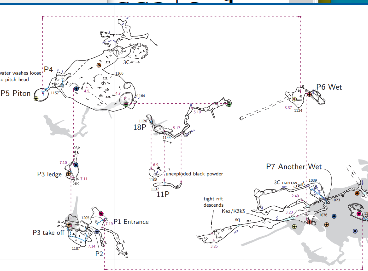
Hello, Thank you all for your answers ! So there is no easy way. Yes indeed the elevation drawing is much easier to read in this case and was also much easier to draw. But I cannot resign myself not to draw the plan, which is useful to guide the exploration. (For instance it might reveal that that one chimney is located just below the base of a pit above, in which case we probably won't waste time to climb that chimney.) The 3D view is even better for that but quite hard to print on paper :) and more generally hard to share with people who are not too familiar with computers. I will try some of your suggestions. Best regards, Jean-Florent. Le 28/01/2025 à 19:31, Bruce Mutton a écrit :
Hi Jean-Florent
As Tarquin said!
However solutions I have used to good effect...
If your data is pencil and paper, then printing and sketching on paper (while viewing models, plan and elevation on-screen simultaneously) then scanning those sketches can be an easier way of untangling.
Or break the survey into small sections of survey that only minimally overlap, and export one at a time for eventual sketching.
If your data is paperless, then the best option is to anticipate this while in the cave - if it is becoming hard to decipher in the cave on your device, then it won't be better in XTherion.
In this case, create a new survey file.
In both cases, limit the scope of your xvi only to the individual survey.
Good luck!
Bruce
PS: Perhaps a key thing to remember is that if the plan is becoming difficult, an elevation drawing will be a better way of conveying to viewers an understanding of the cave.
(An example of a 5 or 6 level shaft spiral that is somewhat OK in plan)
_______________________________________________ Therion mailing list Therion@speleo.sk https://mailman.speleo.sk/listinfo/therion

Hi Jean-Florent, I also had this issue in some caves in Haute Savoie (France). Generally, to avoid this issue, I separate the survey in several sub-surveys corresponding more or less to a small horizontal level, and I draw each subsurvey separately. Then, this is not hard to merge everything together. You may have a look on https://github.com/robertxa/Topographies-Samoens_Folly to get examples on how to separate surveys and merge them. I also use a lot the 3D view with Loch to be sure about the station to be taken in account. To share the 3D view with other people, I am using the Caveview web-app. The great point is that as soon you already have a model on line, if you share a lox file, you can tell your contacts to just grad-and-drop the new lox file in the Caveview window: it will load the local lox file you sent. Cheers, Xavier
Le 29 janv. 2025 à 10:15, Jean-Florent Raymond <jeanflorent@no-log.org> a écrit :
Hello,
Thank you all for your answers ! So there is no easy way.
Yes indeed the elevation drawing is much easier to read in this case and was also much easier to draw. But I cannot resign myself not to draw the plan, which is useful to guide the exploration. (For instance it might reveal that that one chimney is located just below the base of a pit above, in which case we probably won't waste time to climb that chimney.) The 3D view is even better for that but quite hard to print on paper :) and more generally hard to share with people who are not too familiar with computers. I will try some of your suggestions.
Best regards, Jean-Florent.
Le 28/01/2025 à 19:31, Bruce Mutton a écrit :
Hi Jean-Florent As Tarquin said! However solutions I have used to good effect... If your data is pencil and paper, then printing and sketching on paper (while viewing models, plan and elevation on-screen simultaneously) then scanning those sketches can be an easier way of untangling. Or break the survey into small sections of survey that only minimally overlap, and export one at a time for eventual sketching. If your data is paperless, then the best option is to anticipate this while in the cave - if it is becoming hard to decipher in the cave on your device, then it won't be better in XTherion. In this case, create a new survey file. In both cases, limit the scope of your xvi only to the individual survey. Good luck! Bruce PS: Perhaps a key thing to remember is that if the plan is becoming difficult, an elevation drawing will be a better way of conveying to viewers an understanding of the cave. (An example of a 5 or 6 level shaft spiral that is somewhat OK in plan) _______________________________________________ Therion mailing list Therion@speleo.sk https://mailman.speleo.sk/listinfo/therion
_______________________________________________ Therion mailing list Therion@speleo.sk https://mailman.speleo.sk/listinfo/therion
participants (5)
-
 Benedikt Hallinger
 -
 Bruce Mutton
 -
 Jean-Florent Raymond
 -
 Tarquin Wilton-Jones
 -
 Xavier Robert