Joining surveys at a curved/sloping pitch

Hi all, I have an awkward situation in my survey. One of our caves was surveyed in 2 surveys. The 2 surveys join at a sloping pitch with a secondary hole dropping into it. I have managed to draw it all in a way that makes logical sense, but I can't work out how to join the two surveys in the right manner. See attached. Green = upper passage survey. Blue & purple = lower passage and pitch survey. The part I want to fix is the green-blue boundary, where the blue should ideally follow the "pit" lines Ideally, pitches/pits should have their lower colour taken from the lower passage, and their upper colour taken from the upper passage. This is easy when they are in the same survey; you just draw your "pit" line in the upper scrap, and then follow that exact same line with a "-visibility off" wall in the lower scrap. When joining surveys, they are joined in a straight line at the scrap boundaries. This makes it very hard to draw the curved pitch heads, since curves are not straight lines, and you cannot follow the exact same line as the other scrap, because the other scrap sits in another survey, in another .th2 file. I can make additional "lower" scraps in the "upper survey" to follow the pit outlines, but how can I make those scraps take on the colour of a scrap using survey stations in another survey file? Does anyone have any methods to work with this situation? (Preferably not something that becomes just a bunch of trial and error, and then joining every single curve point in the two surveys. I could do that, but it is really painful.) Thanks for any advice, Tarquin
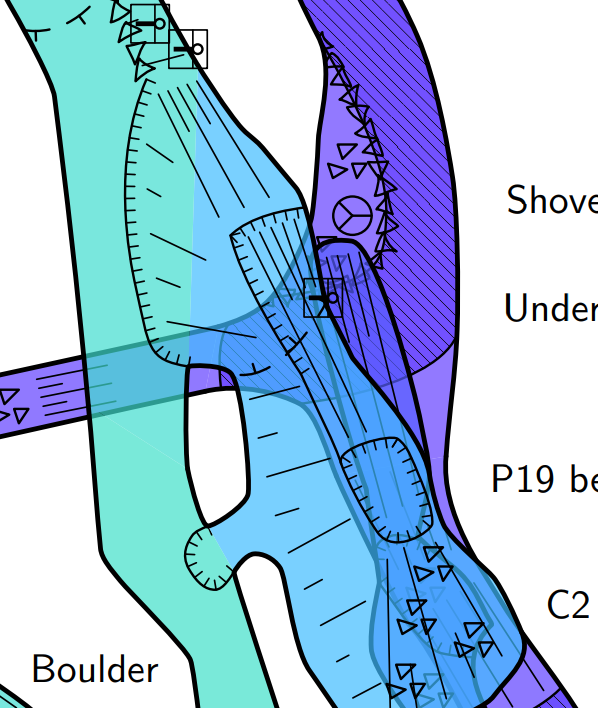

Hi Tarquin, Adding the option -outline out to the (closed) line of your pit on the top scrap should create the whole that you want in the blue color so that you will see the green color of the bottom scrap. Personally, I would not use a line pit in the bottom scrap (this is not a pit on the floor of that level) but rather a line of type ceiling-step to indicate the arrival of the top pit on the ceiling. Hope this helps Xavier Le 10-May-19 à 13:08, Tarquin Wilton-Jones via Therion a écrit :
Hi all,
I have an awkward situation in my survey. One of our caves was surveyed in 2 surveys. The 2 surveys join at a sloping pitch with a secondary hole dropping into it.
I have managed to draw it all in a way that makes logical sense, but I can't work out how to join the two surveys in the right manner. See attached. Green = upper passage survey. Blue & purple = lower passage and pitch survey. The part I want to fix is the green-blue boundary, where the blue should ideally follow the "pit" lines
Ideally, pitches/pits should have their lower colour taken from the lower passage, and their upper colour taken from the upper passage. This is easy when they are in the same survey; you just draw your "pit" line in the upper scrap, and then follow that exact same line with a "-visibility off" wall in the lower scrap.
When joining surveys, they are joined in a straight line at the scrap boundaries. This makes it very hard to draw the curved pitch heads, since curves are not straight lines, and you cannot follow the exact same line as the other scrap, because the other scrap sits in another survey, in another .th2 file.
I can make additional "lower" scraps in the "upper survey" to follow the pit outlines, but how can I make those scraps take on the colour of a scrap using survey stations in another survey file?
Does anyone have any methods to work with this situation? (Preferably not something that becomes just a bunch of trial and error, and then joining every single curve point in the two surveys. I could do that, but it is really painful.)
Thanks for any advice,
Tarquin
_______________________________________________ Therion mailing list Therion@speleo.sk https://mailman.speleo.sk/listinfo/therion
--
------------------------- Xavier Pennec Senior Research Scientist / Directeur de recherche Asclepios project-team, INRIA Sophia-Antipolis 2004 Route des Lucioles, BP93 F-06902 Sophia-Antipolis Cedex, France +33 4 92 38 76 64 +33 6 78 35 16 90 http://www-sop.inria.fr/asclepios/ -------------------------------
Thanks for the reply.
Adding the option -outline out to the (closed) line of your pit on the top scrap should create the whole that you want in the blue color so that you will see the green color of the bottom scrap.
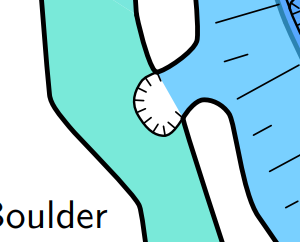
See attached for what happens when you do that. I need the blue to fill the blank area. Blue and green belong to different surveys, so getting them to perfectly match the curve of each other manually is ... hard. Is there a way to create a scrap within the green survey (where it is easy to perfectly follow the same line), but tell it to take it's altitude colour from the blue scrap instead?

I do this sort of thing a lot. You just need an equivalent line in the lower (blue) survey with -outline out to extend the blue scrap border to cover the white hole in your plan. I generally use an invisible wall line (so does not need '-outline out' option specifying) and make it slightly larger than the curved pit line so the overlap of the scraps is maintained even if a bit of distortion is applied due to loop closure corrections. As long as the scraps are in the same map level (i.e. not separated by a break) then the upper scrap will hide the overlapping area of the lower one. You cannot 'join' the scraps automatically now as neither will have an opening in the outline at the pit now. So if you need to join them to keep them aligned you have to specify the exact line points to join to pin the points at either end of the curved lines to each other in the pair of scraps. Footleg On Fri, 10 May 2019 at 12:42, Tarquin Wilton-Jones via Therion < therion@speleo.sk> wrote:
Thanks for the reply.
Adding the option -outline out to the (closed) line of your pit on the top scrap should create the whole that you want in the blue color so that you will see the green color of the bottom scrap.
See attached for what happens when you do that. I need the blue to fill the blank area. Blue and green belong to different surveys, so getting them to perfectly match the curve of each other manually is ... hard.
Is there a way to create a scrap within the green survey (where it is easy to perfectly follow the same line), but tell it to take it's altitude colour from the blue scrap instead? _______________________________________________ Therion mailing list Therion@speleo.sk https://mailman.speleo.sk/listinfo/therion
Indeed, if the two scraps are joined, then using -outline out creates a hole which is not colored. The main problem in this configuration is that the bottom scrap should close its outline contour using the pit line rather than using an implicit line connecting the two shortest points where the contour is open. However, connecting the wall of the bottom scrap to the pit line does not solve the problem since the pit line should have outline out on the top scrap and outline in on the bottom scrap. The solution I used to patch that was to duplicate the geometry of the pit line of the top scrap into a "wall:invisible" line (inversely oriented to have the correct orientation) on the bottom scrap. When the two scarps are not deformed too differently, this works. But if the scraps are deformed differently, then the top and bottom lines are deformed independently and differently and this can create a small hole. This is basically the same solution as the one Footleg just proposed. I wish there would be a more principled way of joining two scraps along a shared line. Xavier Le 10-May-19 à 14:31, Footleg a écrit :
I do this sort of thing a lot. You just need an equivalent line in the lower (blue) survey with -outline out to extend the blue scrap border to cover the white hole in your plan. I generally use an invisible wall line (so does not need '-outline out' option specifying) and make it slightly larger than the curved pit line so the overlap of the scraps is maintained even if a bit of distortion is applied due to loop closure corrections. As long as the scraps are in the same map level (i.e. not separated by a break) then the upper scrap will hide the overlapping area of the lower one. You cannot 'join' the scraps automatically now as neither will have an opening in the outline at the pit now. So if you need to join them to keep them aligned you have to specify the exact line points to join to pin the points at either end of the curved lines to each other in the pair of scraps.
Footleg
On Fri, 10 May 2019 at 12:42, Tarquin Wilton-Jones via Therion <therion@speleo.sk <mailto:therion@speleo.sk>> wrote:
Thanks for the reply.
> Adding the option -outline out to the (closed) line of your pit on the > top scrap should create the whole that you want in the blue color so > that you will see the green color of the bottom scrap.
See attached for what happens when you do that. I need the blue to fill the blank area. Blue and green belong to different surveys, so getting them to perfectly match the curve of each other manually is ... hard.
Is there a way to create a scrap within the green survey (where it is easy to perfectly follow the same line), but tell it to take it's altitude colour from the blue scrap instead? _______________________________________________ Therion mailing list Therion@speleo.sk <mailto:Therion@speleo.sk> https://mailman.speleo.sk/listinfo/therion
_______________________________________________ Therion mailing list Therion@speleo.sk https://mailman.speleo.sk/listinfo/therion
--
------------------------- Xavier Pennec Senior Research Scientist / Directeur de recherche Asclepios project-team, INRIA Sophia-Antipolis 2004 Route des Lucioles, BP93 F-06902 Sophia-Antipolis Cedex, France +33 4 92 38 76 64 +33 6 78 35 16 90 http://www-sop.inria.fr/asclepios/ -------------------------------
So if you need to join them to keep them aligned you have to specify the exact line points to join to pin the points at either end of the curved lines to each other in the pair of scraps.
Many thanks for that. I was afraid you would answer something like that though. Laborious manual editing it is. I was wondering if maybe I could manually add the pit line into the lower scrap's .th2 file using a text editor. Make it invisible, outline out, then use XTherion to move it into position so that it touches the lower scrap properly, and then manually join all the linepoints in the .th file. That way, the shape of the curve should be perfect, with minimal distortion, and not relying on line thickness to hide the approximations. It's a real shame to have to do it like that though. Imagine instead that I could create a scrap filling only the gap, in the *upper* survey's .th2 file (fairly easy to do). Then imagine I could say: fillerscrap@uppersurvey -color lowerscrap@lowersurvey. (Whether this is done as a lookup, or as a direct command or property doesn't really matter, just as long as it is possible.) This would solve the problem without needing all the manual approximations and attempting to copy vectors between surveys. Feature request?
If the two scraps are in the same map layer (i.e. not separated by a break line in the map definition) then the upper scrap will completely hide any part of the lower scrap which passes under it. So the lower scrap curved outline of the pit bottom can be quickly drawn a bit larger than the curved line of the pit in the upper scrap, as any overlap will be hidden. Footleg On Fri, 10 May 2019 at 13:51, Tarquin Wilton-Jones via Therion < therion@speleo.sk> wrote:
So if you need to join them to keep them aligned you have to specify the exact line points to join to pin the points at either end of the curved lines to each other in the pair of scraps.
Many thanks for that.
I was afraid you would answer something like that though. Laborious manual editing it is.
I was wondering if maybe I could manually add the pit line into the lower scrap's .th2 file using a text editor. Make it invisible, outline out, then use XTherion to move it into position so that it touches the lower scrap properly, and then manually join all the linepoints in the .th file. That way, the shape of the curve should be perfect, with minimal distortion, and not relying on line thickness to hide the approximations.
It's a real shame to have to do it like that though. Imagine instead that I could create a scrap filling only the gap, in the *upper* survey's .th2 file (fairly easy to do). Then imagine I could say: fillerscrap@uppersurvey -color lowerscrap@lowersurvey.
(Whether this is done as a lookup, or as a direct command or property doesn't really matter, just as long as it is possible.)
This would solve the problem without needing all the manual approximations and attempting to copy vectors between surveys.
Feature request? _______________________________________________ Therion mailing list Therion@speleo.sk https://mailman.speleo.sk/listinfo/therion
On 10/05/2019 14:28, Footleg wrote:
If the two scraps are in the same map layer (i.e. not separated by a break line in the map definition) then the upper scrap will completely hide any part of the lower scrap which passes under it. So the lower scrap curved outline of the pit bottom can be quickly drawn a bit larger than the curved line of the pit in the upper scrap, as any overlap will be hidden.
Sounds convenient, but sadly not possible in my case, as there is a break. But my manual process does work. Tested it out. Wish it were more convenient, but it works. 1. text editor, copy pit line from upper scrap in upper survey 2. text editor, paste pit line into lower scrap in lower survey 3. set -outline out, -visibility off 4. in XTherion, open lower survey 5. select first line point on the new line (it will be positioned somewhere weird), press "shift from" 6. select the line point on the wall line where it needs to end up, press "shift to" 7. select the new line, press "shift object" 8. connect walls to it as needed 9. in overall .th file, add joins for each line point, and the scrap as needed: join pitchbottomSP@topsurvey pitchtopSP@bottomsurvey -smooth on join pitchedge@topsurvey:0 pitchlip@bottomsurvey:0 join pitchedge@topsurvey:1 pitchlip@bottomsurvey:1 join pitchedge@topsurvey:2 pitchlip@bottomsurvey:2 join pitchedge@topsurvey:3 pitchlip@bottomsurvey:3 join pitchedge@topsurvey:4 pitchlip@bottomsurvey:4
Nice. I had not thought to join all the line points like that. I'll bear that in mind next time I have a particularly tricky join. Footleg On Fri, 10 May 2019 at 14:39, Tarquin Wilton-Jones via Therion < therion@speleo.sk> wrote:
On 10/05/2019 14:28, Footleg wrote:
If the two scraps are in the same map layer (i.e. not separated by a break line in the map definition) then the upper scrap will completely hide any part of the lower scrap which passes under it. So the lower scrap curved outline of the pit bottom can be quickly drawn a bit larger than the curved line of the pit in the upper scrap, as any overlap will be hidden.
Sounds convenient, but sadly not possible in my case, as there is a break. But my manual process does work. Tested it out. Wish it were more convenient, but it works.
1. text editor, copy pit line from upper scrap in upper survey 2. text editor, paste pit line into lower scrap in lower survey 3. set -outline out, -visibility off 4. in XTherion, open lower survey 5. select first line point on the new line (it will be positioned somewhere weird), press "shift from" 6. select the line point on the wall line where it needs to end up, press "shift to" 7. select the new line, press "shift object" 8. connect walls to it as needed 9. in overall .th file, add joins for each line point, and the scrap as needed:
join pitchbottomSP@topsurvey pitchtopSP@bottomsurvey -smooth on join pitchedge@topsurvey:0 pitchlip@bottomsurvey:0 join pitchedge@topsurvey:1 pitchlip@bottomsurvey:1 join pitchedge@topsurvey:2 pitchlip@bottomsurvey:2 join pitchedge@topsurvey:3 pitchlip@bottomsurvey:3 join pitchedge@topsurvey:4 pitchlip@bottomsurvey:4 _______________________________________________ Therion mailing list Therion@speleo.sk https://mailman.speleo.sk/listinfo/therion

Solutions of the type proposed (holes in upper scraps so that scrap below is visible) have their place, and I have done similar myself, using the sorts strategies discussed. Nowadays I am reluctant to do such things, as I place a high value on scraps that are as versatile as possible. The danger of ‘holey’ scraps is that if they are later (or simultaneously) used in maps that do not have the lower level passage displayed, they end up with an inappropriate white (non-passage) space in a location where there clearly should be passage (ie the pit). Similarly, scraps with holes cut-out wreak havoc with the loch models. So you can apply trickery to achieve a perfect particular output, often to the significant detriment to other outputs. Perhaps a way forward would be a feature whereby a passage fill area be defined that is completely transparent to show any scraps that happen to pass below it. And if it is presented in an output that has no scrap shown below it, it takes on the specified map-fg colour that otherwise applies. This kind of a passage fill would avoid the workarounds discussed upsetting model outputs, and avoid the need for complicated workarounds. So, is an ‘area open’, referring to a ‘window’ in a scrap through which a scrap behind or below is visible unobstructed, desirable? Is it possible? Bruce
if they are later (or simultaneously) used in maps that do not have the lower level passage displayed, they end up with an inappropriate white (non-passage) space in a location where there clearly should be passage (ie the pit).
Indeed, though I did come up with a solution for that, in the form of a filler scrap at that location which is used when offsetting maps. It's a messy solution though, and it would be better not to need it.
Similarly, scraps with holes cut-out wreak havoc with the loch models.
Interesting! Thanks for sharing that one, I hadn't noticed until you said.
Perhaps a way forward would be a feature whereby a passage fill area be defined that is completely transparent to show any scraps that happen to pass below it.
Genius! I really want this feature. Don't know if it is possible, but I want it anyway.
Perhaps a way forward would be a feature whereby a passage fill area be defined that is completely transparent to show any scraps that happen to pass below it.
Genius! I really want this feature. Don't know if it is possible, but I want it anyway.
-outline hollow -fillstation 23 meaning that wherever there is nothing behind it, it should take its colour from station 23. but that would mean it is impossible to colour unless there is a relevant station in the same survey (no idea of how to mix stations). And if there are three passages stacked under each other at the pitch (which is the case for one of mine), then it might think it doesn't need to render the fill colour because there is a passage there, even though the pitch doesn't actually connect to that passage. So there would be some kinks to work out.
If the two scraps are in the same map layer (i.e. not separated by a break line in the map definition) then the upper scrap will completely hide any part of the lower scrap which passes under it.
So the lower scrap curved outline of the pit bottom can be quickly drawn a bit larger than the curved line of the pit in the upper scrap, as any overlap will be hidden.
Not sure I've experienced that behaviour, but then I always have - transparency on with a midrange opacity set. Scraps on the same layer that overlap tend to render poorly with those settings.
Perhaps a way forward would be a feature whereby a passage fill area
be defined that is completely transparent to show any scraps that
happen to pass below it.
I imagine that at the time a scrap is rendered, the code cannot know whether there will be a scrap below/behind. But I don't know. But still, maybe... area open(ing) -place bottom #always -clip on #always -visibility [on|off] #off effectively disables the 'opening' effect, as though the area was not specified at all -fill-* # background colour in the ‘opening’ as below ... border line references ... endarea I imagine the opacity of the 'area open' could be set to some fraction of the opacity set for the current layout. That would give the relative impression of transparency, and would let the colour of the passage below bleed through. It could be a default setting, or user definable. To account for scenarios where there is no passage surveyed or drawing immediately below, or if Therion indeed cannot know whether there will be a scrap rendered below the current scrap, there could be -fill-* options to set the underlying colour. It would need to accommodate the -lookup -map-fg options <https://therion.speleo.sk/wiki/examples?s%5b%5d=lookup#colour_scales_-_lookups> that apply to the layout, and respond appropriately to a user input. ie colour map-fg altitude would need area open to accept say -fill-station 23@survey02, or -fill-altitude 850 m, or -fill-colour [r g b] colour map-fg explo-date or topo-date would need area open to accept say -fill-survey survey02 *, or -fill-date <date>, or -fill-colour [r g b] * each centreline or subsurvey could have a different date, so I guess it would just average the date of all centrelines in the survey. colour map-fg map or scrap would need area open to accept say -fill-map or fill-scrap <map or scrap name>, or -fill-colour [r g b] I guess multiple fill colour options could be set in any one area, and options inappropriate to the current lookup would be silently ignored, and the last valid fill-option defined would be the one implemented for a particular area at compile time. This arrangement would allow the user to easily specify outputs that would be consistent across a number of different selection, map, lookup and export scenarios. Its getting complicated now. Sorry coders… Bruce -----Original Message----- From: Therion <therion-bounces@speleo.sk> On Behalf Of Tarquin Wilton-Jones via Therion Sent: Saturday, 11 May 2019 09:33 To: therion@speleo.sk Cc: Tarquin Wilton-Jones <tarquin.wilton-jones@ntlworld.com> Subject: Re: [Therion] Joining surveys at a curved/sloping pitch
Perhaps a way forward would be a feature whereby a passage fill area
be defined that is completely transparent to show any scraps that
happen to pass below it.
Genius! I really want this feature. Don't know if it is possible, but
I want it anyway.
-outline hollow -fillstation 23 meaning that wherever there is nothing behind it, it should take its colour from station 23. but that would mean it is impossible to colour unless there is a relevant station in the same survey (no idea of how to mix stations). And if there are three passages stacked under each other at the pitch (which is the case for one of mine), then it might think it doesn't need to render the fill colour because there is a passage there, even though the pitch doesn't actually connect to that passage. So there would be some kinks to work out. _______________________________________________ Therion mailing list Therion@speleo.sk https://mailman.speleo.sk/listinfo/therion

I've been running into the problem of how to join scraps at curved lines as well and had come up with essentially the same solution as Tarquin. However I sometimes find that the two lines that are joined at every point still don't follow each other closely enough, leaving either a gap or an overlap. Also, it becomes much more difficult when the two scraps are in different th2 files - I've used an Excel spreadsheet to transform coordinates from one file to another with moderate success, but again sometimes find that the lines don't quite follow each other. My dream is to have a syntax like: # in one scrap... line wall -id wall1 [points] endline # in another scrap line wall -conform wall1 with the -conform wall1 telling Therion to make the line's path exactly follow the specified line (in this case wall1) in the final output. A different approach would be able to specify the background colour of an area within one scrap by referring to the name of another scrap, with Therion applying whatever that scrap's background colour is to the area in question. Best regards, Duncan On 11/05/2019, Bruce Mutton <bruce@tomo.co.nz> wrote:
If the two scraps are in the same map layer (i.e. not separated by a break line in the map definition) then the upper scrap will completely hide any part of the lower scrap which passes under it.
So the lower scrap curved outline of the pit bottom can be quickly drawn a bit larger than the curved line of the pit in the upper scrap, as any overlap will be hidden.
Not sure I've experienced that behaviour, but then I always have - transparency on with a midrange opacity set. Scraps on the same layer that overlap tend to render poorly with those settings.
Perhaps a way forward would be a feature whereby a passage fill area
be defined that is completely transparent to show any scraps that
happen to pass below it.
I imagine that at the time a scrap is rendered, the code cannot know whether there will be a scrap below/behind. But I don't know.
But still, maybe...
area open(ing)
-place bottom #always
-clip on #always
-visibility [on|off] #off effectively disables the 'opening' effect, as though the area was not specified at all
-fill-* # background colour in the ‘opening’ as below
... border line references ...
endarea
I imagine the opacity of the 'area open' could be set to some fraction of the opacity set for the current layout. That would give the relative impression of transparency, and would let the colour of the passage below bleed through. It could be a default setting, or user definable.
To account for scenarios where there is no passage surveyed or drawing immediately below, or if Therion indeed cannot know whether there will be a scrap rendered below the current scrap, there could be -fill-* options to set the underlying colour.
It would need to accommodate the -lookup -map-fg options <https://therion.speleo.sk/wiki/examples?s%5b%5d=lookup#colour_scales_-_lookups> that apply to the layout, and respond appropriately to a user input.
ie
colour map-fg altitude would need area open to accept say -fill-station 23@survey02, or
-fill-altitude 850 m, or
-fill-colour [r g b]
colour map-fg explo-date or topo-date would need area open to accept say -fill-survey survey02 *, or
-fill-date <date>, or
-fill-colour [r g b]
* each centreline or subsurvey could have a different date, so I guess it would just average the date of all centrelines in the survey.
colour map-fg map or scrap would need area open to accept say -fill-map or fill-scrap <map or scrap name>, or
-fill-colour [r g b]
I guess multiple fill colour options could be set in any one area, and options inappropriate to the current lookup would be silently ignored, and the last valid fill-option defined would be the one implemented for a particular area at compile time.
This arrangement would allow the user to easily specify outputs that would be consistent across a number of different selection, map, lookup and export scenarios.
Its getting complicated now. Sorry coders…
Bruce
-----Original Message-----
From: Therion <therion-bounces@speleo.sk> On Behalf Of Tarquin Wilton-Jones via Therion
Sent: Saturday, 11 May 2019 09:33
To: therion@speleo.sk
Cc: Tarquin Wilton-Jones <tarquin.wilton-jones@ntlworld.com>
Subject: Re: [Therion] Joining surveys at a curved/sloping pitch
Perhaps a way forward would be a feature whereby a passage fill area
be defined that is completely transparent to show any scraps that
happen to pass below it.
Genius! I really want this feature. Don't know if it is possible, but
I want it anyway.
-outline hollow -fillstation 23
meaning that wherever there is nothing behind it, it should take its colour from station 23. but that would mean it is impossible to colour unless there is a relevant station in the same survey (no idea of how to mix stations). And if there are three passages stacked under each other at the pitch (which is the case for one of mine), then it might think it doesn't need to render the fill colour because there is a passage there, even though the pitch doesn't actually connect to that passage. So there would be some kinks to work out.
_______________________________________________
Therion mailing list
Therion@speleo.sk
participants (5)
-
 Bruce Mutton
 -
 Duncan Collis
 -
 Footleg
 -
 Tarquin Wilton-Jones
 -
 Xavier Pennec