Transparent Labels and Hyperlinks in Labels

These are two features that I would like to make use of and may already be possible, I just don't know how its done. I have played around with custom metapost cide for making labels with a transparent background and can either make a therion label with a colored background or a label with a transparent background but none of the Therion text formatting. Has anybody coded a transparent label for Therion? My second thought is about hyperlinks from within a label. For example one may want to label a significant feature and also include a link to a flickr photo or online video of the feature. This may already be possible by just inserting some Latex code, but I'm not sure what kind of processing Therion does on the label text. Thanks, Carl

I second the hyperlink request. Pdf map and atlas links to web pages and to local files on a relative path would be most useful. Bruce

On Tue, Dec 15, 2009 at 5:21 AM, Carl Magnuson <magnu213@umn.edu> wrote:
These are two features that I would like to make use of and may already be possible, I just don't know how its done. I have played around with custom metapost cide for making labels with a transparent background and can either make a therion label with a colored background or a label with a transparent background but none of the Therion text formatting. Has anybody coded a transparent label for Therion?
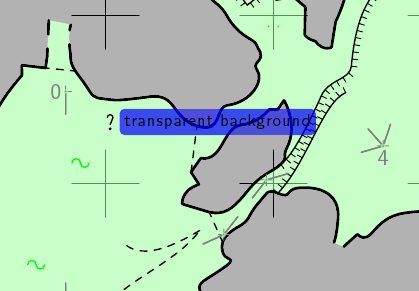
Hi Carl, if you mean something like on attached picture, I can give you some hints how to modify the existing code until it would be implemented as a regular feature: therion provides a metapost macro def_transparent_rgb to define transparent colors like def_transparent_rgb(tr_blue, 0, 0, 1); you apply it using 'withtransparentcolor <colorname>' operator. Following code redefines p_continuation to use transparency: def p_continuation(expr pos,theta,sc,al) = p_continuation_UIS(pos,theta,sc,al); if known(ATTR__text) and picture(ATTR__text): p_label.urt(ATTR__text,(.5u,-.25u) transformed T,0.0,8); % last argument (8) instructs therion to use filledlabel fi; enddef; def process_filledlabel(expr cent, rot) = begingroup; interim bboxmargin:=2.0bp; q:=((bbox lab) smoothed 2) rotatedaround (cent, rot); fill q withtransparentcolor tr_blue; % transparency used draw lab rotatedaround (cent, rot); write_circ_bbox(q); % without corners smoothing it was enough to use % write_bbox(q); endgroup; enddef; All text formatting should be available as usual. Which problems did you have?
My second thought is about hyperlinks from within a label. For example one may want to label a significant feature and also include a link to a flickr photo or online video of the feature. This may already be possible by just inserting some Latex code, but I'm not sure what kind of processing Therion does on the label text.
Unfortunately it requires changes in the core, but it is so useful that I will give it high priority. Martin

On 2.1.2010, at 20:25, Martin Budaj wrote:
My second thought is about hyperlinks from within a label. For example one may want to label a significant feature and also include a link to a flickr photo or online video of the feature. This may already be possible by just inserting some Latex code, but I'm not sure what kind of processing Therion does on the label text.
There is a possibility to use new design version of Zoomify - www.zoomify.com - try 6 Zoomify Hotspot Viewer For Zoomify and cave map check: http://klisura.speleo.sk/pages/ ZoomifyFullScreenViewer-XML_en_2009.htm m.

Martin Sluka a écrit :
On 2.1.2010, at 20:25, Martin Budaj wrote:
My second thought is about hyperlinks from within a label. For example one may want to label a significant feature and also include a link to a flickr photo or online video of the feature. This may already be possible by just inserting some Latex code, but I'm not sure what kind of processing Therion does on the label text.
There is a possibility to use new design version of Zoomify - www.zoomify.com - try 6 Zoomify Hotspot Viewer For Zoomify and cave map check: http://klisura.speleo.sk/pages/ZoomifyFullScreenViewer-XML_en_2009.htm
Hello Martin, I did not know about Zoomify, looks interesting... However the documentation is crude... two beginner's questions: - the free version does not provide full screen viewer, right ? - it does not seem to be able to process pdf files. You have to convert them to jpg before ? Eric.
m. _______________________________________________ Therion mailing list Therion@speleo.sk http://mailman.speleo.sk/mailman/listinfo/therion
On 3.1.2010, at 16:39, Eric Madelaine, INRIA wrote:
- the free version does not provide full screen viewer, right ?
Not. Chcek: http://www.zoomify.com/compare.htm
- it does not seem to be able to process pdf files. You have to convert them to jpg before ?
I convert them to TIFF, because no lost of data. Documentation is poor, but there are XML versions of parameters and they are much more readable. The best start point is: 3 Zoomify Full Screen Viewer -> HTML & XML Examples The viewers are flash applications, you may not change them without Zoomify Flash. You may change only html or XML parameters and buttons in navigation bar. But they are intuitive. I use Zoomify several years, but I bought the Design version now. Martin
Zoomify is based on Flash, I'm not sure it works under Linux. m.

From what I can see, Microsoft has a similar tool called Deep Zoom which is free to generate zoomable images to upload onto websites. While the design tool will only run on Windows, it is possible to generate output compositions which use either Silverlight (a Microsoft technology) or Seadragon AJAX (which should work from any browser+OS).
See http://www.microsoft.com/uk/wave/software-deepzoom.aspx
From my experience the Silverlight pages run a bit faster and smoother than the AJAX output, but on a decent computer both work pretty well.
Footleg 2010/1/4 Martin Sluka <martinsluka@mac.com>
Zoomify is based on Flash, I'm not sure it works under Linux.
m.
http://labs.adobe.com/downloads/flashplayer10.html The following downloads will install Flash Player 10.1 beta 2 for Windows, Macintosh and Linux desktop operating systems. See the Release Notes for more information. Important: All users should uninstall any currently installed Flash Player before installing the latest prerelease. Download plug-in for Windows (EXE, 2.3 MB) Download active-x for Windows (EXE, 2.3 MB) Download plug-in for Macintosh (DMG, 12.6 MB) Download plug-in for Linux (TAR.GZ, 4.3 MB)


How can I convert images on a UNIX or LINUX machine? The Zoomify Converter is currently available for Windows and Macintosh platforms, however, scripted alternatives are available for UNIX/LINUX environments. Access information is provided below. These alternatives have been developed by Zoomify customers and partners and, as script-based implementations, are editable and portable to other scripting languages. They are, however, slower than the compiled offerings for Windows and Macintosh. Zoomify is pursuing the creation of a UNIX/LINUX converter through partners and we hope to have more to announce soon. Please watch our home page for information on this topic. For a Python/PIL/Zope-based conversion solution please see SourceForge.net and search on 'ZoomifyImage'. For a PERL-based conversion alternative you may download the PERL-Slice.zip file from the Zoomify download server. (Note: the PERL-based solution does not support incremental source image data loading so it is only appropriate for images tens or hundreds of megabytes in size rather than gigabytes in size). so it looks, it should be solved If anybody may test the zoomify on Linux - both conversion and Flash extension, please do it and send a note. m.
participants (6)
-
 Bruce
Bruce -
 Carl Magnuson
 -
 Eric Madelaine, INRIA
 -
 Footleg
 -
 Martin Budaj
 -
 Martin Sluka