Metapost for a line ending in an ellipse

Hi all, One of the common symbols used in rigging topos is a deviation. It looks like a solid line, ending with a horizontal ellipse. (The rope would then pass through the centre of the ellipse, which is why it helps to have a line point within the centre of the ellipse, to make it easy to line them up with each other.) __ ----(__) In Therion's Metapost, the line is easy; pickup PenC; thdraw P; Drawing a horizontal ellipse at the coordinates of the last point in the line is easy: p:=fullcircle xscaled (.5u) yscaled (.25u); draw p shifted (point (length P) of P); But making the last "leg" of the line stop at the point where it intersects the ellipse ... I am baffled. One method would be; work out the angle of the last part of the line, work out the radius of the ellipse on that angle. Draw the line from the previous point to the length minus the last "radius" length. That's all fair and good, but when the line is curving, the radius of the ellipse at the final direction where the line ends, and the radius where the line enters the ellipse is different, and therefore the length of the undrawn part of the line is wrong. See the attached picture; the one with the straight line is right, the one with the curved line is wrong - the blue line should not be drawn inside the ellipse. Blue = what I am drawing. Yellow = line points. Green = parts that would be not drawn using the method described above. I am guessing the maths required to calculate the final length of the line is horrendously complicated (but please tell me if I am wrong). Is there maybe another way? Can I say "draw the line, erase the line within the area of this elliptical 'circle', draw this elliptical 'circle'", in that sequence? Thanks for any assistance you can provide. Tarquin
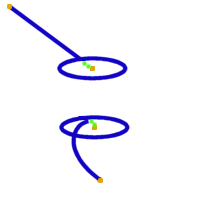
I am going to answer my own question.
Is there maybe another way? Can I say "draw the line, erase the line within the area of this elliptical 'circle', draw this elliptical 'circle'", in that sequence?
Yes. "unfill" is not useful. It actually fills with the background colour, which looks wrong when opacity is <100, and it obscures other things behind it. "clip" is a useful function, but it can only apply slipping to show items *within* a path, not outside it. The answer is to clip showing the whole drawing area (a box from -infinity->infinity in x and y planes), and part way around, come in to the inner path (an ellipse in my case), and traverse it in the opposite direction to the direction that the drawing area was traversed. Then go back out to the edge of the drawing area on exactly the same path as was used to come in to the inner path. Circles are natively drawn from the right side, anticlockwise, to make sure to traverse the outer edges of the drawing area clockwise: ________________ | ___ | | (___)----| |________________| That was a fun learning exercise. Results will be on the wiki once I am happy with my symbol.

On Fri, Nov 22, 2019 at 8:56 PM Tarquin Wilton-Jones via Therion <therion@speleo.sk> wrote:
In Therion's Metapost, the line is easy; pickup PenC; thdraw P;
Drawing a horizontal ellipse at the coordinates of the last point in the line is easy: p:=fullcircle xscaled (.5u) yscaled (.25u); draw p shifted (point (length P) of P);
But making the last "leg" of the line stop at the point where it intersects the ellipse ... I am baffled.
Hi, instead of "thdraw P;" use "thdraw P cutafter p;" after defining both paths P and p. Martin
participants (2)
-
 Martin Budaj
 -
 Tarquin Wilton-Jones