Extended elevations - development snapshot (commit 6860f82)

there is a possibility to specify reduction ratio for extended elevation (0 = vertical, 100 = normal left/right) - just use "extend <number>"
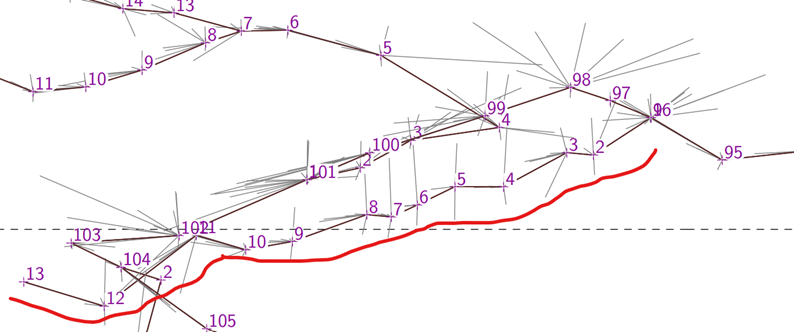
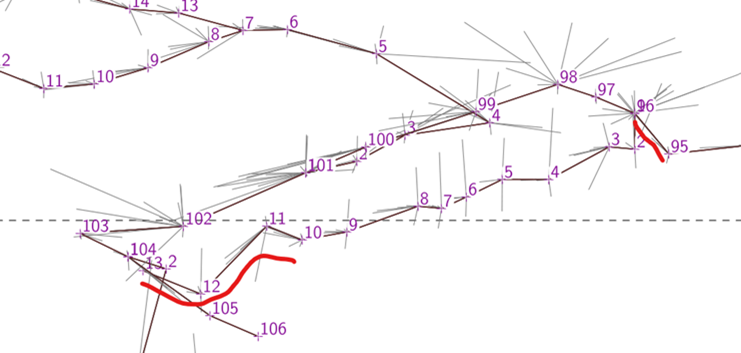
I have a project that is just perfect for this, but have not been able to make it work. I expect I have not understood how the syntax is intended to be used. The statements below relate to only a small part of the selected survey centreline, and cause this error ":\Program Files (x86)\Therion\therion.exe: error -- Extend-DwarfsDoorElevEXT.th [120] -- station doesn't exist - 1" If I remove the group endgroup pair, the project compiles just fine, however this branch (and the whole extended elevation) is compiled full size without the 85% reduction specified. The 'extend 85' statement is ignored. Also there seems to be a problem in that a group block is somehow cancelling the station-names specification (whether or not it is moved inside or outside of the group block). I have never really used group blocks, so am not familiar with their limitations. centreline group station-names []@D-K6 #DwarfsD-K6-Stream.th # now foreshorten this passage so station 13 appears near to station 2 (the red branch in the diagram below) # they could have been a loop, but the surveyor did not close to the same locations extend 85 extend left 1 endgroup endcentreline If I try extend 85 left 1 then I get the error "C:\Program Files (x86)\Therion\therion.exe: error -- Extend-DwarfsDoorElevEXT.th [120] -- unknown extend flag - 85" BTW I assume the reduction and the three-station path ignores will be reported when log extend is added to the thconfig? Bruce

extend 85
extend left 1
endgroup
Not sure how that would even work, since you start and end a group without ever having a station 1 (or any legs) within it. Shouldn't the legs be specified before the "endgroup"?
extend 85 left 1
I had assumed you would use it with two separate commands like this: extend 85 1 extend left 1 or extend 85 1 2 extend left 1 2 That is to say; you use the scaling number in the <spec> position. <spec> therefore becomes one of these: normal reverse left right vertical start ignore hide <number> Not yet had a chance to test how scaling behaves though.
Not sure how that would even work, since you start and end a group without ever having a station 1 (or any legs) within it. Shouldn't the legs be specified before the "endgroup"? Guess I'm misunderstanding group blocks.
I had assumed you would use it with two separate commands like this: extend 85 1 extend left 1 or extend 85 1 2 extend left 1 2
Nope, still gets the unknown extend flag error. Bruce
Stacho
there is a possibility to specify reduction ratio for extended elevation (0 = vertical, 100 = normal left/right) - just use "extend <number>"
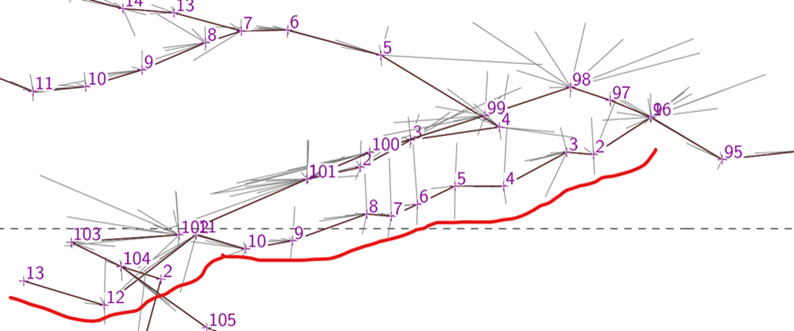
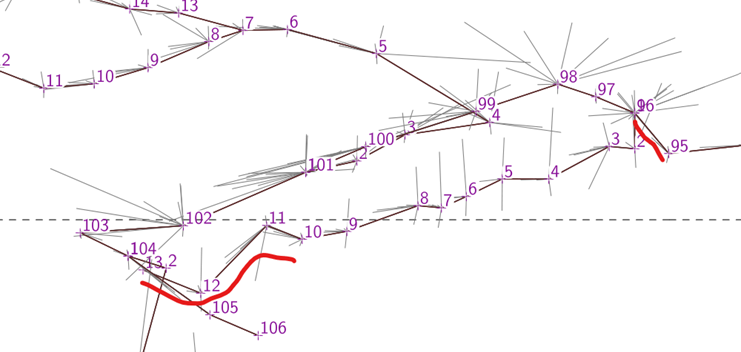
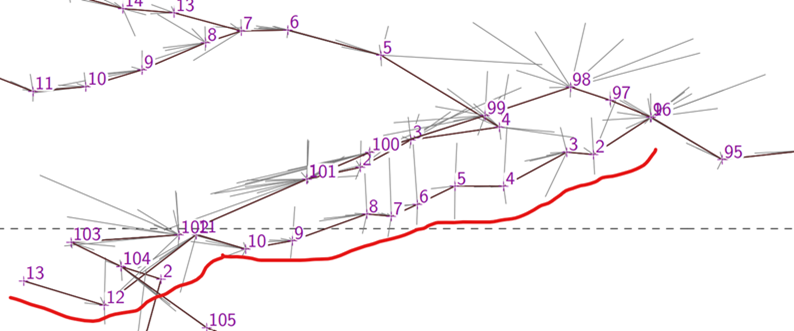
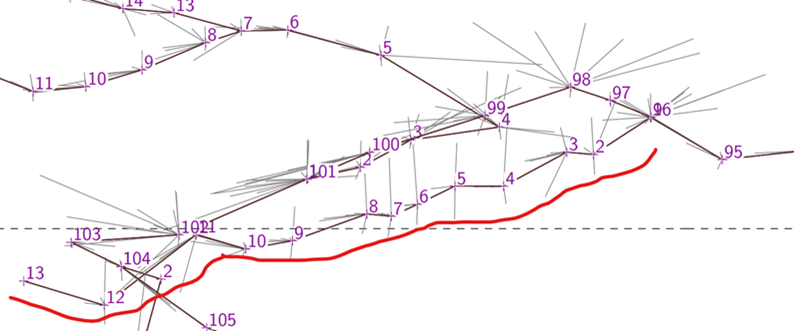
I have made this work, by placing 'extend <number>' statements in-line with the survey data, but that seems to be the only way it will work. Every combination I could think of with the extend controls in a separate centreline or block results in an error. For an example I have managed to make this extended centreline. .into this by using strategically placed 'extend 50', 'extend 100', and 'extend 75', as well as an 'extend vertical'. It now matches more closely what one would expect by looking at the plan view. So it works very well, but the difficulty I have is that to make the extended elevation control manageable, it needs to be separated out (in one place) from the survey data, but now any control of the extend ratio must be in-line with the data. This makes it very confusing and difficult to manage. Is there any chance that the ratio could be controlled by statements in separate centrelines, as with left/right/vertical etc? Maybe by allowing the form 'extend [left <ratio>] <station1> <station2>' as an equivalent to the in-line statements 'extend <ratio>' and then 'extend left'? (I am thinking of similar syntax to 'export map -projection [elevation 290 deg]' where the square brackets are required if the default is not what is wanted). The extend ratios are applied to splays as well as to legs, which is usually desirable, except sometimes where the ratio approaches zero. If the user is to control splay ratios separately to the legs, then I guess the only option is to put the extend ratio statements in-line. And one more thing. The range is limited from 0 to 100%. If we are going to allow distortion of the extended elevation, then I think the upper limit should be something like 150% or 200%. Bruce
And it looks like the extend ratio is not reported when 'log extend' is set. It would be nice to have that if it is possible. Bruce From: Therion <therion-bounces@speleo.sk> On Behalf Of Bruce Mutton Sent: Wednesday, 12 August 2020 22:18 To: 'List for Therion users' <therion@speleo.sk> Subject: [Therion] Extended elevations - development snapshot (commit 6860f82) Stacho
there is a possibility to specify reduction ratio for extended elevation (0 = vertical, 100 = normal left/right) - just use "extend <number>"
I have made this work, by placing 'extend <number>' statements in-line with the survey data, but that seems to be the only way it will work. Every combination I could think of with the extend controls in a separate centreline or block results in an error. For an example I have managed to make this extended centreline. .into this by using strategically placed 'extend 50', 'extend 100', and 'extend 75', as well as an 'extend vertical'. It now matches more closely what one would expect by looking at the plan view. So it works very well, but the difficulty I have is that to make the extended elevation control manageable, it needs to be separated out (in one place) from the survey data, but now any control of the extend ratio must be in-line with the data. This makes it very confusing and difficult to manage. Is there any chance that the ratio could be controlled by statements in separate centrelines, as with left/right/vertical etc? Maybe by allowing the form 'extend [left <ratio>] <station1> <station2>' as an equivalent to the in-line statements 'extend <ratio>' and then 'extend left'? (I am thinking of similar syntax to 'export map -projection [elevation 290 deg]' where the square brackets are required if the default is not what is wanted). The extend ratios are applied to splays as well as to legs, which is usually desirable, except sometimes where the ratio approaches zero. If the user is to control splay ratios separately to the legs, then I guess the only option is to put the extend ratio statements in-line. And one more thing. The range is limited from 0 to 100%. If we are going to allow distortion of the extended elevation, then I think the upper limit should be something like 150% or 200%. Bruce

Hi Bruce, thanks a lot for your feedback. I have added logging of extend ratio, when it is not 100%. Also I hope, I have enabled specification of ratio for given station/shot: extend <ratio> <from> <to> extend <ratio> <station> Allowing the form extend [left <ratio>] would be much more parsing. I have also changed the allowed range to 0 - 200%. Extend ratios are applied to spays also - but in this case - extend ratio of nearest shot is taken for splay. I think, this way it is OK. Could you please check whether it is working now as expected (commit c7d41d9 <https://github.com/therion/therion/commit/c7d41d96ebc47a652243711489813635e58c64d3> <https://github.com/therion/therion/commit/c7d41d96ebc47a652243711489813635e58c64d3> )? Thanks, S. On Wed, 12 Aug 2020 at 12:25, Bruce Mutton <bruce@tomo.co.nz> wrote:
And it looks like the extend ratio is not reported when ‘log extend’ is set.
It would be nice to have that if it is possible.
Bruce
*From:* Therion <therion-bounces@speleo.sk> *On Behalf Of *Bruce Mutton *Sent:* Wednesday, 12 August 2020 22:18 *To:* 'List for Therion users' <therion@speleo.sk> *Subject:* [Therion] Extended elevations - development snapshot (commit 6860f82)
Stacho
there is a possibility to specify reduction ratio for extended elevation (0 = vertical, 100 = normal left/right) - just use "extend <number>"
I have made this work, by placing ‘extend <number>’ statements in-line with the survey data, but that seems to be the only way it will work. Every combination I could think of with the extend controls in a separate centreline or block results in an error.
For an example I have managed to make this extended centreline…
…into this by using strategically placed ‘extend 50’, ‘extend 100’, and ‘extend 75’, as well as an ‘extend vertical’. It now matches more closely what one would expect by looking at the plan view.
So it works very well, but the difficulty I have is that to make the extended elevation control manageable, it needs to be separated out (in one place) from the survey data, but now any control of the extend ratio must be in-line with the data. This makes it very confusing and difficult to manage.
Is there any chance that the ratio could be controlled by statements in separate centrelines, as with left/right/vertical etc?
Maybe by allowing the form ‘extend [left <ratio>] <station1> <station2>’ as an equivalent to the in-line statements ‘extend <ratio>’ and then ‘extend left’?
(I am thinking of similar syntax to ‘export map -projection [elevation 290 deg]’ where the square brackets are required if the default is not what is wanted).
The extend ratios are applied to splays as well as to legs, which is usually desirable, except sometimes where the ratio approaches zero. If the user is to control splay ratios separately to the legs, then I guess the only option is to put the extend ratio statements in-line.
And one more thing. The range is limited from 0 to 100%. If we are going to allow distortion of the extended elevation, then I think the upper limit should be something like 150% or 200%.
Bruce _______________________________________________ Therion mailing list Therion@speleo.sk https://mailman.speleo.sk/listinfo/therion
participants (3)
-
 Bruce Mutton
 -
 Stacho Mudrak
 -
 Tarquin Wilton-Jones