
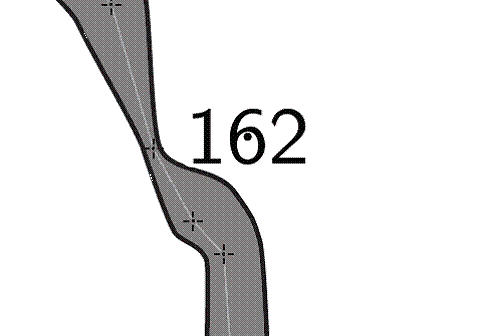
I'm trying to put "altitude" points into my map. I've used point altitude successfully, but the number over-writes the cave. I've found I can move the point outside the cave outline, and it still reports the correct altitude, but it the "dot" appears now outside the cave, of course, as attached. Is there a way of specifying the position of the altitude "point" within the cave passage, but moving the text outside? I could do this manually of course with a point label, but then the altitude data would not be computed from the centreline, so not ideal. Can anyone advise me on this one? - Ben

On 6.5.2008, at 22:55, Ben Cooper wrote:
Can anyone advise me on this one?
The simplest way is to add to point of line "wall" the option "altitude ." You should find in section "Line points" the black rectangle. Highlight the point of wall you want to add the altitude and write "altitude ." there. "altitude <value> . can be speci ed only with the wall type. This option creates an altitude label on the wall. All altitudes are exported as a di erence against grid Z origin (which is 0 by default). If the value is speci ed, it gives the altitude di erence of the point on the wall relative to the nearest station. The value can be pre xed by a keyword \fix", then no nearest station is taken into consideration; the absolute given value is used instead. Units can follow the value. Examples: +4, [+4 m], [fix 1510 m]." "7 General altitude label. All altitudes are exported as a di erence against grid Z origin (which is 0 by default). To display altitude on the passage wall, use altitude option for any line point of the passage wall." M. 

Either you can use altitude option for a wall point - just enter "altitude ." to the line point options text editor, as Martin has written. This way we prefer. Or you can add -align option to your label - e.g. "-align tl" would probably help in your case (tl means top left). Regards, S. 2008/5/6 Martin Sluka <martinsluka@mac.com>:
On 6.5.2008, at 22:55, Ben Cooper wrote:
Can anyone advise me on this one? The simplest way is to add to point of line "wall" the option "altitude ." You should find in section "Line points" the black rectangle. Highlight the point of wall you want to add the altitude and write "altitude ." there.
"altitude <value> . can be speci ed only with the wall type. This option creates an altitude label on the wall. All altitudes are exported as a di erence against grid Z origin (which is 0 by default). If the value is speci ed, it gives the altitude di erence of the point on the wall relative to the nearest station. The value can be pre xed by a keyword \fix", then no nearest station is taken into consideration; the absolute given value is used instead. Units can follow the value. Examples: +4, [+4 m], [fix 1510 m]."
"7 General altitude label. All altitudes are exported as a di erence against grid Z origin (which is 0 by default). To display altitude on the passage wall, use altitude option for any line point of the passage wall."
M.
_______________________________________________ Therion mailing list Therion@speleo.sk http://www.speleo.sk/mailman/listinfo/therion

I've noticed that the "scale" option does not appear to work with the "altitude" point symbol. Is there any particular reason for that? - Ben -----Original Message----- From: therion-bounces@speleo.sk [mailto:therion-bounces@speleo.sk] On Behalf Of Stacho Mudrak Sent: 07 May 2008 08:09 To: therion@speleo.sk Subject: Re: [Therion] Altitude Either you can use altitude option for a wall point - just enter "altitude ." to the line point options text editor, as Martin has written. This way we prefer. Or you can add -align option to your label - e.g. "-align tl" would probably help in your case (tl means top left). Regards, S. 2008/5/6 Martin Sluka <martinsluka@mac.com>:
On 6.5.2008, at 22:55, Ben Cooper wrote:
Can anyone advise me on this one? The simplest way is to add to point of line "wall" the option "altitude ." You should find in section "Line points" the black rectangle. Highlight the point of wall you want to add the altitude and write
"altitude ." there.
"altitude <value> . can be speci ed only with the wall type. This option creates an altitude label on the wall. All altitudes are exported as a di erence against grid Z origin (which is 0 by default). If the value is speci ed, it gives the altitude di erence of the point on the wall relative to the nearest station. The value can be pre xed by a keyword \fix", then no nearest station is taken into consideration; the absolute given value is used instead. Units can follow the value. Examples: +4, [+4 m], [fix 1510 m]."
"7 General altitude label. All altitudes are exported as a di erence against grid Z origin (which is 0 by default). To display altitude on the passage wall, use altitude option for any line point of the passage wall."
M.
_______________________________________________ Therion mailing list Therion@speleo.sk http://www.speleo.sk/mailman/listinfo/therion
_______________________________________________ Therion mailing list Therion@speleo.sk http://www.speleo.sk/mailman/listinfo/therion

On Tue, May 27, 2008 at 10:22 PM, Ben Cooper <ben@caver.plus.com> wrote:
I've noticed that the "scale" option does not appear to work with the "altitude" point symbol. Is there any particular reason for that?
It belongs to labels, for which the scale option is ignored. Anyway, did you try to scale the dot or the text? Martin
It belongs to labels, for which the scale option is ignored. Anyway, did you try to scale the dot or the text?
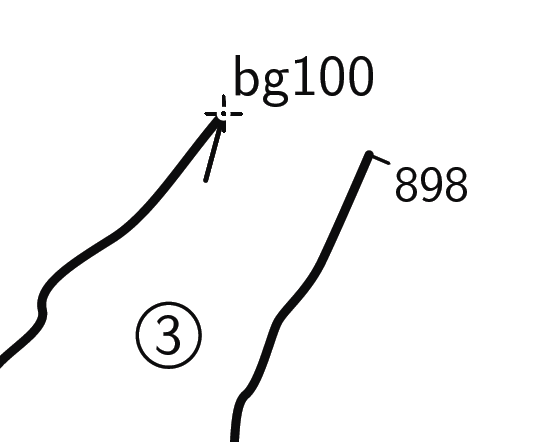
I would like to scale the altitude text. E.g. point 2678.0 844.0 altitude -scale xs -align bl "scale" works with point label, though. Why do you say it is ignored for labels? - Ben -----Original Message----- From: therion-bounces@speleo.sk [mailto:therion-bounces@speleo.sk] On Behalf Of Martin Budaj Sent: 28 May 2008 14:18 To: therion@speleo.sk Subject: Re: [Therion] Altitude On Tue, May 27, 2008 at 10:22 PM, Ben Cooper <ben@caver.plus.com> wrote:
I've noticed that the "scale" option does not appear to work with the "altitude" point symbol. Is there any particular reason for that?
It belongs to labels, for which the scale option is ignored. Anyway, did you try to scale the dot or the text? Martin _______________________________________________ Therion mailing list Therion@speleo.sk http://www.speleo.sk/mailman/listinfo/therion
On Mon, Jun 2, 2008 at 9:35 PM, Ben Cooper <ben@caver.plus.com> wrote:
"scale" works with point label, though. Why do you say it is ignored for labels?
Well, it used to be ignored (therion functionality sometimes surprises even the authors ;-). Now we will implement it consistently also for altitude. Martin
Thanks Martin. That would be fabulous. - Ben -----Original Message----- From: therion-bounces@speleo.sk [mailto:therion-bounces@speleo.sk] On Behalf Of Martin Budaj Sent: 06 June 2008 20:55 To: therion@speleo.sk Subject: Re: [Therion] Altitude On Mon, Jun 2, 2008 at 9:35 PM, Ben Cooper <ben@caver.plus.com> wrote:
"scale" works with point label, though. Why do you say it is ignored for labels?
Well, it used to be ignored (therion functionality sometimes surprises even the authors ;-). Now we will implement it consistently also for altitude. Martin _______________________________________________ Therion mailing list Therion@speleo.sk http://www.speleo.sk/mailman/listinfo/therion
participants (5)
-
 Ben Cooper
 -
 caver@caver.plus.com
 -
 Martin Budaj
 -
 Martin Sluka
 -
 Stacho Mudrak