Re: [Therion] Big room multiple scraps - How to join

HI Bill, Something along the lines of map ProblemchamberMP GrandcanyonSP FlatroomSP endmap select Problemchamber export map -proj plan -o Problemchamber.th2 Instead of exporting to pdf, this will then export this to a .th2 file, where I guess it will appear with all the lines you have joined, instead of you having to join them with line joins/scrap joins or amending line end positions to force therion to automatically recognise them. This will allow you to work on the whole chamber as one in a single .th2 file. Of course then (more or less) in your master file you will have survey StarkCaverns input problemchamber.th2 input otherpartsofcave.th2 map StarkcavernsMP PromblemchamberMP OtherpartsofcaveMP endmap centreline equate ... endcentreline endsurvey This should hopefully reduce the overlap you are seeing in your current workaround, and it's probably still possible to implement this and delete the invisible walls from the centre of your chamber. [cid:b0947cc4-0cfc-45f3-8d84-09fe9b29f7b8] Regards, Al ________________________________ From: Bill Gee <bgee@campercaver.net> Sent: 03 August 2023 15:37 To: alastair gott <alastairgott@hotmail.com> Subject: Re: [Therion] Big room multiple scraps - How to join Hi Alistair - I am not sure I understand what you are suggesting. It sounds like the idea is to use something like GIMP to collect all of the sketches for the room into one JPG file, then use that file as the background for Therion. True? I considered that idea. There are two problems. First, I know almost nothing about GIMP. It would be a steep learning curve. Second, the sketches are not all the same scale. Some of them would have to be shrunk. Again a GIMP task, and beyond my knowledge of how GIMP works. =============== Bill Gee On 8/2/23 12:16, alastair gott wrote:
Hi bill,
Could you set up a map for just that chamber which will then join all the sketches and export the .th2 for it. When you then subsequently export that .th2 to pdf, you do not need the joins and therefore do not lose any of the detail.
Regards, Alastair Gott.
Get Outlook for iOS <https://emea01.safelinks.protection.outlook.com/?url=https%3A%2F%2Faka.ms%2Fo0ukef&data=05%7C01%7C%7C13afc0601da0489ee6ad08db942f3937%7C84df9e7fe9f640afb435aaaaaaaaaaaa%7C1%7C0%7C638266702773179124%7CUnknown%7CTWFpbGZsb3d8eyJWIjoiMC4wLjAwMDAiLCJQIjoiV2luMzIiLCJBTiI6Ik1haWwiLCJXVCI6Mn0%3D%7C3000%7C%7C%7C&sdata=QbCrIJHIwAUKZvxSqZYb6OgO7j%2BIrh7mqwPgjEkWh6c%3D&reserved=0<https://aka.ms/o0ukef>> ------------------------------------------------------------------------ *From:* Therion <therion-bounces@speleo.sk> on behalf of Bill Gee <bgee@campercaver.net> *Sent:* Wednesday, August 2, 2023 4:28:05 PM *To:* Therion Mail List <therion@speleo.sk> *Subject:* [Therion] Big room multiple scraps - How to join Hello everyone - I am having a problem getting Therion to understand how to join several scraps to make a large room. The working map is at
https://emea01.safelinks.protection.outlook.com/?url=https%3A%2F%2Fcampercaver.net%2FMiscFiles%2FStarkCavernsNoCenter.pdf&data=05%7C01%7C%7C13afc0601da0489ee6ad08db942f3937%7C84df9e7fe9f640afb435aaaaaaaaaaaa%7C1%7C0%7C638266702773179124%7CUnknown%7CTWFpbGZsb3d8eyJWIjoiMC4wLjAwMDAiLCJQIjoiV2luMzIiLCJBTiI6Ik1haWwiLCJXVCI6Mn0%3D%7C3000%7C%7C%7C&sdata=JaEkdo9ILBvbQ%2FBvVAopbYGXV5ODrdNV9WTWBT3MNLk%3D&reserved=0<https://campercaver.net/MiscFiles/StarkCavernsNoCenter.pdf> <https://emea01.safelinks.protection.outlook.com/?url=https%3A%2F%2Fcampercaver.net%2FMiscFiles%2FStarkCavernsNoCenter.pdf&data=05%7C01%7C%7C13afc0601da0489ee6ad08db942f3937%7C84df9e7fe9f640afb435aaaaaaaaaaaa%7C1%7C0%7C638266702773179124%7CUnknown%7CTWFpbGZsb3d8eyJWIjoiMC4wLjAwMDAiLCJQIjoiV2luMzIiLCJBTiI6Ik1haWwiLCJXVCI6Mn0%3D%7C3000%7C%7C%7C&sdata=JaEkdo9ILBvbQ%2FBvVAopbYGXV5ODrdNV9WTWBT3MNLk%3D&reserved=0<https://campercaver.net/MiscFiles/StarkCavernsNoCenter.pdf>>
Take a look at the east part of the map in an area called Grand Canyon. This is really one large room, though we did not realize that when we started sketching several years ago. Now I have at least three different pieces of sketch to try and fit together.
As you can see, there is a large triangle in the center which Therion thinks is not cave. There are also some part which are outside the cave, but are considered by Therion to be inside.
All of the joins in here are using line-to-line. I named the lines, then created "join" statements specifying the two lines and which points on those lines to join. Therion is happy with that, and the wall that it draws is a fair depiction of the area. The problem is that much of the interior is getting lost.
I have not tried to use plain joins of the scraps - joins which do not specify the lines. I suspect that would not change much.
I have already drawn some of this area three times. It is extraordinarily complicated due to multiple levels, especially along the east side. We thought for a long time that the east side was separate passages, but it is really just a complicated pile of big breakdown blocks.
I really REALLY do not want to go back and make one huge sketch of the entire room. That would take several days.
What can I do to convince Therion where the cave really is? Can I put in some invisible walls (subtype hidden)?
Thanks!
-- =============== Bill Gee _______________________________________________ Therion mailing list Therion@speleo.sk https://emea01.safelinks.protection.outlook.com/?url=https%3A%2F%2Fmailman.speleo.sk%2Flistinfo%2Ftherion&data=05%7C01%7C%7C13afc0601da0489ee6ad08db942f3937%7C84df9e7fe9f640afb435aaaaaaaaaaaa%7C1%7C0%7C638266702773179124%7CUnknown%7CTWFpbGZsb3d8eyJWIjoiMC4wLjAwMDAiLCJQIjoiV2luMzIiLCJBTiI6Ik1haWwiLCJXVCI6Mn0%3D%7C3000%7C%7C%7C&sdata=7kaOkbQoxP6UMZ3zDt52%2BFMV4aBE7yDxe7yVEQi0QWE%3D&reserved=0<https://mailman.speleo.sk/listinfo/therion> <https://emea01.safelinks.protection.outlook.com/?url=https%3A%2F%2Fmailman.speleo.sk%2Flistinfo%2Ftherion&data=05%7C01%7C%7C13afc0601da0489ee6ad08db942f3937%7C84df9e7fe9f640afb435aaaaaaaaaaaa%7C1%7C0%7C638266702773179124%7CUnknown%7CTWFpbGZsb3d8eyJWIjoiMC4wLjAwMDAiLCJQIjoiV2luMzIiLCJBTiI6Ik1haWwiLCJXVCI6Mn0%3D%7C3000%7C%7C%7C&sdata=7kaOkbQoxP6UMZ3zDt52%2BFMV4aBE7yDxe7yVEQi0QWE%3D&reserved=0<https://mailman.speleo.sk/listinfo/therion>>
_______________________________________________ Therion mailing list Therion@speleo.sk https://emea01.safelinks.protection.outlook.com/?url=https%3A%2F%2Fmailman.speleo.sk%2Flistinfo%2Ftherion&data=05%7C01%7C%7C13afc0601da0489ee6ad08db942f3937%7C84df9e7fe9f640afb435aaaaaaaaaaaa%7C1%7C0%7C638266702773179124%7CUnknown%7CTWFpbGZsb3d8eyJWIjoiMC4wLjAwMDAiLCJQIjoiV2luMzIiLCJBTiI6Ik1haWwiLCJXVCI6Mn0%3D%7C3000%7C%7C%7C&sdata=7kaOkbQoxP6UMZ3zDt52%2BFMV4aBE7yDxe7yVEQi0QWE%3D&reserved=0<https://mailman.speleo.sk/listinfo/therion>
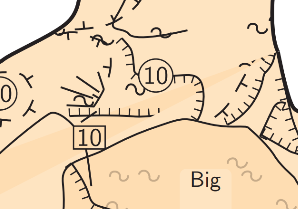

Something along the lines of map ProblemchamberMP GrandcanyonSP FlatroomSP endmap
select Problemchamber export map -proj plan -o Problemchamber.th2
Instead of exporting to pdf, this will then export this to a .th2 file, where I guess it will appear with all the lines you have joined, instead of you having to join them with line joins/scrap joins or amending line end positions to force therion to automatically recognise them.
This will allow you to work on the whole chamber as one in a single .th2 file.
Fun fact, you can even ask therion to take the sketches, and output those, pre-warped and pre-scaled, aligned to each other. It's fairly advanced stuff though, and I only used it once while boggling slightly. Sketch Morphing, in the Therion book. Or here: http://marcocorvi.altervista.org/caving/tbe/m_04/m_045.htm That's harder than the original problem, but very cool if you wanted to use it, since it can solve this exact problem (multiple surveys of different arts of the same chamber at different scales).

A couple of very interesting ideas here. I tried them out this morning on a small test cave. I will have to think about this for a bit to see how it might be useful. My small test cave has a total of about 80 feet of passage. There are three scraps which come from background sketch on two different sheets of paper. The same sheets also include profile and cross-section sketches. The first thing I did was Tarquin's method of creating a single .th2 file. Creating the file was easy - just adding another export line to the thconfig file. It produced a valid .th2 file which has all objects from all scraps. The joins were already performed. There was no background image, so adding anything to this would be a matter of eyeballing it. I don't think there is any way to add a background image that would make sense. The second thing I did was review Marco Corvi's documentation at the URL Tarquin provided. The new thing I learned is that backgrounds can be assigned to scraps as well as the drawing area. With my test cave I added background to the three scraps, added the appropriate export line to thconfig and then compiled. In the map editor I then started a new .th2 file. I imported the .xvi as the drawing area background. It came in. I can see where all three sketches were apparently overlaid. There is a nice centerline for the entire cave. The problem is the sketches are not transparent enough to use. The only part of the sketch that has any visible drawing on it is for the last scrap mentioned in the map statement of the .th file. The other drawings are not visible. The result file can be seen at https://campercaver.net/MiscFiles/test.xvi =============== Bill Gee On 8/3/23 15:13, Tarquin Wilton-Jones via Therion wrote:
Something along the lines of map ProblemchamberMP GrandcanyonSP FlatroomSP endmap
select Problemchamber export map -proj plan -o Problemchamber.th2
Instead of exporting to pdf, this will then export this to a .th2 file, where I guess it will appear with all the lines you have joined, instead of you having to join them with line joins/scrap joins or amending line end positions to force therion to automatically recognise them.
This will allow you to work on the whole chamber as one in a single .th2 file.
Fun fact, you can even ask therion to take the sketches, and output those, pre-warped and pre-scaled, aligned to each other. It's fairly advanced stuff though, and I only used it once while boggling slightly.
Sketch Morphing, in the Therion book. Or here: http://marcocorvi.altervista.org/caving/tbe/m_04/m_045.htm
That's harder than the original problem, but very cool if you wanted to use it, since it can solve this exact problem (multiple surveys of different arts of the same chamber at different scales). _______________________________________________ Therion mailing list Therion@speleo.sk https://mailman.speleo.sk/listinfo/therion

The problem is the sketches are not transparent enough to use. The only part of the sketch that has any visible drawing on it is for the last scrap mentioned in the map statement of the .th file. The other drawings are not visible.
Bill Select the image, untick visibility
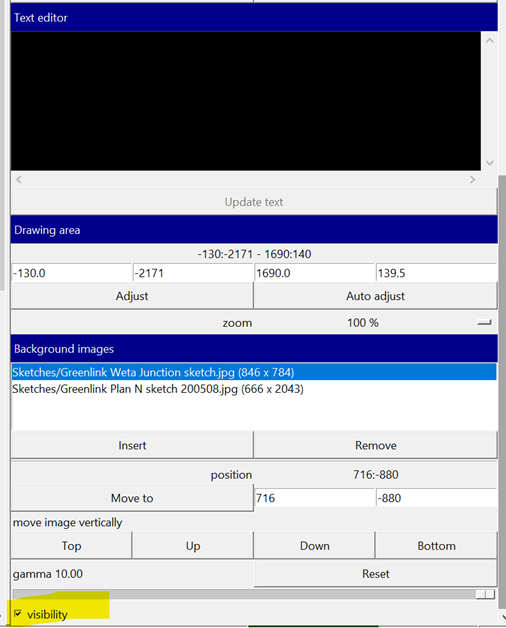
Hmmm.... I think I get it. The xvi file consists of three images. When I set it as the background for a drawing window, there are four entries in the background list. They are the file name and each of the images it contains. The file name holds the centerline and each image holds one drawing. To draw on top, uncheck visibility for all but one of the images. Draw on that, then make it invisible and turn on another image. Add to the drawing, then repeat for the third background. Is that the basic process? Screen shot attached. =============== Bill Gee On 8/4/23 14:53, Bruce Mutton wrote:
The problem is the sketches are not transparent enough to use. The only part of the sketch that has any visible drawing on it is for the last scrap mentioned in the map statement of the .th file. The other drawings are not visible.
Bill
Select the image, untick visibility
_______________________________________________ Therion mailing list Therion@speleo.sk https://mailman.speleo.sk/listinfo/therion
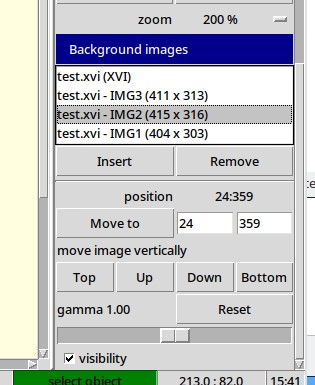
Hi Bill That is generally what I do. Depending on the arrangement of the images you might be able to leave some or most of them visible if you change the stacking order. Experiment with the Top, Up, Down, Bottom buttons. You can also double-right-click an image to allow you to drag it to another location before you start drawing. This can avoid the 'problem' of images overlapping each other. However doing this is likely counter-productive for the work flow we are discussing in this thread. As another aside, if you insert .png format images with a transparent background, the problem of one image obscuring another is greatly reduced. I don't have any experience with how these survive export to .th2 or .xvi, so not sure how relevant this is here. Bruce -----Original Message----- From: Therion <therion-bounces@speleo.sk> On Behalf Of Bill Gee Sent: Saturday, 5 August 2023 08:44 To: Therion Mail List <therion@speleo.sk> Subject: Re: [Therion] Big room multiple scraps - How to join Hmmm.... I think I get it. The xvi file consists of three images. When I set it as the background for a drawing window, there are four entries in the background list. They are the file name and each of the images it contains. The file name holds the centerline and each image holds one drawing. To draw on top, uncheck visibility for all but one of the images. Draw on that, then make it invisible and turn on another image. Add to the drawing, then repeat for the third background. Is that the basic process? Screen shot attached. =============== Bill Gee On 8/4/23 14:53, Bruce Mutton wrote:
The problem is the sketches are not transparent enough to use. The only part of the sketch that has any visible drawing on it is for the last scrap mentioned in the map statement of the .th file. The other drawings are not visible.
Bill
Select the image, untick visibility
_______________________________________________ Therion mailing list Therion@speleo.sk https://mailman.speleo.sk/listinfo/therion
participants (4)
-
 alastair gott
 -
 Bill Gee
 -
 Bruce Mutton
 -
 Tarquin Wilton-Jones