Development 5.4.1+4369eea inverts and recolours altitude legend

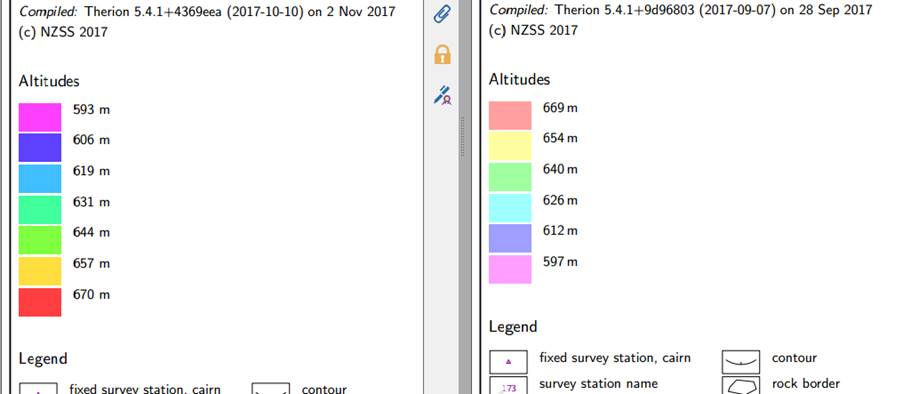
I've just noticed that the latest development snapshot 5.4.1+4369eea seems to have messed with the altitude legend. You can see from the screenshot below, which shows part of identical project compilations, one with 9d96803 and then one with 4369eea. Pretty sure I have not made any other changes that could have caused this at my end, and I see that some of the intervening commits on github relate to colour changes. Neutral (perhaps) changes are that there are more colour bands and the colours are brighter, in the legend at least, though not in the map. A negative change is that the altitude range is now upside down. Bruce

Hello, i think the upside-down notation is actually more natural and intuitively to understand. Am 2017-11-02 11:05, schrieb Bruce Mutton via Therion:
I've just noticed that the latest development snapshot 5.4.1+4369eea seems to have messed with the altitude legend.
You can see from the screenshot below, which shows part of identical project compilations, one with 9d96803 and then one with 4369eea.
Pretty sure I have not made any other changes that could have caused this at my end, and I see that some of the intervening commits on github relate to colour changes.
Neutral (perhaps) changes are that there are more colour bands and the colours are brighter, in the legend at least, though not in the map.
A negative change is that the altitude range is now upside down.
Bruce

Dell - Internal Use - Confidential It would be if the numbers were negative, but they're not. My vote is the traditional method of rising numbers. Henry -----Original Message----- From: Therion [mailto:therion-bounces@speleo.sk] On Behalf Of Benedikt Hallinger via Therion Sent: 07 November 2017 21:19 To: therion@speleo.sk Cc: Benedikt Hallinger <beni@hallinger.org> Subject: Re: [Therion] Development 5.4.1+4369eea inverts and recolours altitude legend Hello, i think the upside-down notation is actually more natural and intuitively to understand. Am 2017-11-02 11:05, schrieb Bruce Mutton via Therion:
I've just noticed that the latest development snapshot 5.4.1+4369eea seems to have messed with the altitude legend.
You can see from the screenshot below, which shows part of identical project compilations, one with 9d96803 and then one with 4369eea.
Pretty sure I have not made any other changes that could have caused this at my end, and I see that some of the intervening commits on github relate to colour changes.
Neutral (perhaps) changes are that there are more colour bands and the colours are brighter, in the legend at least, though not in the map.
A negative change is that the altitude range is now upside down.
Bruce
_______________________________________________ Therion mailing list Therion@speleo.sk https://mailman.speleo.sk/listinfo/therion Dell Corporation Limited is registered in England and Wales. Company Registration Number: 2081369 Registered address: Dell House, The Boulevard, Cain Road, Bracknell, Berkshire, RG12 1LF, UK. Company details for other Dell UK entities can be found on www.dell.co.uk.

Hi, upside-down notation is maybe more natural in other cases but for maps it is IMO against unwritten standard for altitude legend. I agree with Henry and Bruce. But maybe we could make it configurable via some parameter in layout config. Ladislav PS: Therion - Public Use - Not confidential ;-) 7. 11. 2017 v 23:00, Henry.Bennett--- via Therion <therion@speleo.sk>:
Dell - Internal Use - Confidential
It would be if the numbers were negative, but they're not. My vote is the traditional method of rising numbers.
Henry -----Original Message----- From: Therion [mailto:therion-bounces@speleo.sk] On Behalf Of Benedikt Hallinger via Therion Sent: 07 November 2017 21:19 To: therion@speleo.sk Cc: Benedikt Hallinger <beni@hallinger.org> Subject: Re: [Therion] Development 5.4.1+4369eea inverts and recolours altitude legend
Hello, i think the upside-down notation is actually more natural and intuitively to understand.
Am 2017-11-02 11:05, schrieb Bruce Mutton via Therion:
I've just noticed that the latest development snapshot 5.4.1+4369eea seems to have messed with the altitude legend.
You can see from the screenshot below, which shows part of identical project compilations, one with 9d96803 and then one with 4369eea.
Pretty sure I have not made any other changes that could have caused this at my end, and I see that some of the intervening commits on github relate to colour changes.
Neutral (perhaps) changes are that there are more colour bands and the colours are brighter, in the legend at least, though not in the map.
A negative change is that the altitude range is now upside down.
Bruce
_______________________________________________ Therion mailing list Therion@speleo.sk https://mailman.speleo.sk/listinfo/therion Dell Corporation Limited is registered in England and Wales. Company Registration Number: 2081369 Registered address: Dell House, The Boulevard, Cain Road, Bracknell, Berkshire, RG12 1LF, UK. Company details for other Dell UK entities can be found on www.dell.co.uk. _______________________________________________ Therion mailing list Therion@speleo.sk https://mailman.speleo.sk/listinfo/therion
Hello, i have a scrap containing a pit signature that is in the wrong place. How can i move the pit line to a new x/y-position without changing shape or m8ving all points msnually individually?

Open .th2 file in plain text editor. Copy line definitiont to spreadsheet. Do proper spreadsheet calculation to change all coordinates to correct positions. Copy calculated numbers from spreadsheet back to plaint text editor. Save .th2 file Manual work: select point after point and change proper value /s in point coordinates fields in right side menu. m.
8. 11. 2017 v 20:18, Benedikt Hallinger via Therion <therion@speleo.sk>:
Hello, i have a scrap containing a pit signature that is in the wrong place. How can i move the pit line to a new x/y-position without changing shape or m8ving all points msnually individually? _______________________________________________ Therion mailing list Therion@speleo.sk https://mailman.speleo.sk/listinfo/therion
Thanks! for the future: it would be very cool to have a nice drag&drop solution in the editor :) Am 2017-11-08 21:35, schrieb Martin Sluka via Therion:
Open .th2 file in plain text editor. Copy line definitiont to spreadsheet. Do proper spreadsheet calculation to change all coordinates to correct positions. Copy calculated numbers from spreadsheet back to plaint text editor. Save .th2 file
Manual work:
select point after point and change proper value /s in point coordinates fields in right side menu.
m.
8. 11. 2017 v 20:18, Benedikt Hallinger via Therion <therion@speleo.sk>:
Hello, i have a scrap containing a pit signature that is in the wrong place. How can i move the pit line to a new x/y-position without changing shape or m8ving all points msnually individually? _______________________________________________ Therion mailing list Therion@speleo.sk https://mailman.speleo.sk/listinfo/therion
_______________________________________________ Therion mailing list Therion@speleo.sk https://mailman.speleo.sk/listinfo/therion
8. 11. 2017 v 20:47, Benedikt Hallinger via Therion <therion@speleo.sk>:
Thanks! for the future: it would be very cool to have a nice drag&drop solution in the editor :)
Or to be able to change coordinates of all points of a line in two fields. m.s.
8. 11. 2017 v 20:47, Benedikt Hallinger via Therion <therion@speleo.sk>:
for the future: it would be very cool to have a nice drag&drop solution in the editor
This feature is in Therion text editor too. Search/Replace too. But for me is regular plain text editor faster. m.s.
It would be cool to be able to cl7ck to a line point, and while pressing ctrl and move the mouse to m8ve the entire line. Am 2017-11-09 8:55, schrieb Martin Sluka via Therion:
8. 11. 2017 v 20:47, Benedikt Hallinger via Therion <therion@speleo.sk>:
for the future: it would be very cool to have a nice drag&drop solution in the editor
This feature is in Therion text editor too. Search/Replace too.
But for me is regular plain text editor faster.
m.s. _______________________________________________ Therion mailing list Therion@speleo.sk https://mailman.speleo.sk/listinfo/therion

Hello, I have just posted a commit, that enables movement of selected object in xtherion (line or area) according to specified vector. It is not interactive (too much work), but you can select or enter 2 points of vector and move entire line or scrap just by one click. Controls for this feature are at the end of objects toolbar. S. On 9 November 2017 at 11:22, Benedikt Hallinger via Therion < therion@speleo.sk> wrote:
It would be cool to be able to cl7ck to a line point, and while pressing ctrl and move the mouse to m8ve the entire line.
Am 2017-11-09 8:55, schrieb Martin Sluka via Therion:
8. 11. 2017 v 20:47, Benedikt Hallinger via Therion <therion@speleo.sk>:
for the future: it would be very cool to have a nice drag&drop solution in the editor
This feature is in Therion text editor too. Search/Replace too.
But for me is regular plain text editor faster.
m.s. _______________________________________________ Therion mailing list Therion@speleo.sk https://mailman.speleo.sk/listinfo/therion
_______________________________________________ Therion mailing list Therion@speleo.sk https://mailman.speleo.sk/listinfo/therion
Very nice, than you very much! This will help alot! Am 2017-12-03 12:04, schrieb Stacho Mudrak via Therion:
Hello, I have just posted a commit, that enables movement of selected object in xtherion (line or area) according to specified vector.
It is not interactive (too much work), but you can select or enter 2 points of vector and move entire line or scrap just by one click. Controls for this feature are at the end of objects toolbar.
S.
On 9 November 2017 at 11:22, Benedikt Hallinger via Therion <therion@speleo.sk [6]> wrote:
It would be cool to be able to cl7ck to a line point, and while pressing ctrl and move the mouse to m8ve the entire line.
Am 2017-11-09 8:55, schrieb Martin Sluka via Therion:
8. 11. 2017 v 20:47, Benedikt Hallinger via Therion <therion@speleo.sk [1]>:
for the future: it would be very cool to have a nice drag&drop solution in the editor
This feature is in Therion text editor too. Search/Replace too.
But for me is regular plain text editor faster.
m.s. _______________________________________________ Therion mailing list Therion@speleo.sk [2] https://mailman.speleo.sk/listinfo/therion [3]
_______________________________________________ Therion mailing list Therion@speleo.sk [4] https://mailman.speleo.sk/listinfo/therion [5]
Links: ------ [1] mailto:therion@speleo.sk [2] mailto:Therion@speleo.sk [3] https://mailman.speleo.sk/listinfo/therion [4] mailto:Therion@speleo.sk [5] https://mailman.speleo.sk/listinfo/therion [6] mailto:therion@speleo.sk
Very cool. If I might expand on the instructions, as I almost did not figure out the easy way. 1. Create or select a point (or line point) that defines the start of the movement vector. Click ‘shift from’. 2. Create or select a point that defines the end (destination) of the movement vector. Click ‘shift to’. 3. If you did that in the wrong order, click ‘Swap’ to swap the vector coordinates. 4. Select the object (point or line) that you want to move. Click ‘Shift object’. 5. Repeat step 4 until you have moved all the objects that you wish to move. (for version 5.4.1 + ce29e7b) Bruce From: Therion [mailto:therion-bounces@speleo.sk] On Behalf Of Stacho Mudrak via Therion Sent: Sunday, 3 December 2017 11:04 PM To: List for Therion users <therion@speleo.sk> Cc: Stacho Mudrak <lists@group-s.sk> Subject: Re: [Therion] How to move a line in xtherion Hello, I have just posted a commit, that enables movement of selected object in xtherion (line or area) according to specified vector. It is not interactive (too much work), but you can select or enter 2 points of vector and move entire line or scrap just by one click. Controls for this feature are at the end of objects toolbar. S.
It would be very good if one could add this to the wiki and/or book :) Am 2017-12-04 0:00, schrieb Bruce Mutton via Therion:
Very cool.
If I might expand on the instructions, as I almost did not figure out the easy way.
* Create or select a point (or line point) that defines the start of the movement vector. Click ‘shift from’. * Create or select a point that defines the end (destination) of the movement vector. Click ‘shift to’. * If you did that in the wrong order, click ‘Swap’ to swap the vector coordinates. * Select the object (point or line) that you want to move. Click ‘Shift object’. * Repeat step 4 until you have moved all the objects that you wish to move.
(for version 5.4.1 + ce29e7b)
Bruce
FROM: Therion [mailto:therion-bounces@speleo.sk] ON BEHALF OF Stacho Mudrak via Therion SENT: Sunday, 3 December 2017 11:04 PM TO: List for Therion users <therion@speleo.sk> CC: Stacho Mudrak <lists@group-s.sk> SUBJECT: Re: [Therion] How to move a line in xtherion
Hello, I have just posted a commit, that enables movement of selected object in xtherion (line or area) according to specified vector.
It is not interactive (too much work), but you can select or enter 2 points of vector and move entire line or scrap just by one click. Controls for this feature are at the end of objects toolbar.
S.
https://therion.speleo.sk/wiki/tips#moving_lines_and_scraps_within_drawing_a... Feel free to modify it. S. On 4 December 2017 at 10:52, Benedikt Hallinger via Therion < therion@speleo.sk> wrote:
It would be very good if one could add this to the wiki and/or book :)
Am 2017-12-04 0:00, schrieb Bruce Mutton via Therion:
Very cool.
If I might expand on the instructions, as I almost did not figure out the easy way.
* Create or select a point (or line point) that defines the start of the movement vector. Click ‘shift from’. * Create or select a point that defines the end (destination) of the movement vector. Click ‘shift to’. * If you did that in the wrong order, click ‘Swap’ to swap the vector coordinates. * Select the object (point or line) that you want to move. Click ‘Shift object’. * Repeat step 4 until you have moved all the objects that you wish to move.
(for version 5.4.1 + ce29e7b)
Bruce
FROM: Therion [mailto:therion-bounces@speleo.sk] ON BEHALF OF Stacho Mudrak via Therion SENT: Sunday, 3 December 2017 11:04 PM TO: List for Therion users <therion@speleo.sk> CC: Stacho Mudrak <lists@group-s.sk> SUBJECT: Re: [Therion] How to move a line in xtherion
Hello, I have just posted a commit, that enables movement of selected object in xtherion (line or area) according to specified vector.
It is not interactive (too much work), but you can select or enter 2 points of vector and move entire line or scrap just by one click. Controls for this feature are at the end of objects toolbar.
S.
_______________________________________________ Therion mailing list Therion@speleo.sk https://mailman.speleo.sk/listinfo/therion
Thank you very much, i was not aware that it already was in the wiki :) Am 2017-12-04 12:18, schrieb Stacho Mudrak via Therion:
https://therion.speleo.sk/wiki/tips#moving_lines_and_scraps_within_drawing_a... [6]
Feel free to modify it.
S.
On 4 December 2017 at 10:52, Benedikt Hallinger via Therion <therion@speleo.sk [7]> wrote:
It would be very good if one could add this to the wiki and/or book :)
Am 2017-12-04 0:00, schrieb Bruce Mutton via Therion:
Very cool.
If I might expand on the instructions, as I almost did not figure out the easy way.
* Create or select a point (or line point) that defines the start of the movement vector. Click ‘shift from’. * Create or select a point that defines the end (destination) of the movement vector. Click ‘shift to’. * If you did that in the wrong order, click ‘Swap’ to swap the vector coordinates. * Select the object (point or line) that you want to move. Click ‘Shift object’. * Repeat step 4 until you have moved all the objects that you wish to move.
(for version 5.4.1 + ce29e7b)
Bruce
FROM: Therion [mailto:therion-bounces@speleo.sk [1]] ON BEHALF OF Stacho Mudrak via Therion SENT: Sunday, 3 December 2017 11:04 PM TO: List for Therion users <therion@speleo.sk [2]> CC: Stacho Mudrak <lists@group-s.sk [3]> SUBJECT: Re: [Therion] How to move a line in xtherion
Hello, I have just posted a commit, that enables movement of selected object in xtherion (line or area) according to specified vector.
It is not interactive (too much work), but you can select or enter 2 points of vector and move entire line or scrap just by one click. Controls for this feature are at the end of objects toolbar.
S.
_______________________________________________ Therion mailing list Therion@speleo.sk [4] https://mailman.speleo.sk/listinfo/therion [5]
Links: ------ [1] mailto:therion-bounces@speleo.sk [2] mailto:therion@speleo.sk [3] mailto:lists@group-s.sk [4] mailto:Therion@speleo.sk [5] https://mailman.speleo.sk/listinfo/therion [6] https://therion.speleo.sk/wiki/tips#moving_lines_and_scraps_within_drawing_a... [7] mailto:therion@speleo.sk
Sorry, it was not, I have put it there after your suggestion :) On Dec 4, 2017 8:24 PM, "Benedikt Hallinger via Therion" <therion@speleo.sk> wrote:
Thank you very much, i was not aware that it already was in the wiki :)
Am 2017-12-04 12:18, schrieb Stacho Mudrak via Therion:
https://therion.speleo.sk/wiki/tips#moving_lines_and_scraps_ within_drawing_area [6]
Feel free to modify it.
S.
On 4 December 2017 at 10:52, Benedikt Hallinger via Therion < therion@speleo.sk [7]> wrote:
It would be very good if one could add this to the wiki and/or book :)
Am 2017-12-04 0:00, schrieb Bruce Mutton via Therion:
Very cool.
If I might expand on the instructions, as I almost did not figure out the easy way.
* Create or select a point (or line point) that defines the start of the movement vector. Click ‘shift from’. * Create or select a point that defines the end (destination) of the movement vector. Click ‘shift to’. * If you did that in the wrong order, click ‘Swap’ to swap the vector coordinates. * Select the object (point or line) that you want to move. Click ‘Shift object’. * Repeat step 4 until you have moved all the objects that you wish to move.
(for version 5.4.1 + ce29e7b)
Bruce
FROM: Therion [mailto:therion-bounces@speleo.sk [1]] ON BEHALF OF Stacho Mudrak via Therion SENT: Sunday, 3 December 2017 11:04 PM TO: List for Therion users <therion@speleo.sk [2]> CC: Stacho Mudrak <lists@group-s.sk [3]> SUBJECT: Re: [Therion] How to move a line in xtherion
Hello, I have just posted a commit, that enables movement of selected object in xtherion (line or area) according to specified vector.
It is not interactive (too much work), but you can select or enter 2 points of vector and move entire line or scrap just by one click. Controls for this feature are at the end of objects toolbar.
S.
_______________________________________________ Therion mailing list Therion@speleo.sk [4] https://mailman.speleo.sk/listinfo/therion [5]
Links: ------ [1] mailto:therion-bounces@speleo.sk [2] mailto:therion@speleo.sk [3] mailto:lists@group-s.sk [4] mailto:Therion@speleo.sk [5] https://mailman.speleo.sk/listinfo/therion [6] https://therion.speleo.sk/wiki/tips#moving_lines_and_scraps_ within_drawing_area [7] mailto:therion@speleo.sk
_______________________________________________ Therion mailing list Therion@speleo.sk https://mailman.speleo.sk/listinfo/therion
Hi Bruce, thanks for pointing out this bug. I will check the order of numbers, I have probably made some mistake when dealing with automatic color scale generation. I have rewritten the scale code completely, but I had no time until now to write the docs. But if you want to try, something like that should now work in the layout: lookup altitude -title "Altitude legend" 700 [100 0 0] "700 m a.s.l." 680 660 640 620 600 [0 0 100] "below 600 m" endlookup It should generate red -> blue scale with desired values. Also explo-date, topo-date should now work with addition to maps, scraps. E.g. export map -layout-color map-fp topo-date and for example: lookup topo-date 2010.12.31 [] "2010 and before" 2011.12.31 [] 2011 2012.12.31 [] 2012 - [] "2013 and later" endlookup You may specify multiple lookup tables for same criterion using ":" separator in label lookup altitude:scale1 600 800 endlookup and lookup altitude:scale2 800 750 700 endlookup and use then "color map-fg altitude:scale1" or "color map-fg altitude:scale2" You may use also: lookup maps map1@some_survey [color] map2 [color] map3 [color] endlookup Same should work with scraps. With maps, also more simple way should work - you may specify color of a particular map within selection. select map1 -color [100 0 0] Also intervals should work: lookup altitude [1500 1600] [] "cave floor 1" [1800 1900] [] "cave floor 2" endlookup If you are willing to try, I would appreciate any feedback. Probably there are a lot of bugs because a lot of use-cases. I was not able to test them all. S. On 2 November 2017 at 10:05, Bruce Mutton via Therion <therion@speleo.sk> wrote:
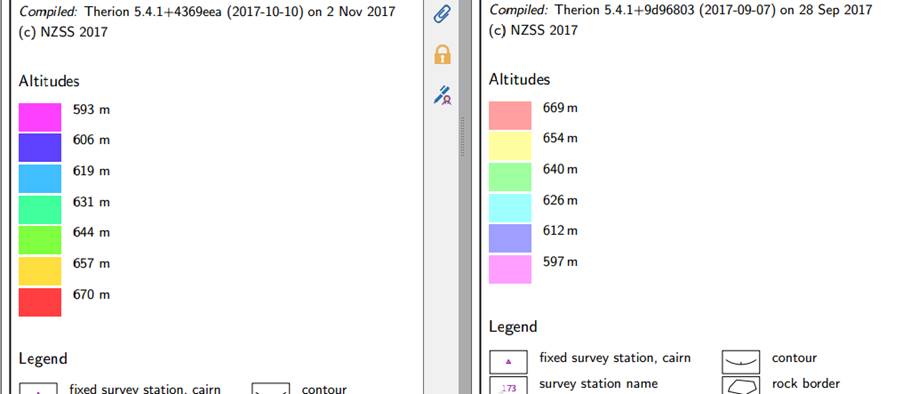
I’ve just noticed that the latest development snapshot 5.4.1+4369eea seems to have messed with the altitude legend.
You can see from the screenshot below, which shows part of identical project compilations, one with 9d96803 and then one with 4369eea.
Pretty sure I have not made any other changes that could have caused this at my end, and I see that some of the intervening commits on github relate to colour changes.
Neutral (perhaps) changes are that there are more colour bands and the colours are brighter, in the legend at least, though not in the map.
A negative change is that the altitude range is now upside down.
Bruce
_______________________________________________ Therion mailing list Therion@speleo.sk https://mailman.speleo.sk/listinfo/therion
I have rewritten the scale code completely, …
It should generate red -> blue scale with desired values. Also explo-date, topo-date should now work with addition to maps, scraps.
I’m very excited about this Stacho. Opens up exciting possibilities. Looking forward to try it out, although might take me some weeks to get to it properly. Bruce
participants (6)
-
 Benedikt Hallinger
 -
 Bruce Mutton
 -
 Henry.Bennett@dell.com
 -
 Ladislav Blažek
 -
 Martin Sluka
 -
 Stacho Mudrak