
Hi all, I wrote import and export plugins for Inkscape to edit th2-files. This is particular useful to remaster existing therion-drawings with the convenience of a quite modern vector-graphics application. The therion line/point type annotation is stored in the object label (Object Properties Dialog) and can also be altered with dialogs from "Extensions
Therion > Set..." menus.
Download: http://www.thomas-holder.de/projects/inkscape-speleo/extensions/th2-latest.z... Unsupported is the editing of lines with line point options, since there is no concept in SVG for this. Such lines will be marked as read-only on import. I will be happy for any feedback (if it works, if you find it useful). Cheers, Thomas Note: An earlier version of the export plugin has already been published on the therion wiki at http://therion.speleo.sk/wiki/doku.php?id=inkscape but is obsolete with the new import/export plugin set.

On Sun, 2011-02-13 at 15:18 +0100, Thomas Holder wrote:
Hi all,
I wrote import and export plugins for Inkscape to edit th2-files. This is particular useful to remaster existing therion-drawings with the convenience of a quite modern vector-graphics application. The therion line/point type annotation is stored in the object label (Object Properties Dialog) and can also be altered with dialogs from "Extensions
Therion > Set..." menus.
Download: http://www.thomas-holder.de/projects/inkscape-speleo/extensions/th2-latest.z...
Unsupported is the editing of lines with line point options, since there is no concept in SVG for this. Such lines will be marked as read-only on import.
I will be happy for any feedback (if it works, if you find it useful).
that's interesting indeed. import works. line drawing is ok, and the line appears in the export with type "wall", but when i change the label it's no longer exported. i do not know anything about inkscape: how to draw points ? and areas ? marco

I know little about Inkscape, but got the basics. Using Inkscape 0.47 r22583 Ubuntu 10.04 So loaded up the add in, one question that does not affect its use, but might be important for update. All my others are in folders, but this just goes in as is (I did try it in a folder but it did not work.) It imported my th2 files fine, but with no background image, not sure if it was meant to. All the ones I tried had been from a PocketTopo import. First impressions are impressive, all the wall types shown, if anything a little fine on the detail, sometimes had to zoom in a bit to tell the difference. Then tried a new file, did not bother with a background image, just played, added walls and even different subtype of walls, okay they all came up the same but when saved and then reloaded they came out fine. Couple of comments, I try to connect node points together when attaching a pit to a wall, etc. I know it is not needed in Therion, as clip sorts it out, but it works for me, but I could not do this on Inkscape. On a loaded file you cannot change the wall subtype, which is how you said, however I am not sure if this is the right behaviour. As I could tell from my new file I could add in different subtypes of wall as new, so why not give the option of changing them. When opening ask if you want read only or changeable. Okay it would not change on the display until next reloaded, but currently I would have to change it in Xtherion or an editor.. Also on loading it found a few errors skipped: #point skipped: #point warning: empty line warning: empty line An indication of which line would be good, or better still an option to correct. Maybe lots of this is planned. It is very impressive, I can see it in the future helping lots of people to be able to use Therion in the future. It would be good to have an idea where you intend to go with it, I have lots of questions, things like viewing at different scale outputs, and seeing the text along a line labels, then there are Areas. Wonderful stuff it looks like I will be teaching myself Inkscape! Andrew On 14/02/11 15:41, marco corvi wrote:
On Sun, 2011-02-13 at 15:18 +0100, Thomas Holder wrote:
Hi all,
I wrote import and export plugins for Inkscape to edit th2-files. This is particular useful to remaster existing therion-drawings with the convenience of a quite modern vector-graphics application. The therion line/point type annotation is stored in the object label (Object Properties Dialog) and can also be altered with dialogs from "Extensions
Therion> Set..." menus.
Download: http://www.thomas-holder.de/projects/inkscape-speleo/extensions/th2-latest.z...
Unsupported is the editing of lines with line point options, since there is no concept in SVG for this. Such lines will be marked as read-only on import.
I will be happy for any feedback (if it works, if you find it useful).
that's interesting indeed.
import works.
line drawing is ok, and the line appears in the export with type "wall", but when i change the label it's no longer exported.
i do not know anything about inkscape: how to draw points ? and areas ?
marco
_______________________________________________ Therion mailing list Therion@speleo.sk http://mailman.speleo.sk/mailman/listinfo/therion
Andrew Atkinson wrote, On 02/14/11 17:05:
I know little about Inkscape, but got the basics. Using Inkscape 0.47 r22583 Ubuntu 10.04
So loaded up the add in, one question that does not affect its use, but might be important for update. All my others are in folders, but this just goes in as is (I did try it in a folder but it did not work.)
what is in folders, the plugin files?
It imported my th2 files fine, but with no background image, not sure if it was meant to. All the ones I tried had been from a PocketTopo import.
there is a hidden layer that should show your background image. Open the layers panel and un-hide it there.
First impressions are impressive, all the wall types shown, if anything a little fine on the detail, sometimes had to zoom in a bit to tell the difference.
Then tried a new file, did not bother with a background image, just played, added walls and even different subtype of walls, okay they all came up the same but when saved and then reloaded they came out fine.
Annotation is not so elegant but can be done for selected elements from the menu with "Extensions > Therion > Set...". So you can change line type, for example draw a couple of rocks, select them all and then annotate as "line rock-border".
Couple of comments, I try to connect node points together when attaching a pit to a wall, etc. I know it is not needed in Therion, as clip sorts it out, but it works for me, but I could not do this on Inkscape. On a loaded file you cannot change the wall subtype, which is how you said, however I am not sure if this is the right behaviour. As I could tell from my new file I could add in different subtypes of wall as new, so why not give the option of changing them. When opening ask if you want read only or changeable. Okay it would not change on the display until next reloaded, but currently I would have to change it in Xtherion or an editor..
you can change the subtype of the complete line by adding the -subtype option to the label. But changing the subtype within the line at a certain point is not supported since this concept does not exist in Inkscape. If you would allow the user to edit such a line, this information would be lost. One way to solve this would be to split the line in parts...
Also on loading it found a few errors
skipped: #point skipped: #point warning: empty line warning: empty line
An indication of which line would be good, or better still an option to correct.
I'll think about it.
Maybe lots of this is planned. It is very impressive, I can see it in the future helping lots of people to be able to use Therion in the future. It would be good to have an idea where you intend to go with it, I have lots of questions, things like viewing at different scale outputs, and seeing the text along a line labels, then there are Areas.
Text along line labels and areas are preserved on import/export, but cannot be edited on the inkscape canvas, sorry. Acutally, I intend to leave it as is for now. Of course any reasonable suggestion for improvement I will consider, that's why I asked for feedback :) Cheers, Thomas
On 14/02/11 16:58, Thomas Holder wrote:
Andrew Atkinson wrote, On 02/14/11 17:05:
I know little about Inkscape, but got the basics. Using Inkscape 0.47 r22583 Ubuntu 10.04
So loaded up the add in, one question that does not affect its use, but might be important for update. All my others are in folders, but this just goes in as is (I did try it in a folder but it did not work.)
what is in folders, the plugin files?
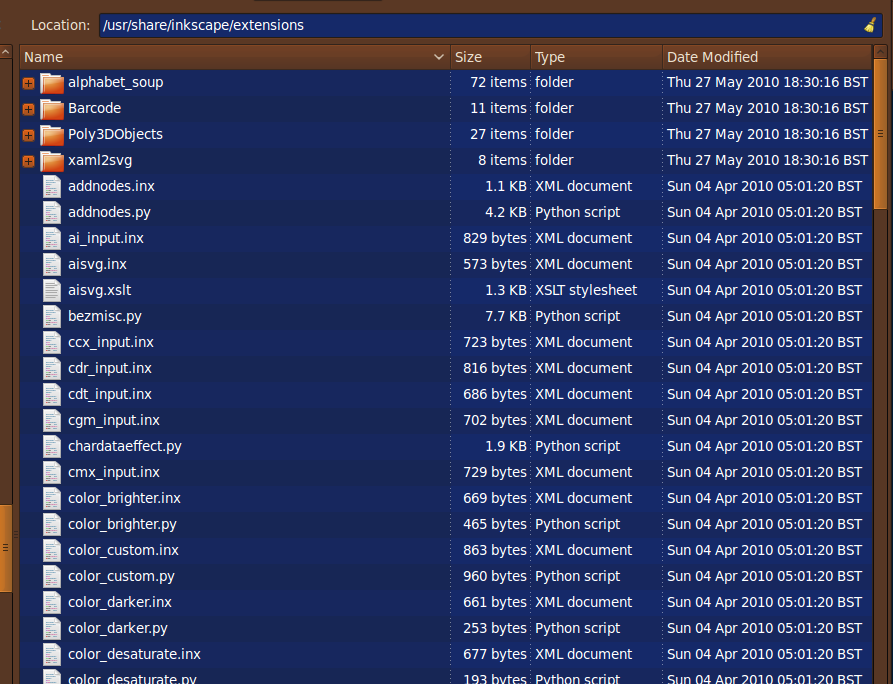
See screen shot, the first 4 are in folders, the rest are just a long list. My thinking was on the lines of on expedition without internet, if all the files where in a folder, I could pass them on to someone else, very unimportant
It imported my th2 files fine, but with no background image, not sure if it was meant to. All the ones I tried had been from a PocketTopo import.
there is a hidden layer that should show your background image. Open the layers panel and un-hide it there.
Okay found the hidden layer, and switch on the legend, which is fine, but cannot get the background to show, relevant files attached (DieselDuck), hope it helps, could be just my poor use of inkscape, there are 2 background images in this file. Tied another, this time switching the image on gives a Linked image not found box
First impressions are impressive, all the wall types shown, if anything a little fine on the detail, sometimes had to zoom in a bit to tell the difference.
Then tried a new file, did not bother with a background image, just played, added walls and even different subtype of walls, okay they all came up the same but when saved and then reloaded they came out fine.
Annotation is not so elegant but can be done for selected elements from the menu with "Extensions > Therion > Set...". So you can change line type, for example draw a couple of rocks, select them all and then annotate as "line rock-border".
Can get this to work for most (all?) things apart from wall subtypes, I am entering it through Extensions-Therion-Set Line type..... However, saving it and reloading it and the subtype works.
you can change the subtype of the complete line by adding the -subtype option to the label. But changing the subtype within the line at a certain point is not supported since this concept does not exist in Inkscape. If you would allow the user to edit such a line, this information would be lost.
I do not tend to change subtype along a line.
Text along line labels and areas are preserved on import/export, but cannot be edited on the inkscape canvas, sorry.
Such is life, I'm always hopeful
Acutally, I intend to leave it as is for now. Of course any reasonable suggestion for improvement I will consider, that's why I asked for feedback :)
Hope this helps, and not sending you in the wrong direction, I must have now got the vast experience of 1 hour using Inkscape. Andrew
Hi Andrew, thanks very much, of course this helps! So far this inkscape stuff is only tested with my biased way of creating therion input files. About the background images: 1) there is no support for xvi :-( 2) my parser for this xth_me_image_insert line is still not perfect, but that can be fixed.
See screen shot, the first 4 are in folders, the rest are just a long list. My thinking was on the lines of on expedition without internet, if all the files where in a folder, I could pass them on to someone else, very unimportant
All *.inx files cannot be put in subfolders, *.py files could, but I think there is not much benefit for it. All my files start with th2*, so it's still quite easy to grab them and copy to another computer. Cheers, Thomas
some feedbacks ... inkscape 0.48.0 r9654 (built yesterday) [1] did not get any layer but the one with the drawing. opened the "layer panel" and it shows only "Layer 1" how does one get to the hidden layers (point types and background images) ? [2] drawing points as circles works, but then it's like in xtherion: no visual clue about the point type. [3] points with orientation (air-draught etc) are displayed correctly when imported. how does one rotate a point ? [3b] in particular labels can be turned 90 degrees at a time, but this does not affect the orientation in the export [4] i loaded a th2 file with two scraps, and i got back a file with one scrap (one layer - one scrap) [5] "Extensions > Therion > Set..." works [6] a tutorial on the wiki will be great. really, do it! marco
Hi, I now wrote a short tutorial for the Inkscape import/export plugins on the therion wiki: http://therion.speleo.sk/wiki/doku.php?id=inkscapeplugins It does not cover general usage of Inkscape, so you should get familiar with it befor trying to edit therion th2 files. marco corvi wrote, On 02/15/11 11:11:
some feedbacks ... inkscape 0.48.0 r9654 (built yesterday)
[1] did not get any layer but the one with the drawing. opened the "layer panel" and it shows only "Layer 1" how does one get to the hidden layers (point types and background images) ?
Layers dialog from "Layer > Layers..." menu.
[2] drawing points as circles works, but then it's like in xtherion: no visual clue about the point type.
but when reloading the saved file, most point will have a visual symbol.
[3] points with orientation (air-draught etc) are displayed correctly when imported. how does one rotate a point ?
click twice (not double click, but with a short pause), then the handles change to rotation handles.
[3b] in particular labels can be turned 90 degrees at a time, but this does not affect the orientation in the export
do you mean vertical text? There is no vertical text concept in therion, so it cannot be saved to th2 files. If you mean 90° rotation, this should indeed be exported!
[4] i loaded a th2 file with two scraps, and i got back a file with one scrap (one layer - one scrap)
Have you selected "All Layers" and checked "Layers as Scraps" on export dialog?
[5] "Extensions > Therion > Set..." works
[6] a tutorial on the wiki will be great. really, do it!
Cheers, Thomas

Thank you for writing this plug-in. I am finding it very useful for importing survey drawings exported from other drawing programs into Therion. Some issues I have encountered: - Regardless of what I name my layers in inkscape, my scraps get names like 'layer1', 'layer2', etc. when I convert to th2 with the layers as scraps option. - If I select the line type to be 'survey' in the plug-in options, the th2 file created contains wall lines. - When working with sketches which have not come from Therion in the first place, you have to be careful what coordinate scale you export your inkscape drawing from. If the coordinates are in the range 0-10 for the entire sketch then it is not possible to zoom in very far in the therion editor to edit the sketch, even if you scale the sketch in therion by setting survey points. If the coordinates are in the range 0-5000 for the entire sketch then things look fine in the sketch editor in therion, but the lox files get created so that when you open them in Loch the scale bars are set to show very large areas (~250km) and the actual cave model is lost somewhere in this massive bounding box. I have found that coordinates in the range 0-500 seem to work best. So scale the entire sketch in inkscape in that coordinate range before converting to th2. Footleg On 7 March 2011 19:58, Thomas Holder <thomas@thomas-holder.de> wrote:
Hi,
I now wrote a short tutorial for the Inkscape import/export plugins on the therion wiki:
http://therion.speleo.sk/wiki/doku.php?id=inkscapeplugins
It does not cover general usage of Inkscape, so you should get familiar with it befor trying to edit therion th2 files.
marco corvi wrote, On 02/15/11 11:11:
some feedbacks ...
inkscape 0.48.0 r9654 (built yesterday)
[1] did not get any layer but the one with the drawing. opened the "layer panel" and it shows only "Layer 1" how does one get to the hidden layers (point types and background images) ?
Layers dialog from "Layer > Layers..." menu.
[2] drawing points as circles works, but then it's like in xtherion:
no visual clue about the point type.
but when reloading the saved file, most point will have a visual symbol.
[3] points with orientation (air-draught etc) are displayed correctly
when imported. how does one rotate a point ?
click twice (not double click, but with a short pause), then the handles change to rotation handles.
[3b] in particular labels can be turned 90 degrees at a time, but this
does not affect the orientation in the export
do you mean vertical text? There is no vertical text concept in therion, so it cannot be saved to th2 files. If you mean 90° rotation, this should indeed be exported!
[4] i loaded a th2 file with two scraps, and i got back a file
with one scrap (one layer - one scrap)
Have you selected "All Layers" and checked "Layers as Scraps" on export dialog?
[5] "Extensions > Therion > Set..." works
[6] a tutorial on the wiki will be great. really, do it!
Cheers, Thomas
_______________________________________________ Therion mailing list Therion@speleo.sk http://mailman.speleo.sk/mailman/listinfo/therion
On Mar 8, 2011, at 10:22 AM, Footleg wrote:
- Regardless of what I name my layers in inkscape, my scraps get names like 'layer1', 'layer2', etc. when I convert to th2 with the layers as scraps option. - If I select the line type to be 'survey' in the plug-in options, the th2 file created contains wall lines.
do you have an old version of th2_output.inx and th2_output.py? Sorry for the hassle, my new set of plugin files replaces the previously published export plugin (available from http://therion.speleo.sk/wiki/doku.php?id=inkscape) . The new output plugin does not have a "Line Type" option anymore in favour of on-canvas annotation.
- When working with sketches which have not come from Therion in the first place, you have to be careful what coordinate scale you export your inkscape drawing from. If the coordinates are in the range 0-10 for the entire sketch then it is not possible to zoom in very far in the therion editor to edit the sketch, even if you scale the sketch in therion by setting survey points. If the coordinates are in the range 0-5000 for the entire sketch then things look fine in the sketch editor in therion, but the lox files get created so that when you open them in Loch the scale bars are set to show very large areas (~250km) and the actual cave model is lost somewhere in this massive bounding box. I have found that coordinates in the range 0-500 seem to work best. So scale the entire sketch in inkscape in that coordinate range before converting to th2.
I'll have look at that, thanks. Cheers, Thomas
Looks like I have the old version. I'll download the latest, thanks. In my case where I have two types of lines in my inkscape file (walls and survey centrelines) it was very useful to be able to export all lines of a certain thickness as a specified therion line type. Is there a way to mark all lines in a selection in inkscape so that the plug-in gets the right type for them? Another really useful addition would be the option to automatically join lines which have end nodes at the same coordinates automatically on export. My drawing in inkscape has lots of very short line segments and it would be very handy if these could be exported as longer line objects in the th2 file? Regards, Footleg On 8 March 2011 10:36, Thomas Holder <thomas@thomas-holder.de> wrote:
On Mar 8, 2011, at 10:22 AM, Footleg wrote:
- Regardless of what I name my layers in inkscape, my scraps get names like 'layer1', 'layer2', etc. when I convert to th2 with the layers as scraps option. - If I select the line type to be 'survey' in the plug-in options, the th2 file created contains wall lines.
do you have an old version of th2_output.inx and th2_output.py? Sorry for the hassle, my new set of plugin files replaces the previously published export plugin (available from http://therion.speleo.sk/wiki/doku.php?id=inkscape). The new output plugin does not have a "Line Type" option anymore in favour of on-canvas annotation.
- When working with sketches which have not come from Therion in the first
place, you have to be careful what coordinate scale you export your inkscape drawing from. If the coordinates are in the range 0-10 for the entire sketch then it is not possible to zoom in very far in the therion editor to edit the sketch, even if you scale the sketch in therion by setting survey points. If the coordinates are in the range 0-5000 for the entire sketch then things look fine in the sketch editor in therion, but the lox files get created so that when you open them in Loch the scale bars are set to show very large areas (~250km) and the actual cave model is lost somewhere in this massive bounding box. I have found that coordinates in the range 0-500 seem to work best. So scale the entire sketch in inkscape in that coordinate range before converting to th2.
I'll have look at that, thanks.
Cheers, Thomas _______________________________________________ Therion mailing list Therion@speleo.sk http://mailman.speleo.sk/mailman/listinfo/therion
OK, now using the latest version of the inkscape plug-in. Much improved thanks! Having worked out how inkscape labels lines, I was able to bulk label my line types as follows: Wall lines and survey lines need to be labelled as such. I did this using search and replace in a plain text editor. All my wall lines had the property: class="c0" So I replaced class="c0" with: class="c0" inkscape:label="line wall " I don't know if the trailing space is needed, but I noticed it got created in labels when I imported th2 files into inkscape so I just went with that. All my survey lines were class="c4" so I was also able to label them by search/replace in the svg file in a text editor too. Opening the edited svg file in inkscape I can now export as th2. With this latest version of the plug-in my scraps are labelled correctly using the layer names from inkscape. To fix the coordinate range problem I found the following worked. Before exporting from inkscape as th2, I scaled the area I was working with to fit on an A2 page so that the coordinate range was suitable for Therion. So now I have a workable th2 file containing a few scraps. I'll try to put on some survey points and generate some output next. Footleg On 8 March 2011 10:36, Thomas Holder <thomas@thomas-holder.de> wrote:
On Mar 8, 2011, at 10:22 AM, Footleg wrote:
- Regardless of what I name my layers in inkscape, my scraps get names like 'layer1', 'layer2', etc. when I convert to th2 with the layers as scraps option. - If I select the line type to be 'survey' in the plug-in options, the th2 file created contains wall lines.
do you have an old version of th2_output.inx and th2_output.py? Sorry for the hassle, my new set of plugin files replaces the previously published export plugin (available from http://therion.speleo.sk/wiki/doku.php?id=inkscape). The new output plugin does not have a "Line Type" option anymore in favour of on-canvas annotation.
- When working with sketches which have not come from Therion in the first
place, you have to be careful what coordinate scale you export your inkscape drawing from. If the coordinates are in the range 0-10 for the entire sketch then it is not possible to zoom in very far in the therion editor to edit the sketch, even if you scale the sketch in therion by setting survey points. If the coordinates are in the range 0-5000 for the entire sketch then things look fine in the sketch editor in therion, but the lox files get created so that when you open them in Loch the scale bars are set to show very large areas (~250km) and the actual cave model is lost somewhere in this massive bounding box. I have found that coordinates in the range 0-500 seem to work best. So scale the entire sketch in inkscape in that coordinate range before converting to th2.
I'll have look at that, thanks.
Cheers, Thomas _______________________________________________ Therion mailing list Therion@speleo.sk http://mailman.speleo.sk/mailman/listinfo/therion
marco corvi wrote, On 02/14/11 16:41:
that's interesting indeed.
import works.
line drawing is ok, and the line appears in the export with type "wall", but when i change the label it's no longer exported.
If you change the label, it must be a valid therion annotation, like: line wall -outline in line rock-border line contour -clip off
i do not know anything about inkscape: how to draw points ?
this is a bit tricky. There is a layer "Symbol Legend" with all known therion points on the top of the page, it is hidden by default but can be made visible with the layers panel. Copy and paste from there into the correct layer that represents your scrap (the Symbol Legend layer is not exported). Furthermore, you could draw a circle and annotate it with something like: point stalactite For drawing text labels, just draw text! You can also annotate text with point station-name point altitude point height You'll get how it works if you import an existing therion drawing and see how it gets displayed and annotated in inkscape.
and areas ?
there is no concept for drawing areas, sorry. I plan to make a tutorial and put it on the wiki, but haven't done so far. Cheers, Thomas

+++ Thomas Holder [2011-02-13 15:18 +0100]:
Hi all,
I wrote import and export plugins for Inkscape to edit th2-files.
Download: http://www.thomas-holder.de/projects/inkscape-speleo/extensions/th2-latest.z...
Given the positive feedback on this it looks like I should package this for Debian/Ubuntu along with the therion packages. As 'therion-inkscape'. Thomas, is there an online code-repository anywhere or is that zipfile 'it'? You don't appear to have allocated any version numbers. Shall we call this verison '0.2'? It would be useful to version your releases so people know which one they have. Wookey -- Principal hats: Linaro, Emdebian, Wookware, Balloonboard, ARM http://wookware.org/
On Mar 9, 2011, at 3:59 PM, Wookey wrote:
Given the positive feedback on this it looks like I should package this for Debian/Ubuntu along with the therion packages. As 'therion-inkscape'.
Thomas, is there an online code-repository anywhere or is that zipfile 'it'?
it's just that zip-file.
You don't appear to have allocated any version numbers. Shall we call this verison '0.2'? It would be useful to version your releases so people know which one they have.
I do have version numbers, the th2-latest.zip is currently linked to th2-1.6.zip http://www.thomas-holder.de/projects/inkscape-speleo/extensions/th2-1.6.zip Cheers, Thomas
participants (5)
-
 Andrew Atkinson
 -
 Footleg
 -
 marco corvi
 -
 Thomas Holder
 -
 Wookey