Projected Elevation Reprojection

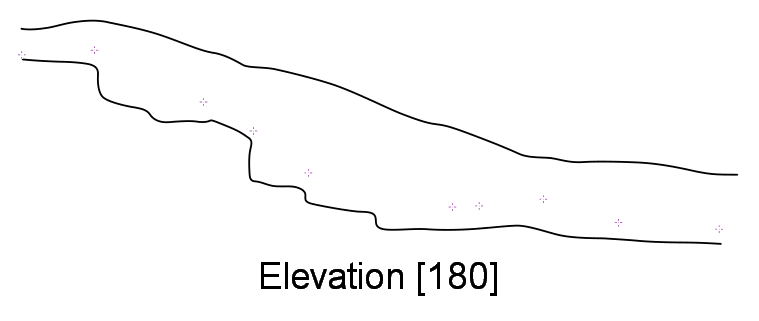
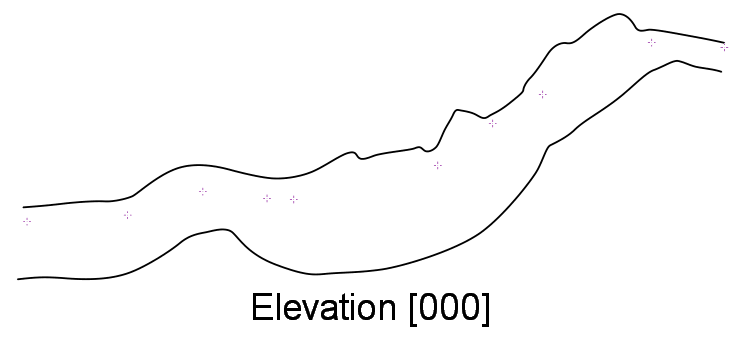
I am just starting to try and draw up my first projected elevations in Therion (only 5 years into the project!). I have found that you cannot reproject an elevation from one bearing onto another (Therion only includes elevation maps containing scraps of the exact same bearing as the export statement). e.g. In my thconfig: export map -projection [elevation 180] -layout local -o ElevEW.pdf My scrap type is set to: elevation 180 If I don't declare the projection in my map, then the map is only included in the export when the bearings match between the export and the scrap. (180 degrees meaning the elevation is a projection looking due South, so the drawing represents a slice through the cave from East to West across the page from left to right. I am drawing the scrap using an extended elevation sketch from PocketTopo which is from a passage which trends approximately due West going downslope. This works OK and the distortion is minimal my elevation comes out looking pretty much like my scrap drawing. [image: TherionElev180.png] But I want to draw my projected elevation sloping down from right to left, as that matches the plan drawing. If I just change the export to [elevation 000] then nothing is output (the map only contains scraps with elevation 180, so the map is not included. If I try to force the map to use -projection [elevation 000] so that it matches the export statement then Therion throws an error saying there is an incompatible projection in my map (because the scrap is elevation 180). Realising that the scrap gets distorted to match the bearing (i.e. I have drawn an extended elevation sketch, but side the scrap is projected at 180), I tried to set the scrap to 'elevation 000'. Afterall, Therion should just distort the drawing to align the stations along on the plane of the projection right? Well sort of. What could be expected to be a simple reversal of the scrap, actually makes quite a mess of it as you can see in the elevation [000] rendering: [image: TherionElev000.png] This looks like a bug in the distortion code. I think the ceiling and floor have been swapped (i.e. Therion has rotated the scrap along a horizontal axis going into the page rather than flipping it left-right. But it has also bent the ceiling and floor lines into some sort of geological folds as well.) Am I missing any tricks here? Do I need to manually try to reproject all my extended elevation sketches onto the projection I want to draw my scraps using, and scan them back in as background sketches? Does anyone know of any tricks to perform the sort of 'horizontal' distortion I need here (i.e. Only moving the pixels of the sketch in the horizontal dimension, not the vertical? I need to learn this inside out so I can write the projected elevations chapter of my tutorial! Footleg

Hi Footleg Generally I have found it is better to draw each scrap specifically for the projection it is intended for. Hence PocketTopo sketches will usually be unsuitable for projected elevations, as PocketTopo is strictly ‘extended’ as far as elevations go. However, you can use -flip horizontal in the scrap definition to swap them around, eg; scrap 06-WhiteLimeElevEXT-s1 -projection extended -flip horizontal -author 2015.04.29 "B Mutton" -copyright 2015 NZSS -scale [0 0 393.7 393.7 0 0 10 10 m] ie this was a situation where I drew the PocketTopo extended elevation in one orientation in the cave, and in XTherion, and then decided that the map should project the other way around. Try searching for flip in the old forums posts, such as; https://www.mail-archive.com/therion@speleo.sk/msg05041.html - Multiple Elevation Maps https://www.mail-archive.com/therion@speleo.sk/msg05484.html -specify all the same You could use revise to change extended elevation scraps to projected elevations (or just hard-code the scrap definition header to be projected to the orientation you want), where, as in your case, the projection you want to use is generally perpendicular to the passage alignment. I thought I had put an example of this in the wiki years ago, or maybe the forum, but maybe not as I cannot find it now. If there are survey legs not perfectly perpendicular you will probably not like the local distortions, although you could use Martin’s tip in the wiki to tidy up zig zag surveys <https://therion.speleo.sk/wiki/tips#how_to_export_correct_extended_elevation_from_zig-zag_centerline> in otherwise perpendicular passages. Bruce
Thank you Bruce and Martin for the replies and links to further reading. These were really helpful. Martin, I am not sure what -flip right, left in centreline is about. I cannot find any reference to using flip in centrelines in the Therion book. But the -flip horizontal scrap option which both of you pointed me to did the trick. In summary, I draw my scrap using the extended elevation sketch from PocketTopo (which was for a passage heading downslope almost due West). I set that scrap type to 'elevation [000]' which represents a 'West to East' slice through the cave model, but also add the '-flip horizontal' into the scrap options. This turns my scrap which was drawn using a sketch representing more or less along the elevation [180] view into a scrap projected onto elevation [000] with minimal distortion. The Rendering looks good. So this is a nice easy technique for easy linear passages along the same approximate bearing as the elevation view you want to present, and allows you to directly use the extended elevation sketch from PocketTopo as the background (so you get the features like auto numbering of survey stations in the sketch editor). For passages not conveniently all aligned with the plane of the elevation slice I will have to distort the drawings in the X dimension only to match the approximate station spacing in the projection, then load these as PNG background sketches and place the stations by hand. I'll report back on how I get on. Footleg

On Mar 20, 2017, at 03:01 PM, Footleg via Therion <therion@speleo.sk> wrote: Martin, I am not sure what -flip right, left in centreline is about. I cannot find any reference to using flip in centrelines in the Therion book. But the -flip horizontal scrap option which both of you pointed me to did the trick. As always, typo in my head: extend left, right, ... m.
participants (3)
-
 Bruce Mutton
 -
 Footleg
 -
 Martin Sluka