drawing files with unnecessary large extents created by therion/topparser

Anyone know what is going on here? I suspect it is something I am not doing that should be obvious. This happens sometimes with background image xvi imports from PocketTopo via Therions converter. I think it happens always (to varying degrees) with background image xvi imports created by TopParser. The th2 file has a drawing area that is set way too large, and the position of the drawing within the application window is never saved (drawing always opens with bottom left of drawing area displayed, and then one has to search for the background image within a very large canvas). You will need to adjust the path pointing to the attached xvi background image. There is something about the drawing extents that is not right. Not sure if it is just a gap in my Xtherion knowledge, or if there is something unusual about how TopParser (and sometimes the therion convert) creates the files. Can I fix it by manually changing something after the file is created? Most times this does not happen with Therions converter. Bruce

Bruce, this is typical for PocketTopo and lines created by mistake, if one didn't switched pen to moving mode before transport of PDA and PocketTopo created a "missed" line somewhere in border of drawing area. It could be just one very short and practically invisible line. Try open the xvi file by plain text editor and find such a lose line. m. Oct 5, 2013 v 5:29 AM, Bruce <bruce@tomo.co.nz>:
There is something about the drawing extents that is not right. Not sure if it is just a gap in my Xtherion knowledge, or if there is something unusual about how TopParser (and sometimes the therion convert) creates the files. Can I fix it by manually changing something after the file is created? Most times this does not happen with Therions converter.
Martin Sluka - Studio Sluka prodej Hahnemühle DFA tisk fotografií a reprodukcí Na Rovnosti 2692/21 130 00 Praha 3 tel.: +420 603513640 mail: martinsluka@mac.com web: http://www.piezografie.cz
That would make sense. More likely that it is particular users accidentally draw near the edges of the screen when zoomed out. That would explain why some cave survey bookers have this more often! In the example I sent, the stray lines are near the end I expect, lines 504 to 506. Have not tried it yet in middle of something else if I delete those three lines, the XVIGRID extent will still be very large. Where can I find the syntax description so that I can intelligently edit it? There are 8 numbers in a row. Bruce _____ From: therion-bounces@speleo.sk [mailto:therion-bounces@speleo.sk] On Behalf Of Martin Sluka Sent: Saturday, 5 October 2013 7:18 p.m. To: List for Therion users Subject: Re: [Therion] drawing files with unnecessary large extents created by therion/topparser Bruce, this is typical for PocketTopo and lines created by mistake, if one didn't switched pen to moving mode before transport of PDA and PocketTopo created a "missed" line somewhere in border of drawing area. It could be just one very short and practically invisible line. Try open the xvi file by plain text editor and find such a lose line. m. Oct 5, 2013 v 5:29 AM, Bruce <bruce@tomo.co.nz>: There is something about the drawing extents that is not right. Not sure if it is just a gap in my Xtherion knowledge, or if there is something unusual about how TopParser (and sometimes the therion convert) creates the files. Can I fix it by manually changing something after the file is created? Most times this does not happen with Therions converter. Martin Sluka - Studio Sluka prodej Hahnemühle DFA tisk fotografií a reprodukcí Na Rovnosti 2692/21 130 00 Praha 3 tel.: +420 603513640 mail: martinsluka@mac.com web: http://www.piezografie.cz
Last line of xvi file: set XVIgrid {-1597.48031496 -19633.6220472 78.7401574803 0.0 0.0 78.7401574803 492.0 268.0} First two number are too big. The same in th2 file - first 4 lines: encoding utf-8 ##XTHERION## xth_me_area_adjust -7709.75 -4195.57 46258.49 25173.45 ##XTHERION## xth_me_area_zoom_to 50 ##XTHERION## xth_me_image_insert {6335.80417323 1 1.0} {21161.1492913 408.13} ptopoQuackery/408-SurfaceTension_p.xvi 0 {} The second line shows too big size of area and 4th line too big coordinates. BTW, zoom factor 50 is too low for such xvi file - line 3. try to change it to 400 for beginning. You may edit all this parameters in th2 file manually in xtherion map editor. m.s. Oct 5, 2013 v 9:25 AM, Bruce <bruce@tomo.co.nz>:
That would make sense. More likely that it is particular users accidentally draw near the edges of the screen when zoomed out. That would explain why some cave survey bookers have this more often!
In the example I sent, the stray lines are near the end I expect, lines 504 to 506. Have not tried it yet – in middle of something else – if I delete those three lines, the XVIGRID extent will still be very large. Where can I find the syntax description so that I can intelligently edit it? There are 8 numbers in a row.
Bruce
From: therion-bounces@speleo.sk [mailto:therion-bounces@speleo.sk] On Behalf Of Martin Sluka Sent: Saturday, 5 October 2013 7:18 p.m. To: List for Therion users Subject: Re: [Therion] drawing files with unnecessary large extents created by therion/topparser
Bruce,
this is typical for PocketTopo and lines created by mistake, if one didn't switched pen to moving mode before transport of PDA and PocketTopo created a "missed" line somewhere in border of drawing area. It could be just one very short and practically invisible line. Try open the xvi file by plain text editor and find such a lose line.
m.
Oct 5, 2013 v 5:29 AM, Bruce <bruce@tomo.co.nz>:
There is something about the drawing extents that is not right. Not sure if it is just a gap in my Xtherion knowledge, or if there is something unusual about how TopParser (and sometimes the therion convert) creates the files. Can I fix it by manually changing something after the file is created? Most times this does not happen with Therions converter.
Martin Sluka - Studio Sluka
prodej Hahnemühle DFA tisk fotografií a reprodukcí
Na Rovnosti 2692/21 130 00 Praha 3 tel.: +420 603513640 mail: martinsluka@mac.com web: http://www.piezografie.cz
_______________________________________________ Therion mailing list Therion@speleo.sk http://mailman.speleo.sk/mailman/listinfo/therion
Martin Sluka - Studio Sluka prodej Hahnemühle DFA tisk fotografií a reprodukcí Na Rovnosti 2692/21 130 00 Praha 3 tel.: +420 603513640 mail: martinsluka@mac.com web: http://www.piezografie.cz
Thanks Martin I think you mean zoom factor 25 is better than zoom factor 50, because 25 is zoomed out more so I can see more. zoom factor 400 zooms in close so it becomes even harder! Your explanation re the large numbers does not guide on how to choose which smaller numbers to use. I presume I can use the coordinate counter on the bottom right of the XTherion window. But even easier, the obvious thing I was not doing was to use the drawing area pane Auto Adjust button. If the referenced xvi file does not exist, it zooms the drawing area to the drawing extents. If it does exist, it zooms the drawing area to the larger of the drawing extents or the xvi grid (but not the xvi drawing if it is outside the grid). So here is the user interface driven solution that requires no manual file editing. When the th2 file extents are too large and or when it will not save the position of the drawing on the screen on reopening 1. Draw some scrap entities that extend to the far reaches of what will be your drawing area. 2. Save your th2 file and close Xtherion 3. Rename the xvi file so that Xtherion temporarily cannot find it 4. Open the th2 file in Xtherion then Drawing pane Auto Adjust button so that Xtherion zooms the drawing extents 5. Save your th2 file and close Xtherion 6. Rename the xvi file back to its original name 7. Open the th2 file in Xtherion and it should have remembered your new drawing area and drawing position in the window, even though the xvi grid and (spurious) drawings may extend far outside of that area. Bruce _____ From: therion-bounces@speleo.sk [mailto:therion-bounces@speleo.sk] On Behalf Of Martin Sluka Sent: Saturday, 5 October 2013 10:03 p.m. To: List for Therion users Subject: Re: [Therion] drawing files with unnecessary large extents createdby therion/topparser Last line of xvi file: set XVIgrid {-1597.48031496 -19633.6220472 78.7401574803 0.0 0.0 78.7401574803 492.0 268.0} First two number are too big. The same in th2 file - first 4 lines: encoding utf-8 ##XTHERION## xth_me_area_adjust -7709.75 -4195.57 46258.49 25173.45 ##XTHERION## xth_me_area_zoom_to 50 ##XTHERION## xth_me_image_insert {6335.80417323 1 1.0} {21161.1492913 408.13} ptopoQuackery/408-SurfaceTension_p.xvi 0 {} The second line shows too big size of area and 4th line too big coordinates. BTW, zoom factor 50 is too low for such xvi file - line 3. try to change it to 400 for beginning. You may edit all this parameters in th2 file manually in xtherion map editor. m.s. Oct 5, 2013 v 9:25 AM, Bruce <bruce@tomo.co.nz>: That would make sense. More likely that it is particular users accidentally draw near the edges of the screen when zoomed out. That would explain why some cave survey bookers have this more often! In the example I sent, the stray lines are near the end I expect, lines 504 to 506. Have not tried it yet in middle of something else if I delete those three lines, the XVIGRID extent will still be very large. Where can I find the syntax description so that I can intelligently edit it? There are 8 numbers in a row. Bruce _____ From: therion-bounces@speleo.sk [mailto:therion-bounces@speleo.sk] On Behalf Of Martin Sluka Sent: Saturday, 5 October 2013 7:18 p.m. To: List for Therion users Subject: Re: [Therion] drawing files with unnecessary large extents created by therion/topparser Bruce, this is typical for PocketTopo and lines created by mistake, if one didn't switched pen to moving mode before transport of PDA and PocketTopo created a "missed" line somewhere in border of drawing area. It could be just one very short and practically invisible line. Try open the xvi file by plain text editor and find such a lose line. m. Oct 5, 2013 v 5:29 AM, Bruce <bruce@tomo.co.nz>: There is something about the drawing extents that is not right. Not sure if it is just a gap in my Xtherion knowledge, or if there is something unusual about how TopParser (and sometimes the therion convert) creates the files. Can I fix it by manually changing something after the file is created? Most times this does not happen with Therions converter. Martin Sluka - Studio Sluka prodej Hahnemühle DFA tisk fotografií a reprodukcí Na Rovnosti 2692/21 130 00 Praha 3 tel.: +420 603513640 mail: martinsluka@mac.com web: http://www.piezografie.cz _______________________________________________ Therion mailing list Therion@speleo.sk http://mailman.speleo.sk/mailman/listinfo/therion Martin Sluka - Studio Sluka prodej Hahnemühle DFA tisk fotografií a reprodukcí Na Rovnosti 2692/21 130 00 Praha 3 tel.: +420 603513640 mail: martinsluka@mac.com web: http://www.piezografie.cz
Yu are right! ;) m. Oct 5, 2013 v 9:21 PM, Bruce <bruce@tomo.co.nz>:
I think you mean zoom factor 25 is better than zoom factor 50, because 25 is zoomed out more so I can see more. zoom factor 400 zooms in close so it becomes even harder!
Martin Sluka - Studio Sluka prodej Hahnemühle DFA tisk fotografií a reprodukcí Na Rovnosti 2692/21 130 00 Praha 3 tel.: +420 603513640 mail: martinsluka@mac.com web: http://www.piezografie.cz
Oct 5, 2013 v 9:21 PM, Bruce <bruce@tomo.co.nz>:
Draw some scrap entities that extend to the far reaches of what will be your drawing area. Save your th2 file and close Xtherion Rename the xvi file so that Xtherion temporarily cannot find it Open the th2 file in Xtherion then ‘Drawing pane’ Auto Adjust button so that Xtherion zooms the drawing extents Save your th2 file and close Xtherion Rename the xvi file back to its original name Open the th2 file in Xtherion and it should have remembered your new drawing area and drawing position in the window, even though the xvi grid and (spurious) drawings may extend far outside of that area.
Bruce
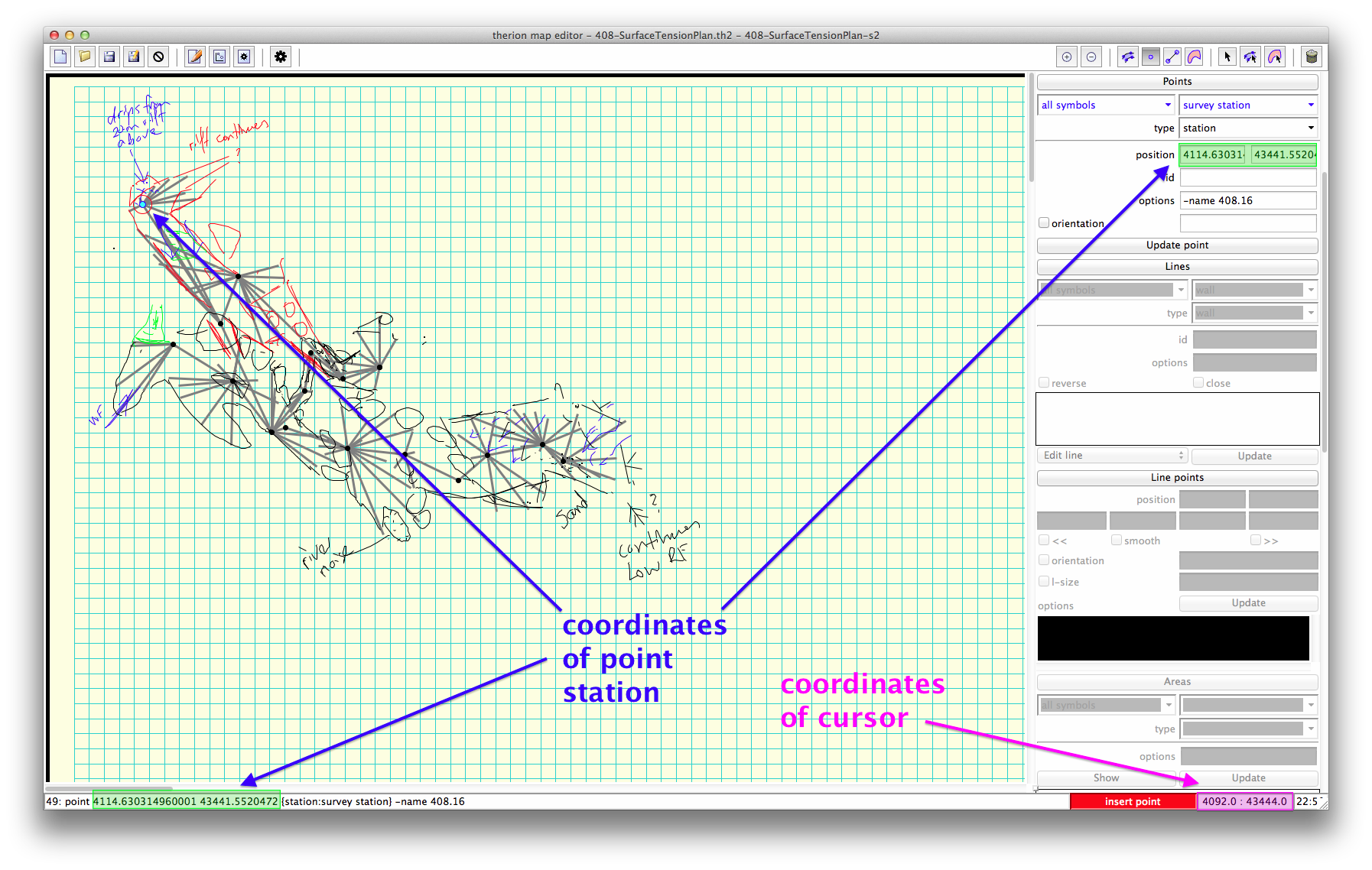
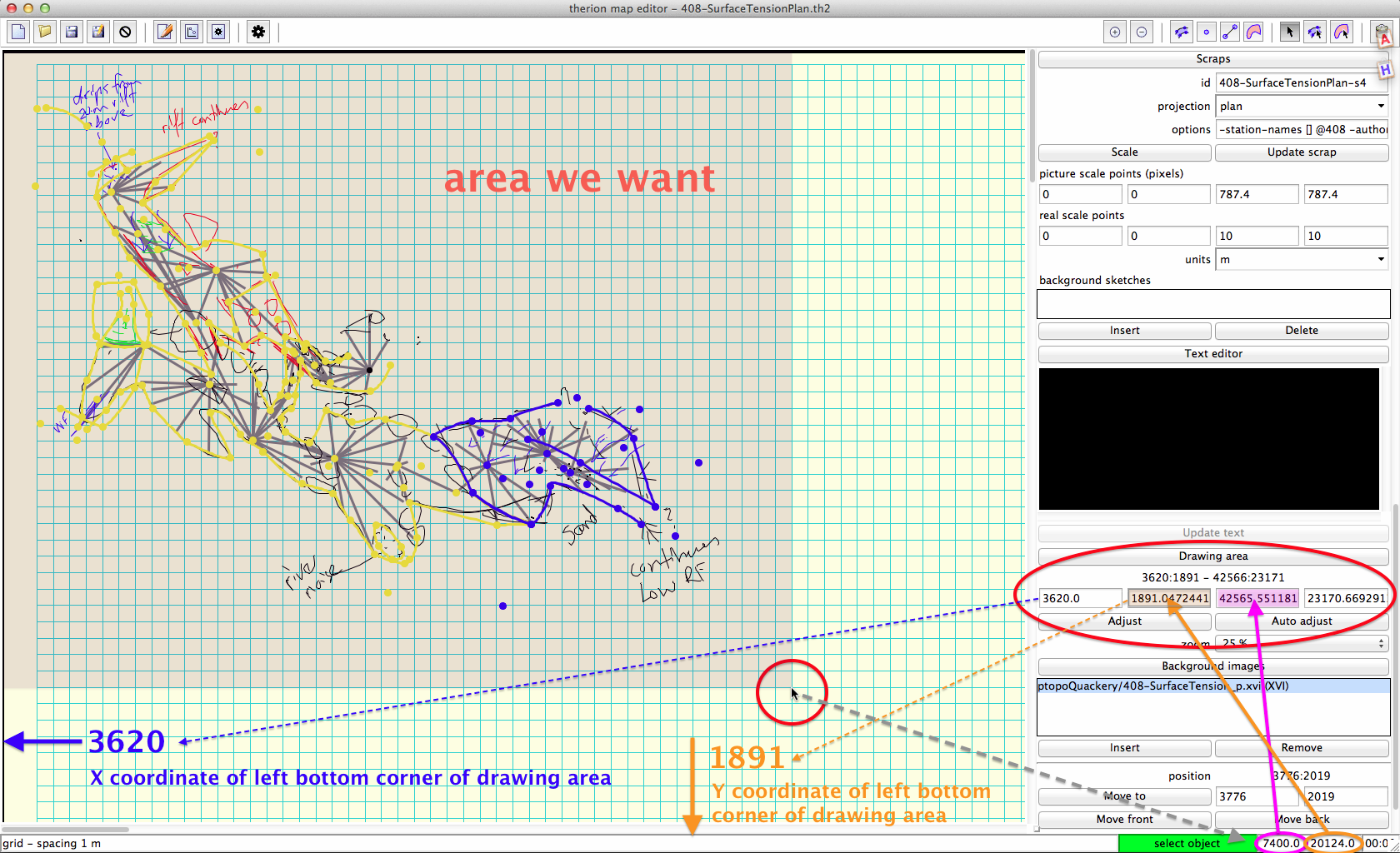
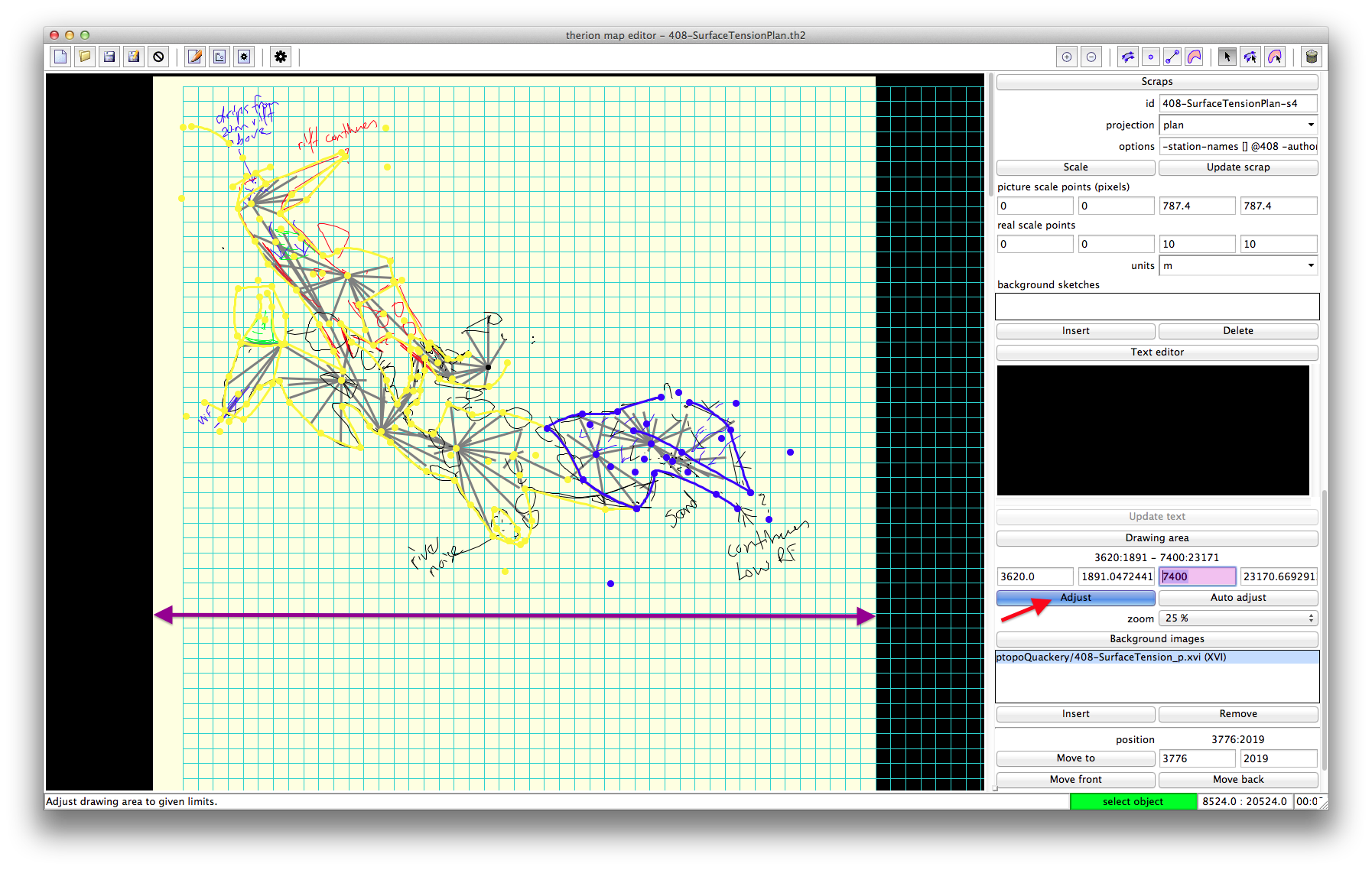
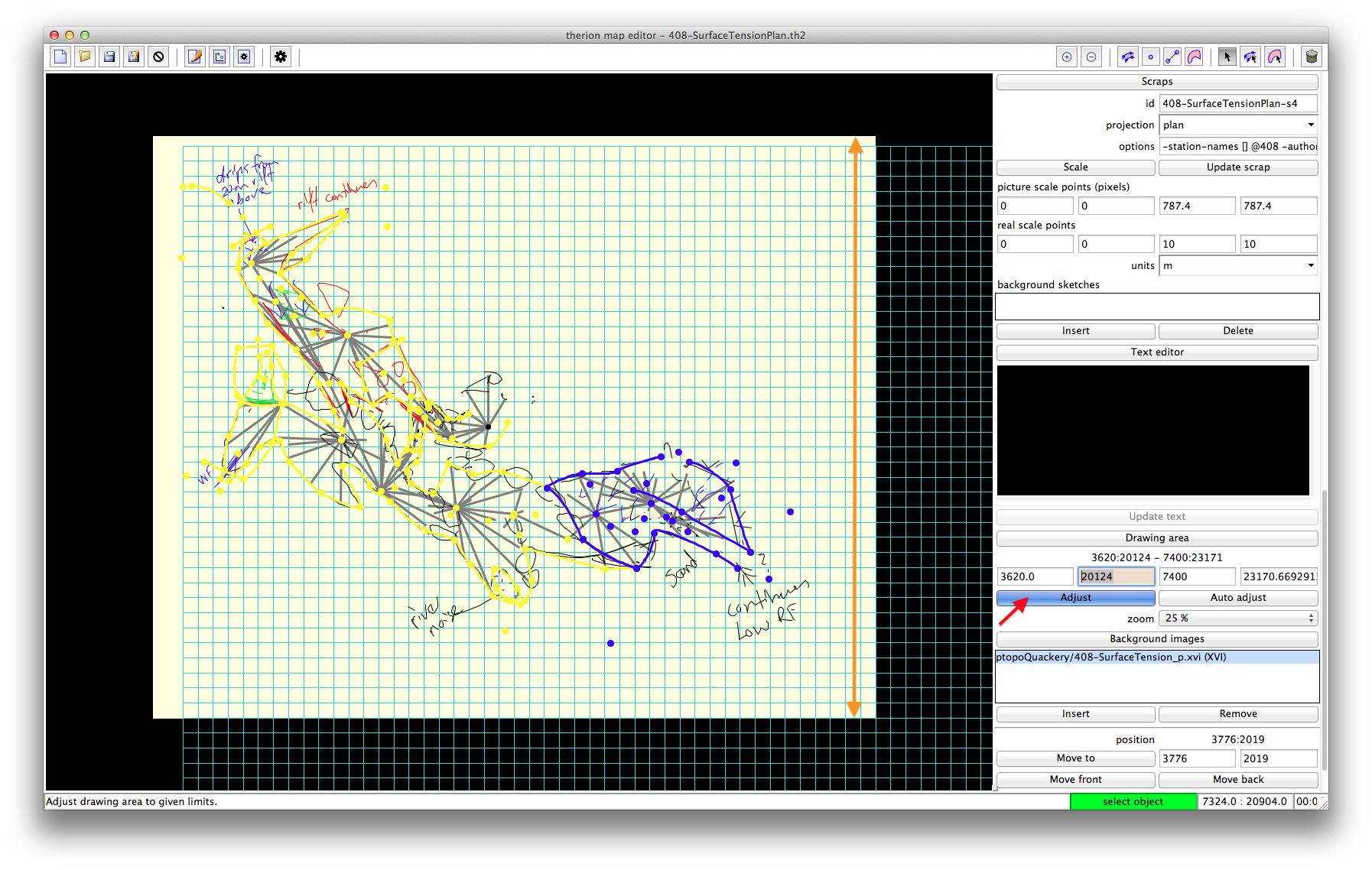
My workflow: there are several places you may find the coordinates of object: cursor, point, left bottom corner of background image or left bottom corner of scrap. Check the attached screenshots. insert xvi, set zoom factor to 25 % use Autoadjust in Scraps part of menu find the sketch - in this case in the left up corner of working area move cursor to right bottom corner of drawing area you want and note the coordinates of cursor write the coordinates to appropriate fields of Drawing area coordinates press Adjust button don't press Auto adjust button! save Martin Sluka
Thanks Martin Well explained and illustrated Bruce
There is one very important tip: When you stop drawing in PocketTopo ALWAYS switch to MOVE tool (arow). m.s. Oct 5, 2013 v 9:25 AM, Bruce <bruce@tomo.co.nz>:
More likely that it is particular users accidentally draw near the edges of the screen when zoomed out. That would explain why some cave survey bookers have this more often!
Martin Sluka - Studio Sluka prodej Hahnemühle DFA tisk fotografií a reprodukcí Na Rovnosti 2692/21 130 00 Praha 3 tel.: +420 603513640 mail: martinsluka@mac.com web: http://www.piezografie.cz
There is one very important tip: When you stop drawing in PocketTopo ALWAYS switch to MOVE tool (arrow). m.s. Yes, been on to that one for some time! I would add. AND switch away from outline, side or data view to Map view. Sometimes belts and braces are required. Bruce

On 05/10/13 04:29, Bruce wrote:
I think it happens always (to varying degrees) with background image xvi imports created by TopParser.
The adjustment of the drawing area of topParser is not very clever, it just records the extreme points and adds 10%, hence it does not always align with the grid. But these numbers come from the top file. Could you send the top file these came from? Was the th2 file you provided produced but topParser? I have not had this happen, so some example data would be good to be able to test thanks Andrew
Hi Andrew It might be a bit unkind to blame Topparser, I suspect it is creeping sloppiness on the part of the bookers using PocketTopo. Here is the source top file. Yes, the xvi and th2 file supplier earlier were created with topparser. And yes, as Martin indicated, the problem looks like it is due to some small red accidentally drawn lines at the extreme bottom right. Bruce On 05/10/13 04:29, Bruce wrote:
I think it happens always (to varying degrees) with background image xvi imports created by TopParser.
The adjustment of the drawing area of topParser is not very clever, it just records the extreme points and adds 10%, hence it does not always align with the grid. But these numbers come from the top file. Could you send the top file these came from? Was the th2 file you provided produced but topParser? I have not had this happen, so some example data would be good to be able to test thanks Andrew _______________________________________________ Therion mailing list Therion@speleo.sk http://mailman.speleo.sk/mailman/listinfo/therion
participants (3)
-
 Andrew Atkinson
 -
 Bruce
Bruce -
 Martin Sluka