
Hello On my therion file, I have a strange error message. Scrap build work find and PDF files are build. Can you explain me this message and how can I correct it ? Thanks Gilbert ####################### metapost log file ######################## This is MetaPost, Version 0.641 (Web2c 7.5.2) (mem=mpost 2004.3.2) 23 AUG 2007 09:27 **data.mp (data.mp [4001] [4002] [4003] [4004] [4005] [1] [2] [3] [4] [5] [6] [7] [8] [9] [10] [11] [12] [13] [14] [15] [16] [Warning: strange path in scrap pinee5_s3@pinee]

On my therion file, I have a strange error message. Scrap build work find and PDF files are build. Can you explain me this message and how can I correct it ?
Usually it means that some line contains zero-length segment. You can check this in the _Lines_ menu in the map editor (two adjacent lines would have the same coordinates). Martin
hello, for exemple, if I have 2 survey stations with a 0 lenght between the 2 points ? it's a problem on the survey file, isn't it ? Gilbert Martin Budaj a écrit :
On my therion file, I have a strange error message. Scrap build work find and PDF files are build. Can you explain me this message and how can I correct it ?
Usually it means that some line contains zero-length segment. You can check this in the _Lines_ menu in the map editor (two adjacent lines would have the same coordinates).
Martin _______________________________________________ Therion mailing list Therion@speleo.sk http://www.speleo.sk/mailman/listinfo/therion

On 24.8.2007, at 19:16, Gilbert Fernandes (mailinglist) wrote:
hello,
for exemple, if I have 2 survey stations with a 0 lenght between the 2 points ? it's a problem on the survey file, isn't it ? Gilbert
Martin Budaj a écrit :
On my therion file, I have a strange error message. Scrap build work find and PDF files are build. Can you explain me this message and how can I correct it ?
Usually it means that some line contains zero-length segment. You can check this in the _Lines_ menu in the map editor (two adjacent lines would have the same coordinates).
Martin
No, it means two adjacent POINTS of line have the same coordinates. See the attached pict. You may open your .th2 file in a plain text editor too and check it. Martin
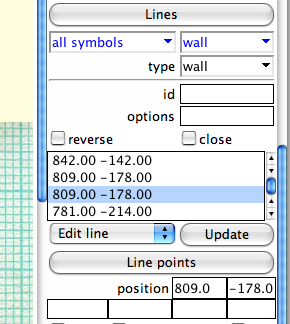

Gilbert Fernandes (mailinglist) wrote:
hello,
for exemple, if I have 2 survey stations with a 0 lenght between the 2 points ? it's a problem on the survey file, isn't it ?
I think you are right, c++ code does not check this when exporting centerline to metapost code. Try change symbol set to UIS - there should no be this warning. Regards, S.

Hi, If someone is interested: I have been able to convert a Corel Draw cave map to the Therion th2 format using a quick-and-dirty Python svg to th2 converter. The workflow is described for Corel Draw 11 at http://therion.speleo.sk/wiki/doku.php?id=cst The script is still very simple and needs a lot of improvement. Also the resulting th2 file in most cases will need some manual editing. It is rather a proof-of-principle thing then a real program (however this could be changed rapidly). I am curious to know if it also works for other vector drawing programs like Adobe Illustrator, and what the specific problems are. Any comments? Best Regards, Juergen
Great work! I think you may make "scraps" if you divide your initial map into several pieces and than convert them independently. Martin On 27.8.2007, at 0:32, Juergen Bohnert wrote:
Hi,
If someone is interested:
I have been able to convert a Corel Draw cave map to the Therion th2 format using a quick-and-dirty Python svg to th2 converter. The workflow is described for Corel Draw 11 at http://therion.speleo.sk/wiki/doku.php?id=cst
The script is still very simple and needs a lot of improvement. Also the resulting th2 file in most cases will need some manual editing.
It is rather a proof-of-principle thing then a real program (however this could be changed rapidly).
I am curious to know if it also works for other vector drawing programs like Adobe Illustrator, and what the specific problems are.
Any comments?
Best Regards,
Juergen
_______________________________________________ Therion mailing list Therion@speleo.sk http://www.speleo.sk/mailman/listinfo/therion
Hi Martin, yes, that is probably the way to do it! My example cave had a length of 860 m and that didn't give any problems although I used several layers. I wonder what the practical length limit per scrap really is, since you recommended rather small values of ~100 m in the manual. However, that would be very cumbersome in terms of reverse engineering of vector maps, unless this process is fully automatic. Now, I am currently in the process of reverse engineering a larger cave map (total length ~ 3 km) and will probably break it up into 3 pieces. The conversion of the first section (~ 1 km) gave no problems, so far. First I wanted to do it in one go, but ran into problems with Inkscape, which crashed upon extracting line data. I found out that the practical svg size limit of a very detailed cave map is probably in the 2 km range (at least on my computer). It would be very practical if there was a very fast way of subdividing large scraps into smaller ones by simply selecting parts of the th2 map with the mouse and moving it to another scrap (like a grouping action in a standard vector graphic software). Do you think that could be implemented? The problems is that at this point you can only select single lines one by one.... Regards, Juergen Zitat von Martin Sluka <martinsluka@mac.com>:
Great work!
I think you may make "scraps" if you divide your initial map into several pieces and than convert them independently.
Martin
On 27.8.2007, at 0:32, Juergen Bohnert wrote:
Hi,
If someone is interested:
I have been able to convert a Corel Draw cave map to the Therion th2 format using a quick-and-dirty Python svg to th2 converter. The workflow is described for Corel Draw 11 at http://therion.speleo.sk/wiki/doku.php?id=cst
The script is still very simple and needs a lot of improvement. Also the resulting th2 file in most cases will need some manual editing.
It is rather a proof-of-principle thing then a real program (however this could be changed rapidly).
I am curious to know if it also works for other vector drawing programs like Adobe Illustrator, and what the specific problems are.
Any comments?
Best Regards,
Juergen
_______________________________________________ Therion mailing list Therion@speleo.sk http://www.speleo.sk/mailman/listinfo/therion
_______________________________________________ Therion mailing list Therion@speleo.sk http://www.speleo.sk/mailman/listinfo/therion
On 28.8.2007, at 0:03, Juergen Bohnert wrote:
The problems is that at this point you can only select single lines one by one....
Ya, but there is "Move to" part in Object section of Map editor. First of all you find the line number of end of scrap you want too move in. After you write this number to Move to field. After you simply select the object and click on Move to button. The color of object should change from blue to yellow. Martin

On 2007-08-28 00:19 +0200, Martin Sluka wrote:
On 28.8.2007, at 0:03, Juergen Bohnert wrote:
The problems is that at this point you can only select single lines one by one....
Ya, but there is "Move to" part in Object section of Map editor. First of all you find the line number of end of scrap you want too move in. After you write this number to Move to field. After you simply select the object and click on Move to button.
The color of object should change from blue to yellow.
But that is still one object at a time. I too could really use the ability to select an area and move all of it to another scrap. Wookey -- Principal hats: Balloonz - Toby Churchill - Aleph One - Debian http://wookware.org/
Hi Wookey, yes that would be nice! It would also speed up the reverse engineering process dramatically, since one then could generate one "super scrap" (1 -2 km length) of all extracted layers and simply break it up into smaller scraps, thereafter. Meanwhile, I have gained more experience with the svg to th2 conversion and it works surprisingly well even with the large Corel Draw maps. I have now changed my strategy a bit and manually extract all symbols of one kind (e.g. rocks, contour lines) using Inkscape and save them as a separate th2 files with the correct line description. Then I combine everything in a single th2 file using a text editor. However, I had to break up one 1 km section into two 500 m scraps since editing the very large scrap turned out to be too slow with the Therion map editor. So I guess the suggested scrap limit of ~100 m is mainly based on editing speed. Juergen Zitat von Wookey <wookey@aleph1.co.uk>:
On 2007-08-28 00:19 +0200, Martin Sluka wrote:
On 28.8.2007, at 0:03, Juergen Bohnert wrote:
The problems is that at this point you can only select single lines one by one....
Ya, but there is "Move to" part in Object section of Map editor. First of all you find the line number of end of scrap you want too move in. After you write this number to Move to field. After you simply select the object and click on Move to button.
The color of object should change from blue to yellow.
But that is still one object at a time. I too could really use the ability to select an area and move all of it to another scrap.
Wookey -- Principal hats: Balloonz - Toby Churchill - Aleph One - Debian http://wookware.org/ _______________________________________________ Therion mailing list Therion@speleo.sk http://www.speleo.sk/mailman/listinfo/therion
I am sorry for the late answer, and also that I was also working on SVG/DXF import (File->Import...) and I did not let you know (I just wrote small item in CHANGES file)... But I believe, that with your python script, you will have much more flexibility and control. Juergen Bohnert wrote:
I wonder what the practical length limit per scrap really is, since you recommended rather small values of ~100 m in the manual.
This limit is due to metapost figure limit size - it has to be within 1m or so. So you can draw up to 200m scrap in 1:200 scale - otherwise metapost will end with error.
It would be very practical if there was a very fast way of subdividing large scraps into smaller ones by simply selecting parts of the th2 map with the mouse and moving it to another scrap (like a grouping action in a standard vector graphic software). Do you think that could be implemented?
It is a long time in the TODO list. OK, I can start working on it. I imagine this like that: 1. you activate multi-select mode 2. you select object by clicking on them with mouse 3. you select objects by selecting rectangular areas on screen 4. then you will be able to: + move those objects to another scrap + move them to front/back in current scrap + change type for those objects Any other ides? Regards, S.
Hi Stacho, you did I nice job with this import function! That we did both the same svg import thing is not a problem - I will further improve my script, to automatically import svg files of large caves - which is my main interest. My strategy would be to store all layers in one large scrap and then divide the scraps automatically which Therion cannot do due to the Metapost limits. Regards, Juergen Zitat von Stacho Mudrak <s.m@group-s.sk>:
I am sorry for the late answer, and also that I was also working on SVG/DXF import (File->Import...) and I did not let you know (I just wrote small item in CHANGES file)...
But I believe, that with your python script, you will have much more flexibility and control.
Juergen Bohnert wrote:
I wonder what the practical length limit per scrap really is, since you recommended rather small values of ~100 m in the manual.
This limit is due to metapost figure limit size - it has to be within 1m or so. So you can draw up to 200m scrap in 1:200 scale - otherwise metapost will end with error.
It would be very practical if there was a very fast way of subdividing large scraps into smaller ones by simply selecting parts of the th2 map with the mouse and moving it to another scrap (like a grouping action in a standard vector graphic software). Do you think that could be implemented?
It is a long time in the TODO list. OK, I can start working on it. I imagine this like that:
1. you activate multi-select mode 2. you select object by clicking on them with mouse 3. you select objects by selecting rectangular areas on screen 4. then you will be able to: + move those objects to another scrap + move them to front/back in current scrap + change type for those objects
Any other ides?
Regards, S. _______________________________________________ Therion mailing list Therion@speleo.sk http://www.speleo.sk/mailman/listinfo/therion
On 2007-08-29 06:57 +0200, Stacho Mudrak wrote:
Juergen Bohnert wrote:
I wonder what the practical length limit per scrap really is, since you recommended rather small values of ~100 m in the manual.
This limit is due to metapost figure limit size - it has to be within 1m or so. So you can draw up to 200m scrap in 1:200 scale - otherwise metapost will end with error.
So it might be possible to have a 'super scrap' so long as scale is kept suitable (1:3000 would allow a scrap 3km long). That might be sufficient to be able to chop it up into smaller pieces which can be processed at a momre useful scale? Wookey -- Principal hats: Balloonz - Toby Churchill - Aleph One - Debian http://wookware.org/
Quoting Wookey <wookey@aleph1.co.uk>:
So it might be possible to have a 'super scrap' so long as scale is kept suitable (1:3000 would allow a scrap 3km long).
You may have "super scrap" as long as you do not want to export PDF/SVG in some large scale.
That might be sufficient to be able to chop it up into smaller pieces which can be processed at a momre useful scale?
Yes. Just to add selection of multiple objects together... Regards, S.
participants (6)
-
 Gilbert Fernandes (mailinglist)
 -
 Juergen Bohnert
 -
 Martin Budaj
 -
 Martin Sluka
 -
 Stacho Mudrak
 -
 Wookey