
Is there a way to draw a large area of water, then draw an exclusion or island in the middle of it? I drew some rocks in the middle of a water area. They partially block the water symbol - but not entirely. I drew a border around the island area. If I use either -outline in or -outline out, then the entire area becomes opaque to everything. It is drawn like it is a column. If I do not use the -outline option, then it has no effect at all. I also tried making the island border part of the water area. No change. One way I can think of to do this is to draw the water as two areas, each of which goes half-way around the island. It would work but seems a bit complicated. Suggestions? -- =============== Bill Gee

Which PDF viewer do you use? Only Adobe Reader will show correct transparency. M. Odesláno z iPhonu
14. 11. 2024 v 16:23, Bill Gee <bgee@campercaver.net>:
Is there a way to draw a large area of water, then draw an exclusion or island in the middle of it?
I drew some rocks in the middle of a water area. They partially block the water symbol - but not entirely.
I drew a border around the island area. If I use either -outline in or -outline out, then the entire area becomes opaque to everything. It is drawn like it is a column. If I do not use the -outline option, then it has no effect at all.
I also tried making the island border part of the water area. No change.
One way I can think of to do this is to draw the water as two areas, each of which goes half-way around the island. It would work but seems a bit complicated.
Suggestions?
-- =============== Bill Gee
_______________________________________________ Therion mailing list Therion@speleo.sk https://mailman.speleo.sk/listinfo/therion
Mostly I use Okular running on Fedora Linux. Occasionally I will open a PDF file in a browser just to see what a different rendering engine might do. In most cases there is no difference. I used to have a VERY old copy of 32-bit Adobe Reader for Linux. It stopped working some years ago, and I think I no longer have the installer. Tarquin has offered an idea that I will try. It is a trick in the way the area border is drawn. =============== Bill Gee On 11/14/24 10:58, Martin Sluka via Therion wrote:
Which PDF viewer do you use?
Only Adobe Reader will show correct transparency.
M.
Odesláno z iPhonu
14. 11. 2024 v 16:23, Bill Gee <bgee@campercaver.net>:
Is there a way to draw a large area of water, then draw an exclusion or island in the middle of it?
I drew some rocks in the middle of a water area. They partially block the water symbol - but not entirely.
I drew a border around the island area. If I use either -outline in or -outline out, then the entire area becomes opaque to everything. It is drawn like it is a column. If I do not use the -outline option, then it has no effect at all.
I also tried making the island border part of the water area. No change.
One way I can think of to do this is to draw the water as two areas, each of which goes half-way around the island. It would work but seems a bit complicated.
Suggestions?
-- =============== Bill Gee
_______________________________________________ Therion mailing list Therion@speleo.sk https://mailman.speleo.sk/listinfo/therion
Therion mailing list Therion@speleo.sk https://mailman.speleo.sk/listinfo/therion

Bill Each pdf viewer renders differently. See lower down this page https://therion.speleo.sk/wiki/contrib:externalviewers#for_pdf_files This might be helpful. https://therion.speleo.sk/wiki/tips#drawing_order_how_to_draw_symbols_over_o r_under_an_area Drawing islands has been discussed from time to time on the forum, but I think the above pages and the idea you came up with about covers it. Maybe an annular water body is an improvement on the two water bodies hack. Adding an -outline in or out option to a line effectively makes it a wall (the outside of a passage/scrap), so not what you are looking for. Bruce -----Original Message----- From: Therion <therion-bounces@speleo.sk> On Behalf Of Bill Gee Sent: Friday, 15 November 2024 04:24 To: Therion Mail List <therion@speleo.sk> Subject: [Therion] How to draw water area with an island Is there a way to draw a large area of water, then draw an exclusion or island in the middle of it? I drew some rocks in the middle of a water area. They partially block the water symbol - but not entirely. I drew a border around the island area. If I use either -outline in or -outline out, then the entire area becomes opaque to everything. It is drawn like it is a column. If I do not use the -outline option, then it has no effect at all. I also tried making the island border part of the water area. No change. One way I can think of to do this is to draw the water as two areas, each of which goes half-way around the island. It would work but seems a bit complicated. Suggestions? -- =============== Bill Gee _______________________________________________ Therion mailing list <mailto:Therion@speleo.sk> Therion@speleo.sk <https://mailman.speleo.sk/listinfo/therion> https://mailman.speleo.sk/listinfo/therion
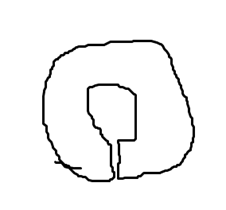
Thanks Bruce and Torquin! The drawing method you proposed works for my need. The discussion in the wiki about the order in which objects are dran is interesting. It supports my habit both in the cave and in Therion of drawing the cave from the ground up. I always draw the walls first, then floor details, then mid-level stuff like overhangs. Last is ceiling features like steps, stalactites, soda straws etc. The Wiki page talking about various PDF view programs needs some updating. It does not mention Okular at all. There was a time up to about 2 years ago when Okular (and anything else that depended on Poppler) was so slow that it was not usable. Some of my maps would take 10 to 15 minutes to render, and that much more again every time you changed the zoom level or scrolled around. I mentioned it somewhere that got the attention of a Fedora developer named Albert Astals Cid. He found a rather simple change in Poppler that dropped the rendering time for a Therion map by several orders of magnitude. That change landed in production packages a few months later. Okular still has some problems (water is not blue!) but mostly it works very well. I think almost all PDF viewers in Linux use Poppler. I have SumatraPDF on a virtual Windows 10 machine. It also does not show water as blue. =============== Bill Gee On 11/14/24 12:22, Bruce Mutton wrote:
Bill
Each pdf viewer renders differently. See lower down this page https:// therion.speleo.sk/wiki/contrib:externalviewers#for_pdf_files <https:// therion.speleo.sk/wiki/contrib:externalviewers#for_pdf_files>
This might be helpful. https://therion.speleo.sk/wiki/ tips#drawing_order_how_to_draw_symbols_over_or_under_an_area <https:// therion.speleo.sk/wiki/ tips#drawing_order_how_to_draw_symbols_over_or_under_an_area>
Drawing islands has been discussed from time to time on the forum, but I think the above pages and the idea you came up with about covers it. Maybe an annular water body is an improvement on the two water bodies hack.
Adding an -outline in or out option to a line effectively makes it a wall (the outside of a passage/scrap), so not what you are looking for.
Bruce
-----Original Message----- From: Therion <therion-bounces@speleo.sk> On Behalf Of Bill Gee Sent: Friday, 15 November 2024 04:24 To: Therion Mail List <therion@speleo.sk> Subject: [Therion] How to draw water area with an island
Is there a way to draw a large area of water, then draw an exclusion or island in the middle of it?
I drew some rocks in the middle of a water area. They partially block the water symbol - but not entirely.
I drew a border around the island area. If I use either -outline in or -outline out, then the entire area becomes opaque to everything. It is drawn like it is a column. If I do not use the -outline option, then it has no effect at all.
I also tried making the island border part of the water area. No change.
One way I can think of to do this is to draw the water as two areas, each of which goes half-way around the island. It would work but seems a bit complicated.
Suggestions?
--
===============
Bill Gee
_______________________________________________
Therion mailing list
Therion@speleo.sk <mailto:Therion@speleo.sk>
https://mailman.speleo.sk/listinfo/therion <https://mailman.speleo.sk/ listinfo/therion>
_______________________________________________ Therion mailing list Therion@speleo.sk https://mailman.speleo.sk/listinfo/therion
I do not have Adobe Reader installed on anything. Yeah, I probably should just to have a basis for function comparison ... On Windows 10 I tried SumatraPDF, Firefox 132 and Microsoft Edge. None of them displayed the water areas as blue. On Linux I ran the PDF file through ImageMagick to convert it to a JPG. Still no blue, but it is a light shade of purple now. Firefox and Vivaldi display it the same as Okular. Xpdf displays water as a very light blue. I even tried LibreOffice Draw. It opened the file after about 2 minutes. Area boundaries were completely wrong, way outside the walls of the cave. In the thconfig file I have this line in the layout section: symbol-color area water [0 0 100] I also have an include file with many custom symbols. Among the MetaPost snippets is this: # Color water areas solid blue def a_water (expr p) = T:=identity; thfill p withcolor (0.1, 0.2, 0.8); enddef; which appears to have no effect. I commented it out and recompiled the map. No change in what the water looks like. =============== Bill Gee On 11/15/24 10:40, Martin Sluka via Therion wrote:
14. 11. 2024 v 23:32, Bill Gee <bgee@campercaver.net>:
I have SumatraPDF on a virtual Windows 10 machine. It also does not show water as blue.
What about Adobe Reader on this Windows 10?
M.
_______________________________________________ Therion mailing list Therion@speleo.sk https://mailman.speleo.sk/listinfo/therion
15. 11. 2024 v 19:05, Bill Gee <bgee@campercaver.net>:
I do not have Adobe Reader installed on anything. Yeah, I probably should just to have a basis for function comparison ...
On Windows 10 I tried SumatraPDF, Firefox 132 and Microsoft Edge. None of them displayed the water areas as blue.
On Linux I ran the PDF file through ImageMagick to convert it to a JPG. Still no blue, but it is a light shade of purple now. Firefox and Vivaldi display it the same as Okular. Xpdf displays water as a very light blue.
I even tried LibreOffice Draw. It opened the file after about 2 minutes. Area boundaries were completely wrong, way outside the walls of the cave.
In the thconfig file I have this line in the layout section:
symbol-color area water [0 0 100]
I also have an include file with many custom symbols. Among the MetaPost snippets is this:
# Color water areas solid blue def a_water (expr p) = T:=identity; thfill p withcolor (0.1, 0.2, 0.8); enddef;
which appears to have no effect. I commented it out and recompiled the map. No change in what the water looks like.
=============== Bill Gee
On 11/15/24 10:40, Martin Sluka via Therion wrote:
14. 11. 2024 v 23:32, Bill Gee <bgee@campercaver.net>:
I have SumatraPDF on a virtual Windows 10 machine. It also does not show water as blue. What about Adobe Reader on this Windows 10? M.
Therion mailing list Therion@speleo.sk https://mailman.speleo.sk/listinfo/therion
_______________________________________________ Therion mailing list Therion@speleo.sk https://mailman.speleo.sk/listinfo/therion
In the thconfig file I have this line in the layout section: symbol-color area water [0 0 100]
Bill, have you tried symbol-color area water [0 100 0] #green and similar for the metapost? Sounds like all your pdf viewers are telling you something. That the lines are not used in your thconfig, or they are being superseded by a subsequent contradictory entry :) Bruce
Well, this is interesting1 I changed the line in thconfig to green as Bruce suggested. The water areas come out as a rather light green, not a fully saturated color. Changing it back to red {0 0 100] gives a sort of light black color. Looking in the thbook, I see that color in this syntax is an RGB triplet. I think the range for each triplet is 0 to 100. Is that right? I tried setting it to [0 0 200] but Therion tossed an error message about that. Just for testing, I commented out another line in the layout section: color map-fg [100 86 66] With that change I now get very light blue water and a white background. It seems there is an interaction between the map-fg color and the area color. I tried adjusting the the map-fg colors, assuming that lower numbers would be paler colors. Nope! Using [50 43 33] gave a dark brown background, and using [25 20 16] gave an almost black background. I set the map-fg colors back to original, then changed the water area color to [0 0 10]. The result is almost black. =============== Bill Gee On 11/15/24 14:06, Bruce Mutton wrote:
In the thconfig file I have this line in the layout section: symbol-color area water [0 0 100]
Bill, have you tried symbol-color area water [0 100 0] #green and similar for the metapost?
Sounds like all your pdf viewers are telling you something. That the lines are not used in your thconfig, or they are being superseded by a subsequent contradictory entry :) Bruce
_______________________________________________ Therion mailing list Therion@speleo.sk https://mailman.speleo.sk/listinfo/therion

Have you tried this in CMYK rather than RGB? symbol-color line water-flow [100 0 0 0] or color-model cmyk def a_water (expr p) = T:=identity; thfill p withcmykcolor (1,0,0,0); enddef; Pavel Dňa 2024-11-15 22:00 Bill Gee napísal(a):
Well, this is interesting1 I changed the line in thconfig to green as Bruce suggested. The water areas come out as a rather light green, not a fully saturated color. Changing it back to red {0 0 100] gives a sort of light black color.
Looking in the thbook, I see that color in this syntax is an RGB triplet. I think the range for each triplet is 0 to 100. Is that right? I tried setting it to [0 0 200] but Therion tossed an error message about that.
Just for testing, I commented out another line in the layout section:
color map-fg [100 86 66]
With that change I now get very light blue water and a white background.
It seems there is an interaction between the map-fg color and the area color. I tried adjusting the the map-fg colors, assuming that lower numbers would be paler colors. Nope! Using [50 43 33] gave a dark brown background, and using [25 20 16] gave an almost black background.
I set the map-fg colors back to original, then changed the water area color to [0 0 10]. The result is almost black.
=============== Bill Gee
On 11/15/24 14:06, Bruce Mutton wrote:
In the thconfig file I have this line in the layout section: symbol-color area water [0 0 100]
Bill, have you tried symbol-color area water [0 100 0] #green and similar for the metapost?
Sounds like all your pdf viewers are telling you something. That the lines are not used in your thconfig, or they are being superseded by a subsequent contradictory entry :) Bruce
_______________________________________________ Therion mailing list Therion@speleo.sk https://mailman.speleo.sk/listinfo/therion
_______________________________________________ Therion mailing list Therion@speleo.sk https://mailman.speleo.sk/listinfo/therion
Hi Pavel - I wondered about trying CYMK colors instead of RGB. Thanks for the hint on how to do it. The web site https://colorcodes.io is useful. CYMK codes have to be converted from 0-255 range to 0-100 range, but that is pretty easy. I tried several combinations. [100 0 0 0] comes out as cyan, a sort of light blue. [97 84 0 4] comes out just about the same as what I currently get. Back to RGB, [3 15 96] looks almost black. All of this is using Okular as the PDF viewer. I asked one of my caving friends to check my maps on his system. Using Windows 10 and Adobe Acrobat he reports that the water areas in my maps are a nice shade of blue. That is using [0 0 100]. I think what this means is that Adobe Reader is the only PDF viewer that will properly render the colors, and that is probably because of how it handles transparency overlays. For my maps - I think I am going to carry on with [3 15 96] for water and [100 86 66] for map-fg. That should be about the same color as "Blue Screen of Death" in Windows. The rendering in Okular is not ideal, but it is readable. =============== Bill Gee On 11/16/24 05:41, Pavel Herich wrote:
Have you tried this in CMYK rather than RGB?
symbol-color line water-flow [100 0 0 0]
or
color-model cmyk
def a_water (expr p) = T:=identity; thfill p withcmykcolor (1,0,0,0); enddef;
Pavel
Dňa 2024-11-15 22:00 Bill Gee napísal(a):
Well, this is interesting1 I changed the line in thconfig to green as Bruce suggested. The water areas come out as a rather light green, not a fully saturated color. Changing it back to red {0 0 100] gives a sort of light black color.
Looking in the thbook, I see that color in this syntax is an RGB triplet. I think the range for each triplet is 0 to 100. Is that right? I tried setting it to [0 0 200] but Therion tossed an error message about that.
Just for testing, I commented out another line in the layout section:
color map-fg [100 86 66]
With that change I now get very light blue water and a white background.
It seems there is an interaction between the map-fg color and the area color. I tried adjusting the the map-fg colors, assuming that lower numbers would be paler colors. Nope! Using [50 43 33] gave a dark brown background, and using [25 20 16] gave an almost black background.
I set the map-fg colors back to original, then changed the water area color to [0 0 10]. The result is almost black.
=============== Bill Gee
On 11/15/24 14:06, Bruce Mutton wrote:
In the thconfig file I have this line in the layout section: symbol-color area water [0 0 100]
Bill, have you tried symbol-color area water [0 100 0] #green and similar for the metapost?
Sounds like all your pdf viewers are telling you something. That the lines are not used in your thconfig, or they are being superseded by a subsequent contradictory entry :) Bruce
_______________________________________________ Therion mailing list Therion@speleo.sk https://mailman.speleo.sk/listinfo/therion
_______________________________________________ Therion mailing list Therion@speleo.sk https://mailman.speleo.sk/listinfo/therion

You can check whether the problematic color rendering is caused by the handling of transparency in the viewer if you set "transparency off" in the layout. Martin On Sat, Nov 16, 2024 at 2:58 PM Bill Gee <bgee@campercaver.net> wrote:
Hi Pavel -
I wondered about trying CYMK colors instead of RGB. Thanks for the hint on how to do it.
The web site https://colorcodes.io is useful. CYMK codes have to be converted from 0-255 range to 0-100 range, but that is pretty easy.
I tried several combinations. [100 0 0 0] comes out as cyan, a sort of light blue. [97 84 0 4] comes out just about the same as what I currently get. Back to RGB, [3 15 96] looks almost black.
All of this is using Okular as the PDF viewer. I asked one of my caving friends to check my maps on his system. Using Windows 10 and Adobe Acrobat he reports that the water areas in my maps are a nice shade of blue. That is using [0 0 100].
I think what this means is that Adobe Reader is the only PDF viewer that will properly render the colors, and that is probably because of how it handles transparency overlays.
For my maps - I think I am going to carry on with [3 15 96] for water and [100 86 66] for map-fg. That should be about the same color as "Blue Screen of Death" in Windows. The rendering in Okular is not ideal, but it is readable.
=============== Bill Gee
On 11/16/24 05:41, Pavel Herich wrote:
Have you tried this in CMYK rather than RGB?
symbol-color line water-flow [100 0 0 0]
or
color-model cmyk
def a_water (expr p) = T:=identity; thfill p withcmykcolor (1,0,0,0); enddef;
Pavel
Dňa 2024-11-15 22:00 Bill Gee napísal(a):
Well, this is interesting1 I changed the line in thconfig to green as Bruce suggested. The water areas come out as a rather light green, not a fully saturated color. Changing it back to red {0 0 100] gives a sort of light black color.
Looking in the thbook, I see that color in this syntax is an RGB triplet. I think the range for each triplet is 0 to 100. Is that right? I tried setting it to [0 0 200] but Therion tossed an error message about that.
Just for testing, I commented out another line in the layout section:
color map-fg [100 86 66]
With that change I now get very light blue water and a white background.
It seems there is an interaction between the map-fg color and the area color. I tried adjusting the the map-fg colors, assuming that lower numbers would be paler colors. Nope! Using [50 43 33] gave a dark brown background, and using [25 20 16] gave an almost black background.
I set the map-fg colors back to original, then changed the water area color to [0 0 10]. The result is almost black.
=============== Bill Gee
On 11/15/24 14:06, Bruce Mutton wrote:
In the thconfig file I have this line in the layout section: symbol-color area water [0 0 100]
Bill, have you tried symbol-color area water [0 100 0] #green and similar for the metapost?
Sounds like all your pdf viewers are telling you something. That the lines are not used in your thconfig, or they are being superseded by a subsequent contradictory entry :) Bruce
_______________________________________________ Therion mailing list Therion@speleo.sk https://mailman.speleo.sk/listinfo/therion
_______________________________________________ Therion mailing list Therion@speleo.sk https://mailman.speleo.sk/listinfo/therion
_______________________________________________ Therion mailing list Therion@speleo.sk https://mailman.speleo.sk/listinfo/therion
The Wiki page talking about various PDF view programs needs some updating. It does not mention Okular at all.
I added Okular to https://therion.speleo.sk/wiki/contrib:externalviewers Bruce

Oops, I sent this direct to Bill instead of the list. Was wondering why Bruce basically said the same thing I already said :D Oh well, this is what I sent earlier.
One way I can think of to do this is to draw the water as two areas, each of which goes half-way around the island. It would work but seems a bit complicated.
You only need one. If you can view this in monospace font, I hope it makes sense. ___ | | ==O | |___| as long as the line into the island and the line back out of the island overlap each other perfectly, it should not be visible as a gap.
participants (6)
-
 Bill Gee
 -
 Bruce Mutton
 -
 Martin Budaj
 -
 Martin Sluka
 -
 Pavel Herich
 -
 Tarquin Wilton-Jones