
Bruce Apologies if the instructions don't make full sense. I wrote them as a user, having had the program tried out on me by Andrew. The 'input' folder is simply that, it's where the Pocket Topo file that you want to use currently resides. In our usage, it tends to be the folder on the SD card taken from the PDA and put into the PC. The output folder is where you want the files to go, within the files structure that you have created for your project. If that makes sense, or doesn't, let us know & I will clarig=fy the instructions accordingly. Graham

Thanks Graham, and Andrew Have tried out TopParser 1.2.1 It seems to work fine, and crashes more gracefully than 1.2.0 which is good (although I am not sure the 1.2.0 crashes were TopParsers fault). There is no Manual packaged with 1.2.1 so new users will need to download both packages to get a copy of the Manual. My confusion with the input and output folders is that the usage of the words is too colloquial. The interface has no labels that match 'input' or 'output'. I can guess which is which, but there are four folder entry boxes. I see; Pockettopo file: (input folder easy enough to guess) Project Directory: (output folder??) Survey Directory: (another output folder??) RAW Directory: (another output folder?? - subfolder in project location where top and xvi are stored) The first two screenshots in the manual do not appear to be a matching pair. If they were it might ease understanding. I think relative paths and the old dos . and .. for self and parent are allowed for the survey and raw directories, but not sure. Here are screen shots of what I have used. This produces the following python log. And then when I manually run the thconfig produced by Topparser I get So probably something I am doing wrong, or at least differently to what you anticipated. One other minor quibble for now. Perhaps the plan and elevation scraps should be forced (or at least have the option)to inherit the map suffixes entered on the Data TAB (and then the specific plan, elevation and section suffixes entered on the plan and elevation TABs). This would ensure better consistency and ready recognition by the human user of the relationship of particular scraps - maps - files. Thanks Bruce -----Original Message----- From: therion-bounces@speleo.sk [mailto:therion-bounces@speleo.sk] On Behalf Of Graham Mullan Sent: Sunday, 28 July 2013 10:52 p.m. To: therion@speleo.sk Subject: Re: [Therion] TopParser Bruce Apologies if the instructions don't make full sense. I wrote them as a user, having had the program tried out on me by Andrew. The 'input' folder is simply that, it's where the Pocket Topo file that you want to use currently resides. In our usage, it tends to be the folder on the SD card taken from the PDA and put into the PC. The output folder is where you want the files to go, within the files structure that you have created for your project. If that makes sense, or doesn't, let us know & I will clarify the instructions accordingly. Graham

On 28/07/13 21:41, Bruce wrote:
Thanks Graham, and Andrew
Have tried out TopParser 1.2.1
It seems to work fine, and crashes more gracefully than 1.2.0 which is good (although I am not sure the 1.2.0 crashes were TopParsers fault).
There is no Manual packaged with 1.2.1 so new users will need to download both packages to get a copy of the Manual.
Forgot that bit had to be done manually, changed the zip file so it has the manual in it.
My confusion with the input and output folders is that the usage of the words is too colloquial.
The interface has no labels that match 'input' or 'output'.
I can guess which is which, but there are four folder entry boxes.
Okay I need to explain this better but for now I will try below.
I see;
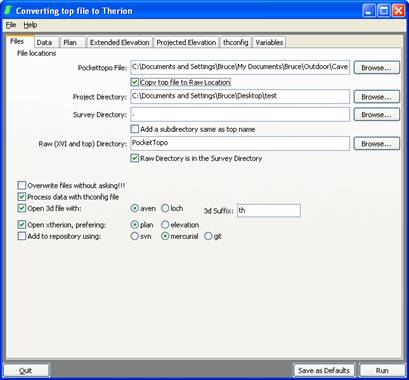
Pockettopo file: (input folder easy enough to guess)
Usually on an external drive it will copy this to the Raw Directory
Project Directory: (output folder??)
So I put all my caved into one area, eg CheddarCatchement. So this is the root of my directory, Survey Directory and Raw directory are relative to this
Survey Directory: (another output folder??)
Inside my CheddarCatchment I have the folders as names of caves, say Reservoir. So if I come back from a trip in reservoir with NewPassage.top, setting Project as CheddarCatchment and the Survey directory as Reservoir, if the Add subdirectory is ticked the th, th2 and thconfig files will go in CheddarCatchment/Reservoir/NewPassage, if it is not ticked they will all just go in CheddarCatchment/Reservoir
RAW Directory: (another output folder?? - subfolder in project location where top and xvi are stored)
So I put xvi and .top in a sub-directory, so here I can name it. if the 'Raw Directory is in the Survey Directory' is ticked it is relative to the Survey Directory if it is not ticked it is relative to the Project Directory. . and /.. should all work. The difficulty I am having here is so many varied ways to organise files, so giving people the option, without having a silly number of boxed to change, ideas welcome. You are probably the first person to use TopParser who has not been taught be me, so most people using it, use my method of filing, so it works for them :)
The first two screenshots in the manual do not appear to be a matching pair. If they were it might ease understanding.
I think relative paths and the old dos . and .. for self and parent are allowed for the survey and raw directories, but not sure.
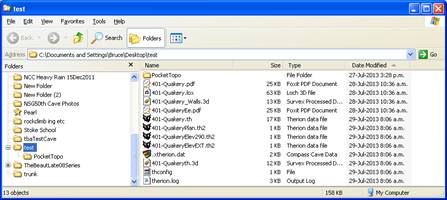
Here are screen shots of what I have used.
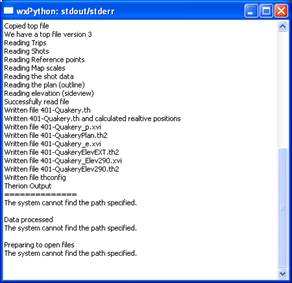
This produces the following python log.
And then when I manually run the thconfig produced by Topparser I get
So probably something I am doing wrong, or at least differently to what you anticipated.
Have you checked that under variables the windows set of command line are in place, click on 'Set to Windows' to check
One other minor quibble for now.
Perhaps the plan and elevation scraps should be forced (or at least have the option)to inherit the map suffixes entered on the Data TAB (and then the specific plan, elevation and section suffixes entered on the plan and elevation TABs).
This would ensure better consistency and ready recognition by the human user of the relationship of particular scraps – maps – files.
Sorry not sure what you mean, do you mean that they all should be NewPassageSuffix. Can you give an example, this is different from what I do Andrew
participants (3)
-
 Andrew Atkinson
 -
 Bruce
Bruce -
 Graham Mullan