
Hello, I've noticed that this here Therion probably fits within the bounds of: http://en.wikipedia.org/wiki/Wikipedia:Notability_%28software%29 Anyone thought of typing it in? If we cover them all then we can have "List of Cave surveying software" onto the wikipedia, which might make a good reference. Julian T.

Hello We (Wookey and I) are working on the Mulu data set which is using survex 3d files to import the survey legs. This shows the survey legs within the passage where it exists, but not when there is no pasage. However what we would really like to do is show the centreline when there is no passage, and not show it when there is passage drawn. Is there any way to do this thanks Andrew

I am sorry, but currently there is no simple (or automatic) way how to do it. The only way how to do this is to add surveys to the map structure. Example: You have 3 maps and 1 survey without map. You define map map_total map1 map2 map3 survey_without_map endmap I will put this problem into TODO list. HTH, S. Quoting Andrew Atkinson <andrew@wotcc.org.uk>:
Hello
We (Wookey and I) are working on the Mulu data set which is using survex 3d files to import the survey legs. This shows the survey legs within the passage where it exists, but not when there is no pasage. However what we would really like to do is show the centreline when there is no passage, and not show it when there is passage drawn.
Is there any way to do this
thanks
Andrew
_______________________________________________ Therion mailing list Therion@speleo.cz http://www.speleo.cz/mailman/listinfo/therion
Hello We have change the gradient line for the BCRA gradient arrow, however, when you use the Area:block feature the block sometimes overlap the arrows, which look silly, is there a way to avoid this, preferably quickly I need to print it tomorrow. It does the same with other area fills but does not look so silly Andrew
We have change the gradient line for the BCRA gradient arrow, however, when you use the Area:block feature the block sometimes overlap the arrows, which look silly, is there a way to avoid this, preferably quickly I need to print it tomorrow.
If it is like that, it is a BUG. All area symbols should be drawn on the bottom of other symbols by default. I will check it. Regards, S.
Strange, I am not able to reproduce this situation. In my case, redefined gradient symbols are all the time above the blocks. Could you please send me some minimal therion code where this happens. Thanks, S. Quoting Andrew Atkinson <andrew@wotcc.org.uk>:
Hello
We have change the gradient line for the BCRA gradient arrow, however, when you use the Area:block feature the block sometimes overlap the arrows, which look silly, is there a way to avoid this, preferably quickly I need to print it tomorrow. It does the same with other area fills but does not look so silly
Andrew
_______________________________________________ Therion mailing list Therion@speleo.cz http://www.speleo.cz/mailman/listinfo/therion
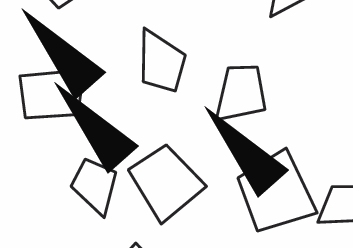
Sorry I was not clear enough, yes they are always on top, but therefore sometime appear half on a block and half off, which does not look quite right Andrew Stacho Mudrak wrote:
Strange, I am not able to reproduce this situation. In my case, redefined gradient symbols are all the time above the blocks. Could you please send me some minimal therion code where this happens.
Thanks, S.
Quoting Andrew Atkinson <andrew@wotcc.org.uk>:
Hello
We have change the gradient line for the BCRA gradient arrow, however, when you use the Area:block feature the block sometimes overlap the arrows, which look silly, is there a way to avoid this, preferably quickly I need to print it tomorrow. It does the same with other area fills but does not look so silly
Andrew
_______________________________________________ Therion mailing list Therion@speleo.cz http://www.speleo.cz/mailman/listinfo/therion
------------------------------------------------------------------------
_______________________________________________ Therion mailing list Therion@speleo.cz http://www.speleo.cz/mailman/listinfo/therion
------------------------------------------------------------------------
No virus found in this incoming message. Checked by AVG Free Edition. Version: 7.1.405 / Virus Database: 268.12.5/450 - Release Date: 18/09/2006
OK, now I understand but unfortunatelly, I see no clear way how to solve this problem :( You may redefine this symbol with some white border, but then block borders will not be closed. It is probably not right solution. Other solution is to add some "tunnel like" block generator into xtherion, but it requires some programming and re-clicking all the maps. The most clear solution is to add some topology detection between area symbols and other symbols, but I am afraid, it is almost impossible to do it in metapost :( S. Quoting Andrew Atkinson <andrew@wotcc.org.uk>:
Sorry I was not clear enough, yes they are always on top, but therefore sometime appear half on a block and half off, which does not look quite right
Quoting Fa. FJH Toni Cavalheiro <Toni.Cavalheiro@wacker.com>:
Hi all, I'm trying to use a Survex centerline on Therion but I don't know how to start. Do I have to use the .SVX or the .3D? Could anybody help me with the first steps, please? Thanks! -Toni
First of all, I wonder why your e-mail did not passed into conference. I am sorry for that. Did you wrote e-mail to therion@speleo.sk? If this does not work, you may try therion@speleo.cz instead - it is an alias. If you would like to keep your centerline data in survex, you need to use 3D files. Otherwise you will need to convert SVX files into therion format. If you will download therion sources, small example (with centerline only) is available in directory tests/svxtst. Regards, S.
participants (3)
-
 Andrew Atkinson
 -
 Julian Todd
 -
 Stacho Mudrak