Aligned cross sections for multiple passages

Hi folks, Next crazy question; I would like to do cross sections of multiple passages that are aligned according to each other. I can see how to do multiple cross sections, and presumably I can manually shift them into positions and hope I get it right. But is there a way to get Therion to place them all relative to each other? As an example, I have used the effect here with a bitmap-rendered survey, done manually: http://www.cavinguk.co.uk/info/cresSurv/CrescentFinalOverlap.gif Thanks for any suggestions. Tarquin
I would like to do cross sections of multiple passages that are aligned according to each other. I can see how to do multiple cross sections, and presumably I can manually shift them into positions and hope I get it right. But is there a way to get Therion to place them all relative to each other?
As an example, I have used the effect here with a bitmap-rendered survey, done manually: http://www.cavinguk.co.uk/info/cresSurv/CrescentFinalOverlap.gif
I have an idea that might just be crazy enough to work. If only I could get Therion to output an XVI file containing the stations and splays I am interested in. Imagine there are three parallel passages, running over the top of each other. I know I want a cross section of all three passages at once; at station 12 in the top passage, station 78 in the middle passage, and station 5 in the bottom passage. source "cystanog.th" select 12@toppassage.mycave select 78@middlepassage.mycave select 5@bottompassage.mycave export map -projection [elevation 355] -fmt xvi -output "test.xvi" If only this worked (it doesn't - you can only select a map or survey, not a single station), I would have the positions of all three passages relative to each other. I could then use those positions to place the cross section scraps for each passage, and include that as a scrap in the overall cave map. So ... can I get Therion to output just those 3 stations - and optionally their splays, projected on a bearing? (I am thinking that yes, I could make a subsurvey for each of these stations, equated to the parent survey's station with the same number. Then use "select" with the subsurvey's name. But this is so very messy, and I was hoping for a cleaner solution, that didn't require modification of my source data.)

26. 5. 2019 v 18:36, Tarquin Wilton-Jones via Therion <therion@speleo.sk>:
I have an idea that might just be crazy enough to work. If only I could get Therion to output an XVI file containing the stations and splays I am interested in.
Do you have stations in all the sections? What to generate xvi file as in your example but without selections source “cystanog.th <http://cystanog.th/>" export map -projection [elevation 355] -fmt xvi -output “centerline.xvi" In that case you receive xvi of all survey in cystanog.th <http://cystanog.th/> If you use it as background image and create a scrap in which only those three stations and profiles will be defined and exported map with that scrap, you receive what you need. Not use point station in that scrap, and set its projection as none. I’m not sure what it will do with scale option in layout. Then input the .th2 file with that scrap to .th file and use in plan scraps for section the name of that scrap as reference. It should work. My .th file, r means sections, s means scraps: survey xxxxxx -title “xxxxxxxx" input xxxxxx_s1_500.th2 input xxxxxx_s2_500.th2 input xxxxxx_s3_500.th2 input xxxxxx_s4_500.th2 input xxxxxx_s5_500.th2 input xxxxxx_podklad.th2 input xxxxxx_r1.th2 input xxxxxx_r2.th2 input xxxxxx_r3.th2 input xxxxxx_r4.th2 input xxxxxx_r5.th2 input xxxxxx_r6.th2 input xxxxxx_r7.th2 input xxxxxx_r8.th2 input xxxxxx_r9.th2 input xxxxxx_r10.th2 input scalebar.th2 centreline … endsurvey And in plan .th2 is reference to section: point 752.0 3128.0 section -scrap r8 because all the scraps are part of one namespace - survey xxxxxx. Martin
Do you have stations in all the sections?
I do not need this, but I could - I have tested and it would work with multiple stations in the cross section. I was planning to create the sections after exporting an XVI, rather than using any existing cross sections (though it would of course be nice to know if an existing cross section could be used - I am sure other people wanting to do this will want to use existing cross sections). I can in fact think of a way to use existing cross sections like that, by copying and moving them into position with the exported points, so it is not impossible. It would of course be nice if it were easier, but I can work with it as it is.
source “cystanog.th" export map -projection [elevation 355] -fmt xvi -output “centerline.xvi"
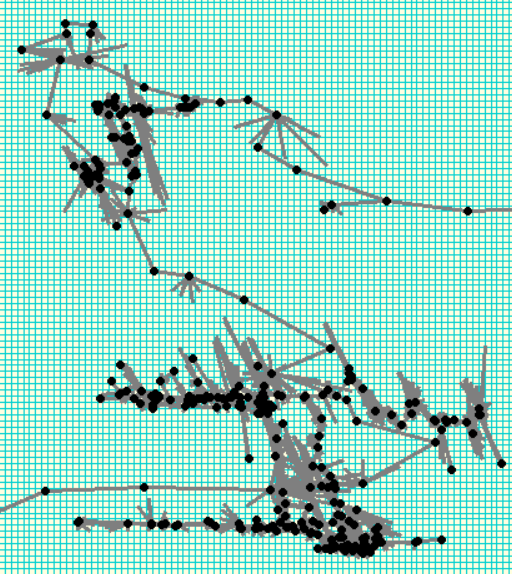
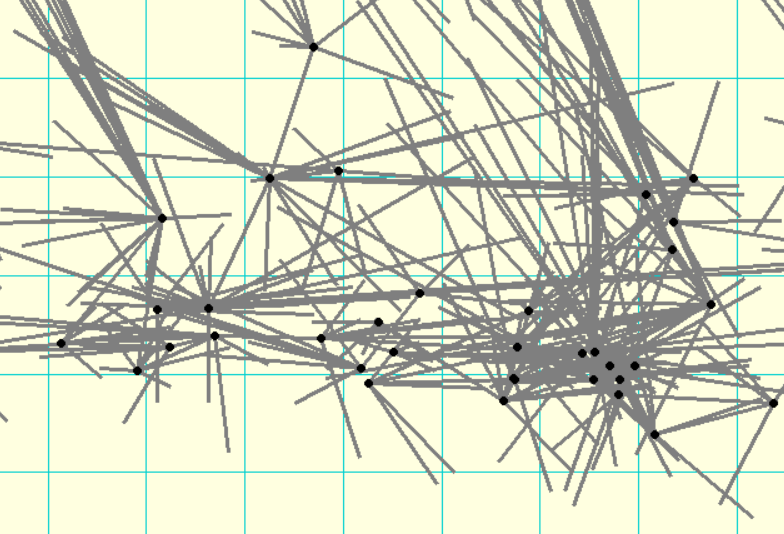
The biggest issue with this is that there will be 2500 stations in that exported centreline. The cave is extremely linear, and when projected on a bearing of 355 (which is what I need for the cross sections), they are almost all in the same 3 locations. So many that it is almost impossible to find the 3 stations I am interested in, and even harder to find the splays that relate to them. See the attached images. This is why I wanted to export only the 3 stations and related splays, so I can actually see what to work with.
If you use it as background image and create a scrap in which only those three stations and profiles will be defined and exported map with that scrap, you receive what you need. Not use point station in that scrap, and set its projection as none. I’m not sure what it will do with scale option in layout.
Then input the .th2 file with that scrap to .th file and use in plan scraps for section the name of that scrap as reference.
It should work.
Exactly what I was planning to do, yes. Good, so I am not insane :) Thanks for confirming this technique.
For anyone interested, I have documented my approach here: https://therion.speleo.sk/wiki/multiplesections Not that I have tested it extensively yet, so I may have to refine the "including it in your survey" part. I do plan to add some screenshots later, once I actually have used it for real. If anyone has any suggestions for how to simplify or improve the process, please let me know :)

Interesting... When I finished my initial Therion learning phase I thought about aligned cross sections through stacked passages, and decided I had bigger problems to solve (ie it was too hard). So glad you are exploring this! Not sure I am keen on duplicating data, but can see it might be tolerable as a means to an end. Wondering why you think that colour by altitude won't work with the method you describe? I would think it would - although you might need to draw several scraps for a tall piece of passage to colour it nicely. Seems to me there might be a number of approaches to the general problem, depending on one's pragmatic-perfection quotient, and on the information you already have. I also have not tested these approaches – just brainstorming. 1. If you have individual sections already drawn, you can position them individually the usual way, and attempt to lay them out manually in more or less the right position by trial and error. This will give a poor result, but if you are not fussy, it will be easy. 2. If you have individual sections drawn, and can get them aligned properly in the same image, then just scan that image and use it as a background in your th2 file, trace it, and reference a station in each passage (it will need to be at the top level of your survey to be able to reference different sub-survey branches) or just one station if you are closer to the pragmatic end of the scale. You can probably then treat this as a single section and scrap of -projection ‘none’. 3. Or as with approach 2 but treat it as -projection [elevation 355 deg] similar to what Tarquin has suggested. So long as you have a station in each passage, Therion should now morph the individual passages into the correct locations. There may well be some undesirable distortions if your sketched relative locations are too far out. 4. Or duplicate some data and draw the aligned cross section of stacked passages from scratch as Tarquin suggests in the wiki page. Probably close to a perfect result. The fundamental relationships between scrap and map definitions in your particular dataset may have an impact on the behaviour of each of these approaches (ie works or not, easy or hard). (Remember this <https://www.mail-archive.com/therion@speleo.sk/msg06555.html> a couple of years ago?) I wonder if an approach similar to what I have used for separating control of extended elevations from the main survey centreline <https://therion.speleo.sk/wiki/extend> can be used? ie, alias the information you want in the section without duplicating it. At this stage concepts I can envisage either result in station and splay overload as previously described, or stations without any splays, neither of which is that useful. Centrelines can have their own -id, so maybe there is something cunning that could be done by putting each of the ORIGINAL section stations and splays in their own centrelines within their parent trip surveys. If these centrelines were in their own th files, they could be input into both their parent survey file and a section th file. Hmm, sounds messy in practise with all that metadata duplication. Probably Tarquin’s way better!(?) Bruce -----Original Message----- From: Therion <therion-bounces@speleo.sk> On Behalf Of Tarquin Wilton-Jones via Therion Sent: Monday, 27 May 2019 19:16 To: therion@speleo.sk Cc: Tarquin Wilton-Jones <tarquin.wilton-jones@ntlworld.com> Subject: Re: [Therion] Aligned cross sections for multiple passages For anyone interested, I have documented my approach here: <https://therion.speleo.sk/wiki/multiplesections> https://therion.speleo.sk/wiki/multiplesections Not that I have tested it extensively yet, so I may have to refine the "including it in your survey" part. I do plan to add some screenshots later, once I actually have used it for real. If anyone has any suggestions for how to simplify or improve the process, please let me know :) _______________________________________________ Therion mailing list <mailto:Therion@speleo.sk> Therion@speleo.sk <https://mailman.speleo.sk/listinfo/therion> https://mailman.speleo.sk/listinfo/therion
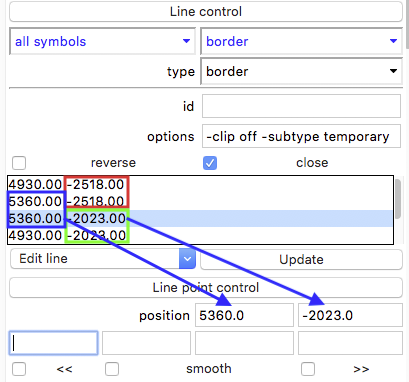
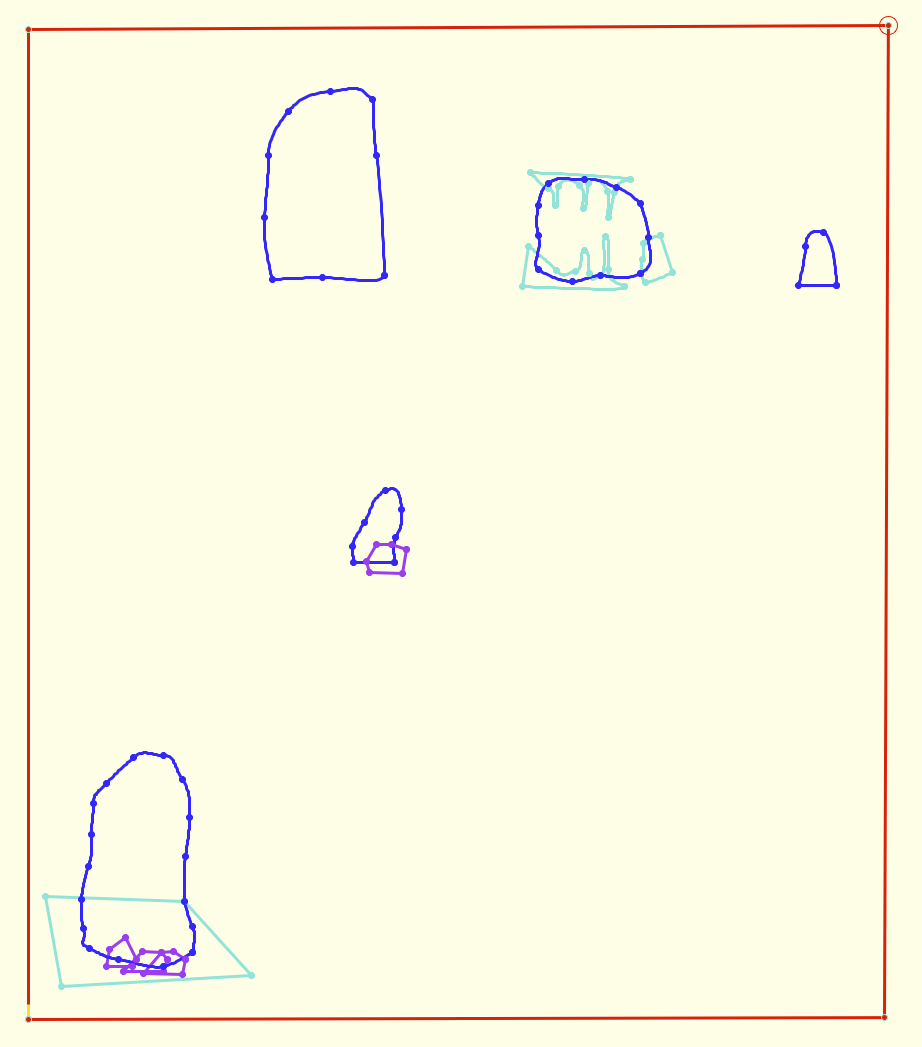
Tip how to draw rectangle around multiple sections: I used line border -clip off -subtype temporary The exact position of corners is possible to set in Line point control of side menu of xTherion Map editor window. Martin

I have a quick and dirty script that sort of already does this. I'm currently not at home but will post what I have on my return in a few days. Documenting and improving it has been on my list of things to do for a while now Andrew On Sun, 26 May 2019, 20:18 Tarquin Wilton-Jones via Therion, < therion@speleo.sk> wrote:
Do you have stations in all the sections?
I do not need this, but I could - I have tested and it would work with multiple stations in the cross section.
I was planning to create the sections after exporting an XVI, rather than using any existing cross sections (though it would of course be nice to know if an existing cross section could be used - I am sure other people wanting to do this will want to use existing cross sections). I can in fact think of a way to use existing cross sections like that, by copying and moving them into position with the exported points, so it is not impossible. It would of course be nice if it were easier, but I can work with it as it is.
source “cystanog.th" export map -projection [elevation 355] -fmt xvi -output “centerline.xvi"
The biggest issue with this is that there will be 2500 stations in that exported centreline. The cave is extremely linear, and when projected on a bearing of 355 (which is what I need for the cross sections), they are almost all in the same 3 locations. So many that it is almost impossible to find the 3 stations I am interested in, and even harder to find the splays that relate to them. See the attached images.
This is why I wanted to export only the 3 stations and related splays, so I can actually see what to work with.
If you use it as background image and create a scrap in which only those three stations and profiles will be defined and exported map with that scrap, you receive what you need. Not use point station in that scrap, and set its projection as none. I’m not sure what it will do with scale option in layout.
Then input the .th2 file with that scrap to .th file and use in plan scraps for section the name of that scrap as reference.
It should work.
Exactly what I was planning to do, yes. Good, so I am not insane :) Thanks for confirming this technique. _______________________________________________ Therion mailing list Therion@speleo.sk https://mailman.speleo.sk/listinfo/therion
participants (4)
-
 Andrew Atkinson
 -
 Bruce Mutton
 -
 Martin Sluka
 -
 Tarquin Wilton-Jones