
Hello everyone - I have recently taken on the task of managing a survey project for a highly commercialized cave. Roughly speaking, about half of the cave is tourist adapted and the other half is wild. In total, my best guess is something around 2000 meters of cave. The existing map was made around 1960 to 1962. It was a good map for that time but is badly in need of update. We are going to resurvey the whole cave from scratch. The old map will serve as a reference for place names but otherwise will not be used. For the tourist parts of the cave I am going to need a bunch of symbols. Before I go to the trouble of defining them myself, I want to ask if anyone has already created them. If so, I would like to utilize some "best practice" ... also known as "plagiarism"! :-) "On Station" has symbols for many of these items, but I do not see them called out in the Therion Book. I was at the cave a few days ago. I think I will need symbols for the following items: Paved trail Tiled floor Bridge Hand rails Boardwalk - Raised walkway over a man-made lake Wood benches Artificial light fixtures Stairway Man-made dams Display cases Midden Does anyone have any of these already defined? If you are interested, there is a Web site for this cave. https://starkcaverns.com/ Thanks! -- Bill Gee

On 03/01/2019 02:20, Bill Gee via Therion wrote:
I was at the cave a few days ago. I think I will need symbols for the following items:
Tiled floor
You can use the blocks code I have been working on https://therion.speleo.sk/wiki/metapost#customisable_area_blocks_with_differ... For squares use symbol_distance:=0.85; % Distance between the blocks as set out in a rectangular grid block_randomisation:=0; % Max each point of the base block can be moved. Too big and they can intersect themselves base_rotation:= 45; % Rotation from 0 of base block, can be used to set all blocks to the same angle random_rotation:= 0; % Rotation either side of base rotation eg 20 will be plus or minus 10 each side min_scale_factor:=1; % Minimum multiplier used for the base shape add_scale_factor:= 0; % Added to the minimum multiplier to get the maximum scale block_rectangle:=1; % How much longer the block is than it is wide, before randomising shift_randomisation:=0; % Max random amount block can be moved from the original grid %Now set the proportions of different sided block b_tri:=0; b_quad:=1; b_pent:=0; b_hex:=0; If you do not want the grouting (gaps) use symbol_distance:=0.707; This misses out all the ones on the edge To improve this a bit change exitif xpart (p intersectiontimes qq) < 0; to exitif xpart (p intersectiontimes qq) < 10; This does not fix if fully to do that you will need to comment out, or remove 2 more lines %if pointinside((i,j),p,outside): % Cleans lines on border, assumably ones outside with just an edge touching thclean qq; thclean qq; thclean qq; thclean qq; thdraw qq; %fi; I really wish I knew exactly what this line did, but I just copied it from another area blocks. Hexagons also tessellate giving a nice effect, but need code modification to align These settings symbol_distance:=0.95; % Distance between the blocks as set out in a rectangular grid block_randomisation:=0; % Max each point of the base block can be moved. Too big and they can intersect themselves base_rotation:= 0; % Rotation from 0 of base block, can be used to set all blocks to the same angle random_rotation:= 0; % Rotation either side of base rotation eg 20 will be plus or minus 10 each side min_scale_factor:=1; % Minimum multiplier used for the base shape add_scale_factor:= 0; % Added to the minimum multiplier to get the maximum scale block_rectangle:=1; % How much longer the block is than it is wide, before randomising shift_randomisation:=0; % Max random amount block can be moved from the original grid %Now set the proportions of different sided block b_tri:=0; b_quad:=0; b_pent:=0; b_hex:=1; and put this bit of code in the appropriate place (first and last 2 lines not modified iu := uu * block_rectangle; blocks := b_tri+b_quad + b_pent + b_hex; k:=0; tmp_pic := image( for i = xpart llcorner q step (symbol_distance * block_rectangle * uu) until xpart urcorner q: k:=k+1; for j = ypart llcorner q step (symbol_distance*uu) until ypart urcorner q: m:= j- (k mod 2) * 0.5 * uu * symbol_distance; pick_sides := uniformdeviate(blocks); if pick_sides < b_tri: Plus 16 lines later on change (j to an m) shifted ((i ,j) randomized (shift_randomisation * uu)); to shifted ((i ,m) randomized (shift_randomisation * uu));
Hand rails
https://therion.speleo.sk/wiki/metapost#line_-_hand_rail I've been meaning to put this one up for a while, so thanks for the prod Good luck Andrew
Hi Andrew - Thanks! It will take me some time to absorb this. The only question I have right now is how are the tile lines aligned with the cave? Are they north-south? On the centerline? Do they take an "orientation" parameter? I looked over the symbols actually in Therion. I found a suitable handrail symbol. It is, in fact, exactly the symbol that is in "On Station". There are also both line and point symbols for stairs. The line symbol won't work. I need to check the point symbol to see how it works. The stairs in Stark Caverns go around several curves. I might wind up using visible borders, or perhaps repurposing the rock edge symbol, and then just drawing the steps individually. The electric light symbol should be pretty easy to create. I have created other point symbols. I found references to a boardwalk symbol in the Wiki, but I don't think it will be useful. It looks like the symbol width is always the same regardless of how wide the actual feature is. -- Bill Gee On Thursday, January 3, 2019 9:07:42 AM CST Andrew Atkinson via Therion wrote:
On 03/01/2019 02:20, Bill Gee via Therion wrote:
I was at the cave a few days ago. I think I will need symbols for the following items:
Tiled floor
You can use the blocks code I have been working on
https://therion.speleo.sk/wiki/metapost#customisable_area_blocks_with_differ...
For squares use
symbol_distance:=0.85; % Distance between the blocks as set out in a rectangular grid block_randomisation:=0; % Max each point of the base block can be moved. Too big and they can intersect themselves base_rotation:= 45; % Rotation from 0 of base block, can be used to set all blocks to the same angle random_rotation:= 0; % Rotation either side of base rotation eg 20 will be plus or minus 10 each side min_scale_factor:=1; % Minimum multiplier used for the base shape add_scale_factor:= 0; % Added to the minimum multiplier to get the maximum scale block_rectangle:=1; % How much longer the block is than it is wide, before randomising shift_randomisation:=0; % Max random amount block can be moved from the original grid %Now set the proportions of different sided block b_tri:=0; b_quad:=1; b_pent:=0; b_hex:=0;
If you do not want the grouting (gaps) use symbol_distance:=0.707;
This misses out all the ones on the edge
To improve this a bit change
exitif xpart (p intersectiontimes qq) < 0;
to
exitif xpart (p intersectiontimes qq) < 10;
This does not fix if fully to do that you will need to comment out, or remove 2 more lines
%if pointinside((i,j),p,outside): % Cleans lines on border, assumably ones outside with just an edge touching thclean qq; thclean qq; thclean qq; thclean qq; thdraw qq; %fi;
I really wish I knew exactly what this line did, but I just copied it from another area blocks.
Hexagons also tessellate giving a nice effect, but need code modification to align
These settings
symbol_distance:=0.95; % Distance between the blocks as set out in a rectangular grid block_randomisation:=0; % Max each point of the base block can be moved. Too big and they can intersect themselves base_rotation:= 0; % Rotation from 0 of base block, can be used to set all blocks to the same angle random_rotation:= 0; % Rotation either side of base rotation eg 20 will be plus or minus 10 each side min_scale_factor:=1; % Minimum multiplier used for the base shape add_scale_factor:= 0; % Added to the minimum multiplier to get the maximum scale block_rectangle:=1; % How much longer the block is than it is wide, before randomising shift_randomisation:=0; % Max random amount block can be moved from the original grid %Now set the proportions of different sided block b_tri:=0; b_quad:=0; b_pent:=0; b_hex:=1;
and put this bit of code in the appropriate place (first and last 2 lines not modified
iu := uu * block_rectangle; blocks := b_tri+b_quad + b_pent + b_hex; k:=0; tmp_pic := image( for i = xpart llcorner q step (symbol_distance * block_rectangle * uu) until xpart urcorner q: k:=k+1; for j = ypart llcorner q step (symbol_distance*uu) until ypart urcorner q: m:= j- (k mod 2) * 0.5 * uu * symbol_distance; pick_sides := uniformdeviate(blocks); if pick_sides < b_tri:
Plus 16 lines later on change (j to an m)
shifted ((i ,j) randomized (shift_randomisation * uu));
to
shifted ((i ,m) randomized (shift_randomisation * uu));
Hand rails
https://therion.speleo.sk/wiki/metapost#line_-_hand_rail
I've been meaning to put this one up for a while, so thanks for the prod
Good luck
Andrew _______________________________________________ Therion mailing list Therion@speleo.sk https://mailman.speleo.sk/listinfo/therion
On 04/01/2019 13:22, Bill Gee via Therion wrote:
Thanks! It will take me some time to absorb this. The only question I have right now is how are the tile lines aligned with the cave? Are they north-south? On the centerline? Do they take an "orientation" parameter?
The orientation of grid comes from Therion, i and j which I believe is up down on the paper, but not sure, as it usually gets randomised for boulders when I use it. It does not take any parameters. The orientation of the tiles comes from the parameters in the coding of the symbol, but they only tessellate on the grid, I guess for squares this could be at 0 or 90 degrees with a bit of messing with the parameters. Andrew

4. 1. 2019 v 14:22, Bill Gee via Therion <therion@speleo.sk>:
There are also both line and point symbols for stairs. The line symbol won't work. I need to check the point symbol to see how it works. The stairs in Stark Caverns go around several curves. I might wind up using visible borders, or perhaps repurposing the rock edge symbol, and then just drawing the steps individually.
Hi Bill, check therion’s wiki - there are examples how the line symbol stairs/steps works. https://therion.speleo.sk/wiki/drawingchecklist#lines <https://therion.speleo.sk/wiki/drawingchecklist#lines>
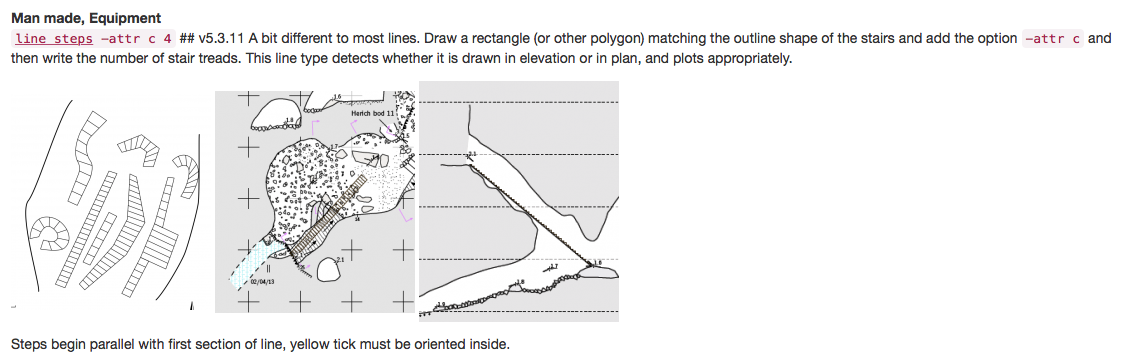
Hi Martin - Very nice! Thanks, I had no idea how to make the steps work. I tried this out and it works great. There is one little problem I discovered. The "steps" line does not like to be crossed by other lines, especially floor steps. I had a floor step going across part of the box, and that resulted in Therion throwing an error at compile about an invalid steps definition. It took me a while to figure that one out. I also created a custom point symbol for electric lights. The label on the legend is not right but everything else about it is working well. It occurs to me that the steps line could also be used for boardwalk. I will take a look at the MetaPost for steps and see what might need to change. That is a task for next week. Also I need to look at Andrew's code for tiled areas, and I need to make a new area fill for pavement. There is always more stuff to do! :-) -- Bill Gee On Friday, January 4, 2019 8:11:28 AM CST Martin Sluka via Therion wrote:
4. 1. 2019 v 14:22, Bill Gee via Therion <therion@speleo.sk>:
There are also both line and point symbols for stairs. The line symbol won't work. I need to check the point symbol to see how it works. The stairs in Stark Caverns go around several curves. I might wind up using visible borders, or perhaps repurposing the rock edge symbol, and then just drawing the steps individually.
Hi Bill, check therion’s wiki - there are examples how the line symbol stairs/steps works.
https://therion.speleo.sk/wiki/drawingchecklist#lines <https://therion.speleo.sk/wiki/drawingchecklist#lines>

Bill, I always put steps on top of all symbol. Don’t hesitate to add yours new symbols to Therion’s wiki. Ask Ladislav Blažek for log-in Martin
4. 1. 2019 v 21:22, Bill Gee via Therion <therion@speleo.sk>:
The "steps" line does not like to be crossed by other lines, especially floor steps.
participants (4)
-
 Andrew Atkinson
 -
 Bill Gee
 -
 Martin Sluka
 -
 Martin Sluka