
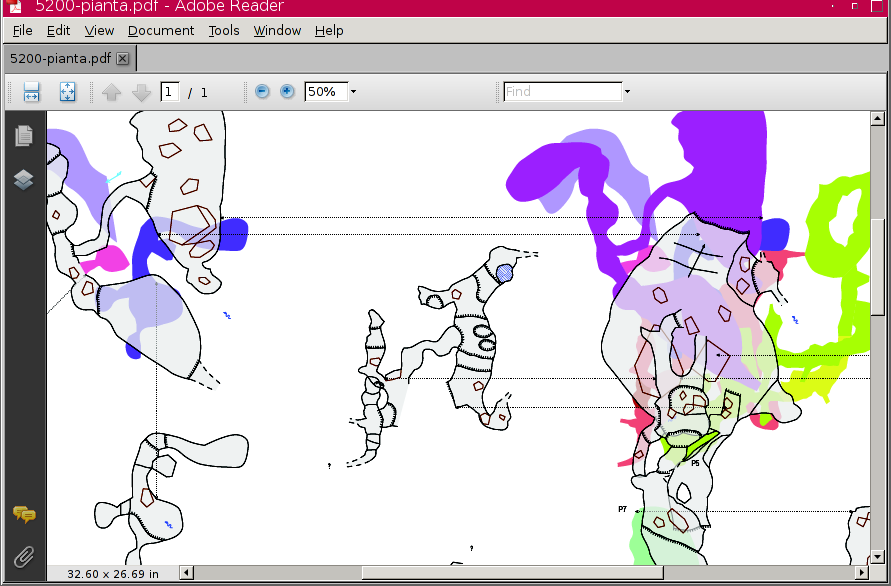
i'm making a therion map with many colors for the maps previewed below. attached is a snapshot of the map (still in draft) in acroread. with xpdf does not look so good (... maybe my mistake). it would also be nice to have transparency in the below colors, and that the order of the below areas reflect that of the selected map(s) (or, better, altitude) is it possible ? thanks. marco

Just happens that I have been experimenting with different PDF readers too. I was frustrated by the fact that Adobe Reader (at least on Windows) locks the PDF file. So you have to close it to recompile a map, and when you reopen the PDF it has reset to the default view and you have to zoom back in the the area you were working on to check the detail. I tried the following other readers: Evince: Does not lock the file, so I can recompile my Therion project with the PDF open on my second monitor, already zoomed into the area I am working on. The PDF refreshes automatically when Therion completes generating it. Very nice. Unfortunately this PDF reader does not clip area fills properly, so my fills extend outside the passage walls in this viewer. But great for previewing scrap joins. Foxit Reader: This one does lock the PDF file. But at least if you close the PDF, recompile the project and then reopen the PDF from the 'recent files' menu it restores the last view you had open. So it shows the detailed area you were last zoomed in to. This reader does clip the fills properly. Both Evince and Foxit Reader render transparency slightly differently to Adboe reader. My rocks show semi-transparent so I can see area fills underneath them. But in Adobe reader the rocks are solid. Anyone got any tips to add? Footleg On 8 January 2013 16:22, Marco Corvi <marco_corvi@yahoo.com> wrote:
i'm making a therion map with many colors for the maps previewed below.
attached is a snapshot of the map (still in draft) in acroread. with xpdf does not look so good (... maybe my mistake).
it would also be nice to have transparency in the below colors, and that the order of the below areas reflect that of the selected map(s) (or, better, altitude)
is it possible ? thanks.
marco
_______________________________________________ Therion mailing list Therion@speleo.sk http://mailman.speleo.sk/mailman/listinfo/therion

Hello 10.01.2013 00:29, Footleg пишет:
Just happens that I have been experimenting with different PDF readers too.
I was frustrated by the fact that Adobe Reader (at least on Windows) locks the PDF file.
On Ubuntu Adobe Reader 9 not locks the file and allowing Ctrl+R to refresh
I tried the following other readers: Evince: Does not lock the file, so I can recompile my Therion project with the PDF open on my second monitor, already zoomed into the area I am working on. The PDF refreshes automatically when Therion completes generating it. Very nice.
It is slow on medium and large maps. And it has crippled and slow zoom. But on small maps Evince is very nice.
Foxit Reader: This one does lock the PDF file.
Old Windows versions (2 or maybe 3) not lock the file, afair
Anyone got any tips to add?
On Windows I am using PDF-XChange viewer. It locks file but faster and more customisable. Shows boulders like FoxIt. Also on Linux exists xpdf. It is non-locking and slow. And it crashes when I open Therion PDFs on recent Ubuntu. -- WBR, Vasily

MacOSX: FastPreview [Space key] - automatically refresh, but has no zoom and other features. It is very useful to find file by preview. Preview (default MacOSX application) - automatically refresh, preserve zoom, but not exact position of view. Acrobat Pro (full) - lock files, there is feature to one-click refresh file if only one file is opened. You may switch on in preferences "Restore last view settings when reopening documents". Acrobat Reader - lock files, there is feature to one-click refresh file if only one file is opened. You may switch on in preferences "Restore last view settings when reopening documents". There are dozens of commercial PDF editors in App Store, but I never tried them. Martin

Thanks for the post below Martin. On ferreting around in my Windows based Adobe and Foxit applications, I find that they also have "Restore last view settings when reopening documents", which I am embarrassed not to have found before now. So old 'non-locking' Foxit Reader versions become (for me) the best compromise. * No crashes when Therion compiles * Opens pdf to previous page and zoom setting with a four key 'no brainer' sequence * Best overall rendering and opens all but files of 100's MB in size. If Evince could sort out the slow file loading and area rendering errors, then it would be the winner. I have updated http://therion.speleo.sk/wiki/doku.php/contrib:externalviewers#for_pdf_files Bruce -----Original Message----- From: therion-bounces@speleo.sk [mailto:therion-bounces@speleo.sk] On Behalf Of Martin Sluka Sent: Tuesday, 15 January 2013 12:05 a.m. To: List for Therion users Subject: Re: [Therion] preview below with many colors MacOSX: FastPreview [Space key] - automatically refresh, but has no zoom and other features. It is very useful to find file by preview. Preview (default MacOSX application) - automatically refresh, preserve zoom, but not exact position of view. Acrobat Pro (full) - lock files, there is feature to one-click refresh file if only one file is opened. You may switch on in preferences "Restore last view settings when reopening documents". Acrobat Reader - lock files, there is feature to one-click refresh file if only one file is opened. You may switch on in preferences "Restore last view settings when reopening documents". There are dozens of commercial PDF editors in App Store, but I never tried them. Martin _______________________________________________ Therion mailing list Therion@speleo.sk http://mailman.speleo.sk/mailman/listinfo/therion
I too was embarrassed to discover that Adobe Reader has those preference settings that I never knew about until now. Just tested the updated Wiki instructions for closing and reopening in Foxit v 5.3 I think you mean Alt+<key> instead of Ctrl+<key> Bruce? At least that is what works for me. Footleg On 15 January 2013 07:04, Bruce <bruce@tomo.co.nz> wrote:
Thanks for the post below Martin.
On ferreting around in my Windows based Adobe and Foxit applications, I find that they also have "Restore last view settings when reopening documents", which I am embarrassed not to have found before now.
So old 'non-locking' Foxit Reader versions become (for me) the best compromise.
§ No crashes when Therion compiles
§ Opens pdf to previous page and zoom setting with a four key 'no brainer' sequence
§ Best overall rendering and opens all but files of 100's MB in size.
If Evince could sort out the slow file loading and area rendering errors, then it would be the winner.
I have updated http://therion.speleo.sk/wiki/doku.php/contrib:externalviewers#for_pdf_files
Bruce

Hi, It is really strange, I discover that evince is on 2.32 version on windows, it is an older version, I had the same issue with area on the 2.30.3.2 version on debian stable. With the 3.4.0-3.1 version it seems to be ok, on debian testing, someone could share with us a pdf file with transparency color or a pdf reference to test ? C.S. 2013/1/15 Bruce <bruce@tomo.co.nz>:
Thanks for the post below Martin.
On ferreting around in my Windows based Adobe and Foxit applications, I find that they also have "Restore last view settings when reopening documents", which I am embarrassed not to have found before now.
So old 'non-locking' Foxit Reader versions become (for me) the best compromise.
§ No crashes when Therion compiles
§ Opens pdf to previous page and zoom setting with a four key 'no brainer' sequence
§ Best overall rendering and opens all but files of 100's MB in size.
If Evince could sort out the slow file loading and area rendering errors, then it would be the winner.
I have updated http://therion.speleo.sk/wiki/doku.php/contrib:externalviewers#for_pdf_files
Bruce
-----Original Message----- From: therion-bounces@speleo.sk [mailto:therion-bounces@speleo.sk] On Behalf Of Martin Sluka Sent: Tuesday, 15 January 2013 12:05 a.m. To: List for Therion users Subject: Re: [Therion] preview below with many colors
MacOSX:
FastPreview [Space key] - automatically refresh, but has no zoom and other features. It is very useful to find file by preview.
Preview (default MacOSX application) - automatically refresh, preserve zoom, but not exact position of view.
Acrobat Pro (full) - lock files, there is feature to one-click refresh file if only one file is opened. You may switch on in preferences "Restore last view settings when reopening documents".
Acrobat Reader - lock files, there is feature to one-click refresh file if only one file is opened. You may switch on in preferences "Restore last view settings when reopening documents".
There are dozens of commercial PDF editors in App Store, but I never tried them.
Martin
_______________________________________________
Therion mailing list
Therion@speleo.sk
http://mailman.speleo.sk/mailman/listinfo/therion
_______________________________________________ Therion mailing list Therion@speleo.sk http://mailman.speleo.sk/mailman/listinfo/therion

+++ Vasily Vl. Suhachev [2013-01-10 08:55 +0800]:
Hello
On Ubuntu Adobe Reader 9 not locks the file and allowing Ctrl+R to refresh
I tried the following other readers: Evince: Does not lock the file, so I can recompile my Therion project with the PDF open on my second monitor, already zoomed into the area I am working on. The PDF refreshes automatically when Therion completes generating it. Very nice.
It is slow on medium and large maps. And it has crippled and slow zoom. But on small maps Evince is very nice.
Also on Linux exists xpdf. It is non-locking and slow. And it crashes when I open Therion PDFs on recent Ubuntu.
I've been using epdfview for a while now (ever since the idiots that package evince decide they don't care about mimetypes any more becuase it's 'old-fashioned', so they ignore older apps that ask for a pdf viewer, and epdfview picks up the request) It's very similar in many ways (same underlying poppler libraries, same GTK widgets) but doesn't have the crummy limted zoom feature of evince. Very nice for general work. It is pretty slow to zoom with big PDFs though. Looks like it re-renders the whole page rather than just the current viewport. Worse than evince. It tries to do a quick-zoom with unchanged resolution but somehow still takes ages over it. There are lots of others. The FSFe keep a list here: http://pdfreaders.org/ (as part of their campaign to get the world to stop giving adobe free advertising) mupdf (also available for windows) is faster than both. Very simple with no graphical controls at all (use keys). can use -r to specify initial resolution (very handy toavoid lots of slow zooms on huge PDFs) xpdf renders like mupdf but has (old) motif-style control. It has prressive rendering which is nice - you can see something happening. It also doesn't render all the stuff off screen, which is quicker, except when dragging too far. Zoom seems quite slow though, just less boring as you get to watch :-) possibly slowest of the lot. okular (also available for windows and macos) is a pretty QT-based viewer. It gets the 'fast-zoom at unchanged resolution, render accurately later' thing right so is nice to use on big maps. You can zoom by area selection too. Very handy. Seems to run out of memory on my machine at high zoom levels (250% on a 5000x4000 px image). Maybe it was just taking forever. Rendering is slow but UI is nice so it matters less. It has loads of features. Export a segment as image, automatically reload on doc-change, options to tradoff memory use for speed The locking problem doesn't seem to exist on Linux, so they are all fine there. All have 'r' meaning reload. Only okular reloads to the zoom/position you were last at. This would be a useful feature to add in others. A PDF viewer optimised for huge single-page images rather than multipage docs would be a useful thing. The codebases for the above are all available if anyone gets enthused. So. I think okular and mupdf come out as best for big map viewing. evince and xpdf tied for bottom. I got bored before trying all the ones in the list. I didn't test anything with fancy transparency layers to see how they vary. One could do a proper test with some example (large/tricky/easy) PDFs and do timings and memory-usage checks. Wookey -- Principal hats: Linaro, Emdebian, Wookware, Balloonboard, ARM http://wookware.org/
Thanks to Wookey for that link, I have downloaded and installed SumatraPDF on Windows. This PDF reader appears to tick all the boxes. It renders surveys nicely, does not lock the PDF file, and auto-reloads the PDF when Therion rewrites it. Now I can have my PDFs all open in Sumatra, and just click compile in xTherion and see my changes in the PDF as soon as it is regenerated. If I want to re-render my entire survey rather than the bit I am working on then I just hit CTRL+t in Notepad++ with my Run command I emailed about yesterday, and that PDF is updated and displayed automatically too. I have added details of SumatraPDF and the PDFreaders.org link to the wiki on this page: http://therion.speleo.sk/wiki/doku.php/contrib:externalviewers Footleg On 15 January 2013 21:38, Wookey <wookey@wookware.org> wrote:
I've been using epdfview for a while now (ever since the idiots that package evince decide they don't care about mimetypes any more becuase it's 'old-fashioned', so they ignore older apps that ask for a pdf viewer, and epdfview picks up the request)
It's very similar in many ways (same underlying poppler libraries, same GTK widgets) but doesn't have the crummy limted zoom feature of evince. Very nice for general work. It is pretty slow to zoom with big PDFs though. Looks like it re-renders the whole page rather than just the current viewport. Worse than evince. It tries to do a quick-zoom with unchanged resolution but somehow still takes ages over it.
There are lots of others. The FSFe keep a list here: http://pdfreaders.org/ (as part of their campaign to get the world to stop giving adobe free advertising)
mupdf (also available for windows) is faster than both. Very simple with no graphical controls at all (use keys). can use -r to specify initial resolution (very handy toavoid lots of slow zooms on huge PDFs)
xpdf renders like mupdf but has (old) motif-style control. It has prressive rendering which is nice - you can see something happening. It also doesn't render all the stuff off screen, which is quicker, except when dragging too far. Zoom seems quite slow though, just less boring as you get to watch :-) possibly slowest of the lot.
okular (also available for windows and macos) is a pretty QT-based viewer. It gets the 'fast-zoom at unchanged resolution, render accurately later' thing right so is nice to use on big maps. You can zoom by area selection too. Very handy. Seems to run out of memory on my machine at high zoom levels (250% on a 5000x4000 px image). Maybe it was just taking forever. Rendering is slow but UI is nice so it matters less. It has loads of features. Export a segment as image, automatically reload on doc-change, options to tradoff memory use for speed
The locking problem doesn't seem to exist on Linux, so they are all fine there. All have 'r' meaning reload.
Only okular reloads to the zoom/position you were last at. This would be a useful feature to add in others. A PDF viewer optimised for huge single-page images rather than multipage docs would be a useful thing. The codebases for the above are all available if anyone gets enthused.
So. I think okular and mupdf come out as best for big map viewing. evince and xpdf tied for bottom. I got bored before trying all the ones in the list.
I didn't test anything with fancy transparency layers to see how they vary.
One could do a proper test with some example (large/tricky/easy) PDFs and do timings and memory-usage checks.
Wookey -- Principal hats: Linaro, Emdebian, Wookware, Balloonboard, ARM http://wookware.org/
Footleg, Vasily, Seems like you have something to add to this page http://therion.speleo.sk/wiki/doku.php/contrib:externalviewers Feel free to edit it if you want. Bruce -----Original Message----- From: therion-bounces@speleo.sk [mailto:therion-bounces@speleo.sk] On Behalf Of Footleg Sent: Thursday, 10 January 2013 5:29 a.m. To: List for Therion users Subject: Re: [Therion] preview below with many colors Just happens that I have been experimenting with different PDF readers too. I was frustrated by the fact that Adobe Reader (at least on Windows) locks the PDF file. So you have to close it to recompile a map, and when you reopen the PDF it has reset to the default view and you have to zoom back in the the area you were working on to check the detail. I tried the following other readers: Evince: Does not lock the file, so I can recompile my Therion project with the PDF open on my second monitor, already zoomed into the area I am working on. The PDF refreshes automatically when Therion completes generating it. Very nice. Unfortunately this PDF reader does not clip area fills properly, so my fills extend outside the passage walls in this viewer. But great for previewing scrap joins. Foxit Reader: This one does lock the PDF file. But at least if you close the PDF, recompile the project and then reopen the PDF from the 'recent files' menu it restores the last view you had open. So it shows the detailed area you were last zoomed in to. This reader does clip the fills properly. Both Evince and Foxit Reader render transparency slightly differently to Adboe reader. My rocks show semi-transparent so I can see area fills underneath them. But in Adobe reader the rocks are solid. Anyone got any tips to add? Footleg
Again, the wiki contains useful information that somehow I failed to notice! I will add my knowledge to that page. Footleg On 11 January 2013 05:00, Bruce <bruce@tomo.co.nz> wrote:
Footleg, Vasily, Seems like you have something to add to this page http://therion.speleo.sk/wiki/doku.php/contrib:externalviewers
Feel free to edit it if you want. Bruce
-----Original Message----- From: therion-bounces@speleo.sk [mailto:therion-bounces@speleo.sk] On Behalf Of Footleg Sent: Thursday, 10 January 2013 5:29 a.m. To: List for Therion users Subject: Re: [Therion] preview below with many colors
Just happens that I have been experimenting with different PDF readers too. I was frustrated by the fact that Adobe Reader (at least on Windows) locks the PDF file. So you have to close it to recompile a map, and when you reopen the PDF it has reset to the default view and you have to zoom back in the the area you were working on to check the detail.
I tried the following other readers: Evince: Does not lock the file, so I can recompile my Therion project with the PDF open on my second monitor, already zoomed into the area I am working on. The PDF refreshes automatically when Therion completes generating it. Very nice. Unfortunately this PDF reader does not clip area fills properly, so my fills extend outside the passage walls in this viewer. But great for previewing scrap joins.
Foxit Reader: This one does lock the PDF file. But at least if you close the PDF, recompile the project and then reopen the PDF from the 'recent files' menu it restores the last view you had open. So it shows the detailed area you were last zoomed in to. This reader does clip the fills properly.
Both Evince and Foxit Reader render transparency slightly differently to Adboe reader. My rocks show semi-transparent so I can see area fills underneath them. But in Adobe reader the rocks are solid.
Anyone got any tips to add?
Footleg
_______________________________________________ Therion mailing list Therion@speleo.sk http://mailman.speleo.sk/mailman/listinfo/therion
I have updated the PDF section on that page, including some pictures to illustrate rendering differences. Footleg On 11 January 2013 05:00, Bruce <bruce@tomo.co.nz> wrote:
Footleg, Vasily, Seems like you have something to add to this page http://therion.speleo.sk/wiki/doku.php/contrib:externalviewers
Feel free to edit it if you want. Bruce
Thanks Footleg, that looks good. I have taken the liberty of adding your Cave Converter here http://therion.speleo.sk/wiki/doku.php/contrib:complimentarycaveapps#cave_co nverter Bruce -----Original Message----- From: therion-bounces@speleo.sk [mailto:therion-bounces@speleo.sk] On Behalf Of Footleg Sent: Sunday, 13 January 2013 11:57 a.m. To: List for Therion users Subject: Re: [Therion] preview below with many colors I have updated the PDF section on that page, including some pictures to illustrate rendering differences. Footleg
Thanks Bruce. I came across that page late last night and had planned to add my cave converter on there today, so that saved me a job. Footleg On 13 January 2013 02:59, Bruce <bruce@tomo.co.nz> wrote:
Thanks Footleg, that looks good. I have taken the liberty of adding your Cave Converter here http://therion.speleo.sk/wiki/doku.php/contrib:complimentarycaveapps#cave_co nverter Bruce
-----Original Message----- From: therion-bounces@speleo.sk [mailto:therion-bounces@speleo.sk] On Behalf Of Footleg Sent: Sunday, 13 January 2013 11:57 a.m. To: List for Therion users Subject: Re: [Therion] preview below with many colors
I have updated the PDF section on that page, including some pictures to illustrate rendering differences.
Footleg
_______________________________________________ Therion mailing list Therion@speleo.sk http://mailman.speleo.sk/mailman/listinfo/therion
Marco I presume the colours in your example did not come from Therion? But if they did, how to do? BTW I think we still have a long standing bug where by preview-above is always dark grey regardless of the user setting. colour preview-above [80 0 40] #should be magenta, but preview above is still dark grey Is it possible to fix? Bruce _____ From: therion-bounces@speleo.sk [mailto:therion-bounces@speleo.sk] On Behalf Of Marco Corvi Sent: Wednesday, 9 January 2013 5:23 a.m. To: List for Therion users Subject: [Therion] preview below with many colors i'm making a therion map with many colors for the maps previewed below. attached is a snapshot of the map (still in draft) in acroread. with xpdf does not look so good (... maybe my mistake). it would also be nice to have transparency in the below colors, and that the order of the below areas reflect that of the selected map(s) (or, better, altitude) is it possible ? thanks. marco
hi bruce, they sort of come from therion, but it's a bad hack. it was just a proof-of-concept. i was too lazy to play with the sources, so i did it by hand. anyways, here is the recipe: define one preview color not used elsewhere (just to find it easily), say [70 20 20]. compile with debug (-d). go in thTMPDIR and edit the tex file, search the preview color (0.70 0.20 0.20 in the example), and insert your colors before the maps (you might have to rearrange their order as well). run pdftex (the "final" step of therion compile): data.pdf is your map. kind of awkward, isn't it ? that's why i'd like to have it done by therion without any fiddling with the temporary files. by the way, i also noticed the problem with preview-above, but i do not know if it's therion or the reader. marco ________________________________ From: Bruce <bruce@tomo.co.nz> To: 'List for Therion users' <therion@speleo.sk> Sent: Tuesday, January 15, 2013 8:04 AM Subject: Re: [Therion] preview below with many colors Marco I presume the colours in your example did not come from Therion? But if they did, how to do? BTW I think we still have a long standing bug where by preview-above is always dark grey regardless of the user setting. colour preview-above [80 0 40] #should be magenta, but preview above is still dark grey Is it possible to fix? Bruce ________________________________ From:therion-bounces@speleo.sk [mailto:therion-bounces@speleo.sk] On Behalf Of Marco Corvi Sent: Wednesday, 9 January 2013 5:23 a.m. To: List for Therion users Subject: [Therion] preview below with many colors i'm making a therion map with many colors for the maps previewed below. attached is a snapshot of the map (still in draft) in acroread. with xpdf does not look so good (... maybe my mistake). it would also be nice to have transparency in the below colors, and that the order of the below areas reflect that of the selected map(s) (or, better, altitude) is it possible ? thanks. marco _______________________________________________ Therion mailing list Therion@speleo.sk http://mailman.speleo.sk/mailman/listinfo/therion
Nice I'll wait for the Therion update:-) I can see uses with colour by altitude, explored date and surveyed date, to compliment similar colour map-fg options Bruce _____ From: therion-bounces@speleo.sk [mailto:therion-bounces@speleo.sk] On Behalf Of Marco Corvi Sent: Tuesday, 15 January 2013 8:58 p.m. To: List for Therion users Subject: Re: [Therion] preview below with many colors hi bruce, they sort of come from therion, but it's a bad hack. it was just a proof-of-concept. i was too lazy to play with the sources, so i did it by hand. anyways, here is the recipe: define one preview color not used elsewhere (just to find it easily), say [70 20 20]. compile with debug (-d). go in thTMPDIR and edit the tex file, search the preview color (0.70 0.20 0.20 in the example), and insert your colors before the maps (you might have to rearrange their order as well). run pdftex (the "final" step of therion compile): data.pdf is your map. kind of awkward, isn't it ? that's why i'd like to have it done by therion without any fiddling with the temporary files. by the way, i also noticed the problem with preview-above, but i do not know if it's therion or the reader. marco _____ From: Bruce <bruce@tomo.co.nz> To: 'List for Therion users' <therion@speleo.sk> Sent: Tuesday, January 15, 2013 8:04 AM Subject: Re: [Therion] preview below with many colors Marco I presume the colours in your example did not come from Therion? But if they did, how to do? BTW I think we still have a long standing bug where by preview-above is always dark grey regardless of the user setting. colour preview-above [80 0 40] #should be magenta, but preview above is still dark grey Is it possible to fix? Bruce _____ From: therion-bounces@speleo.sk [mailto:therion-bounces@speleo.sk] On Behalf Of Marco Corvi Sent: Wednesday, 9 January 2013 5:23 a.m. To: List for Therion users Subject: [Therion] preview below with many colors i'm making a therion map with many colors for the maps previewed below. attached is a snapshot of the map (still in draft) in acroread. with xpdf does not look so good (... maybe my mistake). it would also be nice to have transparency in the below colors, and that the order of the below areas reflect that of the selected map(s) (or, better, altitude) is it possible ? thanks. marco
participants (7)
-
 Bruce
Bruce -
 cawa sorix
 -
 Footleg
 -
 Marco Corvi
 -
 Martin Sluka
 -
 Vasily Vl. Suhachev
 -
 Wookey