
http://search.cpan.org/dist/HTML-WikiConverter-DokuWiki/ HTML::WikiConverter::DokuWiki adds the DokuWiki dialect to HTML::WikiConverter allowing the conversion of HTML to DokuWiki markup. Usage: html2wiki --dialect DokuWiki input.html > output.wiki L. marco napsal(a):
really nice documentation. What about migrate this to therion wiki pages?
i would like to have a wiki output filter, but i never had enough motivations to put my head to it. do you c++ ?
marco
-- Ladislav Blazek

I'm new to Therion, but think it is fabulous! I am just in the process of drawing up our new discoveries in Mendip, UK, and like Andrew am looking at how to include the centreline in the map pdf output. (It is visible in the model output but not the map). I have tried including the "survey" in the list of maps (and additionally found that I need to specify the -projection plan option). However, no centre is visible in the pdf output. Have I misread your email: is this something the software should already be able to do, in which case what have I missed out of my .th file? Stacho Mudrak wrote: ... The only way how to do this is to add surveys to the map structure. Example: You have 3 maps and 1 survey without map. You define map map_total map1 map2 map3 survey_without_map endmap I will put this problem into TODO list. HTH, S. Quoting Andrew Atkinson <andrew at wotcc.org.uk>:
Hello
We (Wookey and I) are working on the Mulu data set which is using survex 3d files to import the survey legs. This shows the survey legs within the passage where it exists, but not when there is no pasage. However what we would really like to do is show the centreline when there is no passage, and not show it when there is passage drawn.
Is there any way to do this
thanks
Andrew
_______________________________________________ Therion mailing list Therion at speleo.cz http://www.speleo.cz/mailman/listinfo/therion

Hello I have a triangle of background within my passage (just off a join, but not on it), and am not able to solve it. Can anyone help. The files can be downloaded from http://mulucaves.org/whiterock_2003.zip If you scroll to the bottom of the page you should see it thanks Andrew

On 20.9.2006, at 15:42, Andrew Atkinson wrote:
I have a triangle of background within my passage (just off a join, but not on it), and am not able to solve it.
Check wiki - there is an example exactly with your problem. The solution is to that one of the scraps includes a small part of another two scraps - so there will be join between two scraps not among three. Martin
This is a triangle all in one scrap, I have looked at the wiki and am familiar with the trick there. This one I just have not been able to solve. It is the lack of walls to provide borders. I tried using invisible borders but this just made it worse, and made the join that is close not work. thanks Andrew Martin Sluka wrote:
On 20.9.2006, at 15:42, Andrew Atkinson wrote:
I have a triangle of background within my passage (just off a join, but not on it), and am not able to solve it.
Check wiki - there is an example exactly with your problem. The solution is to that one of the scraps includes a small part of another two scraps - so there will be join between two scraps not among three.
Martin _______________________________________________ Therion mailing list Therion@speleo.cz http://www.speleo.cz/mailman/listinfo/therion

The problem is all the time the same - therion did not found correct outline. But when I added "line wall -subtype invisible" on the place shown on the picture, the problem was solved. Or did I understand your problem wrong? Do you have any special reason for using "border -subtype invisible -outline out" instead of "wall -subtype invisible"? S. Quoting Andrew Atkinson <andrew@wotcc.org.uk>:
This is a triangle all in one scrap, I have looked at the wiki and am familiar with the trick there. This one I just have not been able to solve. It is the lack of walls to provide borders. I tried using invisible borders but this just made it worse, and made the join that is close not work.
thanks
Andrew
Martin Sluka wrote:
On 20.9.2006, at 15:42, Andrew Atkinson wrote:
I have a triangle of background within my passage (just off a join, but not on it), and am not able to solve it.
Check wiki - there is an example exactly with your problem. The solution is to that one of the scraps includes a small part of another two scraps - so there will be join between two scraps not among three.
Martin _______________________________________________ Therion mailing list Therion@speleo.cz http://www.speleo.cz/mailman/listinfo/therion
_______________________________________________ Therion mailing list Therion@speleo.cz http://www.speleo.cz/mailman/listinfo/therion
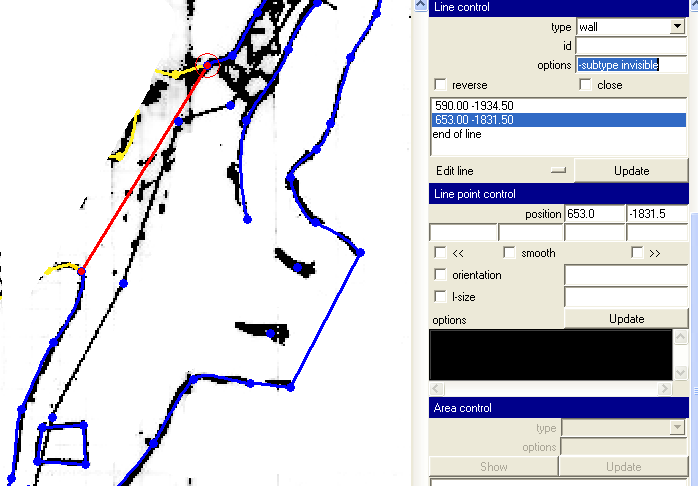
First of all, I am sorry, but this time mail server speleo.sk is down, you may use therion@speleo.cz alias instead. When I added "wall -subtype invisible" as shown on the picture, then the problem was solved. Same with "border -subtype invisible -outline out". Therion obviously did not connect walls in correct order. I am sorry for this, there must be some bug in the "outline finding" code, but it is very difficult to find and using "invisible outlines" allways helps. Regards, S. Quoting Andrew Atkinson <andrew@wotcc.org.uk>:
This is a triangle all in one scrap, I have looked at the wiki and am familiar with the trick there. This one I just have not been able to solve. It is the lack of walls to provide borders. I tried using invisible borders but this just made it worse, and made the join that is close not work.
thanks
Andrew
Martin Sluka wrote:
On 20.9.2006, at 15:42, Andrew Atkinson wrote:
I have a triangle of background within my passage (just off a join, but not on it), and am not able to solve it.
Check wiki - there is an example exactly with your problem. The solution is to that one of the scraps includes a small part of another two scraps - so there will be join between two scraps not among three.
Martin _______________________________________________ Therion mailing list Therion@speleo.cz http://www.speleo.cz/mailman/listinfo/therion
_______________________________________________ Therion mailing list Therion@speleo.cz http://www.speleo.cz/mailman/listinfo/therion
On 20.9.2006, at 15:42, Andrew Atkinson wrote:
I have a triangle of background within my passage (just off a join, but not on it), and am not able to solve it.
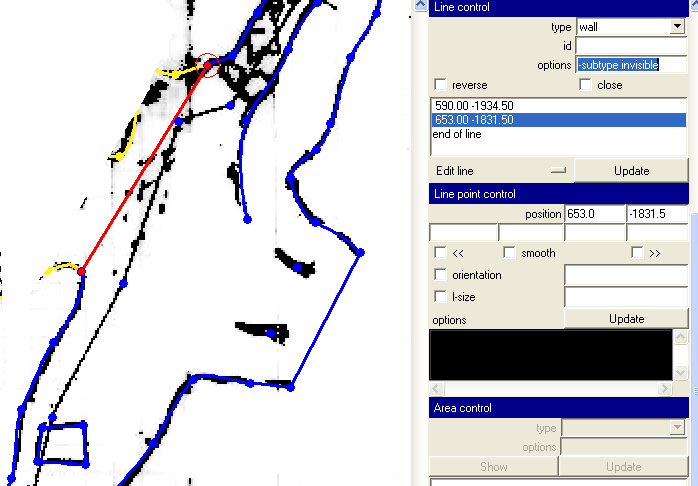
I apologize myself - it is not the problem of joining of three scraps. the problem is you divide the wall lines and therion is looking for the nearest point - which makes the triangle. BTW - the orientation of the wall lines is reverse - the yellow tick line should be inside the free space - inside the gallery. The is missing the join command - as opposite to split line command in xtherion. I!ll send you th2 and map file to see the result. There are 2 pictures too to show the problem. If you change the subtype of wall you don't need to start with new line - just continue with another point and change the subtype back to bedrock. In your case: I removed all short walls. Then I added points to wall coming from bottom and replaced those short walls. From the beginning the this line (from the small yellow tick) I added subtypes - 1. point -subtype unsurveyed 2. point -subtype invisible 3. point -subtype unsurveyed 4. point .subtype bedrock And no the triangle there. I only hope it is what you want to draw there. Martin

On 06-09-20 14:15 +0100, Cooper, Ben wrote:
I'm new to Therion, but think it is fabulous! I am just in the process of drawing up our new discoveries in Mendip, UK, and like Andrew am looking at how to include the centreline in the map pdf output. (It is visible in the model output but not the map). I have tried including the "survey" in the list of maps (and additionally found that I need to specify the -projection plan option). However, no centre is visible in the pdf output. Have I misread your email: is this something the software should already be able to do, in which case what have I missed out of my .th file?
[Hi Ben - didn't have you down as a top-poster]
Stacho Mudrak wrote: ... The only way how to do this is to add surveys to the map structure.
Example:
You have 3 maps and 1 survey without map. You define
map map_total map1 map2 map3 survey_without_map endmap
This is not working for me either: map overall-map -projection plan benarat-plan moon_cave cobweb Whiterock@whiterock endmap (the Whiterock@whiterock specifier is because I have had to bodge things to make it all process together - that is a mail for another thread) cobweb is a top-level survey specifer (read in from a .3d file), with no therion scraps. Do I actually need to specify all the surveys included inside cobweb to get them to appear? Wookey -- Aleph One Ltd, Bottisham, CAMBRIDGE, CB5 9BA, UK Tel +44 (0) 1223 811679 work: http://www.aleph1.co.uk/ play: http://wookware.org/

This is a reply to an ANCIENT post, but I didn't see it answered on the list, so I figured I would post my solution to the problem of getting scraps and centerline to easily show up on the map together: 1. Create a map that consists of nothing but survey data. Make sure to give it a unique id. 2. Create a second map that consists of nothing but scrap data. Again, give it an id. 3. Create a third map that consists of the id of the first map you created and the id of the second map you created. Remember that the order in which you list the maps determines the order which they'll get drawn on your map. This third map needs its own id, of course. 4. In your thconfig file, make sure you select the third map you created. This is where the magic happens. 5. When you compile this, you should get a map that includes all of your finished scraps along with centerlines for everything else! I hope this helps!! -Jonny On Wed, Sep 20, 2006 at 6:11 PM, Wookey <wookey@aleph1.co.uk> wrote:
On 06-09-20 14:15 +0100, Cooper, Ben wrote:
I'm new to Therion, but think it is fabulous! I am just in the process of drawing up our new discoveries in Mendip, UK, and like Andrew am looking at how to include the centreline in the map pdf output. (It is visible in the model output but not the map). I have tried including the "survey" in the list of maps (and additionally found that I need to specify the -projection plan option). However, no centre is visible in the pdf output. Have I misread your email: is this something the software should already be able to do, in which case what have I missed out of my .th file?
visible in the model output but not the map). I have tried including the "survey" in the list of maps (and additionally found that I need to specify the -projection plan option). However, no centre is visible in the pdf output. Have I misread your email: is this something the software should already be able to do, in which case what have I missed out of my .th file?
Yes, therion should do this, but it is difficult to say, what is wrong with your files. Could you please send me some minimal sample where it does not work? Another point:
We (Wookey and I) are working on the Mulu data set which is using survex 3d files to import the survey legs. This shows the survey legs within the passage where it exists, but not when there is no pasage. However what we would really like to do is show the centreline when there is no passage, and not show it when there is passage drawn.
Is there any way to do this
When I read this e-mail once more, I must correct my self. Currently, there is no way how to do it :( Either you will show all centerline, or you will hide all centerline. Solution can be draw centerline from data (not from scraps) with different symbol. If need it, I can do it quite fast. Do you have some terms, when your maps need to be finished? S.
On 06-09-21 11:26 +0200, Stacho Mudrak wrote:
visible in the model output but not the map). I have tried including the "survey" in the list of maps (and additionally found that I need to specify the -projection plan option). However, no centre is visible in the pdf output. Have I misread your email: is this something the software should already be able to do, in which case what have I missed out of my .th file?
Yes, therion should do this, but it is difficult to say, what is wrong with your files. Could you please send me some minimal sample where it does not work?
Another point:
We (Wookey and I) are working on the Mulu data set which is using survex 3d files to import the survey legs. This shows the survey legs within the passage where it exists, but not when there is no pasage. However what we would really like to do is show the centreline when there is no passage, and not show it when there is passage drawn.
Is there any way to do this
When I read this e-mail once more, I must correct my self. Currently, there is no way how to do it :( Either you will show all centerline, or you will hide all centerline.
Solution can be draw centerline from data (not from scraps) with different symbol. If need it, I can do it quite fast. Do you have some terms, when your maps need to be finished?
In about 25 mintues :-) It is BCRA conference this weekend, and large-fornmat printing had to be done by someone else. That deadline is literally as I type, so the panic is now off. We do need a solution to this problem in general though. We have a 220km system, and being able to show centreline data for areas where there is not therion data yet, is important, as therionising the data is such a huge job. I may have a few more atlas quesations before the w/e though :-) Wookey -- Aleph One Ltd, Bottisham, CAMBRIDGE, CB5 9BA, UK Tel +44 (0) 1223 811679 work: http://www.aleph1.co.uk/ play: http://wookware.org/

On Wed, 2006-09-20 at 14:56 +0200, Ladislav Blazek wrote:
http://search.cpan.org/dist/HTML-WikiConverter-DokuWiki/
HTML::WikiConverter::DokuWiki adds the DokuWiki dialect to HTML::WikiConverter allowing the conversion of HTML to DokuWiki markup.
Usage: html2wiki --dialect DokuWiki input.html > output.wiki
L.
well, trying first locally (ie, on my pc): i installed all those perl modules (ages since i perl-ed) ... e-merged apache (nowadays i do not web that much) ... same for a wiki (mediawiki), although the test did not pass, ... created the mysql db and all that to config the wiki, ... now that i have all the pages in "wiki" how do i put them in the wiki db ? how do i make sure the links are correct ? is there a quick way to "wikify" a directory, with subdirectories as well ? thanks for the help. marco
Hi, I don't have any experience with mediawiki (I only know that mediawiki is used for Wikipedia). For therion wiki pages I choose dokuwiki because of its simplicity and because it stores data in plain text files - you can just copy "wikified" text file to dokuwiki data directory and check links. L. marco napsal(a):
On Wed, 2006-09-20 at 14:56 +0200, Ladislav Blazek wrote:
http://search.cpan.org/dist/HTML-WikiConverter-DokuWiki/
HTML::WikiConverter::DokuWiki adds the DokuWiki dialect to HTML::WikiConverter allowing the conversion of HTML to DokuWiki markup.
Usage: html2wiki --dialect DokuWiki input.html > output.wiki
L.
well,
trying first locally (ie, on my pc):
i installed all those perl modules (ages since i perl-ed) ... e-merged apache (nowadays i do not web that much) ... same for a wiki (mediawiki), although the test did not pass, ... created the mysql db and all that to config the wiki, ...
now that i have all the pages in "wiki" how do i put them in the wiki db ? how do i make sure the links are correct ? is there a quick way to "wikify" a directory, with subdirectories as well ?
thanks for the help.
marco
_______________________________________________ Therion mailing list Therion@speleo.cz http://www.speleo.cz/mailman/listinfo/therion
-- Ladislav Blazek
participants (8)
-
 Andrew Atkinson
 -
 Cooper, Ben
 -
 Jonathan Prouty
 -
 Ladislav Blazek
 -
 marco
marco -
 Martin Sluka
 -
 Stacho Mudrak
 -
 Wookey