Drawing lines with graphic tablet

Hi everyone, I tried to draw the cave's walls in therion's map editor using a graphic tablet to have a finer control over the lines' shape and obtain a more realistic-looking cave shape. This method didn't work because therion's map editor uses Bezier curves to draw lines: when the pen touches the tablet, a new point is created - but any further movement of the pen will only adjust the curve's tangent at that point and doesn't extend the line. To create new points one must lift the pen and press again so the result is again imprecise. I was wondering if it would it be possible (and easy) to add a new line type that is more similar to Illustrator's pencil tool? With the pencil tool one can hand-draw a path by continuously moving the pen on the tablet (without lifting it). When the pen is lifted, the software calculates a Bezier curve from the path. Thank you Francesco

Hi Francesco, This isn't exactly an answer to your question, but have you thought about using wtherion? https://github.com/daem-on/wtherion <https://github.com/daem-on/wtherion> It's an alternative to XTherion and among others it has the feature you described (aka freehand drawing). It's not fully released yet but you might still find it useful. You can also find end-user documentation on the page above. Csongor Francesco Serafin <francesco.serafin2@gmail.com> ezt írta (időpont: 2022. júl. 13., Sze 18:09):
Hi everyone,
I tried to draw the cave's walls in therion's map editor using a graphic tablet to have a finer control over the lines' shape and obtain a more realistic-looking cave shape. This method didn't work because therion's map editor uses Bezier curves to draw lines: when the pen touches the tablet, a new point is created - but any further movement of the pen will only adjust the curve's tangent at that point and doesn't extend the line. To create new points one must lift the pen and press again so the result is again imprecise.
I was wondering if it would it be possible (and easy) to add a new line type that is more similar to Illustrator's pencil tool? With the pencil tool one can hand-draw a path by continuously moving the pen on the tablet (without lifting it). When the pen is lifted, the software calculates a Bezier curve from the path.
Thank you
Francesco _______________________________________________ Therion mailing list Therion@speleo.sk https://mailman.speleo.sk/listinfo/therion
Hi Csongor, Thank you for your suggestion. I didn't think about wtherion. It looks impressive and it's a very nice interface, are you developing it?
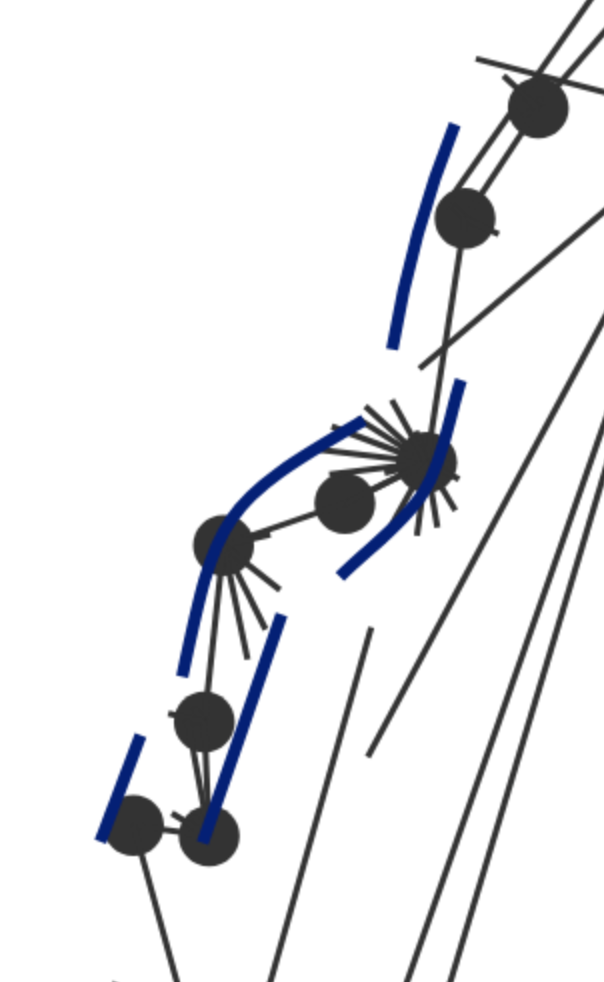
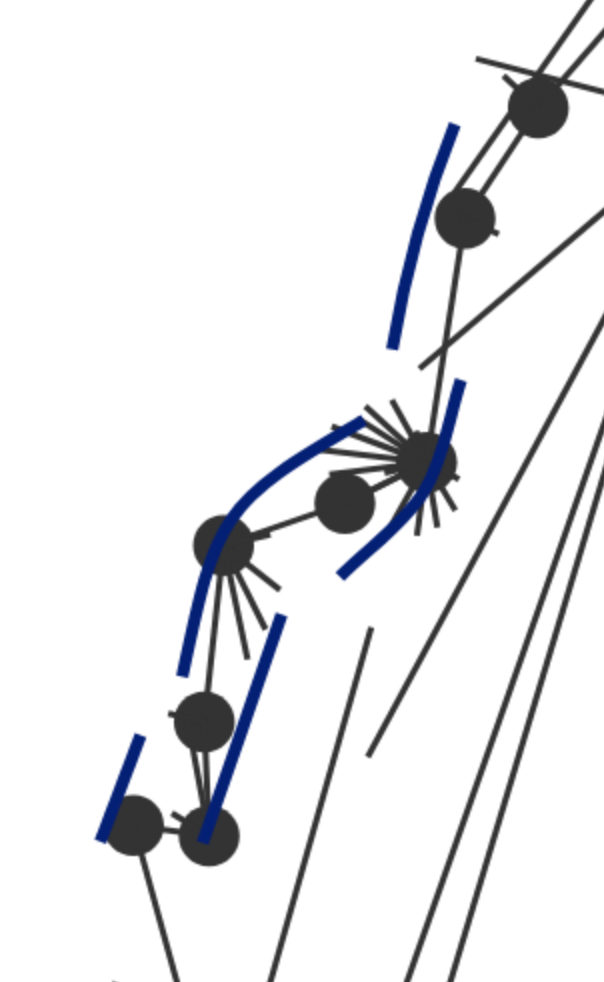
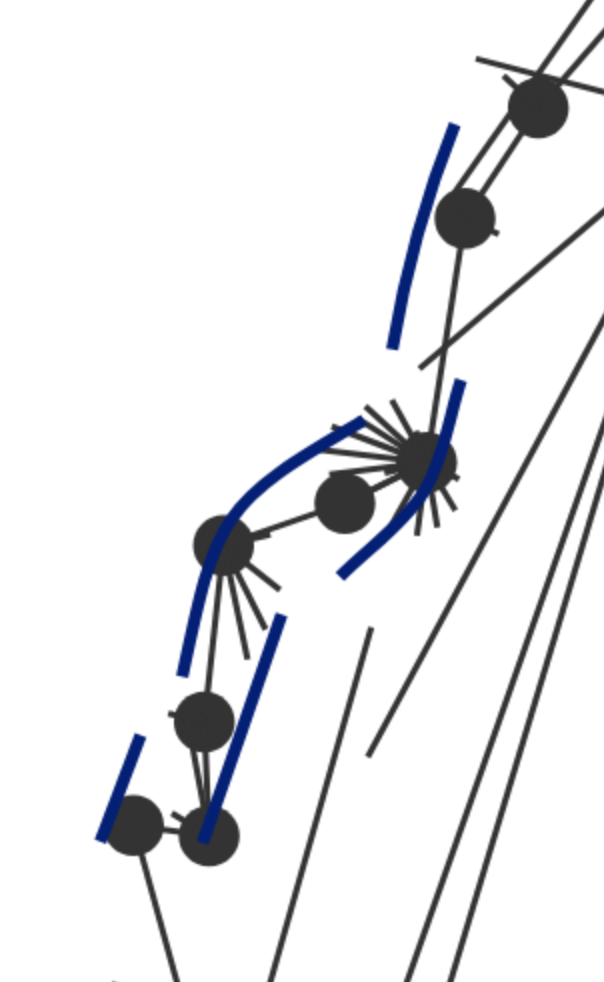
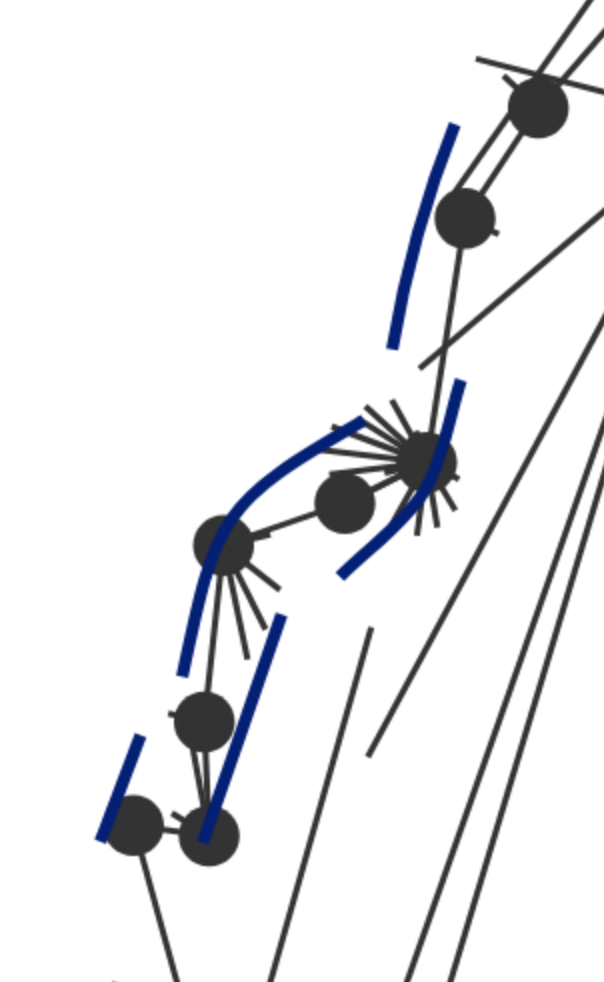
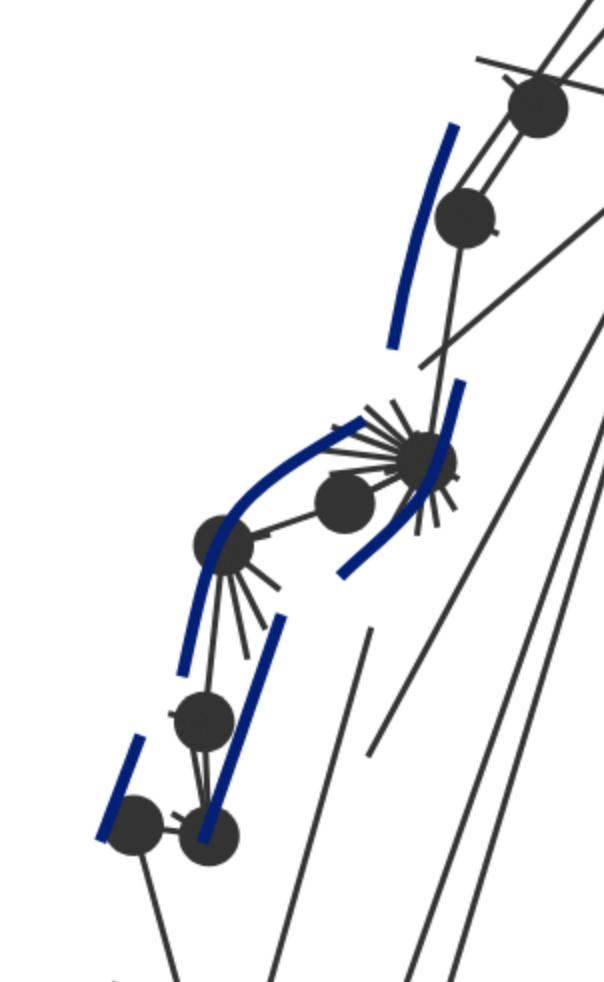
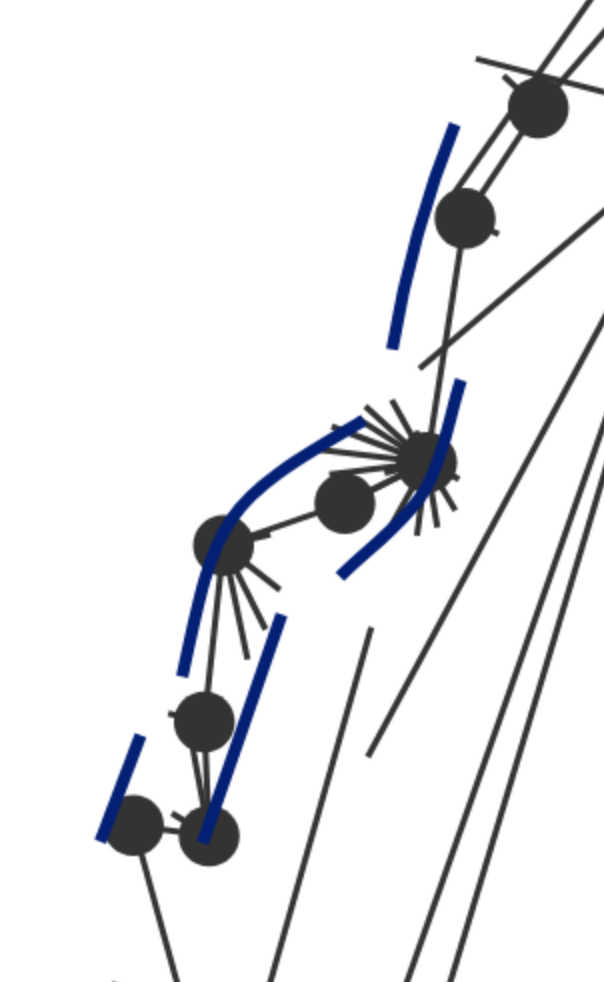
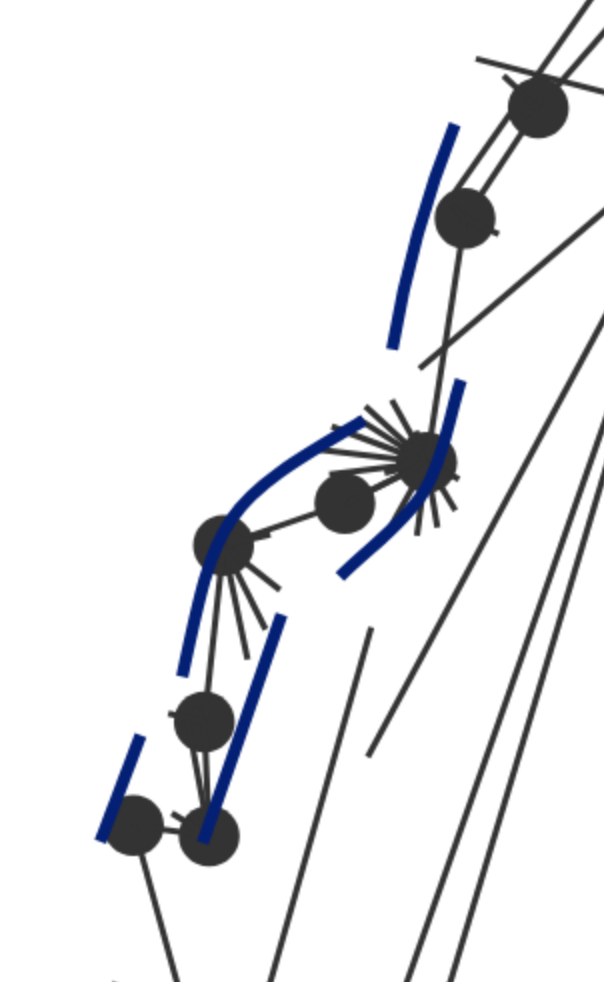
From a first look at it, it has the freehand drawing pen that I had in mind. After importing an .xvi centerline I tried to draw some walls. The Draw tool works with a continuous drag of the pen, that is great. The only question I have is this: given the resolution of the survey, it seems that the smallest segment drawn by the pen is still larger than the features of the wall. An example is the narrow meander that you see here: [image: image.png] The wall's turns are smaller than the pen's resolution. It may be that one can solve this problem by enlarging the xvi output, but I haven't tried this yet.
Thank you, Francesco On Wed, Jul 13, 2022 at 2:00 PM Csongor Zih <daemon.onwave@gmail.com> wrote:
Hi Francesco,
This isn't exactly an answer to your question, but have you thought about using wtherion? https://github.com/daem-on/wtherion
<https://github.com/daem-on/wtherion> It's an alternative to XTherion and among others it has the feature you described (aka freehand drawing). It's not fully released yet but you might still find it useful. You can also find end-user documentation on the page above.
Csongor
Francesco Serafin <francesco.serafin2@gmail.com> ezt írta (időpont: 2022. júl. 13., Sze 18:09):
Hi everyone,
I tried to draw the cave's walls in therion's map editor using a graphic tablet to have a finer control over the lines' shape and obtain a more realistic-looking cave shape. This method didn't work because therion's map editor uses Bezier curves to draw lines: when the pen touches the tablet, a new point is created - but any further movement of the pen will only adjust the curve's tangent at that point and doesn't extend the line. To create new points one must lift the pen and press again so the result is again imprecise.
I was wondering if it would it be possible (and easy) to add a new line type that is more similar to Illustrator's pencil tool? With the pencil tool one can hand-draw a path by continuously moving the pen on the tablet (without lifting it). When the pen is lifted, the software calculates a Bezier curve from the path.
Thank you
Francesco _______________________________________________ Therion mailing list Therion@speleo.sk https://mailman.speleo.sk/listinfo/therion
_______________________________________________ Therion mailing list Therion@speleo.sk https://mailman.speleo.sk/listinfo/therion
If I understand correctly, you need the points on the line to be closer together, resulting in shorter segments. This setting can be adjusted under "Tool options" in the options panel for the Draw tool. If you find that the smallest setting (1) is still too large, that would require changes to the code, please let me know. Yes I am the developer of the project, if you encounter any problems I would be happy to help. Csongor Francesco Serafin <francesco.serafin2@gmail.com> ezt írta (időpont: 2022. júl. 14., Cs, 5:04):
Hi Csongor,
Thank you for your suggestion. I didn't think about wtherion. It looks impressive and it's a very nice interface, are you developing it? From a first look at it, it has the freehand drawing pen that I had in mind. After importing an .xvi centerline I tried to draw some walls. The Draw tool works with a continuous drag of the pen, that is great. The only question I have is this: given the resolution of the survey, it seems that the smallest segment drawn by the pen is still larger than the features of the wall. An example is the narrow meander that you see here: [image: image.png] The wall's turns are smaller than the pen's resolution. It may be that one can solve this problem by enlarging the xvi output, but I haven't tried this yet.
Thank you,
Francesco
On Wed, Jul 13, 2022 at 2:00 PM Csongor Zih <daemon.onwave@gmail.com> wrote:
Hi Francesco,
This isn't exactly an answer to your question, but have you thought about using wtherion? https://github.com/daem-on/wtherion
<https://github.com/daem-on/wtherion> It's an alternative to XTherion and among others it has the feature you described (aka freehand drawing). It's not fully released yet but you might still find it useful. You can also find end-user documentation on the page above.
Csongor
Francesco Serafin <francesco.serafin2@gmail.com> ezt írta (időpont: 2022. júl. 13., Sze 18:09):
Hi everyone,
I tried to draw the cave's walls in therion's map editor using a graphic tablet to have a finer control over the lines' shape and obtain a more realistic-looking cave shape. This method didn't work because therion's map editor uses Bezier curves to draw lines: when the pen touches the tablet, a new point is created - but any further movement of the pen will only adjust the curve's tangent at that point and doesn't extend the line. To create new points one must lift the pen and press again so the result is again imprecise.
I was wondering if it would it be possible (and easy) to add a new line type that is more similar to Illustrator's pencil tool? With the pencil tool one can hand-draw a path by continuously moving the pen on the tablet (without lifting it). When the pen is lifted, the software calculates a Bezier curve from the path.
Thank you
Francesco _______________________________________________ Therion mailing list Therion@speleo.sk https://mailman.speleo.sk/listinfo/therion
_______________________________________________ Therion mailing list Therion@speleo.sk https://mailman.speleo.sk/listinfo/therion
_______________________________________________ Therion mailing list Therion@speleo.sk https://mailman.speleo.sk/listinfo/therion
Thank you very much Csongor! Sorry, I didn't notice that option. Yes, the smallest pen setting works wonderfully. All the indentations of the wall can be drawn at that scale. Many thanks for developing this project, it is very nice. I'd like to ask a small question please: can I drag the xvi across the screen without zooming in and out? I tried combinations of Ctrl+drag, Opt+drag but they didn't work. (I am using a Mac). Thank you Best, Francesco On Wed, Jul 13, 2022 at 11:21 PM Csongor Zih <daemon.onwave@gmail.com> wrote:
If I understand correctly, you need the points on the line to be closer together, resulting in shorter segments. This setting can be adjusted under "Tool options" in the options panel for the Draw tool. If you find that the smallest setting (1) is still too large, that would require changes to the code, please let me know.
Yes I am the developer of the project, if you encounter any problems I would be happy to help.
Csongor
Francesco Serafin <francesco.serafin2@gmail.com> ezt írta (időpont: 2022. júl. 14., Cs, 5:04):
Hi Csongor,
Thank you for your suggestion. I didn't think about wtherion. It looks impressive and it's a very nice interface, are you developing it? From a first look at it, it has the freehand drawing pen that I had in mind. After importing an .xvi centerline I tried to draw some walls. The Draw tool works with a continuous drag of the pen, that is great. The only question I have is this: given the resolution of the survey, it seems that the smallest segment drawn by the pen is still larger than the features of the wall. An example is the narrow meander that you see here: [image: image.png] The wall's turns are smaller than the pen's resolution. It may be that one can solve this problem by enlarging the xvi output, but I haven't tried this yet.
Thank you,
Francesco
On Wed, Jul 13, 2022 at 2:00 PM Csongor Zih <daemon.onwave@gmail.com> wrote:
Hi Francesco,
This isn't exactly an answer to your question, but have you thought about using wtherion? https://github.com/daem-on/wtherion
<https://github.com/daem-on/wtherion> It's an alternative to XTherion and among others it has the feature you described (aka freehand drawing). It's not fully released yet but you might still find it useful. You can also find end-user documentation on the page above.
Csongor
Francesco Serafin <francesco.serafin2@gmail.com> ezt írta (időpont: 2022. júl. 13., Sze 18:09):
Hi everyone,
I tried to draw the cave's walls in therion's map editor using a graphic tablet to have a finer control over the lines' shape and obtain a more realistic-looking cave shape. This method didn't work because therion's map editor uses Bezier curves to draw lines: when the pen touches the tablet, a new point is created - but any further movement of the pen will only adjust the curve's tangent at that point and doesn't extend the line. To create new points one must lift the pen and press again so the result is again imprecise.
I was wondering if it would it be possible (and easy) to add a new line type that is more similar to Illustrator's pencil tool? With the pencil tool one can hand-draw a path by continuously moving the pen on the tablet (without lifting it). When the pen is lifted, the software calculates a Bezier curve from the path.
Thank you
Francesco _______________________________________________ Therion mailing list Therion@speleo.sk https://mailman.speleo.sk/listinfo/therion
_______________________________________________ Therion mailing list Therion@speleo.sk https://mailman.speleo.sk/listinfo/therion
_______________________________________________ Therion mailing list Therion@speleo.sk https://mailman.speleo.sk/listinfo/therion
_______________________________________________ Therion mailing list Therion@speleo.sk https://mailman.speleo.sk/listinfo/therion
Yes, space + drag does that. Depending on what browser you're using this might not work, also if your cursor is in a text field it will block this. You can find this on the wiki here: https://github.com/daem-on/wtherion/wiki/General%20usage Csongor Francesco Serafin <francesco.serafin2@gmail.com> ezt írta (időpont: 2022. júl. 14., Cs, 5:35):
Thank you very much Csongor! Sorry, I didn't notice that option. Yes, the smallest pen setting works wonderfully. All the indentations of the wall can be drawn at that scale.
Many thanks for developing this project, it is very nice.
I'd like to ask a small question please: can I drag the xvi across the screen without zooming in and out? I tried combinations of Ctrl+drag, Opt+drag but they didn't work. (I am using a Mac).
Thank you Best, Francesco
On Wed, Jul 13, 2022 at 11:21 PM Csongor Zih <daemon.onwave@gmail.com> wrote:
If I understand correctly, you need the points on the line to be closer together, resulting in shorter segments. This setting can be adjusted under "Tool options" in the options panel for the Draw tool. If you find that the smallest setting (1) is still too large, that would require changes to the code, please let me know.
Yes I am the developer of the project, if you encounter any problems I would be happy to help.
Csongor
Francesco Serafin <francesco.serafin2@gmail.com> ezt írta (időpont: 2022. júl. 14., Cs, 5:04):
Hi Csongor,
Thank you for your suggestion. I didn't think about wtherion. It looks impressive and it's a very nice interface, are you developing it? From a first look at it, it has the freehand drawing pen that I had in mind. After importing an .xvi centerline I tried to draw some walls. The Draw tool works with a continuous drag of the pen, that is great. The only question I have is this: given the resolution of the survey, it seems that the smallest segment drawn by the pen is still larger than the features of the wall. An example is the narrow meander that you see here: [image: image.png] The wall's turns are smaller than the pen's resolution. It may be that one can solve this problem by enlarging the xvi output, but I haven't tried this yet.
Thank you,
Francesco
On Wed, Jul 13, 2022 at 2:00 PM Csongor Zih <daemon.onwave@gmail.com> wrote:
Hi Francesco,
This isn't exactly an answer to your question, but have you thought about using wtherion? https://github.com/daem-on/wtherion
<https://github.com/daem-on/wtherion> It's an alternative to XTherion and among others it has the feature you described (aka freehand drawing). It's not fully released yet but you might still find it useful. You can also find end-user documentation on the page above.
Csongor
Francesco Serafin <francesco.serafin2@gmail.com> ezt írta (időpont: 2022. júl. 13., Sze 18:09):
Hi everyone,
I tried to draw the cave's walls in therion's map editor using a graphic tablet to have a finer control over the lines' shape and obtain a more realistic-looking cave shape. This method didn't work because therion's map editor uses Bezier curves to draw lines: when the pen touches the tablet, a new point is created - but any further movement of the pen will only adjust the curve's tangent at that point and doesn't extend the line. To create new points one must lift the pen and press again so the result is again imprecise.
I was wondering if it would it be possible (and easy) to add a new line type that is more similar to Illustrator's pencil tool? With the pencil tool one can hand-draw a path by continuously moving the pen on the tablet (without lifting it). When the pen is lifted, the software calculates a Bezier curve from the path.
Thank you
Francesco _______________________________________________ Therion mailing list Therion@speleo.sk https://mailman.speleo.sk/listinfo/therion
_______________________________________________ Therion mailing list Therion@speleo.sk https://mailman.speleo.sk/listinfo/therion
_______________________________________________ Therion mailing list Therion@speleo.sk https://mailman.speleo.sk/listinfo/therion
_______________________________________________ Therion mailing list Therion@speleo.sk https://mailman.speleo.sk/listinfo/therion
_______________________________________________ Therion mailing list Therion@speleo.sk https://mailman.speleo.sk/listinfo/therion
Thank you Csongor, it works. I'll study the guide and learn how to use it. Best, Francesco On Wed, Jul 13, 2022 at 11:42 PM Csongor Zih <daemon.onwave@gmail.com> wrote:
Yes, space + drag does that. Depending on what browser you're using this might not work, also if your cursor is in a text field it will block this. You can find this on the wiki here: https://github.com/daem-on/wtherion/wiki/General%20usage
Csongor
Francesco Serafin <francesco.serafin2@gmail.com> ezt írta (időpont: 2022. júl. 14., Cs, 5:35):
Thank you very much Csongor! Sorry, I didn't notice that option. Yes, the smallest pen setting works wonderfully. All the indentations of the wall can be drawn at that scale.
Many thanks for developing this project, it is very nice.
I'd like to ask a small question please: can I drag the xvi across the screen without zooming in and out? I tried combinations of Ctrl+drag, Opt+drag but they didn't work. (I am using a Mac).
Thank you Best, Francesco
On Wed, Jul 13, 2022 at 11:21 PM Csongor Zih <daemon.onwave@gmail.com> wrote:
If I understand correctly, you need the points on the line to be closer together, resulting in shorter segments. This setting can be adjusted under "Tool options" in the options panel for the Draw tool. If you find that the smallest setting (1) is still too large, that would require changes to the code, please let me know.
Yes I am the developer of the project, if you encounter any problems I would be happy to help.
Csongor
Francesco Serafin <francesco.serafin2@gmail.com> ezt írta (időpont: 2022. júl. 14., Cs, 5:04):
Hi Csongor,
Thank you for your suggestion. I didn't think about wtherion. It looks impressive and it's a very nice interface, are you developing it? From a first look at it, it has the freehand drawing pen that I had in mind. After importing an .xvi centerline I tried to draw some walls. The Draw tool works with a continuous drag of the pen, that is great. The only question I have is this: given the resolution of the survey, it seems that the smallest segment drawn by the pen is still larger than the features of the wall. An example is the narrow meander that you see here: [image: image.png] The wall's turns are smaller than the pen's resolution. It may be that one can solve this problem by enlarging the xvi output, but I haven't tried this yet.
Thank you,
Francesco
On Wed, Jul 13, 2022 at 2:00 PM Csongor Zih <daemon.onwave@gmail.com> wrote:
Hi Francesco,
This isn't exactly an answer to your question, but have you thought about using wtherion? https://github.com/daem-on/wtherion
<https://github.com/daem-on/wtherion> It's an alternative to XTherion and among others it has the feature you described (aka freehand drawing). It's not fully released yet but you might still find it useful. You can also find end-user documentation on the page above.
Csongor
Francesco Serafin <francesco.serafin2@gmail.com> ezt írta (időpont: 2022. júl. 13., Sze 18:09):
Hi everyone,
I tried to draw the cave's walls in therion's map editor using a graphic tablet to have a finer control over the lines' shape and obtain a more realistic-looking cave shape. This method didn't work because therion's map editor uses Bezier curves to draw lines: when the pen touches the tablet, a new point is created - but any further movement of the pen will only adjust the curve's tangent at that point and doesn't extend the line. To create new points one must lift the pen and press again so the result is again imprecise.
I was wondering if it would it be possible (and easy) to add a new line type that is more similar to Illustrator's pencil tool? With the pencil tool one can hand-draw a path by continuously moving the pen on the tablet (without lifting it). When the pen is lifted, the software calculates a Bezier curve from the path.
Thank you
Francesco _______________________________________________ Therion mailing list Therion@speleo.sk https://mailman.speleo.sk/listinfo/therion
_______________________________________________ Therion mailing list Therion@speleo.sk https://mailman.speleo.sk/listinfo/therion
_______________________________________________ Therion mailing list Therion@speleo.sk https://mailman.speleo.sk/listinfo/therion
_______________________________________________ Therion mailing list Therion@speleo.sk https://mailman.speleo.sk/listinfo/therion
_______________________________________________ Therion mailing list Therion@speleo.sk https://mailman.speleo.sk/listinfo/therion
_______________________________________________ Therion mailing list Therion@speleo.sk https://mailman.speleo.sk/listinfo/therion

Hi Axel, I don't think handling of scraps was changed at all, but in my testing it has always achieved better performance than XTherion. The only thing that it doesn't handle as well are large XVI files, because XTherion renders those very efficiently. Other than that, big scraps should work just the same as small scraps. If you could file a bug report for this that would be very useful. Thanks, Csongor Axel <dropstone@gmx.de> ezt írta (időpont: 2022. júl. 14., Cs 8:32):
morning,
if u wont use altitude line points have a look at the Inkscape Therion Plugin.
And out of curiousity Csongor, are big scraps now possible? Last time I tried it (when u anounced it I guess) with some bigger th2 files and it couldnt handle the different scraps properly...
Axel
*Gesendet:* Donnerstag, 14. Juli 2022 um 05:48 Uhr *Von:* "Francesco Serafin" <francesco.serafin2@gmail.com> *An:* "List for Therion users" <therion@speleo.sk> *Betreff:* Re: [Therion] Drawing lines with graphic tablet Thank you Csongor, it works. I'll study the guide and learn how to use it.
Best, Francesco
On Wed, Jul 13, 2022 at 11:42 PM Csongor Zih <daemon.onwave@gmail.com> wrote:
Yes, space + drag does that. Depending on what browser you're using this might not work, also if your cursor is in a text field it will block this. You can find this on the wiki here: https://github.com/daem-on/wtherion/wiki/General%20usage
Csongor
Francesco Serafin <francesco.serafin2@gmail.com> ezt írta (időpont: 2022. júl. 14., Cs, 5:35):
Thank you very much Csongor! Sorry, I didn't notice that option. Yes, the smallest pen setting works wonderfully. All the indentations of the wall can be drawn at that scale.
Many thanks for developing this project, it is very nice.
I'd like to ask a small question please: can I drag the xvi across the screen without zooming in and out? I tried combinations of Ctrl+drag, Opt+drag but they didn't work. (I am using a Mac).
Thank you Best, Francesco
On Wed, Jul 13, 2022 at 11:21 PM Csongor Zih <daemon.onwave@gmail.com> wrote:
If I understand correctly, you need the points on the line to be closer together, resulting in shorter segments. This setting can be adjusted under "Tool options" in the options panel for the Draw tool. If you find that the smallest setting (1) is still too large, that would require changes to the code, please let me know.
Yes I am the developer of the project, if you encounter any problems I would be happy to help.
Csongor
Francesco Serafin <francesco.serafin2@gmail.com> ezt írta (időpont: 2022. júl. 14., Cs, 5:04):
Hi Csongor,
Thank you for your suggestion. I didn't think about wtherion. It looks impressive and it's a very nice interface, are you developing it? From a first look at it, it has the freehand drawing pen that I had in mind. After importing an .xvi centerline I tried to draw some walls. The Draw tool works with a continuous drag of the pen, that is great. The only question I have is this: given the resolution of the survey, it seems that the smallest segment drawn by the pen is still larger than the features of the wall. An example is the narrow meander that you see here: [image: image.png] The wall's turns are smaller than the pen's resolution. It may be that one can solve this problem by enlarging the xvi output, but I haven't tried this yet.
Thank you,
Francesco
On Wed, Jul 13, 2022 at 2:00 PM Csongor Zih <daemon.onwave@gmail.com> wrote:
Hi Francesco,
This isn't exactly an answer to your question, but have you thought about using wtherion? https://github.com/daem-on/wtherion
It's an alternative to XTherion and among others it has the feature you described (aka freehand drawing). It's not fully released yet but you might still find it useful. You can also find end-user documentation on the page above.
Csongor
Francesco Serafin <francesco.serafin2@gmail.com> ezt írta (időpont: 2022. júl. 13., Sze 18:09):
> Hi everyone, > > I tried to draw the cave's walls in therion's map editor using a > graphic tablet to have a finer control over the lines' shape and obtain a > more realistic-looking cave shape. > This method didn't work because therion's map editor uses Bezier > curves to draw lines: when the pen touches the tablet, a new point is > created - but any further movement of the pen will only adjust the curve's > tangent at that point and doesn't extend the line. To create new points one > must lift the pen and press again so the result is again imprecise. > > I was wondering if it would it be possible (and easy) to add a new > line type that is more similar to Illustrator's pencil tool? With the > pencil tool one can hand-draw a path by continuously moving the pen on the > tablet (without lifting it). When the pen is lifted, the software > calculates a Bezier curve from the path. > > Thank you > > Francesco > _______________________________________________ > Therion mailing list > Therion@speleo.sk > https://mailman.speleo.sk/listinfo/therion
_______________________________________________ Therion mailing list Therion@speleo.sk https://mailman.speleo.sk/listinfo/therion
_______________________________________________ Therion mailing list Therion@speleo.sk https://mailman.speleo.sk/listinfo/therion
_______________________________________________ Therion mailing list Therion@speleo.sk https://mailman.speleo.sk/listinfo/therion
_______________________________________________ Therion mailing list Therion@speleo.sk https://mailman.speleo.sk/listinfo/therion
_______________________________________________ Therion mailing list Therion@speleo.sk https://mailman.speleo.sk/listinfo/therion
_______________________________________________ Therion mailing list Therion@speleo.sk https://mailman.speleo.sk/listinfo/therion _______________________________________________ Therion mailing list Therion@speleo.sk https://mailman.speleo.sk/listinfo/therion

Scraps are one of basic feature of Therion. One may draw only one scrap in time, not take into account surrounding passages, what is above, what is bellow. You may generate map with only one scrap of all system, you may generate map of only two scraps one from first system, second from second system just to look for connection. Etc. Big scraps are more easy to draw, you don’t need to connect several small scraps, but it may bring complications later. M.
14. 7. 2022 v 9:01, Csongor Zih <daemon.onwave@gmail.com>:
I don't think handling of scraps was changed at all, but in my testing it has always achieved better performance than XTherion. The only thing that it doesn't handle as well are large XVI files, because XTherion renders those very efficiently. Other than that, big scraps should work just the same as small scraps.

I was wondering if it would it be possible (and easy) to add a new line type that is more similar to Illustrator's pencil tool?
Sorry, I do not know about whether you can draw lines like that in XTherion. However, you can in TopoDroid. It creates lines with loads of line points, and no Bezier curves. Then you open it in XTherion, right click the line, select "Edit line" - "Convert to curve". XTherion will turn it from a series of points into a Bezier curve. So if you could find a way to create a set of dots instead of Bezier curves, then XTherion can handle the second part of your request. Perhaps by tapping repeatedly as you "draw" your stroke. Just make sure you do not create any drag handles, because if you do then Therion cannot create a curve from the line.
Hi Tarquin, *> However, you can in TopoDroid. * Thank you for mentioning TopoDroid, this could be a very good solution in fact. *> Perhaps by tapping repeatedly as you "draw" your stroke. * You are right, in fact when I tested the drawing tablet this is how I drew some lines. It was a bit like doing pointillism - especially on long walls. It certainly works, it may just be a little impractical when the cave is very long perhaps... Maybe it is just a matter of practicing. Thank you Francesco On Wed, Jul 13, 2022 at 4:10 PM Tarquin Wilton-Jones via Therion < therion@speleo.sk> wrote:
I was wondering if it would it be possible (and easy) to add a new line type that is more similar to Illustrator's pencil tool?
Sorry, I do not know about whether you can draw lines like that in XTherion. However, you can in TopoDroid. It creates lines with loads of line points, and no Bezier curves.
Then you open it in XTherion, right click the line, select "Edit line" - "Convert to curve". XTherion will turn it from a series of points into a Bezier curve.
So if you could find a way to create a set of dots instead of Bezier curves, then XTherion can handle the second part of your request. Perhaps by tapping repeatedly as you "draw" your stroke. Just make sure you do not create any drag handles, because if you do then Therion cannot create a curve from the line. _______________________________________________ Therion mailing list Therion@speleo.sk https://mailman.speleo.sk/listinfo/therion
You may create angular line (not create bezier handles in points) and than use function smooth line. M.
13. 7. 2022 v 22:10, Tarquin Wilton-Jones via Therion <therion@speleo.sk>:
I was wondering if it would it be possible (and easy) to add a new line type that is more similar to Illustrator's pencil tool?
Sorry, I do not know about whether you can draw lines like that in XTherion.
participants (5)
-
 Axel
Axel -
 Csongor Zih
 -
 Francesco Serafin
 -
 Martin Sluka
 -
 Tarquin Wilton-Jones