Error visualisation data, drawing pdf

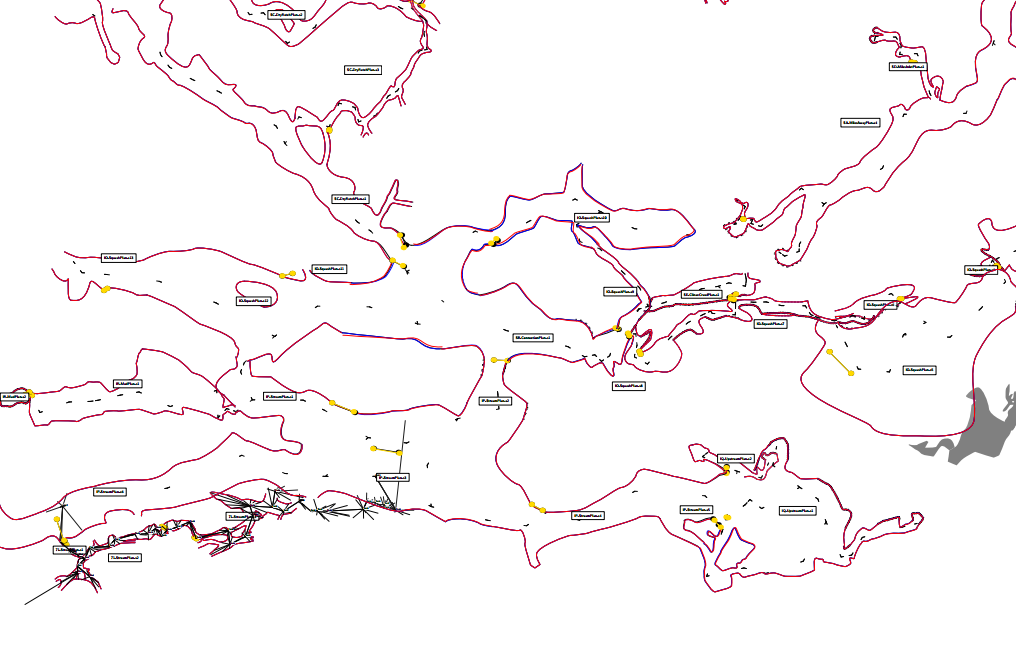
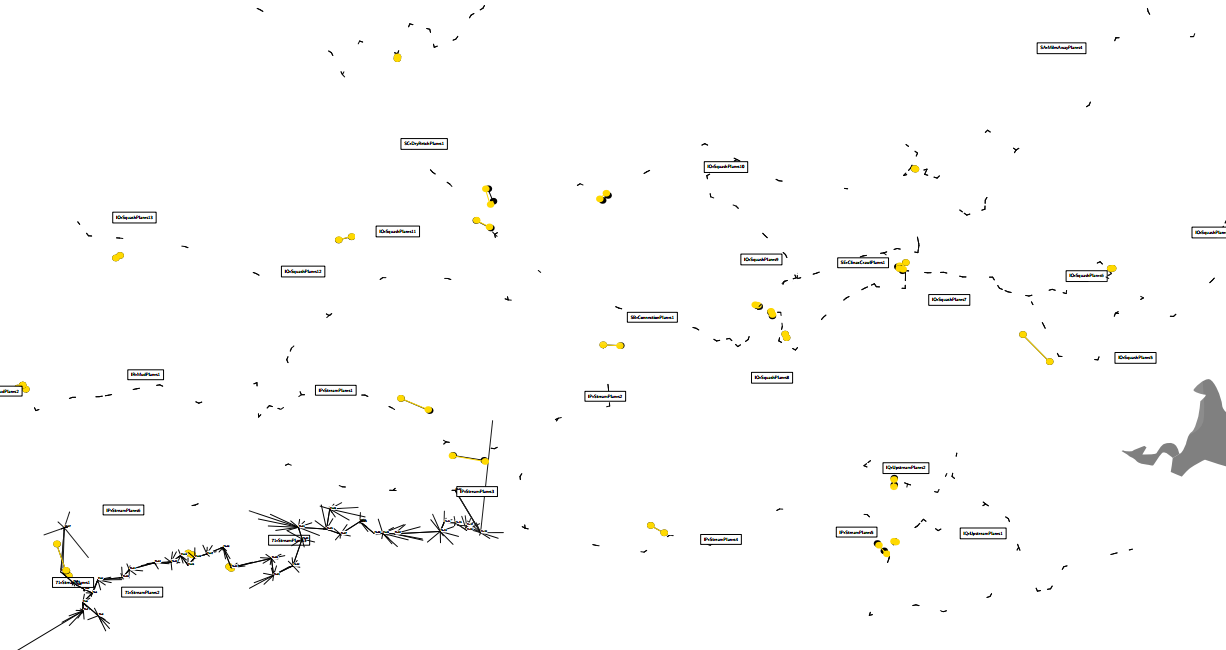
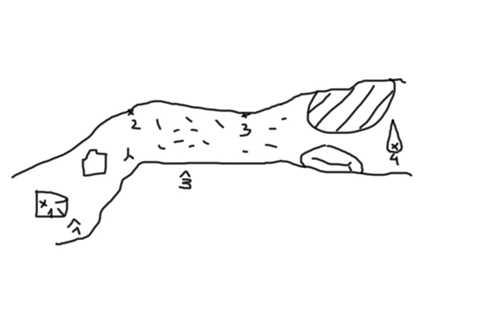
The thread 'Aven colour by loop error' resolved my initial query (I understand a solution has been pushed to the repo <https://www.mail-archive.com/therion@speleo.sk/msg06282.html> ), and then got a bit off topic and discussed centreline and drawing distortions as shown with 'debug', which seems to be not quite the same thing, so I have started a new topic here. I have used debug to troubleshoot gross drawing errors for one or two scraps at a time, but I have never considered that it might be useful to look at centrelines or whole drawing projects. It might not be, but I want to explore that here, because I don't understand it well. Maybe it would be good to come up with a layout that facilitates emphasising the debug information. I have added lots of links to this mail, so if your mail client has stripped the links, you will have to view it from the wiki start page or the mail archive https://www.mail-archive.com/therion@speleo.sk/ Therion's debug features are described in the wiki here <https://therion.speleo.sk/wiki/tbe:wiki5?s%5b%5d=debug#debug> a bit more fully than in the Therion Book. A clarification I would add to that description, is that there are black and yellow point pairs for each scrap (and centreline??) But there are some questions I have, like; What is the difference between debug on and debug all? (nothing that I have noticed) Why is there a debug off, and how would one use it? (unless one wants to be sure that the default 'off' is enforced, which is a good enough reason) Is it possible have debug all, but without the red first and blue second transformations? (I have partially achieved that I think, but my solution is not as good as Martin's) Orange points are described as points with maximal change in distance - I don't seem to have any orange dots, just lots of red dots located at every symbol. Are there really orange dots with the current Therion version? Is there one orange dot per scrap, or only one for the entire exported map? What are the meanings that can be gained from the yellow and black dot configurations? What I have deduced is; * Yellow dots over top of black dots indicates no distortion ie perfect. A small distance between yellow and black is good. * Length of parallel yellow and black lines has no meaning. Very short lines and very long lines can both occur where there is almost no distortion, and long lines can occur where there is distortion as well. * Yellow and black lines forming triangles, squares or other polygons typically means a significant distortion. To recap on the previous thread. Martin Sluka has provided some useful output examples. By the way, is it possible to create a Therion debug with the black, yellow and orange debug features, without the <https://www.mail-archive.com/therion@speleo.sk/msg06287.html> 'first', 'second' and 'scrap-names'? The question of removing the 'first' and 'second' morphing transformations is not answered, but reducing the text size by adjusting scales and base-scales is a good idea. Martin clarified that it would find typos like 1.23m, in place of 12.3m, although where there is no sketch and no loop, I cannot work out how Therion would know that. He posted 4 pairs of useful pdf examples showing errors with centrelines, although for some reason I cannot find the message in the mail-archive, so I have attached them to this message and copied Martin's example sketch and th file. survey error_visualization input nacrt.th2 centerline data normal from to tape compass clino ignoreall 1 2 11 45 -10 2 3 10.5 95 +10 no error #2 3 10.5 275 +10 backsight #2 3 1.05 95 +10 typo #2 3 10.5 65 +10 misreading 3 4 12 100 0 endcenterline endsurvey outputs without walls and with walls: Although the attached files appear to show pairs of outputs with only the centreline and 'centreline plus scrap' for comparison, they all have the label 'scrap 1' so the scraps are clearly present in the compilation for all examples, it's just that the walls are hidden somehow. I have tried to replicate this with one of my larger projects, and find the following anomalies. When I use the layout below, which essentially just hides the walls (or not), the yellow and black dots are positioned identically for each run, whereas Martins examples clearly show a distinction between 'centreline only' behaviour and ' centreline + scrap' behaviour. How have you hidden your walls Martin, such that they are ignored by the debug dots when hidden? Here is the layout I have used, and below that, screen grabs of pdf outputs; layout LayoutDistortion ## Hides most features and emphasises ??centreline and maximal ??drawing errors (but not ??loop errors) ## If used with or after other layouts then behaviour may not be consistent with this layout when used alone! ## Yellow/black spots indicate maximal distortion of scrap, regardless of whether line wall (scrap) is 'shown' below ## Enforce white background and passage infill to reduce colour confusion colour map-bg 100 #white colour map-fg 100 #white symbol-colour group all 1 #black symbols opacity 10 #mostly transparent debug all #turns on all debug options, for visible entities only ## Options to control text size ## Use scale base-scale pair to control text size ratios 2:1 to 10:1 OK scale 1 1000 base-scale 1 200 #set base-scale to smaller number to reduce text size (but increases relative yellow/black dot size) ## OR Use fonts_setup to control text size for xs s m l xl respectively # code metapost # fonts_setup(0.01,0.01,2,3,5); ## Hide features we don't want to see symbol-hide group all #hides ALL except passage infill colour, and preview-above, below symbol-show group cave-centreline symbol-show group surface-centreline symbol-show line map-connection symbol-hide group text ## If all rows below commented out, only these entities visible; ## - part centreline and yellow/black spots ## - scrap names ## - full centrelines and all station names for centrelines included in a map definition # symbol-show line wall #this adds scrap outlines and red/blue morphing lines to output # symbol-show point cave-station #optional, sets up for showing cave only # symbol-show point surface-station #optional, sets up for showing surface only # symbol-show point station #shows and labels all stations and red debug spots # symbol-show point station:fixed #shows and labels fixed stations only and red debug spots endlayout LayoutDistortion Thanks for reading this far! I would appreciate any corrections, clarifications, improvements or insights you may have. Bruce

26. 2. 2017 v 6:55, Bruce Mutton via Therion <therion@speleo.sk>:
How have you hidden your walls Martin, such that they are ignored by the debug dots when hidden?
Simply I used scraps which have only point stations and nothing else. The very first test of data and possibility of misplaced or misnamed stations, duplicity, etc. Martin s.
26. 2. 2017 v 6:55, Bruce Mutton via Therion <therion@speleo.sk>:
Martin clarified that it would find typos like 1.23m, in place of 12.3m, although where there is no sketch and no loop, I cannot work out how Therion would know that.
There is huge difference between stations position and local scale of image calculated from positions of stations. BTW you may very simple create th2 file without walls just extract only station lines from th2 file and save it under different name obviously with identical header. Martin
26. 2. 2017 v 6:55, Bruce Mutton via Therion <therion@speleo.sk <mailto:therion@speleo.sk> >: Martin clarified that it would find typos like 1.23m, in place of 12.3m, although where there is no sketch and no loop, I cannot work out how Therion would know that.
There is huge difference between stations position and local scale of image calculated from positions of stations.
BTW you may very simple create th2 file without walls just extract only station lines from th2 file and save it under different name obviously with identical header.
Martin
So the debug is not used until the sketched location of stations is drawn. That was my misunderstanding - I thought only the centreline was being used. This method of finding typos or gross measuring errors will not be of use to the typical NZ caver. We are famous for never drawing to scale, that is what we employ computers for! Bruce
Bruce, there is not possible for real sketcher to draw 1.23 m long passage as 12.3 m long and vice versa. Nor in Kiwis country! :D m.s.
27. 2. 2017 v 8:43, Bruce Mutton via Therion <therion@speleo.sk>:
26. 2. 2017 v 6:55, Bruce Mutton via Therion <therion@speleo.sk <mailto:therion@speleo.sk>>:
Martin clarified that it would find typos like 1.23m, in place of 12.3m, although where there is no sketch and no loop, I cannot work out how Therion would know that.
There is huge difference between stations position and local scale of image calculated from positions of stations.
BTW you may very simple create th2 file without walls just extract only station lines from th2 file and save it under different name obviously with identical header.
Martin
So the debug is not used until the sketched location of stations is drawn. That was my misunderstanding – I thought only the centreline was being used. This method of finding typos or gross measuring errors will not be of use to the typical NZ caver. We are famous for never drawing to scale, that is what we employ computers for! Bruce _______________________________________________ Therion mailing list Therion@speleo.sk <mailto:Therion@speleo.sk> https://mailman.speleo.sk/listinfo/therion <https://mailman.speleo.sk/listinfo/therion>
participants (2)
-
 Bruce Mutton
 -
 Martin Sluka